instrument panel VOLVO XC90 TWIN ENGINE 2020 Owners Manual
[x] Cancel search | Manufacturer: VOLVO, Model Year: 2020, Model line: XC90 TWIN ENGINE, Model: VOLVO XC90 TWIN ENGINE 2020Pages: 693, PDF Size: 13.34 MB
Page 611 of 693
MAINTENANCE AND SERVICE
}}
609
a warning symbol is displayed in the instru- ment panel when oil pressure is low
. On
engine variants with an oil level sensor, the
warning symbol in the instrument panel
and display messages are used to alert the driver. Some engine variants have both sys-tems. Contact a Volvo retailer for more infor-mation. Change the engine oil and oil filter according to the schedule specified in the Warranty andMaintenance Records Information booklet.Oils of a higher grade than that specified maybe used. If the vehicle is driven in adverse con-ditions, Volvo recommends using an oil with ahigher grade than that specified.
Related information
Checking and filling engine oil (p. 609)
Engine oil specifications (p. 669)
Checking and filling engine oil
The engine oil level is monitored by an elec- tronic oil level sensor.
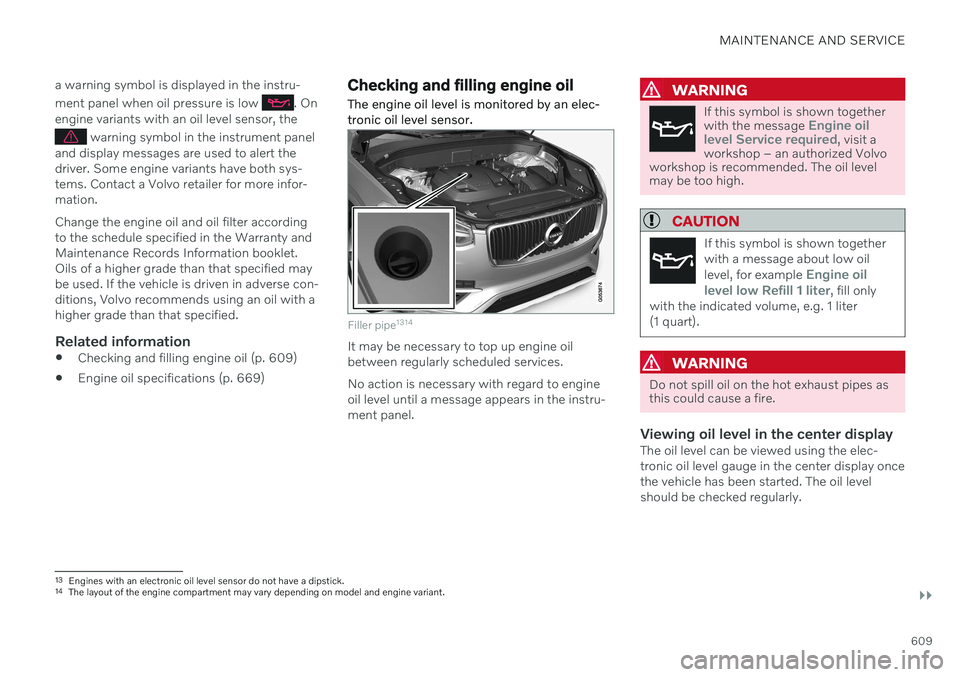
Filler pipe 1314
It may be necessary to top up engine oil between regularly scheduled services. No action is necessary with regard to engine oil level until a message appears in the instru-ment panel.
WARNING
If this symbol is shown together with the message Engine oil
level Service required, visit a
workshop – an authorized Volvo
workshop is recommended. The oil level may be too high.
CAUTION
If this symbol is shown together with a message about low oil level, for example
Engine oil
level low Refill 1 liter, fill only
with the indicated volume, e.g. 1 liter (1 quart).
WARNING
Do not spill oil on the hot exhaust pipes as this could cause a fire.
Viewing oil level in the center displayThe oil level can be viewed using the elec- tronic oil level gauge in the center display oncethe vehicle has been started. The oil levelshould be checked regularly.
13 Engines with an electronic oil level sensor do not have a dipstick.
14 The layout of the engine compartment may vary depending on model and engine variant.
Page 632 of 693
||
MAINTENANCE AND SERVICE
* Option/accessory.
630
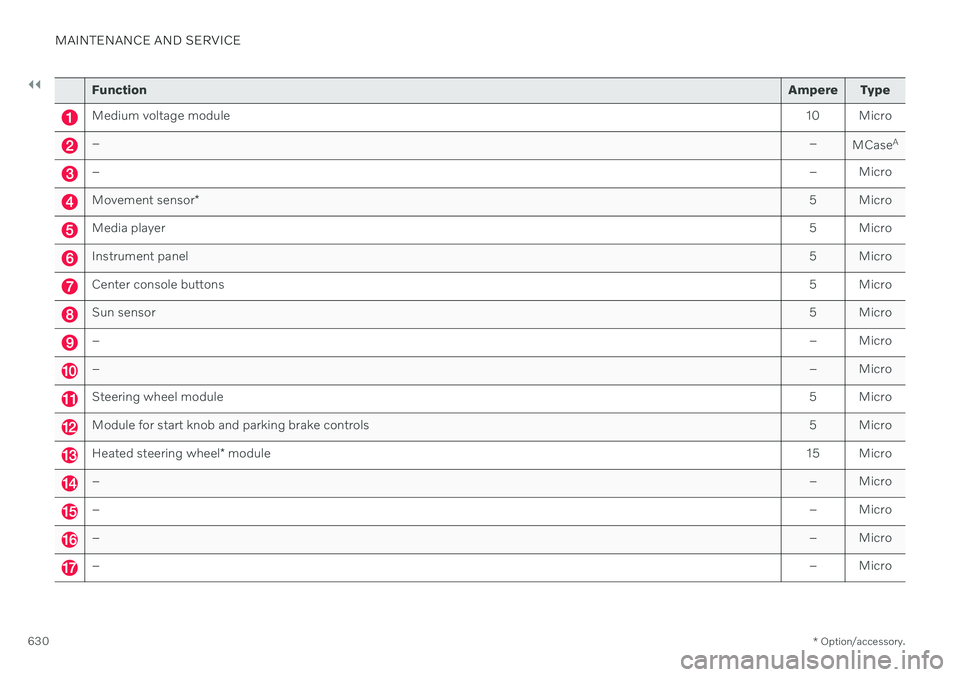
Function Ampere Type
Medium voltage module 10 Micro
– –
MCaseA
–
– Micro
Movement sensor* 5 Micro
Media player
5 Micro
Instrument panel5 Micro
Center console buttons5 Micro
Sun sensor5 Micro
–– Micro
–– Micro
Steering wheel module 5 Micro
Module for start knob and parking brake controls5 Micro
Heated steering wheel* module 15 Micro
–
– Micro
–– Micro
–– Micro
–– Micro
Page 633 of 693
MAINTENANCE AND SERVICE
}}
* Option/accessory.631
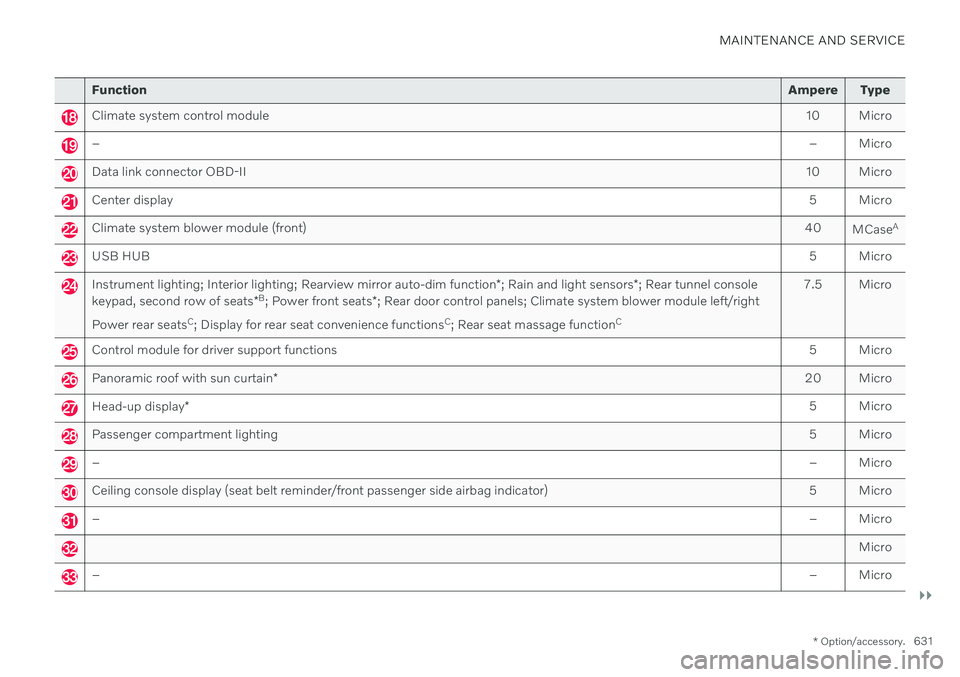
Function Ampere Type
Climate system control module 10 Micro
– – Micro
Data link connector OBD-II10 Micro
Center display 5 Micro
Climate system blower module (front)40
MCaseA
USB HUB
5 Micro
Instrument lighting; Interior lighting; Rearview mirror auto-dim function*; Rain and light sensors *; Rear tunnel console
keypad, second row of seats *B
; Power front seats *; Rear door control panels; Climate system blower module left/right
Power rear seats C
; Display for rear seat convenience functions C
; Rear seat massage function C 7.5 Micro
Control module for driver support functions
5 Micro
Panoramic roof with sun curtain* 20 Micro
Head-up display
* 5 Micro
Passenger compartment lighting
5 Micro
–– Micro
Ceiling console display (seat belt reminder/front passenger side airbag indicator) 5 Micro
–– Micro
Micro
–– Micro
Page 645 of 693
MAINTENANCE AND SERVICE
}}
* Option/accessory.643
Cleaning the leather steering wheel
Only use cleaning agents and car care prod- ucts recommended by Volvo. Clean regularlyand treat stains immediately. It is importantto vacuum before using a cleaning agent.
Leather needs to breathe. Never cover the leather steering wheel with a plastic protector.Volvo Leather Care Kit 951 0251 and LeatherSoftener 943 7429 are recommended forcleaning the leather steering wheel. First,remove dirt, dust, etc. with a damp sponge orcloth.
CAUTION
Sharp objects such as rings could damage the leather on the steering wheel.
Treating stains on the steering wheel:Type 1 (ink, wine, coffee, milk, sweat or blood)
–Use a soft cloth or sponge. Wipe the steering wheel using a solution of 5%ammonia. For blood stains, mix approxi-mately 2 dl (1 cup) of water with 25 g(one ounce) of salt and wipe the stain.
Type 2 (grease, oil, sauces or chocolate)
1. Same procedure as for Type 1 stains.
2. Finish by wiping the wheel with an absorbent paper or towel. Type 3
(dry dirt or dust)
1. Remove the dirt/dust using a soft brush.
2. Same procedure as for Type 1 stains.
Related information
Cleaning the interior (p. 639)
Cleaning the center display (p. 639)
Cleaning fabric upholstery and ceiling liner (p. 641)
Cleaning the seat belt (p. 641)
Cleaning floor mats and inlay mats(p. 641)
Cleaning leather upholstery
* (p. 642)
Cleaning interior plastic, metal and woodsurfaces (p. 643)
Cleaning interior plastic, metal and wood surfaces
Only use cleaning agents and car care prod- ucts recommended by Volvo. Clean regularlyand treat stains immediately.
A lightly dampened microfiber cloth is recom- mended for cleaning interior details and surfa-ces. These cloths are available for purchase atVolvo retailers. Never scrape or rub a stain. Never use strong stain removers.
CAUTION
Do not use solvent containing alcohol to clean the instrument panel glass.
CAUTION
Keep in mind that glossy surfaces can be easily scratched. Wipe these surfaces witha clean and dry microfiber cloth usingsmall, circular motions. If necessary, mois-ten the cloth lightly with clean water.
Related information
Cleaning the interior (p. 639)
Cleaning the center display (p. 639)
Cleaning fabric upholstery and ceiling liner (p. 641)
Cleaning the seat belt (p. 641)
Page 658 of 693
||
MAINTENANCE AND SERVICE
* Option/accessory.
656 The wiper blades will also move out of the service position if:
The windshield wipers are turned on.
The windshield washers are turned on.
The rain sensor is activated.
The vehicle begins moving.
CAUTION
If the wiper arms in service position are raised from the windshield, they must befolded back against the windscreen beforeactivating wiping, washing or rain sensoras well as before departure. This is to pre-vent scratching the paint on the hood.
Related information
Using the rain sensor (p. 182)
Using the windshield and headlight wash- ers (p. 184)
Using automatic rear window wipingwhen backing up (p. 186)
Using the rain sensor's memory function(p. 183)
Using the rear window wiper/washer(p. 185)
Filling washer fluid (p. 656)
Replacing windshield wiper blades(p. 654)
Changing rear window wipers (p. 653)
Using the windshield wipers (p. 181)
Wiper blades and washer fluid (p. 181)
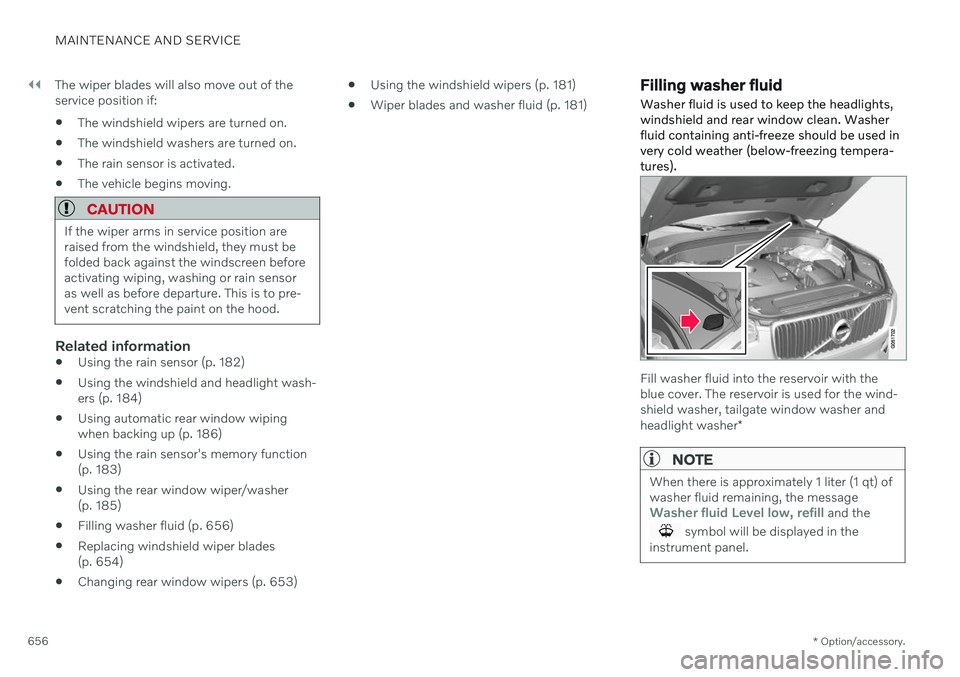
Filling washer fluid Washer fluid is used to keep the headlights, windshield and rear window clean. Washerfluid containing anti-freeze should be used invery cold weather (below-freezing tempera-tures).
Fill washer fluid into the reservoir with the blue cover. The reservoir is used for the wind-shield washer, tailgate window washer and headlight washer
*
NOTE
When there is approximately 1 liter (1 qt) of washer fluid remaining, the message
Washer fluid Level low, refill and the
symbol will be displayed in the
instrument panel.
Page 681 of 693
INDEX
679
HomeLink
® 471
programming 472
type approval 474
use 474
HomeLink ® remote control
programmable 471
Home safe lighting, Homesafe Lighting,Follow me home lighting, follow-me-
home lighting 165
Honk 205
Hood, opening 605
Horn 205
Hybrid battery 617 Charging 395
Hybrid battery gauge 90
Hybrid gauge 89
Hybrid mode 433, 439
I
IAQS (Interior Air Quality System) 212
IC (Inflatable Curtain) 63
ID, Volvo 28
Identification number 40
Ignition mode 415, 416
Immobilizer 259 Electronic immobilizer 259
Indicator symbols 97
Individual drive mode 433
Infant seats 69
Inflatable curtain 63
Inflatable Curtain 63
Inflating tires 573Inflation pressure adjusting 554
Checking 553
decal with recommended pressure 555
Inflation pressure monitoring 555 action 559
save new inflation pressure 557
Status 558
Inflation pressure table 672
Information display 86, 88
Infotainment (Audio and media) 478
Instrument cluster 86 settings 88
Instrument illumination 167
Instrument lighting 167
Instrument panel 86 App menu 107, 108hybrid-related symbols and mes-
sages 408
messages 109
settings 88
Instruments and controls 84 Instruments overview left-hand drive vehicle 84
Integrated booster cushion 79 folding down 81
folding up 80
IntelliSafe driver support 31
Interior Air Quality System 212
Intermittent wiping 181 Internet, see Internet-connected vehi- cle 524
Internet-connected vehicle 524 book service and repair 601
No connection or poor connection 529
send car data 602
system updates 600
iPod ®, connecting 506
ISOFIX/LATCH anchors 77
Page 688 of 693
INDEX
686rotation when changing 546
specifications 550, 672
storage 546
tread wear indicator 549
winter tires 567
Tire sealing system Inflating tires 573
use 569
Tire tread 549
Tools 560 Top tether anchors (child restraint sys-
tems) 75
Top view 135
Total airing function 246
Towbar 463 removable, attaching, installing,
mounting 463
removable, removing, detaching 463
retractable 461
Towing 469
Towing capacity and towball load 667
Towing eyelet 469 TPMS - Tire Pressure Monitoring Sys-
tem 555
Traction control 281
Traffic information 486
Trailer driving with a trailer 465
Lamps 468
swaying 467
Trailer Stability Assist 282 trailer 467
Trailer stabilizer 282, 467 Trailer towing trailer hitch 463
Transmission 426 automatic 427, 428
Transmission fluid grade 670
Travel Link 494 Fuel 497
Notifications 496
Sports 498
weather 495
Tread depth 549 winter tires 567
Tread wear indicator 549
Trip computer 91 display in instrument panel 93
Trip odometer 91
Trip odometer resetting 94
Trip statistics 94 settings 95TroubleshootingAdaptive Cruise Control 296
Camera unit 322
City Safety 337
Radar unit 322
TSA - Trailer Stability Assist 467
Tunnel detection 159
Turn off engine 414
Turn signals 162Twin Engine general 394
Type approval HomeLink ® 474
radar system 319
U
Uniform Tire Quality Grading 552
Units 135 Unlocking settings 249
with key blade 258
USB socket for connecting media 506