light VOLVO XC90 TWIN ENGINE 2020 Owners Manual
[x] Cancel search | Manufacturer: VOLVO, Model Year: 2020, Model line: XC90 TWIN ENGINE, Model: VOLVO XC90 TWIN ENGINE 2020Pages: 693, PDF Size: 13.34 MB
Page 516 of 693
AUDIO, MEDIA AND INTERNET
* Option/accessory.
514
Settings for Android Auto *
Settings for Android devices initially con- nected with Android Auto.
Automatic start1. Tap Settings in the Top view.
2. Tap
CommunicationAndroid Autoand select setting: Check the box - Android Auto will start automatically when the USB cable isconnected.
Uncheck the box - Android Auto will notstart automatically when the USB cableis connected.
A maximum of 20 Android devices can bestored in the list. When the list is full and anew device is connected, the oldest one willbe deleted. A factory reset must be performed to delete the list.
System Volumes1. Tap Settings in the Top view.
2. Tap
SoundSystem Volumes to
change the settings for the following:
Voice Control
Navi Voice Guidance
Phone Ringtone
Related information
Android Auto
* (p. 512)
Using Android Auto
* (p. 513)
Resetting center display settings (p. 137)
Tips for using Android Auto
*
Here are some useful tips for when you use Android Auto.
Ensure that your apps are updated.
When starting the vehicle, wait until the center display has started, connect thedevice and then open Android Auto fromthe app view.
In the event of problems with AndroidAuto, unplug your Android device from theUSB port and then plug it in again. Other-wise, try closing the app on the device andthen restarting the app.
When a device is connected to AndroidAuto it is still possible to play media viaBluetooth to another media player. TheBluetooth function is on when AndroidAuto is used.
If the Android Auto icon is grayed out, itmeans that a device is no longer con-nected. When you connect your device,the icon will light up. If there is no icon atall, the vehicle does not support connect-ing a device for this purpose.
If the device is connected to the vehiclethrough Bluetooth, the connection will bebroken when Android Auto is used.Resume Internet connection in the vehicle
Page 560 of 693
WHEELS AND TIRES
* Option/accessory.
558
Viewing tire pressure status in the center display *
With the system for tire pressure monitor- ing 10
, tire pressure status can be viewed in
the center display.
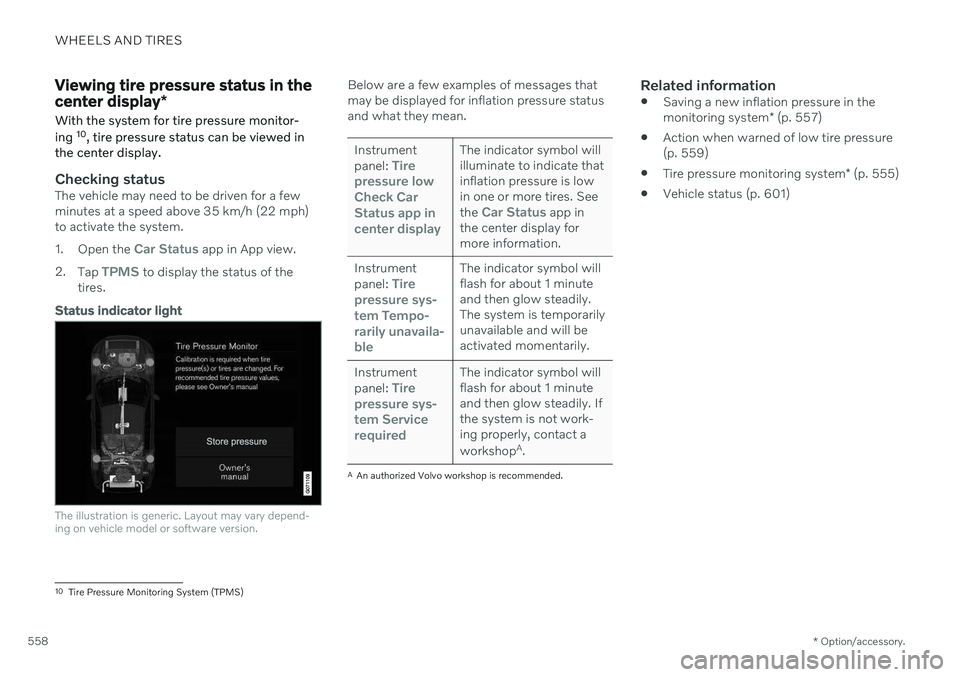
Checking statusThe vehicle may need to be driven for a few minutes at a speed above 35 km/h (22 mph)to activate the system. 1. Open the
Car Status app in App view.
2. Tap
TPMS to display the status of the
tires.
Status indicator light
The illustration is generic. Layout may vary depend- ing on vehicle model or software version.
Below are a few examples of messages that may be displayed for inflation pressure statusand what they mean.
Instrument panel: Tire
pressure low Check CarStatus app incenter displayThe indicator symbol will illuminate to indicate thatinflation pressure is lowin one or more tires. See the
Car Status app in
the center display for more information.
Instrument panel:
Tire
pressure sys- tem
Tempo-
rarily unavaila- ble
The indicator symbol will flash for about 1 minuteand then glow steadily.The system is temporarilyunavailable and will beactivated momentarily.
Instrument panel:
Tire
pressure sys- tem
Service
required
The indicator symbol will flash for about 1 minuteand then glow steadily. Ifthe system is not work-ing properly, contact a workshop A
.
A An authorized Volvo workshop is recommended.
Related information
Saving a new inflation pressure in the monitoring system
* (p. 557)
Action when warned of low tire pressure (p. 559)
Tire pressure monitoring system
* (p. 555)
Vehicle status (p. 601)
10
Tire Pressure Monitoring System (TPMS)
Page 563 of 693

WHEELS AND TIRES
* Option/accessory.561
Jack*
The jack can be used to lift the vehicle to e.g. change a wheel.CAUTION
When not in use, the jack
* should be
kept in its storage compartment under the cargo compartment floor.
The jack provided with your vehicle isintended to be used only in temporarysituations such as changing wheels inthe event of a flat tire. Only the jackthat came with your particular modelshould be used to lift the vehicle. If thevehicle needs to be lifted more fre-quently or for a prolonged period, usinga garage jack or hoist is recommended.Always follow this device's instructionsfor use.
The jack needs to be cranked together to the correct position in order to fit. For vehicles with
Leveling Control*
: If the
vehicle is equipped with the optional pneu- matic suspension, it must be turned off beforethe vehicle is lifted on a jack.
Related information
Tool kit (p. 560)
Hoisting the vehicle (p. 603)
Wheel bolts
The wheel bolts hold the wheel in place on the wheel hub.
Only use rims that have been tested and approved by Volvo and are included in Volvo'soriginal product range. Use a torque wrench to check that the wheel bolts are tightened correctly. Do not grease the wheel bolt threads.
WARNING
The wheel bolts may need to be tightened again several days after a wheel change.Temperature fluctuations and vibrationscan cause them to loosen slightly.
CAUTION
The wheel bolts should be tightened to 140 Nm (103 ft. lbs.). Over-tightening orunder-tightening could damage the threa-ded joints.
Locking wheel bolts *A tool for removing the locking wheel bolts is located in the foam block under the cargocompartment floor.
Related information
Removing a wheel (p. 562)
Installing a wheel (p. 564)
Page 567 of 693
WHEELS AND TIRES
}}
* Option/accessory.565
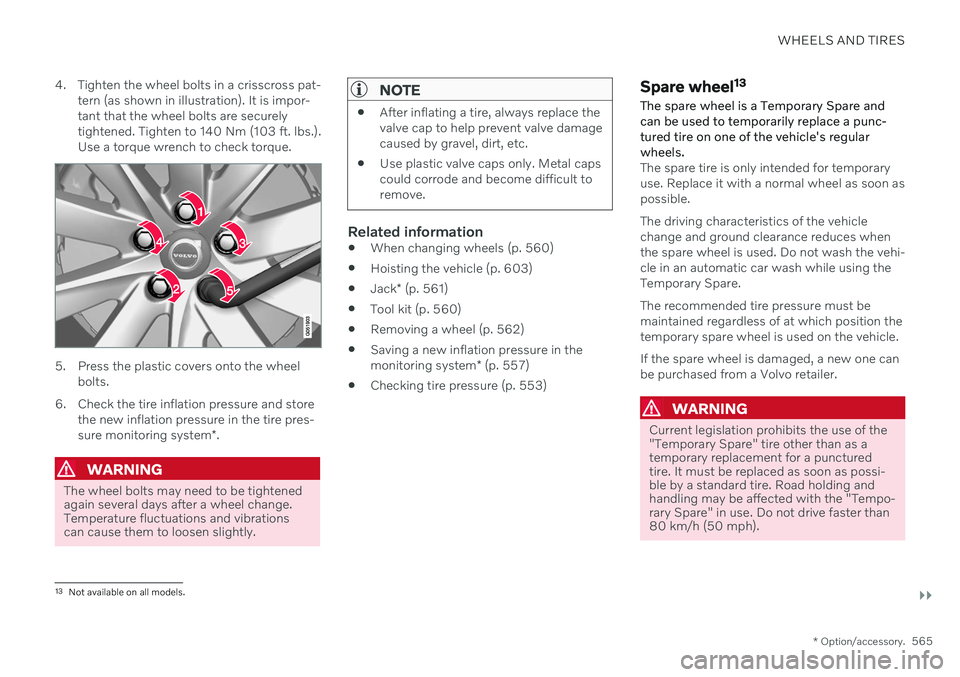
4. Tighten the wheel bolts in a crisscross pat-
tern (as shown in illustration). It is impor- tant that the wheel bolts are securelytightened. Tighten to 140 Nm (103 ft. lbs.).Use a torque wrench to check torque.
5. Press the plastic covers onto the wheel bolts.
6. Check the tire inflation pressure and store the new inflation pressure in the tire pres- sure monitoring system *.
WARNING
The wheel bolts may need to be tightened again several days after a wheel change.Temperature fluctuations and vibrationscan cause them to loosen slightly.
NOTE
After inflating a tire, always replace the valve cap to help prevent valve damagecaused by gravel, dirt, etc.
Use plastic valve caps only. Metal capscould corrode and become difficult toremove.
Related information
When changing wheels (p. 560)
Hoisting the vehicle (p. 603)
Jack
* (p. 561)
Tool kit (p. 560)
Removing a wheel (p. 562)
Saving a new inflation pressure in the monitoring system
* (p. 557)
Checking tire pressure (p. 553)
Spare wheel 13
The spare wheel is a Temporary Spare and can be used to temporarily replace a punc- tured tire on one of the vehicle's regularwheels.
The spare tire is only intended for temporary use. Replace it with a normal wheel as soon aspossible. The driving characteristics of the vehicle change and ground clearance reduces whenthe spare wheel is used. Do not wash the vehi-cle in an automatic car wash while using theTemporary Spare. The recommended tire pressure must be maintained regardless of at which position thetemporary spare wheel is used on the vehicle. If the spare wheel is damaged, a new one can be purchased from a Volvo retailer.
WARNING
Current legislation prohibits the use of the "Temporary Spare" tire other than as atemporary replacement for a puncturedtire. It must be replaced as soon as possi-ble by a standard tire. Road holding andhandling may be affected with the "Tempo-rary Spare" in use. Do not drive faster than80 km/h (50 mph).
13 Not available on all models.
Page 582 of 693
LOADING, STORAGE AND PASSENGER COMPARTMENT
* Option/accessory.
580
Electrical outlets
There are two 12 V electrical outlets and one 120 V electrical outlet * in the tunnel console,
and one 12 V electrical outlet * in the trunk/
cargo compartment. If a problem occurs with an electrical socket, contact a workshop - an authorized Volvoworkshop is recommended.
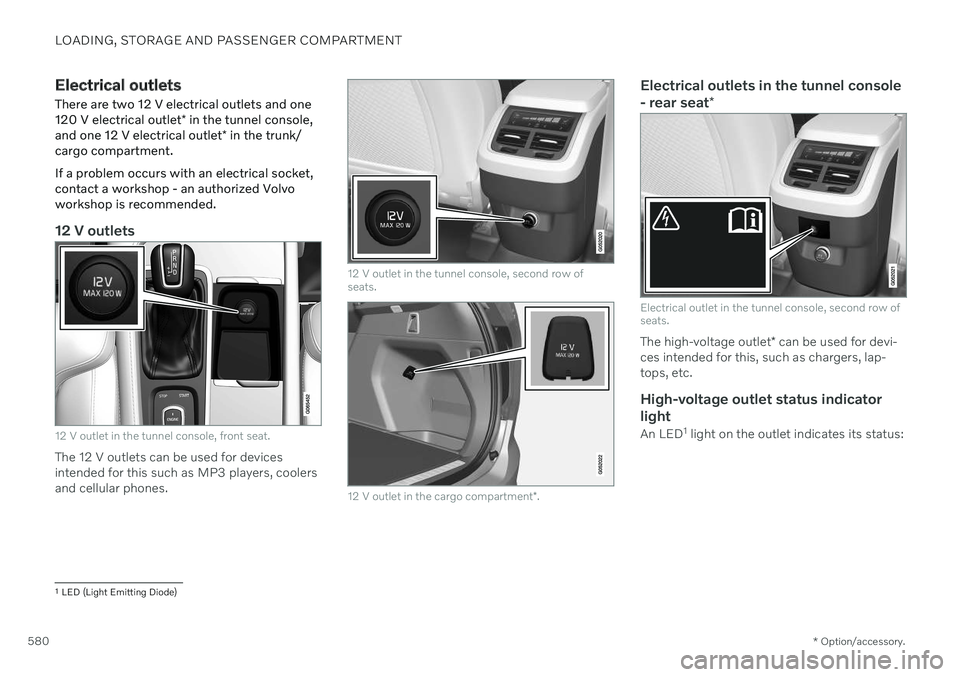
12 V outlets
12 V outlet in the tunnel console, front seat.
The 12 V outlets can be used for devices intended for this such as MP3 players, coolersand cellular phones.
12 V outlet in the tunnel console, second row of seats.
12 V outlet in the cargo compartment *.
Electrical outlets in the tunnel console - rear seat *
Electrical outlet in the tunnel console, second row of seats.
The high-voltage outlet * can be used for devi-
ces intended for this, such as chargers, lap- tops, etc.
High-voltage outlet status indicator
light
An LED 1
light on the outlet indicates its status:
1 LED (Light Emitting Diode)
Page 583 of 693

LOADING, STORAGE AND PASSENGER COMPARTMENT
581
Status indicator light CauseAction
Steady green light The outlet is providing electrical current to a connected device. None.
Flashing orange light The outlet's voltage converter is too hot (e.g. if the device draws too much current or if the temperature in the passenger compartment is very high). Unplug the device, let the voltage convertercool down and plug in the device again.
The connected device is drawing too much current (at the moment orconstantly) or is not functioning properly. None. The device cannot be used in the out-let.
Indicator light off The outlet has not detected a device plugged into the outlet. Make sure the device is correctly plugged into the outlet.
The outlet is not active. Make sure the vehicle's ignition is in at leastmode I.
The outlet has been active but has been deactivated. Start the engine and/or charge the start bat- tery.
Related information
Passenger compartment interior (p. 578)
Using the electrical outlets (p. 582)
Page 584 of 693
LOADING, STORAGE AND PASSENGER COMPARTMENT
* Option/accessory.
582
Using the electrical outlets
The 12 V outlet can be used for devices intended for this such as MP3 players, cool-ers and cellular phones. The high-voltage outlet * can be used for devi-
ces intended for this, such as chargers, lap- tops, etc.
The ignition must be in at least mode I for the
outlets to supply current. The outlets will then be active as long as there is sufficient chargein the start battery. If the engine is turned off and the vehicle is locked, the outlets will be deactivated. If theengine is turned off and the vehicle remainsunlocked, the sockets will remain active for upto 7 minutes.
NOTE
Bear in mind that using the electrical out- lets when the engine is off could cause thestarter battery to have too low of a chargelevel, which could limit other functionality. Accessories connected to the electrical outlets can be activated even when thevehicle electrical system is off or if precon-ditioning is used. For this reason, discon-nect plugs when they are not in use to pre-vent the starter battery from becoming dis-charged.
WARNING
Do not use accessories with large or heavy plugs – they could damage theoutlet or come loose while you are driv-ing.
Do not use accessories that couldcause disruptions to e.g. the vehicle'sradio receiver or electrical system.
Position the accessory so that there isno risk of it injuring the driver or pas-sengers in the event of heavy brakingor a collision.
Pay attention to connected accessoriesas they can generate heat that couldburn passengers or the interior.
Using 12 V outlets1. Remove the stopper (tunnel console) or
fold down the cover (trunk/cargo com-partment) over the socket and plug in thedevice.
2. Unplug the device and put the stopper back in (tunnel console) or fold up thecover (trunk/cargo compartment) whenthe socket is not in use or left unattended.
CAUTION
The maximum power is 120 W (10 A) per outlet.
Using high-voltage outletsThe ignition must be in at least mode I for the
outlets to supply current. The outlets will then be active as long as there is sufficient chargein the start battery. 1. Slide down the cover over the outlet and plug in the device. >
The LED 2
light on the outlet will indi-
cate its status.
2. The outlet is supplying electrical current when the light is glowing steadily green.
2LED (Light Emitting Diode)
Page 586 of 693

||
LOADING, STORAGE AND PASSENGER COMPARTMENT
* Option/accessory.
584 ignition is in mode
II or when the engine is
running).
The illustration is generic – the design may vary.
Activate cooling.
Deactivate cooling.
–Activate or deactivate cooling by moving the control as far as possible toward thepassenger compartment/glove compart-ment.
Related information
Passenger compartment interior (p. 578)
Private Locking (p. 274)
Sun visors
In the ceiling in front of the driver's and front passenger's seats, there are sun visors thatcan be lowered and angled to the side asnecessary.
The illustration is generic – the design may vary.
The mirror lighting * comes on automatically
when the visor is lifted up. The mirror frame has a holder for e.g. cards or tickets.
Related information
Passenger compartment interior (p. 578)
Cargo compartment
The vehicle has a flexible cargo compartment that makes it possible to carry and securelarge objects.
The cargo compartment capacity can be con- siderably increased by folding down the back- rests in the second and third rows * of seats.
To make loading and unloading easier, the rear section of the vehicle can be raised and low- ered using the level control function *. Use the
load anchoring eyelets or grocery bag holders to help secure objects in place, and the retractable cargo compartment cover * to help
conceal objects in the cargo compartment. If the vehicle is equipped with a temporary spare tire, this is secured to the cargo com-partment floor under the cover. The towingeyelet and tire sealing system are locatedunder the cargo compartment floor.
Related information
Loading recommendations (p. 585)
Grocery bag holders (p. 587)
Load anchoring eyelets (p. 587)
Installing and removing the cargo com- partment cover
* (p. 588)
Page 591 of 693
LOADING, STORAGE AND PASSENGER COMPARTMENT
}}
589
Fully open7-seat models 1.
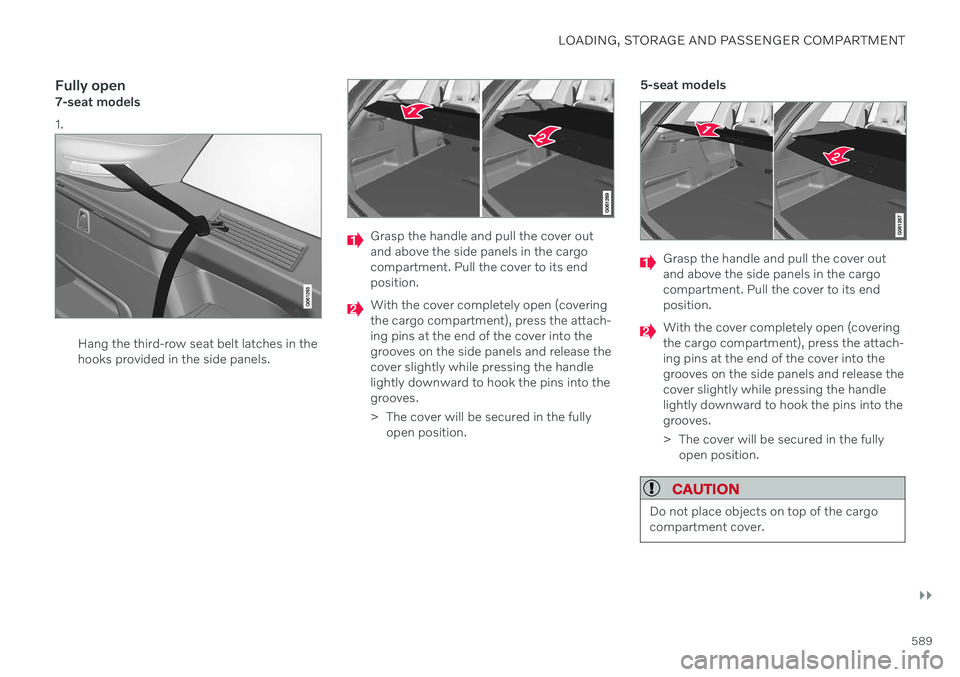
Hang the third-row seat belt latches in the hooks provided in the side panels.
Grasp the handle and pull the cover out and above the side panels in the cargocompartment. Pull the cover to its endposition.
With the cover completely open (covering the cargo compartment), press the attach-ing pins at the end of the cover into thegrooves on the side panels and release thecover slightly while pressing the handlelightly downward to hook the pins into thegrooves.
> The cover will be secured in the fullyopen position. 5-seat models
Grasp the handle and pull the cover out and above the side panels in the cargocompartment. Pull the cover to its endposition.
With the cover completely open (covering the cargo compartment), press the attach-ing pins at the end of the cover into thegrooves on the side panels and release thecover slightly while pressing the handlelightly downward to hook the pins into thegrooves.
> The cover will be secured in the fully
open position.
CAUTION
Do not place objects on top of the cargo compartment cover.
Page 592 of 693
||
LOADING, STORAGE AND PASSENGER COMPARTMENT
* Option/accessory.
590
WARNING
In 7-seat models - never have a cargo com- partment cover mounted when there arepassengers in the rear seats. This couldlead to serious injury in the event of a colli-sion.
Loading mode
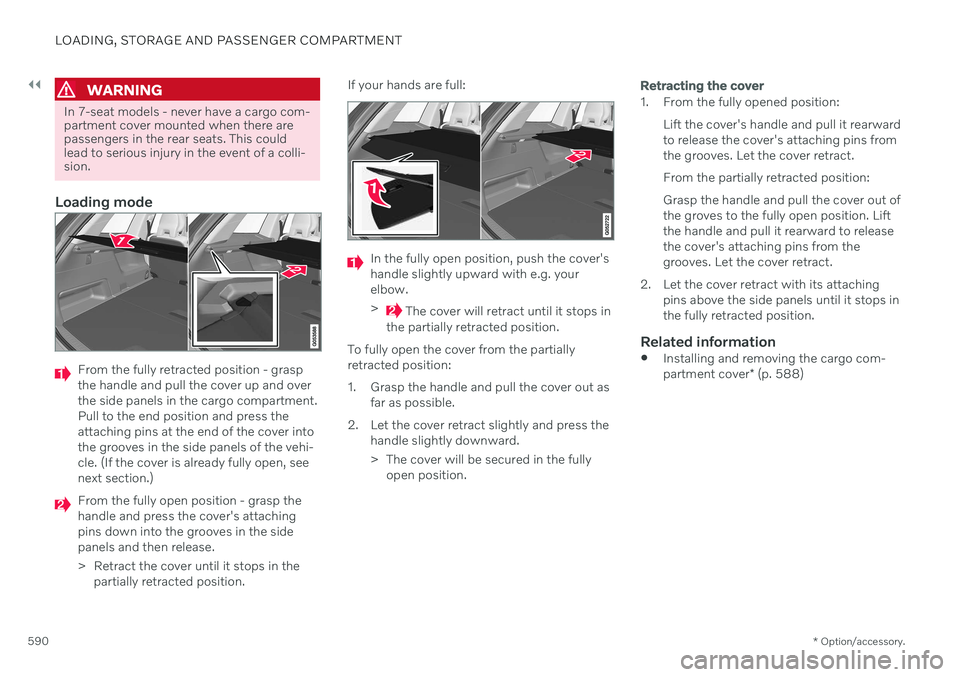
From the fully retracted position - grasp the handle and pull the cover up and overthe side panels in the cargo compartment.Pull to the end position and press theattaching pins at the end of the cover intothe grooves in the side panels of the vehi-cle. (If the cover is already fully open, seenext section.)
From the fully open position - grasp the handle and press the cover's attachingpins down into the grooves in the sidepanels and then release.
> Retract the cover until it stops in the
partially retracted position. If your hands are full:
In the fully open position, push the cover's handle slightly upward with e.g. yourelbow. >
The cover will retract until it stops in
the partially retracted position.
To fully open the cover from the partially retracted position:
1. Grasp the handle and pull the cover out as far as possible.
2. Let the cover retract slightly and press the handle slightly downward.
> The cover will be secured in the fullyopen position.
Retracting the cover
1. From the fully opened position:
Lift the cover's handle and pull it rearward to release the cover's attaching pins fromthe grooves. Let the cover retract. From the partially retracted position: Grasp the handle and pull the cover out of the groves to the fully open position. Liftthe handle and pull it rearward to releasethe cover's attaching pins from thegrooves. Let the cover retract.
2. Let the cover retract with its attaching pins above the side panels until it stops inthe fully retracted position.
Related information
Installing and removing the cargo com- partment cover
* (p. 588)