brake light VOLVO XC90 TWIN ENGINE 2020 Owner's Manual
[x] Cancel search | Manufacturer: VOLVO, Model Year: 2020, Model line: XC90 TWIN ENGINE, Model: VOLVO XC90 TWIN ENGINE 2020Pages: 693, PDF Size: 13.34 MB
Page 335 of 693

DRIVER SUPPORT
}}
333
Large animals
Examples of what City Safety would interpret as a large animal: stationary or moving slowly and withclear body contours.
For good performance, the system's function for detecting large animals (e.g. moose,horses, etc.) needs the clearest possible infor-mation about body contours. This entailsbeing able to detect the animal straight fromthe side in combination with normal move-ments for that animal. If parts of the animal's body are not visible to the function's camera, the system will not beable to detect the animal. City Safety can detect large animals even in dark conditions if they are illuminated by thevehicle's headlights.
WARNING
City Safety is supplementary driver sup- port, but it cannot detect all large animalsin all situations and, for example, cannotsee: partially obscured larger animals.
larger animals seen from the front or from behind.
running or fast moving larger animals.
larger animals if the contrast of the ani-mal's background is poor - warningand brake interventions may thenoccur late or not at all.
smaller animals such as cats and dogs.
The driver is always responsible for ensur- ing that the vehicle is driven correctly andwith a safety distance suitable for thespeed.
Related information
City Safety
™ (p. 327)
City Safety limitations (p. 337)
City Safety in crossing traffic City Safety 59
can assist the driver when turn-
ing into the path of an oncoming vehicle in an intersection.
Sector in which City Safety can detect an oncoming vehicle in crossing traffic.
In order for City Safety to detect an oncomingvehicle in situations where there is a risk of acollision, that vehicle must be within the sec-tor in which City Safety can analyze the situa-tion. The following criteria must also be met:
your vehicle's speed must be at least 4 km/h (3 mph)
your vehicle must be making a left turn
the oncoming vehicle's headlights mustbe on
59
This function is not available on all markets.
Page 338 of 693

||
DRIVER SUPPORT
336City Safety will not intervene to automatically apply the brakes if it is possible for the driverto avoid a collision by steering the vehicle. However, if City Safety determines that an evasive maneuver would not be possible dueto traffic in the adjacent lane(s), the functioncan assist the driver by automatically startingto apply the brakes at an earlier stage.
Related information
City Safety
™ (p. 327)
City Safety limitations (p. 337)
City Safety braking for oncoming vehicles City Safety can help you apply the brakes for an oncoming vehicle in your lane.
If an oncoming vehicle veers into your lane and a collision is unavoidable, City Safety canhelp reduce your vehicle's speed to attempt tomitigate the force of the collision.
Own vehicle
Oncoming vehicles
The following criteria must be met for the function to work:
your vehicle's speed must be above4 km/h (3 mph)
the road must be straight
your lane must have clear side lane mark-ings
your vehicle must be positioned straight inyour lane
the oncoming vehicle must be positionedwithin your vehicle's lane markings
the oncoming vehicle's headlights mustbe on
the function can only handle “front-to-front” collisions
the function can only detect vehicles withfour wheels.
WARNING
Warnings and brake interventions due to an imminent collision with an oncomingvehicle always come very late.
Related information
City Safety
™ (p. 327)
City Safety limitations (p. 337)
60
This function is not available on all markets.
Page 340 of 693

||
DRIVER SUPPORT
338
Other limitations
WARNING
The driver support system only issues a warning for obstacles detected by its radarsensor – thus, a warning may come after adelay or not at all. Never wait for a warning or assistance. Apply the brakes when necessary.
WARNING
Warnings and brake interventions can be triggered late or not at all if the traf-fic situation or external influences pre-vent the camera and radar unit fromproperly detecting pedestrians,cyclists, large animals or vehiclesahead of the vehicle.
To be able to detect vehicles at night,its front and rear lights must work andilluminate clearly.
The camera and radar unit have a lim-ited range for pedestrians and cyclists– the system can provide effectivewarnings and brake interventions if therelative speed is lower than 50 km/h(30 mph). For stationary or slow-mov-ing vehicles, warnings and brake inter-ventions are effective at vehicle speedsof up to 70 km/h (43 mph). Speedreduction for large animals is less than15 km/h (9 mph) and can be achievedat vehicle speeds over 70 km/h(43 mph). At lower speeds, the warn-ing and brake intervention for large ani-mals is less effective.
Warnings for stationary or slow-mov-ing vehicles and large animals can bedisengaged due to darkness or poorvisibility.
Warnings and brake interventions for pedestrians and cyclists are disen-gaged at vehicle speeds over 80 km/h(50 mph).
Do not place, affix or mount anythingon the inside or outside of the wind-shield, or in front of or around the cam-era and radar unit – this could disruptcamera-based functions.
Objects, snow, ice or dirt in the area ofthe camera sensor can reduce thefunction, disengage it completely orgive an improper function response.
Page 349 of 693

DRIVER SUPPORT
}}
* Option/accessory.347
Related information
Driver support systems (p. 280)
Activating or deactivating Cross Traffic Alert
* (p. 347)
Cross Traffic Alert
* limitations (p. 347)
Cross Traffic Alert
* messages (p. 349)
BLIS
* (p. 342)
Park Assist
* (p. 370)
Activating or deactivating Cross Traffic Alert *73
The driver can select to switch off the warn-
ing in the function Cross Traffic Alert (CTA) –
the sub-function auto brake cannot be
switched off and continues to be active.
Activate or deactivate the function using this button inthe center display's Functionview.
GREEN button indicator light – the func- tion is activated.
GRAY button indication – warning signaland indication on display for the functionis deactivated.
The function is automatically activated eachtime the engine is started.
Related information
Cross Traffic Alert
* (p. 346)
Cross Traffic Alert
* limitations (p. 347)
Cross Traffic Alert *74
limitations
The Cross Traffic Alert (CTA) function with auto brake may have limited functionality in
certain situations. Auto-brake is active atspeeds under 15 km/h (9.3 mph).
WARNING
The auto-brake sub-function can only
detect and apply the brakes for other mov- ing vehicles – not for e.g. stationary obsta-
cles, cyclists or pedestrians.
CTA has certain limitations – The CTA sen- sors, for example, cannot "see" through otherparked vehicles or objects blocking the vehi-cle. Below are a few examples of situations in which CTA's field of vision may be initially lim-ited and approaching vehicles may thereforenot be detected until they are very close toyour vehicle:
73 Warning for crossing traffic when the vehicle is backing up.
74 Warning for crossing traffic when the vehicle is backing up.
Page 373 of 693
DRIVER SUPPORT
}}
* Option/accessory.371
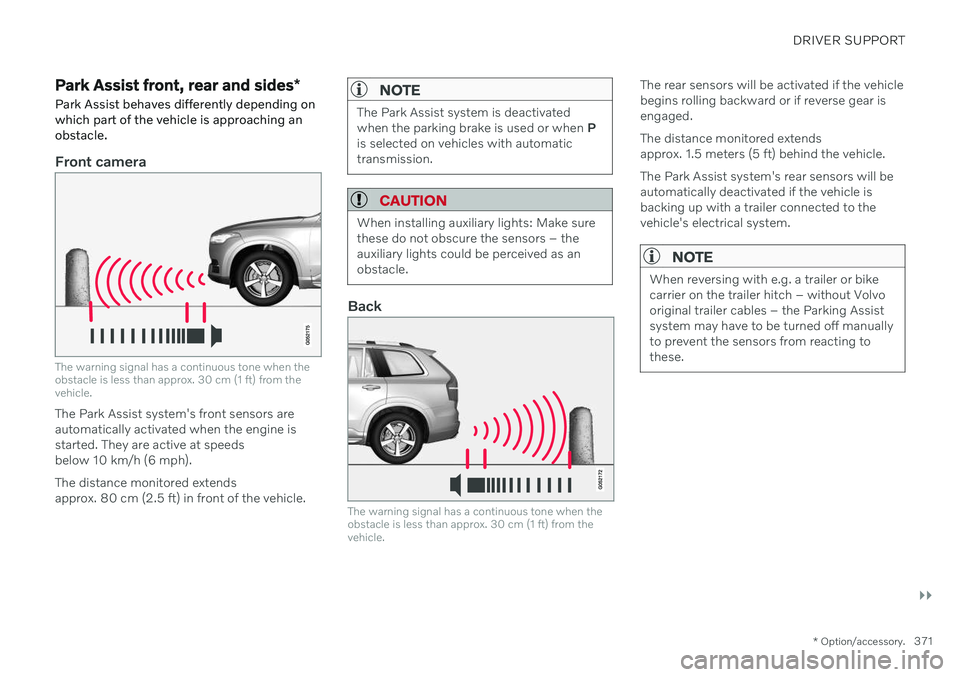
Park Assist front, rear and sides *
Park Assist behaves differently depending on which part of the vehicle is approaching anobstacle.
Front camera
The warning signal has a continuous tone when the obstacle is less than approx. 30 cm (1 ft) from thevehicle.
The Park Assist system's front sensors are automatically activated when the engine isstarted. They are active at speedsbelow 10 km/h (6 mph). The distance monitored extends approx. 80 cm (2.5 ft) in front of the vehicle.
NOTE
The Park Assist system is deactivated when the parking brake is used or when P
is selected on vehicles with automatictransmission.
CAUTION
When installing auxiliary lights: Make sure these do not obscure the sensors – theauxiliary lights could be perceived as anobstacle.
Back
The warning signal has a continuous tone when the obstacle is less than approx. 30 cm (1 ft) from thevehicle.
The rear sensors will be activated if the vehicle begins rolling backward or if reverse gear isengaged. The distance monitored extends approx. 1.5 meters (5 ft) behind the vehicle. The Park Assist system's rear sensors will be automatically deactivated if the vehicle isbacking up with a trailer connected to thevehicle's electrical system.
NOTE
When reversing with e.g. a trailer or bike carrier on the trailer hitch – without Volvooriginal trailer cables – the Parking Assistsystem may have to be turned off manuallyto prevent the sensors from reacting tothese.
Page 388 of 693
DRIVER SUPPORT
* Option/accessory.
386
Using Park Assist Pilot *
Park Assist Pilot (PAP 102
) helps the driver
park using three different steps. The function can also help the driver pull out of a parkingspace.
The function measures the space and steers the vehicle. The driver's role is to:
keep close watch of the area around thevehicle
follow the instructions on the center dis-play
change gears (reverse/forward) – an audi-ble signal indicates when the driver needsto change gears
regulating and maintaining a safe speed
applying the brakes and stopping the vehi-cle.
Information about the actions required by thedriver are provided in the center display usingsymbols, graphics and/or text. The function can be activated if the following criteria have been met after the engine isstarted:
No trailer is hitched to the vehicle
Your vehicle's speed is lower than30 km/h (20 mph).
NOTE
The distance between the vehicle and parking spots should be 0.5–1.5 meters(1.6–5.0 ft) when the function is lookingfor parking.
Parking with Park Assist PilotThe function helps park the vehicle using the following steps:
1. The system searches for and measures
potential parking spaces.
2. The vehicle is steered while it is backing into the parking space.
3. The vehicle is positioned in the parking space (the driver may be prompted to shift gears and apply the brakes).
Searching and measuring potential parking spots
The function can be activated in the center display's Func-tion view. It can also be accessed from the camera views.
GREEN button indicator light – the func- tion is activated.
GRAY button indicator light – the functionis deactivated.
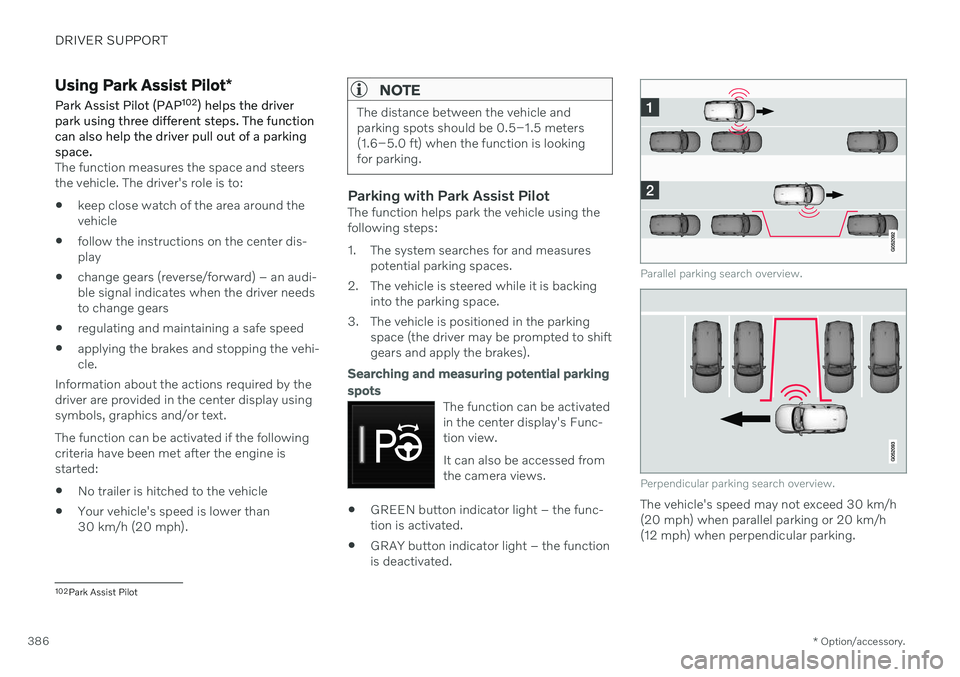
Parallel parking search overview.
Perpendicular parking search overview.
The vehicle's speed may not exceed 30 km/h (20 mph) when parallel parking or 20 km/h(12 mph) when perpendicular parking.
102
Park Assist Pilot
Page 396 of 693
HYBRID INFORMATION
394
General information about Twin Engine Twin Engine vehicles are driven just like any other vehicle, but certain functions differ froma vehicle powered exclusively by gasoline.The electric motor powers the vehicle primar-ily at low speeds; the gasoline engine is usedat higher speeds or during more active driv-ing.
The instrument panel displays Twin Engine- specific information - charging information,selected drive mode, distance to dischargedbattery and hybrid battery charge level. Different drive modes can be selected while driving, e.g. electric power only or, if morepower is needed, a combination of electric andgasoline power. The vehicle calculates a com-bination of driveability, driving experience,environmental impact and fuel economy forthe selected drive mode. In order to function optimally, the hybrid bat- tery (and its electrical drive systems) and thegasoline engine (and its drive systems) mustbe at the correct operating temperature. Bat-tery capacity can be considerably reduced ifthe battery is too cold or too hot. Precondi-tioning prepares the vehicle's drive systemsand passenger compartment before driving tohelp reduce both wear and energy consump-tion. It also helps increase the hybrid battery'srange.The hybrid battery which powers the electricmotor is recharged using the charging cable. Itcan also be recharged during light braking andthrough engine braking in gear position
B. The
combustion engine can also help recharge thehybrid battery.
Important
No electrical current
Keep in mind that if there is no electrical cur- rent to the vehicle, i.e. the ignition is switchedoff or the start battery is discharged, certainfunctions such as brakes, power steering, etc.will not work.
WARNING
If the vehicle does not have electrical cur- rent and both the electric motor and thegasoline engine are switched off, thebrakes cannot be used to stop the vehicle.
Towing not permitted
Never tow a Twin Engine vehicle behind another vehicle, as this could damage theelectric motor.
Exterior engine noise
Because there is no sound from the engine when only the electric motor is running, thevehicle is equipped with artificial exteriorbackground noise. This sound is intended tohelp warn children, pedestrians, cyclists, ani- mals, etc. outside the vehicle of the vehicle'sapproach.
High-voltage electrical current
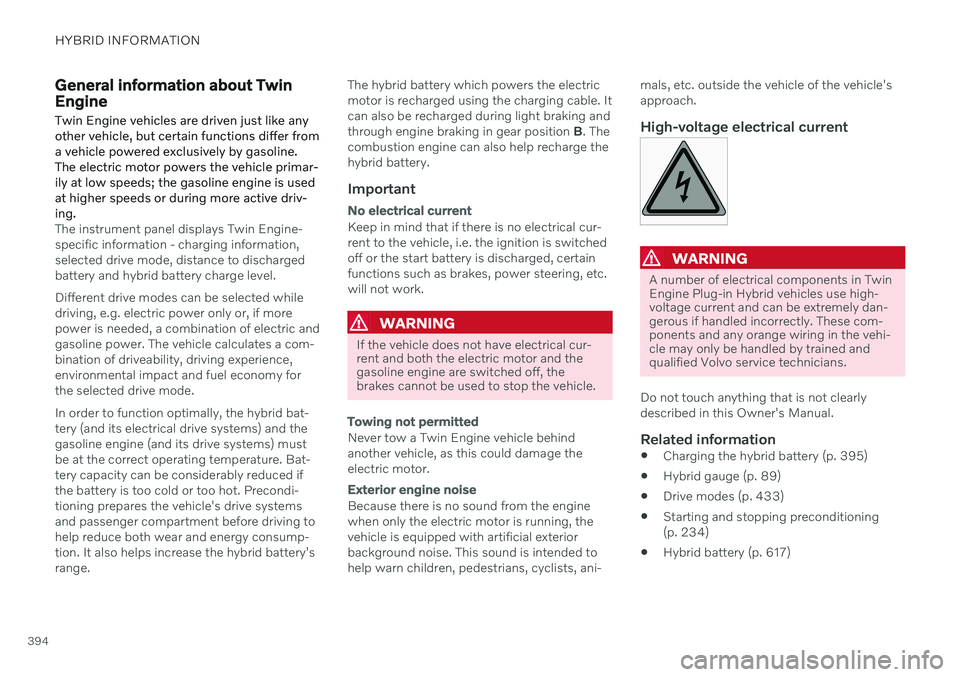
WARNING
A number of electrical components in Twin Engine Plug-in Hybrid vehicles use high-voltage current and can be extremely dan-gerous if handled incorrectly. These com-ponents and any orange wiring in the vehi-cle may only be handled by trained andqualified Volvo service technicians.
Do not touch anything that is not clearly described in this Owner's Manual.
Related information
Charging the hybrid battery (p. 395)
Hybrid gauge (p. 89)
Drive modes (p. 433)
Starting and stopping preconditioning(p. 234)
Hybrid battery (p. 617)
Page 398 of 693
||
HYBRID INFORMATION
396
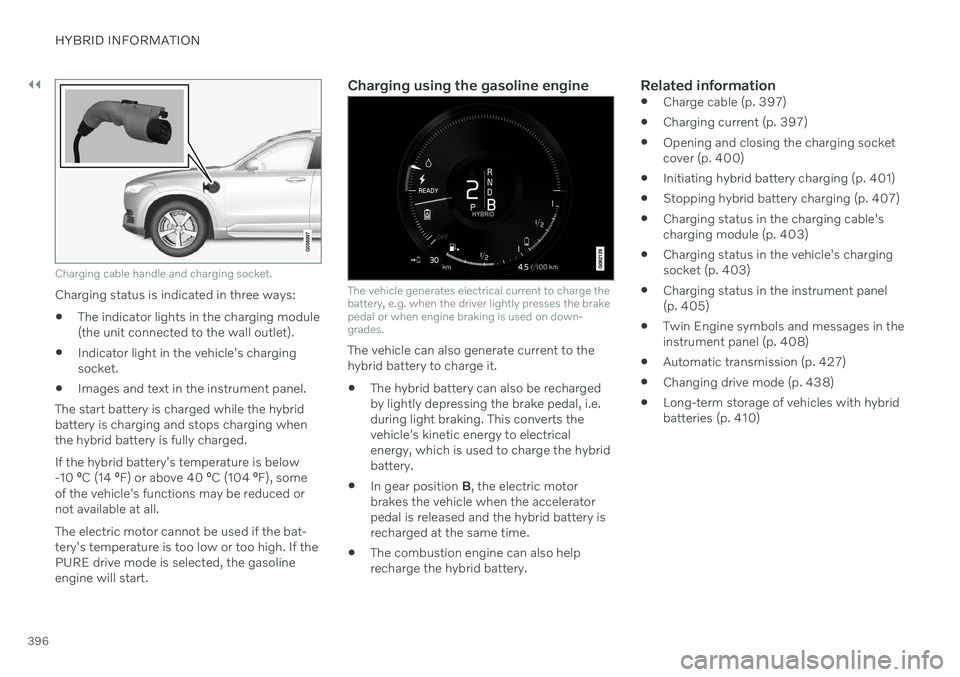
Charging cable handle and charging socket.
Charging status is indicated in three ways:
The indicator lights in the charging module (the unit connected to the wall outlet).
Indicator light in the vehicle's chargingsocket.
Images and text in the instrument panel.
The start battery is charged while the hybridbattery is charging and stops charging whenthe hybrid battery is fully charged. If the hybrid battery's temperature is below -10 ºC (14 ºF) or above 40 ºC (104 ºF), some
of the vehicle's functions may be reduced ornot available at all. The electric motor cannot be used if the bat- tery's temperature is too low or too high. If thePURE drive mode is selected, the gasolineengine will start.
Charging using the gasoline engine
The vehicle generates electrical current to charge the battery, e.g. when the driver lightly presses the brakepedal or when engine braking is used on down-grades.
The vehicle can also generate current to the hybrid battery to charge it. The hybrid battery can also be recharged by lightly depressing the brake pedal, i.e.during light braking. This converts thevehicle's kinetic energy to electricalenergy, which is used to charge the hybridbattery.
In gear position
B, the electric motor
brakes the vehicle when the acceleratorpedal is released and the hybrid battery isrecharged at the same time.
The combustion engine can also helprecharge the hybrid battery.
Related information
Charge cable (p. 397)
Charging current (p. 397)
Opening and closing the charging socketcover (p. 400)
Initiating hybrid battery charging (p. 401)
Stopping hybrid battery charging (p. 407)
Charging status in the charging cable'scharging module (p. 403)
Charging status in the vehicle's chargingsocket (p. 403)
Charging status in the instrument panel(p. 405)
Twin Engine symbols and messages in theinstrument panel (p. 408)
Automatic transmission (p. 427)
Changing drive mode (p. 438)
Long-term storage of vehicles with hybridbatteries (p. 410)
Page 418 of 693
||
STARTING AND DRIVING
* Option/accessory.
416
Mode Functions
I The panoramic roof, power windows, 12-volt electricalsocket in the passenger com-partment, Bluetooth, naviga-tion, phone, blower and wind-shield wipers can be used.
The power seats can beadjusted.
The 12-volt electrical socket
* in
the cargo compartment can beused.
Electrical current will be taken
from the battery in this ignitionmode.
II The headlights illuminate.
Warning/indicator lights illumi-nate for 5 seconds.
A number of other systems areactivated. However, seat andrear window heating can onlybe activated when the engineis running.
This ignition mode uses a lot of
current from the battery andshould be avoided wheneverpossible!
A Also activated when the door is opened.
Related information
Starting the vehicle (p. 412)
Adjusting the steering wheel (p. 206)
Jump starting using another battery (p. 459)
Selecting ignition mode (p. 416)
Selecting ignition mode
The vehicle's ignition can be put in various modes (levels) to make different functionsavailable.
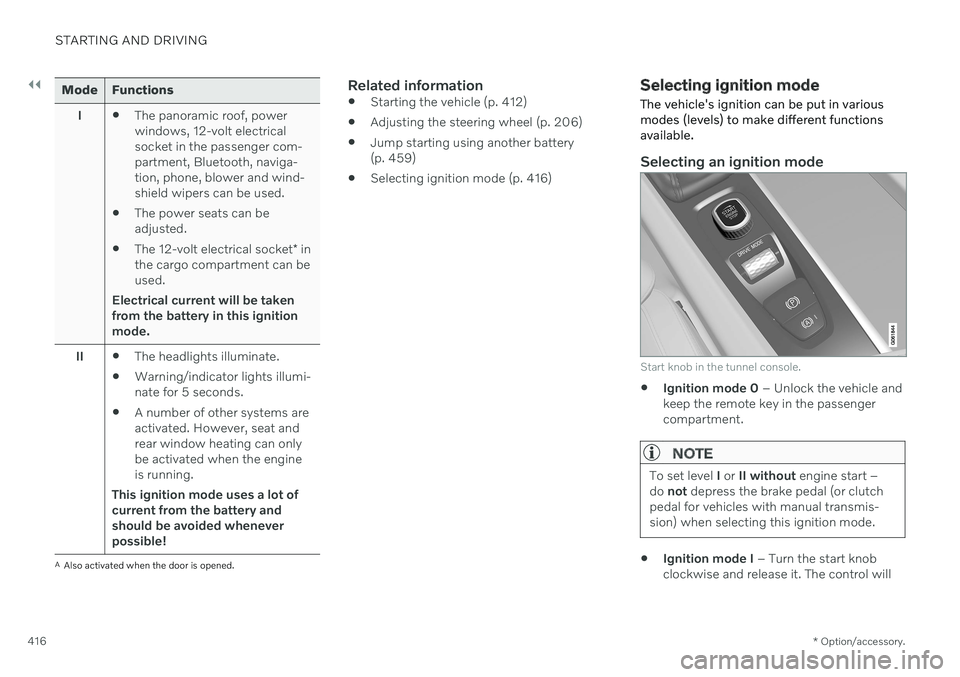
Selecting an ignition mode
Start knob in the tunnel console.
Ignition mode 0
– Unlock the vehicle and
keep the remote key in the passenger compartment.
NOTE
To set level I or II without engine start –
do not depress the brake pedal (or clutch
pedal for vehicles with manual transmis- sion) when selecting this ignition mode.
Ignition mode I
– Turn the start knob
clockwise and release it. The control will
Page 419 of 693
STARTING AND DRIVING
}}
417
automatically return to the original posi- tion.
Ignition mode II
– Turn the start knob
clockwise and hold it there forapprox. 5 seconds. Release the knob,which will automatically return to its origi-nal position.
Back to ignition mode 0
– To return to
ignition mode 0 from modes I and II, turn
the start knob clockwise and release it.The control will automatically return to theoriginal position.
Related information
Starting the vehicle (p. 412)
Switching off the vehicle (p. 414)
Ignition modes (p. 415)
Adjusting the steering wheel (p. 206)
Jump starting using another battery(p. 459)
Brake functions
The vehicle's brakes are used to reduce speed or prevent the vehicle from rolling.
In addition to the wheel brakes and parking brakes, the vehicle is also equipped with anumber of automatic brake assist functions.These systems provide assistance by e.g. thedriver not needing to depress the brake pedalat a traffic light, when starting up a hill orwhen driving down a hill. Depending on how the vehicle is equipped, the following brake assist functions may beincluded:
Auto-hold brake function at a standstill(Auto Hold)
Hill Start Assist (Hill Start Assist)
Braking assist after a collision
City Safety
Hill Descent Control (Hill Descent Control)
Related information
Brakes (p. 417)
Parking brake (p. 421)
Auto-hold brakes (p. 424)
Braking assist after a collision (p. 426)
Hill Start Assist (p. 426)
City Safety
™ (p. 327)
Hill Descent Control (p. 445)
Brakes
The brake pedal is used to apply the vehicle's regular brakes, which are part of the brakesystem.
The vehicle is equipped with two brake cir- cuits. If one brake circuit is damaged, thebrake pedal will go down further whendepressed. More pressure will then berequired from the driver for normal brakingeffect.
WARNING
The power brakes only work when the electric motor or combustion engine is run-ning.
If the brake pedal is used when the engine is switched off, greater pressure must be appliedto brake the vehicle. In very hilly areas or when driving with a heavy load, gear position B can be used to augment
the brakes with engine braking. Use the Off Road drive mode to increase the engine braking effect when driving on steepdowngrades at low speeds.
Anti-lock brakesThe vehicle is equipped with an Anti-lock Braking System (ABS 2
), which helps prevent
the wheels from locking and helps maintain steering control when braking. Vibrations may