belt VOLVO XC90 TWIN ENGINE 2020 Repair Manual
[x] Cancel search | Manufacturer: VOLVO, Model Year: 2020, Model line: XC90 TWIN ENGINE, Model: VOLVO XC90 TWIN ENGINE 2020Pages: 693, PDF Size: 13.34 MB
Page 590 of 693

LOADING, STORAGE AND PASSENGER COMPARTMENT
* Option/accessory.
588
Installing and removing the cargo compartment cover *
The cover can be rolled out to conceal objects in the cargo compartment.
Installing the cargo compartment cover 3
Press the end piece on one side of the cover into the retaining bracket in the sidepanel of the cargo compartment.
Then put the other end piece in the recess in the side panel on the opposite side.
Push the end piece down on both sides, one at a time.
> When a click is heard and the red
marks on each end piece are no longer visible, the cover is in place. Check thatit is secure.
Removing the cargo compartment cover
In retracted position:
1. Press the button on one of the cover's ends and lift out that end.For 7-seat models - remove the third row seat belt latches from the hooks above theside panels.
2. Carefully lift the cover up and out. > The other end will release automaticallyand the cover can then be lifted out ofthe cargo compartment.
Related information
Operating the cargo compartment cover
*
(p. 588)
Loading recommendations (p. 585)
Operating the cargo compartment cover
*
The cover can be used in two positions: fully open to completely cover the cargo compart-ment or partially retracted to make it easier toreach further into the cargo compartment.
3 In the XC90 Excellence, the cargo compartment cover is permanently fixed and cannot be taken out or put in.
Page 591 of 693
LOADING, STORAGE AND PASSENGER COMPARTMENT
}}
589
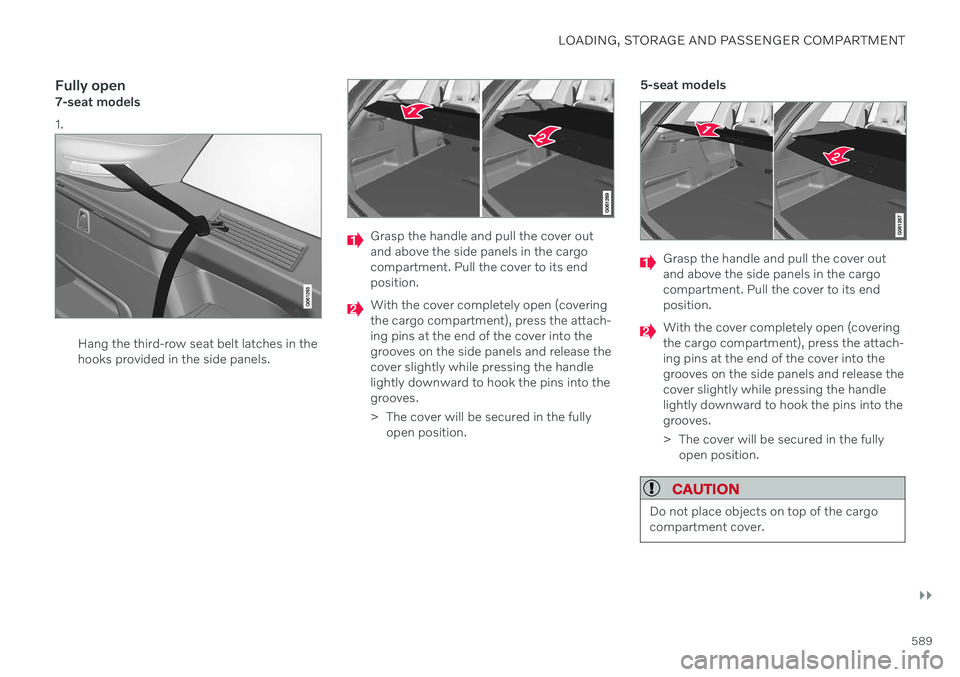
Fully open7-seat models 1.
Hang the third-row seat belt latches in the hooks provided in the side panels.
Grasp the handle and pull the cover out and above the side panels in the cargocompartment. Pull the cover to its endposition.
With the cover completely open (covering the cargo compartment), press the attach-ing pins at the end of the cover into thegrooves on the side panels and release thecover slightly while pressing the handlelightly downward to hook the pins into thegrooves.
> The cover will be secured in the fullyopen position. 5-seat models
Grasp the handle and pull the cover out and above the side panels in the cargocompartment. Pull the cover to its endposition.
With the cover completely open (covering the cargo compartment), press the attach-ing pins at the end of the cover into thegrooves on the side panels and release thecover slightly while pressing the handlelightly downward to hook the pins into thegrooves.
> The cover will be secured in the fully
open position.
CAUTION
Do not place objects on top of the cargo compartment cover.
Page 599 of 693
MAINTENANCE AND SERVICE
}}
597
Applicable warranties - U.S./Canada
In accordance with applicable U.S. and Cana- dian regulations, the following list of warran-ties is provided. New Vehicle Limited Warranty
Parts and Accessories Limited Warranty
Corrosion Protection Limited Warranty
Seat Belt and Supplemental Restraint Systems Limited Warranty
Emission Design and Defect Warranty
Emission Performance Warranty
These are federal warranties; other warrantiesare provided as required by state/provinciallaw. Refer to your separate Warranty andService Records Information booklet fordetailed information concerning each of thewarranties.
Periodic maintenance helps minimize emissions
NOTE
Refer to your Service and Warranty Booklet for a comprehensive serviceand maintenance schedule up to240,000 km (150,000 miles). Thisprogram contains inspections and ser-vices necessary for the proper functionof your vehicle and includes compo-nents that affect vehicle emissions.
The Warranty and Service RecordsInformation booklet also containsdetailed information concerning thewarranties that apply to your vehicle.
On-board Diagnostic SystemOBD II is part of your vehicle's computerized engine management system. It stores diag-nostic information about your vehicle's emis-sion controls. It can light the Check Enginelight (MIL) if it detects an emission control"fault." A "fault" is a component or systemthat is not performing within an expectedrange. A fault may be permanent or temporary.OBD II will store a message about any fault.
Emission inspection readiness
How do states use
OBD II for emission
inspections?
Many states connect a computer directly to a vehicle's OBD II system. The inspector canthen read "faults." In some states, this type ofinspection has replaced the tailpipe emissiontest.
How can my vehicle fail OBD II emission
inspection?
Your vehicle can fail OBD II emission inspec- tion for any of the following reasons: If your Check Engine (MIL) light is lit, your vehicle may fail inspection.
If your vehicle's Check Engine light was lit,but went out without any action on yourpart, OBD II will still have a recorded fault.Your vehicle may pass or fail, dependingon the inspection practices in your area.
If you had recent service that required dis-connecting the battery, OBD II diagnosticinformation may be incomplete and "notready" for inspection. A vehicle that is notready may fail inspection.
Page 608 of 693
||
MAINTENANCE AND SERVICE
606
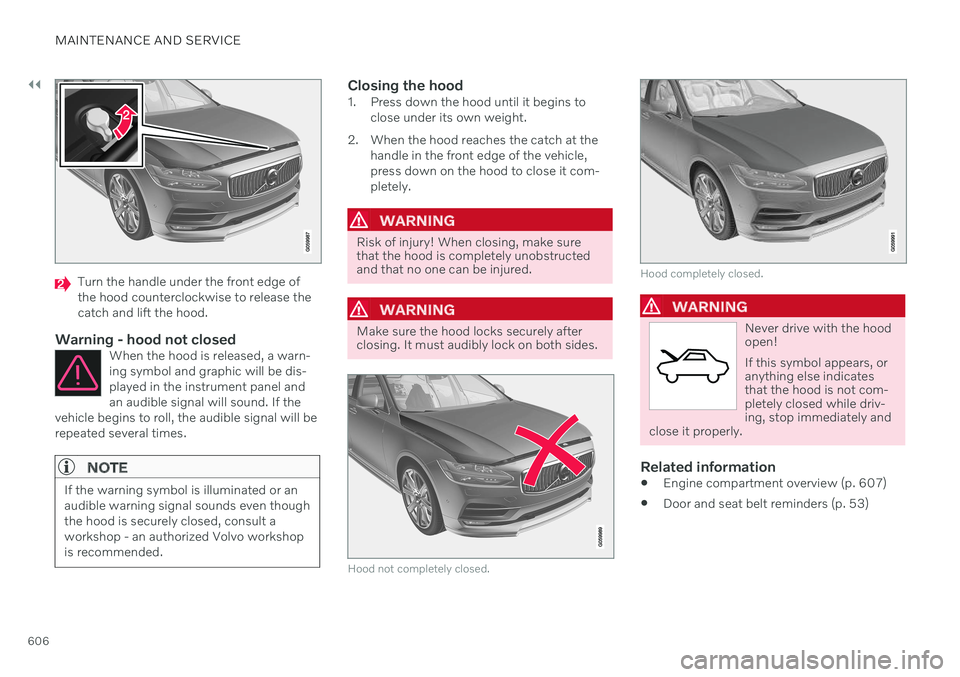
Turn the handle under the front edge of the hood counterclockwise to release thecatch and lift the hood.
Warning - hood not closedWhen the hood is released, a warn-ing symbol and graphic will be dis-played in the instrument panel andan audible signal will sound. If the
vehicle begins to roll, the audible signal will berepeated several times.
NOTE
If the warning symbol is illuminated or an audible warning signal sounds even thoughthe hood is securely closed, consult aworkshop - an authorized Volvo workshopis recommended.
Closing the hood1. Press down the hood until it begins to close under its own weight.
2. When the hood reaches the catch at the handle in the front edge of the vehicle, press down on the hood to close it com-pletely.
WARNING
Risk of injury! When closing, make sure that the hood is completely unobstructedand that no one can be injured.
WARNING
Make sure the hood locks securely after closing. It must audibly lock on both sides.
Hood not completely closed.
Hood completely closed.
WARNING
Never drive with the hood open! If this symbol appears, or anything else indicatesthat the hood is not com-pletely closed while driv-ing, stop immediately and
close it properly.
Related information
Engine compartment overview (p. 607)
Door and seat belt reminders (p. 53)
Page 633 of 693
MAINTENANCE AND SERVICE
}}
* Option/accessory.631
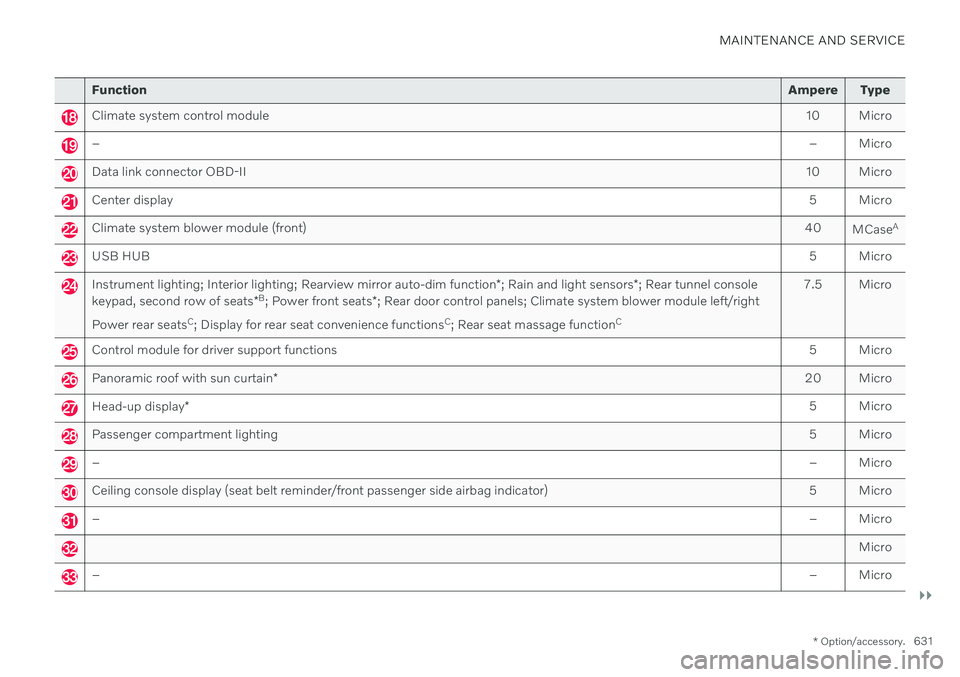
Function Ampere Type
Climate system control module 10 Micro
– – Micro
Data link connector OBD-II10 Micro
Center display 5 Micro
Climate system blower module (front)40
MCaseA
USB HUB
5 Micro
Instrument lighting; Interior lighting; Rearview mirror auto-dim function*; Rain and light sensors *; Rear tunnel console
keypad, second row of seats *B
; Power front seats *; Rear door control panels; Climate system blower module left/right
Power rear seats C
; Display for rear seat convenience functions C
; Rear seat massage function C 7.5 Micro
Control module for driver support functions
5 Micro
Panoramic roof with sun curtain* 20 Micro
Head-up display
* 5 Micro
Passenger compartment lighting
5 Micro
–– Micro
Ceiling console display (seat belt reminder/front passenger side airbag indicator) 5 Micro
–– Micro
Micro
–– Micro
Page 636 of 693

MAINTENANCE AND SERVICE
* Option/accessory.
634
Fuses in the cargo compartment
The fuses in the cargo compartment help pro- tect electrical components such as the power seats *, airbags and seat belt tensioners.
Page 638 of 693

||
MAINTENANCE AND SERVICE
* Option/accessory.
636
Positions
Function Ampere Type
– –
MCaseA
Central electrical module
40
MCaseA
Pneumatic suspension
* compressor 40
MCaseA
MCaseA
Rear electric heater (right-hand side) 30
Electrical outlets in the tunnel console between the rear seatsB
30B
MCaseA
Rear electric heater (left-hand side)
30
MCaseA
Power front passenger seat
*
Door module right side, rear 20
MCaseA
Control module for reduction of nitrous oxides (diesel)
30
MCaseA
Power rear seat (right-hand side) B
20
Power tailgate* 25
MCaseA
Power front passenger seat
*
Door module right side, front 20
MCaseA
Towbar
* control module 40
MCaseA
Seat belt tensioner module (right side)
40
MCaseA
Internal relay windings
5 Micro
Page 639 of 693

MAINTENANCE AND SERVICE
}}
* Option/accessory.637
Function Ampere Type
– – Micro
Power rear seat, left side B
20
Door module left side, rear 20 Micro
USB hub/accessory port – Micro
Module for electrically folding third-row seats* 20 Micro
Towbar
* control module 25
MCaseA
Accessory module 40
MCaseA
Power driver seat
*
Door module left side, front 20
MCaseA
Seat belt tensioner module (left side)
40
MCaseA
Park Assist Camera
* 5 Micro
–
– Micro
–– Micro
–– Micro
Feed when ignition is on10 Micro
– – Micro
CoolerB
; Heated/cooled cup holder (rear) B
Accessory module 10
B
5 Micro
Page 640 of 693

||
MAINTENANCE AND SERVICE
* Option/accessory.
638
Function Ampere Type
Heated rear seat (left side)* 15 Micro
–
– Micro
Blind Spot Information (BLIS)*
Exterior reverse signal control module 5 Micro
–
– Micro
Modules for seat belt tensioners 5 Micro
Emissions system actuator (gasoline, certain engine variants)5 Micro
–– Micro
–– Micro
Heated rear seat (right side)* 15 Micro
–
–
MCaseA
A
This type of fuse should be replaced by a workshop. An authorized Volvo workshop is recommended.
B Excellence
Related information
Fuses and fuseboxes (p. 619)
Replacing fuses (p. 619)
Page 641 of 693

MAINTENANCE AND SERVICE
}}
* Option/accessory.639
Cleaning the interior
Only use cleaning agents and car care prod- ucts recommended by Volvo. Clean regularlyand treat stains immediately. It is importantto vacuum before using a cleaning agent.
CAUTION
Some colored clothing (for example, dark jeans and suede garments) maystain the upholstery. If this occurs, it isimportant to clean and treat theseparts of the upholstery as soon as pos-sible.
Never use strong solvents such aswasher fluid, gasoline, mineral spirit orconcentrated alcohol to clean the inte-rior as this can damage the upholsteryas well as other interior materials.
Never spray cleaning agent directlyonto components that have electricalbuttons and controls. Wipe insteadwith a damp cloth with cleaning agent.
Sharp objects and Velcro can damagethe car's textile upholstery.
Only use cleaning agent on the type ofmaterial it is intended for.
Related information
Cleaning the center display (p. 639)
Cleaning fabric upholstery and ceiling liner (p. 641)
Cleaning the seat belt (p. 641)
Cleaning floor mats and inlay mats(p. 641)
Cleaning leather upholstery
* (p. 642)
Cleaning the leather steering wheel(p. 643)
Cleaning interior plastic, metal and woodsurfaces (p. 643)
Cleaning the center display
Marks, stains, finger smudges etc. on the center display may affect its performance andreadability. Clean the screen regularly with amicrofiber cloth.
1. Turn off the center display by pressing and holding the Home button.
2. Wipe the screen clean with the microfiber cloth provided or use another microfiber cloth of similar quality. Wipe the screenwith a clean, dry microfiber cloth usingsmall, circular motions. If necessary, mois-ten the cloth slightly.
3. Reactivate the display by pressing the Home button briefly.