belt VOLVO XC90 TWIN ENGINE 2020 Service Manual
[x] Cancel search | Manufacturer: VOLVO, Model Year: 2020, Model line: XC90 TWIN ENGINE, Model: VOLVO XC90 TWIN ENGINE 2020Pages: 693, PDF Size: 13.34 MB
Page 88 of 693
DISPLAYS AND VOICE CONTROL
* Option/accessory.
86
Instrument panel The instrument panel displays information related to the vehicle and driving.
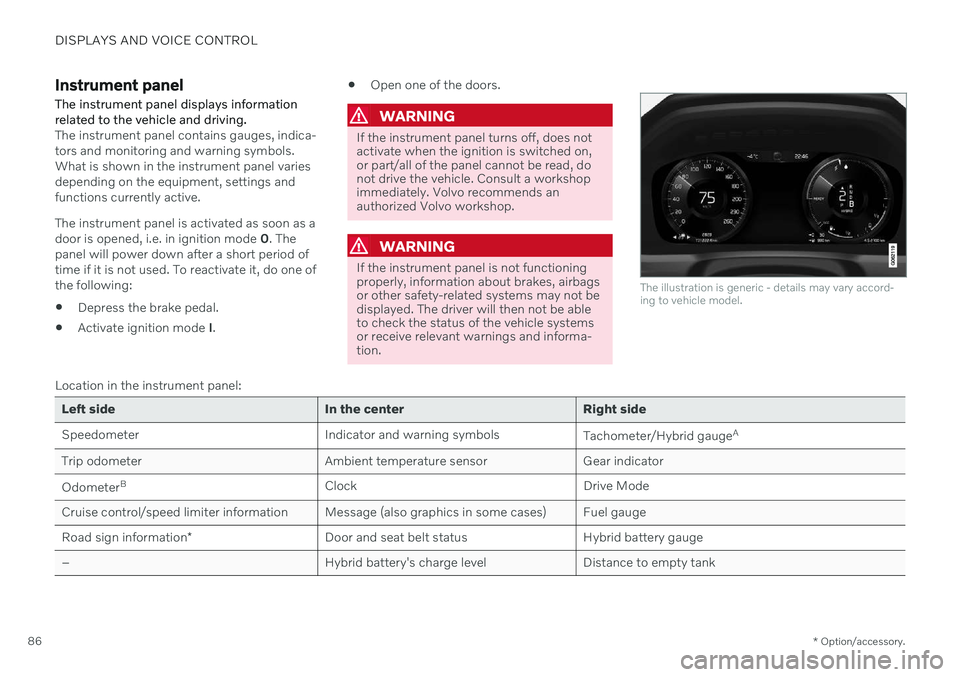
The instrument panel contains gauges, indica- tors and monitoring and warning symbols.What is shown in the instrument panel variesdepending on the equipment, settings andfunctions currently active. The instrument panel is activated as soon as a door is opened, i.e. in ignition mode 0. The
panel will power down after a short period oftime if it is not used. To reactivate it, do one ofthe following:
Depress the brake pedal.
Activate ignition mode
I.
Open one of the doors.
WARNING
If the instrument panel turns off, does not activate when the ignition is switched on,or part/all of the panel cannot be read, donot drive the vehicle. Consult a workshopimmediately. Volvo recommends anauthorized Volvo workshop.
WARNING
If the instrument panel is not functioning properly, information about brakes, airbagsor other safety-related systems may not bedisplayed. The driver will then not be ableto check the status of the vehicle systemsor receive relevant warnings and informa-tion.
The illustration is generic - details may vary accord- ing to vehicle model.
Location in the instrument panel:
Left side In the center Right side
Speedometer Indicator and warning symbols
Tachometer/Hybrid gaugeA
Trip odometer Ambient temperature sensor Gear indicator Odometer B
Clock Drive Mode
Cruise control/speed limiter information Message (also graphics in some cases) Fuel gauge Road sign information * Door and seat belt status Hybrid battery gauge
– Hybrid battery's charge level Distance to empty tank
Page 102 of 693
DISPLAYS AND VOICE CONTROL
100
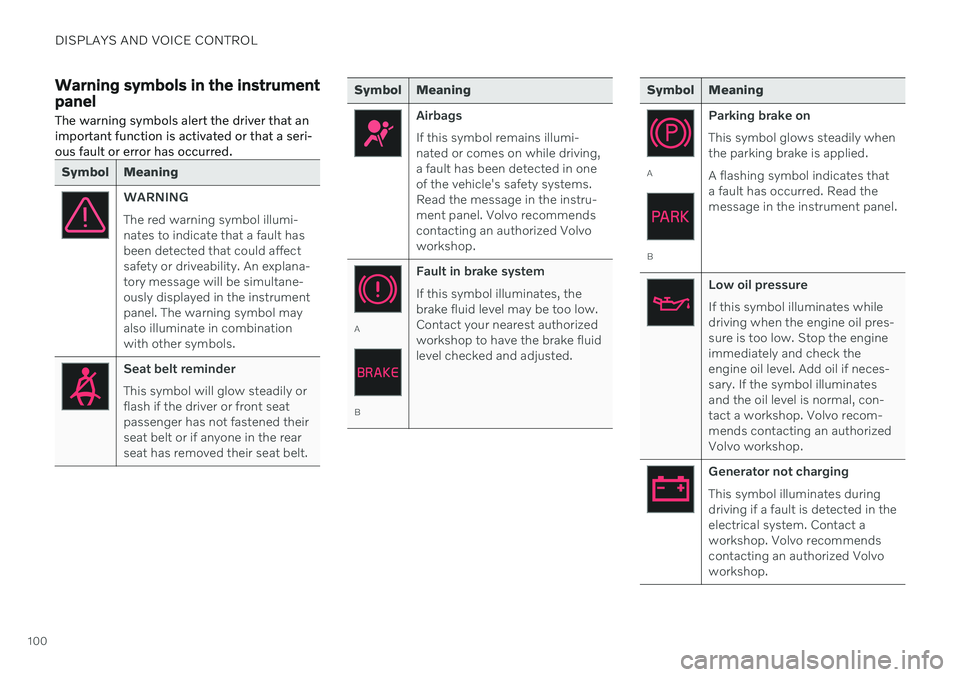
Warning symbols in the instrument panelThe warning symbols alert the driver that an important function is activated or that a seri-ous fault or error has occurred.
Symbol Meaning
WARNING The red warning symbol illumi- nates to indicate that a fault hasbeen detected that could affectsafety or driveability. An explana-tory message will be simultane-ously displayed in the instrumentpanel. The warning symbol mayalso illuminate in combinationwith other symbols.
Seat belt reminder This symbol will glow steadily or flash if the driver or front seatpassenger has not fastened theirseat belt or if anyone in the rearseat has removed their seat belt.
Symbol Meaning
Airbags If this symbol remains illumi- nated or comes on while driving,a fault has been detected in oneof the vehicle's safety systems.Read the message in the instru-ment panel. Volvo recommendscontacting an authorized Volvoworkshop.
A
B Fault in brake system If this symbol illuminates, the brake fluid level may be too low.Contact your nearest authorizedworkshop to have the brake fluidlevel checked and adjusted.
Symbol Meaning
A
B
Parking brake on This symbol glows steadily when the parking brake is applied. A flashing symbol indicates that a fault has occurred. Read themessage in the instrument panel.
Low oil pressure If this symbol illuminates while driving when the engine oil pres-sure is too low. Stop the engineimmediately and check theengine oil level. Add oil if neces-sary. If the symbol illuminatesand the oil level is normal, con-tact a workshop. Volvo recom-mends contacting an authorizedVolvo workshop.
Generator not charging This symbol illuminates during driving if a fault is detected in theelectrical system. Contact aworkshop. Volvo recommendscontacting an authorized Volvoworkshop.
Page 200 of 693
SEATS AND STEERING WHEEL
* Option/accessory.
198
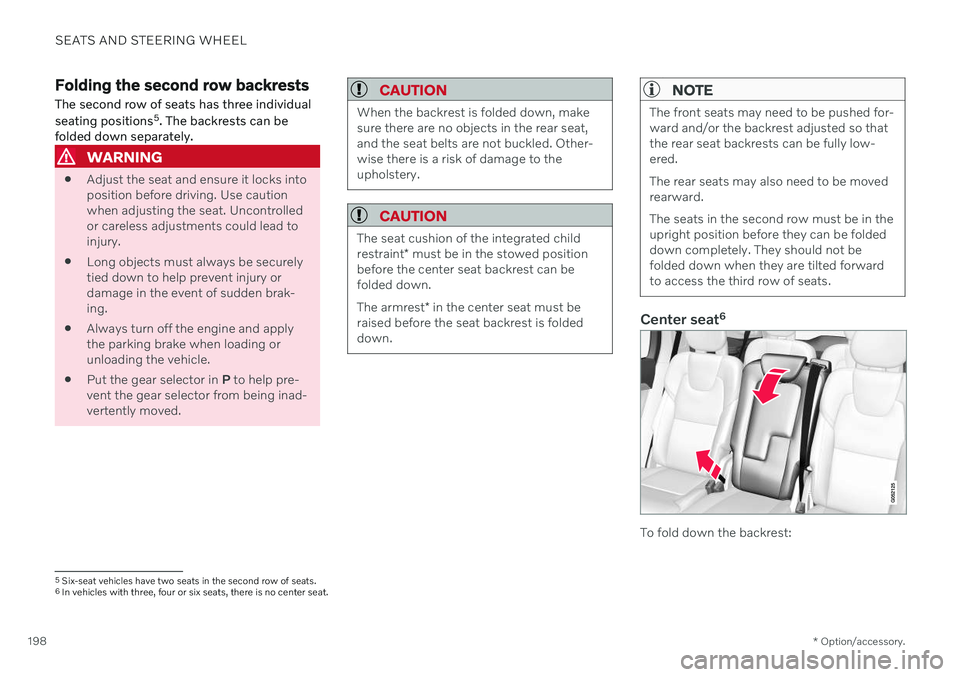
Folding the second row backrests
The second row of seats has three individual seating positions 5
. The backrests can be
folded down separately.
WARNING
Adjust the seat and ensure it locks into position before driving. Use cautionwhen adjusting the seat. Uncontrolledor careless adjustments could lead toinjury.
Long objects must always be securelytied down to help prevent injury ordamage in the event of sudden brak-ing.
Always turn off the engine and applythe parking brake when loading orunloading the vehicle.
Put the gear selector in
P to help pre-
vent the gear selector from being inad-vertently moved.
CAUTION
When the backrest is folded down, make sure there are no objects in the rear seat,and the seat belts are not buckled. Other-wise there is a risk of damage to theupholstery.
CAUTION
The seat cushion of the integrated child restraint * must be in the stowed position
before the center seat backrest can be folded down. The armrest * in the center seat must be
raised before the seat backrest is folded down.
NOTE
The front seats may need to be pushed for- ward and/or the backrest adjusted so thatthe rear seat backrests can be fully low-ered. The rear seats may also need to be moved rearward. The seats in the second row must be in the upright position before they can be foldeddown completely. They should not befolded down when they are tilted forwardto access the third row of seats.
Center seat 6
To fold down the backrest:
5
Six-seat vehicles have two seats in the second row of seats.6In vehicles with three, four or six seats, there is no center seat.
Page 235 of 693

CLIMATE CONTROL
}}
* Option/accessory.233
Activating and deactivating climate control for the third-row seats *
The third row of seats has separate air condi- tioning that cools and dehumidifies incomingair as needed.
1. Tap the symbol in the center of the climate bar to open Climate view in the center dis- play.
2. Select the
Rear climate tab.
3. Tap
3rd row climate.
> The air conditioning is activated/deacti- vated and the button lights up/goes out.
NOTE
The air conditioning for the third row of seats is automatically activated if any ofthe third row seat belts are buckled. It is not possible to manually activate air conditioning for the third row of seats if themain air conditioning system is deactivatedor the climate system for the second rowof seats is deactivated.
Related information
Climate system controls (p. 219)
Parking climate
Parking climate is an umbrella term for vari- ous functions that improve the passengercompartment climate when the vehicle isparked, e.g. preconditioning.
Parking climate functions are con- trolled from the Parking climate tab
in the center display's Climate view. Tap the symbol in the center of the
climate bar to open Climate view.
Related information
Climate (p. 208)
Preconditioning (p. 233)
Climate comfort retaining function (p. 238)
Parking climate symbols and messages(p. 239)
Preconditioning
Preconditioning is a climate function that, if possible, attempts to achieve a comfortabletemperature in the passenger compartmentbefore driving.
Preconditioning can be started immediately or started at a preset time using a timer. The function utilizes several of the vehicle's systems:
In cold weather, the parking heater heatsthe passenger compartment to a comfort-able temperature.
In warm weather, air conditioning coolsthe passenger compartment to a comfort-able temperature.
The electrically heated steering wheel
*
and seats * can be activated.
Heating for the windshield, rear windowand door mirrors are automatically acti-vated as needed.
During preconditioning in a hot climate, con-densation from the air conditions may dripunder the vehicle. This is normal.
Page 295 of 693

DRIVER SUPPORT
}}
* Option/accessory.293
Selecting and activating Adaptive Cruise Control *23
Adaptive Cruise Control (ACC 24
) must first be
selected and then activated before it can reg- ulate speed and distance.
To start the function:
The driver's seat belt must be buckled and the driver's door must be closed.
There must be a vehicle ahead (targetvehicle) within a reasonable distance or your vehicle's current speed must be atleast 15 km/h (9 mph).
1. Press the ◀ (2) or ▶ (3) button on the
steering wheel keypad and scroll to the Adaptive Cruise Control symbol
(4).
> Gray symbol – Adaptive Cruise Control is in standby mode.
2. When Speed Limiter is selected, press
(1) on the steering wheel keypad to
activate.
> White symbol – Speed Limiter starts and the current speed is stored as the maximum speed.
Reactivating Adaptive Cruise Control to the last stored speed
–When Adaptive Cruise Control is selected, press
on the steering wheel keypad to
activate.
> The Cruise Control marking in the instrument panel will change from GRAY to WHITE and the vehicle willthen return to the most recently setspeed.
WARNING
A noticeable increase in speed may follow when the speed is resumed with the
steering wheel button.
Additional markings in the instrument panel
ACC will only regulate the time interval to the vehicleahead when the distancesymbol shows two vehicles.
A speed interval will be marked at the same time. The higher speed is the stored speed for your vehicleand the lower speed is thespeed of the vehicle ahead
(target vehicle).
Related information
Adaptive Cruise Control
* (p. 290)
Deactivating Adaptive Cruise Control
*
(p. 294)
23 Depending on market, this function can be either standard or optional.
24 Adaptive Cruise Control
Page 297 of 693
DRIVER SUPPORT
}}
* Option/accessory.295
Adaptive Cruise Control *27
standby
mode Adaptive Cruise Control (ACC 28
) can be deac-
tivated and put in standby mode. This may happen automatically or be due to driverintervention.
Standby mode means that the function is selected in the instrument panel but not acti-vated. In standby mode, Adaptive Cruise Con-trol will not regulate speed or distance to thevehicle ahead.
Standby mode due to action by the
driver
Adaptive Cruise Control will be deactivatedand put in standby mode if any of the follow-ing occurs:
The brakes are applied.
The gear selector is moved to
N.
The vehicle is driven faster than the setspeed for more than 1 minute.
Temporarily increasing speed using the accel-erator pedal, e.g. when passing another vehi-cle, will not affect the setting. The vehicle willreturn to the set speed when the acceleratorpedal is released.
WARNING
If Adaptive Cruise Control is in standby mode, the driver must intervene andregulate both speed and distance tothe vehicle ahead.
If the vehicle comes too close to a vehi-cle ahead when Adaptive Cruise Con-trol is in standby mode, the driver canbe warned of the short distance by the Distance Alert
* function.
Automatic standby modeAdaptive Cruise Control is dependent on other systems, such as Electronic Stability Control (ESC 29
). If any of these other systems stops
working, Adaptive Cruise Control will be auto- matically deactivated.
WARNING
With automatic standby mode, the driver is warned by an acoustic signal and a mes-sage on the instrument panel.
The driver must then regulate vehicle speed, apply the brakes if necessary,and maintain a safe distance to othervehicles. Adaptive Cruise Control may go into standbymode if:
your vehicle's speed goes below 5 km/h(3 mph) and ACC cannot determine if thevehicle ahead is stationary or if it isanother object, e.g. a speed bump.
your vehicle's speed goes under 5 km/h(3 mph) and the vehicle ahead turns sothat ACC no longer has a vehicle to follow.
the driver opens the door.
the driver unbuckles the seat belt.
the engine speed (rpm) is too low/high.
one or more of the wheels lose traction.
the brake temperature is high.
the parking brake is applied.
the camera/radar sensor is covered bysnow or heavy rain (the camera lens/radarwaves are blocked).Related information
Adaptive Cruise Control
* (p. 290)
Selecting and activating Adaptive Cruise Control
* (p. 293)
27
Depending on market, this function can be either standard or optional.
28 Adaptive Cruise Control
29 Electronic Stability Control
Page 305 of 693
DRIVER SUPPORT
}}
* Option/accessory.303
Instrument panel
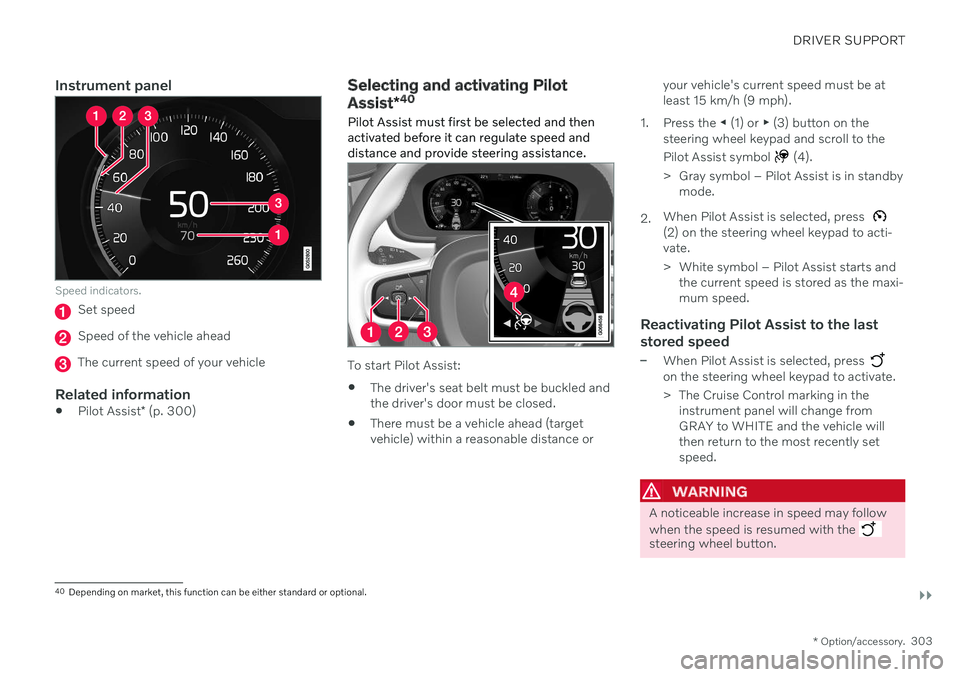
Speed indicators.
Set speed
Speed of the vehicle ahead
The current speed of your vehicle
Related information
Pilot Assist
* (p. 300)
Selecting and activating Pilot Assist *40
Pilot Assist must first be selected and then activated before it can regulate speed anddistance and provide steering assistance.
To start Pilot Assist: The driver's seat belt must be buckled and the driver's door must be closed.
There must be a vehicle ahead (targetvehicle) within a reasonable distance or your vehicle's current speed must be atleast 15 km/h (9 mph).
1. Press the ◀ (1) or ▶ (3) button on the
steering wheel keypad and scroll to the Pilot Assist symbol
(4).
> Gray symbol – Pilot Assist is in standby mode.
2. When Pilot Assist is selected, press
(2) on the steering wheel keypad to acti- vate.
> White symbol – Pilot Assist starts and
the current speed is stored as the maxi- mum speed.
Reactivating Pilot Assist to the last stored speed
–When Pilot Assist is selected, press on the steering wheel keypad to activate.
> The Cruise Control marking in theinstrument panel will change from GRAY to WHITE and the vehicle willthen return to the most recently setspeed.
WARNING
A noticeable increase in speed may follow when the speed is resumed with the
steering wheel button.
40Depending on market, this function can be either standard or optional.
Page 307 of 693
DRIVER SUPPORT
* Option/accessory.305
Pilot Assist*42
standby mode
Pilot Assist can be deactivated and put in standby mode. This may happen automati-cally or be due to driver intervention.
Standby mode means that the function is selected in the instrument panel but not acti-vated. In standby mode, Pilot Assist will notregulate the speed or distance to the vehicleahead or provide steering assistance.
Standby mode due to action by the
driver
Pilot Assist will be deactivated and put instandby mode if any of the following occurs:
The brakes are applied.
The gear selector is moved to
N.
A turn signal is used for more than1 minute.
The vehicle is driven faster than the setspeed for more than 1 minute.
Automatic standby modePilot Assist is dependent on other systems, such as Electronic Stability Control (ESC 43
). If
any of these other systems stops working, Pilot Assist will be automatically deactivated.
WARNING
With automatic standby mode, the driver is warned by an acoustic signal and a mes-sage on the instrument panel.
The driver must then regulate vehicle speed, apply the brakes if necessary,and maintain a safe distance to othervehicles.
Adaptive Cruise Control may go into standbymode if, e.g.: the driver opens the door.
the brake temperature is high.
the driver's hands are not on the steering wheel.
the parking brake is applied.
the engine speed (rpm) is too low/high.
the driver unbuckles the seat belt.
one or more of the wheels lose traction.
the camera/radar sensor is covered by snow or heavy rain (the camera lens/radarwaves are blocked).
your vehicle's speed goes under 5 km/h(3 mph) and Pilot Assist cannot determineif the vehicle ahead is stationary or if it isanother object, e.g. a speed bump.
your vehicle's speed goes under 5 km/h(3 mph) and the vehicle ahead turns sothat Pilot Assist no longer has a vehicle tofollow.
Related information
Pilot Assist
* (p. 300)
Selecting and activating Pilot Assist
*
(p. 303)
Deactivating Pilot Assist
* (p. 304)
Pilot Assist
* limitations (p. 306)
42
Depending on market, this function can be either standard or optional.
43 Electronic Stability Control
Page 316 of 693
||
DRIVER SUPPORT
* Option/accessory.
314
WARNING
The driver support system only issues a warning for obstacles detected by its radarsensor – thus, a warning may come after adelay or not at all.
Never wait for a warning or assistance. Apply the brakes when necessary.
NOTE
Driver support can keep the vehicle sta- tionary for no more than 5 minutes – afterthat time the parking brake is applied andthe function is deactivated. The parking brake must be released before driver support can be reactivated.
Deactivation of the Auto-hold brake function
In certain situations, auto-hold will be deacti- vated when the vehicle is at a standstill andthe function will go into standby mode. This means that the brakes will be released and the vehicle could begin to roll. The driver mustactively apply the brakes to keep the vehiclestationary. This can occur if:
the driver depresses the brake pedal
the parking brake is applied
the gear selector is moved to the
P, N or R
positions
the driver puts the function in standby mode.
Auto Activate Parking BrakeIn certain situations, the parking brake will beapplied to keep the vehicle at a standstill. This occurs if the function is keeping the vehi- cle stationary using the brakes and:
the driver opens the door or unbuckleshis/her seat belt
the function has kept the vehicle at astandstill for more than approx. 5 minutes
the brakes overheat
the driver switches off the engine man-ually.
Related information
Driver support systems (p. 280)
Adaptive Cruise Control
* (p. 290)
Pilot Assist
* (p. 300)
Brake functions (p. 417)
Drive mode for driver support The driver can choose different drive modes to determine how driver support shouldmaintain a time interval to the vehicle ahead.
Settings are made using the
DRIVE MODE
controls. Select one of the following:
Pure - Driver support will focus on provid-
ing good fuel economy, which will increase the time interval to the vehicleahead.
Hybrid - Driver support will focus on fol-
lowing the set time interval to the vehicle ahead as smoothly as possible.
Power - Driver support will focus on fol-
lowing the set time interval to the vehicle ahead more exactly, which could meanfaster acceleration and heavier braking.
Related information
Driver support systems (p. 280)
Drive modes (p. 433)
Setting time interval to the vehicle ahead(p. 312)
Page 331 of 693
DRIVER SUPPORT
}}
* Option/accessory.329
1 - Collision warning
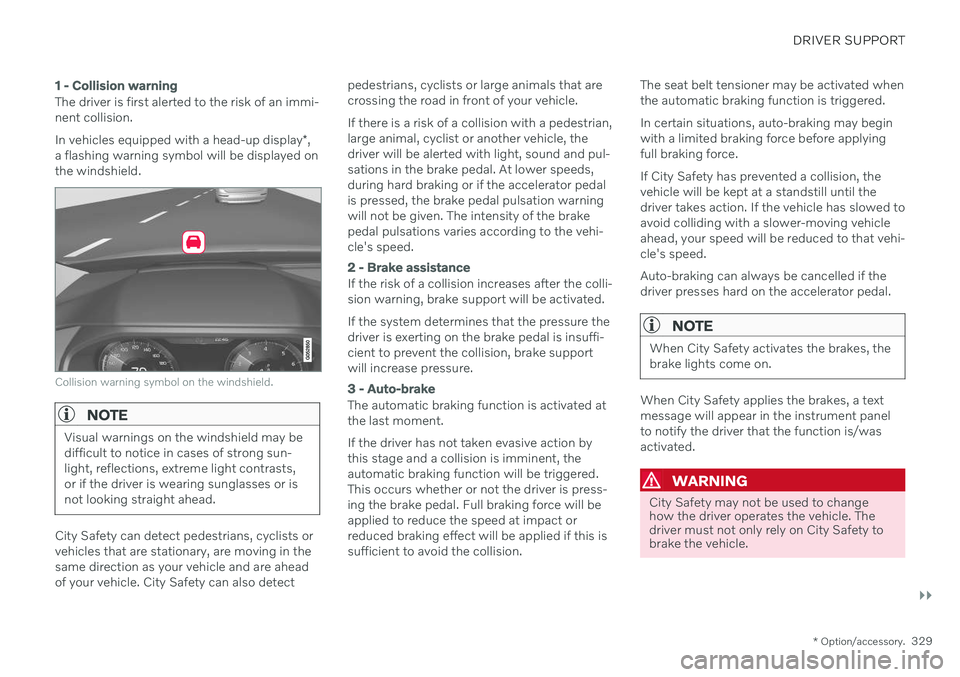
The driver is first alerted to the risk of an immi- nent collision. In vehicles equipped with a head-up display *,
a flashing warning symbol will be displayed on the windshield.
Collision warning symbol on the windshield.
NOTE
Visual warnings on the windshield may be difficult to notice in cases of strong sun-light, reflections, extreme light contrasts,or if the driver is wearing sunglasses or isnot looking straight ahead.
City Safety can detect pedestrians, cyclists or vehicles that are stationary, are moving in thesame direction as your vehicle and are aheadof your vehicle. City Safety can also detect pedestrians, cyclists or large animals that arecrossing the road in front of your vehicle. If there is a risk of a collision with a pedestrian, large animal, cyclist or another vehicle, thedriver will be alerted with light, sound and pul-sations in the brake pedal. At lower speeds,during hard braking or if the accelerator pedalis pressed, the brake pedal pulsation warningwill not be given. The intensity of the brakepedal pulsations varies according to the vehi-cle's speed.
2 - Brake assistance
If the risk of a collision increases after the colli- sion warning, brake support will be activated. If the system determines that the pressure the driver is exerting on the brake pedal is insuffi-cient to prevent the collision, brake supportwill increase pressure.
3 - Auto-brake
The automatic braking function is activated at the last moment. If the driver has not taken evasive action by this stage and a collision is imminent, theautomatic braking function will be triggered.This occurs whether or not the driver is press-ing the brake pedal. Full braking force will beapplied to reduce the speed at impact orreduced braking effect will be applied if this issufficient to avoid the collision.
The seat belt tensioner may be activated whenthe automatic braking function is triggered. In certain situations, auto-braking may begin with a limited braking force before applyingfull braking force. If City Safety has prevented a collision, the vehicle will be kept at a standstill until thedriver takes action. If the vehicle has slowed toavoid colliding with a slower-moving vehicleahead, your speed will be reduced to that vehi-cle's speed. Auto-braking can always be cancelled if the driver presses hard on the accelerator pedal.
NOTE
When City Safety activates the brakes, the brake lights come on.
When City Safety applies the brakes, a text message will appear in the instrument panelto notify the driver that the function is/wasactivated.
WARNING
City Safety may not be used to change how the driver operates the vehicle. Thedriver must not only rely on City Safety tobrake the vehicle.