brake VOLVO XC90 TWIN ENGINE 2020 Manual Online
[x] Cancel search | Manufacturer: VOLVO, Model Year: 2020, Model line: XC90 TWIN ENGINE, Model: VOLVO XC90 TWIN ENGINE 2020Pages: 693, PDF Size: 13.34 MB
Page 438 of 693
||
STARTING AND DRIVING
* Option/accessory.
436 This drive mode is adapted for optimal control when driving at low speeds on very poor roads or difficult terrain. It raises the chassis
7
,
reduces driveline throttle response, and locks the vehicle in all-wheel drive. The Hill DescentControl function facilitates controlled drivingon steep downgrades.
NOTE
This drive mode is not designed to be used for normal street driving.
NOTE
Due to the increased ground clearance, if the Off Road mode was selected when
the engine was switched off, the suspen- sion will lower when the engine is restar-ted.
CAUTION
Do not use the Off Road drive mode when
towing a trailer without an electrical con- nection. This could result in damage to thepneumatic suspension system's bellows.
Constant AWD
Improves the vehicle's traction and han- dling by increasing all-wheel drive. This drive mode locks the vehicle in all-wheeldrive. An adapted distribution between frontand rear axle torque provides effective control,stability and traction, e.g. on slippery roads orwhen towing a heavy trailer or another vehicle. The
Constant AWD drive mode is always
available regardless of the hybrid battery's charge status. Both the combustion engine and the electric motor are engaged to enable all-wheel drive,which results in higher fuel consumption. In the other drive modes, the vehicle automati- cally adapts the need for all-wheel driveaccording to the road surface, and can acti-vate the electric motor or start the combustionengine as needed.
Power
The vehicle gets sportier driving characte- ristics and a faster acceleration response.
This drive mode adapts the combined powerfrom the combustion engine and the electricmotor by providing power to both the frontand rear wheels. Gear shifting will be fasterand more distinct and the transmission willprioritize gears with a higher traction force.Steering response is faster, suspension is stiffer and ground clearance is lower 7
to help
reduce body roll when cornering. Both the combustion engine and the electric motor are engaged to enable all-wheel drive,which results in higher fuel consumption. This drive mode is adapted for optimal per- formance and response during acceleration. Itchanges the throttle response, gear shiftingprogram and turbo boost system. Chassis set-tings and steering and brake response are also optimized. The
Power drive mode is always
available regardless of the hybrid battery's charge status.
Power mode is also available in a Polestar
Engineered* version.
7
For vehicles with pneumatic suspension.
Page 439 of 693

STARTING AND DRIVING
}}
* Option/accessory.437
Individual
Customizes drive mode to personal prefer- ences.
Select one of the drive modes as a basis andadjust the settings to achieve your preferreddriving characteristics. These settings will bestored in your driver profile. Individual drive mode is only available if it has been activated in the center display.
Settings view 8
for Individual drive mode.
1. Tap Settings in the Top view.
2. Tap
My CarIndividual Drive Modeand select Individual Drive Mode. 3.
Under
Presets, select one of the following
drive modes as a basis: Pure, Hybrid,Power or Polestar Engineered* .
The following settings can be modified:
Driver Display
Steering Force
Powertrain Characteristics
Brake Characteristics
Suspension Control
ECO Climate
Using the electric or combustion engine
An advanced control system determines the distance that the vehicle can be driven on thecombustion engine, electric motor, or both atthe same time. Its primary function is to use the motor/engine and the current available in the hybrid batteryas efficiently as possible based on the charac-teristics of the various drive modes and thepower output requested by the driver bypressing the accelerator pedal. In certain cases, temporary limitations in the system or mandatory functions to help main- tain a low overall emissions level may result in greater use of the combustion engine.
8 The illustration is generic - details may vary according to vehicle model.
Page 445 of 693
STARTING AND DRIVING
}}
* Option/accessory.443
Leveling control settings *
Turn off leveling control before lifting the vehicle with a jack to help avoid problemswith the pneumatic suspension. The vehicle can be lowered or raised to make it easier to load or for passengers to get inand out.
Adjusting loading mode
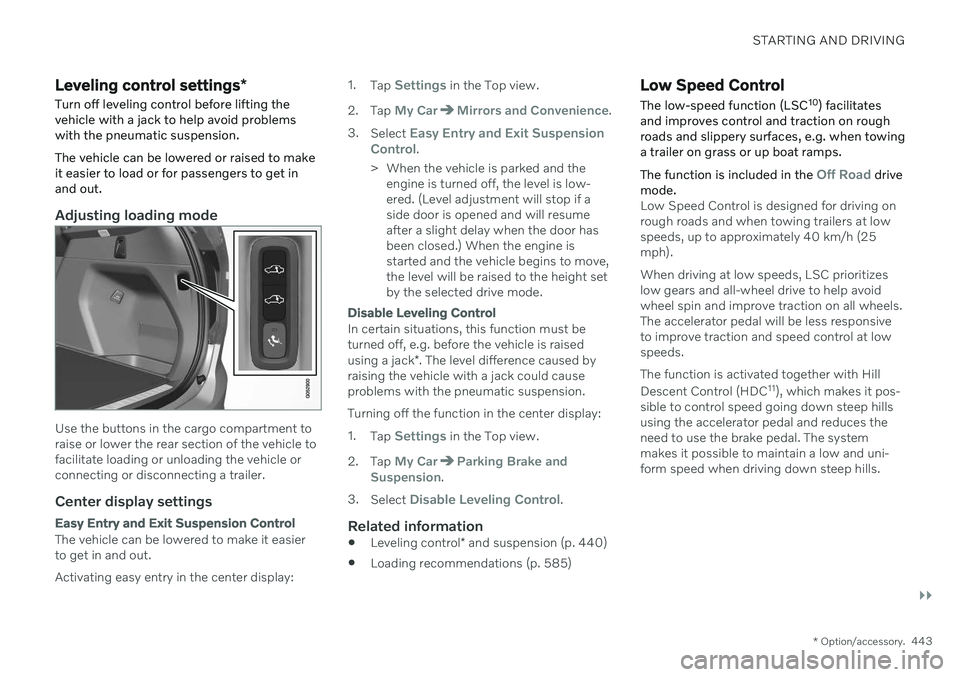
Use the buttons in the cargo compartment to raise or lower the rear section of the vehicle tofacilitate loading or unloading the vehicle orconnecting or disconnecting a trailer.
Center display settings
Easy Entry and Exit Suspension Control
The vehicle can be lowered to make it easier to get in and out. Activating easy entry in the center display: 1.
Tap
Settings in the Top view.
2. Tap
My CarMirrors and Convenience.
3. Select
Easy Entry and Exit Suspension
Control.
> When the vehicle is parked and the engine is turned off, the level is low- ered. (Level adjustment will stop if aside door is opened and will resumeafter a slight delay when the door hasbeen closed.) When the engine isstarted and the vehicle begins to move,the level will be raised to the height setby the selected drive mode.
Disable Leveling Control
In certain situations, this function must be turned off, e.g. before the vehicle is raised using a jack *. The level difference caused by
raising the vehicle with a jack could cause problems with the pneumatic suspension. Turning off the function in the center display:1. Tap
Settings in the Top view.
2. Tap
My CarParking Brake and
Suspension.
3. Select
Disable Leveling Control.
Related information
Leveling control
* and suspension (p. 440)
Loading recommendations (p. 585)
Low Speed Control
The low-speed function (LSC 10
) facilitates
and improves control and traction on rough roads and slippery surfaces, e.g. when towinga trailer on grass or up boat ramps. The function is included in the
Off Road drive
mode.
Low Speed Control is designed for driving on rough roads and when towing trailers at lowspeeds, up to approximately 40 km/h (25mph). When driving at low speeds, LSC prioritizes low gears and all-wheel drive to help avoidwheel spin and improve traction on all wheels.The accelerator pedal will be less responsiveto improve traction and speed control at lowspeeds. The function is activated together with Hill Descent Control (HDC 11
), which makes it pos-
sible to control speed going down steep hills using the accelerator pedal and reduces theneed to use the brake pedal. The systemmakes it possible to maintain a low and uni-form speed when driving down steep hills.
Page 447 of 693

STARTING AND DRIVING
445
Hill Descent Control
The function for assisting when driving down- hill (HDC 12
) is a low-speed function with
increased engine braking. The function makes it possible to increase or decrease thevehicle's speed on steep downhill gradientsby only using the accelerator pedal, withoutapplying the brakes. The function is included in the
Off Road drive
mode.
HDC is designed for driving on rough roads at low speeds and downhill gradients with slip-pery or otherwise difficult road surfaces. Thedriver does not need to use the brake pedalbut can instead focus on steering.
WARNING
HDC is only intended to be a supplemen- tary braking aid and it does not function inall situations. The driver is always ultimately responsible for operating the vehicle in a safe manner.
FunctionHill Descent Control allows the vehicle to move forward or backward at very low speedsassisted by the brake system. The driver canincrease the speed by pressing the acceleratorpedal. When the accelerator pedal is released, the vehicle will return to very low speedregardless of how steep the hill is and withoutthe brakes needing to be applied. The brakelights will illuminate when the function is acti-vated. The driver can brake to stop or slow the vehi- cle at any time by depressing the brake pedal. HDC is activated along with Low Speed Con- trol (LSC
13
), which facilitates and improves
traction and control on rough and slippery sur- faces. The system is intended to be used atlow speeds, up to approximately 40 km/h (25mph).
To keep in mind when using HDC
If the function is switched off while drivingon a steep downhill gradient, brakingeffect will be gradually reduced.
HDC can be used in gear positions
D and
R , and in manual gears 1 or 2.
It is not possible to manually shift to thirdgear or higher when HDC is active.
NOTE
When LSC with HDC is activated in theOff Road drive mode, the feel of the accel-
erator pedal and engine response will change.
NOTE
This drive mode is not designed to be used for normal street driving.
NOTE
The function is deactivated when driving at high speeds and must be reactivated atlower speeds if so desired.
Related information
Activating and deactivating Hill Descent Control using the function button (p. 446)
Changing drive mode (p. 438)
Low Speed Control (p. 443)
All Wheel Drive (AWD) (p. 431)
12
Hill Descent Control
13 Low Speed Control
Page 449 of 693
STARTING AND DRIVING
* Option/accessory.447
Preconditioning
Whenever possible, precondition the vehi- cle before driving by connecting thecharging cable to an electrical outlet.
Avoid parking the vehicle somewherewhere the interior will become too hot ortoo cold while the vehicle is parked. If pos-sible, park the vehicle in a climate-con-trolled garage.
During a short drive after passenger com-partment preconditioning, turn off thepassenger compartment fan or the airconditioning in a hot climate.
If preconditioning is not possible when itis cold outside, use seat and steeringwheel heating first. Avoid heating theentire passenger compartment to reducethe amount of current being taken fromthe hybrid battery.
Driving
Choose the Pure drive mode to help mini-
mize electric power consumption.
Maintain a steady speed and a generous following distance to traffic ahead to mini-mize braking. This drive mode has thelowest power consumption.
Balance energy requirements using theaccelerator pedal. Use the indicator on theinstrument panel to see available electricpower and avoid starting the combustion engine unnecessarily. The electric motor is more effective than the combustion engine, especially at low speeds.
When braking is necessary, brake gentlyusing the brake pedal. This will helprecharge the hybrid battery. A regenerativefunction is integrated in the brake pedaland can be augmented by the electricmotor's braking capacity when the gearselector is in mode
B.
Higher speeds increase energy consump-tion - air resistance increases with speed.
Activate the
Hold function in the Function
view at high speeds when traveling farther than is possible using the hybrid battery'scapacity.
Whenever possible, avoid using the
Charge function to charge the hybrid bat-
tery. Charging the battery using the com- bustion engine increases fuel consump-tion and carbon dioxide emissions.
In a cold climate, reduce heating of thewindshield/rear window, mirrors, seatsand the steering wheel.
Maintain the correct pressure in the tiresand check pressure regularly.
The type of tires used could affect energyconsumption - consult a retailer for adviceon suitable tires.
Remove unnecessary items from the vehi-cle - the heavier the load, the higher thefuel consumption.
Roof loads increase air resistance andincrease fuel consumption. Remove roofboxes, ski racks, etc. that are not in use.
Avoid driving with the windows open.
Do not keep the vehicle still on an upwardgradient by using the accelerator pedal.Use the brakes instead.
Related information
Drive-E
‒ purer driving pleasure (p. 30)
Energy distribution in hybrid mode using map data
* (p. 439)
Factors affecting electric motor range (p. 448)
Hybrid gauge (p. 89)
Checking tire pressure (p. 553)
Page 452 of 693
STARTING AND DRIVING
* Option/accessory.
450
Preparing for a long trip
It is important to have the vehicle's systems and equipment checked carefully before driv-ing long distances.
Check that
the engine is running properly and that fuel consumption is normal
there are no leaks (fuel, oil or other fluid)
the brake pedal is functioning properly
all lights are working
‒ adjust the head-
light height if the vehicle is carrying aheavy load
tire tread depth and air pressure are atcorrect levels. Change to snow tires whendriving in areas where there is a risk ofsnowy or icy roads
the start battery is sufficiently charged
the wiper blades are in good condition
Related information
Checking tire pressure (p. 553)
Filling washer fluid (p. 656)
Winter driving (p. 450)
Economical driving (p. 446)
Vehicle modem settings (p. 527)
Loading recommendations (p. 585)
Driving with a trailer (p. 465)
Pilot Assist
* (p. 300)
Tire sealing system (p. 568)
Winter driving
It is important to check the vehicle before driving in cold/snowy conditions to makesure it can be driven safely.
Before the cold season arrives: Make sure the engine coolant contains 50% antifreeze. This mixture helps pro-tect the engine from frost erosion down toapprox. –35 °C (–31 °F). Do not mix dif-ferent types of antifreeze as this couldpose a health risk.
Keep the fuel tank well filled to preventcondensation from forming.
Check the viscosity of the engine oil. Oilwith low viscosity (thinner oil) improvescold-weather starting and reduces fuelconsumption when driving with a coldengine.
CAUTION
Low-viscosity oil should not be used with hard driving or in hot weather.
Check the condition and charge level of the start battery. Cold weather placesgreater demands on the start battery andreduces its capacity.
Use washer fluid containing antifreeze tohelp prevent ice from forming in thewasher fluid reservoir.
Page 453 of 693
STARTING AND DRIVING
}}
451
Slippery driving conditionsTo help optimize traction and roadholding, Volvo recommends using snow tires on allwheels whenever there is a risk of snow or iceon the road.
NOTE
Certain countries require use of winter tires by law. Not all countries permit the use ofstudded tires.
Practice driving on slippery surfaces under controlled conditions to learn how the vehiclereacts.
Related information
Snow tires (p. 567)
Snow chains (p. 567)
Braking on salted roads (p. 420)
Braking on wet roads (p. 420)
Filling washer fluid (p. 656)
Start battery (p. 613)
Replacing windshield wiper blades(p. 654)
Changing rear window wipers (p. 653)
Refilling coolant (p. 610)
Driving through standing water
It may be necessary to drive the vehicle through standing water, e.g. deep puddles orflooding on the road. This must be done withgreat caution.
To help prevent damage to the vehicle when driving through water:
Do not drive in water higher than the floorof the vehicle. If possible, check the depthof the water at its deepest point beforedriving through it. Be particularly carefulwhen driving through flowing water.
Always select the
Off Road drive mode
before driving in water to ensure the gaso- line engine is running.
Do not drive faster than walking speed.
Do not stop the vehicle in the water. Drivecarefully forward or back the vehicle out ofthe water.
Remember that waves created by passingvehicles could cause the water level to riseabove the vehicle's floor level.
Avoid driving through salt water to helpavoid the risk of corrosion.
CAUTION
Parts of the vehicle (e.g. engine, transmis- sion, driveline, electrical components, etc.)can be damaged if the vehicle is driventhrough water higher than its floor level.Damage to any components caused byflooding, vapor lock or insufficient oil is notcovered under warranty. If the engine stalls while the vehicle is in water, do not attempt to restart it. Havethe vehicle towed on the bed of a towtruck to a workshop - an authorized Volvoworkshop is recommended.
CAUTION
Because it can be difficult to determine the water depth, Volvo recommends not driv-ing through standing or running water. Thedriver is always responsible for operatingthe vehicle in a safe manner and adheringto all applicable laws and regulations.
When you have passed the water, press lightly on the brake pedal and check that the brakesare functioning properly. Water, mud, slush,etc. can make the brake linings slippery,resulting in delayed braking effect. If the vehicle is equipped with a trailer cou- pling contact, clean the contact after driving inwater or mud.
Page 467 of 693
STARTING AND DRIVING
}}
* Option/accessory.465
Driving with a trailer
There are a number of things to consider when towing a trailer, such as the towbar, thetrailer and how the load is distributed in thetrailer.
Load-carrying capacity is determined by the vehicle's curb weight. The total weight of allpassengers and any installed accessories, e.g.towbar, reduces the vehicle's load-carryingcapacity by the corresponding amount.
Towbars used on the vehicle must beapproved for the applicable use.
Distribute the load on the trailer so thatthe weight on the towbar complies withthe specified maximum towball weight.The tongue weight is calculated as part ofthe vehicle's payload.
Increase the tire pressure to the recom-mended pressure for a full load.
The engine is subjected to more load thanusual when towing a trailer.
Towing a trailer affects the vehicle's han-dling, durability and driving economy.
Do not drive with a heavy trailer when thevehicle is very new. Wait until the mileagehas reached at least 1000 km (620 miles).
On long and steep downgrades, the vehi-cle's brakes are subjected to much moreload than usual. When manually shifting, downshift and adapt speed accordingly.
Follow applicable regulations regarding permitted speed and weight.
Drive slowly when towing a trailer up along and steep incline.
The maximum trailer weights given onlyapply to altitudes up to 1000 meters(3280 feet) above sea level. At higher alti-tudes, engine power (and thus the vehi-cle's climbing ability) is decreased due tothe reduced air density, and the maximumtrailer weight must therefore be reduced.The weight of the vehicle and trailer mustbe decreased by 10% for each additional1000 m (3280 feet) or part thereof.
Avoid driving with a trailer on inclines ofmore than 12%.
Avoid overloading and other incorrect use.
The trailer's brakes must be balanced withthe vehicle's brakes to help ensure safestops (follow applicable local regulations).
NOTE
To facilitate towing a trailer in a vehicle equipped with pneumatic suspension
*,
select: the
Suspension ControlDynamic setting in Individual drive mode.
CAUTION
Bumper-attached trailer hitches must not be used on Volvos, nor shouldsafety chains be attached to thebumper.
Trailer hitches attaching to the vehiclerear axle must not be used.
Never connect a trailer's hydraulicbrake system directly to the vehiclebrake system, nor a trailer's lightingsystem directly to the vehicle lightingsystem. Consult your nearest author-ized Volvo retailer for correct installa-tion.
When towing a trailer, the trailer'ssafety chains or wire must be correctlyfastened to the attachment points pro-vided in the trailer hitch on the vehicle.The safety chain or wire must never befastened to or wound around the tow-ing ball.
NOTE
The optional detachable trailer hitch may not be available in all markets or on allmodels. Consult your Volvo retailer.
Page 468 of 693
||
STARTING AND DRIVING
* Option/accessory.
466
NOTE
Extreme weather conditions, towing a trailer, high altitude and lower fuel gradethan recommended are factors that cansignificantly increase the vehicle's fuel con-sumption.
Trailer weights
WARNING
Please adhere to the recommendations provided for trailer weight. If the recom-mendations are not followed, the vehicleand trailer may be difficult to control duringevasive maneuvers and braking.
NOTE
The specified maximum trailer weights are those permitted by Volvo. National vehicleregulations may set additional restrictionson trailer weight and speed. The trailerhitches may be certified for higher towingweights than the vehicle is permitted totow.
Self-leveling suspension *The vehicle's self-leveling system attempts to keep the vehicle at a constant level, regardlessof load (up to the maximum permitted weight).When the vehicle is stationary, the rear end of the vehicle will be slightly lowered, which isnormal.
Driving in hilly terrain or hot weatherIn certain conditions, there is a risk of over-heating when driving with a trailer. If overheat-ing of the engine and drive system is detected,a warning symbol will illuminate in the instru-ment panel and a message will appear. The automatic transmission selects the opti- mal gear for the current load and enginespeed.
Steep inclines
Do not lock the automatic transmission into a higher gear than what the engine can handle
‒
it is not always preferable to drive in highgears at low rpm.
Parking on a hill
1. Depress the brake pedal.
2. Apply the parking brake.
3. Put the gear selector in P.
4. Release the brake pedal.Put chocks behind the wheels when the vehi- cle is parked on a hill with a trailer attached.
Starting on a hill
1. Depress the brake pedal.
2. Put the gear selector in D.
3. Release the parking brake.
4. Release the brake pedal and start driving.
Related information
Trailer Stability Assist
* (p. 467)
Checking trailer lights (p. 468)
Towing capacity and tongue weight (p. 667)
Overheating of engine and transmission(p. 458)
Retractable hitch
* (p. 461)
Page 469 of 693
STARTING AND DRIVING
* Option/accessory.467
Trailer Stability Assist *
Trailer Stability Assist (TSA 16
) is a function
designed to help stabilize a vehicle that is towing a trailer when the vehicle and trailerhave begun to sway. The function is part of the Electronic Stability Control system ESC 17
.
Reasons for swayingA vehicle towing a trailer may begin to sway for various reasons. Normally this only occursat high speeds. However, if the trailer is over-loaded or unevenly distributed, e.g. too farback, there is a risk of swaying even at lowspeeds. Swaying may be caused by factors such as:
The vehicle and trailer are hit by a sudden, strong crosswind.
The vehicle and trailer are traveling on anuneven road or over a bump.
Sudden movements of the steering wheel.
Once swaying has begun, it can be difficult orimpossible to stop it. This makes the vehicleand trailer difficult to control and there is a riskof swerving into oncoming traffic or driving offthe road.
Trailer Stability Assist functionTrailer Stability Assist continuously monitorsthe vehicle's movements, particularly lateral movements. If swaying is detected, the brakesare applied individually on the front wheels,which has a stabilizing effect on the vehicleand trailer. This is often enough to enable thedriver to regain control of the vehicle. If the Trailer Stability Assist function's first attempt is not adequate to stop the swayingmotion, the brakes are applied on all wheelsand engine power is temporarily reduced. Asthe swaying motion begins to decrease andthe vehicle and trailer have once againbecome stable, TSA stops regulating thebrakes/engine power and the driver regainscontrol of the vehicle.
NOTE
Trailer Stability Assist is deactivated if the driver selects the sport mode by deactivat- ing
ESC in the center display's menu sys-
tem.
Trailer Stability Assist may not intervene if the driver tries to compensate for the swayingmotion by moving the steering wheel rapidly,because the system will then not be able todetermine if it is the trailer or the driver caus-ing the swaying. When Trailer Stability Assistis activated, the ESC symbolis displayed in the instrumentpanel.
Related information
Driving with a trailer (p. 465)
Electronic Stability Control (p. 281)
16
Trailer Stability Assist
17 Electronic Stability Control