mirror VOLVO XC90 TWIN ENGINE 2020 Owners Manual
[x] Cancel search | Manufacturer: VOLVO, Model Year: 2020, Model line: XC90 TWIN ENGINE, Model: VOLVO XC90 TWIN ENGINE 2020Pages: 693, PDF Size: 13.34 MB
Page 7 of 693
5
WINDOWS, GLASS AND MIRRORS
Windows, glass and mirrors170
Pinch protection for windows and sun curtains 170
Reset procedure for pinch protection 171
Power windows 171
Operating the power windows 172
Using sun curtains *
173
Rearview/door mirrors 174
Adjusting the rearview mirror dim-ming function 174
Adjusting the door mirrors 175
Panoramic roof *
176
Operating the panoramic roof *
178
Auto closing the panoramic roof *
sun curtain 180
Wiper blades and washer fluid 181
Using the windshield wipers 181
Using the rain sensor 182
Using the rain sensor's memoryfunction 183
Using the windshield and head-light washers 184
Using the rear window wiper/washer 185
Using automatic rear windowwiping when backing up 186
SEATS AND STEERING WHEEL
Manual front seats
188
Power * front seats
189
Adjusting the power * front seats
189
Storing positions for seats, mir- rors and head-up display *190
Using stored positions for seats,mirrors and head-up display *191
Front seat massage * settings
192
Adjusting front seat massage set-tings * 193
Adjusting * front seat cushion length
194
Adjusting front seat side bolstersettings * 195
Adjusting front seat lumbar support *
195
Adjusting the passenger seat fromthe driver's seat * 197
Folding the second row backrests 198
Adjusting the second row head restraints 200
Moving the second row seats for- ward/rearward * 201
Adjusting the second row backrest tilt 202
Getting into and out of the thirdrow of seats * 203
Folding the third row backrests *
204
Steering wheel controls and horn 205
Adjusting the steering wheel 206
CLIMATE CONTROL
Climate208
Climate zones 208
Climate control sensors 208
Perceived temperature 209
Climate control system voice commands 209
Air quality 210
Clean Zone *
211
Clean Zone Interior Package *
212
Interior Air Quality System *
212
Activating and deactivating the air quality sensor * 213
Passenger compartment air filter 213
Air distribution 213
Adjusting air distribution 214
Opening, closing and directing air vents 215
Air distribution options 216
Climate system controls 219
Activating and deactivating power front seats * 221
Activating and deactivating theheated front seat * 221
Activating and deactivating theheated rear seats * 222
Activating and deactivating frontseat ventilation * 222
Page 8 of 693
6
Activating and deactivating the heated steering wheel*223
Activating and deactivating auto-matic steering wheel heating *223
Activating auto climate control 224
Activating and deactivating recir- culation 224
Activating and deactivating therecirculation timer setting 225
Activating and deactivating maxdefroster 225
Activating and deactivating theheated rear window and door mirrors 226
Automatically activating and deac-tivating the heated rear windowand door mirrors 227
Setting the blower speed for thefront seats 227
Setting the blower speed for therear seats 228
Setting the temperature for thefront seats 229
Setting the temperature for therear seats 230
Synchronize temperature 231
Activating and deactivating airconditioning 232
Activating and deactivating cli- mate control for the third-row seats *233
Parking climate
233
Preconditioning 233
Starting and stopping preconditioning 234
Preconditioning timer 235
Adding and editing timer settings for preconditioning 235
Activating and deactivating pre-conditioning timer 236
Deleting preconditioning timersettings 237
Climate comfort retaining function 238
Starting and switching off the cli-mate retaining function when parking 238
Parking climate symbols and mes-sages 239
Heater 240
Parking heater 240
Additional heater 240
Activating and deactivating theauxiliary heater 241
KEY, LOCKS AND ALARM
Lock indication
244
Lock confirmation settings 245
Remote key 246
Locking and unlocking using the remote key 248
Settings for remote and insidedoor unlock 249
Unlocking the tailgate using theremote key 250
Remote key range 250
Replacing the remote key's battery 251
Ordering additional remote keys 254
Red Key - restricted remote key *
255
Settings for Red Key *
256
Detachable key blade 257
Locking and unlocking withdetachable key blade 258
Electronic immobilizer 259
Start and lock system type desig-nations 260
Keyless and touch-sensitive surfaces *
261
Keyless locking and unlocking *
262
Keyless unlock settings *
263
Keyless tailgate unlock *
264
Antenna locations for the startand lock system 264
Page 61 of 693
SAFETY
}}
59
Occupant weight sensor
The Occupant Weight Sensor (OWS) is designed to meet the regulatory require-ments of Federal Motor Vehicle SafetyStandard (FMVSS) 208 and is designed todisable (will not inflate) the passenger's sidefront airbag under certain conditions.
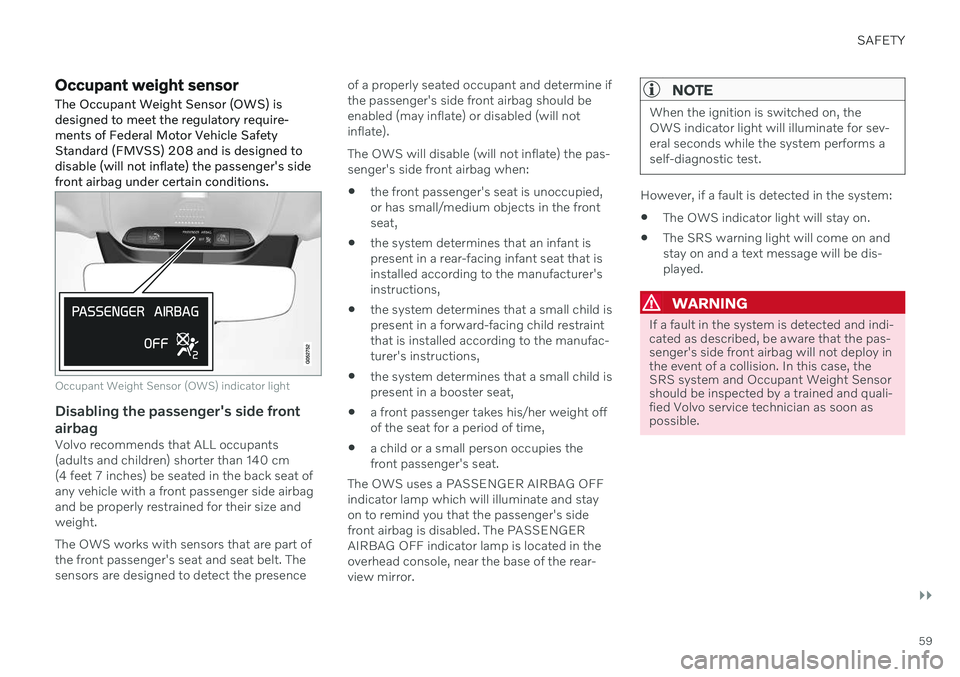
Occupant Weight Sensor (OWS) indicator light
Disabling the passenger's side front airbag
Volvo recommends that ALL occupants (adults and children) shorter than 140 cm(4 feet 7 inches) be seated in the back seat ofany vehicle with a front passenger side airbagand be properly restrained for their size andweight. The OWS works with sensors that are part of the front passenger's seat and seat belt. Thesensors are designed to detect the presence of a properly seated occupant and determine ifthe passenger's side front airbag should beenabled (may inflate) or disabled (will notinflate). The OWS will disable (will not inflate) the pas- senger's side front airbag when:
the front passenger's seat is unoccupied,or has small/medium objects in the frontseat,
the system determines that an infant ispresent in a rear-facing infant seat that isinstalled according to the manufacturer'sinstructions,
the system determines that a small child ispresent in a forward-facing child restraintthat is installed according to the manufac-turer's instructions,
the system determines that a small child ispresent in a booster seat,
a front passenger takes his/her weight offof the seat for a period of time,
a child or a small person occupies thefront passenger's seat.
The OWS uses a PASSENGER AIRBAG OFFindicator lamp which will illuminate and stayon to remind you that the passenger's sidefront airbag is disabled. The PASSENGERAIRBAG OFF indicator lamp is located in theoverhead console, near the base of the rear-view mirror.
NOTE
When the ignition is switched on, the OWS indicator light will illuminate for sev-eral seconds while the system performs aself-diagnostic test.
However, if a fault is detected in the system:
The OWS indicator light will stay on.
The SRS warning light will come on and stay on and a text message will be dis-played.
WARNING
If a fault in the system is detected and indi- cated as described, be aware that the pas-senger's side front airbag will not deploy inthe event of a collision. In this case, theSRS system and Occupant Weight Sensorshould be inspected by a trained and quali-fied Volvo service technician as soon aspossible.
Page 70 of 693

||
SAFETY
68
Convertible seat
WARNING
A child seat should never be used in the front passenger seat of any vehicle with afront passenger airbag - not even if the"Passenger airbag off" symbol near therear-view mirror is illuminated. If theseverity of an accident were to cause theairbag to inflate, this could lead to seriousinjury or death to a child seated in thisposition.
Booster cushion
WARNING
Always refer to the child restraint manufac- turer's instructions for detailed informationon securing the restraint.
WARNING
When not in use, keep the child restraint system secured or remove itfrom the passenger compartment tohelp prevent it from injuring passen-gers in the event of a sudden stop orcollision.
A small child's head represents a con-siderable part of its total weight and itsneck is still very weak. Volvo recom-mends that children up to age 4 travel,properly restrained, facing rearward. Inaddition, Volvo recommends that chil-dren should ride rearward facing, prop-erly restrained, as long as possible.
NOTE
Prolonged installation and use of the child restraint may damage the vehicle's interior.Volvo recommends using the kick guardaccessory to help protect the vehicle'sinterior.
Automatic Locking Retractor/ Emergency Locking Retractor (ALR/ELR)
To make child seat installation easier, each seat belt (except for the driver's belt) is equip-ped with a locking mechanism to help keepthe seat belt taut.
Page 72 of 693

||
SAFETY
70
Route the seat belt through the infant seat.
WARNING
An infant seat must be in the rear-facing position only.
The infant seat should not be positionedbehind the driver's seat unless there isadequate space for safe installation.
WARNING
A child seat should never be used in the front passenger seat of any vehicle with afront passenger airbag - not even if the"Passenger airbag off" symbol near therear-view mirror is illuminated. If theseverity of an accident were to cause theairbag to inflate, this could lead to seriousinjury or death to a child seated in thisposition.
3.
Fasten the seat belt.
Fasten the seat belt by inserting the latch plate into the buckle (lock) until a distinctclick is audible.
Pull out the shoulder section of the seat belt.
4. Pull the shoulder section of the seat belt out as far as possible to activate the belt's automatic locking function.
Page 75 of 693

SAFETY
}}
73
Fasten the seat belt.
3. Fasten the seat belt by inserting the latchplate into the buckle (lock) until a distinct click is audible.
4. Pull the shoulder section of the seat belt out as far as possible to activate the belt'sautomatic locking function.
NOTE
The locking retractor will automatically release when the seat belt is unbuckledand allowed to retract fully.
5. Press the convertible seat firmly in place,let the seat belt retract and pull it taut. A sound from the seat belt retractor's auto-matic locking function will be audible atthis time and is normal. The seat beltshould now be locked in place.
Pull out the shoulder section of the seat belt.
6. Push and pull the convertible seat alongthe seat belt path to ensure that it is held securely in place by the seat belt.
WARNING
It should not be possible to move the child restraint more than 2.5 cm (1 in.) in anydirection along the seat belt path.
The convertible seat can be removed by unbuckling the seat belt and letting it retractcompletely.
Ensure that the convertible seat is securely in place.
WARNING
A child seat should never be used in the front passenger seat of any vehicle with afront passenger airbag - not even if the"Passenger airbag off" symbol near therear-view mirror is illuminated. If theseverity of an accident were to cause theairbag to inflate, this could lead to seriousinjury or death to a child seated in thisposition.
Page 87 of 693
DISPLAYS AND VOICE CONTROL
* Option/accessory.85
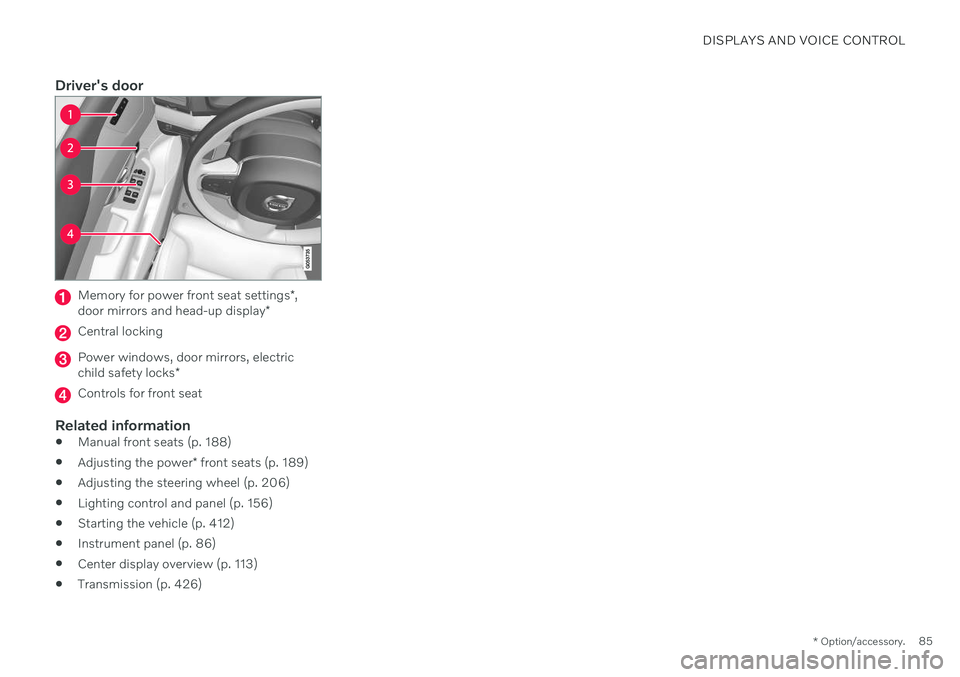
Driver's door
Memory for power front seat settings *,
door mirrors and head-up display *
Central locking
Power windows, door mirrors, electric child safety locks*
Controls for front seat
Related information
Manual front seats (p. 188)
Adjusting the power
* front seats (p. 189)
Adjusting the steering wheel (p. 206)
Lighting control and panel (p. 156)
Starting the vehicle (p. 412)
Instrument panel (p. 86)
Center display overview (p. 113)
Transmission (p. 426)
Page 94 of 693
||
DISPLAYS AND VOICE CONTROL
92
Distance to empty tankThe trip computer calculates the dis- tance that can be driven on the fuelremaining in the tank.
This calculation is based on average fuel con- sumption during the last 30 km (20 miles)and the amount of fuel remaining in the tank. When the gauge displays "----", there is not enough fuel remaining to calculate the remain-ing mileage. Refuel as soon as possible.
NOTE
The information will change based on your driving style.
An economical driving style will generally increase how far you can drive on a certainamount of fuel.
Distance to discharged batteryThis gauge shows the approximatedistance that can be driven with theremaining current in the hybrid bat-tery.
This calculation is based on average consump- tion with a normally loaded vehicle in normaldriving conditions, and takes into accountwhether the air conditioning is on or off. Changing drive modes from
Hybrid to Puremay increase the calculated distance because
Pure mode has reduced climate control set-
tings (ECO Climate). When the gauge displays "----", there is little charge remaining in the battery and electricmotor range cannot be reliably calculated.
NOTE
The information will change based on your driving style.
An economical driving style will generally increase how far you can drive on a certainamount of fuel.
Starting values for fully charged hybrid battery
Because it is difficult to predict driving style and other factors that affect the range of elec-tric motors, Volvo uses a starting value whenthe vehicle is fully charged. This starting valueprovides an "up to" amount instead of a pre-diction on the range of the electric current inthe motor. The difference in starting value between
Hybrid and Pure is because the
vehicle is permitted to use more current from the hybrid battery in
Pure mode, and because
the vehicle switches to ECO Climate.
Mileage when using electric motor
To achieve the longest possible mileage when using the electric motor, the driver of an elec-tric vehicle also needs to think about conserv- ing electricity. The more electricity consumers(stereo, heated windows/mirrors/seats, verycold air from climate control system, etc.) thatare active, the shorter the potential mileage.
NOTE
In addition to high electrical consumption in the passenger compartment, rapidacceleration, sudden braking, high speeds,heavy loads, low ambient temperaturesand driving up hills can reduce possibledriving distance.
Tourist - alternative speedometerThe alternative digital speedometer makes it easier to drive in countries where speed limitsigns are shown in a different measurementunit than the one shown in the vehicle'sgauges. When used, the digital speed is displayed in the opposite unit to that shown in the analogspeedometer. If
mph is used in the analog
speedometer, the equivalent speed in km/h
will be shown in the digital speedometer.
Related information
Displaying trip data in the instrumentpanel (p. 93)
Resetting the trip odometer (p. 94)
Displaying trip statistics in the center dis-play (p. 94)
Page 116 of 693
||
DISPLAYS AND VOICE CONTROL
* Option/accessory.
114
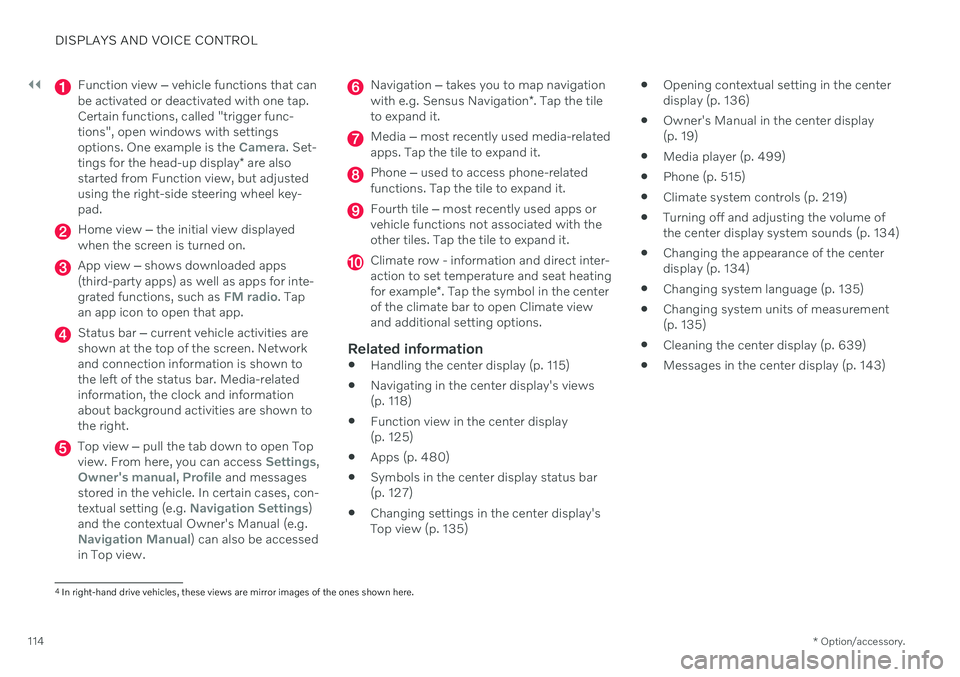
Function view ‒ vehicle functions that can
be activated or deactivated with one tap. Certain functions, called "trigger func-tions", open windows with settingsoptions. One example is the
Camera. Set-
tings for the head-up display * are also
started from Function view, but adjusted using the right-side steering wheel key-pad.
Home view ‒ the initial view displayed
when the screen is turned on.
App view ‒ shows downloaded apps
(third-party apps) as well as apps for inte- grated functions, such as
FM radio. Tap
an app icon to open that app.
Status bar ‒ current vehicle activities are
shown at the top of the screen. Network and connection information is shown tothe left of the status bar. Media-relatedinformation, the clock and informationabout background activities are shown tothe right.
Top view ‒ pull the tab down to open Top
view. From here, you can access Settings,Owner's manual, Profile and messages
stored in the vehicle. In certain cases, con- textual setting (e.g.
Navigation Settings)
and the contextual Owner's Manual (e.g.
Navigation Manual) can also be accessed
in Top view.
Navigation ‒ takes you to map navigation
with e.g. Sensus Navigation *. Tap the tile
to expand it.
Media ‒ most recently used media-related
apps. Tap the tile to expand it.
Phone ‒ used to access phone-related
functions. Tap the tile to expand it.
Fourth tile ‒ most recently used apps or
vehicle functions not associated with the other tiles. Tap the tile to expand it.
Climate row - information and direct inter- action to set temperature and seat heating for example *. Tap the symbol in the center
of the climate bar to open Climate view and additional setting options.
Related information
Handling the center display (p. 115)
Navigating in the center display's views (p. 118)
Function view in the center display (p. 125)
Apps (p. 480)
Symbols in the center display status bar(p. 127)
Changing settings in the center display'sTop view (p. 135)
Opening contextual setting in the centerdisplay (p. 136)
Owner's Manual in the center display(p. 19)
Media player (p. 499)
Phone (p. 515)
Climate system controls (p. 219)
Turning off and adjusting the volume ofthe center display system sounds (p. 134)
Changing the appearance of the centerdisplay (p. 134)
Changing system language (p. 135)
Changing system units of measurement(p. 135)
Cleaning the center display (p. 639)
Messages in the center display (p. 143)
4
In right-hand drive vehicles, these views are mirror images of the ones shown here.
Page 136 of 693

||
DISPLAYS AND VOICE CONTROL
134
New lines in free-text fields in handwriting mode
Create a new line by drawing above the characters in the handwriting field as shown in the illustration12
.
Writing blank spaces in free-text fields
Make a blank space by drawing a line from left to right 13
.
Related information
Using the center display keyboard (p. 129)
Changing the appearance of the center display The appearance of the center display can be changed by selecting a different theme.
1.
Tap Settings in the Top view.
2. Tap
My CarDisplaysDisplay
Themes.
3. Select a theme, e.g.
Minimalistic orChrome Rings.
In addition to these themes, you can also choose between
Normal and Bright. InNormal, the background of the screen is dark
and the text is light. This option is the default setting for all themes. If the bright version isselected, the background will be light and thetext will be dark. This option can, for example,make the screen easier to see in bright day-light conditions. These alternatives are always available for selection and are not affected by the ambientlighting.
Related information
Changing settings in the center display'sTop view (p. 135)
Activating and deactivating the center dis-play (p. 118)
Cleaning the center display (p. 639)
Turning off and adjusting the volume of the center displaysystem sounds
The volume of the center display system sounds can be adjusted or turned off com-pletely.
1. Tap Settings in the Top view in the center
display.
2. Tap
SoundSystem Volumes.
3. Pull the control under
Touch Sounds to
adjust the volume or turn off screen tap sounds. Pull the control to the desiredsound level.
Related information
Center display overview (p. 113)
Changing settings in the center display'sTop view (p. 135)
Sound settings (p. 478)
12
For Arabic keyboards, draw the same character, but in mirror image.
13 For Arabic keyboards, draw the line from right to left.