key VOLVO XC90 TWIN ENGINE HYBRID 2017 User Guide
[x] Cancel search | Manufacturer: VOLVO, Model Year: 2017, Model line: XC90 TWIN ENGINE HYBRID, Model: VOLVO XC90 TWIN ENGINE HYBRID 2017Pages: 584, PDF Size: 14.2 MB
Page 41 of 584
INTRODUCTION
}}
39
Special characters
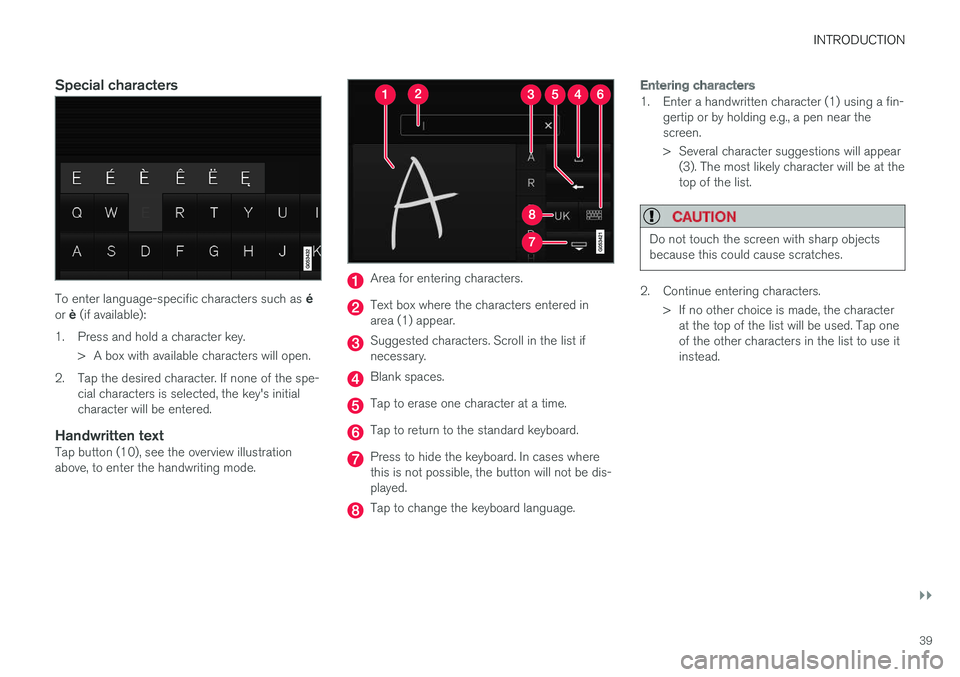
To enter language-specific characters such as éor è (if available):
1.Press and hold a character key.
> A box with available characters will open.
2. Tap the desired character. If none of the spe-cial characters is selected, the key's initialcharacter will be entered.
Handwritten text
Tap button (10), see the overview illustrationabove, to enter the handwriting mode.
Area for entering characters.
Text box where the characters entered inarea (1) appear.
Suggested characters. Scroll in the list ifnecessary.
Blank spaces.
Tap to erase one character at a time.
Tap to return to the standard keyboard.
Press to hide the keyboard. In cases wherethis is not possible, the button will not be dis-played.
Tap to change the keyboard language.
Entering characters
1. Enter a handwritten character (1) using a fin-gertip or by holding e.g., a pen near thescreen.
> Several character suggestions will appear(3). The most likely character will be at thetop of the list.
CAUTION
Do not touch the screen with sharp objectsbecause this could cause scratches.
2. Continue entering characters.
>If no other choice is made, the characterat the top of the list will be used. Tap oneof the other characters in the list to use itinstead.
Page 55 of 584
INTRODUCTION
53
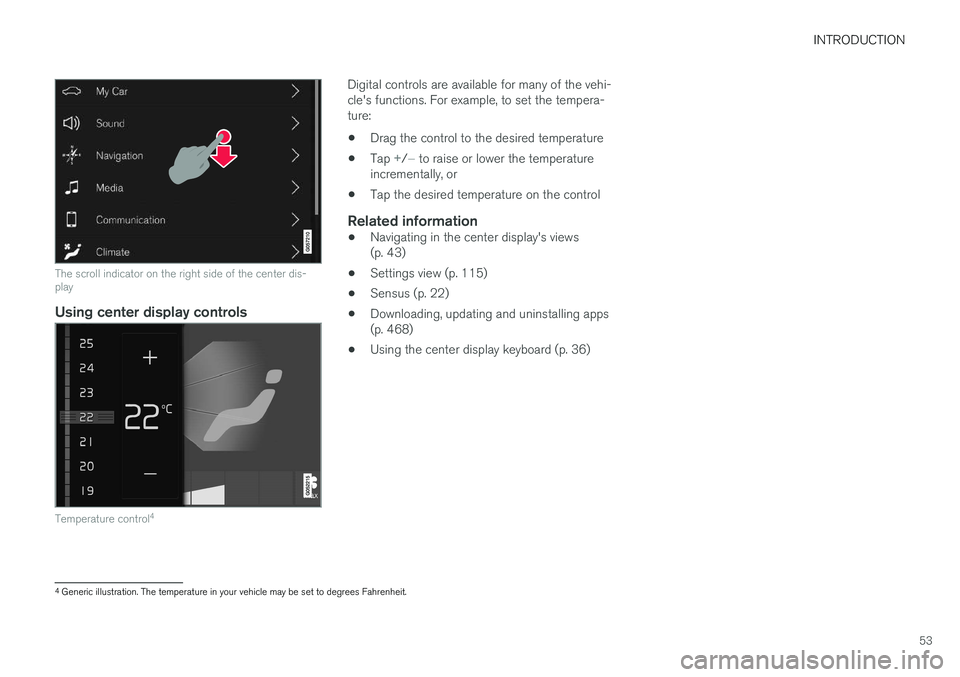
The scroll indicator on the right side of the center dis-play
Using center display controls
Temperature control4
Digital controls are available for many of the vehi-cle's functions. For example, to set the tempera-ture:
•Drag the control to the desired temperature
•Tap +/− to raise or lower the temperatureincrementally, or
•Tap the desired temperature on the control
Related information
•Navigating in the center display's views(p. 43)
•Settings view (p. 115)
•Sensus (p. 22)
•Downloading, updating and uninstalling apps(p. 468)
•Using the center display keyboard (p. 36)
4Generic illustration. The temperature in your vehicle may be set to degrees Fahrenheit.
Page 61 of 584
INTRODUCTION
* Option/accessory, for more information, see Introduction.59
Using the search function
1.Tap the magnifying glass icon () in theowner's manual's upper menu. A keyboardwill appear at the bottom of the screen.
2.Enter a word, e.g., "seat belt."
> Suggested articles will be displayed asmore characters are entered.
3. Confirm by tapping the article. To leavesearch mode tap the up-arrow next to thesearch box.
Related information
•On-board digital owner's manual (p. 56)
•Using the center display keyboard (p. 36)
Glass
Laminated glass
The windshield and panoramic roof* are made oflaminated glass, which is reinforced to help pre-vent break-ins and to provide additional sound-proofing. Laminated glass is optional for theother side windows.
Laminated glass symbol5
Related information
•Laminated panoramic roof* (p. 110)
•Power windows (p. 113)
•Defrosting windows and mirrors (p. 206)
•Using sun shades (p. 115)
•Rearview mirror (p. 114)
•Power windows (p. 113)
•Head-up display (HUD)* (p. 122)
•Activating/deactivating the rain sensor(p. 162)
•Windshield and headlight washers (p. 163)
•Tailgate window wiper and washer (p. 164)
•Defrosting windows and mirrors (p. 206)
Technician certification
In addition to Volvo factory training, Volvo sup-ports certification by the National Institute forAutomotive Service Excellence (A.S.E.).
Certified technicians have demonstrated a highdegree of competence in specific areas. Besidespassing exams, each technician must also haveworked in the field for two or more years before acertificate is issued. These professional techni-cians are best able to analyze vehicle problemsand perform the necessary maintenance proce-dures to keep your Volvo at peak operating con-dition.
XC90 T8 Twin Engine Plug-in Hybrid
Technicians performing work on a vehicle withelectrification should also have the necessarytraining and specialized certification required forperforming repairs and/or maintenance on avehicle with electrification.
WARNING
A number of electrical components in theXC90 T8 Twin Engine Plug-in Hybrid usehigh-voltage current and can be extremelydangerous if handled incorrectly. These com-ponents and any orange wiring in the vehiclemay only be handled by trained and qualifiedVolvo service technicians.
5This symbol is not shown on the windshield or moon roof/panoramic roof.
Page 72 of 584
SAFETY
70
Door and seat belt reminders
The door and seat belt reminders are intendedto alert all occupants of the vehicle that theirseat belts should be buckled before the vehiclebegins to move or if a door, the hood, tailgate orfuel filler door have not been closed properly.
Graphics in the instrument panel
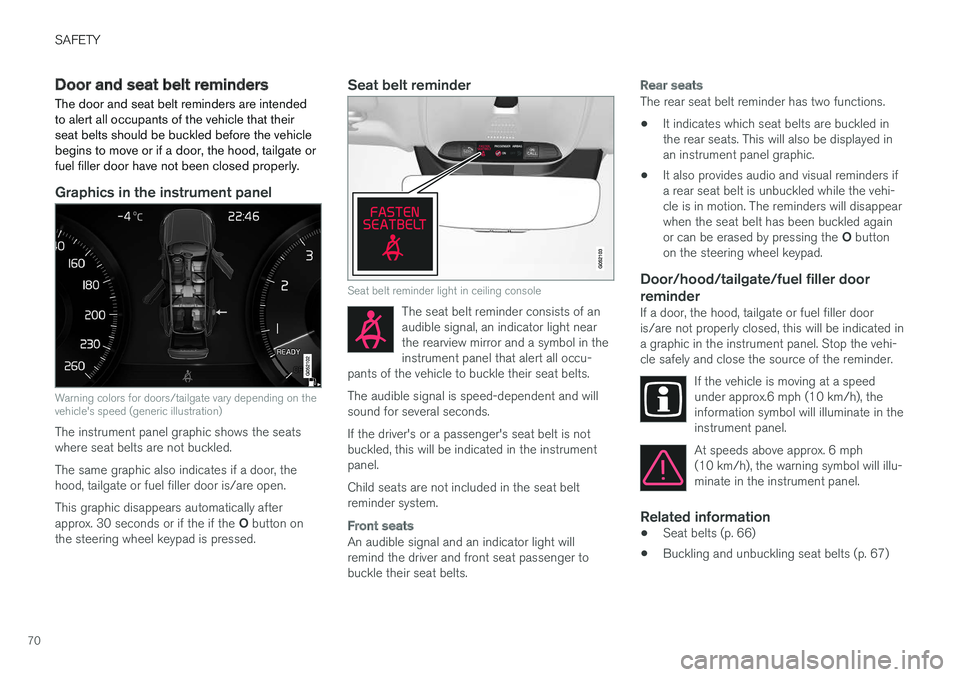
Warning colors for doors/tailgate vary depending on thevehicle's speed (generic illustration)
The instrument panel graphic shows the seatswhere seat belts are not buckled.
The same graphic also indicates if a door, thehood, tailgate or fuel filler door is/are open.
This graphic disappears automatically afterapprox. 30 seconds or if the if the O button onthe steering wheel keypad is pressed.
Seat belt reminder
Seat belt reminder light in ceiling console
The seat belt reminder consists of anaudible signal, an indicator light nearthe rearview mirror and a symbol in theinstrument panel that alert all occu-pants of the vehicle to buckle their seat belts.
The audible signal is speed-dependent and willsound for several seconds.
If the driver's or a passenger's seat belt is notbuckled, this will be indicated in the instrumentpanel.
Child seats are not included in the seat beltreminder system.
Front seats
An audible signal and an indicator light willremind the driver and front seat passenger tobuckle their seat belts.
Rear seats
The rear seat belt reminder has two functions.
•It indicates which seat belts are buckled inthe rear seats. This will also be displayed inan instrument panel graphic.
•It also provides audio and visual reminders ifa rear seat belt is unbuckled while the vehi-cle is in motion. The reminders will disappearwhen the seat belt has been buckled againor can be erased by pressing the O buttonon the steering wheel keypad.
Door/hood/tailgate/fuel filler door
reminder
If a door, the hood, tailgate or fuel filler dooris/are not properly closed, this will be indicated ina graphic in the instrument panel. Stop the vehi-cle safely and close the source of the reminder.
If the vehicle is moving at a speedunder approx.6 mph (10 km/h), theinformation symbol will illuminate in theinstrument panel.
At speeds above approx. 6 mph(10 km/h), the warning symbol will illu-minate in the instrument panel.
Related information
•Seat belts (p. 66)
•Buckling and unbuckling seat belts (p. 67)
Page 102 of 584
INSTRUMENTS AND CONTROLS
* Option/accessory, for more information, see Introduction.100
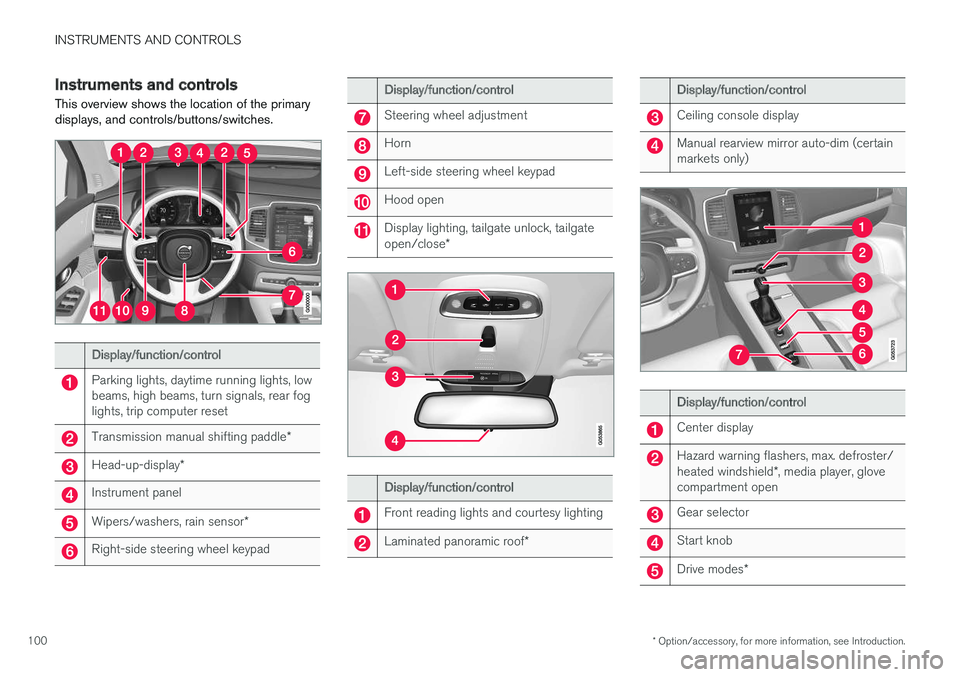
Instruments and controls
This overview shows the location of the primarydisplays, and controls/buttons/switches.
Display/function/control
Parking lights, daytime running lights, lowbeams, high beams, turn signals, rear foglights, trip computer reset
Transmission manual shifting paddle*
Head-up-display*
Instrument panel
Wipers/washers, rain sensor*
Right-side steering wheel keypad
Display/function/control
Steering wheel adjustment
Horn
Left-side steering wheel keypad
Hood open
Display lighting, tailgate unlock, tailgateopen/close*
Display/function/control
Front reading lights and courtesy lighting
Laminated panoramic roof*
Display/function/control
Ceiling console display
Manual rearview mirror auto-dim (certainmarkets only)
Display/function/control
Center display
Hazard warning flashers, max. defroster/heated windshield*, media player, glovecompartment open
Gear selector
Start knob
Drive modes*
Page 105 of 584
INSTRUMENTS AND CONTROLS
* Option/accessory, for more information, see Introduction.103
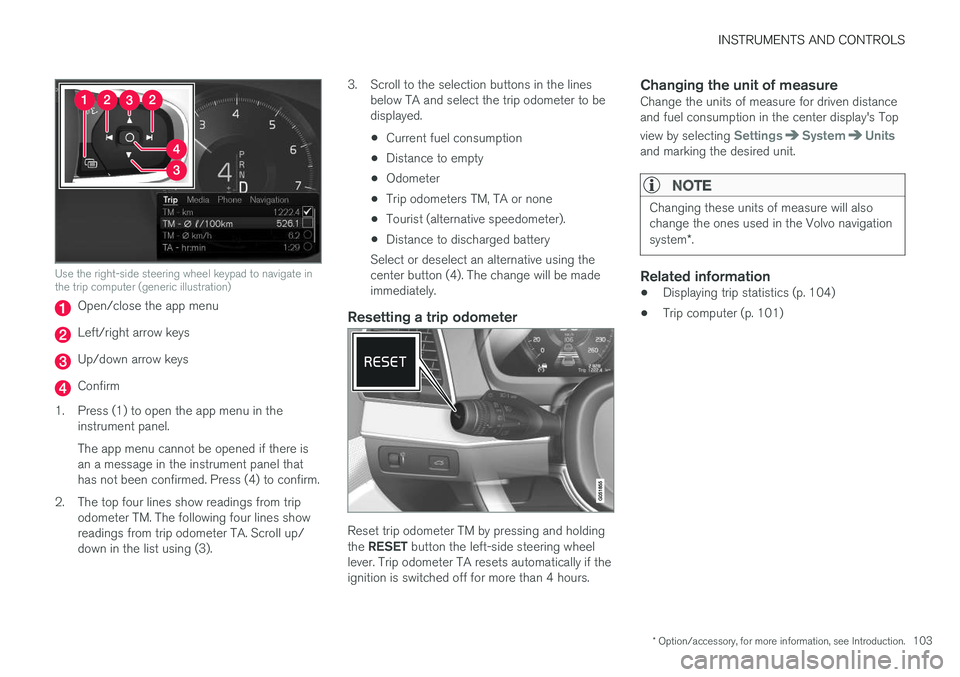
Use the right-side steering wheel keypad to navigate inthe trip computer (generic illustration)
Open/close the app menu
Left/right arrow keys
Up/down arrow keys
Confirm
1.Press (1) to open the app menu in theinstrument panel.
The app menu cannot be opened if there isan a message in the instrument panel thathas not been confirmed. Press (4) to confirm.
2. The top four lines show readings from tripodometer TM. The following four lines showreadings from trip odometer TA. Scroll up/down in the list using (3).
3. Scroll to the selection buttons in the linesbelow TA and select the trip odometer to bedisplayed.
•Current fuel consumption
•Distance to empty
•Odometer
•Trip odometers TM, TA or none
•Tourist (alternative speedometer).
•Distance to discharged battery
Select or deselect an alternative using thecenter button (4). The change will be madeimmediately.
Resetting a trip odometer
Reset trip odometer TM by pressing and holdingthe RESET button the left-side steering wheellever. Trip odometer TA resets automatically if theignition is switched off for more than 4 hours.
Changing the unit of measure
Change the units of measure for driven distanceand fuel consumption in the center display's Top
view by selecting SettingsSystemUnitsand marking the desired unit.
NOTE
Changing these units of measure will alsochange the ones used in the Volvo navigationsystem*.
Related information
•Displaying trip statistics (p. 104)
•Trip computer (p. 101)
Page 113 of 584
INSTRUMENTS AND CONTROLS
}}
* Option/accessory, for more information, see Introduction.111
Operating the laminated panoramic
roof*
When opened automatically, the sun shade androof open first to the "comfort" position thathelps reduce wind noise and then open com-pletely.
In the tilt (ventilation) position, the rear edge ofthe front section of the roof is raised.
Operation
WARNING
•During manual closing, if the laminatedpanoramic roof is obstructed, immediatelyopen it again.
•Never open or close the laminated panor-amic roof if it is obstructed in any way.
•Never allow a child to operate the lamina-ted panoramic roof.
•Never leave a child alone in a vehicle.
•When leaving the vehicle, ensure that theignition is in mode 0. Never leave aremote key in the vehicle.
•Never extend any object or body partthough the open laminated panoramicroof, even if the vehicle's ignition is com-pletely switched off.
CAUTION
The optional panoramic roof should not beopened while load carriers are installed onthe vehicle.
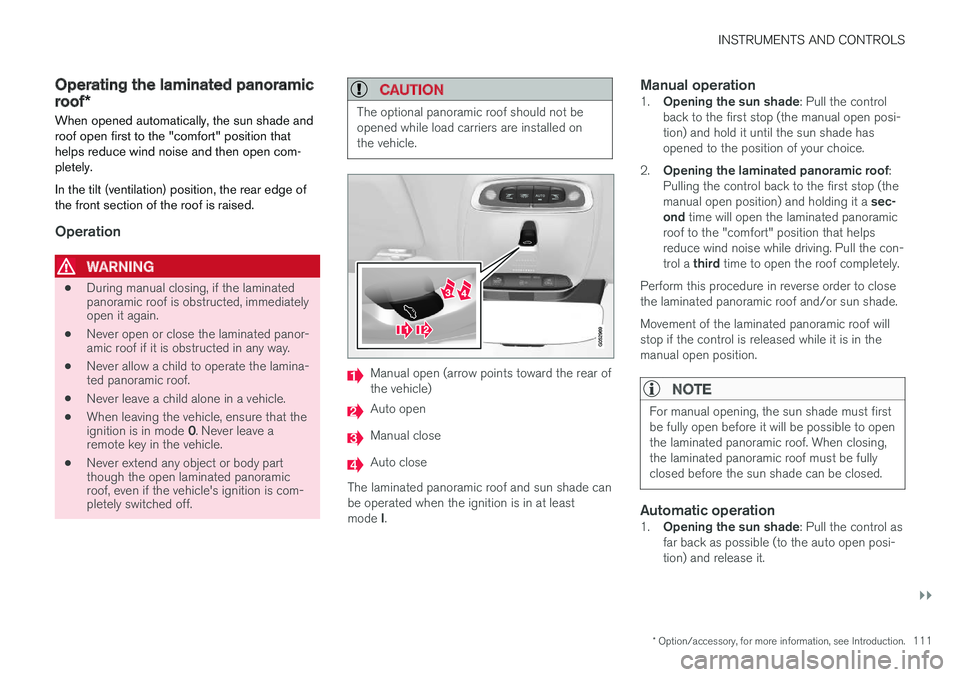
Manual open (arrow points toward the rear ofthe vehicle)
Auto open
Manual close
Auto close
The laminated panoramic roof and sun shade canbe operated when the ignition is in at leastmode I.
Manual operation
1.Opening the sun shade: Pull the controlback to the first stop (the manual open posi-tion) and hold it until the sun shade hasopened to the position of your choice.
2.Opening the laminated panoramic roof:Pulling the control back to the first stop (themanual open position) and holding it a sec-ond time will open the laminated panoramicroof to the "comfort" position that helpsreduce wind noise while driving. Pull the con-trol a third time to open the roof completely.
Perform this procedure in reverse order to closethe laminated panoramic roof and/or sun shade.
Movement of the laminated panoramic roof willstop if the control is released while it is in themanual open position.
NOTE
For manual opening, the sun shade must firstbe fully open before it will be possible to openthe laminated panoramic roof. When closing,the laminated panoramic roof must be fullyclosed before the sun shade can be closed.
Automatic operation
1.Opening the sun shade: Pull the control asfar back as possible (to the auto open posi-tion) and release it.
Page 114 of 584
||
INSTRUMENTS AND CONTROLS
112
2.Opening the laminated panoramic roof:Pull the control as far back as possible asecond time (to the auto open position) andrelease it to open the laminated panoramicroof to the "comfort" position that helpsreduce wind noise while driving. Pull the con-trol a third time (to the auto open position)and release it to open the roof completely.
Perform this procedure in reverse order to closethe laminated panoramic roof/sun shade. Theroof will not stop at the "comfort" position if it isclosed from the fully open position.
The laminated panoramic roof will stop when itreaches the "comfort" position, the fully openposition or the closed position. Movement willalso stop if the control is moved in the oppositedirection to the movement of the roof.
The roof will not stop at the "comfort" position ifit is closed from the fully open position.
Quick open/close
The laminated panoramic roof and the sun shadecan be opened/closed at the same time:
•Open: pull the control back (to the autoopen position) twice in quick succession andrelease it.
•Close: push the control forward (to the autoclose position) twice in quick succession andrelease it.
The laminated panoramic roof will stop when itreaches the "comfort" position or the closedposition. Movement will also stop if the control ismoved in the opposite direction to the movementof the roof.
The roof will not stop at the "comfort" position ifit is closed from the fully open position. The sunshade never stops when the roof reaches the"comfort" position.
Tilt (ventilation) position
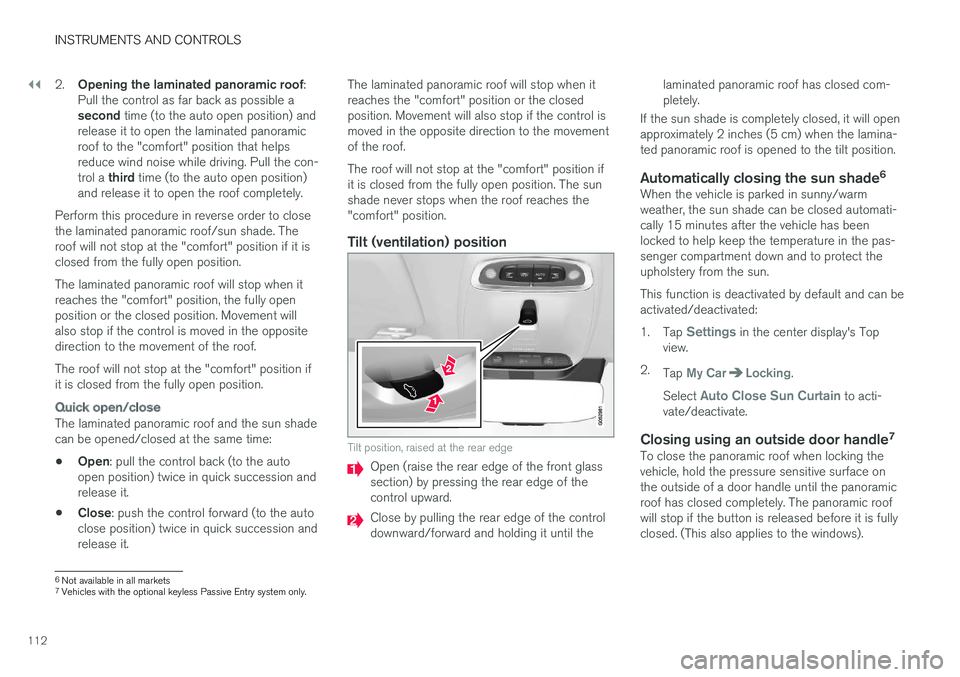
Tilt position, raised at the rear edge
Open (raise the rear edge of the front glasssection) by pressing the rear edge of thecontrol upward.
Close by pulling the rear edge of the controldownward/forward and holding it until the
laminated panoramic roof has closed com-pletely.
If the sun shade is completely closed, it will openapproximately 2 inches (5 cm) when the lamina-ted panoramic roof is opened to the tilt position.
Automatically closing the sun shade 6
When the vehicle is parked in sunny/warmweather, the sun shade can be closed automati-cally 15 minutes after the vehicle has beenlocked to help keep the temperature in the pas-senger compartment down and to protect theupholstery from the sun.
This function is deactivated by default and can beactivated/deactivated:
1.Tap Settings in the center display's Topview.
2.Tap My CarLocking.
Select Auto Close Sun Curtain to acti-vate/deactivate.
Closing using an outside door handle 7
To close the panoramic roof when locking thevehicle, hold the pressure sensitive surface onthe outside of a door handle until the panoramicroof has closed completely. The panoramic roofwill stop if the button is released before it is fullyclosed. (This also applies to the windows).
6
Not available in all markets
7
Vehicles with the optional keyless Passive Entry system only.
Page 115 of 584
INSTRUMENTS AND CONTROLS
}}
* Option/accessory, for more information, see Introduction.113
Auto-stop
The laminated panoramic roof has an auto-stopfeature that is triggered if the glass section of theroof or the sun shade is blocked in any way whenbeing closed. In this case, the laminated panor-amic roof or sun shade will stop and reverseautomatically approximately 2 in. (5 cm) from thepoint at which it was blocked (or will open fully tothe tilt position).
The auto-stop feature also functions when thelaminated panoramic roof or sun shade is beingopened.
WARNING
For 10 minutes after the auto-stop functionhas been triggered, it will not function againthe first time the control is moved in the samedirection as when the auto-stop function wastriggered.
The auto-stop feature can be overridden if theclosing procedure has been interrupted (e.g., dueto ice around the moonroof) by pressing andholding the control forward/down until the moon-roof is closed.
Power windows
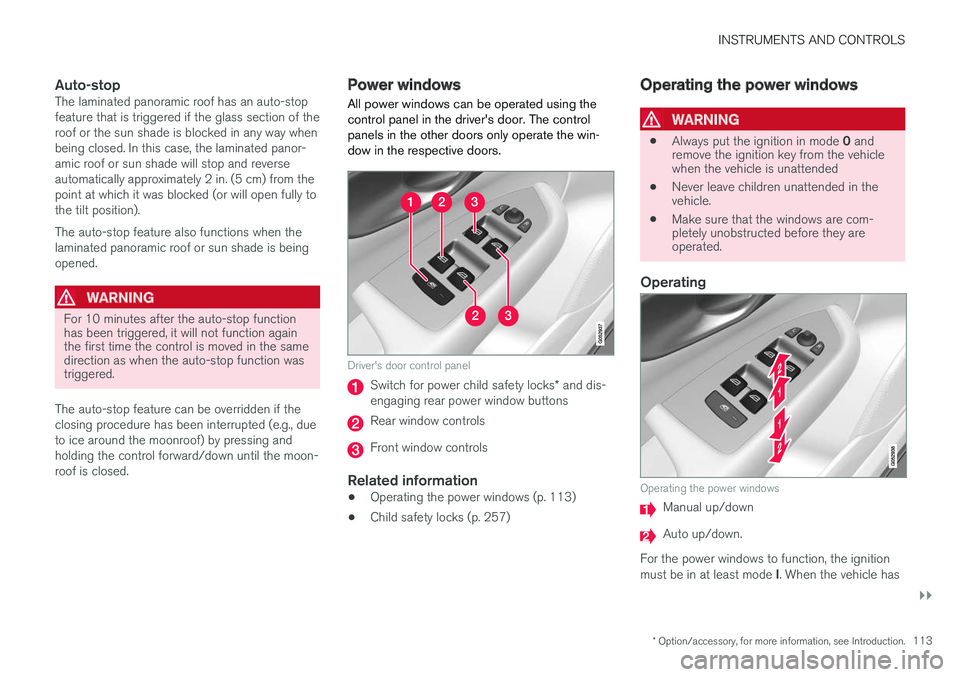
All power windows can be operated using thecontrol panel in the driver's door. The controlpanels in the other doors only operate the win-dow in the respective doors.
Driver's door control panel
Switch for power child safety locks* and dis-engaging rear power window buttons
Rear window controls
Front window controls
Related information
•Operating the power windows (p. 113)
•Child safety locks (p. 257)
Operating the power windows
WARNING
•Always put the ignition in mode 0 andremove the ignition key from the vehiclewhen the vehicle is unattended
•Never leave children unattended in thevehicle.
•Make sure that the windows are com-pletely unobstructed before they areoperated.
Operating
Operating the power windows
Manual up/down
Auto up/down.
For the power windows to function, the ignitionmust be in at least mode I. When the vehicle has
Page 119 of 584
INSTRUMENTS AND CONTROLS
* Option/accessory, for more information, see Introduction.117
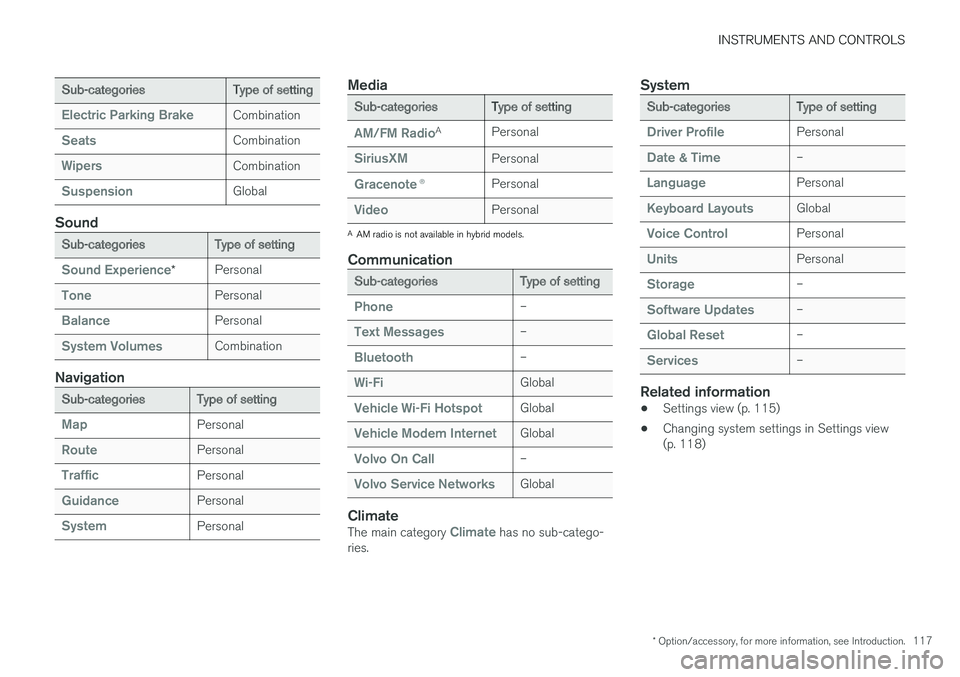
Sub-categoriesType of setting
Electric Parking BrakeCombination
SeatsCombination
WipersCombination
SuspensionGlobal
Sound
Sub-categoriesType of setting
Sound Experience*Personal
TonePersonal
BalancePersonal
System VolumesCombination
Navigation
Sub-categoriesType of setting
MapPersonal
RoutePersonal
TrafficPersonal
GuidancePersonal
SystemPersonal
Media
Sub-categoriesType of setting
AM/FM RadioAPersonal
SiriusXMPersonal
Gracenote®Personal
VideoPersonal
AAM radio is not available in hybrid models.
Communication
Sub-categoriesType of setting
Phone–
Text Messages–
Bluetooth–
Wi-FiGlobal
Vehicle Wi-Fi HotspotGlobal
Vehicle Modem InternetGlobal
Volvo On Call–
Volvo Service NetworksGlobal
Climate
The main category Climate has no sub-catego-ries.
System
Sub-categoriesType of setting
Driver ProfilePersonal
Date & Time–
LanguagePersonal
Keyboard LayoutsGlobal
Voice ControlPersonal
UnitsPersonal
Storage–
Software Updates–
Global Reset–
Services–
Related information
•Settings view (p. 115)
•Changing system settings in Settings view(p. 118)