maintenance VOLVO XC90 TWIN ENGINE HYBRID 2017 User Guide
[x] Cancel search | Manufacturer: VOLVO, Model Year: 2017, Model line: XC90 TWIN ENGINE HYBRID, Model: VOLVO XC90 TWIN ENGINE HYBRID 2017Pages: 584, PDF Size: 14.2 MB
Page 323 of 584

DRIVER SUPPORT
* Option/accessory, for more information, see Introduction.321
CAUTION
•Service and maintenance on City Safetymay only be carried out by a trained andqualified Volvo service technician.
•If a crack, scratch or stone chip shouldoccur in the section of the windshield infront the camera/radar sensor, contact atrained and qualified Volvo service techni-cian to repair or replace the windshield.Failing to do so may result in reducedCity Safety functionality.
•This can also result in certain functionsbeing reduced or disabled, or they mayrespond incorrectly.
To help avoid the risk of incorrect, reduced ordisabled functionality for driver support sys-tems using the camera or radar sensors:
•Volvo recommends that cracks, scratchesor stone chips on the windshield in frontof the camera/radar sensor should notbe repaired; in such cases, the entirewindshield should be replaced.
•Before the windshield is replaced, con-tact a Volvo retailer to ensure that thecorrect windshield is ordered and instal-led. If the wrong type of windshield isused, this may cause City Safety to func-tion improperly or not at all.
•Volvo recommends the use of only Genu-ine Volvo Replacement Windshields.
•When replacing windshield wipers, usethe same type or ones approved by Volvo.
After the windshield has been replaced, thecamera/radar sensor will have to be recalibra-ted by a trained and qualified Volvo servicetechnician to help ensure proper function ofall of the vehicle's camera-/radar-based sys-tems.
Maintenance
In order for camera and radar sensor to functionproperly, the area of the windshield must be keptfree of dirt, ice, snow, etc. and should be washedregularly with a suitable car washing detergent.
NOTE
Dirt, ice and/or snow covering the cameraand radar sensors reduce functionality andmay disable the vehicle's camera-/radar-based systems.
This can also result in certain functions beingreduced or disabled, or they may respondincorrectly.
Related information
•Driver support system radar sensor (p. 318)
•Camera limitations (p. 323)
•Pilot Assist-1 limitations (p. 304)
•Pilot Assist-2 limitations (p. 315)
•City Safety limitations (p. 334)
•City Safety limitations (p. 334)
•Road Sign Information (RSI)* limitations(p. 348)
•Park Assist Pilot (PAP)* limitations (p. 372)
Page 326 of 584
||
DRIVER SUPPORT
324
CauseAction
There is dirt between the inside of the windshield and the camera/radar sensor.Have the area of the windshield cleaned by a trained and qualifiedVolvo service technician.
Strong backlightingNo action required. The came will reset automatically when lightingconditions improve.
High temperatures
If the temperature in the passenger compartmentis very high, the camera and radar sensor may betemporarily turned off for approx. 15 minutesafter the engine has been started to protect theirelectronic components. When the temperaturehas cooled sufficiently, the camera and radarsensor will restart automatically.
Damaged windshield CAUTION
•Service and maintenance on City Safetymay only be carried out by a trained andqualified Volvo service technician.
•If a crack, scratch or stone chip shouldoccur in the section of the windshield infront the camera/radar sensor, contact atrained and qualified Volvo service techni-cian to repair or replace the windshield.Failing to do so may result in reducedCity Safety functionality.
•This can also result in certain functionsbeing reduced or disabled, or they mayrespond incorrectly.
To help avoid the risk of incorrect, reduced ordisabled functionality for driver support sys-tems using the camera or radar sensors:
•Volvo recommends that cracks, scratchesor stone chips on the windshield in frontof the camera/radar sensor should not
be repaired; in such cases, the entirewindshield should be replaced.
•Before the windshield is replaced, con-tact a Volvo retailer to ensure that thecorrect windshield is ordered and instal-led. If the wrong type of windshield isused, this may cause City Safety to func-tion improperly or not at all.
•Volvo recommends the use of only Genu-ine Volvo Replacement Windshields.
•When replacing windshield wipers, usethe same type or ones approved by Volvo.
After the windshield has been replaced, thecamera/radar sensor will have to be recalibra-ted by a trained and qualified Volvo servicetechnician to help ensure proper function ofall of the vehicle's camera-/radar-based sys-tems.
Maintenance
In order for camera and radar sensor to functionproperly, the area of the windshield must be kept
Page 329 of 584
DRIVER SUPPORT
}}
327
WARNING
Warnings will only be provided if there is animminent risk of a collision taking place. Thedriver should be aware of the system's limita-tions before operating the vehicle.
Warnings and automatic braking for pedes-trians and cyclists are deactivated at speedsabove approx. 43 mph (70 km/h).
City Safety's auto-brake function can helpprevent a collision or reduce the speed atwhich a collision occurs. However, the drivershould always apply the brakes, even if auto-brake is operating.
The driver is always responsible for maintain-ing the correct speed and distance in relationto the vehicle ahead. Never wait for a collisionwarning or for City Safety to intervene.
City Safety does not activate the auto-brakefunction during fast acceleration.
City Safety maintenance may only be carriedout by a trained and qualified Volvo servicetechnician.
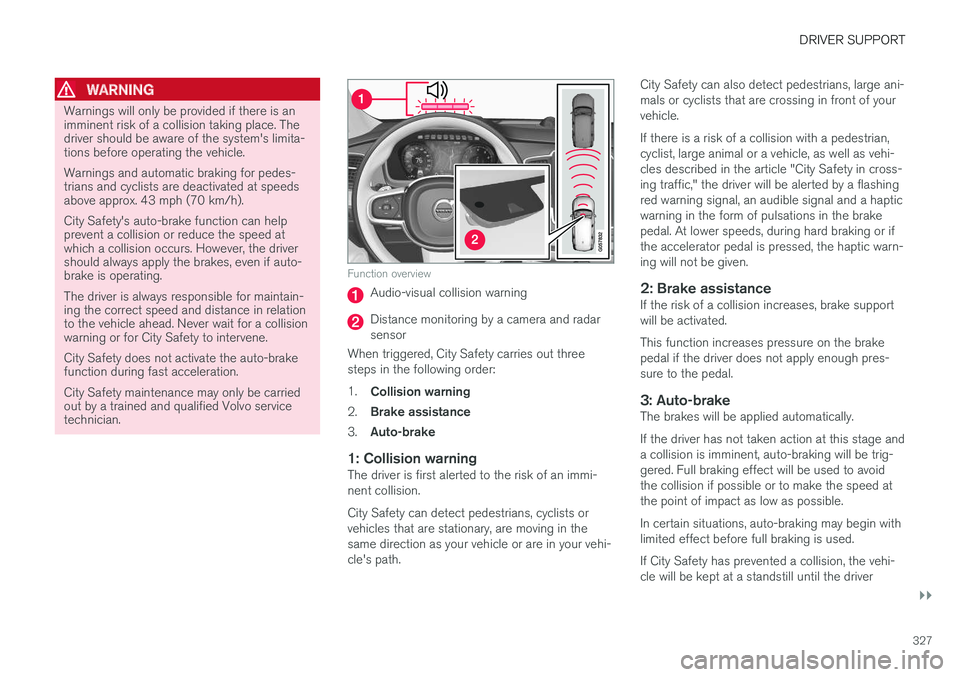
Function overview
Audio-visual collision warning
Distance monitoring by a camera and radarsensor
When triggered, City Safety carries out threesteps in the following order:
1.Collision warning
2.Brake assistance
3.Auto-brake
1: Collision warning
The driver is first alerted to the risk of an immi-nent collision.
City Safety can detect pedestrians, cyclists orvehicles that are stationary, are moving in thesame direction as your vehicle or are in your vehi-cle's path.
City Safety can also detect pedestrians, large ani-mals or cyclists that are crossing in front of yourvehicle.
If there is a risk of a collision with a pedestrian,cyclist, large animal or a vehicle, as well as vehi-cles described in the article "City Safety in cross-ing traffic," the driver will be alerted by a flashingred warning signal, an audible signal and a hapticwarning in the form of pulsations in the brakepedal. At lower speeds, during hard braking or ifthe accelerator pedal is pressed, the haptic warn-ing will not be given.
2: Brake assistance
If the risk of a collision increases, brake supportwill be activated.
This function increases pressure on the brakepedal if the driver does not apply enough pres-sure to the pedal.
3: Auto-brake
The brakes will be applied automatically.
If the driver has not taken action at this stage anda collision is imminent, auto-braking will be trig-gered. Full braking effect will be used to avoidthe collision if possible or to make the speed atthe point of impact as low as possible.
In certain situations, auto-braking may begin withlimited effect before full braking is used.
If City Safety has prevented a collision, the vehi-cle will be kept at a standstill until the driver
Page 335 of 584

DRIVER SUPPORT
}}
* Option/accessory, for more information, see Introduction.333
The following table shows some of the situationsthat can cause the message to be displayed andsuggested actions.
CauseAction
The area of the wind-shield in front of thecamera/radar sensor isdirty or covered by ice orsnow.
Clean the wind-shield or removethe ice/ snow.
Thick fog or heavy rain/snow blocks reduces thecamera/radar sensor'srange of visibility.
No action. Thedriver should beextra alert in condi-tions of this type.
There is dirt betweenthe inside of the wind-shield and the camera/radar sensor.
Have the area ofthe windshieldcleaned by atrained and quali-fied Volvo servicetechnician.
CAUTION
•Service and maintenance on City Safetymay only be carried out by a trained andqualified Volvo service technician.
•If a crack, scratch or stone chip shouldoccur in the section of the windshield infront the camera/radar sensor, contact atrained and qualified Volvo service techni-cian to repair or replace the windshield.Failing to do so may result in reducedCity Safety functionality.
•This can also result in certain functionsbeing reduced or disabled, or they mayrespond incorrectly.
To help avoid the risk of incorrect, reduced ordisabled functionality for driver support sys-tems using the camera or radar sensors:
•Volvo recommends that cracks, scratchesor stone chips on the windshield in frontof the camera/radar sensor should notbe repaired; in such cases, the entirewindshield should be replaced.
•Before the windshield is replaced, con-tact a Volvo retailer to ensure that thecorrect windshield is ordered and instal-led. If the wrong type of windshield isused, this may cause City Safety to func-tion improperly or not at all.
•Volvo recommends the use of only Genu-ine Volvo Replacement Windshields.
•When replacing windshield wipers, usethe same type or ones approved by Volvo.
After the windshield has been replaced, thecamera/radar sensor will have to be recalibra-ted by a trained and qualified Volvo servicetechnician to help ensure proper function ofall of the vehicle's camera-/radar-based sys-tems.
Maintenance
In order for City Safety to function properly, thearea of the windshield must be kept free of dirt,ice, snow, etc.
Other vehicle functions
If a message is displayed in the instrument panel,this means that the other systems using the cam-era/radar sensor (see the list below) will not havefull functionality or may not function at all.
The camera and radar sensor is used by the fol-lowing functions:
•Distance Alert*
•Driver Alert Control*
•Adaptive Cruise Control*
•Pilot Assist*
•Run-off Mitigation
•Road Sign Information*
•Active High Beams*
•Lane Keeping Aid*
Page 343 of 584

DRIVER SUPPORT
}}
* Option/accessory, for more information, see Introduction.341
Blind Spot Information (BLIS)*limitations
Blind Spot Information functionality may bereduced in certain situations.
•Dirt, ice and snow on the sensors mayreduce functionality and prevent the systemfrom providing warnings.
•Do not attach any objects, tape, decals, etc.,on the surface of the sensors.
•BLIS is deactivated if a trailer is attached tothe vehicle's electrical system.
Maintenance
The BLIS/CTA6 sensors are located on theinside of the rear fenders/bumper.
Keep the highlighted area clean (on both sides of thevehicle)
For the system to function optimally, the areaover and around the sensors must be kept clean.
CAUTION
Repairs to the BLIS/CTA systems and/orrepainting the rear bumper should only bedone by a trained and qualified Volvo servicetechnician.
Related information
•Blind Spot Information (BLIS)* On/Off(p. 340)
•Blind Spot Information (BLIS)* (p. 339)
•Cross Traffic Alert (CTA)* (p. 341)
Cross Traffic Alert (CTA)*
Cross Traffic Alert (CTA) is a supplementary partof Blind Spot Information and is intended todetect vehicles crossing behind your vehiclewhile you are backing up.
When does Cross Traffic Alert function
Principle for CTA
CTA supplements BLIS by warning the driver ofcrossing traffic behind your vehicle, for example,when backing out of a parking space.
It is primarily designed to detect another vehiclebut in certain cases may also detect pedestriansor smaller objects such as bicycles.
CTA is only activated when the vehicle is rollingrearward or backing up and is activated automati-cally when the gear selector is put in reverse.
6Cross Traffic Alert*
Page 345 of 584

DRIVER SUPPORT
}}
* Option/accessory, for more information, see Introduction.343
Cross Traffic Alert (CTA)* limitations
CTA functionality may be reduced in certain sit-uations.
Limitations
CTA has limitations in certain situations, forexample, the CTA sensors cannot "see" throughother parked vehicles or obstructions.
The following are several examples where CTA's"field of vision" may initially be limited andapproaching vehicles cannot be detected untilthey are too close:
The vehicle is pulled far into a parking space
In angled parking spaces, CTA may be "blind" on oneside
CTA's blind area
CTA's "field of vision"
However, as you back your vehicle out of a park-ing space, CTA's "field of vision" expands.
Examples of other limitations include:
•Dirt, ice or snow obstructing the sensors mayreduce the system's function or make itimpossible to detect other vehicles orobjects.
•CTA is deactivated if a trailer's wiring is con-nected to the vehicle's electrical system.
Maintenance
The CTA sensors are located on the inside of therear fenders/bumper.
Keep the highlighted area clean (on both sides of thevehicle)
For the system to function optimally, the areaover and around the sensors must be kept clean.
Do not attach any objects, tape, decals, etc., onthe surface of the sensors.
CAUTION
Repairs to the BLIS/CTA systems and/orrepainting the rear bumper should only bedone by a trained and qualified Volvo servicetechnician.
Related information
•Cross Traffic Alert (CTA)* (p. 341)
•Activating/deactivating Cross Traffic Alert(CTA)* (p. 342)
Page 369 of 584

DRIVER SUPPORT
* Option/accessory, for more information, see Introduction.367
Park Assist Camera* (PAC)limitations
The Park Assist Camera system has certain limi-tations that the driver should be aware of.
NOTE
Bicycle carriers or other accessories mountedon the tailgate may obstruct the camera'sfield of vision.
Blind sectors
Even if a fairly small section of the screen imageappears to be obstructed, this may mean that arelatively large area is hidden and objects theremay not be detected until they are very near thevehicle.
The "blind" sectors between the cameras' fields of vision
With 360° view selected, objects/obstacles maynot be detected at the edges of the individualcameras' fields of vision.
Defective camera
If a camera sector is dark andcontains this symbol, this indi-cates that the camera is notfunctioning properly (see thefollowing illustration).
In this example, the driver's side camera is not function-ing
Dark camera sectors
A dark camera sector may also be displayed inthe following situations but without the defectivecamera symbol. A sector may be dark because:
•the door mirror is folded in
•the door is open
•the tailgate is open
Ambient lighting
The camera images are adjusted automatically tothe ambient light, which means the image mayvary slightly in terms of light and quality. Poorambient lighting may reduce the quality of theimage.
Maintenance
•Keep the camera's lens free of dirt, ice andsnow. This is particularly important in poorambient lighting conditions.
•Remove dirt, ice and snow carefully to avoidscratching the lenses.
•Clean the lens regularly with warm water anda suitable car washing detergent.
Related information
•Park Assist Camera (PAC)* (p. 362)
Page 375 of 584

DRIVER SUPPORT
* Option/accessory, for more information, see Introduction.373
•Heavy rain or snow may inhibit PAP'scapacity to correctly measure a parkingspace.
•Do not use PAP when using snow chainsand/or a temporary spare tire.
•Do not use PAP if there are any objects pro-truding from the vehicle.
WARNING
•The front end of your vehicle may turn outtoward oncoming traffic during the park-ing procedure.
•Objects located above the parking sen-sors' field of vision are not included whenPAP measures a parking space. For thisreason, PAP may turn into the parkingspace too soon. Avoid parking spaces ofthis type.
•The driver is always responsible for deter-mining if PAP has selected a suitableparking space.
Maintenance
Location of the PAP sensors
In order for PAP to function correctly, these sen-sors must be cleaned regularly with water and asuitable car washing detergent.
Related information
•Park Assist Pilot (PAP)* (p. 368)
•Park Assist Pilot (PAP)* limitations (p. 372)
•Park Assist Pilot (PAP)* symbols and mes-sages (p. 374)
Page 399 of 584
STARTING AND DRIVING
}}
397
Driving with a trailer
When towing a trailer, always observe the legalrequirements of the state/province.
•All Volvo models are equipped with energy-absorbing shock-mounted bumpers. Trailerhitch installation should not interfere with theproper operation of this bumper system.
Trailer towing does not normally present any par-ticular problems, but take into consideration:
•Increase tire pressure to recommended fullpressure.
•When your vehicle is new, avoid towing heavytrailers during the first 620 miles (1,000 km).
•Maximum speed when towing a trailer:50 mph (80 km/h).
•Engine and transmission are subject toincreased loads. Therefore, engine coolanttemperature should be closely watched whendriving in hot climates or hilly terrain. Use alower gear and turn off the air conditioner ifthe temperature gauge needle enters the redrange.
•If the automatic transmission begins to over-heat, a message will be displayed in the textwindow.
•Avoid overload and other abusive operation.
•Hauling a trailer affects handling, durability,and economy.
•It is necessary to balance trailer brakes withthe towing vehicle brakes to provide a safestop (check and observe state/local regula-tions).
•Do not connect the trailer's brake systemdirectly to the vehicle's brake system.
•More frequent vehicle maintenance isrequired.
•Remove the ball holder when the hitch is notbeing used.
NOTE
•When parking the vehicle with a trailer ona hill, apply the parking brake before put-ting the gear selector in P. Always followthe trailer manufacturer's recommenda-tions for wheel chocking.
•When starting on a hill, put the gearselector in D before releasing the parkingbrake.
•If you use the manual (Geartronic) shiftpositions while towing a trailer, make surethe gear you select does not put toomuch strain on the engine (using toohigh a gear).
•The drawbar assembly/trailer hitch maybe rated for trailers heavier than the vehi-cle is designed to tow. Please adhere toVolvo's recommended trailer weights.
•Avoid driving with a trailer on inclines ofmore than 15%.
Page 409 of 584
STARTING AND DRIVING
407
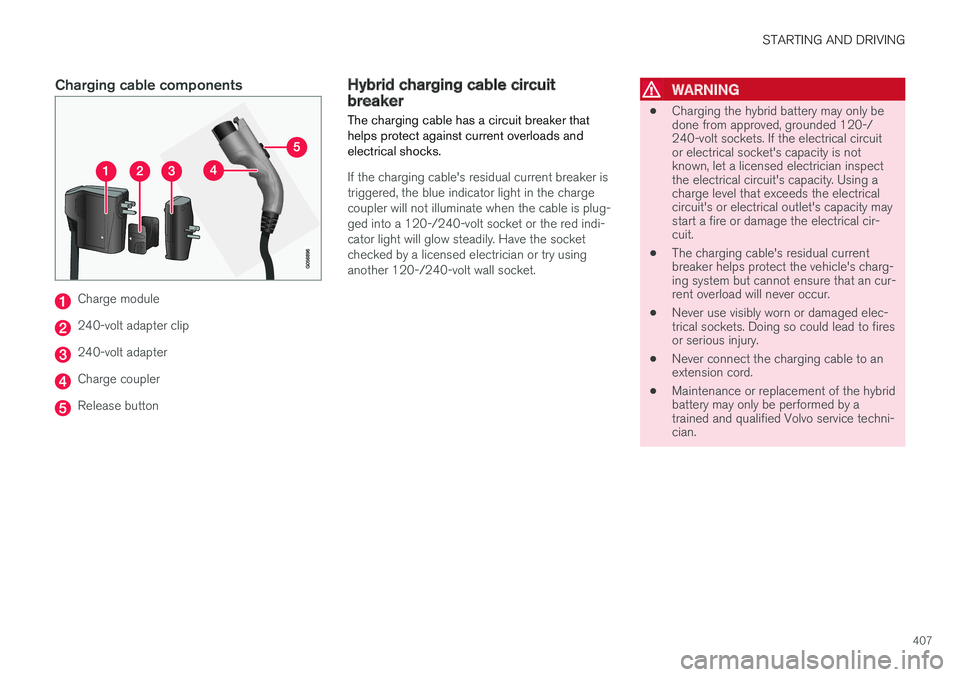
Charging cable components
Charge module
240-volt adapter clip
240-volt adapter
Charge coupler
Release button
Hybrid charging cable circuitbreaker
The charging cable has a circuit breaker thathelps protect against current overloads andelectrical shocks.
If the charging cable's residual current breaker istriggered, the blue indicator light in the chargecoupler will not illuminate when the cable is plug-ged into a 120-/240-volt socket or the red indi-cator light will glow steadily. Have the socketchecked by a licensed electrician or try usinganother 120-/240-volt wall socket.
WARNING
•Charging the hybrid battery may only bedone from approved, grounded 120-/240-volt sockets. If the electrical circuitor electrical socket's capacity is notknown, let a licensed electrician inspectthe electrical circuit's capacity. Using acharge level that exceeds the electricalcircuit's or electrical outlet's capacity maystart a fire or damage the electrical cir-cuit.
•The charging cable's residual currentbreaker helps protect the vehicle's charg-ing system but cannot ensure that an cur-rent overload will never occur.
•Never use visibly worn or damaged elec-trical sockets. Doing so could lead to firesor serious injury.
•Never connect the charging cable to anextension cord.
•Maintenance or replacement of the hybridbattery may only be performed by atrained and qualified Volvo service techni-cian.