ignition VOLVO XC90 TWIN ENGINE HYBRID 2017 Owners Manual
[x] Cancel search | Manufacturer: VOLVO, Model Year: 2017, Model line: XC90 TWIN ENGINE HYBRID, Model: VOLVO XC90 TWIN ENGINE HYBRID 2017Pages: 584, PDF Size: 14.2 MB
Page 10 of 584
8
STARTING AND DRIVING
Starting and driving376
Brakes376
Brake functions378
Auto-hold brake function379
Brake assist system379
Braking effect after a collision380
Emergency brake lights380
Hill Descent Control (HDC)380
Hill Start Assist381
Parking brake382
Using the parking brake382
Parking brake malfunctions384
Before a long distance trip385
Driving economically385
Driving through standing water387
Overheating the engine and transmission387
Winter driving388
Towing eyelet389
Towing recommendations389
Fuel391
Octane rating392
Opening/closing the fuel filler door393
Emission controls394
Jump starting395
Driving with a trailer397
Detachable trailer hitch398
Trailer Stability Assist (TSA)399
Ignition modes400
Battery drain402
Starting the engine402
Turning the engine off404
Driving systems405
Hybrid battery charging cable405
Hybrid charging cable circuit breaker407
Hybrid-related symbols and messages408
Preparations for charging the hybridbattery410
Stopping hybrid battery charging411
Initiating hybrid battery charging412
Charging the hybrid battery413
Hybrid battery charge status415
Charger status indicators417
Hybrid battery charging current417
Long-term storage of a vehicle witha hybrid battery418
Using the electric motor in city driving419
Maintaining/increasing the hybridbattery's charge while driving420
Drive modes420
Automatic transmission424
Shiftlock424
Gear shift indicator425
Gear selector positions425
Steering wheel paddles*427
Low Speed Control (LSC)428
All Wheel Drive (AWD)429
Suspension and leveling control*429
Page 48 of 584
||
INTRODUCTION
46
ignition is being started/switched off or when amessage is displayed on the screen.
Going to Top view from an app
To pull down Top view when an app is running(e.g., FM radio):
•Tap FM Radio Settings to display thesesettings.
•Tap Owner's manual to open an articlerelated to the specific app.
This applies only to your vehicle's factory-installed apps. This is not possible for third-party apps that have been downloaded.
Climate view
The climate bar, where the most common climatesystem settings can be made, is located at thebottom of the screen and is always visible.
Tap the symbol at the center of the cli-mate bar to open Climate view foraccess to additional climate systemsettings.
Tap the symbol to close Climate viewand return to a previous view.
App view
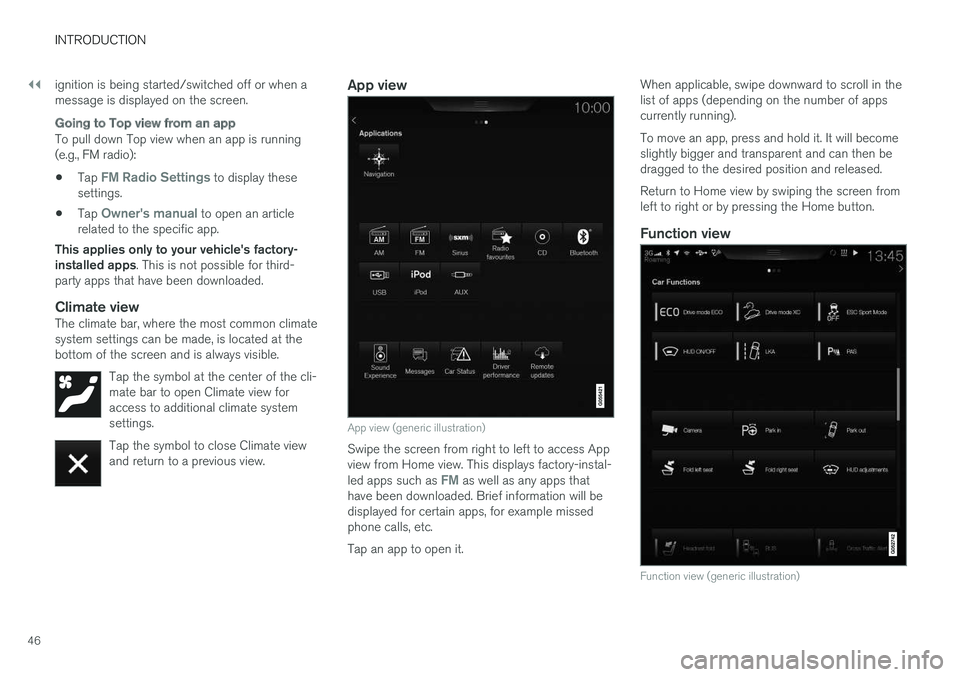
App view (generic illustration)
Swipe the screen from right to left to access Appview from Home view. This displays factory-instal-led apps such as FM as well as any apps thathave been downloaded. Brief information will bedisplayed for certain apps, for example missedphone calls, etc.
Tap an app to open it.
When applicable, swipe downward to scroll in thelist of apps (depending on the number of appscurrently running).
To move an app, press and hold it. It will becomeslightly bigger and transparent and can then bedragged to the desired position and released.
Return to Home view by swiping the screen fromleft to right or by pressing the Home button.
Function view
Function view (generic illustration)
Page 54 of 584
||
INTRODUCTION
52
Turning off and reactivating the center
display
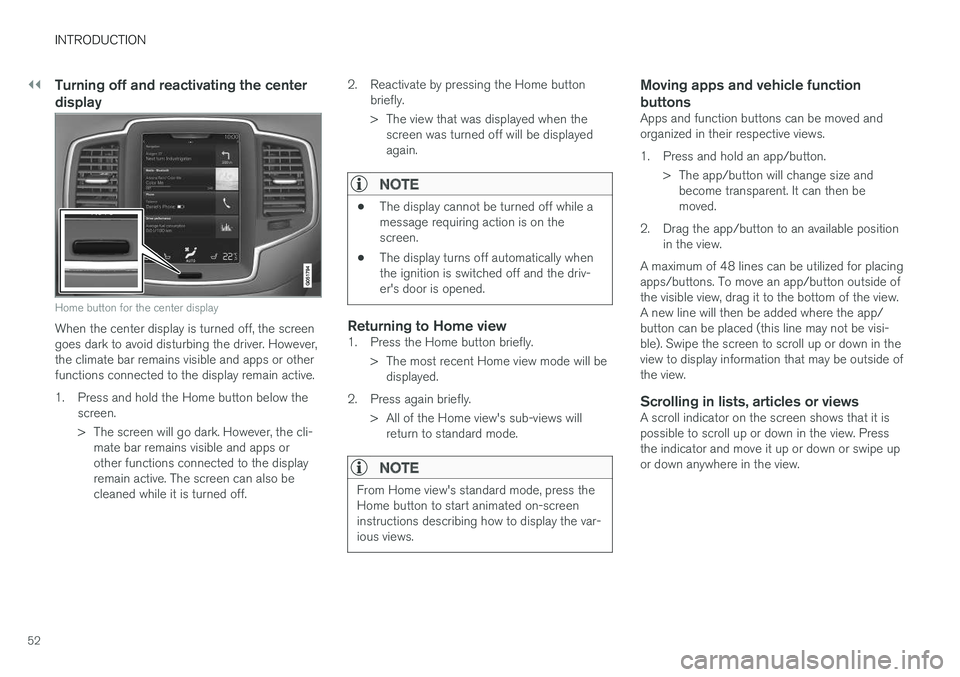
Home button for the center display
When the center display is turned off, the screengoes dark to avoid disturbing the driver. However,the climate bar remains visible and apps or otherfunctions connected to the display remain active.
1.Press and hold the Home button below thescreen.
> The screen will go dark. However, the cli-mate bar remains visible and apps orother functions connected to the displayremain active. The screen can also becleaned while it is turned off.
2. Reactivate by pressing the Home buttonbriefly.
> The view that was displayed when thescreen was turned off will be displayedagain.
NOTE
•The display cannot be turned off while amessage requiring action is on thescreen.
•The display turns off automatically whenthe ignition is switched off and the driv-er's door is opened.
Returning to Home view
1. Press the Home button briefly.
> The most recent Home view mode will bedisplayed.
2. Press again briefly.
> All of the Home view's sub-views willreturn to standard mode.
NOTE
From Home view's standard mode, press theHome button to start animated on-screeninstructions describing how to display the var-ious views.
Moving apps and vehicle function
buttons
Apps and function buttons can be moved andorganized in their respective views.
1. Press and hold an app/button.
> The app/button will change size andbecome transparent. It can then bemoved.
2. Drag the app/button to an available positionin the view.
A maximum of 48 lines can be utilized for placingapps/buttons. To move an app/button outside ofthe visible view, drag it to the bottom of the view.A new line will then be added where the app/button can be placed (this line may not be visi-ble). Swipe the screen to scroll up or down in theview to display information that may be outside ofthe view.
Scrolling in lists, articles or views
A scroll indicator on the screen shows that it ispossible to scroll up or down in the view. Pressthe indicator and move it up or down or swipe upor down anywhere in the view.
Page 64 of 584
SAFETY
62
General safety information
The vehicle is equipped with a number of safetysystems for the driver and passengers.
In the event of an accident, there are a number ofsensors in the vehicle that react and triggersafety systems such as Roll Stability Control, air-bags, seat belt pretensioners, etc., depending onthe severity of the collision. There are alsomechanical systems such as the WhiplashProtection System.
Warning symbol in the instrument panel
The warning symbol in the instrumentpanel illuminates when the ignition is inmode II or higher. It will go out afterapprox. 6 seconds if no faults aredetected in the airbag system.
WARNING
•If the SRS warning light stays on after theengine has started or if it illuminateswhile you are driving, have the vehicleinspected by a trained and qualified Volvoservice technician as soon as possible.
•Never try to repair any component or partof the SRS yourself. Any interference inthe system could cause malfunction andserious injury. All work on these systemsshould be performed by a trained andqualified Volvo service technician.
If the dedicated warning symbol is notfunctioning, the general warning sym-bol will illuminate instead and the samemessage will be displayed in the instru-ment panel.
Related information
•Safety during pregnancy (p. 64)
•Seat belts (p. 66)
•Airbag system (p. 71)
•Safety mode (p. 79)
•Whiplash protection system (p. 65)
•Child safety (p. 81)
Occupant safety
Safety is Volvo's cornerstone.
Volvo's concern for safety
Our concern for safety dates back to 1927 whenthe first Volvo rolled off the production line.Three-point seat belts (a Volvo invention), safetycages, and energy-absorbing impact zones weredesigned into Volvo vehicles long before it wasfashionable or required by government regulation.
We will not compromise our commitment tosafety. We continue to seek out new safety fea-tures and to refine those already in our vehicles.You can help. We would appreciate hearing yoursuggestions about improving automobile safety.We also want to know if you ever have a safetyconcern with your vehicle. Call us in the U.S. at:1-800-458-1552 or in Canada at:1-800-663-8255.
Page 73 of 584
SAFETY
}}
71
Airbag system
As an enhancement to the three-point seat belts,your vehicle is equipped with an airbag system.
WARNING
•If the airbag warning light stays on afterthe engine has started or if it illuminateswhile you are driving, have the vehicleinspected by a trained and qualified Volvoservice technician as soon as possible.
•Never try to repair any component or partof the airbag systems yourself. Any inter-ference in the system could cause mal-function and serious injury. All work onthese systems should be performed by atrained and qualified Volvo service techni-cian.
WARNING
If your vehicle has become flood-damaged inany way (e.g., soaked carpeting/standingwater on the floor of the vehicle), do notattempt to start the vehicle. This may causeairbag deployment which could result in seri-ous injury. Have the vehicle towed to a trainedand qualified Volvo service technician forrepairs.
Before attempting to tow the vehicle:
1.Switch off the ignition for at least10 minutes and disconnect the battery.
2. Follow the instructions for manually over-riding the shiftlock system.
Deployed airbags
WARNING
If any of the airbags have deployed:
•Do not attempt to drive the vehicle. Haveit towed to a qualified repair facility.
•If necessary seek medical attentIon.
Driver/passenger side airbags
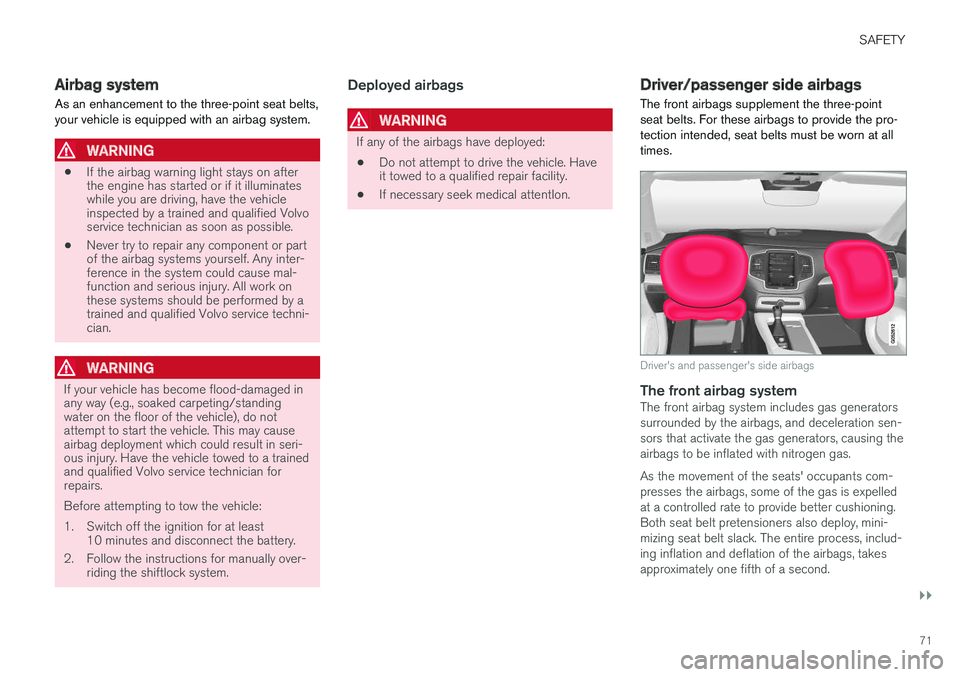
The front airbags supplement the three-pointseat belts. For these airbags to provide the pro-tection intended, seat belts must be worn at alltimes.
Driver's and passenger's side airbags
The front airbag system
The front airbag system includes gas generatorssurrounded by the airbags, and deceleration sen-sors that activate the gas generators, causing theairbags to be inflated with nitrogen gas.
As the movement of the seats' occupants com-presses the airbags, some of the gas is expelledat a controlled rate to provide better cushioning.Both seat belt pretensioners also deploy, mini-mizing seat belt slack. The entire process, includ-ing inflation and deflation of the airbags, takesapproximately one fifth of a second.
Page 77 of 584
SAFETY
}}
75
seated occupant and determine if the passeng-er's side front airbag should be enabled (mayinflate) or disabled (will not inflate).
The OWS will disable (will not inflate) the pas-senger's side front airbag when:
•the front passenger's seat is unoccupied, orhas small/medium objects in the front seat,
•the system determines that an infant is pres-ent in a rear-facing infant seat that is instal-led according to the manufacturer's instruc-tions,
•the system determines that a small child ispresent in a forward-facing child restraintthat is installed according to the manufactur-er's instructions,
•the system determines that a small child ispresent in a booster seat,
•a front passenger takes his/her weight off ofthe seat for a period of time,
•a child or a small person occupies the frontpassenger's seat.
The OWS uses a PASSENGER AIRBAG OFFindicator lamp which will illuminate and stay on toremind you that the passenger's side front airbagis disabled. The PASSENGER AIRBAG OFF indi-cator lamp is located in the overhead console,near the base of the rearview mirror.
NOTE
When the ignition is switched on, the OWSindicator light will illuminate for several sec-onds while the system performs a self-diag-nostic test.
However, if a fault is detected in the system:
•The OWS indicator light will stay on
•The SRS warning light will come on and stayon and a text message will be displayed.
WARNING
If a fault in the system is detected and indi-cated as described, be aware that the pas-senger's side front airbag will not deploy inthe event of a collision. In this case, the SRSsystem and Occupant Weight Sensor shouldbe inspected by a trained and qualified Volvoservice technician as soon as possible.
WARNING
•Never try to open, remove, or repair anycomponents in the OWS system. Thiscould result in system malfunction. Main-tenance or repairs should only be carriedout by an a trained and qualified Volvoservice technician.
•The front passenger's seat should not bemodified in any way. This could reducepressure on the seat cushion, whichmight interfere with the OWS system'sfunction.
Passenger'sseat occu-pancy status
OWS indi-cator lightstatus
Passenger'sside front air-bag status
Seat unoccu-piedOWS indi-cator lightlights up.
Passenger'sside front air-bag disabled
Seat occu-pied by lowweight occu-
pant/objectA
OWS indi-cator lightlights up
Passenger'sside front air-bag disabled
Seat occu-pied by heavyoccupant/object
OWS indi-cator light isnot lit
Passenger'sside front air-bag enabled
AVolvo recommends that children always be properly restrainedin appropriate child restraints in the rear seats. Do not assumethat the passenger's side front airbag is disabled unless the
Page 105 of 584
INSTRUMENTS AND CONTROLS
* Option/accessory, for more information, see Introduction.103
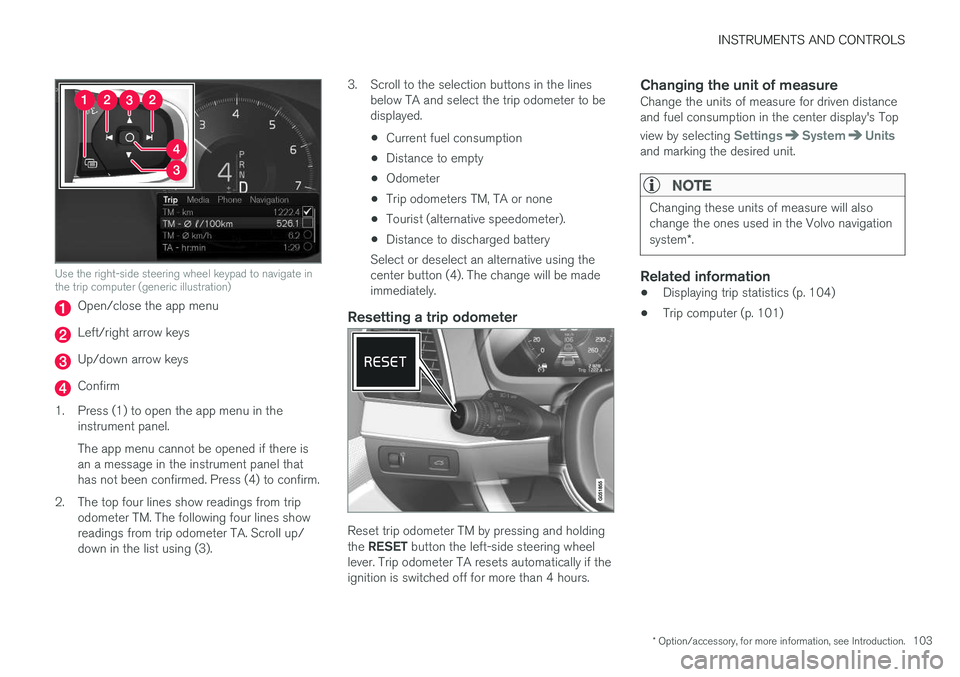
Use the right-side steering wheel keypad to navigate inthe trip computer (generic illustration)
Open/close the app menu
Left/right arrow keys
Up/down arrow keys
Confirm
1.Press (1) to open the app menu in theinstrument panel.
The app menu cannot be opened if there isan a message in the instrument panel thathas not been confirmed. Press (4) to confirm.
2. The top four lines show readings from tripodometer TM. The following four lines showreadings from trip odometer TA. Scroll up/down in the list using (3).
3. Scroll to the selection buttons in the linesbelow TA and select the trip odometer to bedisplayed.
•Current fuel consumption
•Distance to empty
•Odometer
•Trip odometers TM, TA or none
•Tourist (alternative speedometer).
•Distance to discharged battery
Select or deselect an alternative using thecenter button (4). The change will be madeimmediately.
Resetting a trip odometer
Reset trip odometer TM by pressing and holdingthe RESET button the left-side steering wheellever. Trip odometer TA resets automatically if theignition is switched off for more than 4 hours.
Changing the unit of measure
Change the units of measure for driven distanceand fuel consumption in the center display's Top
view by selecting SettingsSystemUnitsand marking the desired unit.
NOTE
Changing these units of measure will alsochange the ones used in the Volvo navigationsystem*.
Related information
•Displaying trip statistics (p. 104)
•Trip computer (p. 101)
Page 107 of 584
INSTRUMENTS AND CONTROLS
}}
* Option/accessory, for more information, see Introduction.105
systems, even home lighting. Additional informa-tion can be found on the Internet at,www.homelink.com/www.youtube.com/HomeLinkGentex or by phoning the hotline at 1–800–355–3515.
WARNING
•If you use HomeLink® to open a garagedoor or gate, be sure no one is near thegate or door while it is in motion.
•When programming a garage dooropener, it is advised to park outside of thegarage.
•Do not use HomeLink® with any garagedoor opener that lacks safety stop andreverse features as required by U.S. fed-eral safety standards (this includes anygarage door opener model manufacturedbefore April 1, 1982). A garage door thatcannot detect an object - signaling thedoor to stop and reverse - does not meetcurrent U.S. federal safety standards. Formore information, contact HomeLink at:www.homelink.com.
Retain the original transmitter of the RF deviceyou are programming for use in other vehicles aswell as for future HomeLink programming. It isalso suggested that upon the sale of the vehicle,the programmed HomeLink buttons be erasedfor security purposes. See the article "Program-ming HomeLink."
Related information
•Programming the HomeLink® Wireless Con-trol System* (p. 105)
Programming the HomeLink®
Wireless Control System*
NOTE
Some vehicles may require the ignition to beswitched on or be in the “accessories” posi-tion for programming and/or operation ofHomeLink. It is also recommended that a newbattery be placed in the hand-held transmitterof the device being programmed to Home-Link for quicker training and accurate trans-mission of the radio-frequency signal. TheHomeLink buttons must be reset first. Whenthis has been completed, Homelink is inlearning mode so that you can perform pro-gramming.
To program HomeLink®
1.Press the HomeLink® button to be pro-
grammed. The HomeLink® indicator willbegin flashing yellow once a second. You donot need to continue holding the button.
2.Point the hand-held transmitter toward the
HomeLink® button to be programmed andhold it approx. 6–12 inches (15–30 cm)
away from the HomeLink® button. Do not
obstruct the HomeLink® indicator light.
Page 109 of 584
INSTRUMENTS AND CONTROLS
}}
107
Gate Operator/Canadian Programming
Canadian radio-frequency laws require transmit-ter signals to “time-out” (or quit) after severalseconds of transmission – which may not be longenough for HomeLink to pick up the signal dur-ing programming. Similar to this Canadian law,some U.S. gate operators are designed to “time-out” in the same manner.
If you live in Canada or you are having difficultiesprogramming a gate operator or garage dooropener by using the “Programming” procedures,replace “Programming HomeLink” step 3with the following:
•Continue to press and hold the HomeLinkbutton while you press and release - everytwo seconds (“cycle”) your hand-held trans-mitter until the HomeLink indicator lightchanges from a slow to a rapidly blinkinglight. Now you may release both the Home-Link and hand-held transmitter buttons.
Proceed with “Programming” step 4 to complete.
Using HomeLink ®
When programming has been completed,
HomeLink® can be used instead of the originalremote controls.
To operate, press and hold the programmed
HomeLink® button until the trained device begins
to operate3 (this may take several seconds). The
indicator light will glow steadily or flash when thebutton has been pressed. Activation will nowoccur for the trained device (i.e., garage dooropener, gate operator, security system, entry doorlock, home/office lighting, etc.).
NOTE
If the ignition is switched off, HomeLink willfunction for 30 minutes after the driver's doorhas been opened.
For convenience, the hand-held transmitter of thedevice may also be used at any time.
In the event that there are still programming diffi-culties or questions, contact HomeLink at:www.HomeLink.com, www.youtube.com/HomeLinkGentex or by phoning the hotline at 1–800–355–3515.
Resetting HomeLink ®
buttons
Use the following procedure to reset (erase pro-
gramming) from the three HomeLink® buttons(individual buttons cannot be reset but can be“reprogrammed” as outlined in the following sec-tion):
1.Press and hold HomeLink® buttons 1 and 3for approx. 10 seconds until the indicatorlight begins to flash green.
2. Release both buttons.
>HomeLink® is now in the training (orlearning) mode and can be programmedat any time beginning with “To program
HomeLink®" above.
Reprogramming a single HomeLink ®
button
To reprogram an individual HomeLink® button:
1.Press and hold the desired HomeLink® but-ton. DO NOT release the button.
2. The yellow indicator light will begin to flashafter 20 seconds. Without releasing theHomeLink button, proceed with “To program
HomeLink®" step 1 above.
For questions or comments, contact HomeLinkat: www.HomeLink.com, www.youtube.com/HomeLinkGentex or by phoning the hotline at 1–800–355–3515.
FCC (USA) and IC (Canada)
This device complies with FCC rules part 15 andIndustry Canada RSS-210. Operation is subjectto the following two conditions: (1) This devicemay not cause harmful interference, and (2) Thisdevice must accept any interference that may bereceived including interference that may causeundesired operation. WARNING: The transmitterhas been tested and complies with FCC and IC
3Do not hold the button for more than 20 seconds as this will clear the programming of the button.
Page 111 of 584
INSTRUMENTS AND CONTROLS
* Option/accessory, for more information, see Introduction.109
NOTE
Only one mirror can be tilted down at a time.
Automatically tilting the door mirrors
when parking 5
This function can be activated/deactivated in thecenter display.
1.Tap Settings in Top view.
2.Tap My CarMirrors.
3.Under Tilt Mirror In Reverse, select Off,Driver, Passenger or Both to activate/deactivate and select which mirror to tilt.
Folding mirrors *
When parking in a limited space, the mirrors canbe folded in:
1.Press the L and R buttons at the same time(the ignition must be in at least mode I).
2. Release the buttons after approx. 1 second.The mirrors will stop automatically when theyare completely folded in.
Fold out the mirrors by pressing the L and R atthe same time. The mirrors will stop automaticallywhen they return to their original positions.
Automatic folding when the vehicle is
locked 5
The mirrors can be folded in/out automaticallywhen the vehicle is locked/unlocked.
This function can be activated/deactivated in thecenter display.
1.Tap Settings in Top view.
2.Tap My CarMirrors.
3.Select Fold Mirrors When Locking to acti-vate/deactivate.
Resetting the mirrors' position
A mirror that has been moved manually (e.g.,bumped into in a parking lot, etc.) has to bereturned to its normal position electrically beforeautomatic folding will function correctly.
1.Fold in the mirrors with the L and R buttons.
2.Fold out the mirrors with the L and R buttons.
The mirrors have now been reset to their originalpositions.
Auto-dim *
Settings can be made for the auto-dim functionin the rearview and door mirrors.
The auto-dim function is always active while thevehicle is being driven except when the reversegear has been selected. The level of sensitivity
for this function can be set to three levels, whichaffect the rearview mirror and door mirrors.
NOTE
When the level of sensitivity is changed, thischange will not be noticeable immediately butwill take effect after a short period of time.
The level of sensitivity is set from the center dis-play:
1.Tap Settings in Top view.
2.Tap My CarMirrors.
3.Under Auto Dim Mirrors, select Normal,Dark or Light.
Related information
•Using the power seat memory function*(p. 169)
•Rearview mirror (p. 114)
5
Only on models equipped with a power driver's seat.