remote control VOLVO XC90 TWIN ENGINE HYBRID 2017 User Guide
[x] Cancel search | Manufacturer: VOLVO, Model Year: 2017, Model line: XC90 TWIN ENGINE HYBRID, Model: VOLVO XC90 TWIN ENGINE HYBRID 2017Pages: 584, PDF Size: 14.2 MB
Page 186 of 584

||
INSTRUMENTS AND CONTROLS
184
Related information
•Driver profiles (p. 181)
•Editing a driver profile (p. 182)
•Remote key (p. 238)
Importing/exporting a driver profilefrom/to a USB flash drive
The personal settings stored in a driver profilecan be imported or exported to another vehicleusing a USB flash drive.
The following steps describe the procedure forimporting or exporting personal settings saved ina driver profile to a USB flash drive:
1.Tap Settings in the center display's Topview.
2.Tap SystemDriver Profile.
3. Insert a flash drive in the USB socket in thetunnel console.
USB socket in the tunnel console
4.Select Import Profile From USB/ExportProfile To USB.
NOTE
•The Guest profile cannot be imported orexported
•Several profiles can be exported to USBbut only one profile can be imported.When a profile is imported, it overwritesthe one currently being used in the vehicle.
5. Select the profile(s) to be imported/exported.
6.Select OK.
If an export does not succeed, this may be dueto:
•USB flash drive is full.
•USB flash drive was not inserted correctly orwas removed before the export was comple-ted.
If an import does not succeed, this may be dueto:
•USB flash drive was not inserted correctly orwas removed before the import was comple-ted.
•No driver profile had been stored on the USBflash drive.
•The driver profile file on the USB flash driveis damaged.
Page 223 of 584

LOADING AND STORAGE
}}
221
Storage spaces, cup holders and 12-voltsocket/AUX/USB sockets in the tunnel console in thetunnel console
Second row of seats
Storage compartments in the door panels, cupholders inthe center seat's backrest, storage pockets on the rearside of the front seat backrest, and 12-volt socket onthe rear side of the tunnel console
Third row of seats
Storage space and cup holder in the side panel and thestorage space between the seats
WARNING
Always stow loose items such as cell phones,cameras, remote controls, etc. in the glovecompartment or other storage spaces to helpkeep them from becoming projectiles in theevent of sudden braking, etc.
Related information
•Tunnel console (p. 222)
•Using the glove compartment (p. 221)
•Electrical sockets (p. 230)
•Sun visors (p. 229)
Using the glove compartment
The glove compartment provides storage spacefor small items.
The glove compartment and opening button on the cen-ter console
The owner's manual and maps can be kept here.There are also holders for pens on the inside ofthe glove compartment door.
Opening the glove compartment
–Press the glove compartment button on thecenter console.
>The glove compartment door will open.
Locking/unlocking the glove
compartment
The glove compartment and tailgate can belocked when e.g., the vehicle is in a workshop forservice, etc. See also the article "Private locking"for additional information.
Page 239 of 584

LOCKS AND ALARM
237
NOTE
Volvo recommends that the batteries used inthe remote control meet the UN Manual ofTest and Criteria, Part III, sub-section 38.3.
Batteries installed in the key from the factoryand batteries exchanged by an authorizedVolvo workshop fulfill the above criteria.
Old batteries should be disposed of properlyat a recycling center or at your Volvo retailer.
Put the battery cover in place and turn itclockwise until the marker points to CLOSE.
Put the rear cover in position and pressdown until it clicks into place.
Slide the cover into place as indicated byarrow 2 in the illustration.
>Another click indicates that it is correctlyin position and closed.
Turn the key over and press the frontcover (with the Volvo logo) until it clicks intoplace.
Slide the cover into position as indicatedby arrow 2 in the illustration.
>Another click indicates that it is correctlyin position and closed.
Dispose of old batteries properly, preferably atrecycling station.
Related information
•Remote key (p. 238)
Page 241 of 584
LOCKS AND ALARM
* Option/accessory, for more information, see Introduction.239
The remote key's buttons
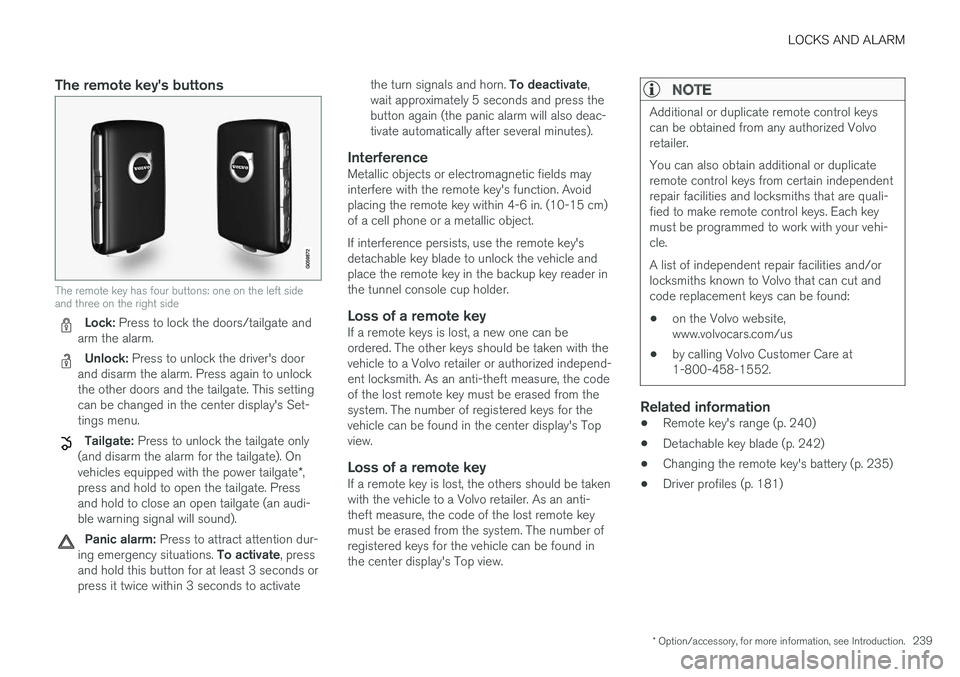
The remote key has four buttons: one on the left sideand three on the right side
Lock: Press to lock the doors/tailgate andarm the alarm.
Unlock: Press to unlock the driver's doorand disarm the alarm. Press again to unlockthe other doors and the tailgate. This settingcan be changed in the center display's Set-tings menu.
Tailgate: Press to unlock the tailgate only(and disarm the alarm for the tailgate). Onvehicles equipped with the power tailgate*,press and hold to open the tailgate. Pressand hold to close an open tailgate (an audi-ble warning signal will sound).
Panic alarm: Press to attract attention dur-ing emergency situations. To activate, pressand hold this button for at least 3 seconds orpress it twice within 3 seconds to activate
the turn signals and horn. To deactivate,wait approximately 5 seconds and press thebutton again (the panic alarm will also deac-tivate automatically after several minutes).
Interference
Metallic objects or electromagnetic fields mayinterfere with the remote key's function. Avoidplacing the remote key within 4-6 in. (10-15 cm)of a cell phone or a metallic object.
If interference persists, use the remote key'sdetachable key blade to unlock the vehicle andplace the remote key in the backup key reader inthe tunnel console cup holder.
Loss of a remote key
If a remote keys is lost, a new one can beordered. The other keys should be taken with thevehicle to a Volvo retailer or authorized independ-ent locksmith. As an anti-theft measure, the codeof the lost remote key must be erased from thesystem. The number of registered keys for thevehicle can be found in the center display's Topview.
Loss of a remote key
If a remote key is lost, the others should be takenwith the vehicle to a Volvo retailer. As an anti-theft measure, the code of the lost remote keymust be erased from the system. The number ofregistered keys for the vehicle can be found inthe center display's Top view.
NOTE
Additional or duplicate remote control keyscan be obtained from any authorized Volvoretailer.
You can also obtain additional or duplicateremote control keys from certain independentrepair facilities and locksmiths that are quali-fied to make remote control keys. Each keymust be programmed to work with your vehi-cle.
A list of independent repair facilities and/orlocksmiths known to Volvo that can cut andcode replacement keys can be found:
•on the Volvo website,www.volvocars.com/us
•by calling Volvo Customer Care at1-800-458-1552.
Related information
•Remote key's range (p. 240)
•Detachable key blade (p. 242)
•Changing the remote key's battery (p. 235)
•Driver profiles (p. 181)
Page 243 of 584
LOCKS AND ALARM
* Option/accessory, for more information, see Introduction.241
Settings for the Red Key can be made by astandard remote key user from the center dis-
play's Top view under: SettingsSystem
Driver ProfileRed key.
Several of the vehicle's safety function cannot beturned off by a Red Key user.
The restrictions are designed to help reduce therisk of an accident and they cannot be changedby a Red Key user. These settings cannot bechanged by the Red Key's user.
Possible settings
The following settings can be made for a RedKey:
Speed Limiter * (On/Off)
•Setting interval: 30-160 mph (50-250 km/h)
•Default setting: 75 mph (120 km/h)
•Increments: 1 mph (1 km/h)
This symbol will appear in the instru-ment panel and the message RedkeySpeed limitation cannot beexceeded will be displayed if thedriver attempts to exceed the set maximumspeed.
See the article "Speed limiter" for additionalinformation.
Speed reminder (On/Off):
•Setting interval: 0-155 mph (0-250 km/h
•Default settings: 30, 45 and 55 mph (50, 70and 90 km/h.)
•Increments: 1 mph (1 km/h)
•Max. number of reminders: 6
Reduced max. volume (on/off)
•Default setting: On
Adaptive cruise control * (On/Off)
•Initial setting: On at the longest interval
•See the article "Adaptive cruise control" foradditional information
Safety functions
The following safety functions will always beactive for a Red Key user:
•Blind Spot Information (BLIS)*
•Lane Keeping Aid (LKA)*
•Distance Alert*
•City Safety*
•Driver Alert Control (DAC)*
•Road Sign Information (RSI)*
Related information
•Remote key (p. 238)
•Adaptive Cruise Control (ACC)* (p. 281)
•Speed limiter (SL)* (p. 267)
•Blind Spot Information (BLIS)* (p. 339)
•Driving lane assistance (p. 350)
•Distance Alert* (p. 279)
•City Safety™ (p. 326)
•Driver Alert Control (DAC) (p. 348)
•Road Sign Information (RSI)* (p. 346)
Page 248 of 584
||
LOCKS AND ALARM
* Option/accessory, for more information, see Introduction.246
Unlocking
Pull a door handle to unlock and open the dooror press the rubberized button under the tailgateopening control. The lock indicator light on thedashboard will go out to show that the vehicle isunlocked and the alarm has been disarmed.
The lock/unlock settings can be changed in thecenter display's Top view:
Go to: SettingsMy CarKeyless Unlockand select All Doors or Single Door.
Automatic relocking
If no door or the tailgate is opened within twominutes after being unlocked, the vehicle willautomatically relock.
Remote door unlock
The vehicle can be unlocked using the Volvo OnCall app.
Related information
•Remote key (p. 238)
•Remote key's range (p. 240)
•Detachable key blade (p. 242)
•Alarm (p. 256)
•Locking/unlocking from inside the vehicle(p. 246)
•Foot movement tailgate operation* (p. 243)
•Locking/unlocking the tailgate (p. 249)
Locking/unlocking from inside thevehicle
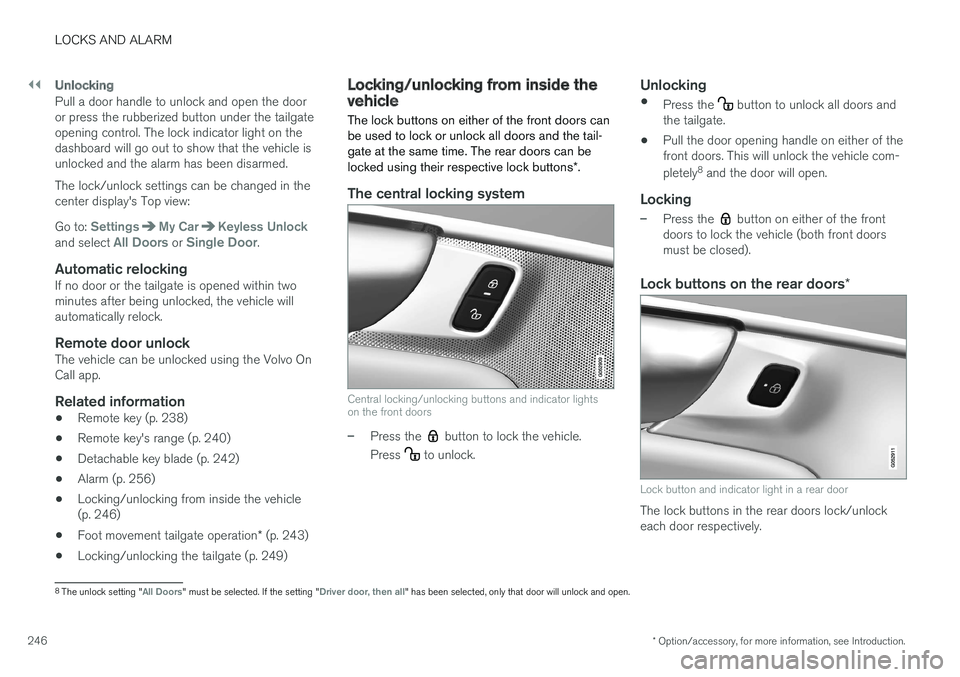
The lock buttons on either of the front doors canbe used to lock or unlock all doors and the tail-gate at the same time. The rear doors can belocked using their respective lock buttons*.
The central locking system
Central locking/unlocking buttons and indicator lightson the front doors
–Press the button to lock the vehicle.
Press to unlock.
Unlocking
•Press the button to unlock all doors andthe tailgate.
•Pull the door opening handle on either of thefront doors. This will unlock the vehicle com-
pletely8 and the door will open.
Locking
–Press the button on either of the frontdoors to lock the vehicle (both front doorsmust be closed).
Lock buttons on the rear doors *
Lock button and indicator light in a rear door
The lock buttons in the rear doors lock/unlockeach door respectively.
8The unlock setting "All Doors" must be selected. If the setting "Driver door, then all" has been selected, only that door will unlock and open.
Page 259 of 584
LOCKS AND ALARM
}}
* Option/accessory, for more information, see Introduction.257
the ignition has been put in mode I (turn thestart knob to START and release it): thealarm has been triggered
Related information
•Automatically arming/disarming the alarm(p. 255)
•Deactivating the alarm without a functioningremote key (p. 257)
Deactivating the alarm without afunctioning remote key
If the remote key is not functioning properly, thealarm can be turned off and the vehicle can bestarted as follows:
1. Unlock and open the driver's door with thedetachable key blade.
>This will trigger the alarm.
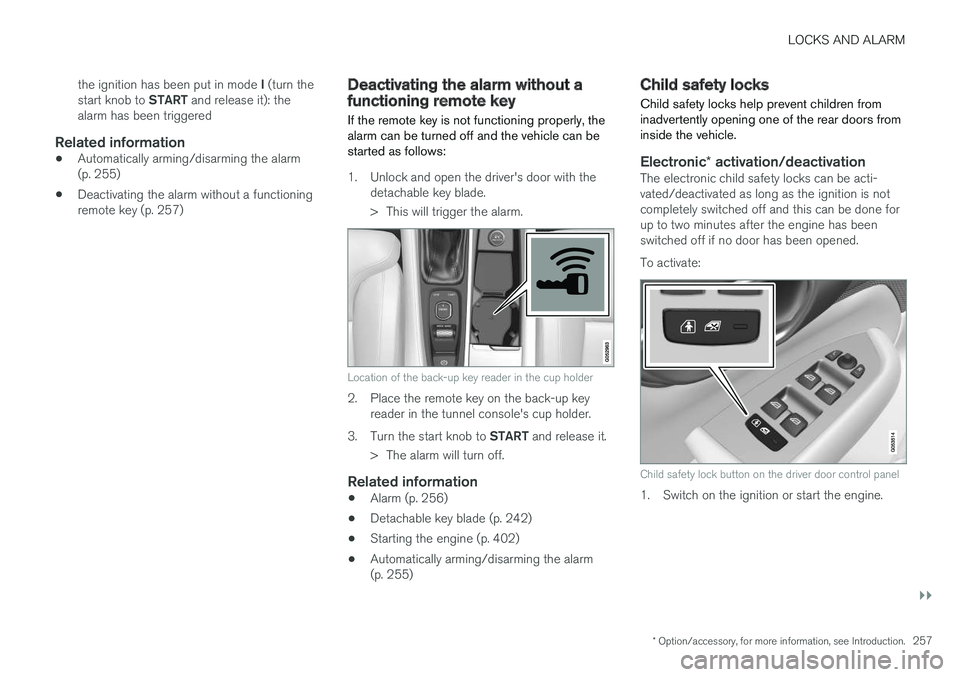
Location of the back-up key reader in the cup holder
2. Place the remote key on the back-up keyreader in the tunnel console's cup holder.
3.Turn the start knob to START and release it.
>The alarm will turn off.
Related information
•Alarm (p. 256)
•Detachable key blade (p. 242)
•Starting the engine (p. 402)
•Automatically arming/disarming the alarm(p. 255)
Child safety locks
Child safety locks help prevent children frominadvertently opening one of the rear doors frominside the vehicle.
Electronic * activation/deactivation
The electronic child safety locks can be acti-vated/deactivated as long as the ignition is notcompletely switched off and this can be done forup to two minutes after the engine has beenswitched off if no door has been opened.
To activate:
Child safety lock button on the driver door control panel
1. Switch on the ignition or start the engine.
Page 260 of 584

||
LOCKS AND ALARM
258
2. Press the button on the driver's door controlpanel.
>Rear child lock Activated will be dis-played in the instrument panel and theindicator light in the button will illuminateto show that the child safety locking func-tion is activated.
While the child safety locks are activated:
•the rear door windows can only be openedfrom the driver door control panel
•the rear doors cannot be opened from theinside
To deactivate:
–Press the button in the driver door controlpanel.
>Rear child lock Deactivated will be dis-played in the instrument panel and theindicator light in the button will go out toshow that the child safety locking functionis deactivated.
When the ignition is switched off, the current set-ting for the child safety locks will be stored. If thelocks were activated at that time, they will con-tinue to be activated when the ignition isswitched on again.
SymbolMessageExplanation
Rear childlockActivatedThe rear-doorchild safetylocks are acti-vated.
Rear childlockDeacti-vated
The rear-doorchild safetylocks are deacti-vated.
Manual activation/deactivation
Manual child safety locks in the rear doors
–Use the detachable key blade in the remotekey to adjust these controls.
The rear doors can only be opened from theoutside.
The rear doors can be opened from theinside or the outside.
NOTE
•Each control on the respective doorscontrol that door only, not both doors.
•There are no manual child safety locks onmodels equipped with the electronicoption.
Related information
•Detachable key blade (p. 242)
•Ignition modes (p. 400)
Page 406 of 584
||
STARTING AND DRIVING
404
NOTE
After a cold start, idle speed may be noticea-bly higher than normal for a short period. Thisis done to help bring components in theemission control system to their normal oper-ating temperature as quickly as possible,which enables them to control emissions andhelp reduce the vehicle's impact on the envi-ronment.
CAUTION
•When starting in cold weather, the auto-matic transmission may shift up at slightlyhigher engine speeds than normal untilthe automatic transmission fluid reachesnormal operating temperature.
•Do not race a cold engine immediatelyafter starting. Oil flow may not reachsome lubrication points fast enough toprevent engine damage.
•The engine should be idling when youmove the gear selector. Never accelerateuntil after you feel the transmissionengage. Accelerating immediately afterselecting a gear will cause harsh engage-ment and premature transmission wear.
•Selecting P or N when idling at a stand-still for prolonged periods of time will helpprevent overheating of the automatictransmission fluid.
Related information
•Ignition modes (p. 400)
•Turning the engine off (p. 404)
•Changing the remote key's battery (p. 235)
•Jump starting (p. 395)
Turning the engine off
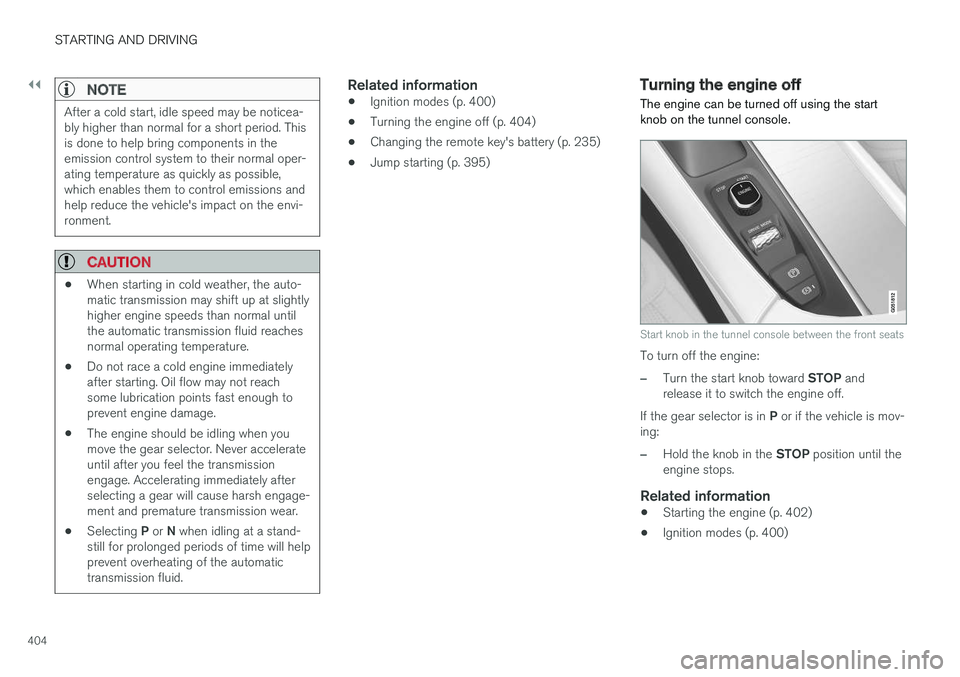
The engine can be turned off using the startknob on the tunnel console.
Start knob in the tunnel console between the front seats
To turn off the engine:
–Turn the start knob toward STOP andrelease it to switch the engine off.
If the gear selector is in P or if the vehicle is mov-ing:
–Hold the knob in the STOP position until theengine stops.
Related information
•Starting the engine (p. 402)
•Ignition modes (p. 400)
Page 450 of 584
INFOTAINMENT
* Option/accessory, for more information, see Introduction.448
SiriusXM Travel Link - Sports
This SiriusXM Travel Link service provides infor-mation sporting events, tournaments, teams, lea-gues, etc.
From the SiriusXM Travel Link home screen, todisplay sports information:
–Tap the Sports button to display the mainsports screen.
A number of Sports categories will be listed(Football, Baseball, Basketball, etc.)
Tap a sport to select a league in that sport (NFL,MLB, etc.) or a sport organization (PGA, LPGA,etc.).
The following is an example of the result oftapping Baseball:
1.MLB (Major League Baseball) will be dis-played.
2. Tap MLB to display the two leagues in MajorLeague Baseball (American League orNational League).
3. Tap one of the league names to display thedivisions in the league.
4. Tap one of the divisions to display:
•In progress: play-by-play informationabout a match/game/tournament cur-rently in progress. Continue tapping todisplay. In the detailed view, you can alsoselect a radio station that is currentlybroadcasting an ongoing sporting event
•Headlines for MLB: Tap to display briefheadline information
•Scheduled: schedules for comingmatches, games, etc.
•Scores: match/game results
The same principle applies to all sports.
Related information
•Using SiriusXM® Satellite radio radio*(p. 440)
Phone
A Bluetooth-enabled cell phone can be pairedand connected to the vehicle's integrated hands-free system.
The infotainment system offers hands-free func-tionality for remote-controlling a number of a cellphone's features. The phone's integrated controlscan also be used, even when it is connected tothe vehicle.
When the phone has been paired and connectedto the infotainment system, it can be used tomake or receive calls, send or receive text mes-sages, to stream music, etc., or as an Internetconnection.
The phone is controlled fromthe center display but the Appmenu (accessed using theright-side steering wheel key-pad) and voice commands canalso be used to control certainfunctions.