trailer VOLVO XC90 TWIN ENGINE HYBRID 2017 User Guide
[x] Cancel search | Manufacturer: VOLVO, Model Year: 2017, Model line: XC90 TWIN ENGINE HYBRID, Model: VOLVO XC90 TWIN ENGINE HYBRID 2017Pages: 584, PDF Size: 14.2 MB
Page 345 of 584

DRIVER SUPPORT
}}
* Option/accessory, for more information, see Introduction.343
Cross Traffic Alert (CTA)* limitations
CTA functionality may be reduced in certain sit-uations.
Limitations
CTA has limitations in certain situations, forexample, the CTA sensors cannot "see" throughother parked vehicles or obstructions.
The following are several examples where CTA's"field of vision" may initially be limited andapproaching vehicles cannot be detected untilthey are too close:
The vehicle is pulled far into a parking space
In angled parking spaces, CTA may be "blind" on oneside
CTA's blind area
CTA's "field of vision"
However, as you back your vehicle out of a park-ing space, CTA's "field of vision" expands.
Examples of other limitations include:
•Dirt, ice or snow obstructing the sensors mayreduce the system's function or make itimpossible to detect other vehicles orobjects.
•CTA is deactivated if a trailer's wiring is con-nected to the vehicle's electrical system.
Maintenance
The CTA sensors are located on the inside of therear fenders/bumper.
Keep the highlighted area clean (on both sides of thevehicle)
For the system to function optimally, the areaover and around the sensors must be kept clean.
Do not attach any objects, tape, decals, etc., onthe surface of the sensors.
CAUTION
Repairs to the BLIS/CTA systems and/orrepainting the rear bumper should only bedone by a trained and qualified Volvo servicetechnician.
Related information
•Cross Traffic Alert (CTA)* (p. 341)
•Activating/deactivating Cross Traffic Alert(CTA)* (p. 342)
Page 347 of 584

DRIVER SUPPORT
* Option/accessory, for more information, see Introduction.345
Blind Spot Information (BLIS)* with
Cross Traffic Alert (CTA)* symbolsand messages
In situations where Blind Spot Informationand/or Cross Traffic Alert are not functioning
properly or if the function is interrupted, a sym-bol and a text message may be displayed in theinstrument panel. Follow the instructions provi-ded.
The following table lists several symbols and messages:
MessageExplanation
Blind spot sensor
Service required
The system is not functioning properly. Contact a trained and qualified Volvo service technician
Blind spot system off
Trailer attached
BLIS and CTA have been deactivated because a trailer has been connected to teh vehicle's electrical system.
A text message can be erased by briefly pressingthe O button on the right-side steering wheelkeypad. If the message recurs, contact a trainedand authorized Volvo service technician orretailer.
Related information
•Cross Traffic Alert (CTA)* (p. 341)
•Blind Spot Information (BLIS)* (p. 339)
Page 350 of 584
DRIVER SUPPORT
* Option/accessory, for more information, see Introduction.348
Road Sign Information (RSI)*limitations
The RSI function may be limited in certain situa-tions.
RSI may have difficulty reading signs that are:
•Faded
•Located in a curve
•Twisted or damaged
•Positioned high above the road
•Obstructed (by bushes, etc.)
•Partially covered by snow, ice, etc.
•If the digital maps used by the SensusNavigation system* are not up-to-date or do
not contain speed information7.
The camera used by RSI has certain limitations.See the article "Camera limitations" for additionalinformation.
NOTE
RSI may perceive certain types of bicycleholders (with wiring attached to the trailerelectrical socket) as a trailer, which may resultin faulty speed limit information to the driver.
Related information
•Road Sign Information (RSI)* (p. 346)
•Road Sign Information (RSI)* operation(p. 346)
•Camera limitations (p. 323)
Driver Alert Control (DAC)
DAC is intended to alert the driver if his/her driv-ing becomes erratic due to e.g., distraction orfatigue.
DAC is designed to help detect a slowly chang-ing driving pattern. It is primarily intended to beused on main roads and is not meant for use incity traffic.
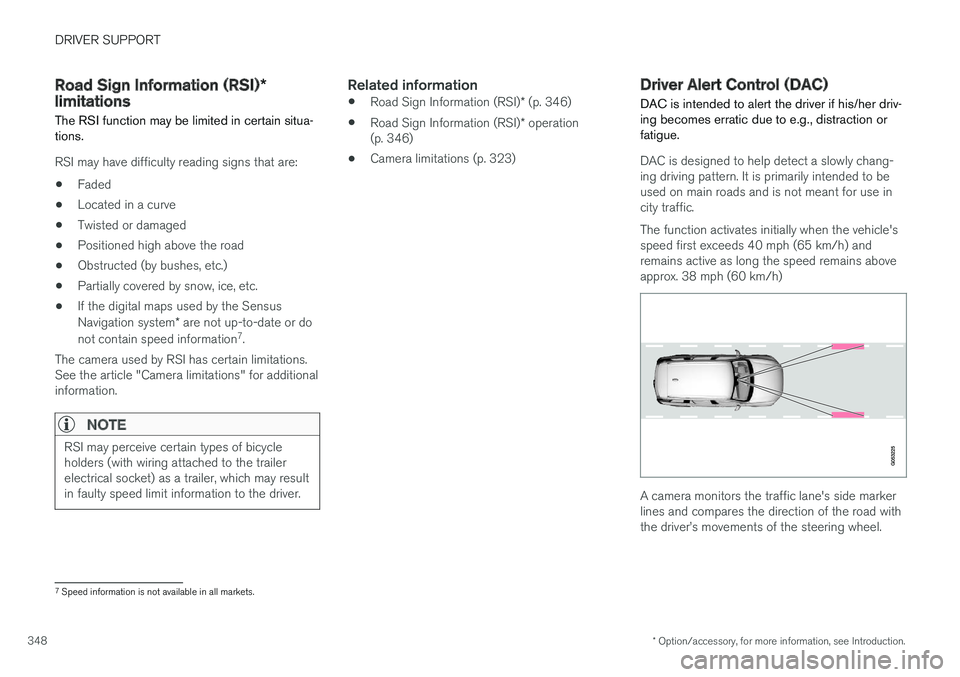
The function activates initially when the vehicle'sspeed first exceeds 40 mph (65 km/h) andremains active as long the speed remains aboveapprox. 38 mph (60 km/h)
A camera monitors the traffic lane's side markerlines and compares the direction of the road withthe driver
Page 360 of 584

DRIVER SUPPORT
* Option/accessory, for more information, see Introduction.358
Park Assist*
The Park Assist system is designed to assist youwhen driving into parking spaces, garages, etc.An audible signal and symbols in the instrumentpanel and center display indicate the distance tothe object.
Display view showing object zones and sensor sectors
The center display shows an overview of the vehi-cle in relation to objects that have been detected.
The highlighted sector shows which of the sen-sors has detected the object. The closer thehighlighted sector is to the vehicle symbol, thecloser the actual object is to your vehicle.
The Park Assist system uses an intermittent tonethat pulses faster as you come closer to anobject. Sound from the infotainment system willbe temporarily turned down.
The audible signals for objects in front of and tothe sides are active while the vehicle is movingand will stop after the vehicle has been stoppedfor approx. 2 seconds. The audible signals forobjects behind the vehicle are active even whenthe vehicle has stopped moving.
The audible signal becomes constant when youare within approximately 1 ft (30 cm) of an objectand the highlighted sensor field is filled in.
While an audible signal is being given, its volumelevel can be raised/lowered using the >II controlin the center console or can be adjusted in thecenter displays Top view under Settings.
NOTE
Audible alerts will only be provided for objectsthat are directly in the vehicle's path.
WARNING
Park Assist is an information system, NOT asafety system. This system is designed to bea supplementary aid when parking the vehicle.It is not, however, intended to replace the driv-er's attention and judgement.
Rear park assist
The system's rear sensors are activated automat-ically when the engine is started and are active ifthe vehicle rolls rearward with the gear selectorin N or if R has been selected.
The distance monitored behind the vehicle isapproximately 5 ft (1.5 m). The audible signalcomes from the rear speakers.
The rear sensors will be deactivated automaticallywhen towing a trailer if Volvo genuine trailer wir-ing is used. If a non-Volvo trailer hitch is beingused, it may be necessary to switch off the sys-tem manually.
Page 362 of 584
DRIVER SUPPORT
* Option/accessory, for more information, see Introduction.360
Park Assist limitations
The Park Assist system has certain limitations.
NOTE
A trailer hitch whose wiring is integrated withthe vehicle's electrical system will be takeninto account when measuring the availablespace behind the vehicle.
NOTE
•The system will not detect high objects,such as a loading dock, etc.
•Certain materials or fabrics may not bedetected by the sensors. Objects made ofthese materials or people wearing cloth-ing made of these fabrics may not bedetected.
•Children or animals near the vehicle maynot always be detected.
•Objects such as chains, thin shiny polesor low objects may temporarily not bedetected by the system. This may resultin the pulsing tone unexpectedly stoppinginstead of changing to a constant tone asthe vehicle approaches the object. Insuch cases, use caution when backing upor stop the vehicle to help avoid damage.
•In certain circumstances, the park assistsystem may give unexpected warning sig-nals that can be caused by externalsound sources that use the same ultra-sound frequencies as the system. Thismay include such things as the horns ofother vehicles, wet tires on asphalt, pneu-matic brakes, motorcycle exhaust pipes,other vehicles with similar ultrasound sys-tems, etc. This does not indicate a fault inthe system.
Cleaning the sensors
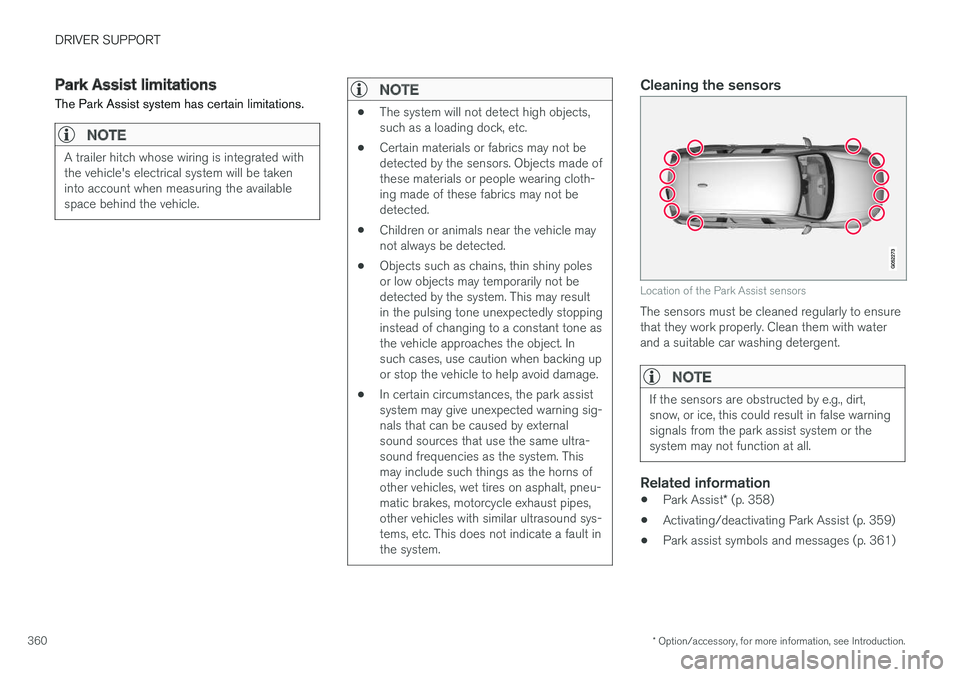
Location of the Park Assist sensors
The sensors must be cleaned regularly to ensurethat they work properly. Clean them with waterand a suitable car washing detergent.
NOTE
If the sensors are obstructed by e.g., dirt,snow, or ice, this could result in false warningsignals from the park assist system or thesystem may not function at all.
Related information
•Park Assist* (p. 358)
•Activating/deactivating Park Assist (p. 359)
•Park assist symbols and messages (p. 361)
Page 364 of 584

DRIVER SUPPORT
* Option/accessory, for more information, see Introduction.362
Park Assist Camera (PAC)*
The Park Assist Camera system is designed toprovide the driver with a view of the area aroundthe vehicle in the form of a camera image andgraphics in the center display.
PAC is a supplementary parking aid that can beactivated automatically when the gear selector isin R or by tapping a button in the center display,depending on the selected settings. See also thearticle "Starting the Park Assist Camera."
Lines: Guiding lines On/Off
Towbar: Guiding lines for a trailer hitch*11
On/Off
PAS: Park Assist On/Off
CTA: Cross Traffic Alert* On/Off
Zoom: Zoom in/out12
NOTE
A trailer hitch whose wiring is integrated withthe vehicle's electrical system will be takeninto account when measuring the availablespace behind the vehicle.
WARNING
•PAC is designed to be a supplementaryaid when parking the vehicle. It is not,however, intended to replace the driver
Page 365 of 584

DRIVER SUPPORT
* Option/accessory, for more information, see Introduction.363
Backing up
Location of the rear Park Assist Camera (generic illus-tration)
The rear camera shows a wide area behind thevehicle and on certain models, part of the bumperand the trailer hitch (if installed) will be visible.
Some objects on the screen may appear to “lean”slightly, which is normal.
WARNING
People/objects/obstructions displayed on thecenter console screen may be closer to thevehicle than they appear.
Front camera
Location of the front Park Assist Camera (generic illus-tration)
The front camera is located behind the grill andcan be useful when driving off in areas with lim-ited visibility (hedges, bushes, etc). It is active atspeeds up to approx. 16 mph (25 km/h) and isautomatically turned off when the vehicleexceeds this speed.
However, if the vehicle's speed does not exceed30 mph (50 km/h) and its speed goes under14 mph (22 km/h) within 60 seconds after thecamera has been switched off, the front camerawill reactivate.
NOTE
The front camera will only reactivate automati-cally if Auto Camera Reverse Activation
has been selected in SettingsMy CarPark Assist.
Side camera
The side cameras are located in the respectivedoor mirrors and shows views along the sides ofthe vehicle.
Related information
•Park Assist Camera (PAC)* trajectory linesand fields (p. 364)
•Park Assist Camera* (PAC) limitations(p. 367)
•Starting the Park Assist Camera (PAC)*(p. 366)
Page 366 of 584

DRIVER SUPPORT
* Option/accessory, for more information, see Introduction.364
Park Assist Camera (PAC)*trajectory lines and fields
The Park Assist Camera system uses trajectorylines and fields to indicate the vehicle's positionin relation to its immediate surroundings.
Trajectory lines
Sample guidelines
The trajectory lines are intended to show theposition of the vehicle's outermost dimensionsbased on the current position of the steeringwheel to help simplify parallel parking, backinginto tight spaces or when attaching a trailer.
The lines on the screen are projected as if theywere a path on the ground around the vehicleand are directly affected by the way in which thesteering wheel is turned. This enables the driverto see path the vehicle will take, even if he/sheturns the steering wheel.
These lines also indicate the outermost limits thatany object (door mirrors, corners of the body, atrailer hitch, etc.) extends out from the vehicle,even when it turns.
NOTE
When backing up with a trailer, the trajectorylines show the path that the vehicle will take,not the trailer.
Trajectory lines will not be displayed whilezooming in.
WARNING
Keep in mind that when the rear camera hasbeen selected, the image on the screen onlyshows the area behind the vehicle. The drivermust always watch for people, animals, othervehicles, etc., near the sides or the front of thevehicle when turning while backing up.
The opposite is true when the front camera isselected.
Please note that the trajectory lines show theshortest path. Be sure that the vehicle
Page 367 of 584

DRIVER SUPPORT
* Option/accessory, for more information, see Introduction.365
Trajectory lines for a trailer hitch (towbar)
Towbar: activate trajectory lines for a trailerhitch
Zoom: zoom in/out
The camera can help make hitching a trailer eas-ier by showing the "line" that the trailer hitch willtake toward the trailer.
1.Tap Towbar (1).
>The trajectory lines will be displayed andthe trajectory lines for the vehicle will dis-appear.
2.Tap Zoom (2) for a close-up view.
>The camera will zoom in.
Trajectory lines for the trailer hitch and the vehi-cle cannot be shown at the same time.
Front and rear sensor fields
If the vehicle is also equipped with the optionalPark Assist system, this information will be dis-played on the screen as colored field showingthe distance to obstacles that have beendetected.
Front and rear sensors
The screen can display colored sensor fields on the carsymbol at the right
The front and rear fields change colors (yellow-orange-red) as the vehicle moves closer to anobject.
Front/rear field col-orsDistance to the object
Yellow2.0–4.9 ft (0.6–1.5 m )
Orange1.3–2.0 ft (0.4–0.6 m)
Red0–1.3 ft (0–0.4 m)
Side sensors
The side fields will only be shown in orange.
Side field colorDistance to the object
Orange0–1.0 ft (0–0.3 m)
Related information
•Park Assist Camera (PAC)* (p. 362)
•Starting the Park Assist Camera (PAC)*(p. 366)
Page 371 of 584

DRIVER SUPPORT
}}
* Option/accessory, for more information, see Introduction.369
WARNING
•PAP does not function in all situationsand is only intended to assist the driverduring parallel or perpendicular parking.
•As the driver, you have full responsibilityfor parking the vehicle in a safe manner.
Related information
•Using Park Assist Pilot (PAP)* (p. 369)
•Park Assist Pilot (PAP)* limitations (p. 372)
•Park Assist Pilot (PAP)* symbols and mes-sages (p. 374)
Using Park Assist Pilot (PAP)*
Park Assist Pilot (PAP) gives the driver instruc-tions during the parking procedure. The functioncan also assist when leaving a parking space.
NOTE
While PAP is active, the driver's task is to:
•carefully monitor the area around thevehicle
•follow the instructions provided in thecenter display
•select a gear (D or R) when prompted
•regulate the vehicle's speed
•apply the brakes when necessary andstop the vehicle
Symbols, images and text in the center displayindicate when the various steps in the parkingprocedure will be carried out.
PAP can be activated if the following conditionsare met after the engine has started:
•The vehicle may not be towing a trailer.
•The vehicle's speed must be below approx.20 mph (30 km/h).
•The distance between the vehicle and aparking space must be between 1.6-5.0 ft(0.5-1.5 m)
NOTE
If a trailer hitch is configured in the vehicle'selectrical system, PAP will take the trailerhitch into consideration when determining thenecessary size of a parking space.
Parking
Procedure for parking:
1. The system searches for and measures apossible parking space.
2. The vehicle is steered while it is backing intothe parking space.
3. The vehicle's position is adjusted in the park-ing space by moving forward and rearward.