lock VOLVO XC90 TWIN ENGINE HYBRID 2017 Service Manual
[x] Cancel search | Manufacturer: VOLVO, Model Year: 2017, Model line: XC90 TWIN ENGINE HYBRID, Model: VOLVO XC90 TWIN ENGINE HYBRID 2017Pages: 584, PDF Size: 14.2 MB
Page 169 of 584

INSTRUMENTS AND CONTROLS
* Option/accessory, for more information, see Introduction.167
•Moving the second row seats forward/rear-ward (p. 176)
•Adjusting the second row backrest tilt(p. 177)
Manually operated front seats
The front seats can be adjusted in a number ofways to help provide the most comfortable seat-ing position.
Raise/lower the front edge of seat cushionby pumping up/down
Move the seat forward/rearward by pullingthe bar upward and moving the seat.
Change lumbar support by pressing the but-ton*
Raise/lower the seat by moving the controlup/down
Change backrest tilt by turning the wheel
WARNING
•Do not adjust the seat while driving. Theseat should be adjusted so that the brakepedal can be depressed fully. In addition,position the seat as far rearward as com-fort and control allow.
•Check that the seat is securely lockedinto position after adjusting.
Related information
•Turning seat heating* on and off (p. 210)
•Power front seats* (p. 168)
•Multifunctional front seats* (p. 170)
•Seat belts (p. 66)
Page 170 of 584
INSTRUMENTS AND CONTROLS
* Option/accessory, for more information, see Introduction.168
Power front seats*
The power front seats offer a number of adjust-ment possibilities to help maximize comfort andergonomics.
The power seats have an overload protector thatactivates if a seat is blocked by any object. If thisoccurs, put the ignition in mode I or 0 and waitfor a short period before operating the seatagain.
The power seat(s) can be adjusted for a shortperiod after unlocking the door with the remotekey without switching the ignition on. Seat adjust-ment can always be made when the engine isrunning.
Related information
•Multifunctional front seats* (p. 170)
•Adjusting power front seats* (p. 168)
•Using the power seat memory function*(p. 169)
•Manually operated front seats (p. 167)
•Turning seat heating* on and off (p. 210)
•Turning front seat ventilation* on and off(p. 211)
•Easy access to and from the driver seat(p. 174)
Adjusting power front seats*
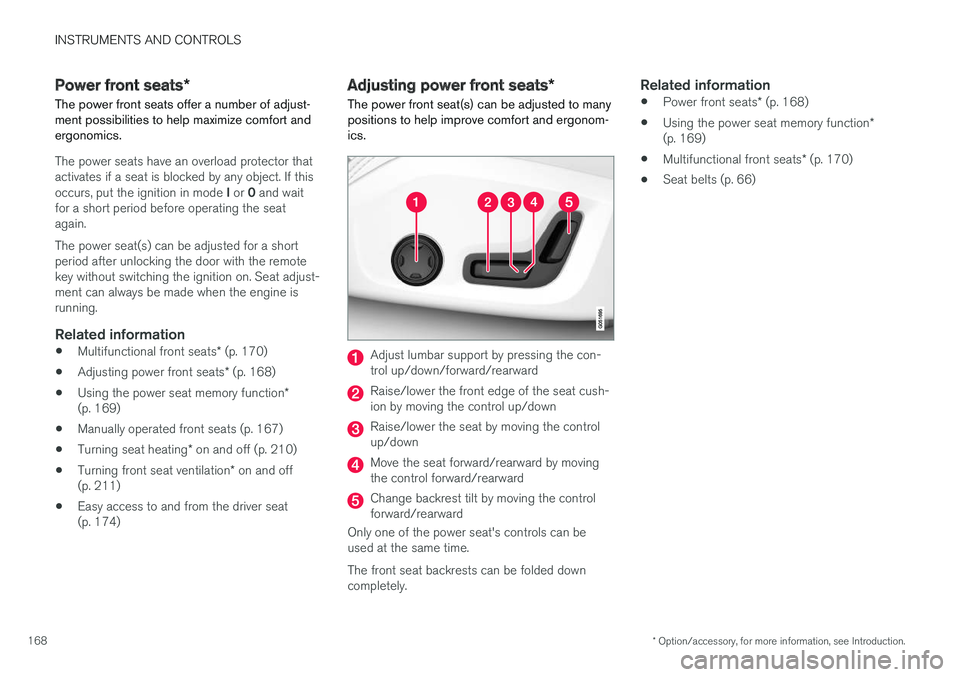
The power front seat(s) can be adjusted to manypositions to help improve comfort and ergonom-ics.
Adjust lumbar support by pressing the con-trol up/down/forward/rearward
Raise/lower the front edge of the seat cush-ion by moving the control up/down
Raise/lower the seat by moving the controlup/down
Move the seat forward/rearward by movingthe control forward/rearward
Change backrest tilt by moving the controlforward/rearward
Only one of the power seat's controls can beused at the same time.
The front seat backrests can be folded downcompletely.
Related information
•Power front seats* (p. 168)
•Using the power seat memory function*(p. 169)
•Multifunctional front seats* (p. 170)
•Seat belts (p. 66)
Page 179 of 584

INSTRUMENTS AND CONTROLS
}}
177
Related information
•Rear seats (p. 175)
•Getting into and out of the third row of seats(p. 179)
Adjusting the second row backresttilt
Backrest tilt can be adjusted separately for eachof the second row seats.
Center seat
1. Pull the strap on the center seat's right side.
2.Adjust backrest tilt forward/rearward bydecreasing/increasing pressure on it.
3. Release the strap to lock the backrest in thenew position and press the backrest until itslock engages.
Outboard seats
1. Pull the handle on the side of the seatupward.
2.Adjust backrest tilt forward/rearward bydecreasing/increasing pressure on it.
3. Release the handle to lock the backrest inthe new position and press the backrest untilits lock engages.
WARNING
Check that all backrests are securely lockedin place after changing the tilt angle.
Related information
•Rear seats (p. 175)
•Moving the second row seats forward/rear-ward (p. 176)
Page 180 of 584

INSTRUMENTS AND CONTROLS
* Option/accessory, for more information, see Introduction.178
•Folding the second row backrests (p. 178)
•Seat belts (p. 66)
Folding the second row backrests
The second row of seats has three individualseating positions whose backrests can befolded down separately.
CAUTION
•To help avoid damage to the seat uphols-tery, before a rear seat backrest is foldeddown, remove any objects from the seatand ensure that the seat belts are notbuckled.
•The integrated booster cushion* in thecenter position must be stowed (foldeddown) before the backrest is foldeddown.
•The center seating position armrest mustbe folded up before the backrest isfolded down.
NOTE
•It may be necessary to adjust the frontseat backrests and/or move these seatsforward in order to fold down the rearseat backrests completely.
•It may also be necessary to move thesecond row of seats rearward.
WARNING
Adjust the seat and be sure it is locked in thenew position before driving.
Center seat
To fold down the backrest:
1.Fold down the head restraint manually.
2. Pull the strap on the center seat's right side.
3. Fold the backrest down until it locks in posi-tion. The seat cushion will move downward/forward as the backrest is folded down tocreate a flat surface.
To return the backrest to the upright position:
1. Pull the strap.
2. Fold the backrest and release the strap.Push it into position until its lock engages.
Page 181 of 584
INSTRUMENTS AND CONTROLS
}}
* Option/accessory, for more information, see Introduction.179
3.Adjust the head restraint if necessary.
Outboard seats
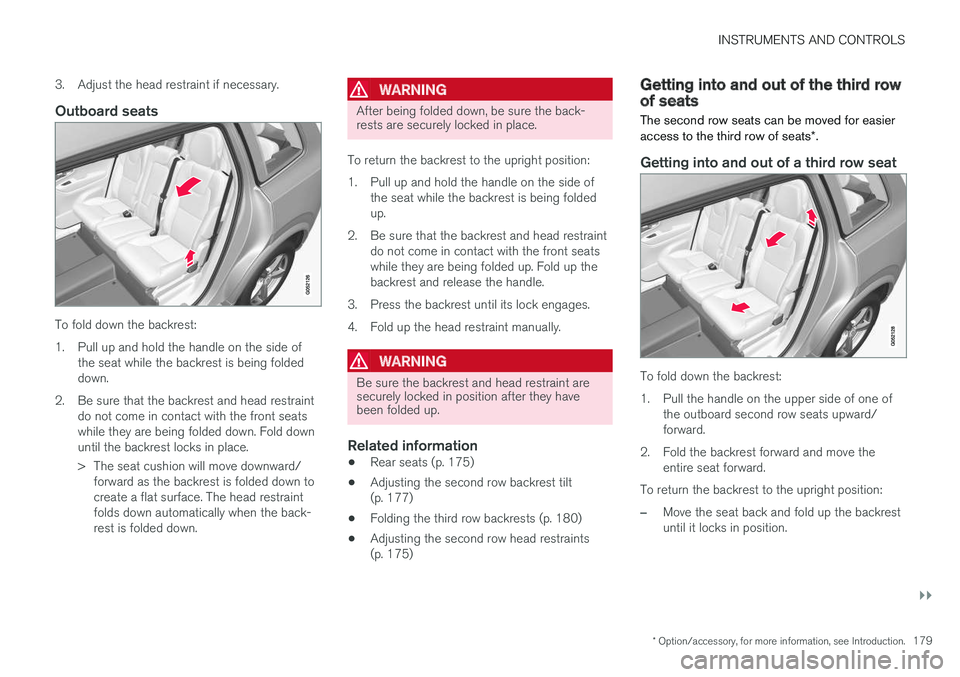
To fold down the backrest:
1.Pull up and hold the handle on the side ofthe seat while the backrest is being foldeddown.
2. Be sure that the backrest and head restraintdo not come in contact with the front seatswhile they are being folded down. Fold downuntil the backrest locks in place.
> The seat cushion will move downward/forward as the backrest is folded down tocreate a flat surface. The head restraintfolds down automatically when the back-rest is folded down.
WARNING
After being folded down, be sure the back-rests are securely locked in place.
To return the backrest to the upright position:
1.Pull up and hold the handle on the side ofthe seat while the backrest is being foldedup.
2. Be sure that the backrest and head restraintdo not come in contact with the front seatswhile they are being folded up. Fold up thebackrest and release the handle.
3. Press the backrest until its lock engages.
4. Fold up the head restraint manually.
WARNING
Be sure the backrest and head restraint aresecurely locked in position after they havebeen folded up.
Related information
•Rear seats (p. 175)
•Adjusting the second row backrest tilt(p. 177)
•Folding the third row backrests (p. 180)
•Adjusting the second row head restraints(p. 175)
Getting into and out of the third rowof seats
The second row seats can be moved for easieraccess to the third row of seats*.
Getting into and out of a third row seat
To fold down the backrest:
1.Pull the handle on the upper side of one ofthe outboard second row seats upward/forward.
2. Fold the backrest forward and move theentire seat forward.
To return the backrest to the upright position:
–Move the seat back and fold up the backrestuntil it locks in position.
Page 182 of 584

||
INSTRUMENTS AND CONTROLS
* Option/accessory, for more information, see Introduction.180
WARNING
Be sure the backrest and head restraint aresecurely locked in position after they havebeen folded up.
Related information
•Moving the second row seats forward/rear-ward (p. 176)
•Adjusting the second row backrest tilt(p. 177)
•Folding the second row backrests (p. 178)
Folding the third row backrests
The third row of seats has two individual seatingpositions that can be folded down manually orelectrically*.
NOTE
Before folding down the third row seats, itmay be necessary to change the position/tiltof the seats in the second row.
1. Pull the handle on the upper side of thebackrest upward/forward.
2.Be sure that the backrest and head restraintdo not come in contact with the seat aheadwhile they are being folded down. Fold thebackrest down.
> The seat cushion will move downward/forward as the backrest is folded down tocreate a flat surface. The head restraintfolds down automatically when the back-rest is folded down.
To return the backrest to the upright position,fold the backrest up until it locks in position. Thehead restraint has to be folded up manually.
WARNING
Be sure the backrest and head restraint aresecurely locked in position after they havebeen folded up.
Related information
•Rear seats (p. 175)
•Adjusting the second row head restraints(p. 175)
•Adjusting the second row backrest tilt(p. 177)
•Moving the second row seats forward/rear-ward (p. 176)
Page 183 of 584
INSTRUMENTS AND CONTROLS
}}
181
Driver profiles
Many of the vehicle's settings can be adapted tothe driver's personal preferences and saved inone or more driver profiles.
The personal settings made are automaticallysaved in the active driver profile. Each remote keyis linked to a driver profile and when this key isused, the vehicle's settings are adapted accord-ing to the specific ones saved in that profile.
Which settings are saved in driver
profiles?
The settings that can be changed in the vehicleare either personal or global.
Changes made to personal settings are savedautomatically in the active (current) driver profile,assuming that this profile is not locked. See thearticle "Editing a driver profile" for additionalinformation.
Changes to global settings are not saved in aspecific driver profile but instead affect all driverprofiles.
Global settings
Global settings and parameters remain the sameregardless of which driver profile is currentlyactive.
Keyboard layout is an example of a global setting.If driver profile X is used to add additional key-board languages, these languages will also beavailable even if driver profile Y is used. This type
of global change is not specific to a single driverprofile.
Personal settings
If driver profile X has been used to e.g., set thebrightness for the center display, driver profile Ywill not be affected by this setting since it is spe-cific (personal) to driver profile X.
See also the article "Categories in Settings view"for an overview of global and personal settings.
Related information
•Editing a driver profile (p. 182)
•Categories in Settings view (p. 116)
Selecting a driver profile
The most recently selected driver profile will beused automatically the next time the vehicle isstarted. However, a different driver profile can beselected after the vehicle has started.
When the vehicle is started, the most recentlyselected driver profile will be shown at the top ofthe center display. There are two alternatives forchanging to another driver profile.
Alternative1:
1.Tap the name of the drive profile shown atthe top of the center display when the vehi-cle has been started.
> A list of driver profiles that can beselected will be displayed.
2. Select the desired profile.
3.Tap Confirm.
>The new driver profile has now beenselected and the system will load the set-tings stored in that profile.
Alternative 2:
1. Pull down the center display's Top view.
2.Tap Profile.
>A list of driver profiles that can beselected will be displayed.
3. Select the desired profile.
Page 184 of 584

||
INSTRUMENTS AND CONTROLS
182
4.Tap Confirm.
>The new driver profile has now beenselected and the system will load the set-tings stored in that profile.
Related information
•Driver profiles (p. 181)
•Editing a driver profile (p. 182)
•Linking a remote key to a driver profile(p. 183)
Editing a driver profile
The driver profiles can be edited to e.g., changetheir names or lock a profile.
All types of changes in driver profiles are made
from the center display's Top view: Settings
SystemDriver Profile.
Changing a profile's name
Changing a driver profile's name is done from theDriver Profile window:
1.Tap Edit Profile.
>A menu will open in which the profile canbe edited.
2.Tap the Profile Name box.
>A keyboard will be displayed and can be
used to change the name. Tap toclose the keyboard.
3.Save the changes by tapping Back/Close.
>The name has now been changed.
Locking/unlocking a driver profile
In some cases, it may be desirable to not savecertain settings in the active driver profile. Forthis reason, the profile can be locked. To lock/unlock a profile from the Driver Profile window:
1.Tap Edit Profile.
>A menu will open in which the profile canbe edited.
2.Tap Protect My Profile to lock/unlock theprofile.
3.Save the change by tapping Back/Close.
>When a profile is locked, settings that arechanged in the vehicle will not be savedautomatically in the profile and will have tosaved manually by tapping Savechanges. However, when the profile isunlocked, the changes will be saved auto-matically.
Resetting driver profile changes
Settings that have been changed and saved inone or more driver profiles can be reset.
NOTE
Global Reset is only possible when the vehi-cle is stationary.
Page 185 of 584
INSTRUMENTS AND CONTROLS
}}
183
1.Tap Settings in the center display's Topview.
2.Select SystemGlobal ResetResetPersonal Settings.
3.Select one of the following: Reset for theactive profile, Reset for all profiles orCancel.
Related information
•Driver profiles (p. 181)
•Resetting the settings view (p. 119)
•Using the center display keyboard (p. 36)
•Using the center display (p. 50)
•Selecting a driver profile (p. 181)
Linking a remote key to a driverprofile
A remote key can be linked to a driver profile,which means that all of the settings stored in thedriver profile will apply each time that particularremote key is used with the vehicle.
A remote key is not initially linked to a specificdriver profile. When the key is used to unlock thevehicle/start the engine for the first time, theGuest profile will be used.
A driver profile can be selected manually eachtime the vehicle is unlocked/started without aremote key being linked to that profile. When thevehicle is started, the most recently selecteddriver profile will be activated. If the key has previ-ously been linked to a driver profile, it is not nec-essary to manually select a profile when that par-ticular key is used.
Linking a remote key to a driver profile
for the first time
Select a profile to link to the remote key (if thatprofile is not already active).
1. Pull down the center display's Top view andtap Settings.
2.Tap SystemDriver Profile.
3. Tap the profile to be linked to the remotekey. The Guest profile cannot be linked to aremote key.
4.Open Top view in the center display and tap
SettingsSystemDriver ProfileEdit Profile.
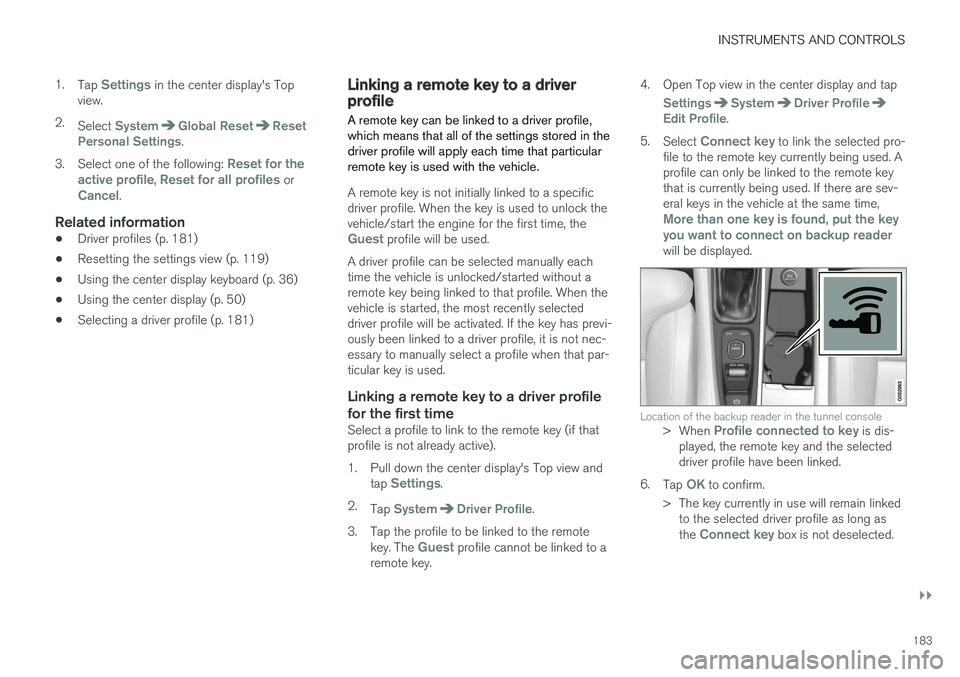
5.Select Connect key to link the selected pro-file to the remote key currently being used. Aprofile can only be linked to the remote keythat is currently being used. If there are sev-eral keys in the vehicle at the same time,More than one key is found, put the keyyou want to connect on backup readerwill be displayed.
Location of the backup reader in the tunnel console>When Profile connected to key is dis-played, the remote key and the selecteddriver profile have been linked.
6.Tap OK to confirm.
>The key currently in use will remain linkedto the selected driver profile as long asthe Connect key box is not deselected.
Page 191 of 584
CLIMATE
}}
* Option/accessory, for more information, see Introduction.189
Climate system sensors
The climate system's sensors help regulate thepassenger compartment temperature, humiditylevel, etc.
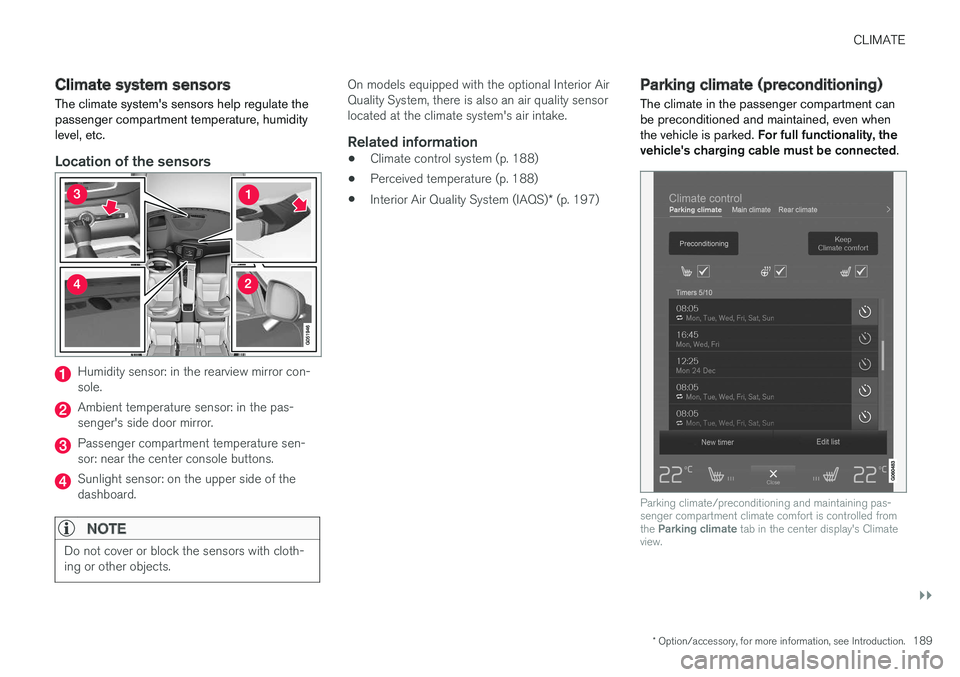
Location of the sensors
Humidity sensor: in the rearview mirror con-sole.
Ambient temperature sensor: in the pas-senger's side door mirror.
Passenger compartment temperature sen-sor: near the center console buttons.
Sunlight sensor: on the upper side of thedashboard.
NOTE
Do not cover or block the sensors with cloth-ing or other objects.
On models equipped with the optional Interior AirQuality System, there is also an air quality sensorlocated at the climate system's air intake.
Related information
•Climate control system (p. 188)
•Perceived temperature (p. 188)
•Interior Air Quality System (IAQS)* (p. 197)
Parking climate (preconditioning)
The climate in the passenger compartment canbe preconditioned and maintained, even whenthe vehicle is parked. For full functionality, thevehicle's charging cable must be connected.
Parking climate/preconditioning and maintaining pas-senger compartment climate comfort is controlled fromthe Parking climate tab in the center display's Climateview.