change wheel VOLVO XC90 TWIN ENGINE HYBRID 2017 Owners Manual
[x] Cancel search | Manufacturer: VOLVO, Model Year: 2017, Model line: XC90 TWIN ENGINE HYBRID, Model: VOLVO XC90 TWIN ENGINE HYBRID 2017Pages: 584, PDF Size: 14.2 MB
Page 20 of 584
||
INTRODUCTION
18
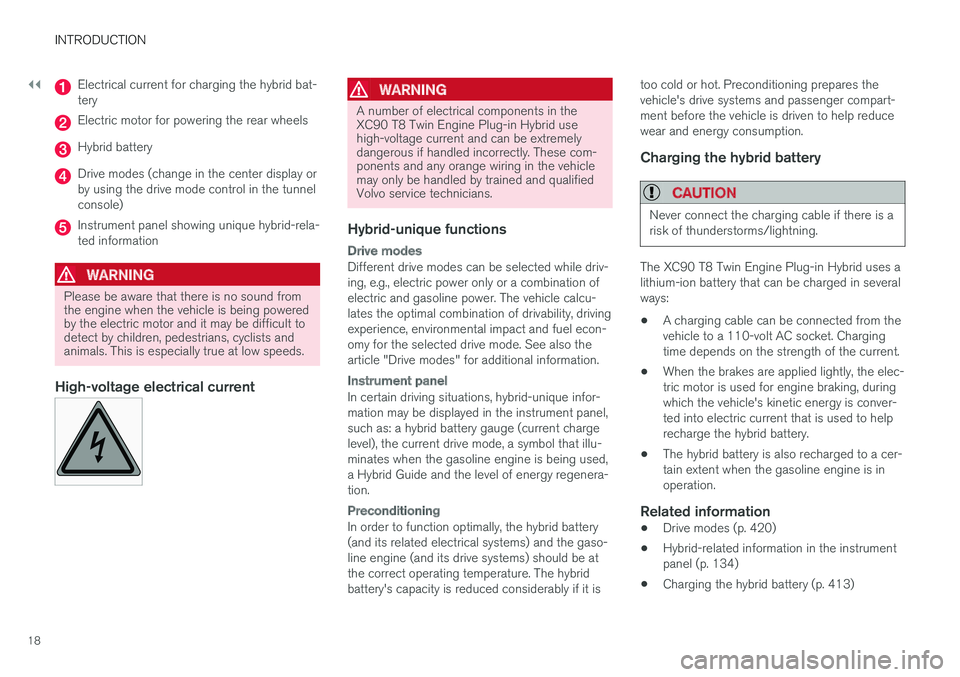
Electrical current for charging the hybrid bat-tery
Electric motor for powering the rear wheels
Hybrid battery
Drive modes (change in the center display orby using the drive mode control in the tunnelconsole)
Instrument panel showing unique hybrid-rela-ted information
WARNING
Please be aware that there is no sound fromthe engine when the vehicle is being poweredby the electric motor and it may be difficult todetect by children, pedestrians, cyclists andanimals. This is especially true at low speeds.
High-voltage electrical current WARNING
A number of electrical components in theXC90 T8 Twin Engine Plug-in Hybrid usehigh-voltage current and can be extremelydangerous if handled incorrectly. These com-ponents and any orange wiring in the vehiclemay only be handled by trained and qualifiedVolvo service technicians.
Hybrid-unique functions
Drive modes
Different drive modes can be selected while driv-ing, e.g., electric power only or a combination ofelectric and gasoline power. The vehicle calcu-lates the optimal combination of drivability, drivingexperience, environmental impact and fuel econ-omy for the selected drive mode. See also thearticle "Drive modes" for additional information.
Instrument panel
In certain driving situations, hybrid-unique infor-mation may be displayed in the instrument panel,such as: a hybrid battery gauge (current chargelevel), the current drive mode, a symbol that illu-minates when the gasoline engine is being used,a Hybrid Guide and the level of energy regenera-tion.
Preconditioning
In order to function optimally, the hybrid battery(and its related electrical systems) and the gaso-line engine (and its drive systems) should be atthe correct operating temperature. The hybridbattery's capacity is reduced considerably if it is
too cold or hot. Preconditioning prepares thevehicle's drive systems and passenger compart-ment before the vehicle is driven to help reducewear and energy consumption.
Charging the hybrid battery
CAUTION
Never connect the charging cable if there is arisk of thunderstorms/lightning.
The XC90 T8 Twin Engine Plug-in Hybrid uses alithium-ion battery that can be charged in severalways:
•A charging cable can be connected from thevehicle to a 110-volt AC socket. Chargingtime depends on the strength of the current.
•When the brakes are applied lightly, the elec-tric motor is used for engine braking, duringwhich the vehicle's kinetic energy is conver-ted into electric current that is used to helprecharge the hybrid battery.
•The hybrid battery is also recharged to a cer-tain extent when the gasoline engine is inoperation.
Related information
•Drive modes (p. 420)
•Hybrid-related information in the instrumentpanel (p. 134)
•Charging the hybrid battery (p. 413)
Page 104 of 584
||
INSTRUMENTS AND CONTROLS
102
The accuracy of this figure may vary if your driv-ing style changes. An economical driving style willgenerally increase this distance.
Distance to discharged battery
This gauge shows the approximate distance thatcan be driven on the charge remaining in thehybrid battery. When the gauge displays "----"there is no guaranteed driving charge remainingin the battery.
This calculation is based on the average electricalcurrent consumption in a normally loaded vehicleduring normal driving, and whether the A/C is onor off.
An economical driving style will generallyincrease this distance.
Distance using the electric motor
To get the optimal driving distance using theelectric motor, it is essential to conserve current.Functions that use a great deal of current (e.g.,audio system, electrical heating in the steeringwheel/door mirrors/rear window/seats, very coldair from the climate system, etc.) reduce the pos-sible driving distance.
NOTE
In addition to high electrical consumption inthe passenger compartment, fast accelera-tion, sudden braking, heavy loads, low ambienttemperatures and driving up hills can reducethe possible driving distance.
Tourist (alternative speedometer)
This is an alternative digital speedometer can beused when driving in areas in which the speedlimit is listed in a different unit of measure. If thespeedometer is in mph, this gauge will show thevehicle's speed in km/h and vice versa.
Related information
•Displaying trip computer information (p. 102)
•Displaying trip statistics (p. 104)
Displaying trip computerinformation
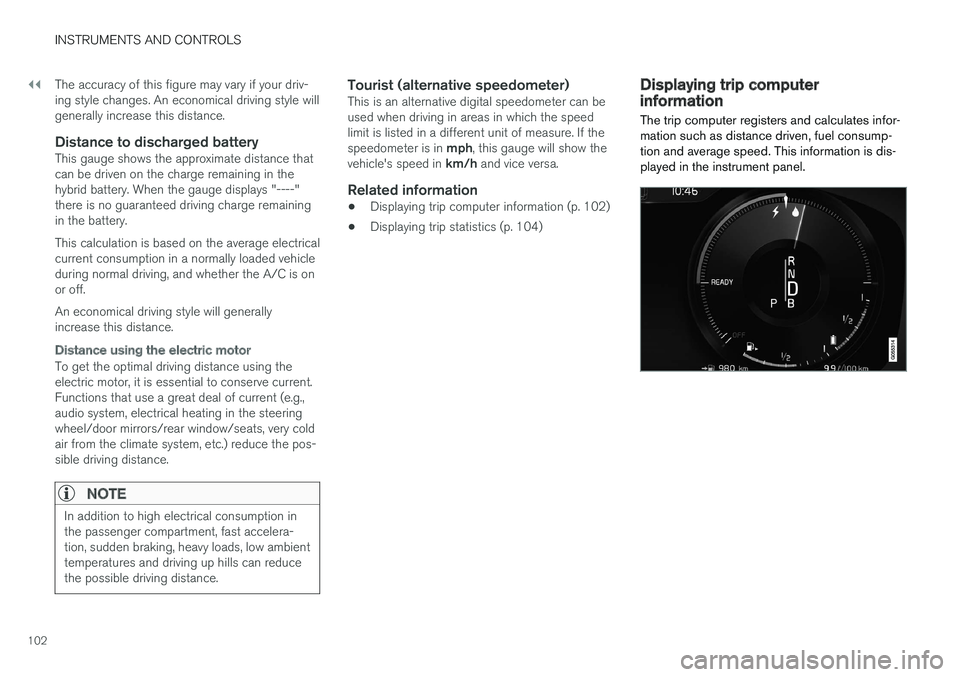
The trip computer registers and calculates infor-mation such as distance driven, fuel consump-tion and average speed. This information is dis-played in the instrument panel.
Page 105 of 584
INSTRUMENTS AND CONTROLS
* Option/accessory, for more information, see Introduction.103
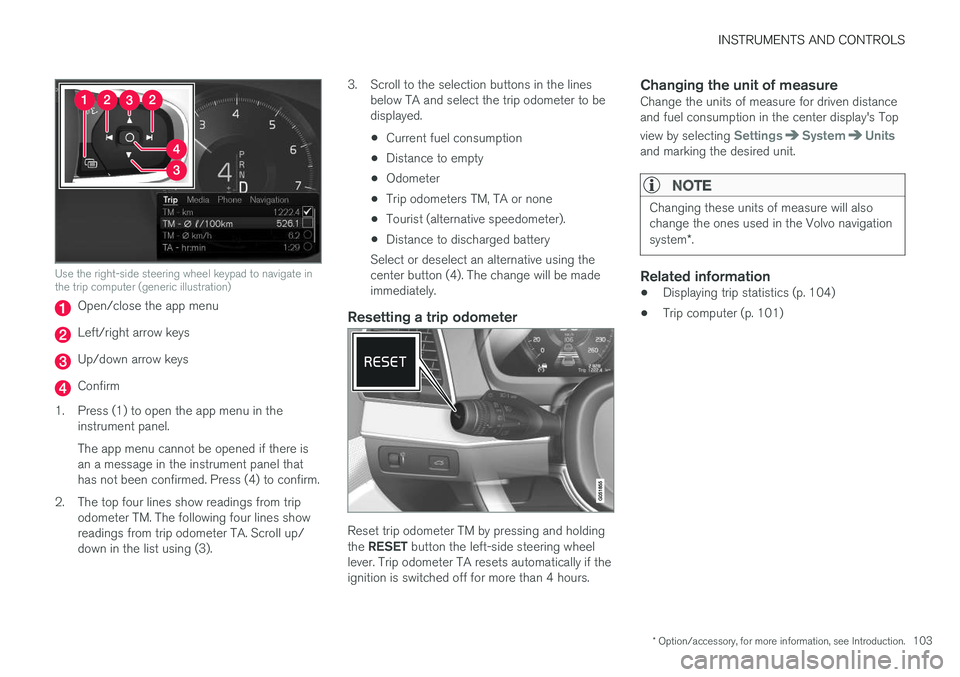
Use the right-side steering wheel keypad to navigate inthe trip computer (generic illustration)
Open/close the app menu
Left/right arrow keys
Up/down arrow keys
Confirm
1.Press (1) to open the app menu in theinstrument panel.
The app menu cannot be opened if there isan a message in the instrument panel thathas not been confirmed. Press (4) to confirm.
2. The top four lines show readings from tripodometer TM. The following four lines showreadings from trip odometer TA. Scroll up/down in the list using (3).
3. Scroll to the selection buttons in the linesbelow TA and select the trip odometer to bedisplayed.
•Current fuel consumption
•Distance to empty
•Odometer
•Trip odometers TM, TA or none
•Tourist (alternative speedometer).
•Distance to discharged battery
Select or deselect an alternative using thecenter button (4). The change will be madeimmediately.
Resetting a trip odometer
Reset trip odometer TM by pressing and holdingthe RESET button the left-side steering wheellever. Trip odometer TA resets automatically if theignition is switched off for more than 4 hours.
Changing the unit of measure
Change the units of measure for driven distanceand fuel consumption in the center display's Top
view by selecting SettingsSystemUnitsand marking the desired unit.
NOTE
Changing these units of measure will alsochange the ones used in the Volvo navigationsystem*.
Related information
•Displaying trip statistics (p. 104)
•Trip computer (p. 101)
Page 118 of 584
||
INSTRUMENTS AND CONTROLS
* Option/accessory, for more information, see Introduction.116
Changing a setting
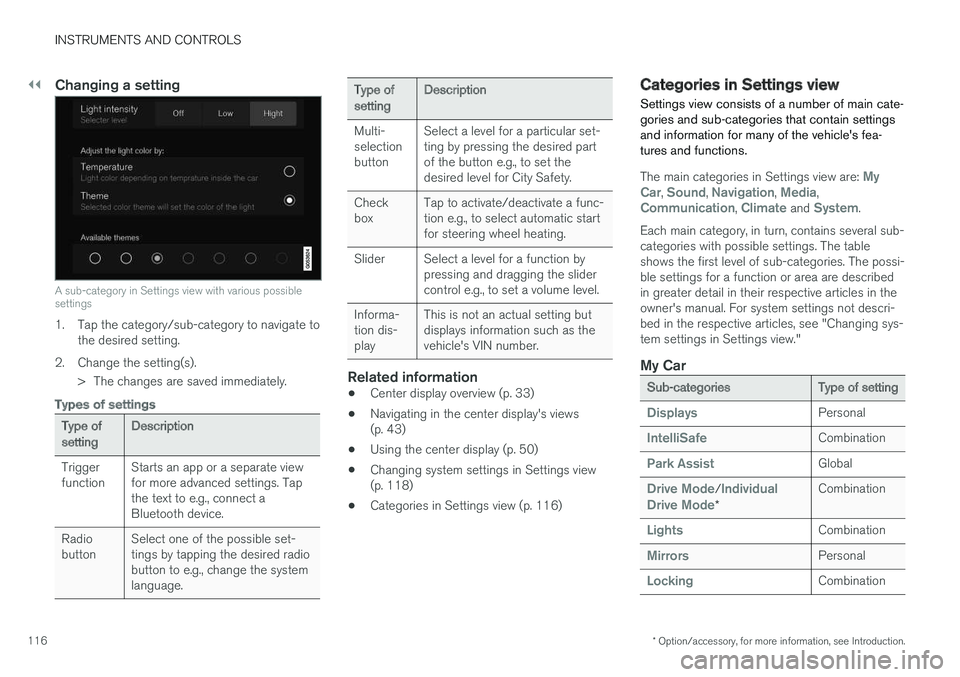
A sub-category in Settings view with various possiblesettings
1. Tap the category/sub-category to navigate tothe desired setting.
2.Change the setting(s).
> The changes are saved immediately.
Types of settings
Type ofsettingDescription
TriggerfunctionStarts an app or a separate viewfor more advanced settings. Tapthe text to e.g., connect aBluetooth device.
RadiobuttonSelect one of the possible set-tings by tapping the desired radiobutton to e.g., change the systemlanguage.
Type ofsettingDescription
Multi-selectionbutton
Select a level for a particular set-ting by pressing the desired partof the button e.g., to set thedesired level for City Safety.
CheckboxTap to activate/deactivate a func-tion e.g., to select automatic startfor steering wheel heating.
SliderSelect a level for a function bypressing and dragging the slidercontrol e.g., to set a volume level.
Informa-tion dis-play
This is not an actual setting butdisplays information such as thevehicle's VIN number.
Related information
•Center display overview (p. 33)
•Navigating in the center display's views(p. 43)
•Using the center display (p. 50)
•Changing system settings in Settings view(p. 118)
•Categories in Settings view (p. 116)
Categories in Settings view
Settings view consists of a number of main cate-gories and sub-categories that contain settingsand information for many of the vehicle's fea-tures and functions.
The main categories in Settings view are: MyCar, Sound, Navigation, Media,Communication, Climate and System.
Each main category, in turn, contains several sub-categories with possible settings. The tableshows the first level of sub-categories. The possi-ble settings for a function or area are describedin greater detail in their respective articles in theowner's manual. For system settings not descri-bed in the respective articles, see "Changing sys-tem settings in Settings view."
My Car
Sub-categoriesType of setting
DisplaysPersonal
IntelliSafeCombination
Park AssistGlobal
Drive Mode/IndividualDrive Mode*
Combination
LightsCombination
MirrorsPersonal
LockingCombination
Page 130 of 584
INSTRUMENTS AND CONTROLS
* Option/accessory, for more information, see Introduction.128
Climate system voice commands
Voice commands can be used to control the cli-mate system to e.g., change the temperature,activate seat heating* or change blower (fan)speed.
To use the voice control system, press the on the right-side steering wheel keypad and sayone of the following commands after the tone:
•"Climate": starts a command dialog andprovides examples of commands that can beused.
•"Set temperature to X degrees": sets thedesired temperature.
•"Raise temperature"/"Lowertemperature": raises/lowers the tempera-ture.
•"Sync temperature": synchronizes the tem-perature in all of the vehicle's climate zoneswith the one set for the driver's side.
•"Air on feet"/"Air on body": opens thedesired air vent.
•"Air on feet off"/"Air on body off": closesthe desired air vent.
•"Set fan to max"/"Turn off fan": changesthe blower speed to Max/Off.
•"Raise fan speed"/"Lower fan speed":raises/lowers the blower speed.
•"Turn on auto": activates automatic climatecontrol.
•"Air condition on"/"Air condition off":activates/deactivates the air conditioning.
•"Recirculation on"/"Recirculation off":activates/deactivates recirculation.
•"Turn on defroster "/"Turn off defroster":activates/deactivates window and door mirrordefrosting.
•"Turn on max defroster"/"Turn off maxdefroster": activates/deactivates maxdefroster.
•"Turn on electric defroster"/"Turn offelectric defroster": activates/deactivatesthe electrically heated windshield*.
•"Turn on rear defroster"/"Turn off reardefroster": activates/deactivates the electri-cally heated rear window and door mirrors.
•"Turn steering wheel heat on"/"Turnsteering wheel heat off": activates/deacti-vates the electrically heated steering wheel*.
•"Raise steering wheel heat"/"Lowersteering wheel heat": raises/lowers theheating level for the electrically heated steer-ing wheel*.
•"Turn on seat heat"/"Turn off seat heat":activates/deactivates the electrically heatedseats*.
•"Raise seat heat"/"Lower seat heat": rai-ses/lowers the heating level for the electri-cally heated seats*.
•"Turn on seat ventilation"/"Turn off seatventilation": activates/deactivates seat ven-tilation*.
•"Raise seat ventilation"/"Lower seatventilation": raises/lowers the level for seatventilation*.
Related information
•Climate system controls (p. 199)
•Voice control (p. 125)
•Using voice commands (p. 125)
Page 131 of 584

INSTRUMENTS AND CONTROLS
129
Navigation system voice commands
Many of the navigation system's functions canbe activated using voice commands.
The procedure for using voice control is descri-bed in greater detail in the articles "Voice con-trol," "Using voice control" and "Voice controlsettings."
Voice commands
The following list contains examples of com-mands that are unique to navigation system.
To use the voice control system, press the on the right-side steering wheel keypad and sayone of the following commands after the tone:
•"Navigation": Starts a navigation voice com-mand dialog and displays available com-mands.
•"Take me home": Guidance will be given tothe location set as Home.
•"Go to [City]": Enter a city as a destination,e.g., "Go to New York."
•"Go to [Address]": Enter an address as adestination, e.g., Go to 125 43 St., NewYork."
•"Go to Intersection": Starts a dialog wheretwo street names are entered. The destina-tion will then be the intersection of the twostreets.
•"Go to [Zip code]": Enter a zip code as adestination, e.g., "Go to 07405."
•"Go to [Name]": Enter a name from a list ofcontacts e.g., "Go to John Smith."
•"Search [POI category] in [City]": The listof results will be sorted around the center ofthe selected city/town, e.g., Search restau-rants in Butler.
•Search [POI category]": For example,Search Yankee Stadium.
•"Change country/Change state":Changes the country/state in which a searchis conducted.
•"Show favorites": Shows a list of Favoritesin the center display's Top view.
•"Clear itinerary": Deletes all intermediatedestinations in an itinerary.
•"Repeat voice guidance": Repeats themost recent guidance instruction.
•"Pause guidance": Pauses guidance onthe map.
•"Resume guidance": Resumes guidanceon the map.
•"Turn off voice guidance": Turns voicenavigation guidance off.
•"Turn on voice guidance": Turns voicenavigation guidance on.
Related information
•Voice control (p. 125)
•Using voice commands (p. 125)
•Voice control settings (p. 130)
Page 135 of 584
INSTRUMENTS AND CONTROLS
}}
133
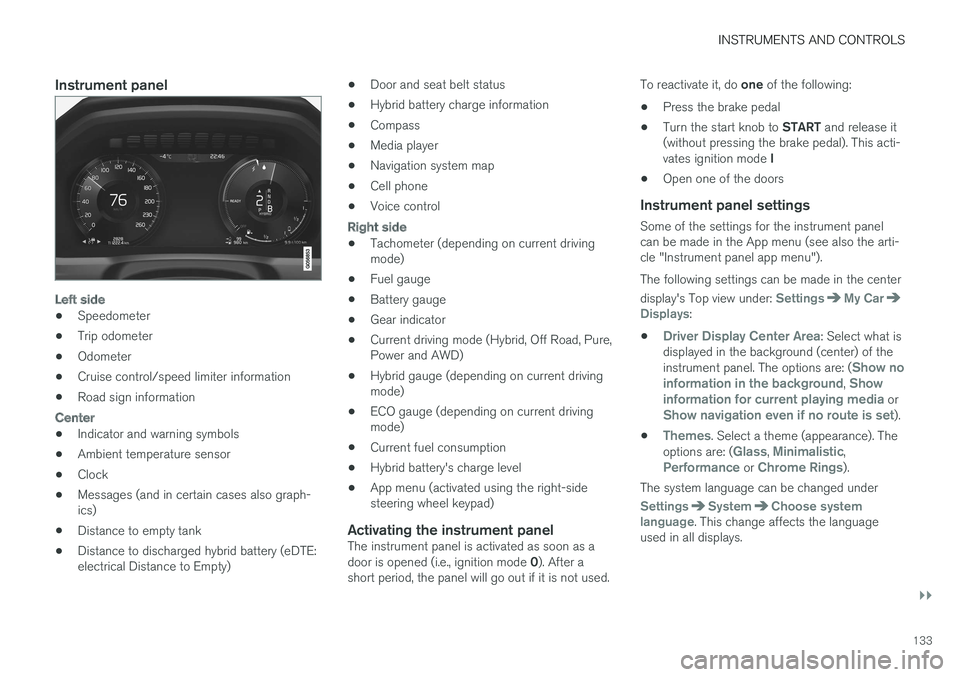
Instrument panel
Left side
•Speedometer
•Trip odometer
•Odometer
•Cruise control/speed limiter information
•Road sign information
Center
•Indicator and warning symbols
•Ambient temperature sensor
•Clock
•Messages (and in certain cases also graph-ics)
•Distance to empty tank
•Distance to discharged hybrid battery (eDTE:electrical Distance to Empty)
•Door and seat belt status
•Hybrid battery charge information
•Compass
•Media player
•Navigation system map
•Cell phone
•Voice control
Right side
•Tachometer (depending on current drivingmode)
•Fuel gauge
•Battery gauge
•Gear indicator
•Current driving mode (Hybrid, Off Road, Pure,Power and AWD)
•Hybrid gauge (depending on current drivingmode)
•ECO gauge (depending on current drivingmode)
•Current fuel consumption
•Hybrid battery's charge level
•App menu (activated using the right-sidesteering wheel keypad)
Activating the instrument panel
The instrument panel is activated as soon as adoor is opened (i.e., ignition mode 0). After ashort period, the panel will go out if it is not used.
To reactivate it, do one of the following:
•Press the brake pedal
•Turn the start knob to START and release it(without pressing the brake pedal). This acti-vates ignition mode I
•Open one of the doors
Instrument panel settings
Some of the settings for the instrument panelcan be made in the App menu (see also the arti-cle "Instrument panel app menu").
The following settings can be made in the center
display's Top view under: SettingsMy CarDisplays:
•Driver Display Center Area: Select what isdisplayed in the background (center) of theinstrument panel. The options are: (Show noinformation in the background, Showinformation for current playing media orShow navigation even if no route is set).
•Themes. Select a theme (appearance). Theoptions are: (Glass, Minimalistic,Performance or Chrome Rings).
The system language can be changed under
SettingsSystemChoose systemlanguage. This change affects the languageused in all displays.
Page 150 of 584

INSTRUMENTS AND CONTROLS
148
High and low beam headlights
If the ignition is in mode II or when the engine isstarted, the low beams are activated automati-
cally if the lighting ring is in position . Indark conditions, the low beams will also be on if
the lighting ring is in the position.
Lighting ring
High beam flash
Continuous high beams
High beam flash
Pull the lever slightly toward the steering wheel.The high beams illuminate until the lever isreleased.
Continuous high beams
Continuous high beams are available if the light-
ing ring is turned to 9 or . Toggle tohigh beams by moving the lever forward. Returnto low beams by moving the lever toward thesteering wheel.
The symbol will illuminate in the instrumentpanel when the high beams are on.
Active high beams
The active high beam system uses a camera atthe upper edge of the windshield to detect theheadlights of oncoming vehicles or the taillightsof a vehicle directly ahead. When this happens,the headlights will automatically switch from highbeams to low beams.
When the camera no longer detects anapproaching vehicle or one that is ahead, yourheadlights will switch back to high beams.
Vehicles with halogen headlights 10
When the camera no longer detects the head-lights of an approaching vehicle or the taillightsof a vehicle ahead, your headlights will switchback to high beams after several seconds.
Operation
Activate/deactivate this function by turning the
lighting ring past the position to .
When released, the ring will automatically return
to the position.
If the active high beam function has not beenactivated, switching between high and low beamsmust be done manually.
A white symbol () in the instrument panelindicates that the function has been activated.
When the high beams are on, the symbol willchange to blue.
NOTE
•Keep the windshield in front of the cam-era free of ice, snow, dirt, etc.
•Do not mount or in any way attach any-thing on the windshield that couldobstruct the camera.
If a message is displayed in the instru-ment panel saying that active highbeams are temporarily unavailable,switching between high and low beamswill have to be done manually. However, the light
switch can remain in the position. Thesame applies if a message saying that the wind-shield sensors are blocked and the symbol above
are displayed. The symbol will go out if thishappens.
9When the low beams are on.
10
Halogen headlights are not available on all models.
Page 156 of 584
||
INSTRUMENTS AND CONTROLS
* Option/accessory, for more information, see Introduction.154
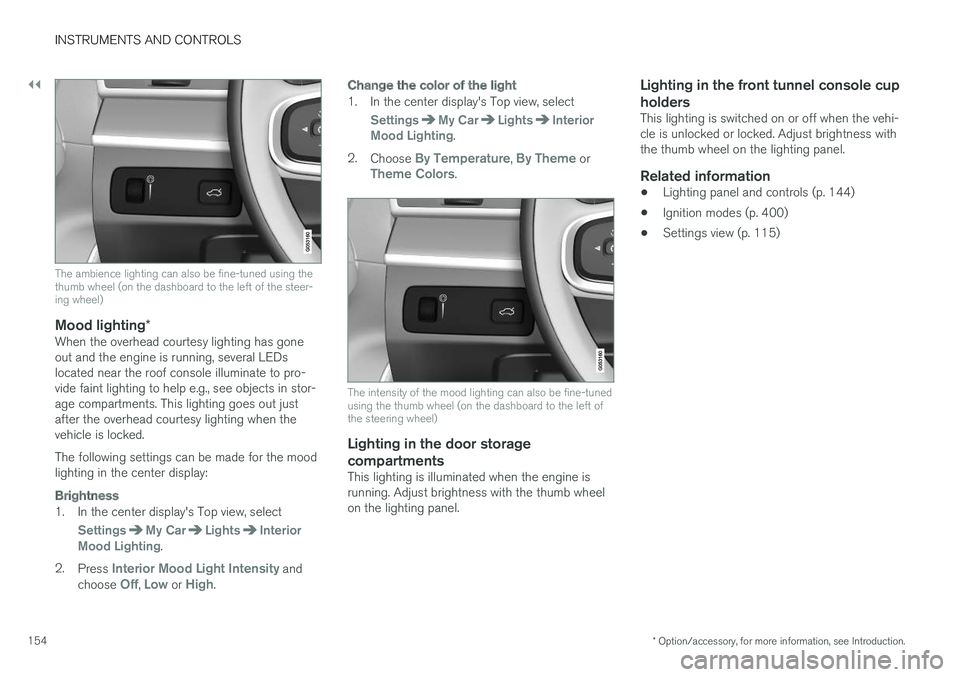
The ambience lighting can also be fine-tuned using thethumb wheel (on the dashboard to the left of the steer-ing wheel)
Mood lighting *
When the overhead courtesy lighting has goneout and the engine is running, several LEDslocated near the roof console illuminate to pro-vide faint lighting to help e.g., see objects in stor-age compartments. This lighting goes out justafter the overhead courtesy lighting when thevehicle is locked.
The following settings can be made for the moodlighting in the center display:
Brightness
1. In the center display's Top view, select
SettingsMy CarLightsInteriorMood Lighting.
2.Press Interior Mood Light Intensity andchoose Off, Low or High.
Change the color of the light
1. In the center display's Top view, select
SettingsMy CarLightsInteriorMood Lighting.
2.Choose By Temperature, By Theme orTheme Colors.
The intensity of the mood lighting can also be fine-tunedusing the thumb wheel (on the dashboard to the left ofthe steering wheel)
Lighting in the door storage
compartments
This lighting is illuminated when the engine isrunning. Adjust brightness with the thumb wheelon the lighting panel.
Lighting in the front tunnel console cup
holders
This lighting is switched on or off when the vehi-cle is unlocked or locked. Adjust brightness withthe thumb wheel on the lighting panel.
Related information
•Lighting panel and controls (p. 144)
•Ignition modes (p. 400)
•Settings view (p. 115)
Page 168 of 584
INSTRUMENTS AND CONTROLS
* Option/accessory, for more information, see Introduction.166
Adjusting the steering wheel
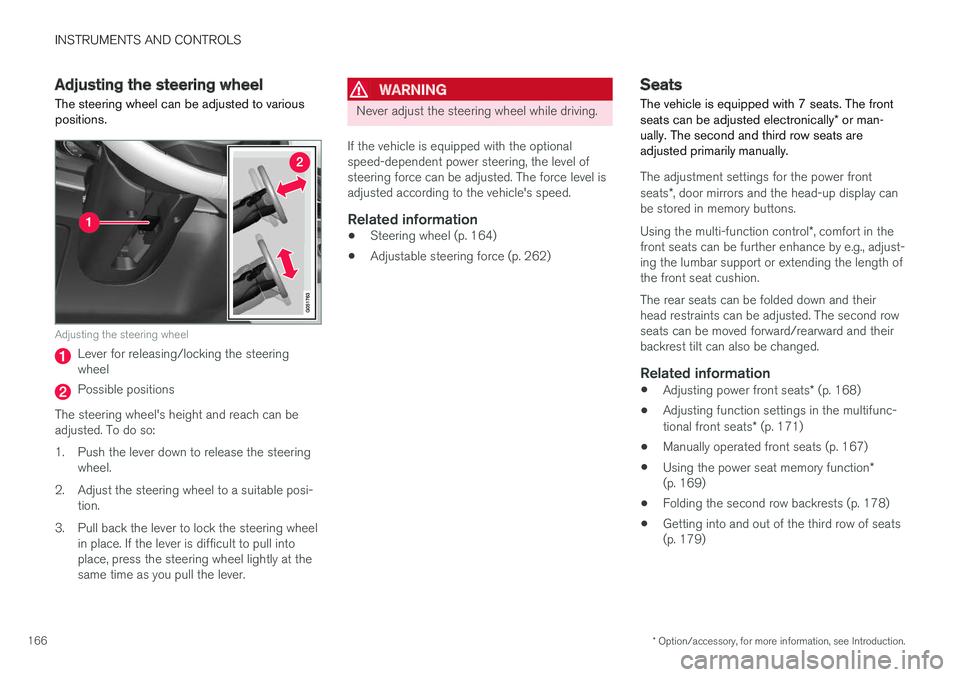
The steering wheel can be adjusted to variouspositions.
Adjusting the steering wheel
Lever for releasing/locking the steeringwheel
Possible positions
The steering wheel's height and reach can beadjusted. To do so:
1.Push the lever down to release the steeringwheel.
2. Adjust the steering wheel to a suitable posi-tion.
3. Pull back the lever to lock the steering wheelin place. If the lever is difficult to pull intoplace, press the steering wheel lightly at thesame time as you pull the lever.
WARNING
Never adjust the steering wheel while driving.
If the vehicle is equipped with the optionalspeed-dependent power steering, the level ofsteering force can be adjusted. The force level isadjusted according to the vehicle's speed.
Related information
•Steering wheel (p. 164)
•Adjustable steering force (p. 262)
Seats
The vehicle is equipped with 7 seats. The frontseats can be adjusted electronically* or man-ually. The second and third row seats areadjusted primarily manually.
The adjustment settings for the power frontseats*, door mirrors and the head-up display canbe stored in memory buttons.
Using the multi-function control*, comfort in thefront seats can be further enhance by e.g., adjust-ing the lumbar support or extending the length ofthe front seat cushion.
The rear seats can be folded down and theirhead restraints can be adjusted. The second rowseats can be moved forward/rearward and theirbackrest tilt can also be changed.
Related information
•Adjusting power front seats* (p. 168)
•Adjusting function settings in the multifunc-tional front seats* (p. 171)
•Manually operated front seats (p. 167)
•Using the power seat memory function*(p. 169)
•Folding the second row backrests (p. 178)
•Getting into and out of the third row of seats(p. 179)