reset VOLVO XC90 TWIN ENGINE HYBRID 2017 Owners Manual
[x] Cancel search | Manufacturer: VOLVO, Model Year: 2017, Model line: XC90 TWIN ENGINE HYBRID, Model: VOLVO XC90 TWIN ENGINE HYBRID 2017Pages: 584, PDF Size: 14.2 MB
Page 5 of 584
3
Top tether anchors92
Integrated booster cushion*93
Raising the integrated booster cushion*94
Stowing the integrated booster cushion*96
INSTRUMENTS AND CONTROLS
Instruments and controls100
Trip computer101
Displaying trip computer information102
Displaying trip statistics104
HomeLink® Wireless Control System*104
Programming the HomeLink® Wire-less Control System*105
Adjusting the power door mirrors108
Laminated panoramic roof*110
Operating the laminated panoramic roof*111
Power windows113
Operating the power windows113
Rearview mirror114
Using sun shades115
Settings view115
Categories in Settings view116
Changing system settings in Set-tings view118
Changing settings in apps119
Resetting the settings view119
Resetting user data when the vehiclechanges owners120
Ambient temperature sensor120
Clock121
Head-up display (HUD)*122
Voice control125
Using voice commands125
Voice control for cell phones126
Voice control for radio and media127
Climate system voice commands128
Navigation system voice commands129
Voice control settings130
Indicator symbols in the instrument panel130
Instrument panel132
Hybrid-related information in theinstrument panel134
Instrument panel licenses136
Warning symbols in the instrument panel141
Compass142
Calibrating the compass143
Lighting panel and controls144
Parking lights146
Daytime Running Lights (DRL)146
Low beam headlights147
High and low beam headlights148
Active Bending Lights*149
Rear fog lights (certain models only)150
Brake lights151
Hazard warning flashers151
Using turn signals151
Page 31 of 584
INTRODUCTION
}}
29
Driver distraction
Please keep the following warnings in mindwhen operating/servicing your vehicle.
A driver has a responsibility to do everything pos-sible to ensure his or her own safety and thesafety of passengers in the vehicle and otherssharing the roadway. Avoiding distractions is partof that responsibility.
Driver distraction results from driver activities thatare not directly related to controlling the vehiclein the driving environment. Your new Volvo is, orcan be, equipped with many feature-rich enter-tainment and communication systems. Theseinclude hands-free cellular telephones, navigationsystems, and multipurpose audio systems. Youmay also own other portable electronic devicesfor your own convenience. When used properlyand safely, they enrich the driving experience.Improperly used, any of these could cause a dis-traction.
For all of these systems, we want to provide thefollowing warning that reflects the strong Volvoconcern for your safety. Never use these devicesor any feature of your vehicle in a way that dis-tracts you from the task of driving safely. Distrac-tion can lead to a serious accident. In addition tothis general warning, we offer the following guid-ance regarding specific newer features that maybe found in your vehicle:
WARNING
•Never use a hand-held cellular telephonewhile driving. Some jurisdictions prohibitcellular telephone use by a driver whilethe vehicle is moving.
•If your vehicle is equipped with a naviga-tion system, set and make changes toyour travel itinerary only with the vehicleparked.
•Never program your audio system whilethe vehicle is moving. Program radio pre-sets with the vehicle parked, and use yourprogrammed presets to make radio usequicker and simpler.
•Never use portable computers or per-sonal digital assistants while the vehicleis moving.
Accessory installation
•We strongly recommend that Volvo ownersinstall only genuine, Volvo-approved acces-sories, and that accessory installations beperformed only by a trained and qualifiedVolvo service technician.
•Genuine Volvo accessories are tested toensure compatibility with the performance,safety, and emission systems in your vehicle.Additionally, a trained and qualified Volvoservice technician knows where accessoriesmay and may not be safely installed in yourVolvo. In all cases, please consult a trained
and qualified Volvo service technician beforeinstalling any accessory in or on your vehicle.
•Accessories that have not been approved byVolvo may or may not be specifically testedfor compatibility with your vehicle. Addition-ally, an inexperienced installer may not befamiliar with some of your car's systems.
•Any of your car's performance and safetysystems could be adversely affected if youinstall accessories that Volvo has not tested,or if you allow accessories to be installed bysomeone unfamiliar with your vehicle.
•Damage caused by unapproved or improperlyinstalled accessories may not be covered byyour new vehicle warranty. See your Warrantyand Service Records Information booklet formore warranty information. Volvo assumes noresponsibility for death, injury, or expensesthat may result from the installation of non-genuine accessories.
Page 69 of 584
SAFETY
}}
67
Seat belt pretensioners
The vehicle's seat belts are equipped with stand-ard and electric pretensioners that can help pullthe seat belts taut in a critical situation or a colli-sion. Some or all of the pretensioners will betriggered in certain types of collisions, depend-ing on the direction and severity of the impact.
Reversible seat belt pretensioners
Reversible seat belt pretensioners is a system inthe front seats that pulls the seat belts slightlytaut prior to a collision. This function helps posi-tion the front seat occupants to help improve theeffects of other safety systems, e.g., the airbagsystem.
Seat belt pretensioners in collisions
The seat belts are equipped with standard pre-tensioners that are triggered according to theseverity of a collision.
Seat belt pretensioners in critical
situations
In addition to the standard pretensioners, theseat belts in the front seats are also equippedwith electric pretensioners.
The pretensioners interact and can be triggeredalong with the City Safety and Rear CollisionWarning systems. In critical situations such assudden braking, evasive maneuvers, etc., the seatbelt can be pulled taut by the pretensioner'selectric motor.
The electric pretensioner positions the occupantin the seat to help reduce the risk of striking theinterior of the passenger compartment andimproves the effect of other safety systems suchas the airbags.
Resetting the electric pretensioners
When a critical situation has passed, the seat beltand the electric pretensioner are reset automati-cally.
If the seat belt should remain taut:
1. Stop the vehicle safely.
2. Unbuckle the seat belt and rebuckle it.
> The seat belt and the electric preten-sioner will be reset.
Related information
•Seat belts (p. 66)
•Door and seat belt reminders (p. 70)
•Buckling and unbuckling seat belts (p. 67)
Buckling and unbuckling seat belts
Seat belts should be used by all occupants inthe vehicle when it is in motion.
Page 81 of 584
SAFETY
79
WARNING
•Never try to open or repair any compo-nents of the IC system. This should bedone only by a trained and qualified Volvoservice technician.
•Never hang heavy items from the ceilinghandles. This could impede deploymentof the Inflatable Curtain.
•The cargo area and rear seat should notbe loaded to a level higher than 4 in.(10 cm) below the upper edge of the rearside windows. Objects placed higher thanthis level could impede the function ofthe Inflatable Curtain.
•In order for the IC to provide its best pro-tection, both front seat occupants andboth outboard rear seat occupants shouldsit in an upright position with the seat beltproperly fastened; adults using the seatbelt and children using the proper childrestraint system.
Related information
•Airbag system (p. 71)
•Side impact airbags (p. 77)
•Child safety (p. 81)
•Seat belts (p. 66)
Safety mode
As a safety precaution after a collision, the func-tionality of some of the vehicle's systems may bereduced.
If the vehicle has been involved in a collision, thetext Safety mode may appear in the informationdisplay.
NOTE
This text can only be shown if the display isundamaged and the vehicle's electrical sys-tem is intact.
Safety mode is a feature that is triggered if oneor more of the safety systems such as the front/side airbags inflatable curtain, etc., or one ormore of the seat belt pretensioners has deployed.The collision may have damaged an importantfunction in the vehicle, such as the fuel lines,sensors for one of the safety systems, the brakesystem, etc.
WARNING
•Never attempt to repair the vehicle your-self or to reset the electrical system afterthe vehicle has displayed Safety mode.This could result in injury or improper sys-tem function.
•Restoring the vehicle to normal operatingstatus should only be done by a trainedand qualified Volvo service technician.
•After Safety mode has been displayed, ifyou detect the odor of fuel vapor, or seeany signs of fuel leakage, do not attemptto start the vehicle. Leave the vehicleimmediately.
Related information
•Starting or moving a vehicle in safety mode(p. 80)
•General safety information (p. 62)
Page 82 of 584
SAFETY
80
Starting or moving a vehicle insafety mode
If Safety mode has been set, it may be possibleto start and move the vehicle, for example, if it isblocking traffic.
Starting the vehicle in safety mode
1. Check the vehicle for damage, particularly forfuel leakage or the smell of gasoline fumes.
If the damage to the vehicle is minor andthere is no fuel leakage/fumes, you mayattempt to start the engine and move thevehicle.
WARNING
If you smell gasoline fumes or detect fuelleakage while Safety mode See Owner'smanual is displayed in the instrument panel,do not attempt to start the vehicle. Leavethe vehicle immediately.
2.Turn the start knob to STOP and release it.
3.Try to start the vehicle.
>Vehicle start System check, wait willbe displayed in the instrument panel whilethe vehicle's electrical system attempts toreset to normal mode. This may take up toa minute.
4.When Vehicle start System check, wait isno longer displayed, try to start the vehicleagain.
WARNING
If the message Safety mode See Owner'smanual is still displayed, the vehicle shouldnot be driven and must be towed (lifted onto aflatbed tow truck. The vehicle may never betowed with the wheels on the ground). Con-cealed faults may make the vehicle difficult tocontrol.
Moving the vehicle after safety mode
has been set
If the message Normal mode The vehicle isnow in normal mode is displayed, the vehiclemay be moved carefully from its present positionif, for example, it is blocking traffic.
It should, however, not be moved farther thanis absolutely necessary.
WARNING
After Safety mode has been set, the vehicleshould not be driven or towed (pulled on theground by another vehicle). It must be trans-ported on a flatbed tow truck to a trained andqualified Volvo service technician for inspec-tion/repairs.
Related information
•Safety mode (p. 79)
•Towing recommendations (p. 389)
Page 102 of 584
INSTRUMENTS AND CONTROLS
* Option/accessory, for more information, see Introduction.100
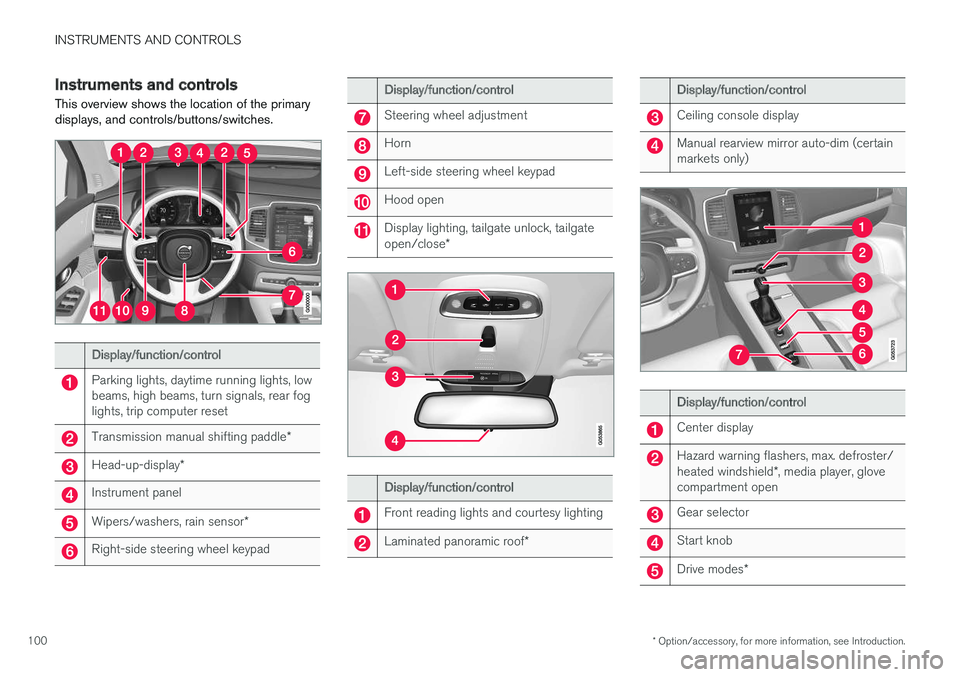
Instruments and controls
This overview shows the location of the primarydisplays, and controls/buttons/switches.
Display/function/control
Parking lights, daytime running lights, lowbeams, high beams, turn signals, rear foglights, trip computer reset
Transmission manual shifting paddle*
Head-up-display*
Instrument panel
Wipers/washers, rain sensor*
Right-side steering wheel keypad
Display/function/control
Steering wheel adjustment
Horn
Left-side steering wheel keypad
Hood open
Display lighting, tailgate unlock, tailgateopen/close*
Display/function/control
Front reading lights and courtesy lighting
Laminated panoramic roof*
Display/function/control
Ceiling console display
Manual rearview mirror auto-dim (certainmarkets only)
Display/function/control
Center display
Hazard warning flashers, max. defroster/heated windshield*, media player, glovecompartment open
Gear selector
Start knob
Drive modes*
Page 103 of 584
INSTRUMENTS AND CONTROLS
}}
* Option/accessory, for more information, see Introduction.101
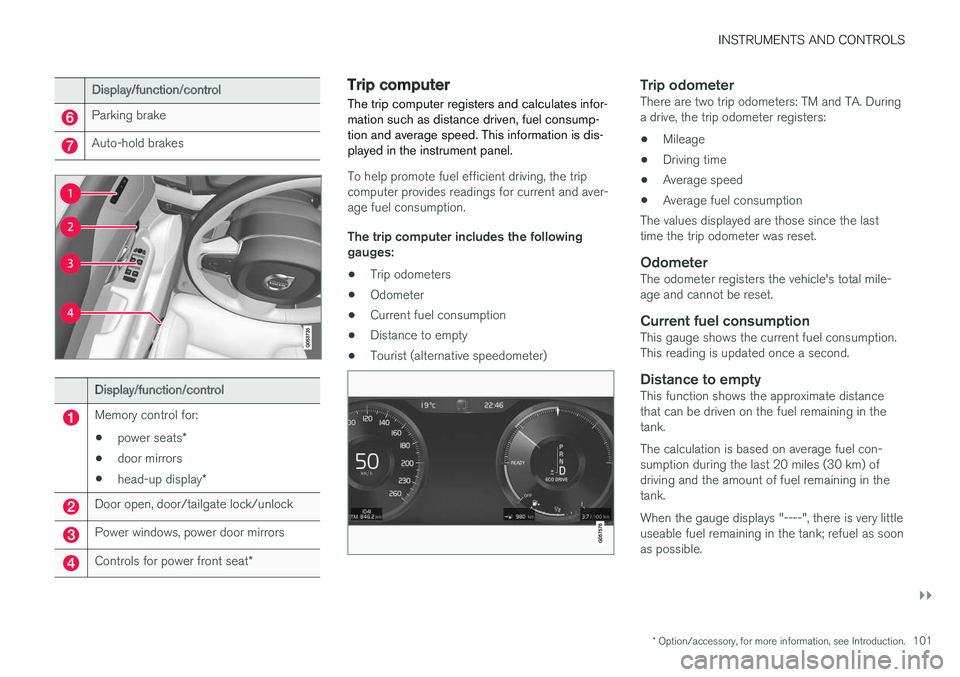
Display/function/control
Parking brake
Auto-hold brakes
Display/function/control
Memory control for:
•power seats*
•door mirrors
•head-up display*
Door open, door/tailgate lock/unlock
Power windows, power door mirrors
Controls for power front seat*
Trip computer
The trip computer registers and calculates infor-mation such as distance driven, fuel consump-tion and average speed. This information is dis-played in the instrument panel.
To help promote fuel efficient driving, the tripcomputer provides readings for current and aver-age fuel consumption.
The trip computer includes the followinggauges:
•Trip odometers
•Odometer
•Current fuel consumption
•Distance to empty
•Tourist (alternative speedometer)
Trip odometer
There are two trip odometers: TM and TA. Duringa drive, the trip odometer registers:
•Mileage
•Driving time
•Average speed
•Average fuel consumption
The values displayed are those since the lasttime the trip odometer was reset.
Odometer
The odometer registers the vehicle's total mile-age and cannot be reset.
Current fuel consumption
This gauge shows the current fuel consumption.This reading is updated once a second.
Distance to empty
This function shows the approximate distancethat can be driven on the fuel remaining in thetank.
The calculation is based on average fuel con-sumption during the last 20 miles (30 km) ofdriving and the amount of fuel remaining in thetank.
When the gauge displays "----", there is very littleuseable fuel remaining in the tank; refuel as soonas possible.
Page 105 of 584
INSTRUMENTS AND CONTROLS
* Option/accessory, for more information, see Introduction.103
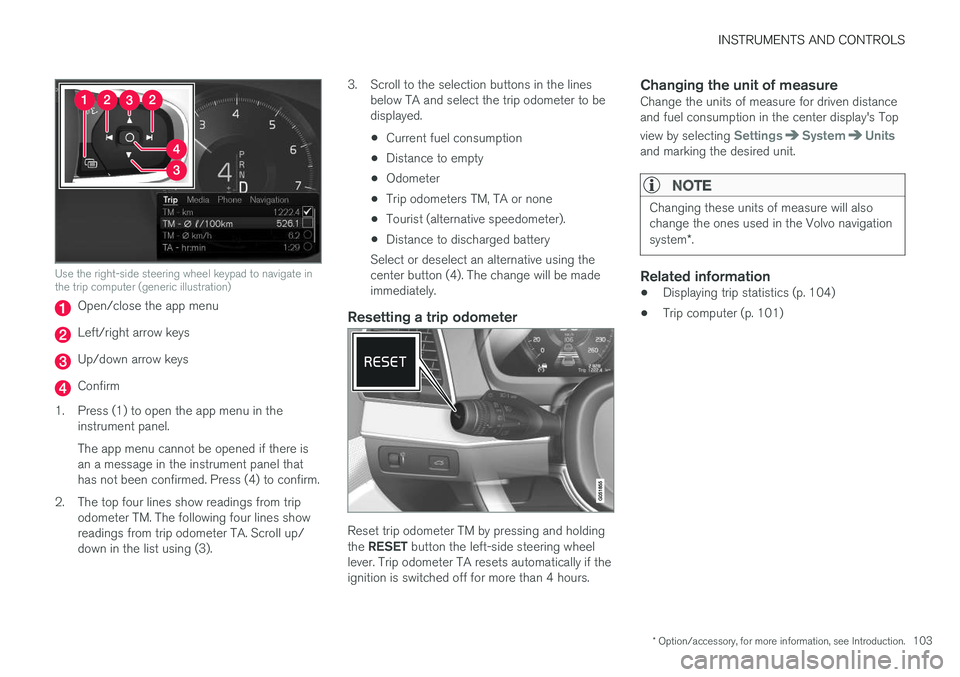
Use the right-side steering wheel keypad to navigate inthe trip computer (generic illustration)
Open/close the app menu
Left/right arrow keys
Up/down arrow keys
Confirm
1.Press (1) to open the app menu in theinstrument panel.
The app menu cannot be opened if there isan a message in the instrument panel thathas not been confirmed. Press (4) to confirm.
2. The top four lines show readings from tripodometer TM. The following four lines showreadings from trip odometer TA. Scroll up/down in the list using (3).
3. Scroll to the selection buttons in the linesbelow TA and select the trip odometer to bedisplayed.
•Current fuel consumption
•Distance to empty
•Odometer
•Trip odometers TM, TA or none
•Tourist (alternative speedometer).
•Distance to discharged battery
Select or deselect an alternative using thecenter button (4). The change will be madeimmediately.
Resetting a trip odometer
Reset trip odometer TM by pressing and holdingthe RESET button the left-side steering wheellever. Trip odometer TA resets automatically if theignition is switched off for more than 4 hours.
Changing the unit of measure
Change the units of measure for driven distanceand fuel consumption in the center display's Top
view by selecting SettingsSystemUnitsand marking the desired unit.
NOTE
Changing these units of measure will alsochange the ones used in the Volvo navigationsystem*.
Related information
•Displaying trip statistics (p. 104)
•Trip computer (p. 101)
Page 106 of 584
INSTRUMENTS AND CONTROLS
* Option/accessory, for more information, see Introduction.104
Displaying trip statistics
Trip computer statistics can be displayed graphi-cally in the center display.
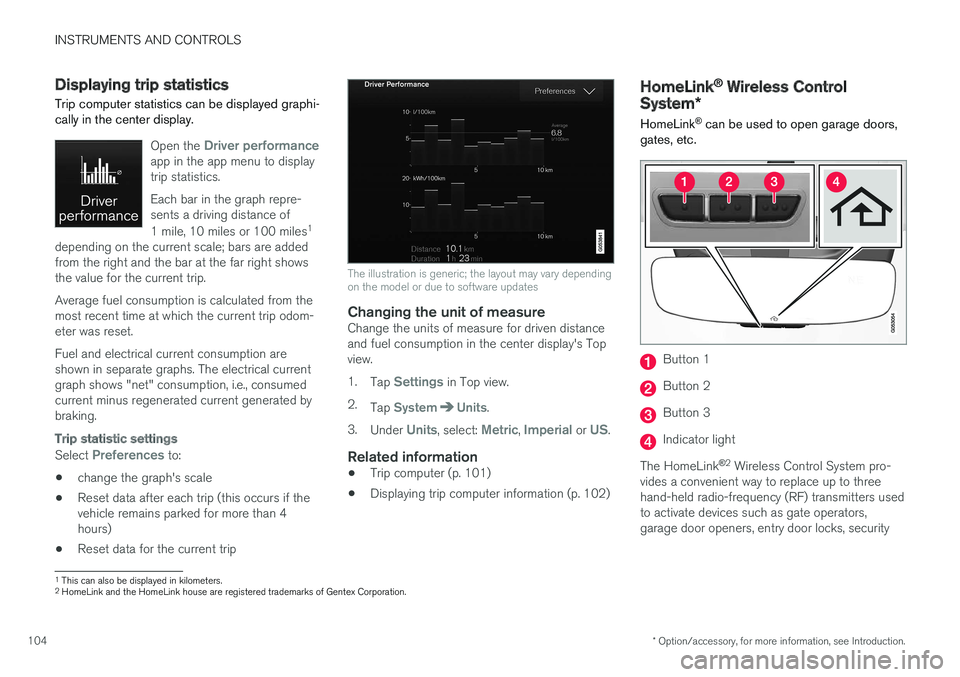
Open the Driver performanceapp in the app menu to displaytrip statistics.
Each bar in the graph repre-sents a driving distance of
1 mile, 10 miles or 100 miles1
depending on the current scale; bars are addedfrom the right and the bar at the far right showsthe value for the current trip.
Average fuel consumption is calculated from themost recent time at which the current trip odom-eter was reset.
Fuel and electrical current consumption areshown in separate graphs. The electrical currentgraph shows "net" consumption, i.e., consumedcurrent minus regenerated current generated bybraking.
Trip statistic settings
Select Preferences to:
•change the graph's scale
•Reset data after each trip (this occurs if thevehicle remains parked for more than 4hours)
•Reset data for the current trip
The illustration is generic; the layout may vary dependingon the model or due to software updates
Changing the unit of measure
Change the units of measure for driven distanceand fuel consumption in the center display's Topview.
1.Tap Settings in Top view.
2.Tap SystemUnits.
3.Under Units, select: Metric, Imperial or US.
Related information
•Trip computer (p. 101)
•Displaying trip computer information (p. 102)
HomeLink® Wireless Control
System*
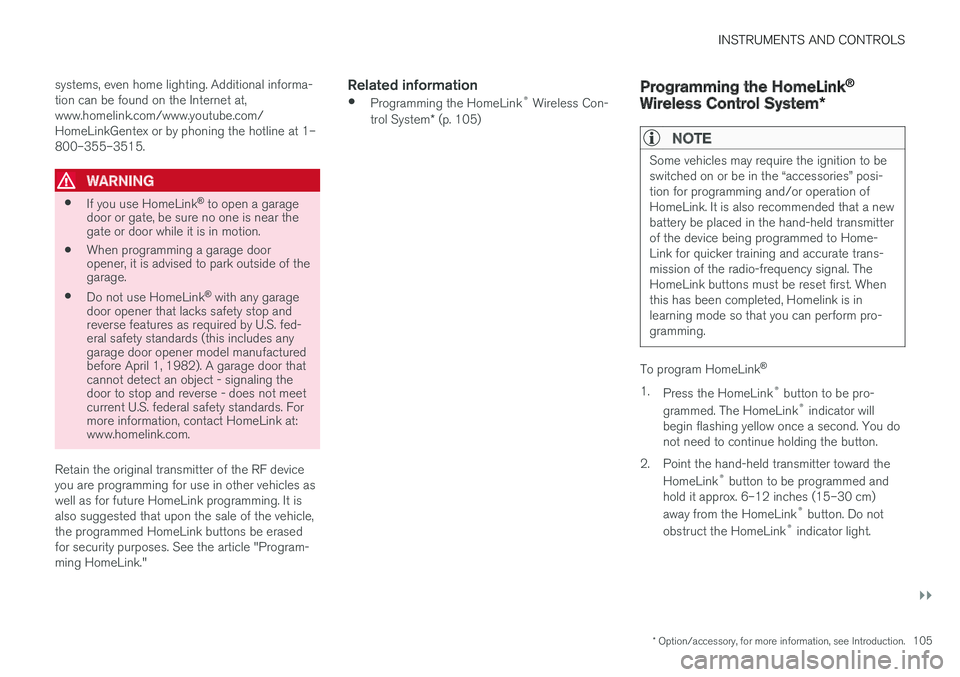
HomeLink® can be used to open garage doors,gates, etc.
Button 1
Button 2
Button 3
Indicator light
The HomeLink®2 Wireless Control System pro-vides a convenient way to replace up to threehand-held radio-frequency (RF) transmitters usedto activate devices such as gate operators,garage door openers, entry door locks, security
1This can also be displayed in kilometers.2HomeLink and the HomeLink house are registered trademarks of Gentex Corporation.
Page 107 of 584
INSTRUMENTS AND CONTROLS
}}
* Option/accessory, for more information, see Introduction.105
systems, even home lighting. Additional informa-tion can be found on the Internet at,www.homelink.com/www.youtube.com/HomeLinkGentex or by phoning the hotline at 1–800–355–3515.
WARNING
•If you use HomeLink® to open a garagedoor or gate, be sure no one is near thegate or door while it is in motion.
•When programming a garage dooropener, it is advised to park outside of thegarage.
•Do not use HomeLink® with any garagedoor opener that lacks safety stop andreverse features as required by U.S. fed-eral safety standards (this includes anygarage door opener model manufacturedbefore April 1, 1982). A garage door thatcannot detect an object - signaling thedoor to stop and reverse - does not meetcurrent U.S. federal safety standards. Formore information, contact HomeLink at:www.homelink.com.
Retain the original transmitter of the RF deviceyou are programming for use in other vehicles aswell as for future HomeLink programming. It isalso suggested that upon the sale of the vehicle,the programmed HomeLink buttons be erasedfor security purposes. See the article "Program-ming HomeLink."
Related information
•Programming the HomeLink® Wireless Con-trol System* (p. 105)
Programming the HomeLink®
Wireless Control System*
NOTE
Some vehicles may require the ignition to beswitched on or be in the “accessories” posi-tion for programming and/or operation ofHomeLink. It is also recommended that a newbattery be placed in the hand-held transmitterof the device being programmed to Home-Link for quicker training and accurate trans-mission of the radio-frequency signal. TheHomeLink buttons must be reset first. Whenthis has been completed, Homelink is inlearning mode so that you can perform pro-gramming.
To program HomeLink®
1.Press the HomeLink® button to be pro-
grammed. The HomeLink® indicator willbegin flashing yellow once a second. You donot need to continue holding the button.
2.Point the hand-held transmitter toward the
HomeLink® button to be programmed andhold it approx. 6–12 inches (15–30 cm)
away from the HomeLink® button. Do not
obstruct the HomeLink® indicator light.