lock YAMAHA EC-03 2012 User Guide
[x] Cancel search | Manufacturer: YAMAHA, Model Year: 2012, Model line: EC-03, Model: YAMAHA EC-03 2012Pages: 78, PDF Size: 2.19 MB
Page 39 of 78
CHARGING THE BATTERY
6-5
2
3
4
567
8
9
6. Close the seat and push down on
the back to lock it in position.
TIPBefore closing the seat, make sure thatnothing is left under it.
7. Remove the key. To help prevent theft, be sure to lock the steering,
and then remove the key when
charging the battery.
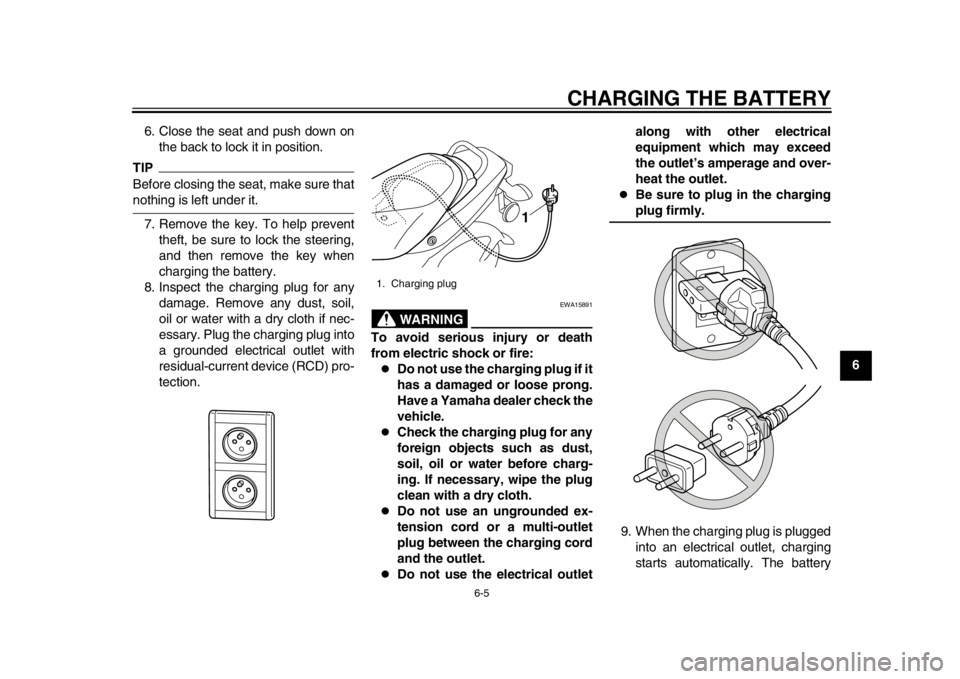
8. Inspect the charging plug for any damage. Remove any dust, soil,
oil or water with a dry cloth if nec-
essary. Plug the charging plug into
a grounded electrical outlet with
residual-current device (RCD) pro-
tection.
WARNING
EWA15891
To avoid serious injury or death
from electric shock or fire:
Do not use the charging plug if it
has a damaged or loose prong.
Have a Yamaha dealer check the
vehicle.
Check the charging plug for any
foreign objects such as dust,
soil, oil or water before charg-
ing. If necessary, wipe the plug
clean with a dry cloth.
Do not use an ungrounded ex-
tension cord or a multi-outlet
plug between the charging cord
and the outlet.
Do not use the electrical outlet along with other electrical
equipment which may exceed
the outlet’s amperage and over-
heat the outlet.
Be sure to plug in the chargingplug firmly.
9. When the charging plug is plugged into an electrical outlet, charging
starts automatically. The battery
1. Charging plug
1
1CB-9-EA.book 5 ページ 2012年4月11日 水曜日 午前9時34分
Page 41 of 78
CHARGING THE BATTERY
6-7
2
3
4
567
8
9
pears in the display during charg-
ing. The display goes off if the
charging plug is unplugged during
charging.
Even if the key is turned to “ON”,
the vehicle does not enter thestandby mode during charging.
Completing charging
When the battery is fully charged, the
display goes off automatically after a
few minutes. 1. Grasp the charging plug, and then unplug it from the electrical outlet.
NOTICE: Do not pull the charg-
ing cord to unplug the charging
plug from the electrical outlet.
This could damage the charging
cord.
[ECA17470]
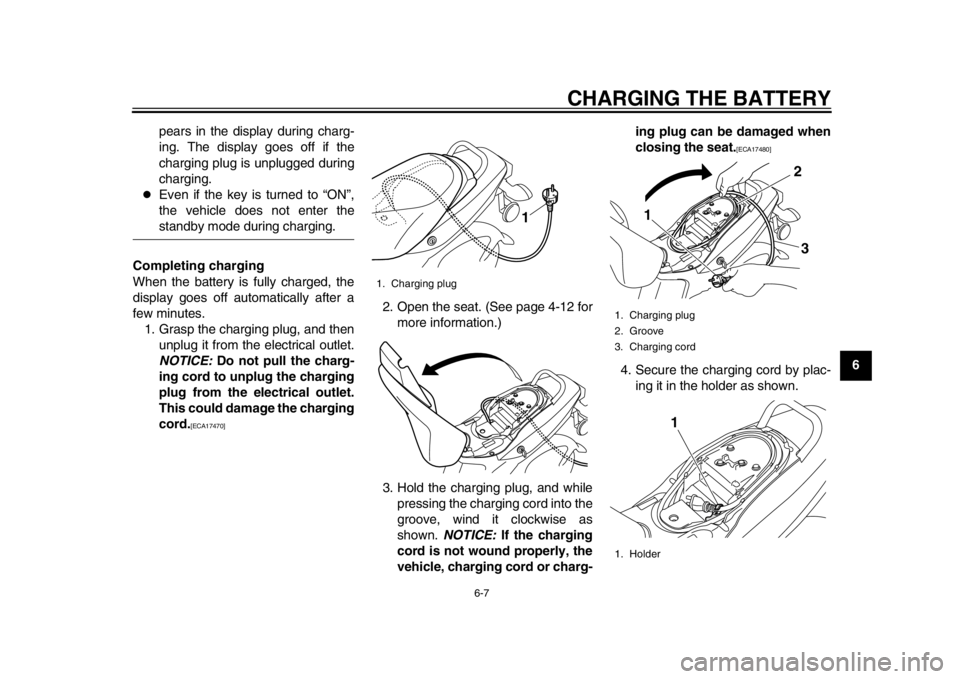
2. Open the seat. (See page 4-12 for
more information.)
3. Hold the charging plug, and while pressing the charging cord into the
groove, wind it clockwise as
shown. NOTICE: If the charging
cord is not wound properly, the
vehicle, charging cord or charg- ing plug can be damaged when
closing the seat.
[ECA17480]
4. Secure the charging cord by plac- ing it in the holder as shown.
1. Charging plug
1
1. Charging plug
2. Groove
3. Charging cord
1. Holder
1 2
3
1
1CB-9-EA.book 7 ページ 2012年4月11日 水曜日 午前9時34分
Page 42 of 78
CHARGING THE BATTERY
6-8
1
2
3
4
56
7
8
95. Close the seat, and push down on
the back to lock it in position.
TIP
Before closing the seat, make sure
that nothing is left under the seat.
Make sure that the seat is securelylocked before riding.
6. Remove the key.WARNING
EWA15900
When not in use, do not leave the
charging plug plugged into an out-
let. Dust or foreign objects could
build up and cause a fire. Be sure to
unplug the charging plug from theoutlet after use.
EAU50402
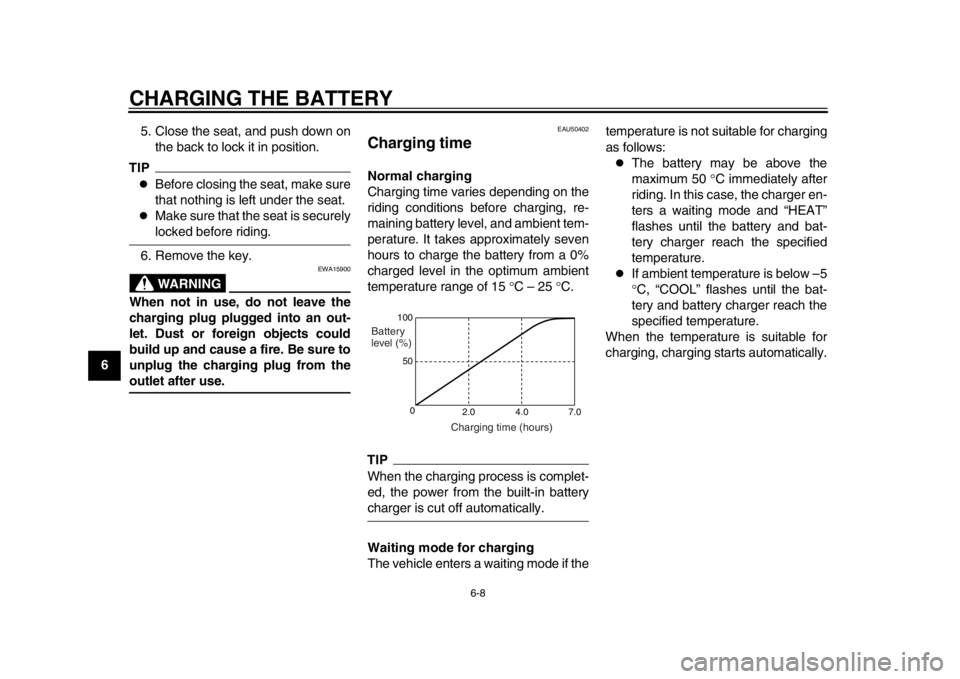
Charging time Normal charging
Charging time varies depending on the
riding conditions before charging, re-
maining battery level, and ambient tem-
perature. It takes approximately seven
hours to charge the battery from a 0%
charged level in the optimum ambient
temperature range of 15 C – 25 C.TIPWhen the charging process is complet-
ed, the power from the built-in batterycharger is cut off automatically.
Waiting mode for charging
The vehicle enters a waiting mode if the temperature is not suitable for charging
as follows:
The battery may be above the
maximum 50
C immediately after
riding. In this case, the charger en-
ters a waiting mode and “HEAT”
flashes until the battery and bat-
tery charger reach the specified
temperature.
If ambient temperature is below –5
C, “COOL” flashes until the bat-
tery and battery charger reach the
specified temperature.
When the temperature is suitable for
charging, charging starts automatically.
100
50
0 2.0 4.0 7.0
Charging time (hours)
Battery
level (%)
1CB-9-EA.book 8 ページ 2012年4月11日 水曜日 午前9時34分
Page 46 of 78
OPERATION AND IMPORTANT RIDING POINTS
7-2
1
2
3
4
5
67
8
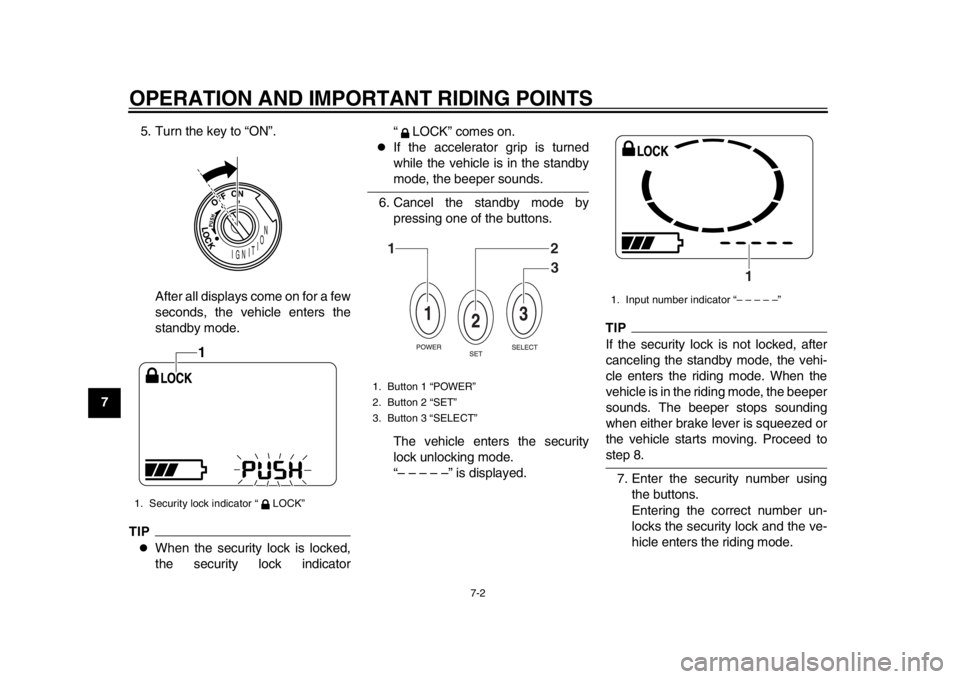
95. Turn the key to “ON”.
After all displays come on for a few
seconds, the vehicle enters the
standby mode.
TIP
When the security lock is locked,
the security lock indicator “ LOCK” comes on.
If the accelerator grip is turned
while the vehicle is in the standbymode, the beeper sounds.
6. Cancel the standby mode by pressing one of the buttons.
The vehicle enters the security
lock unlocking mode.
“– – – – –” is displayed.
TIPIf the security lock is not locked, after
canceling the standby mode, the vehi-
cle enters the riding mode. When the
vehicle is in the riding mode, the beeper
sounds. The beeper stops sounding
when either brake lever is squeezed or
the vehicle starts moving. Proceed tostep 8.
7. Enter the security number using the buttons.
Entering the correct number un-
locks the security lock and the ve-
hicle enters the riding mode.
1. Security lock indicator “ LOCK”
1
1. Button 1 “POWER”
2. Button 2 “SET”
3. Button 3 “SELECT”
12
3
1. Input number indicator “– – – – –”
1
1CB-9-EA.book 2 ページ 2012年4月11日 水曜日 午前9時34分
Page 47 of 78
OPERATION AND IMPORTANT RIDING POINTS
7-3
2
3
4
5
678
9
TIPWhen the vehicle enters the riding
mode, the beeper sounds. The beeper
stops sounding when either brake lever
is squeezed or the vehicle starts mov-ing.
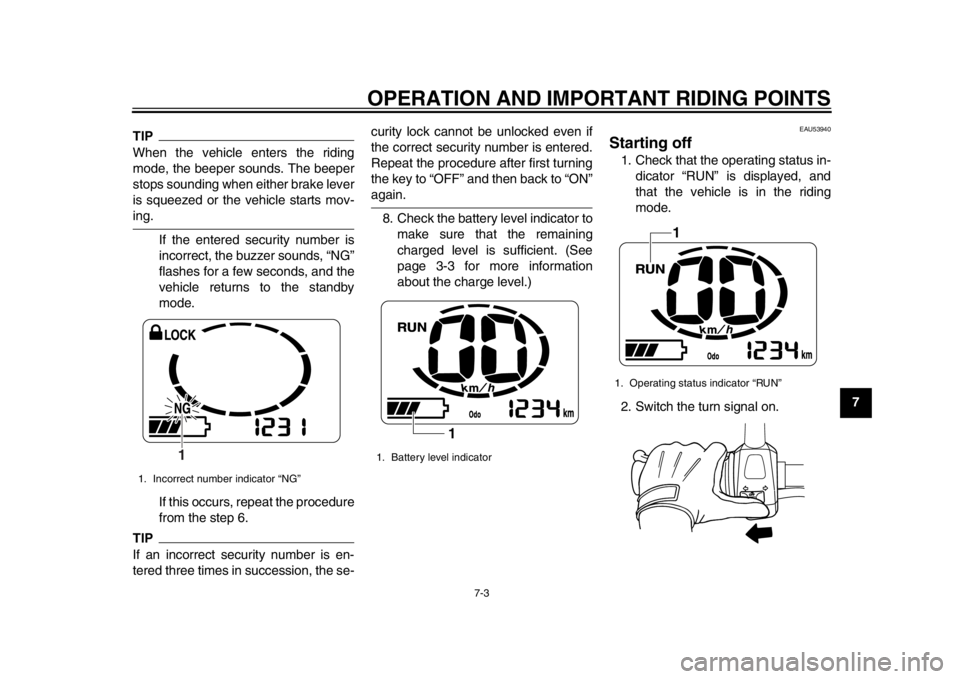
If the entered security number is
incorrect, the buzzer sounds, “NG”
flashes for a few seconds, and the
vehicle returns to the standby
mode.
If this occurs, repeat the procedure
from the step 6.TIPIf an incorrect security number is en-
tered three times in succession, the se- curity lock cannot be unlocked even if
the correct security number is entered.
Repeat the procedure after first turning
the key to “OFF” and then back to “ON”
again.
8. Check the battery level indicator to make sure that the remaining
charged level is sufficient. (See
page 3-3 for more information
about the charge level.)
EAU53940
Starting off 1. Check that the operating status in-dicator “RUN” is displayed, and
that the vehicle is in the riding
mode.
2. Switch the turn signal on.
1. Incorrect number indicator “NG”
1
1. Battery level indicator
1
1. Operating status indicator “RUN”
1
1CB-9-EA.book 3 ページ 2012年4月11日 水曜日 午前9時34分
Page 49 of 78
OPERATION AND IMPORTANT RIDING POINTS
7-5
2
3
4
5
678
9
EAU50961
Braking
WARNING
EWA10300
Avoid braking hard or suddenly
(especially when leaning over to
one side), otherwise the scooter
may skid or overturn.
Railroad crossings, streetcar
rails, iron plates on road con-
struction sites, and manhole
covers become extremely slip-
pery when wet. Therefore, slow
down when approaching such
areas and cross them with cau-
tion.
Keep in mind that braking on a
wet road is much more difficult.
Ride slowly down a hill, as brak-
ing downhill can be very diffi-cult.
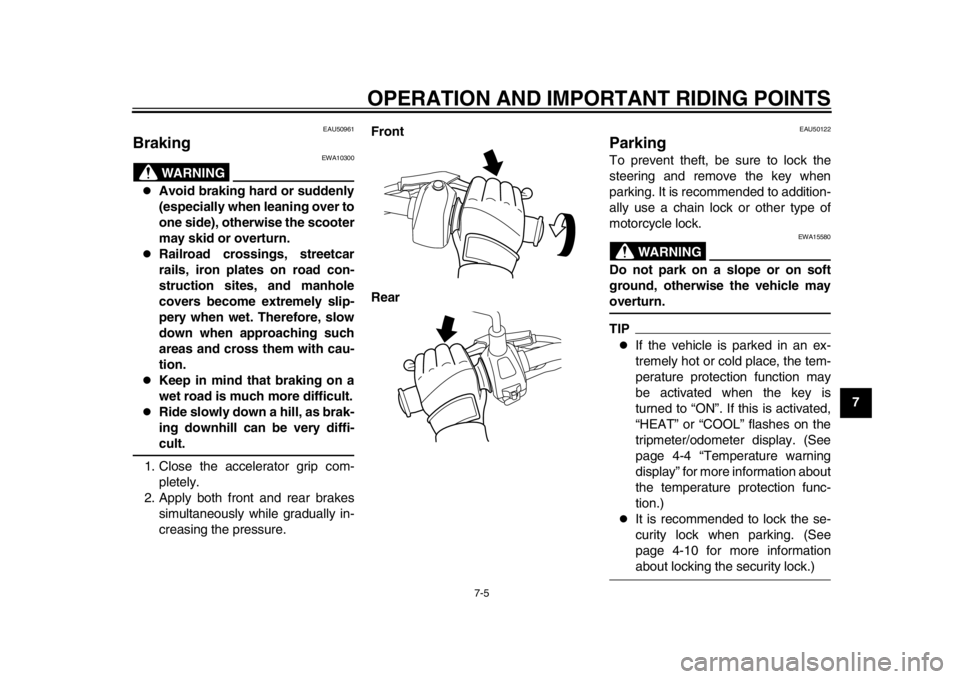
1. Close the accelerator grip com- pletely.
2. Apply both front and rear brakes simultaneously while gradually in-
creasing the pressure. Front
Rear
EAU50122
Parking To prevent theft, be sure to lock the
steering and remove the key when
parking. It is recommended to addition-
ally use a chain lock or other type of
motorcycle lock.
WARNING
EWA15580
Do not park on a slope or on soft
ground, otherwise the vehicle mayoverturn.TIP
If the vehicle is parked in an ex-
tremely hot or cold place, the tem-
perature protection function may
be activated when the key is
turned to “ON”. If this is activated,
“HEAT” or “COOL” flashes on the
tripmeter/odometer display. (See
page 4-4 “Temperature warning
display” for more information about
the temperature protection func-
tion.)
It is recommended to lock the se-
curity lock when parking. (See
page 4-10 for more informationabout locking the security lock.)
1CB-9-EA.book 5 ページ 2012年4月11日 水曜日 午前9時34分
Page 61 of 78
PERIODIC MAINTENANCE AND ADJUSTMENT
8-12
2
3
4
5
6
789
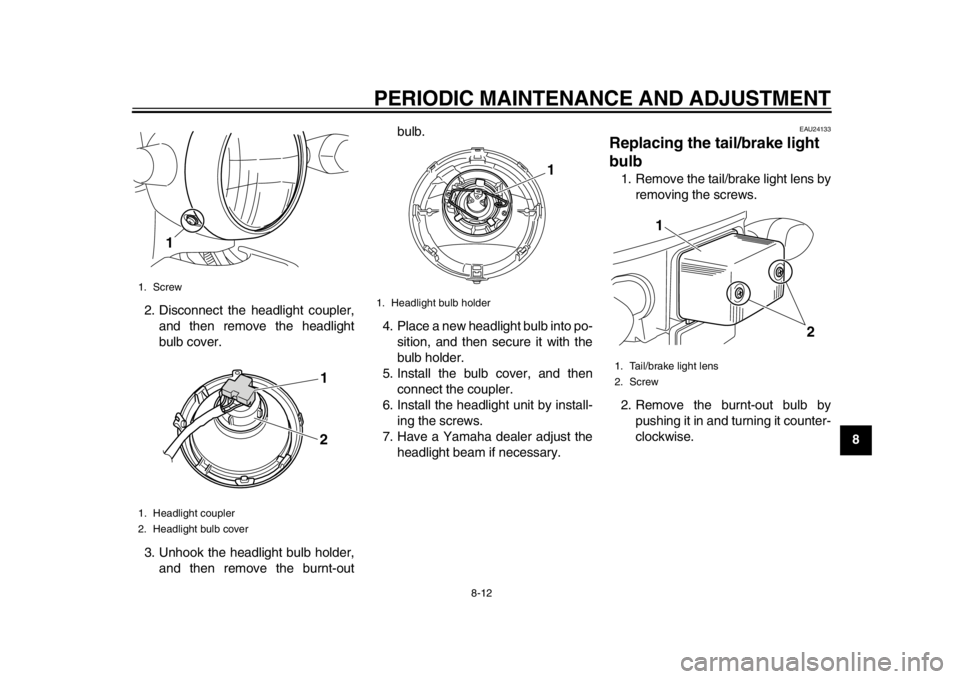
2. Disconnect the headlight coupler,
and then remove the headlight
bulb cover.
3. Unhook the headlight bulb holder, and then remove the burnt-out bulb.
4. Place a new headlight bulb into po- sition, and then secure it with the
bulb holder.
5. Install the bulb cover, and then connect the coupler.
6. Install the headlight unit by install- ing the screws.
7. Have a Yamaha dealer adjust the headlight beam if necessary.
EAU24133
Replacing the ta il/brake light
bulb 1. Remove the tail/brake light lens by
removing the screws.
2. Remove the burnt-out bulb by pushing it in and turning it counter-
clockwise.
1. Screw
1. Headlight coupler
2. Headlight bulb cover
1
1
2
1. Headlight bulb holder
1
1. Tail/brake light lens
2. Screw
1
2
1CB-9-EA.book 12 ページ 2012年4月11日 水曜日 午前9時34分
Page 62 of 78
PERIODIC MAINTENANCE AND ADJUSTMENT
8-13
1
2
3
4
5
6
78
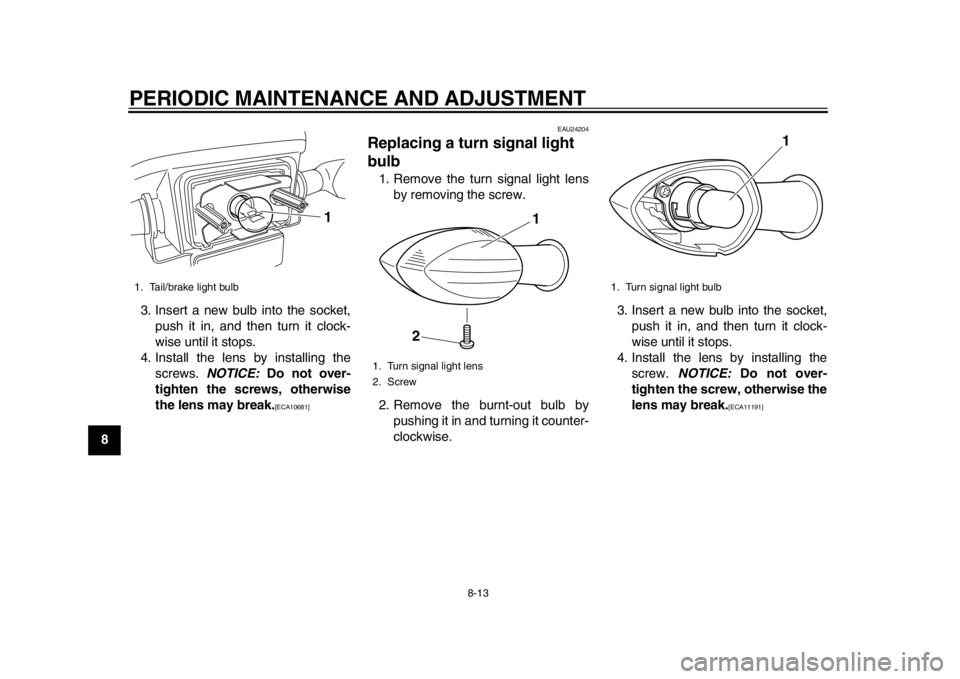
93. Insert a new bulb into the socket,
push it in, and then turn it clock-
wise until it stops.
4. Install the lens by installing the screws. NOTICE: Do not over-
tighten the screws, otherwise
the lens may break.
[ECA10681]
EAU24204
Replacing a turn signal light
bulb 1. Remove the turn signal light lens
by removing the screw.
2. Remove the burnt-out bulb by pushing it in and turning it counter-
clockwise. 3. Insert a new bulb into the socket,
push it in, and then turn it clock-
wise until it stops.
4. Install the lens by installing the screw. NOTICE: Do not over-
tighten the screw, otherwise the
lens may break.
[ECA11191]
1. Tail/brake light bulb
1
1. Turn signal light lens
2. Screw
1
2
1. Turn signal light bulb
1
1CB-9-EA.book 13 ページ 2012年4月11日 水曜日 午前9時34分
Page 65 of 78
PERIODIC MAINTENANCE AND ADJUSTMENT
8-16
2
3
4
5
6
789
NOTICE
ECA11982
Do not use a bulb of a wattage other
than specified to avoid causing ex-
tensive damage to the electrical sys-tem and possibly a fire.
The motor stops while riding
Check the following:1. Is the battery sufficiently charged? Check the battery level indicator. If
the remaining charge is insuffi-
cient, charge the battery before
continuing to ride.
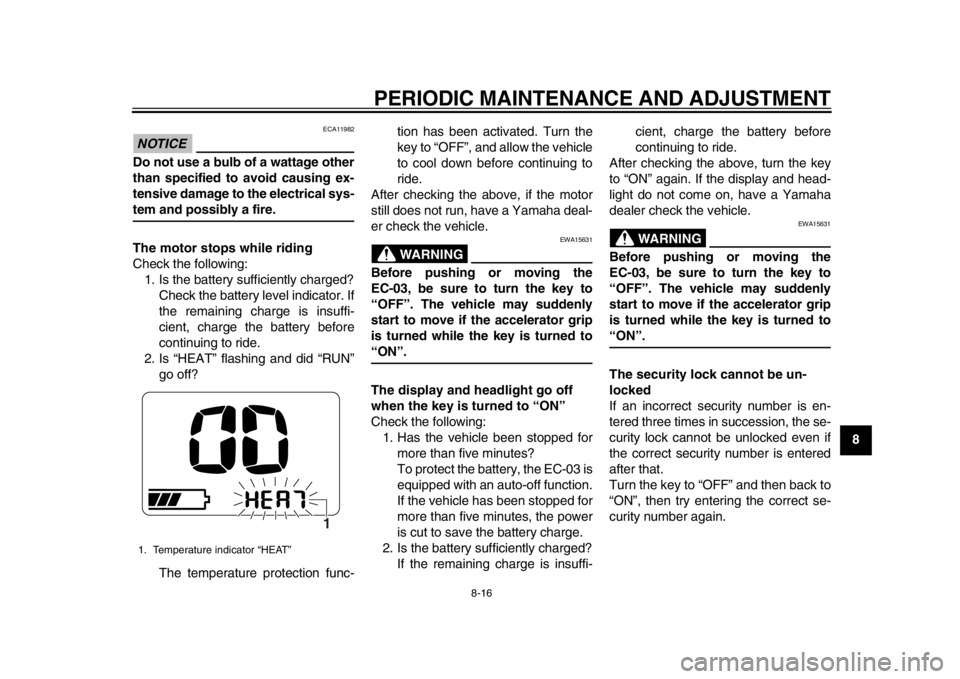
2. Is “HEAT” flashing and did “RUN” go off?
The temperature protection func- tion has been activated. Turn the
key to “OFF”, and allow the vehicle
to cool down before continuing to
ride.
After checking the above, if the motor
still does not run, have a Yamaha deal-
er check the vehicle.
WARNING
EWA15631
Before pushing or moving the
EC-03, be sure to turn the key to
“OFF”. The vehicle may suddenly
start to move if the accelerator grip
is turned while the key is turned to“ON”.
The display and headlight go off
when the key is turned to “ON”
Check the following: 1. Has the vehicle been stopped for more than five minutes?
To protect the battery, the EC-03 is
equipped with an auto-off function.
If the vehicle has been stopped for
more than five minutes, the power
is cut to save the battery charge.
2. Is the battery sufficiently charged? If the remaining charge is insuffi- cient, charge the battery before
continuing to ride.
After checking the above, turn the key
to “ON” again. If the display and head-
light do not come on, have a Yamaha
dealer check the vehicle.
WARNING
EWA15631
Before pushing or moving the
EC-03, be sure to turn the key to
“OFF”. The vehicle may suddenly
start to move if the accelerator grip
is turned while the key is turned to“ON”.
The security lock cannot be un-
locked
If an incorrect security number is en-
tered three times in succession, the se-
curity lock cannot be unlocked even if
the correct security number is entered
after that.
Turn the key to “OFF” and then back to
“ON”, then try entering the correct se-
curity number again.
1. Temperature indicator “HEAT”
1
1CB-9-EA.book 16 ページ 2012年4月11日 水曜日 午前9時34分
Page 76 of 78

INDEXAAcceleration and deceleration....................7-4
Accelerator grip, checking..........................8-4BBattery, charging location ..........................6-1
Battery, charging procedure.......................6-3
Battery, charging safely .............................1-5
Battery, charging time ................................6-8
Battery, effective use of .............................3-2
Battery level ...............................................3-3
Battery type, about .....................................6-9
Beeper .......................................................4-1
Brake lever, front......................................4-11
Brake lever, rear ......................................4-11
Brake levers, lubricating.............................8-9
Brake shoes, checking ...............................8-8
Braking .......................................................7-5CCables, checking and lubricating ...............8-8
Care ...........................................................9-1
Centerstand, checking and lubricating .......8-9
Charging cord and pl ug, checking ...........8-14
Charging display, progress status..............6-9FFeatures .....................................................3-1
Front and rear brak e lever free play,
adjusting ..................................................8-6
Front fork, checking .................................8-10GGrab bar ...................................................4-13HHandlebar switches..................................4-11
Headlight bulb, replacing .........................8-11
Helmet holder...........................................4-12 Horn switch .............................................. 4-11
IIdentification numbers ............................. 11-1LLuggage hook .......................................... 4-13MMain switch/steering lock........................... 4-1
Maintenance and lubrication, periodic ....... 8-2
Matte color, caution ................................... 9-1
Model label .............................................. 11-1
Motor, checking for irregular sounds ......... 8-4
Multi-function display ................................. 4-2PParking ...................................................... 7-5
Part locations ............................................. 2-1SSafe-riding points....................................... 1-5
Safety information...................................... 1-1
Seat ......................................................... 4-12
Security lock, using.................................... 4-7
Specifications .......................................... 10-1
Starting off ................................................. 7-3
Starting off, preparations ........................... 7-1
Steering, checking ................................... 8-10
Storage ...................................................... 9-3TTail/brake light bulb, replacing ................. 8-12
Tires........................................................... 8-5
Traveling distance ..................................... 3-1
Troubleshooting ....................................... 8-15
Turn signal light bulb, replacing ............... 8-13
Turn signal switch .................................... 4-11VVehicle identification number................... 11-1
WWheel bearings, checking ....................... 8-11
Wheels ...................................................... 8-6
1CB-9-EA.book 2 ページ 2012年4月11日 水曜日 午前9時34分