battery YAMAHA EC-03 2012 Owner's Manual
[x] Cancel search | Manufacturer: YAMAHA, Model Year: 2012, Model line: EC-03, Model: YAMAHA EC-03 2012Pages: 78, PDF Size: 2.19 MB
Page 44 of 78
CHARGING THE BATTERY
6-10
1
2
3
4
56
7
8
9Battery depletion
The electric output capacity of the
Li-ion battery used in the EC-03 gradu-
ally decreases in the course of use. Al-
though the extent of depletion varies
based on the conditions of use, electric
output capacity typically decreases to
70% of a new battery when having trav-
eled 8000–10000 km for two years.
This is equivalent to charging about
500 times with the condition of riding
16–20 km on a single charge.
Battery electric output auto-stop-
ping function
The battery is equipped with a function
to prevent further use in case of exces-
sive depletion. When eight years have
passed since initial battery charging or the accumulated charging amount has
reached 14000 Ah, the battery will no
longer be usable.
TIP
When the battery is replaced with
a new one, fully charge the battery
once before using it. If the battery
is not fully charged, the battery lev-
el indicator does not show the pre-
cise battery level.
At low temperatures such as 0
C,
the electric output capacity de-
creases by approximately 20%
compared with normal tempera-
ture.
If a depleted battery is used at low
temperatures, the electric output
capacity decreases by approxi-
mately 20% compared with normaltemperatures.
1CB-9-EA.book 10 ページ 2012年4月11日 水曜日 午前9時34分
Page 47 of 78
OPERATION AND IMPORTANT RIDING POINTS
7-3
2
3
4
5
678
9
TIPWhen the vehicle enters the riding
mode, the beeper sounds. The beeper
stops sounding when either brake lever
is squeezed or the vehicle starts mov-ing.
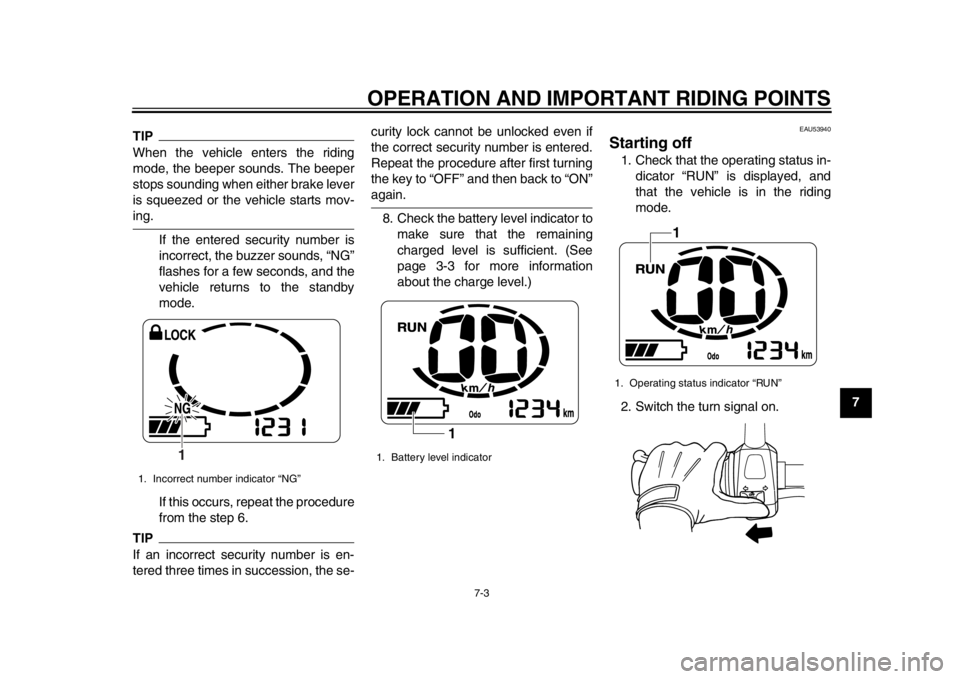
If the entered security number is
incorrect, the buzzer sounds, “NG”
flashes for a few seconds, and the
vehicle returns to the standby
mode.
If this occurs, repeat the procedure
from the step 6.TIPIf an incorrect security number is en-
tered three times in succession, the se- curity lock cannot be unlocked even if
the correct security number is entered.
Repeat the procedure after first turning
the key to “OFF” and then back to “ON”
again.
8. Check the battery level indicator to make sure that the remaining
charged level is sufficient. (See
page 3-3 for more information
about the charge level.)
EAU53940
Starting off 1. Check that the operating status in-dicator “RUN” is displayed, and
that the vehicle is in the riding
mode.
2. Switch the turn signal on.
1. Incorrect number indicator “NG”
1
1. Battery level indicator
1
1. Operating status indicator “RUN”
1
1CB-9-EA.book 3 ページ 2012年4月11日 水曜日 午前9時34分
Page 48 of 78
OPERATION AND IMPORTANT RIDING POINTS
7-4
1
2
3
4
5
67
8
9
TIPThe beeper sounds while the turn sig-nal switch is signaling.3. Check in front of and behind the vehicle to make sure that it is safe
to start off.
4. Release the rear brake lever.
5. Check for oncoming traffic, and then slowly turn the accelerator
grip in order to start off.
6. Push the turn signal switch to can- cel the turn signals.TIPTo protect the battery, the EC-03 is
equipped with an auto-off function. The
power stops automatically if the vehicle
is stopped for more than five minutes. To restart the vehicle after the vehicle
has been stopped for more than five
minutes, turn the key to “OFF” and then
back to “ON” again.
EAU50111
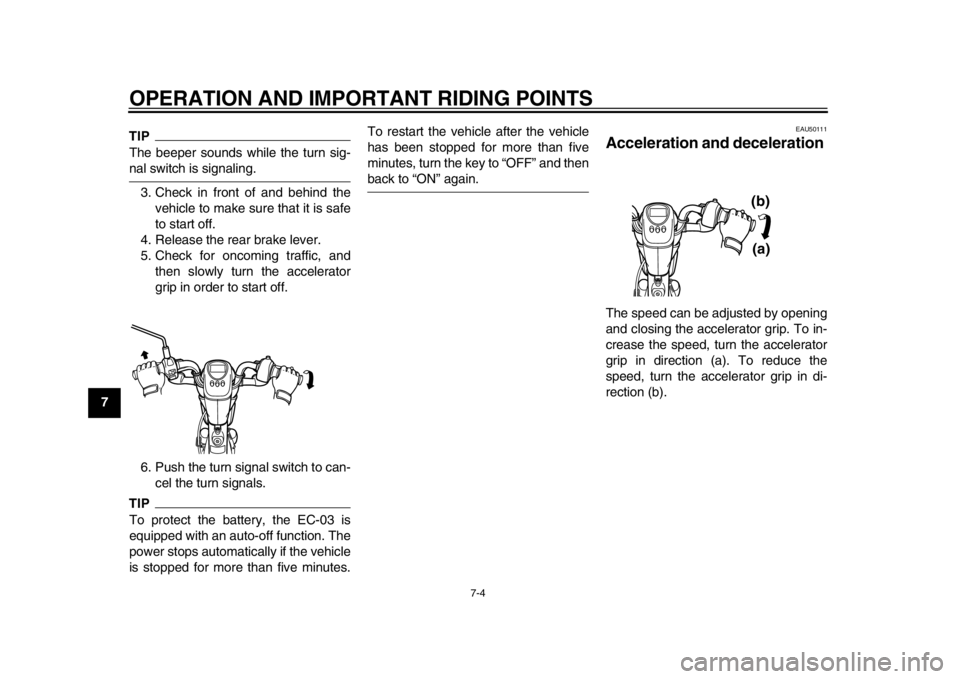
Acceleration and deceleration The speed can be adjusted by opening
and closing the accelerator grip. To in-
crease the speed, turn the accelerator
grip in direction (a). To reduce the
speed, turn the accelerator grip in di-
rection (b).
(a)
(b)
1CB-9-EA.book 4 ページ 2012年4月11日 水曜日 午前9時34分
Page 65 of 78
PERIODIC MAINTENANCE AND ADJUSTMENT
8-16
2
3
4
5
6
789
NOTICE
ECA11982
Do not use a bulb of a wattage other
than specified to avoid causing ex-
tensive damage to the electrical sys-tem and possibly a fire.
The motor stops while riding
Check the following:1. Is the battery sufficiently charged? Check the battery level indicator. If
the remaining charge is insuffi-
cient, charge the battery before
continuing to ride.
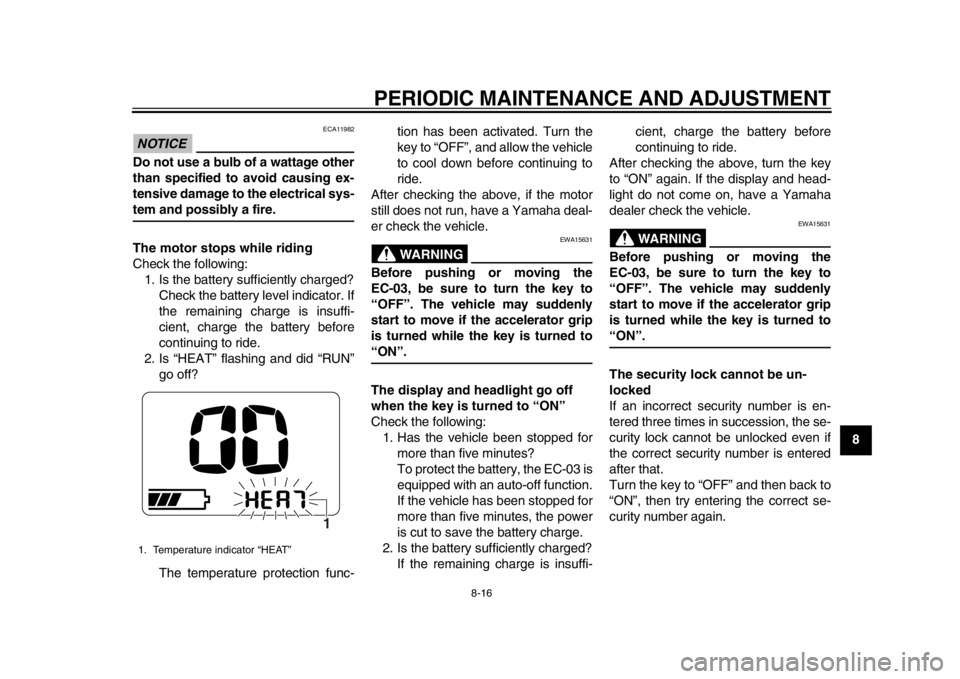
2. Is “HEAT” flashing and did “RUN” go off?
The temperature protection func- tion has been activated. Turn the
key to “OFF”, and allow the vehicle
to cool down before continuing to
ride.
After checking the above, if the motor
still does not run, have a Yamaha deal-
er check the vehicle.
WARNING
EWA15631
Before pushing or moving the
EC-03, be sure to turn the key to
“OFF”. The vehicle may suddenly
start to move if the accelerator grip
is turned while the key is turned to“ON”.
The display and headlight go off
when the key is turned to “ON”
Check the following: 1. Has the vehicle been stopped for more than five minutes?
To protect the battery, the EC-03 is
equipped with an auto-off function.
If the vehicle has been stopped for
more than five minutes, the power
is cut to save the battery charge.
2. Is the battery sufficiently charged? If the remaining charge is insuffi- cient, charge the battery before
continuing to ride.
After checking the above, turn the key
to “ON” again. If the display and head-
light do not come on, have a Yamaha
dealer check the vehicle.
WARNING
EWA15631
Before pushing or moving the
EC-03, be sure to turn the key to
“OFF”. The vehicle may suddenly
start to move if the accelerator grip
is turned while the key is turned to“ON”.
The security lock cannot be un-
locked
If an incorrect security number is en-
tered three times in succession, the se-
curity lock cannot be unlocked even if
the correct security number is entered
after that.
Turn the key to “OFF” and then back to
“ON”, then try entering the correct se-
curity number again.
1. Temperature indicator “HEAT”
1
1CB-9-EA.book 16 ページ 2012年4月11日 水曜日 午前9時34分
Page 66 of 78
PERIODIC MAINTENANCE AND ADJUSTMENT
8-17
1
2
3
4
5
6
78
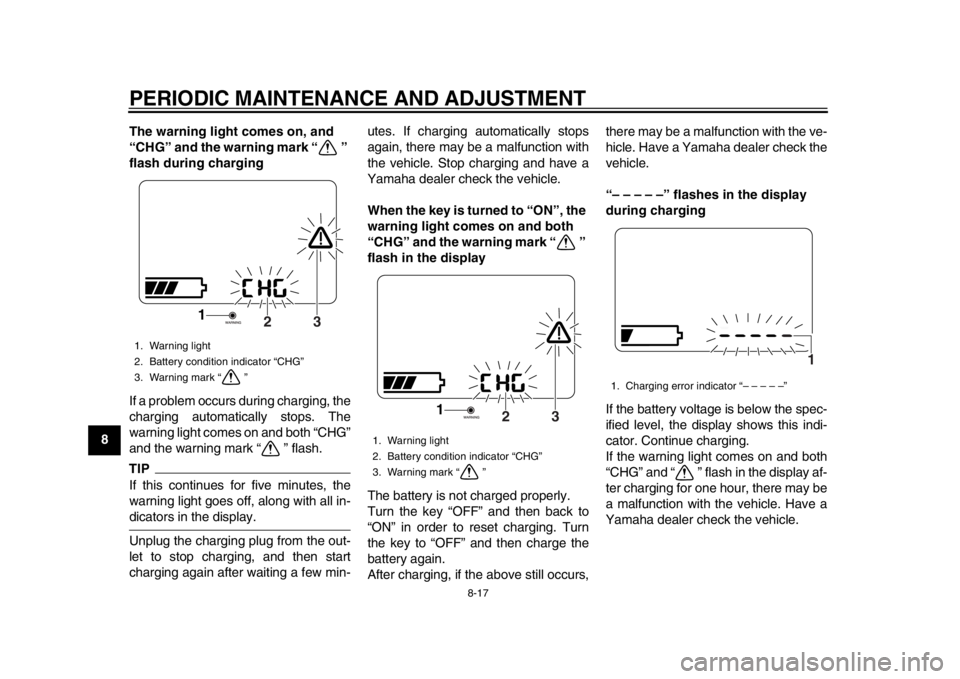
9The warning light comes on, and
“CHG” and the warning mark “ ”
flash during charging
If a problem occurs during charging, the
charging automatically stops. The
warning light comes on and both “CHG”
and the warning mark “ ” flash.
TIPIf this continues for five minutes, the
warning light goes off, along with all in-dicators in the display.
Unplug the charging plug from the out-
let to stop charging, and then start
charging again after waiting a few min- utes. If charging automatically stops
again, there may be a malfunction with
the vehicle. Stop charging and have a
Yamaha dealer check the vehicle.
When the key is turned to “ON”, the
warning light comes on and both
“CHG” and the warning mark “ ”
flash in the display
The battery is not charged properly.
Turn the key “OFF” and then back to
“ON” in order to reset charging. Turn
the key to “OFF” and then charge the
battery again.
After charging, if the above still occurs,there may be a malfunction with the ve-
hicle. Have a Yamaha dealer check the
vehicle.
“– – – – –” flashes in the display
during charging
If the battery voltage is below the spec-
ified level, the display shows this indi-
cator. Continue charging.
If the warning light comes on and both
“CHG” and “ ” flash in the display af-
ter charging for one hour, there may be
a malfunction with the vehicle. Have a
Yamaha dealer check the vehicle.1. Warning light
2. Battery condition indicator “CHG”
3. Warning mark “ ”
3
2
1
1. Warning light
2. Battery condition indicator “CHG”
3. Warning mark “ ”
3
2
1
1. Charging error indicator “– – – – –”
1
1CB-9-EA.book 17 ページ 2012年4月11日 水曜日 午前9時34分
Page 67 of 78

PERIODIC MAINTENANCE AND ADJUSTMENT
8-18
2
3
4
5
6
789
“HEAT” flashes in the display dur-
ing charging
This is not a malfunction. The charging process is in the standby
mode because the battery temperature
is higher than 50
C. Allow the battery
to cool down.
When the battery temperature falls to
the specified temperature, “HEAT”
goes off and charging starts automati-
cally. (See page 6-1 for more informa-
tion about “Battery charging place”.)
“COOL” flashes in the display dur-
ing charging
This is not a malfunction.
The charging process is in the standby
mode because the battery temperature
is lower than –5 C.
If this occurs, start recharging in a warm place.
When the battery temperature reaches
the specified temperature, “COOL”
goes off and charging starts automati-
cally. (See page 6-1 for more informa-
tion about “Battery charging place”.)
When the key is turned to “ON”, the
beeper sounds and the following
occurs
The warning light flashes
The warning mark “ ” comes on
The battery level indicator seg-
ments move from side to side
“PUSH” indicator and “OLD” indi-
cator alternately appear
1. Warning light
2. Battery condition indicator “CHG”
3. Warning mark “ ”
1. Temperature indicator “HEAT”
3
2
1
1
1. Temperature indicator “COOL”
1
1CB-9-EA.book 18 ページ 2012年4月11日 水曜日 午前9時34分
Page 68 of 78
PERIODIC MAINTENANCE AND ADJUSTMENT
8-19
1
2
3
4
5
6
78
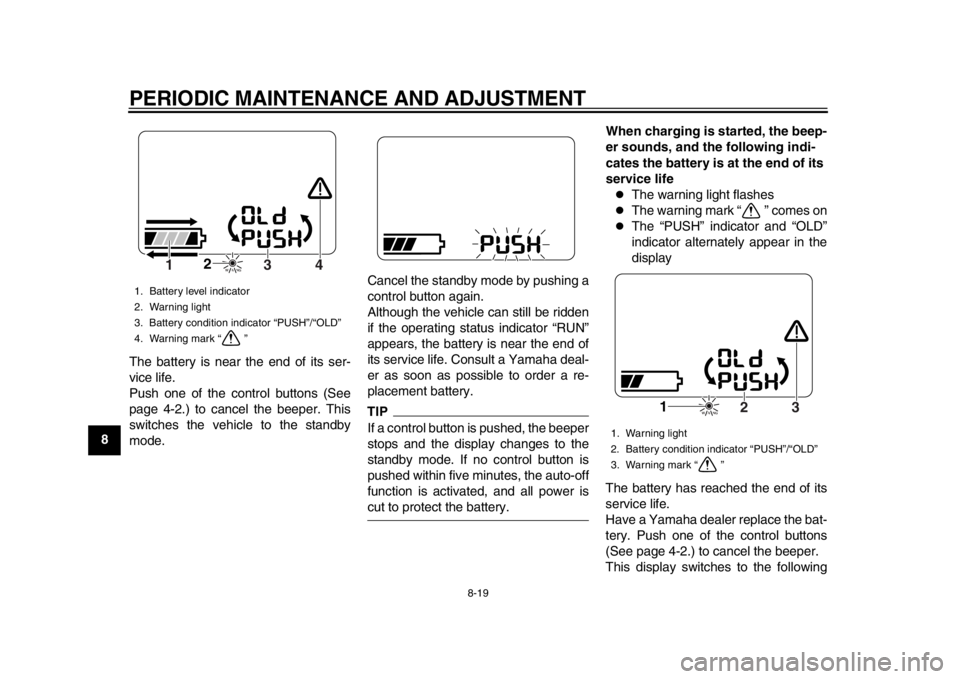
9The battery is near the end of its ser-
vice life.
Push one of the control buttons (See
page 4-2.) to cancel the beeper. This
switches the vehicle to the standby
mode. Cancel the standby mode by pushing a
control button again.
Although the vehicle can still be ridden
if the operating status indicator “RUN”
appears, the battery is near the end of
its service life. Consult a Yamaha deal-
er as soon as possible to order a re-
placement battery.
TIPIf a control button is pushed, the beeper
stops and the display changes to the
standby mode. If no control button is
pushed within five minutes, the auto-off
function is activated, and all power iscut to protect the battery.When charging is started, the beep-
er sounds, and the following indi-
cates the battery is at the end of its
service life
The warning light flashes
The warning mark “ ” comes on
The “PUSH” indicator and “OLD”
indicator alternately appear in the
display
The battery has reached the end of its
service life.
Have a Yamaha dealer replace the bat-
tery. Push one of the control buttons
(See page 4-2.) to cancel the beeper.
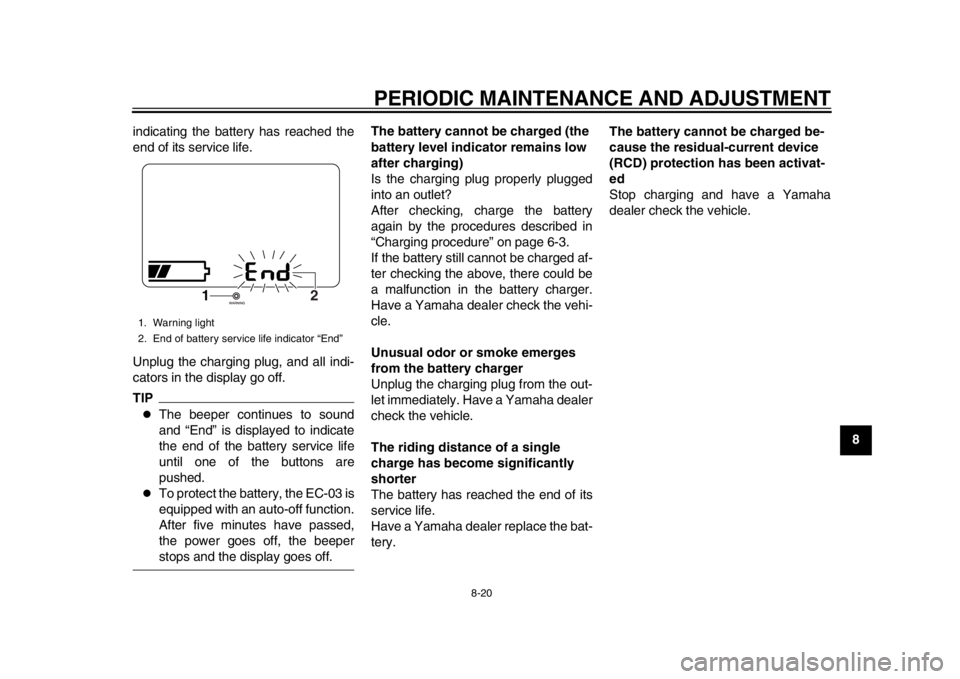
This display switches to the following
1. Battery level indicator
2. Warning light
3. Battery condition indicator “PUSH”/“OLD”
4. Warning mark “ ”
2
4
3
1
1. Warning light
2. Battery condition indicator “PUSH”/“OLD”
3. Warning mark “ ”
1
3
2
1CB-9-EA.book 19 ページ 2012年4月11日 水曜日 午前9時34分
Page 69 of 78
PERIODIC MAINTENANCE AND ADJUSTMENT
8-20
2
3
4
5
6
789
indicating the battery has reached the
end of its service life.
Unplug the charging plug, and all indi-
cators in the display go off.
TIP
The beeper continues to sound
and “End” is displayed to indicate
the end of the battery service life
until one of the buttons are
pushed.
To protect the battery, the EC-03 is
equipped with an auto-off function.
After five minutes have passed,
the power goes off, the beeperstops and the display goes off. The battery cannot be charged (the
battery level indicator remains low
after charging)
Is the charging plug properly plugged
into an outlet?
After checking, charge the battery
again by the procedures described in
“Charging procedure” on page 6-3.
If the battery still cannot be charged af-
ter checking the above, there could be
a malfunction in the battery charger.
Have a Yamaha dealer check the vehi-
cle.
Unusual odor or smoke emerges
from the battery charger
Unplug the charging plug from the out-
let immediately. Have a Yamaha dealer
check the vehicle.
The riding distance of a single
charge has become significantly
shorter
The battery has reached the end of its
service life.
Have a Yamaha dealer replace the bat-
tery.
The battery cannot be charged be-
cause the residual-current device
(RCD) protection has been activat-
ed
Stop charging and have a Yamaha
dealer check the vehicle.
1. Warning light
2. End of battery service life indicator “End”
1
2
1CB-9-EA.book 20 ページ 2012年4月11日 水曜日 午前9時34分
Page 70 of 78
9-1
1
2
3
4
5
6
7
89
SCOOTER CARE AND STORAGE
EAU37833
Matte color caution NOTICE
ECA15192
Some models are equipped with
matte colored finished parts. Be
sure to consult a Yamaha dealer for
advice on what products to use be-
fore cleaning the vehicle. Using a
brush, harsh chemical products or
cleaning compounds when cleaning
these parts will scratch or damage
their surface. Wax also should not
be applied to any matte colored fin-ished parts.
EAU50832
Care While the open design of a scooter re-
veals the attractiveness of the technol-
ogy, it also makes it more vulnerable.
Rust and corrosion can develop even if
high-quality components are used. Fre-
quent and proper care does not only
comply with the terms of the warranty,
but it will also keep your scooter looking
good, extend its life and optimize its
performance.
Before cleaning1. Make sure that the seat is properly closed before cleaning.
2. Make sure that all caps and covers as well as all electrical couplers
and connectors, are tightly in-
stalled.
3. Remove extremely stubborn dirt, with a degreasing agent and a
brush, but never apply such prod-
ucts onto seals, gaskets and wheel
axles. Always rinse the dirt and de-
greaser off with water. Cleaning
WARNING
EWA15810
Do not wash the vehicle while
charging the battery. This could
cause a fire or electric shock.
Make sure that the seat is prop-
erly closed before washing. If
the seat is not properly closed,
water could splash on the bat-
tery or built-in charger. This
could cause an electric shock or
short circuit.
Do not wash the charging cord
and charging plug. Wipe cleanwith a dry rag.
NOTICE
ECA17122
Avoid using strong acidic wheel
cleaners, especially on spoked
wheels. If such products are
used on hard-to-remove dirt, do
not leave the cleaner on the af-
fected area any longer than in-
structed. Also, thoroughly rinse
the area off with water, immedi-
ately dry it, and then apply a cor-
1CB-9-EA.book 1 ページ 2012年4月11日 水曜日 午前9時34分
Page 72 of 78

SCOOTER CARE AND STORAGE
9-3
1
2
3
4
5
6
7
893. To prevent corrosion, it is recom-
mended to apply a corrosion pro-
tection spray on all metal,
including chrome- and nickel-plat-
ed, surfaces.
4. Use spray oil as a universal clean- er to remove any remaining dirt.
5. Touch up minor paint damage caused by stones, etc.
6. Wax all painted surfaces.
7. Let the scooter dry completely be- fore storing or covering it.
WARNING
EWA15820
Contaminants on the brakes or tires
can cause loss of control.
Make sure that there is no oil or
wax on the brakes or tires. If
necessary, wash the tires with
warm water and a mild deter-
gent.
Before operating the scooter,
test its braking performanceand cornering behavior.
NOTICE
ECA10800
Apply spray oil and wax spar-
ingly and make sure to wipe off any excess.
Never apply oil or wax to any
rubber and plastic parts, but
treat them with a suitable care
product.
Avoid using abrasive polishing
compounds as they will wearaway the paint.
TIP
Consult a Yamaha dealer for ad-
vice on what products to use.
Washing, rainy weather or humid
climates can cause the headlight
lens to fog. Turning the headlight
on for a short period of time will
help remove the moisture from thelens.
EAU50843
Storage Short-term
Always store your scooter in a cool, dry
place and, if necessary, protect it
against dust with a porous cover. Be
sure the motor is cool before covering
the scooter.NOTICE
ECA17130
Storing the scooter in a poorly
ventilated room or covering it
with a tarp while it is still wet,
will allow water and humidity to
seep in and cause rust, power
unit failure, electric leakage, or
short-circuiting.
To prevent corrosion, avoid
damp cellars, stables (because
of the presence of ammonia)
and areas where strong chemi-cals are stored.
Long-term
NOTICE
ECA17143
Charge the battery if the level
drops to the last segment. In or-
1CB-9-EA.book 3 ページ 2012年4月11日 水曜日 午前9時34分