brake YAMAHA EC-03 2012 Owners Manual
[x] Cancel search | Manufacturer: YAMAHA, Model Year: 2012, Model line: EC-03, Model: YAMAHA EC-03 2012Pages: 78, PDF Size: 2.19 MB
Page 6 of 78

TABLE OF CONTENTSSAFETY INFORMATION .................. 1-1
Further safe-riding points ................ 1-5
Charging the battery sa fely ............. 1-5
DESCRIPTION .................................. 2-1
Left view .......................................... 2-1
Right view ........................................ 2-2
Controls and instrument s................. 2-3
EC-03 FEATURES ............................. 3-1
Features ......................................... 3-1
Traveling distance .......................... 3-1
Effective use of the battery ............. 3-2
Battery level .................................... 3-3
INSTRUMENT AND CONTROL
FUNCTIONS ....................................... 4-1
Beeper ............................................ 4-1
Main switch/steering lock ................ 4-1
Multi-function display ...................... 4-2
Using the security lock .................... 4-7
Handlebar switches ...................... 4-11
Front brake lever .......................... 4-11
Rear brake lever ........................... 4-11
Seat .............................................. 4-12
Helmet holder ............................... 4-12
Luggage hook ............................... 4-13
Grab bar ....................................... 4-13
FOR YOUR SAFETY –
PRE-OPERATION CHECKS .............. 5-1CHARGING THE BATTERY
.............. 6-1
Battery charging locati on ................ 6-1
Charging procedure ....................... 6-3
Charging time ................................. 6-8
Display of charging progress status .......................................... 6-9
About the battery ............................ 6-9
OPERATION AND IMPORTANT
RIDING POINTS ................................. 7-1
Preparations for starting off ............ 7-1
Starting off ...................................... 7-3
Acceleration and deceleration ........ 7-4
Braking ........................................... 7-5
Parking ........................................... 7-5
PERIODIC MAINTENANCE AND
ADJUSTMENT ................................... 8-1
General maintenance and lubrication chart .......................... 8-2
Checking for irregular motor sounds ........................................ 8-4
Checking the accelerato r grip ........ 8-4
Tires ............................................... 8-5
Cast wheels .................................... 8-6
Adjusting the front and rear brake lever free play ............................. 8-6
Checking the front and rear brake
shoes .......................................... 8-8
Checking and lubricating the cables ......................................... 8-8 Lubricating the front and rear
brake levers ................................. 8-9
Checking and lubricating the centerstand .................................. 8-9
Checking the front fork .................. 8-10
Checking the steering ................... 8-10
Checking the wheel bearings ........ 8-11
Replacing the headlight bulb ........ 8-11
Replacing the tail/brake light bulb ............................................ 8-12
Replacing a turn signal light
bulb ............................................ 8-13
Checking the charging cord and charging plug ............................. 8-14
Troubleshooting .......... .................. 8-15
SCOOTER CARE AND STORAGE .... 9-1
Matte color caution ......................... 9-1
Care ................................................ 9-1
Storage ........................................... 9-3
SPECIFICATIONS ........................... 10-1
CONSUMER INFORMATION ........... 11-1
Identification numbers .. ................. 11-11CB-9-EA.book 1 ページ 2012年4月11日 水曜日 午前9時34分
Page 11 of 78
1-5
1
SAFETY INFORMATION
EAUT2031
Further safe-riding points
Make sure to signal clearly when
making turns.
Braking can be extremely difficult
on a wet road. Avoid hard braking,
because the scooter could slide.
Apply the brakes slowly when
stopping on a wet surface.
Slow down as you approach a cor-
ner or turn. Once you have com-
pleted a turn, accelerate slowly.
Be careful when passing parked
cars. A driver might not see you
and open a door in your path.
Railroad crossings, streetcar rails,
iron plates on road construction
sites, and manhole covers be-
come extremely slippery when
wet. Slow down and cross them
with caution. Keep the scooter up-
right, otherwise it could slide out
from under you.
The brake lining could get wet
when you wash the scooter. After
washing the scooter, check the
brakes before riding.
Always wear a helmet, gloves,
trousers (tapered around the cuffand ankle so they do not flap), and
a bright colored jacket.
Do not carry too much luggage on
the scooter. An overloaded scoot-
er is unstable.
EAU50823
Charging the battery safely
Do not charge the battery in areas
potentially exposed to rain or wa-
ter. This could cause an electric
shock or short circuit.
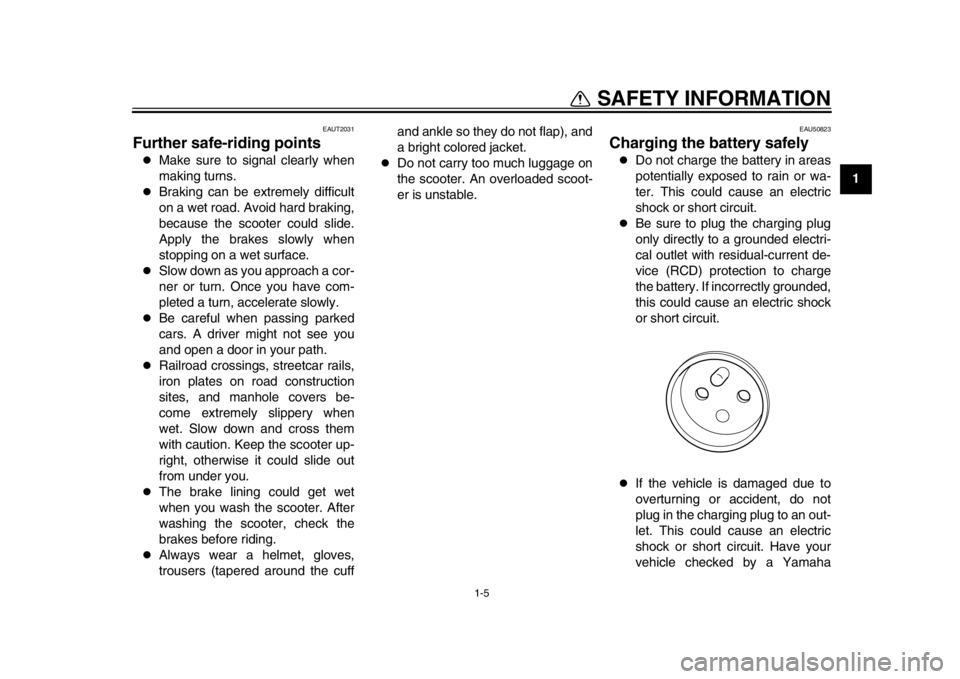
Be sure to plug the charging plug
only directly to a grounded electri-
cal outlet with residual-current de-
vice (RCD) protection to charge
the battery. If incorrectly grounded,
this could cause an electric shock
or short circuit.
If the vehicle is damaged due to
overturning or accident, do not
plug in the charging plug to an out-
let. This could cause an electric
shock or short circuit. Have your
vehicle checked by a Yamaha
1CB-9-EA.book 5 ページ 2012年4月11日 水曜日 午前9時34分
Page 13 of 78
2-1
12
DESCRIPTION
EAU10410
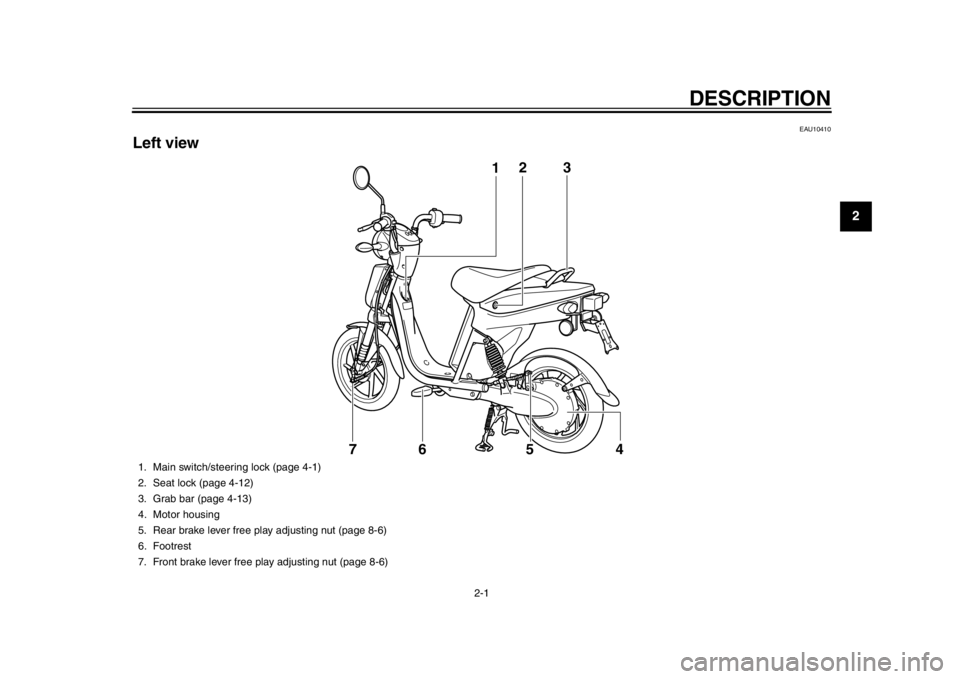
Left view
12
54
7 3
6
1. Main switch/steering lock (page 4-1)
2. Seat lock (page 4-12)
3. Grab bar (page 4-13)
4. Motor housing
5. Rear brake lever free play adjusting nut (page 8-6)
6. Footrest
7. Front brake lever free play adjusting nut (page 8-6)
1CB-9-EA.book 1 ページ 2012年4月11日 水曜日 午前9時34分
Page 15 of 78

DESCRIPTION
2-3
23
4
5
6
7
8
9
EAU10430
Controls and instruments
12
4
5
3
1. Rear brake lever (page 4-11)
2. Handlebar switches (page 4-11)
3. Multi-function display (page 4-2)
4. Front brake lever (page 4-11)
5. Accelerator grip (page 8-4)
1CB-9-EA.book 3 ページ 2012年4月11日 水曜日 午前9時34分
Page 23 of 78
INSTRUMENT AND CONTROL FUNCTIONS
4-4
2
345
6
7
8
9
TIPWhen the vehicle is in the riding mode,
the beeper sounds. The beeper stops
when either brake lever is squeezed orthe vehicle starts moving.
Control buttons
Button 1 “POWER”
Button 2 “SET”
Button 3 “SELECT”
The following operations and settings
are made using these buttons.
Changing from the standby mode
to the riding mode
Switching between the odometer
and the tripmeter
Resetting the tripmeter
Registering or changing the secu-
rity number
Locking and unlocking the security
lock
Speedometer
The speedometer shows the riding
speed.
Tripmeter “Trip”
The tripmeter shows the distance trav- eled since it was last set to zero. To re-
set the tripmeter, push and hold button
3 “SELECT” for a few seconds until
“0.0” is displayed.
Odometer “Odo”
Push button 3 “SELECT” for at least
one second to switch the display to the
odometer.
The odometer shows the total distance
traveled. Use the odometer as a refer-
ence for the intervals between perform-
ing periodic maintenance.
Push button 3 for at least one second to
switch the display to the tripmeter.
Temperature warning display
“HEAT”/“COOL”
The EC-03 is equipped with a tempera-
ture protection function to protect the
battery and control unit.
If a problem is detected, the tripmeter/
odometer display is canceled and
“COOL” or “HEAT” flash.
When the temperature of the bat-
tery or control unit exceeds a spec-
ified temperature, “HEAT” flashes.
When the temperature of the bat-
tery falls below a specified temper-ature, “COOL” flashes.
TIP
When the temperature of the bat-
tery exceeds a specified tempera-
ture, “HEAT” flashes and the
driving power is reduced to limit
the electric output from the battery,
but this is normal.
When the temperature of the bat-
tery falls below a specified temper-
ature, “COOL” flashes and the
driving power is reduced to limit
the electric output from the battery,
but this is normal.
If the vehicle is ridden for an ex-
tended period in high tempera-
tures, “HEAT” may flash and the
riding speed may be reduced.
If the vehicle is ridden after it has
been left in a hot place or under di-
rect sunlight, “HEAT” may flash
and the riding speed may be re-
duced.
If the vehicle is ridden after it has
been left in an excessively cold
place (less than 0
C), “COOL”
may flash and the riding speed
may be reduced.
1CB-9-EA.book 4 ページ 2012年4月11日 水曜日 午前9時34分
Page 27 of 78
INSTRUMENT AND CONTROL FUNCTIONS
4-8
2
345
6
7
8
9
The display shows that the vehicle
is in the riding mode.
TIP
When the security lock is locked,
after changing to the riding mode,
enter the security number to un- lock the security lock. (See page
7-1 for more information about un-
locking the security lock.)
When the vehicle enters the riding
mode, the beeper sounds. The
beeper stops sounding when ei-
ther brake lever is squeezed or thevehicle starts moving.
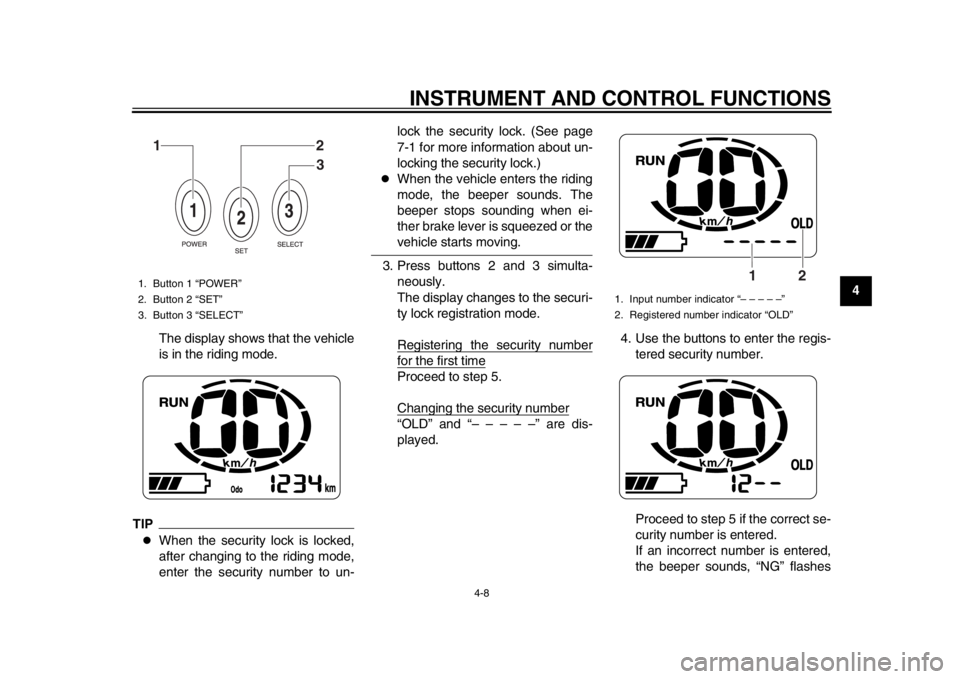
3. Press buttons 2 and 3 simulta- neously.
The display changes to the securi-
ty lock registration mode.
Registering the security numberfor the first timeProceed to step 5.
Changing the security number“OLD” and “– – – – –” are dis-
played. 4. Use the buttons to enter the regis-
tered security number.
Proceed to step 5 if the correct se-
curity number is entered.
If an incorrect number is entered,
the beeper sounds, “NG” flashes
1. Button 1 “POWER”
2. Button 2 “SET”
3. Button 3 “SELECT”
12
3
1. Input number indicator “– – – – –”
2. Registered number indicator “OLD”
2
1
1CB-9-EA.book 8 ページ 2012年4月11日 水曜日 午前9時34分
Page 30 of 78
INSTRUMENT AND CONTROL FUNCTIONS
4-11
1
2
34
5
6
7
8
9
EAU1234A
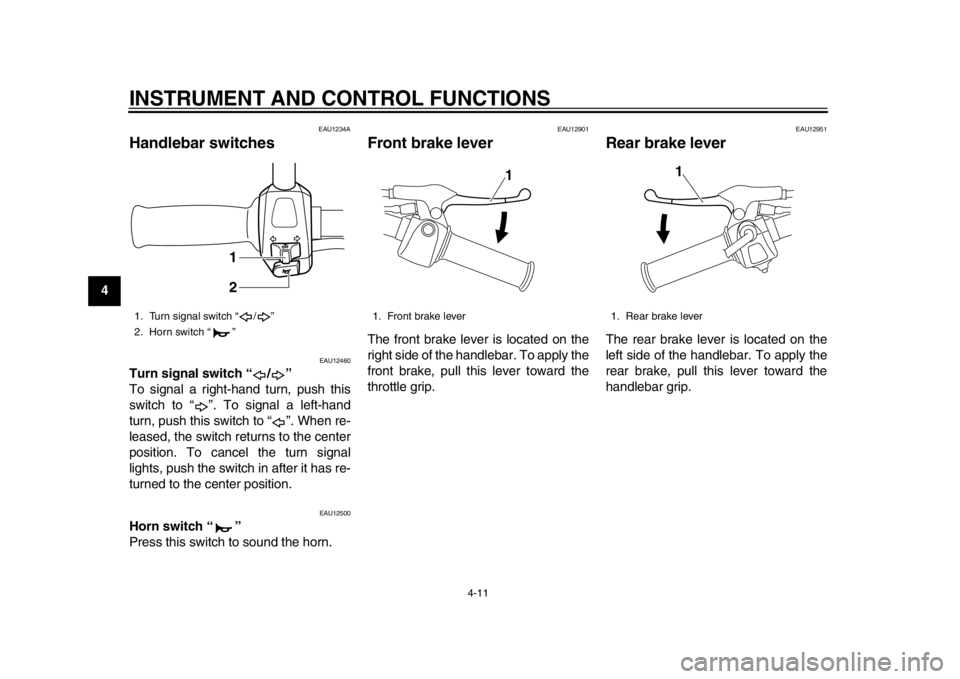
Handlebar switches
EAU12460
Turn signal switch “ / ”
To signal a right-hand turn, push this
switch to “ ”. To signal a left-hand
turn, push this switch to “ ”. When re-
leased, the switch returns to the center
position. To cancel the turn signal
lights, push the switch in after it has re-
turned to the center position.
EAU12500
Horn switch “ ”
Press this switch to sound the horn.
EAU12901
Front brake lever The front brake lever is located on the
right side of the handlebar. To apply the
front brake, pull this lever toward the
throttle grip.
EAU12951
Rear brake lever The rear brake lever is located on the
left side of the handlebar. To apply the
rear brake, pull this lever toward the
handlebar grip.
1. Turn signal switch “ / ”
2. Horn switch “ ”
1
2
1. Front brake lever
1
1. Rear brake lever
1
1CB-9-EA.book 11 ページ 2012年4月11日 水曜日 午前9時34分
Page 33 of 78
5-1
2
3
456
7
8
9
FOR YOUR SAFETY – PRE-OPERATION CHECKS
EAU15596
Inspect your vehicle each time you use it to make sure the vehicle is in safe operating condition. Always follow the inspection
and maintenance procedures and schedules described in the Owner’s Manual.
WARNING
EWA11151
Failure to inspect or maintain the vehicle properly increases the possibility of an accident or equipment damage.
Do not operate the vehicle if you find any problem. If a problem cannot be corrected by the procedures provided inthis manual, have the vehicle inspected by a Yamaha dealer.
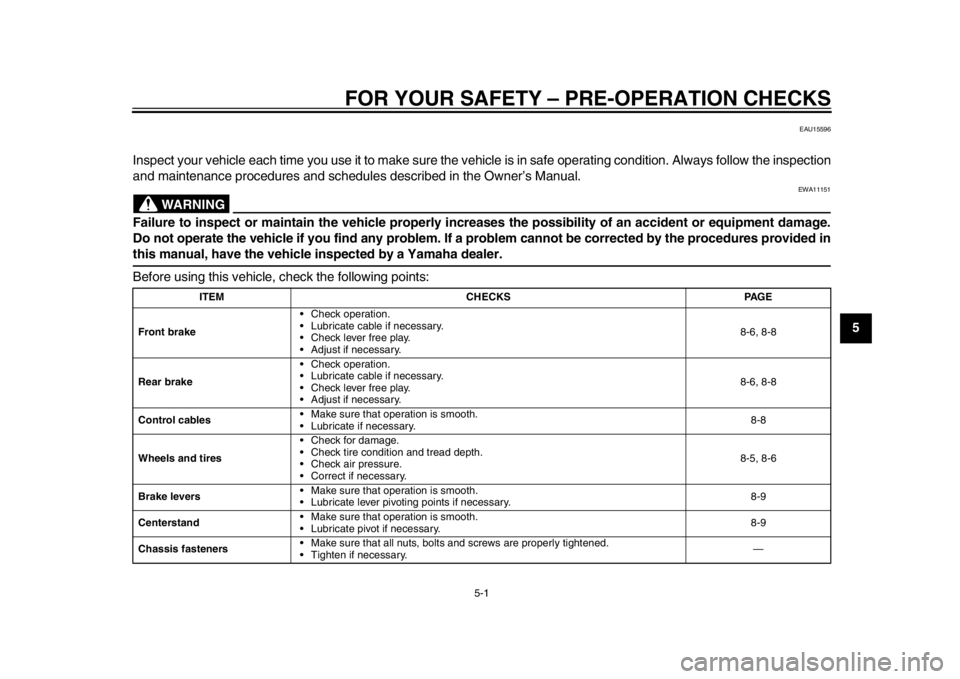
Before using this vehicle, check the following points:
ITEM CHECKS PAGE
Front brake Check operation.
Lubricate cable if necessary.
Check lever free play.
Adjust if necessary. 8-6, 8-8
Rear brake Check operation.
Lubricate cable if necessary.
Check lever free play.
Adjust if necessary. 8-6, 8-8
Control cables Make sure that operation is smooth.
Lubricate if necessary. 8-8
Wheels and tires Check for damage.
Check tire condition and tread depth.
Check air pressure.
Correct if necessary. 8-5, 8-6
Brake levers Make sure that operation is smooth.
Lubricate lever pivoting
points if necessary. 8-9
Centerstand Make sure that operation is smooth.
Lubricate pivot if necessary. 8-9
Chassis fasteners Make sure that all nuts, bolts
and screws are properly tightened.
Tighten if necessary. —
1CB-9-EA.book 1 ページ 2012年4月11日 水曜日 午前9時34分
Page 45 of 78
7-1
2
3
4
5
678
9
OPERATION AND IMPORTANT RIDING POINTS
EAU15951
Read the Owner’s Manual carefully to
become familiar with all controls. If
there is a control or function you do not
understand, ask your Yamaha dealer.
WARNING
EWA10271
Failure to familiarize yourself with
the controls can lead to loss of con-
trol, which could cause an accidentor injury.
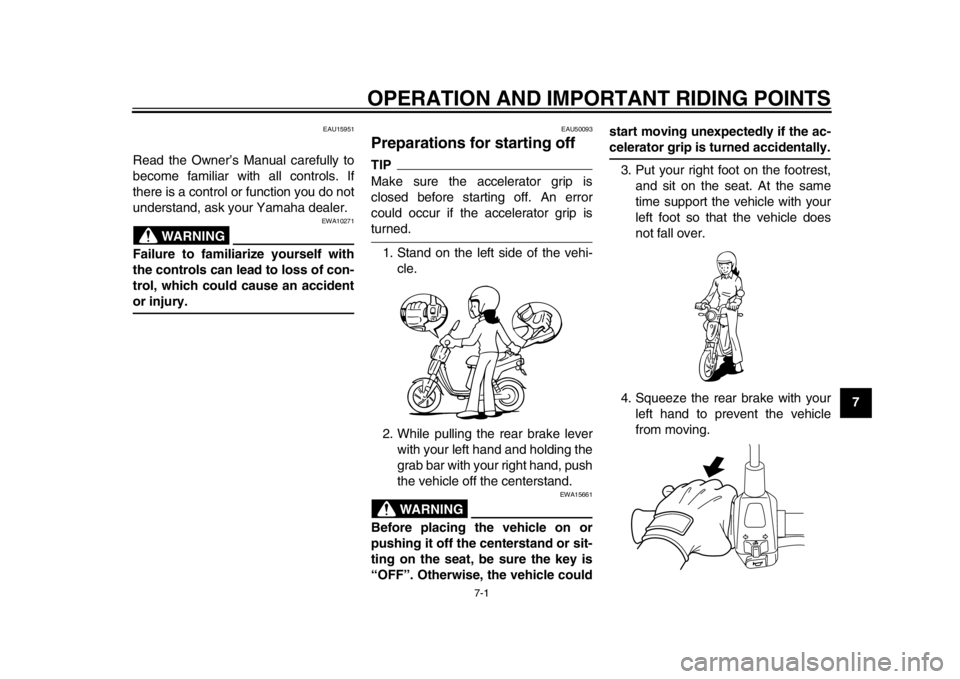
EAU50093
Preparations for starting off TIPMake sure the accelerator grip is
closed before starting off. An error
could occur if the accelerator grip isturned.
1. Stand on the left side of the vehi- cle.
2. While pulling the rear brake lever with your left hand and holding the
grab bar with your right hand, push
the vehicle off the centerstand.
WARNING
EWA15661
Before placing the vehicle on or
pushing it off the centerstand or sit-
ting on the seat, be sure the key is
“OFF”. Otherwise, the vehicle could start moving unexpectedly if the ac-
celerator grip is turned accidentally.
3. Put your right foot on the footrest, and sit on the seat. At the same
time support the vehicle with your
left foot so that the vehicle does
not fall over.
4. Squeeze the rear brake with your left hand to prevent the vehicle
from moving.
1CB-9-EA.book 1 ページ 2012年4月11日 水曜日 午前9時34分
Page 46 of 78
OPERATION AND IMPORTANT RIDING POINTS
7-2
1
2
3
4
5
67
8
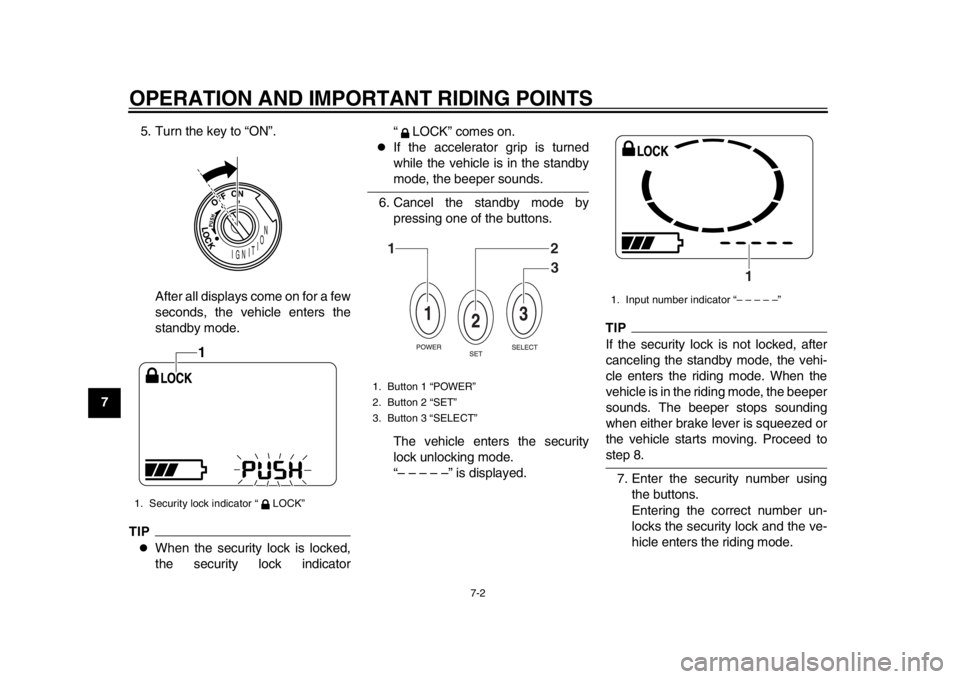
95. Turn the key to “ON”.
After all displays come on for a few
seconds, the vehicle enters the
standby mode.
TIP
When the security lock is locked,
the security lock indicator “ LOCK” comes on.
If the accelerator grip is turned
while the vehicle is in the standbymode, the beeper sounds.
6. Cancel the standby mode by pressing one of the buttons.
The vehicle enters the security
lock unlocking mode.
“– – – – –” is displayed.
TIPIf the security lock is not locked, after
canceling the standby mode, the vehi-
cle enters the riding mode. When the
vehicle is in the riding mode, the beeper
sounds. The beeper stops sounding
when either brake lever is squeezed or
the vehicle starts moving. Proceed tostep 8.
7. Enter the security number using the buttons.
Entering the correct number un-
locks the security lock and the ve-
hicle enters the riding mode.
1. Security lock indicator “ LOCK”
1
1. Button 1 “POWER”
2. Button 2 “SET”
3. Button 3 “SELECT”
12
3
1. Input number indicator “– – – – –”
1
1CB-9-EA.book 2 ページ 2012年4月11日 水曜日 午前9時34分