battery YAMAHA EX 2018 Owners Manual
[x] Cancel search | Manufacturer: YAMAHA, Model Year: 2018, Model line: EX, Model: YAMAHA EX 2018Pages: 102, PDF Size: 3.64 MB
Page 6 of 102

Table of contents
Operation ......................................... 61
Operating your watercraft ............. 61
Getting to know your watercraft ...... 61
Learning to operate your
watercraft ...................................... 61
Riding position ................................. 62
Launching the watercraft ................. 62
Starting the engine on water ............ 62
Stopping the engine ......................... 63
Leaving the watercraft...................... 63
Operating the watercraft .................. 63
Turning the watercraft ...................... 65
Stopping the watercraft ................... 66
Operating the watercraft in reverse
or neutral (EX Sport /
EX Deluxe)..................................... 67
Boarding the watercraft ................... 68
Starting off........................................ 71
Capsized watercraft ......................... 72
Beaching and docking the
watercraft ...................................... 73
Operating in weeded areas .............. 73
After removing the watercraft from
the water ....................................... 74
Care and storage............................. 75
Post-operation care ...................... 75
Flushing the cooling water
passages....................................... 75
Cleaning the watercraft .................... 76
Battery care ...................................... 76
Long-term storage ........................ 79
Cleaning ........................................... 79
Lubrication ....................................... 79
Rustproofing..................................... 80
Maintenance .................................... 82
Maintenance.................................. 82
Tool kit.............................................. 82
Periodic maintenance chart ............. 83
Engine oil and oil filter ...................... 85
Specifications .................................. 86
Specifications ............................... 86
Trouble recovery ............................. 87
Troubleshooting ............................ 87
Troubleshooting chart ...................... 87
Emergency procedures ................ 90
Cleaning the jet intake and
impeller ......................................... 90
Raising the reverse gate
(EX Deluxe) .................................... 91
Jumping the battery ......................... 91
Towing the watercraft....................... 92
Submerged watercraft ..................... 92
Index................................................. 94
UF3Y71E0.book Page 2 Thursday, May 25, 2017 11:17 AM
Page 30 of 102
Description
24
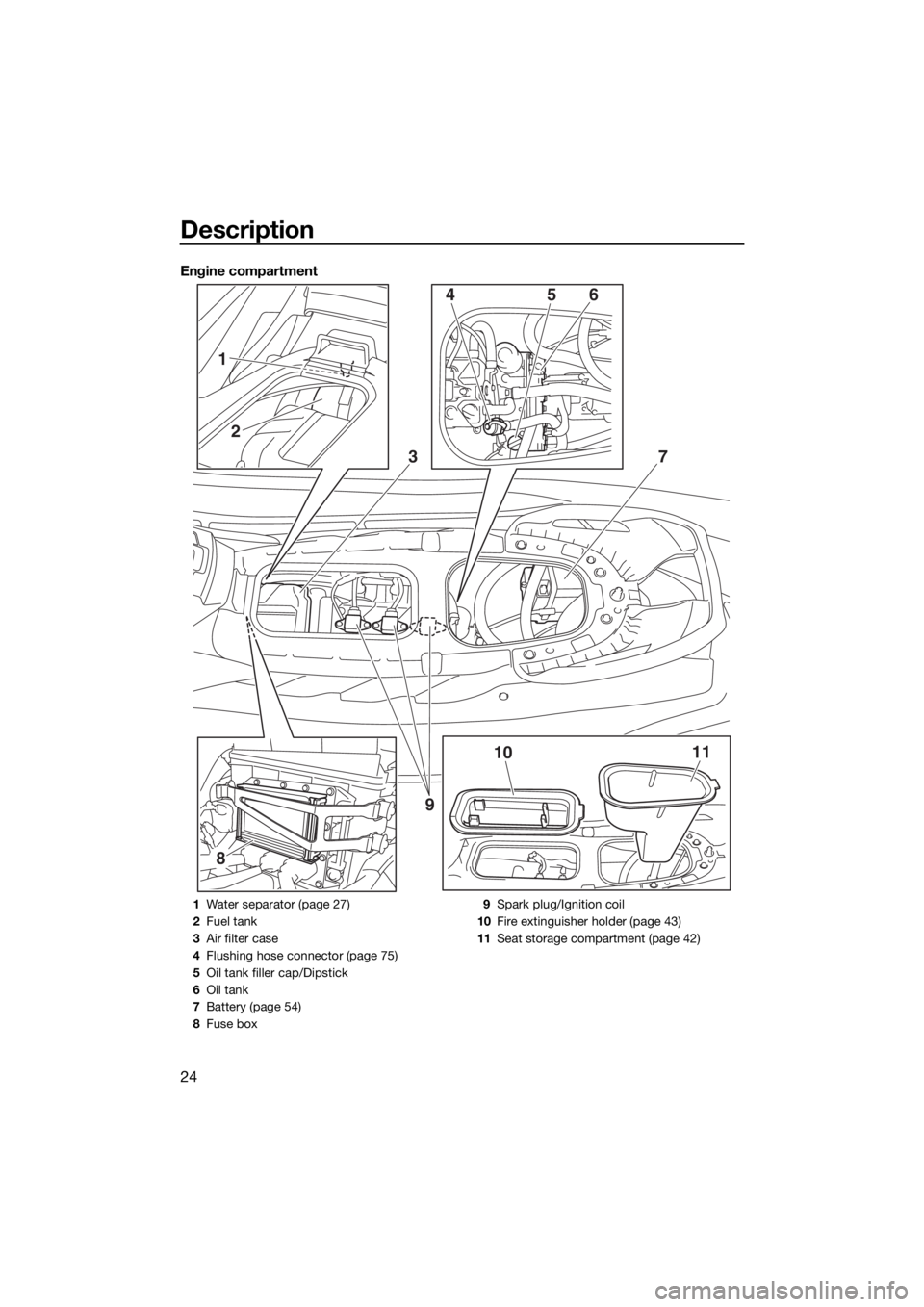
Engine compartment
8
3
1011 4
2
156
7
9
1Water separator (page 27)
2Fuel tank
3Air filter case
4Flushing hose connector (page 75)
5Oil tank filler cap/Dipstick
6Oil tank
7Battery (page 54)
8Fuse box9Spark plug/Ignition coil
10Fire extinguisher holder (page 43)
11Seat storage compartment (page 42)
UF3Y71E0.book Page 24 Thursday, May 25, 2017 11:17 AM
Page 31 of 102
Control function operation
25
EJU31026
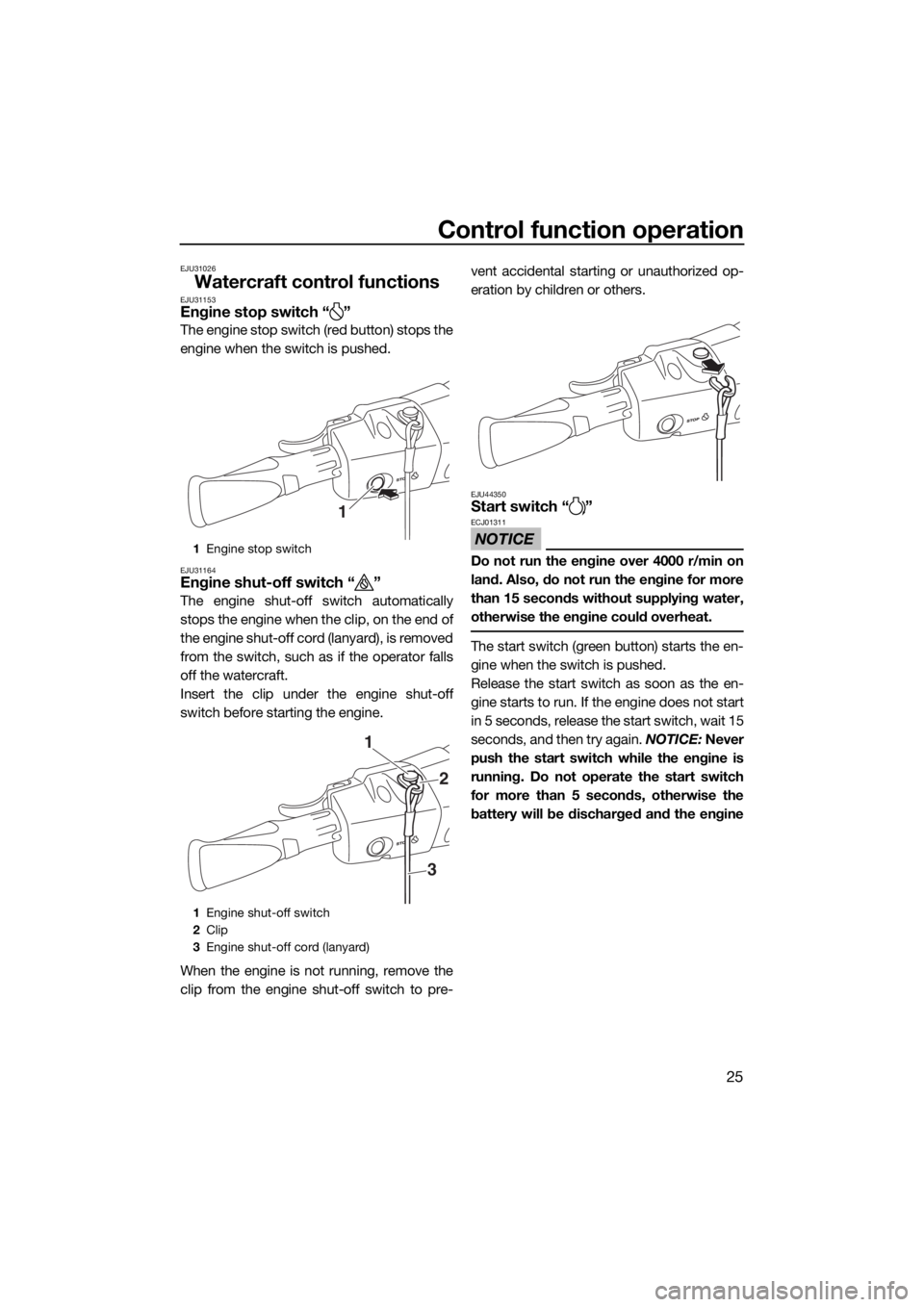
Watercraft control functionsEJU31153Engine stop switch “ ”
The engine stop switch (red button) stops the
engine when the switch is pushed.
EJU31164Engine shut-off switch “ ”
The engine shut-off switch automatically
stops the engine when the clip, on the end of
the engine shut-off cord (lanyard), is removed
from the switch, such as if the operator falls
off the watercraft.
Insert the clip under the engine shut-off
switch before starting the engine.
When the engine is not running, remove the
clip from the engine shut-off switch to pre-vent accidental starting or unauthorized op-
eration by children or others.
EJU44350Start switch “ ”
NOTICE
ECJ01311
Do not run the engine over 4000 r/min on
land. Also, do not run the engine for more
than 15 seconds without supplying water,
otherwise the engine could overheat.
The start switch (green button) starts the en-
gine when the switch is pushed.
Release the start switch as soon as the en-
gine starts to run. If the engine does not start
in 5 seconds, release the start switch, wait 15
seconds, and then try again. NOTICE: Never
push the start switch while the engine is
running. Do not operate the start switch
for more than 5 seconds, otherwise the
battery will be discharged and the engine
1Engine stop switch
1Engine shut-off switch
2Clip
3Engine shut-off cord (lanyard)
1
1
2
3
UF3Y71E0.book Page 25 Thursday, May 25, 2017 11:17 AM
Page 40 of 102
Instrument operation
34
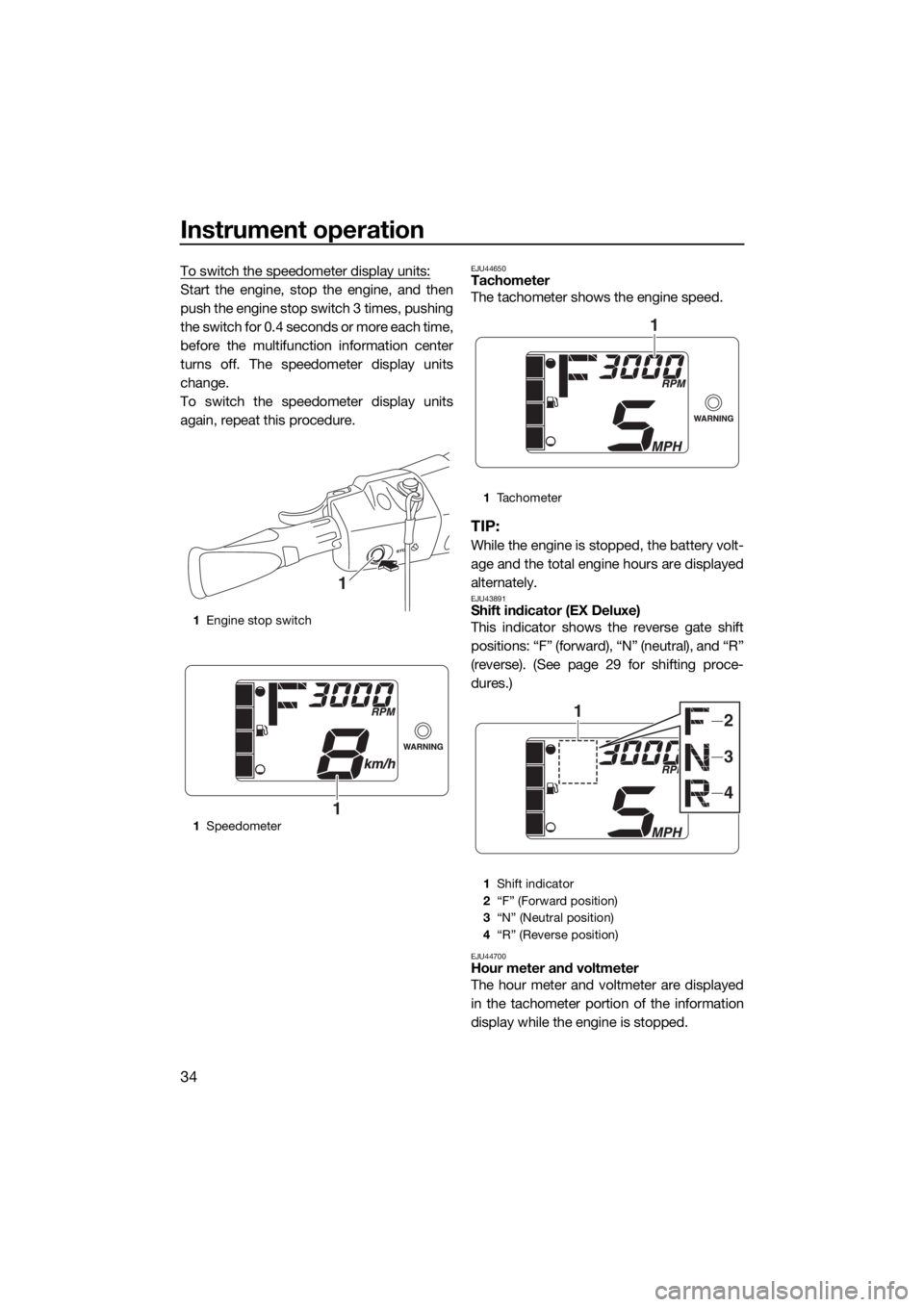
To switch the speedometer display units:
Start the engine, stop the engine, and then
push the engine stop switch 3 times, pushing
the switch for 0.4 seconds or more each time,
before the multifunction information center
turns off. The speedometer display units
change.
To switch the speedometer display units
again, repeat this procedure.
EJU44650Tachometer
The tachometer shows the engine speed.
TIP:
While the engine is stopped, the battery volt-
age and the total engine hours are displayed
alternately.
EJU43891Shift indicator (EX Deluxe)
This indicator shows the reverse gate shift
positions: “F” (forward), “N” (neutral), and “R”
(reverse). (See page 29 for shifting proce-
dures.)
EJU44700Hour meter and voltmeter
The hour meter and voltmeter are displayed
in the tachometer portion of the information
display while the engine is stopped.
1Engine stop switch
1Speedometer
1
1
1Tachometer
1Shift indicator
2“F” (Forward position)
3“N” (Neutral position)
4“R” (Reverse position)
1
12
3
4
UF3Y71E0.book Page 34 Thursday, May 25, 2017 11:17 AM
Page 41 of 102
Instrument operation
35
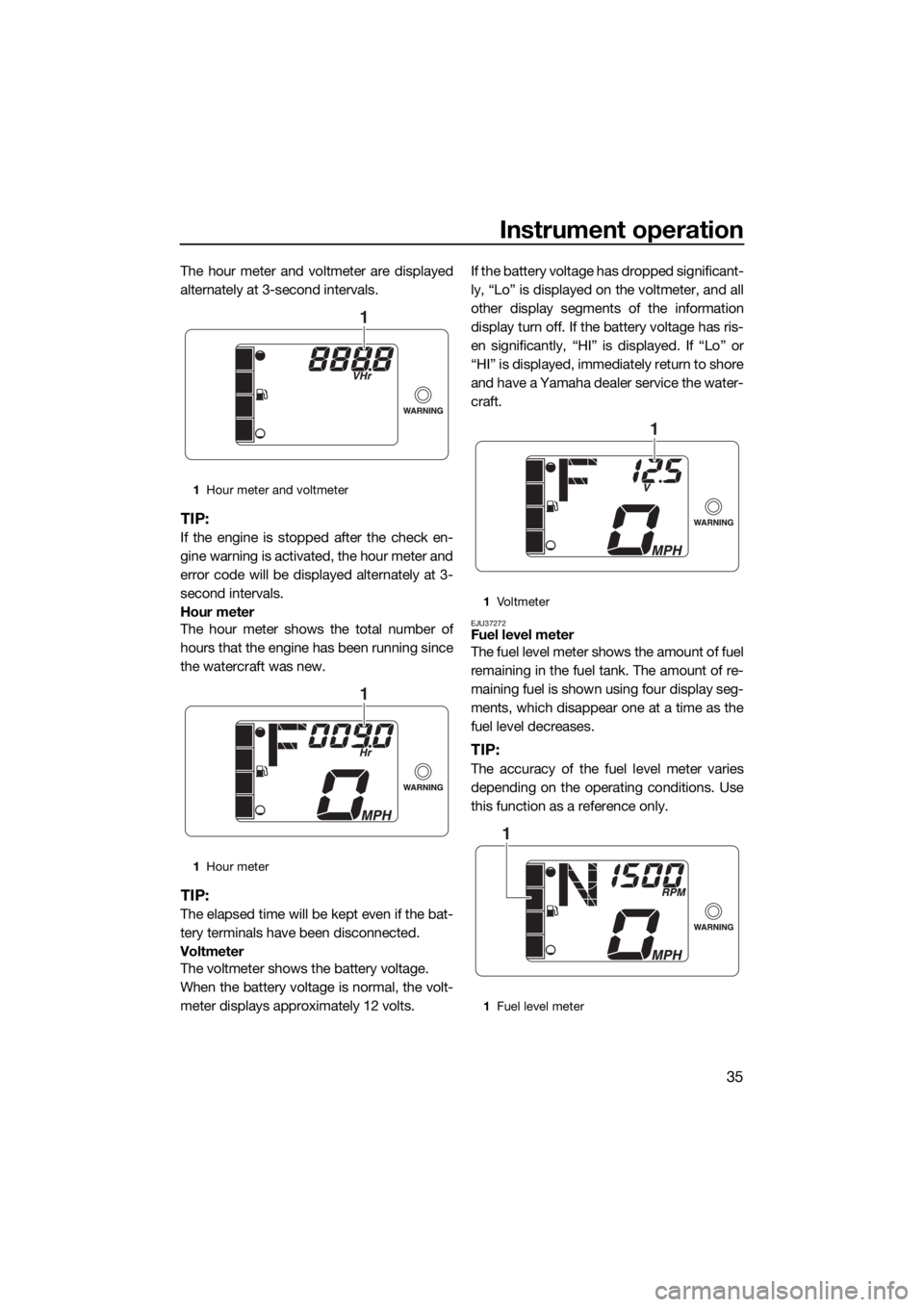
The hour meter and voltmeter are displayed
alternately at 3-second intervals.
TIP:
If the engine is stopped after the check en-
gine warning is activated, the hour meter and
error code will be displayed alternately at 3-
second intervals.
Hour meter
The hour meter shows the total number of
hours that the engine has been running since
the watercraft was new.
TIP:
The elapsed time will be kept even if the bat-
tery terminals have been disconnected.
Voltmeter
The voltmeter shows the battery voltage.
When the battery voltage is normal, the volt-
meter displays approximately 12 volts.If the battery voltage has dropped significant-
ly, “Lo” is displayed on the voltmeter, and all
other display segments of the information
display turn off. If the battery voltage has ris-
en significantly, “HI” is displayed. If “Lo” or
“HI” is displayed, immediately return to shore
and have a Yamaha dealer service the water-
craft.
EJU37272Fuel level meter
The fuel level meter shows the amount of fuel
remaining in the fuel tank. The amount of re-
maining fuel is shown using four display seg-
ments, which disappear one at a time as the
fuel level decreases.
TIP:
The accuracy of the fuel level meter varies
depending on the operating conditions. Use
this function as a reference only.
1Hour meter and voltmeter
1Hour meter
1
1
1Vo l t m et e r
1Fuel level meter
1
1
UF3Y71E0.book Page 35 Thursday, May 25, 2017 11:17 AM
Page 57 of 102

Pre-operation checks
51
EJU31982
WARNING
EWJ00412
Failure to inspect or maintain the watercraft properly increases the possibility of an ac-
cident or damage to the watercraft. Do not operate the watercraft if you find any prob-
lem. If a problem cannot be corrected by the procedures provided in this manual, have
the watercraft inspected by a Yamaha dealer.
EJU41234Pre-operation checklist
Before using this watercraft, be sure to perform the checks in the following checklist.
ITEM ROUTINE PAGE
PRE-LAUNCH CHECKS
Engine compartmentVentilate the engine compartment.
Check inside the engine compartment for damage.53
Fuel systemCheck the fuel system for leakage.
Check the fuel level in the fuel tank.53
Water separatorCheck the water separator for water. 53
Engine unitCheck the exterior of the engine unit for damage. 54
Engine oil levelCheck the engine oil level. 54
Bilge waterCheck the engine compartment for bilge water. 54
BatteryCheck the battery connections and electrolyte level. 54
Steering systemCheck the steering system for proper operation. 55
Reverse system (EX Sport)Check the reverse system for proper operation. 56
RiDE lever (EX Deluxe)Check the RiDE lever for proper operation. 56
Throttle leverCheck the throttle lever for proper operation. 57
Engine shut-off cord (lan-
yard)Check the engine shut-off cord (lanyard) for dam-
age.57
SwitchesCheck the start switch, engine stop switch, and en-
gine shut-off switch for proper operation.57
Storage compartmentsCheck the storage compartments for damage and
water.58
Fire extinguisher holderCheck the fire extinguisher holder for damage. 58
Fire extinguisherCheck the condition of the fire extinguisher. 58
Safety equipmentCheck that safety equipment meeting the applica-
ble regulations is on board.58
Hull and deckCheck the hull and deck for damage. 58
Jet intakeCheck the jet intake for damage and clogging. 58
Jet thrust nozzle and re-
verse gate (EX Sport / EX
Deluxe)Check the jet thrust nozzle and reverse gate for
damage.58
Stern drain plugsCheck the stern drain plugs for damage and foreign
material and check that they are securely installed.58
UF3Y71E0.book Page 51 Thursday, May 25, 2017 11:17 AM
Page 60 of 102
Pre-operation checks
54
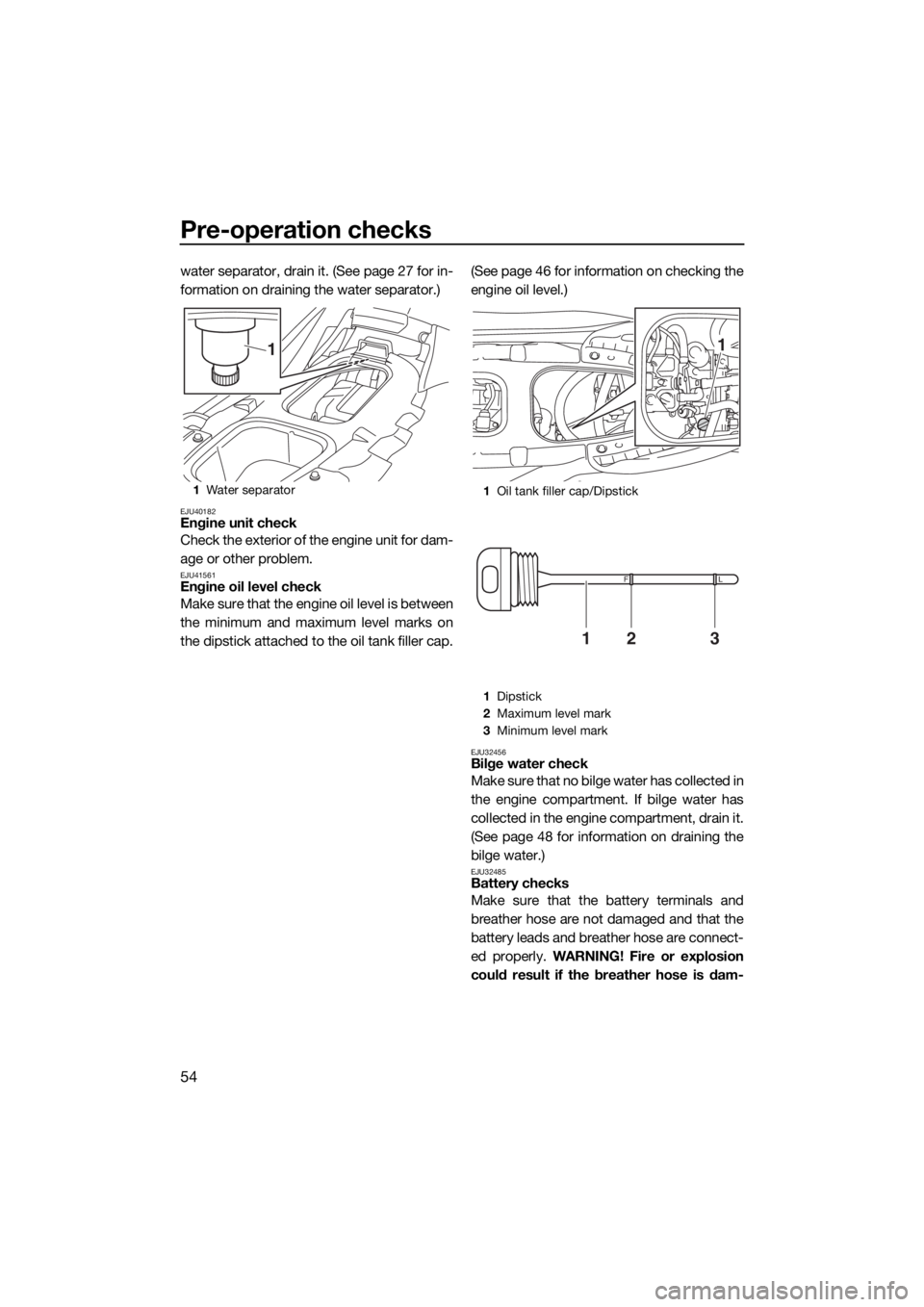
water separator, drain it. (See page 27 for in-
formation on draining the water separator.)
EJU40182Engine unit check
Check the exterior of the engine unit for dam-
age or other problem.
EJU41561Engine oil level check
Make sure that the engine oil level is between
the minimum and maximum level marks on
the dipstick attached to the oil tank filler cap.(See page 46 for information on checking the
engine oil level.)
EJU32456Bilge water check
Make sure that no bilge water has collected in
the engine compartment. If bilge water has
collected in the engine compartment, drain it.
(See page 48 for information on draining the
bilge water.)
EJU32485Battery checks
Make sure that the battery terminals and
breather hose are not damaged and that the
battery leads and breather hose are connect-
ed properly. WARNING! Fire or explosion
could result if the breather hose is dam-
1Water separator
1
1Oil tank filler cap/Dipstick
1Dipstick
2Maximum level mark
3Minimum level mark
1
FL
213
UF3Y71E0.book Page 54 Thursday, May 25, 2017 11:17 AM
Page 61 of 102
![YAMAHA EX 2018 Owners Manual Pre-operation checks
55
aged, obstructed, or not connected prop-
erly.
[EWJ00452]
Make sure that the electrolyte level is be-
tween the minimum and maximum level
marks. WARNING! Never operate the wa-](/img/51/49478/w960_49478-60.png "YAMAHA EX 2018 Owners Manual Pre-operation checks
55
aged, obstructed, or not connected prop-
erly.
[EWJ00452]
Make sure that the electrolyte level is be-
tween the minimum and maximum level
marks. WARNING! Never operate the wa-")
Pre-operation checks
55
aged, obstructed, or not connected prop-
erly.
[EWJ00452]
Make sure that the electrolyte level is be-
tween the minimum and maximum level
marks. WARNING! Never operate the wa-
tercraft if the battery does not have suffi-
cient power to start the engine or if it
shows any other signs of decreased pow-
er. Loss of battery power may leave you
stranded.
[EWJ01241]
Make sure that the battery is securely held in
place.
EJU32614Steering system checks
Turn the handlebars to the right and left sev-
eral times to make sure that operation is
smooth and unrestricted throughout thewhole range, and that the free play is not ex-
cessive.
Turn the handlebars as far as possible to the
right and left to make sure that the jet thrust
nozzle moves as the handlebars are turned,
and that there is no difference between the
1Negative (–) battery terminal: Black lead
2Positive (+) battery terminal: Red lead
3Breather hose
1Maximum level mark
2Minimum level mark
13
2
UF3Y71E0.book Page 55 Thursday, May 25, 2017 11:17 AM
Page 82 of 102
Care and storage
76
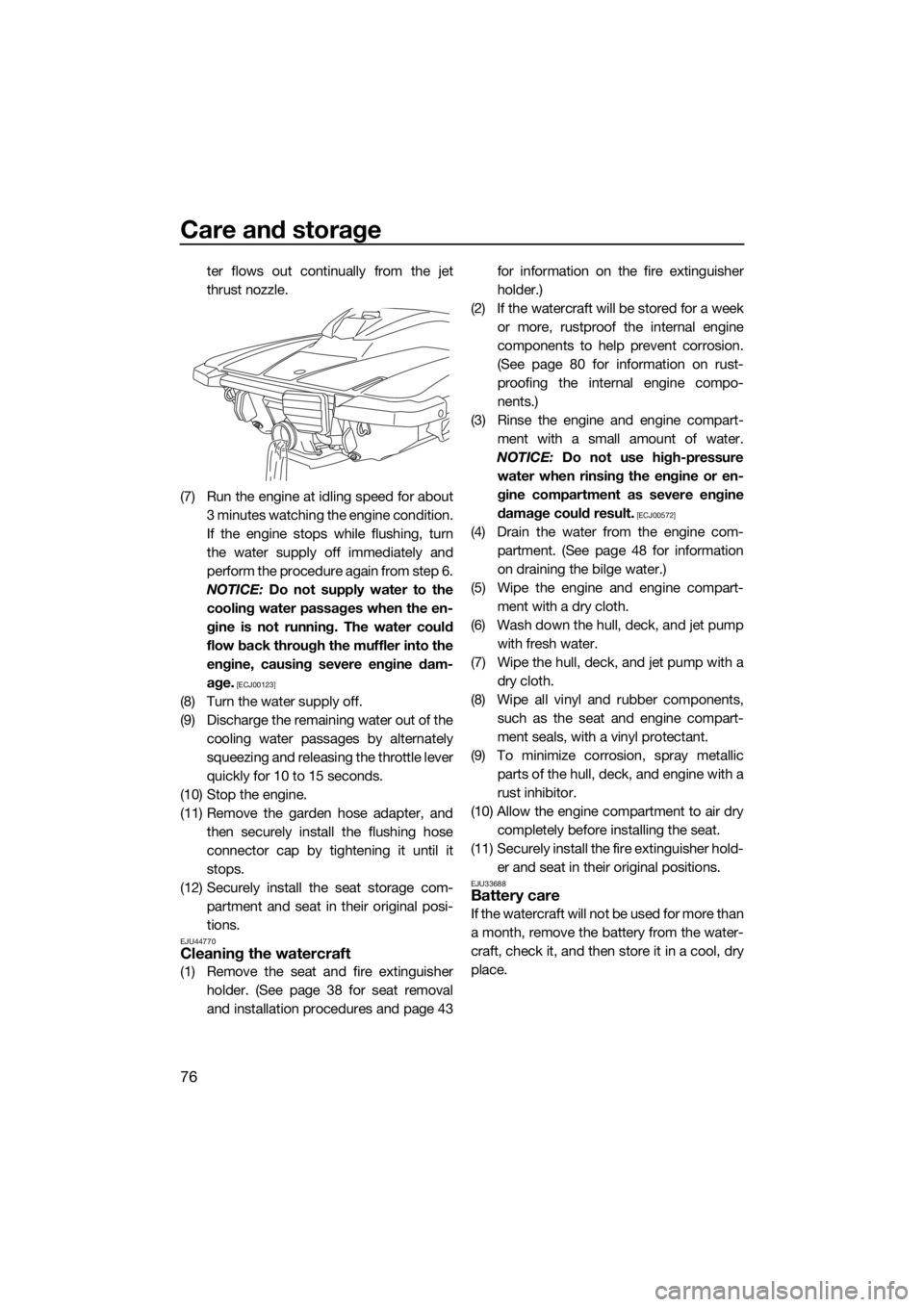
ter flows out continually from the jet
thrust nozzle.
(7) Run the engine at idling speed for about
3 minutes watching the engine condition.
If the engine stops while flushing, turn
the water supply off immediately and
perform the procedure again from step 6.
NOTICE: Do not supply water to the
cooling water passages when the en-
gine is not running. The water could
flow back through the muffler into the
engine, causing severe engine dam-
age.
[ECJ00123]
(8) Turn the water supply off.
(9) Discharge the remaining water out of the
cooling water passages by alternately
squeezing and releasing the throttle lever
quickly for 10 to 15 seconds.
(10) Stop the engine.
(11) Remove the garden hose adapter, and
then securely install the flushing hose
connector cap by tightening it until it
stops.
(12) Securely install the seat storage com-
partment and seat in their original posi-
tions.
EJU44770Cleaning the watercraft
(1) Remove the seat and fire extinguisher
holder. (See page 38 for seat removal
and installation procedures and page 43for information on the fire extinguisher
holder.)
(2) If the watercraft will be stored for a week
or more, rustproof the internal engine
components to help prevent corrosion.
(See page 80 for information on rust-
proofing the internal engine compo-
nents.)
(3) Rinse the engine and engine compart-
ment with a small amount of water.
NOTICE: Do not use high-pressure
water when rinsing the engine or en-
gine compartment as severe engine
damage could result.
[ECJ00572]
(4) Drain the water from the engine com-
partment. (See page 48 for information
on draining the bilge water.)
(5) Wipe the engine and engine compart-
ment with a dry cloth.
(6) Wash down the hull, deck, and jet pump
with fresh water.
(7) Wipe the hull, deck, and jet pump with a
dry cloth.
(8) Wipe all vinyl and rubber components,
such as the seat and engine compart-
ment seals, with a vinyl protectant.
(9) To minimize corrosion, spray metallic
parts of the hull, deck, and engine with a
rust inhibitor.
(10) Allow the engine compartment to air dry
completely before installing the seat.
(11) Securely install the fire extinguisher hold-
er and seat in their original positions.
EJU33688Battery care
If the watercraft will not be used for more than
a month, remove the battery from the water-
craft, check it, and then store it in a cool, dry
place.
UF3Y71E0.book Page 76 Thursday, May 25, 2017 11:17 AM
Page 83 of 102
Care and storage
77
WARNING
EWJ00792
Battery electrolyte is poisonous and dan-
gerous, causing severe burns, etc. Elec-
trolyte contains sulfuric acid. Avoid
contact with skin, eyes, or clothing.
Antidotes
External: Flush with water.
Internal: Drink large quantities of water or
milk. Follow with milk of magnesia, beaten
egg, or vegetable oil. Call a physician im-
mediately.
Eyes: Flush with water for 15 minutes and
get prompt medical attention.
Batteries produce explosive gases. Keep
sparks, flames, cigarettes, etc., well away.
If using or charging the battery in an en-
closed space, make sure that it is well
ventilated. Always shield your eyes when
working near batteries.
Keep out of the reach of children.
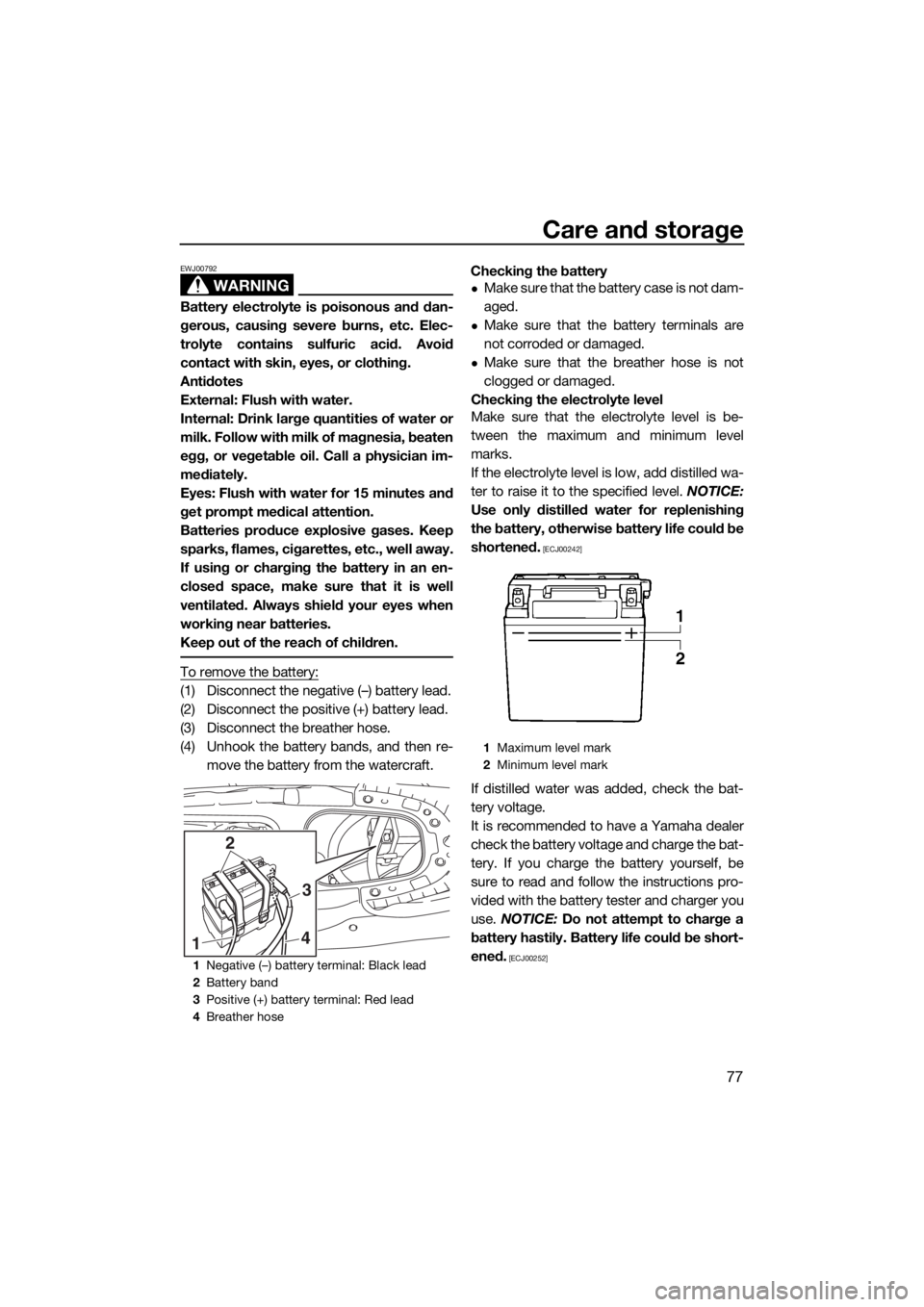
To remove the battery:
(1) Disconnect the negative (–) battery lead.
(2) Disconnect the positive (+) battery lead.
(3) Disconnect the breather hose.
(4) Unhook the battery bands, and then re-
move the battery from the watercraft.Checking the battery
Make sure that the battery case is not dam-
aged.
Make sure that the battery terminals are
not corroded or damaged.
Make sure that the breather hose is not
clogged or damaged.
Checking the electrolyte level
Make sure that the electrolyte level is be-
tween the maximum and minimum level
marks.
If the electrolyte level is low, add distilled wa-
ter to raise it to the specified level. NOTICE:
Use only distilled water for replenishing
the battery, otherwise battery life could be
shortened.
[ECJ00242]
If distilled water was added, check the bat-
tery voltage.
It is recommended to have a Yamaha dealer
check the battery voltage and charge the bat-
tery. If you charge the battery yourself, be
sure to read and follow the instructions pro-
vided with the battery tester and charger you
use. NOTICE: Do not attempt to charge a
battery hastily. Battery life could be short-
ened.
[ECJ00252]1Negative (–) battery terminal: Black lead
2Battery band
3Positive (+) battery terminal: Red lead
4Breather hose
12
4
3
1Maximum level mark
2Minimum level mark
UF3Y71E0.book Page 77 Thursday, May 25, 2017 11:17 AM