engine YAMAHA FJR1300A 2013 User Guide
[x] Cancel search | Manufacturer: YAMAHA, Model Year: 2013, Model line: FJR1300A, Model: YAMAHA FJR1300A 2013Pages: 118, PDF Size: 3.28 MB
Page 25 of 118
INSTRUMENT AND CONTROL FUNCTIONS
3-10
3
settings while riding can distract the
operator and increase the risk of an
accident.
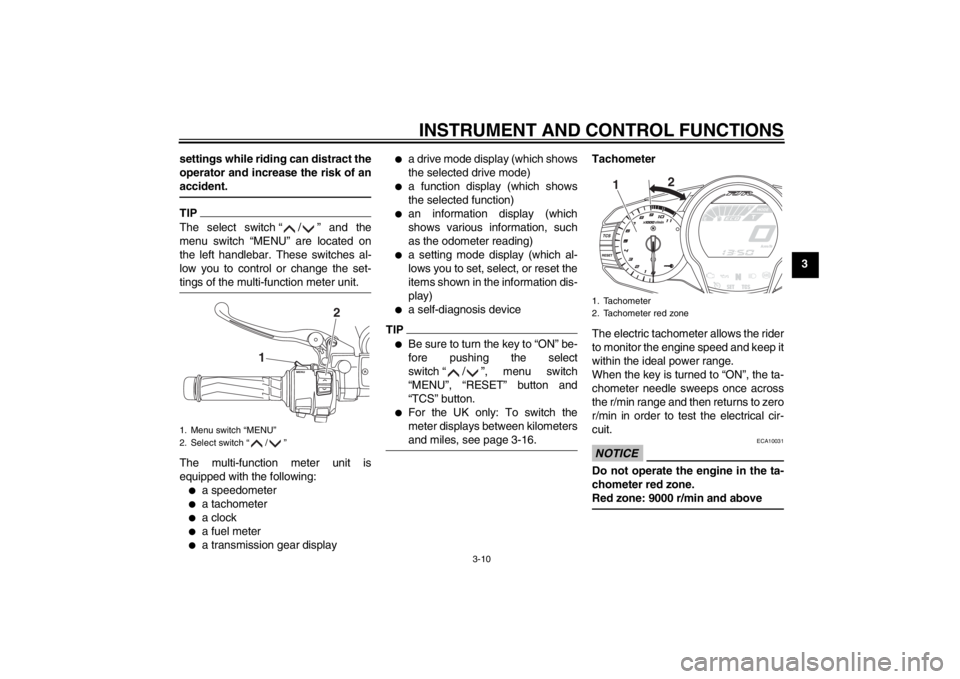
TIPThe select switch “ / ” and the
menu switch “MENU” are located on
the left handlebar. These switches al-
low you to control or change the set-
tings of the multi-function meter unit.The multi-function meter unit is
equipped with the following:●
a speedometer
●
a tachometer
●
a clock
●
a fuel meter
●
a transmission gear display
●
a drive mode display (which shows
the selected drive mode)
●
a function display (which shows
the selected function)
●
an information display (which
shows various information, such
as the odometer reading)
●
a setting mode display (which al-
lows you to set, select, or reset the
items shown in the information dis-
play)
●
a self-diagnosis device
TIP●
Be sure to turn the key to “ON” be-
fore pushing the select
switch “ / ”, menu switch
“MENU”, “RESET” button and
“TCS” button.
●
For the UK only: To switch the
meter displays between kilometers
and miles, see page 3-16.
Tachometer
The electric tachometer allows the rider
to monitor the engine speed and keep it
within the ideal power range.
When the key is turned to “ON”, the ta-
chometer needle sweeps once across
the r/min range and then returns to zero
r/min in order to test the electrical cir-
cuit.NOTICE
ECA10031
Do not operate the engine in the ta-
chometer red zone.
Red zone: 9000 r/min and above
1. Menu switch “MENU”
2. Select switch “ / ”
1
2
1. Tachometer
2. Tachometer red zone
1
2
U1MCE0E0.book Page 10 Thursday, July 19, 2012 6:59 PM
Page 26 of 118
INSTRUMENT AND CONTROL FUNCTIONS
3-11
3Fuel meter
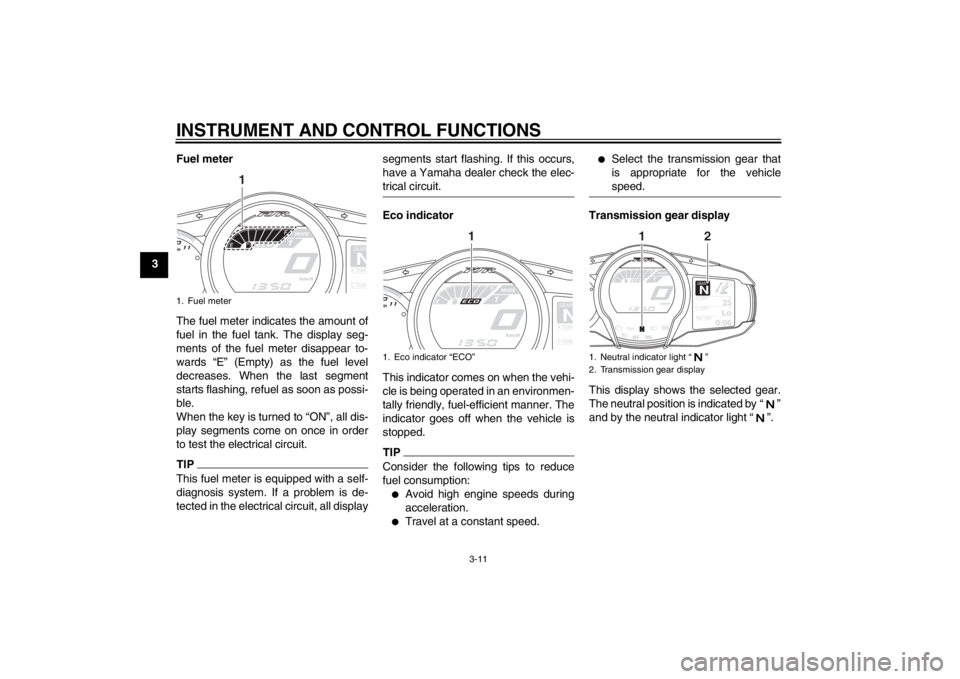
The fuel meter indicates the amount of
fuel in the fuel tank. The display seg-
ments of the fuel meter disappear to-
wards “E” (Empty) as the fuel level
decreases. When the last segment
starts flashing, refuel as soon as possi-
ble.
When the key is turned to “ON”, all dis-
play segments come on once in order
to test the electrical circuit.
TIPThis fuel meter is equipped with a self-
diagnosis system. If a problem is de-
tected in the electrical circuit, all display segments start flashing. If this occurs,
have a Yamaha dealer check the elec-
trical circuit.
Eco indicator
This indicator comes on when the vehi-
cle is being operated in an environmen-
tally friendly, fuel-efficient manner. The
indicator goes off when the vehicle is
stopped.TIPConsider the following tips to reduce
fuel consumption:●
Avoid high engine speeds during
acceleration.
●
Travel at a constant speed.
●
Select the transmission gear that
is appropriate for the vehicle
speed.
Transmission gear display
This display shows the selected gear.
The neutral position is indicated by “ ”
and by the neutral indicator light “ ”.
1. Fuel meter
GEARNA.TEM
P
C.TEM
P
1
1. Eco indicator “ECO”
GEARNA.TEM
P
C.TEM
P
1
1. Neutral indicator light “ ”
2. Transmission gear display
GEARN
25
A.TEMP
˚C
Lo
C.TEMP˚C
0:06
TIME TRIP
1
2
U1MCE0E0.book Page 11 Thursday, July 19, 2012 6:59 PM
Page 27 of 118
INSTRUMENT AND CONTROL FUNCTIONS
3-12
3
Drive mode display
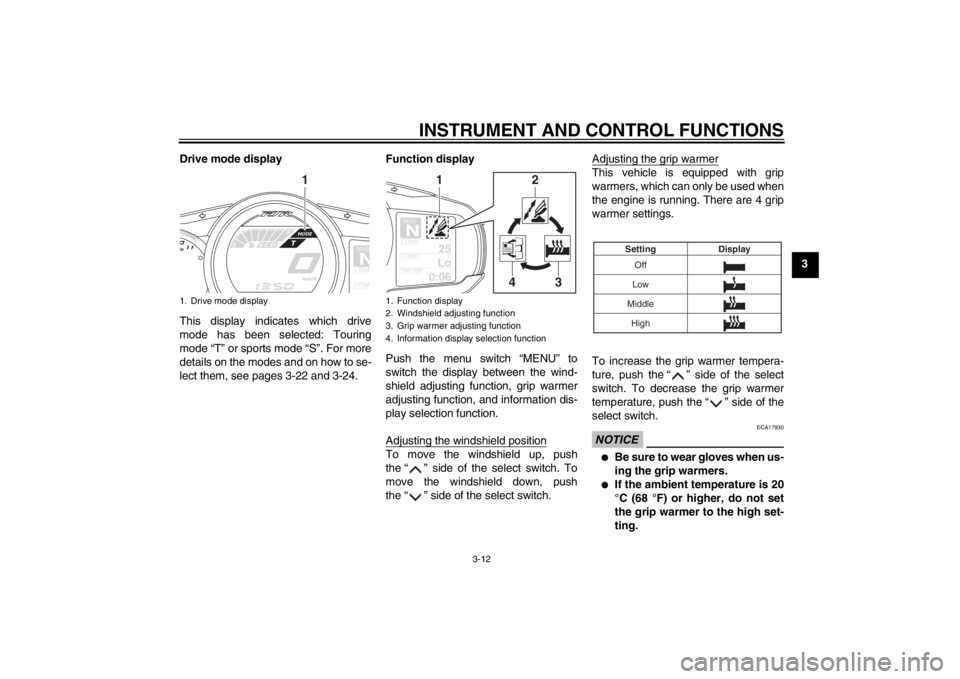
This display indicates which drive
mode has been selected: Touring
mode “T” or sports mode “S”. For more
details on the modes and on how to se-
lect them, see pages 3-22 and 3-24. Function display
Push the menu switch “MENU” to
switch the display between the wind-
shield adjusting function, grip warmer
adjusting function, and information dis-
play selection function.
Adjusting the windshield position
To move the windshield up, push
the “ ” side of the select switch. To
move the windshield down, push
the “ ” side of the select switch. Adjusting the grip warmer
This vehicle is equipped with grip
warmers, which can only be used when
the engine is running. There are 4 grip
warmer settings.
To increase the grip warmer tempera-
ture, push the “ ” side of the select
switch. To decrease the grip warmer
temperature, push the “ ” side of the
select switch.NOTICE
ECA17930
●
Be sure to wear gloves when us-
ing the grip warmers.
●
If the ambient temperature is 20
°C (68 °F) or higher, do not set
the grip warmer to the high set-
ting.
1. Drive mode display
GEARNA.TEM
P
C.TEM
P
1
1. Function display
2. Windshield adjusting function
3. Grip warmer adjusting function
4. Information display selection function
GEARN
25
A.TEMP
˚C
Lo
C.TEMP˚C
0:06
TIME TRIP
1
2
3
4
Off
Low
Middle Display
Setting
High
U1MCE0E0.book Page 12 Thursday, July 19, 2012 6:59 PM
Page 29 of 118
INSTRUMENT AND CONTROL FUNCTIONS
3-14
3
TRIP-F
→ Display–1 → Display–2 →
Display–3 → TRIP-F
To reset a tripmeter, use the select
switch to select the information display
that contains the tripmeter. Push the
“RESET” button briefly so that the trip-
meter flashes, and then push the “RE-
SET” button again for at least 2
seconds while the tripmeter is flashing.
If you do not reset the fuel reserve trip-
meter manually, it will reset itself auto-
matically and the display will return to
the prior mode after refueling and trav-
eling 5 km (3 mi).
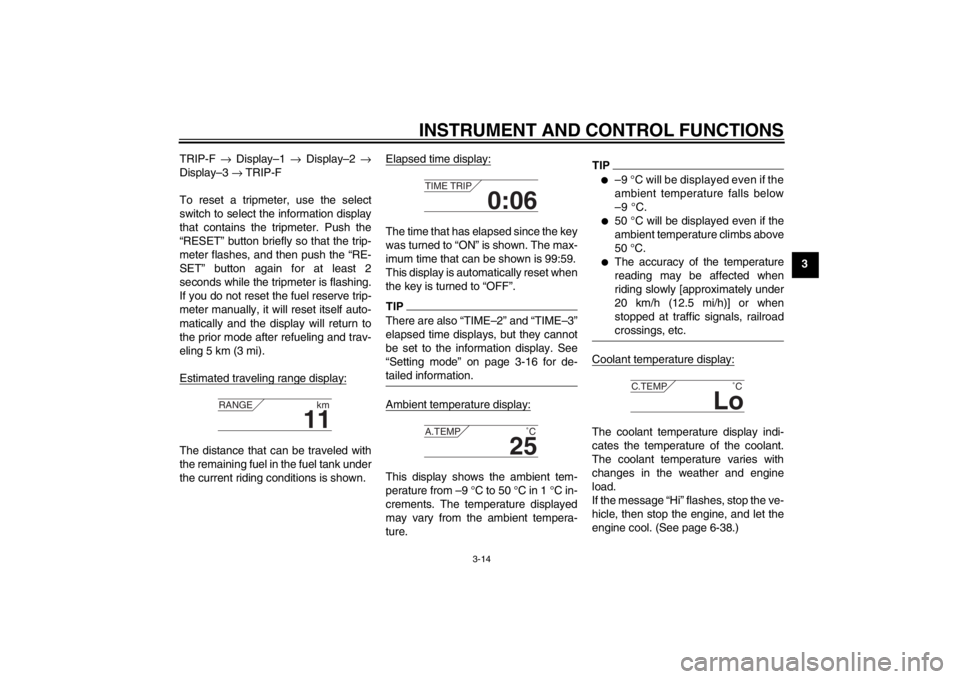
Estimated traveling range display:
The distance that can be traveled with
the remaining fuel in the fuel tank under
the current riding conditions is shown. Elapsed time display:
The time that has elapsed since the key
was turned to “ON” is shown. The max-
imum time that can be shown is 99:59.
This display is automatically reset when
the key is turned to “OFF”.TIPThere are also “TIME–2” and “TIME–3”
elapsed time displays, but they cannot
be set to the information display. See
“Setting mode” on page 3-16 for de-
tailed information.Ambient temperature display:This display shows the ambient tem-
perature from –9 °C to 50 °C in 1 °C in-
crements. The temperature displayed
may vary from the ambient tempera-
ture.
TIP●
–9 °C will be displayed even if the
ambient temperature falls below
–9 °C.
●
50 °C will be displayed even if the
ambient temperature climbs above
50 °C.
●
The accuracy of the temperature
reading may be affected when
riding slowly [approximately under
20 km/h (12.5 mi/h)] or when
stopped at traffic signals, railroad
crossings, etc.
Coolant temperature display:The coolant temperature display indi-
cates the temperature of the coolant.
The coolant temperature varies with
changes in the weather and engine
load.
If the message “Hi” flashes, stop the ve-
hicle, then stop the engine, and let the
engine cool. (See page 6-38.)
11
RANGE
km
0:06
TIME TRIP
25
A.TEMP ˚C
Lo
C.TEMP˚C
U1MCE0E0.book Page 14 Thursday, July 19, 2012 6:59 PM
Page 36 of 118
INSTRUMENT AND CONTROL FUNCTIONS
3-21
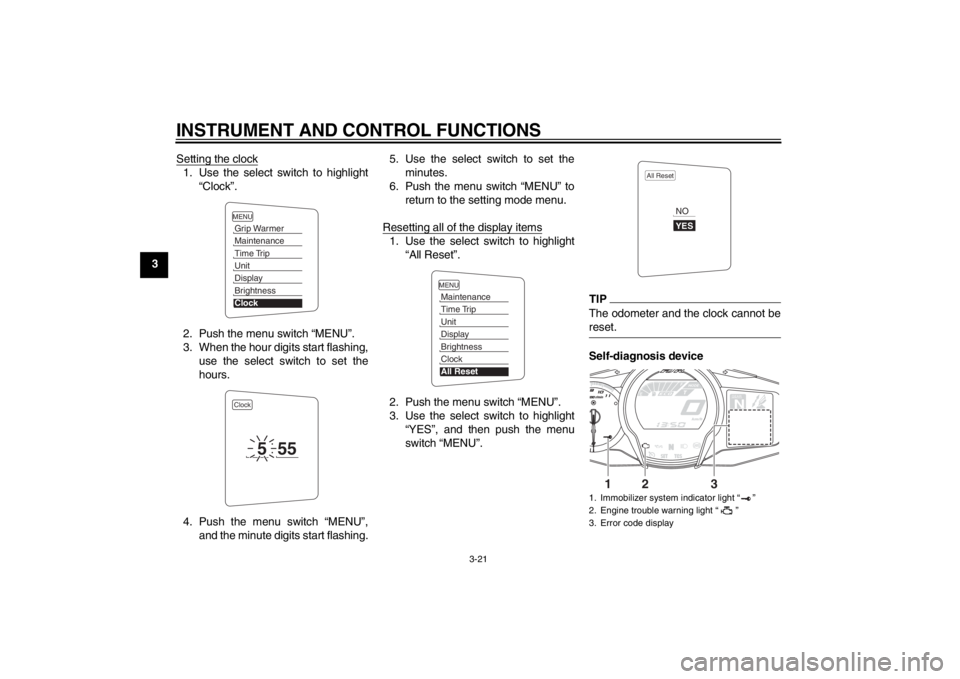
3Setting the clock
1. Use the select switch to highlight
“Clock”.
2. Push the menu switch “MENU”.
3. When the hour digits start flashing, use the select switch to set the
hours.
4. Push the menu switch “MENU”, and the minute digits start flashing. 5. Use the select switch to set the
minutes.
6. Push the menu switch “MENU” to return to the setting mode menu.
Resetting all of the display items
1. Use the select switch to highlight “All Reset”.
2. Push the menu switch “MENU”.
3. Use the select switch to highlight “YES”, and then push the menu
switch “MENU”.
TIPThe odometer and the clock cannot be
reset.Self-diagnosis device
MENUGrip WarmerMaintenanceTime TripUnitDisplayBrightnessClockClock
5
55
MENUMaintenanceTime TripUnitDisplayBrightnessClockAll Reset
1. Immobilizer system indicator light “ ”
2. Engine trouble warning light “ ”
3. Error code display
All Reset
YESNO
GEARN
25
A.TEMP ˚C
Lo
C.TEMP ˚C
0:06
TIME TRIP
1
2
3
U1MCE0E0.book Page 21 Thursday, July 19, 2012 6:59 PM
Page 37 of 118
INSTRUMENT AND CONTROL FUNCTIONS
3-22
3
This model is equipped with a self-diag-
nosis device for various electrical cir-
cuits. If a problem is detected in any of
those circuits, the engine trouble warn-
ing light will come on and the informa-
tion display will indicate an error code.
If the information display indicates any
error codes, note the code number, and
then have a Yamaha dealer check the
vehicle.
The self-diagnosis device also detects
problems in the immobilizer system cir-
cuits.
If a problem is detected in the immobi-
lizer system circuits, the immobilizer
system indicator light will flash and the
information display will indicate an error
code when the key is turned to “ON”.
TIPIf the information display indicates error
code 52, this could be caused by tran-
sponder interference. If this error ap-
pears, try the following.1. Use the code re-registering key to
start the engine.
TIPMake sure there are no other immobi-
lizer keys close to the main switch, and
do not keep more than one immobilizer
key on the same key ring! Immobilizer
system keys may cause signal interfer-
ence, which may prevent the engine
from starting.2. If the engine starts, turn it off, andtry starting the engine with the
standard keys.
3. If one or both of the standard keys do not start the engine, take the
vehicle, the code re-registering
key and both standard keys to a
Yamaha dealer and have the stan- dard keys re-registered.NOTICE
ECA11590
If the display indicates an error
code, the vehicle should be checked
as soon as possible in order to avoid
engine damage.
EAU49431
D-mode (drive mode) D-mode is an electronically controlled
engine performance system with two
mode selections (touring mode “T” and
sports mode “S”).
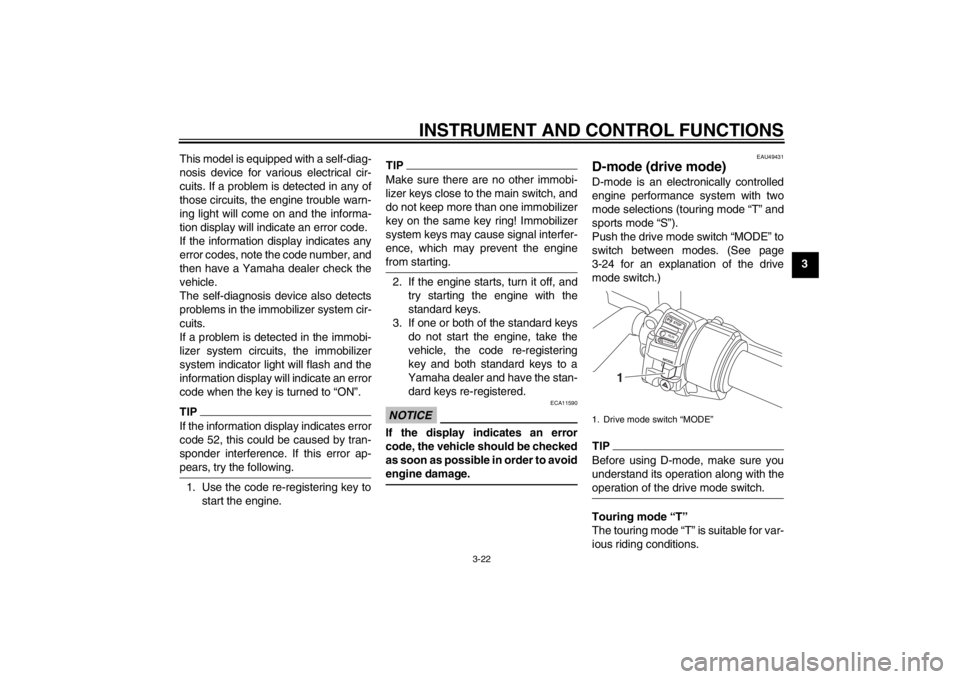
Push the drive mode switch “MODE” to
switch between modes. (See page
3-24 for an explanation of the drive
mode switch.)TIPBefore using D-mode, make sure you
understand its operation along with the
operation of the drive mode switch.Touring mode “T”
The touring mode “T” is suitable for var-
ious riding conditions.1. Drive mode switch “MODE”
STOPM ODERUNSTART
1
U1MCE0E0.book Page 22 Thursday, July 19, 2012 6:59 PM
Page 38 of 118
INSTRUMENT AND CONTROL FUNCTIONS
3-23
3This mode allows the rider to enjoy
smooth drivability from the low-speed
range to the high-speed range.
Sports mode “S”
This mode offers a sportier engine re-
sponse in the low- to mid-speed range
compared to the touring mode.
EAU1234B
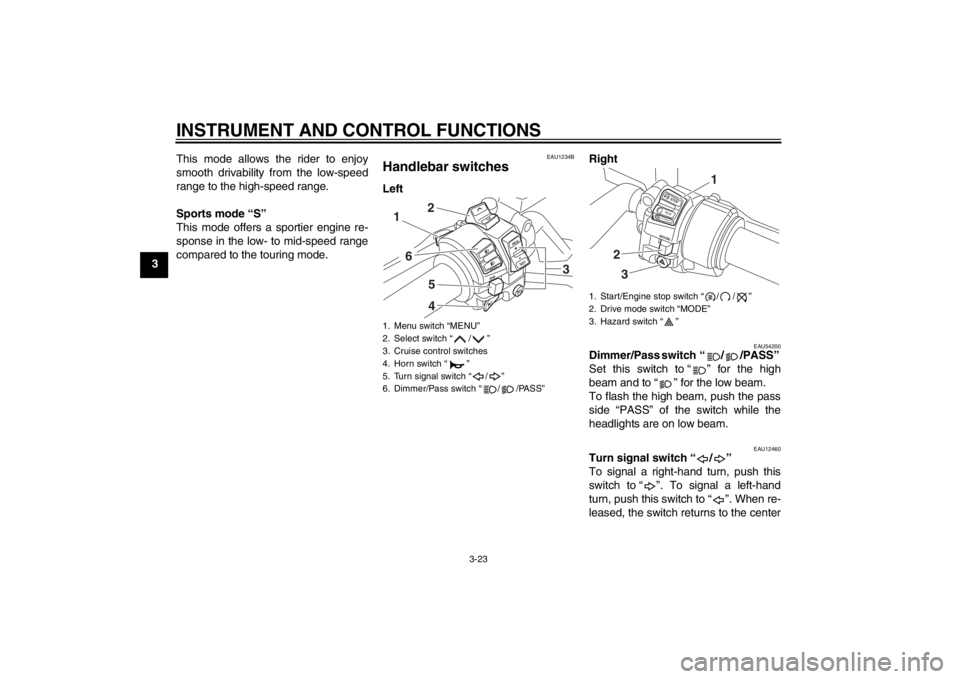
Handlebar switches Left
Right
EAU54200
Dimmer/Pass switch “ / /PASS”
Set this switch to “ ” for the high
beam and to “ ” for the low beam.
To flash the high beam, push the pass
side “PASS” of the switch while the
headlights are on low beam.
EAU12460
Turn signal switch “ / ”
To signal a right-hand turn, push this
switch to “ ”. To signal a left-hand
turn, push this switch to “ ”. When re-
leased, the switch returns to the center
1. Menu switch “MENU”
2. Select switch “ / ”
3. Cruise control switches
4. Horn switch “ ”
5. Turn signal switch “ / ”
6. Dimmer/Pass switch “ / /PASS”
R
ESSET
PA S S
1
6
542
3
1. Start/Engine stop switch “ / / ”
2. Drive mode switch “MODE”
3. Hazard switch “ ”
STOPMODERUNSTART
32
1
U1MCE0E0.book Page 23 Thursday, July 19, 2012 6:59 PM
Page 39 of 118
INSTRUMENT AND CONTROL FUNCTIONS
3-24
3
position. To cancel the turn signal
lights, push the switch in after it has re-
turned to the center position.
EAU12500
Horn switch “ ”
Press this switch to sound the horn.
EAU54210
Start/Engine stop switch “ / / ”
To crank the engine with the starter, set
this switch to “ ”, and then push
the “ ” side of the switch. See page
5-1 for starting instructions prior to
starting the engine.
Set this switch to “ ” to stop the en-
gine in case of an emergency, such as
when the vehicle overturns or when the
throttle cable is stuck.
EAU42341
The engine trouble warning light and
ABS warning light may come on when
the key is turned to “ON” and the start
switch is pushed, but this does not indi-
cate a malfunction.
EAU12733
Hazard switch “ ”
With the key in the “ON” or “ ” posi-
tion, use this switch to turn on the haz-
ard lights (simultaneous flashing of all
turn signal lights).
The hazard lights are used in case of
an emergency or to warn other drivers
when your vehicle is stopped where it
might be a traffic hazard.NOTICE
ECA10061
Do not use the hazard lights for an
extended length of time with the en-
gine not running, otherwise the bat-
tery may discharge.
EAU12780
Cruise control switches
See page 3-6 for an explanation of the
cruise control system.
EAU54230
Menu switch “MENU”
This switch is used to perform selec-
tions in the function display and setting
mode display of the multi-function
meter unit.
See “Multi-function meter unit” on page
3-9 for detailed information.
EAU54220
Select switch “ / ”
This switch is used to perform selec-
tions in the function display and setting
mode display of the multi-function
meter unit.
See “Multi-function meter unit” on page
3-9 for detailed information.
EAU54690
Drive mode switch “MODE”
WARNING
EWA15340
Do not change the D-mode while the
vehicle is moving.Using this switch changes the drive
mode to touring mode “T” or sports
mode “S”.
The throttle grip must be completely
closed in order to change the drive
mode.
The selected mode is shown on the
drive mode display. (See page 3-12.)
The drive mode cannot be changed
while the cruise control system is oper-
ating.
U1MCE0E0.book Page 24 Thursday, July 19, 2012 6:59 PM
Page 42 of 118
INSTRUMENT AND CONTROL FUNCTIONS
3-27
3
TIP●
The ABS performs a self-diagno-
sis test each time the vehicle first
starts off after the key is turned to
“ON” and the vehicle has traveled
at a speed of 10 km/h (6 mi/h) or
higher. During this test, a “clicking”
noise can be heard from under the
seat, and if the brake lever or
brake pedal is even slightly ap-
plied, a vibration can be felt at the
lever and pedal, but these do not
indicate a malfunction.
●
This ABS has a test mode which
allows the owner to experience the
pulsation at the brake lever or
brake pedal when the ABS is oper-
ating. However, special tools are
required, so please consult your
Yamaha dealer when performing
this test.
NOTICE
ECA16830
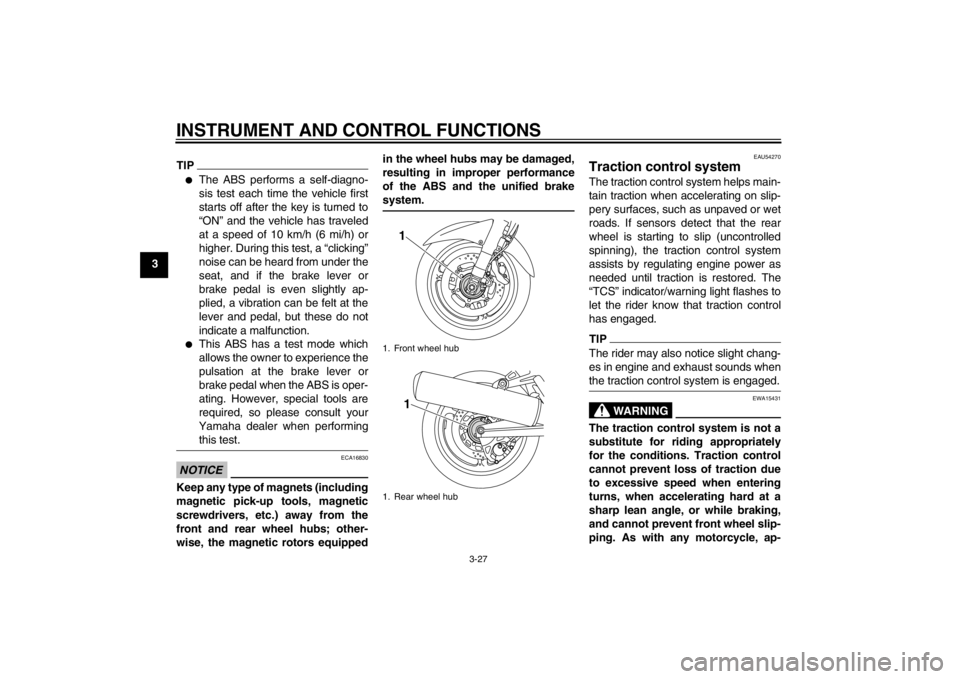
Keep any type of magnets (including
magnetic pick-up tools, magnetic
screwdrivers, etc.) away from the
front and rear wheel hubs; other-
wise, the magnetic rotors equippedin the wheel hubs may be damaged,
resulting in improper performance
of the ABS and the unified brake
system.
EAU54270
Traction control system The traction control system helps main-
tain traction when accelerating on slip-
pery surfaces, such as unpaved or wet
roads. If sensors detect that the rear
wheel is starting to slip (uncontrolled
spinning), the traction control system
assists by regulating engine power as
needed until traction is restored. The
“TCS” indicator/warning light flashes to
let the rider know that traction control
has engaged.TIPThe rider may also notice slight chang-
es in engine and exhaust sounds when
the traction control system is engaged.
WARNING
EWA15431
The traction control system is not a
substitute for riding appropriately
for the conditions. Traction control
cannot prevent loss of traction due
to excessive speed when entering
turns, when accelerating hard at a
sharp lean angle, or while braking,
and cannot prevent front wheel slip-
ping. As with any motorcycle, ap-
1. Front wheel hub
1. Rear wheel hub
11
U1MCE0E0.book Page 27 Thursday, July 19, 2012 6:59 PM
Page 43 of 118
INSTRUMENT AND CONTROL FUNCTIONS
3-28
3
proach surfaces that may be
slippery with caution and avoid es-
pecially slippery surfaces.
When the key is turned to “ON”, the
traction control system automatically
turns on.
The traction control system can be
turned on or off manually only when the
key is in the “ON” position and the mo-
torcycle is stopped.TIPTurn the traction control system off to
help free the rear wheel if the motorcy-
cle gets stuck in mud, sand, or other
soft surfaces.NOTICE
ECA16800
Use only the specified tires. (See
page 6-19.) Using different sized
tires will prevent the traction control
system from controlling tire rotation
accurately.
Turning on/off the traction control
system
WARNING
EWA15440
Be sure to stop the vehicle before
making any setting changes to the
traction control system. Changing
settings while riding can distract the
operator and increase the risk of an
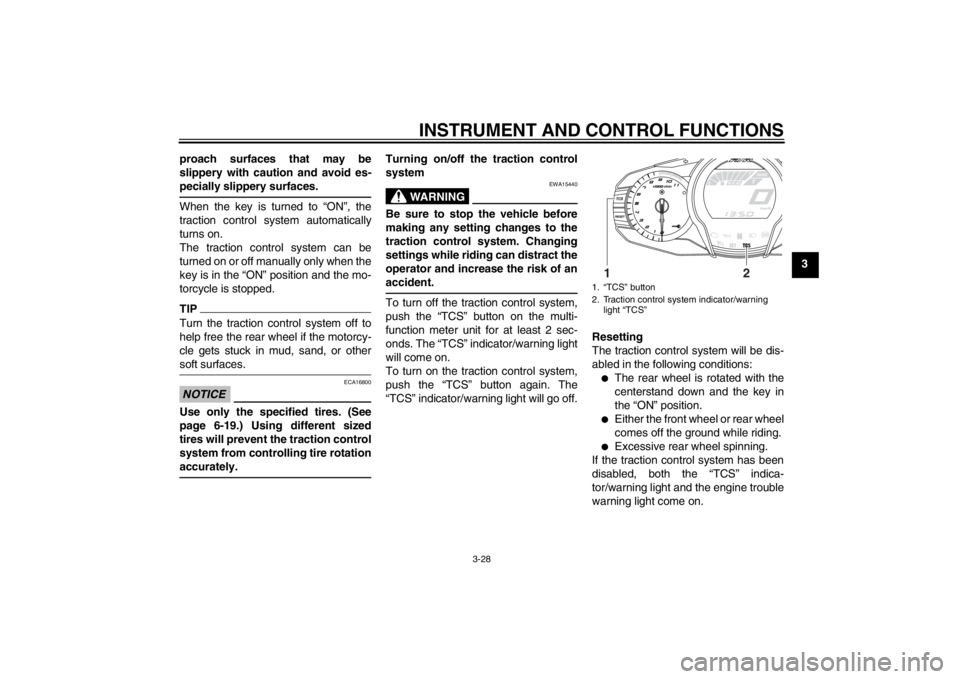
accident.To turn off the traction control system,
push the “TCS” button on the multi-
function meter unit for at least 2 sec-
onds. The “TCS” indicator/warning light
will come on.
To turn on the traction control system,
push the “TCS” button again. The
“TCS” indicator/warning light will go off.
Resetting
The traction control system will be dis-
abled in the following conditions:
●
The rear wheel is rotated with the
centerstand down and the key in
the “ON” position.
●
Either the front wheel or rear wheel
comes off the ground while riding.
●
Excessive rear wheel spinning.
If the traction control system has been
disabled, both the “TCS” indica-
tor/warning light and the engine trouble
warning light come on.
1. “TCS” button
2. Traction control system indicator/warning light “TCS”
1
2
U1MCE0E0.book Page 28 Thursday, July 19, 2012 6:59 PM