lock YAMAHA FJR1300A 2013 User Guide
[x] Cancel search | Manufacturer: YAMAHA, Model Year: 2013, Model line: FJR1300A, Model: YAMAHA FJR1300A 2013Pages: 118, PDF Size: 3.28 MB
Page 33 of 118
INSTRUMENT AND CONTROL FUNCTIONS
3-18
3
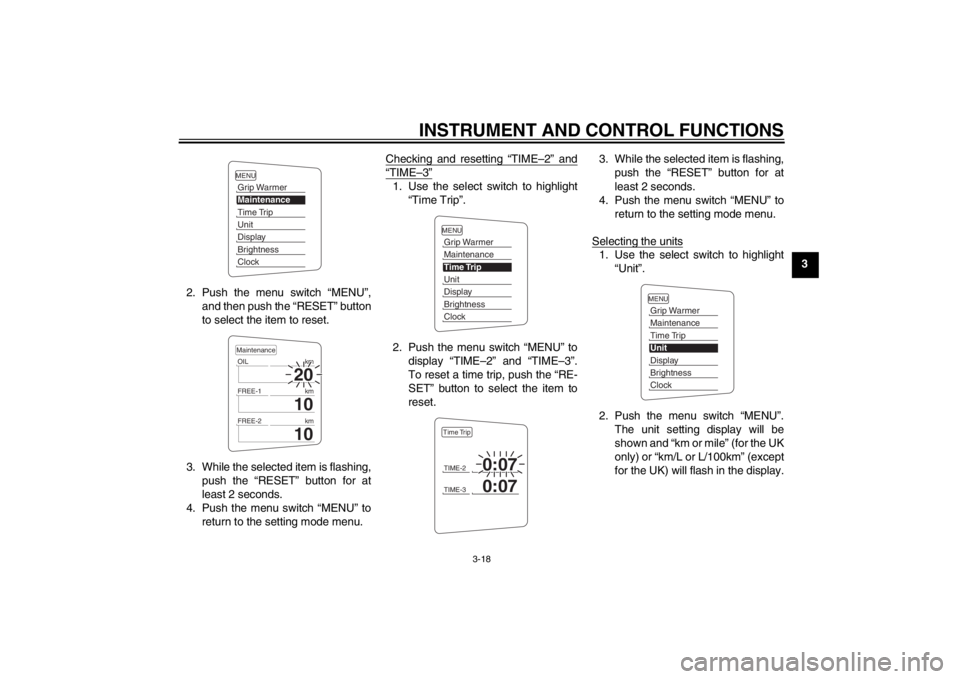
2. Push the menu switch “MENU”, and then push the “RESET” button
to select the item to reset.
3. While the selected item is flashing, push the “RESET” button for at
least 2 seconds.
4. Push the menu switch “MENU” to return to the setting mode menu. Checking and resetting “TIME–2” and
“TIME–3”1. Use the select switch to highlight
“Time Trip”.
2. Push the menu switch “MENU” to display “TIME–2” and “TIME–3”.
To reset a time trip, push the “RE-
SET” button to select the item to
reset. 3. While the selected item is flashing,
push the “RESET” button for at
least 2 seconds.
4. Push the menu switch “MENU” to return to the setting mode menu.
Selecting the units
1. Use the select switch to highlight “Unit”.
2. Push the menu switch “MENU”. The unit setting display will be
shown and “km or mile” (for the UK
only) or “km/L or L/100km” (except
for the UK) will flash in the display.
MENUGrip WarmerMaintenanceTime TripUnitDisplayBrightnessClock
20
OIL km
10
FREE-1km
10
FREE-2kmMaintenance
MENUGrip WarmerMaintenanceTime TripUnitDisplayBrightnessClockTIME-2
0:07
TIME-3
0:07
Time Trip
MENUGrip WarmerMaintenanceTime TripUnitDisplayBrightnessClock
U1MCE0E0.book Page 18 Thursday, July 19, 2012 6:59 PM
Page 34 of 118
INSTRUMENT AND CONTROL FUNCTIONS
3-19
3
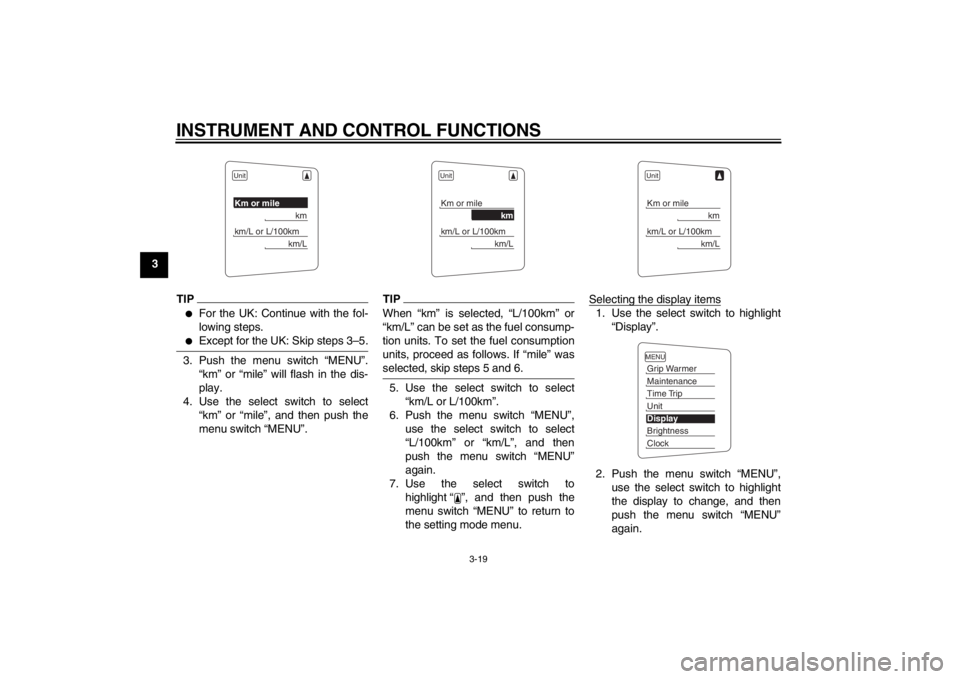
TIP●
For the UK: Continue with the fol-
lowing steps.
●
Except for the UK: Skip steps 3–5.
3. Push the menu switch “MENU”.“km” or “mile” will flash in the dis-
play.
4. Use the select switch to select “km” or “mile”, and then push the
menu switch “MENU”.
TIPWhen “km” is selected, “L/100km” or
“km/L” can be set as the fuel consump-
tion units. To set the fuel consumption
units, proceed as follows. If “mile” was
selected, skip steps 5 and 6.5. Use the select switch to select“km/L or L/100km”.
6. Push the menu switch “MENU”, use the select switch to select
“L/100km” or “km/L”, and then
push the menu switch “MENU”
again.
7. Use the select switch to highlight “ ”, and then push the
menu switch “MENU” to return to
the setting mode menu. Selecting the display items
1. Use the select switch to highlight
“Display”.
2. Push the menu switch “MENU”, use the select switch to highlight
the display to change, and then
push the menu switch “MENU”
again.
UnitKm or mile
km
km/L or L/100km
km/L
UnitKm or mile
km
km/L or L/100km
km/L
UnitKm or mile
km
km/L or L/100km
km/L
MENUGrip WarmerMaintenanceTime TripUnitDisplayBrightnessClock
U1MCE0E0.book Page 19 Thursday, July 19, 2012 6:59 PM
Page 35 of 118
INSTRUMENT AND CONTROL FUNCTIONS
3-20
3
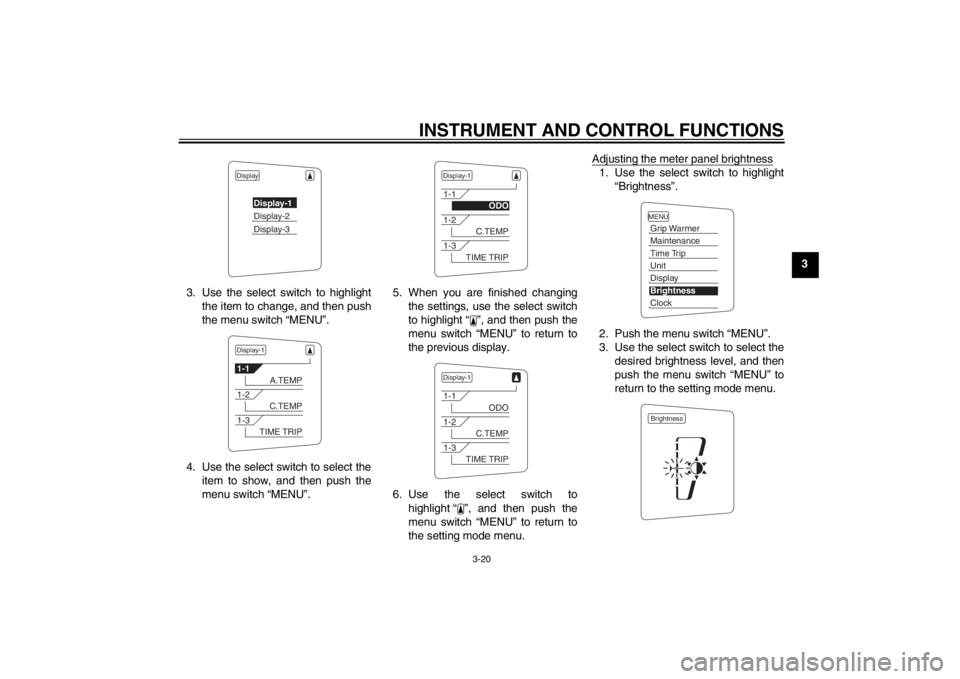
3. Use the select switch to highlight the item to change, and then push
the menu switch “MENU”.
4. Use the select switch to select the item to show, and then push the
menu switch “MENU”. 5. When you are finished changing
the settings, use the select switch
to highlight “ ”, and then push the
menu switch “MENU” to return to
the previous display.
6. Use the select switch to highlight “ ”, and then push the
menu switch “MENU” to return to
the setting mode menu. Adjusting the meter panel brightness
1. Use the select switch to highlight
“Brightness”.
2. Push the menu switch “MENU”.
3. Use the select switch to select the desired brightness level, and then
push the menu switch “MENU” to
return to the setting mode menu.
Display
Display-1Display-2Display-3
Display-11-1
A.TEMP
1-2
C.TEMP
1-3
TIME TRIP
Display-11-1
ODO
1-2
C.TEMP
1-3
TIME TRIP
Display-11-1
ODO
1-2
C.TEMP
1-3
TIME TRIP
MENUGrip WarmerMaintenanceTime TripUnitDisplayBrightnessClockBrightness
U1MCE0E0.book Page 20 Thursday, July 19, 2012 6:59 PM
Page 36 of 118
INSTRUMENT AND CONTROL FUNCTIONS
3-21
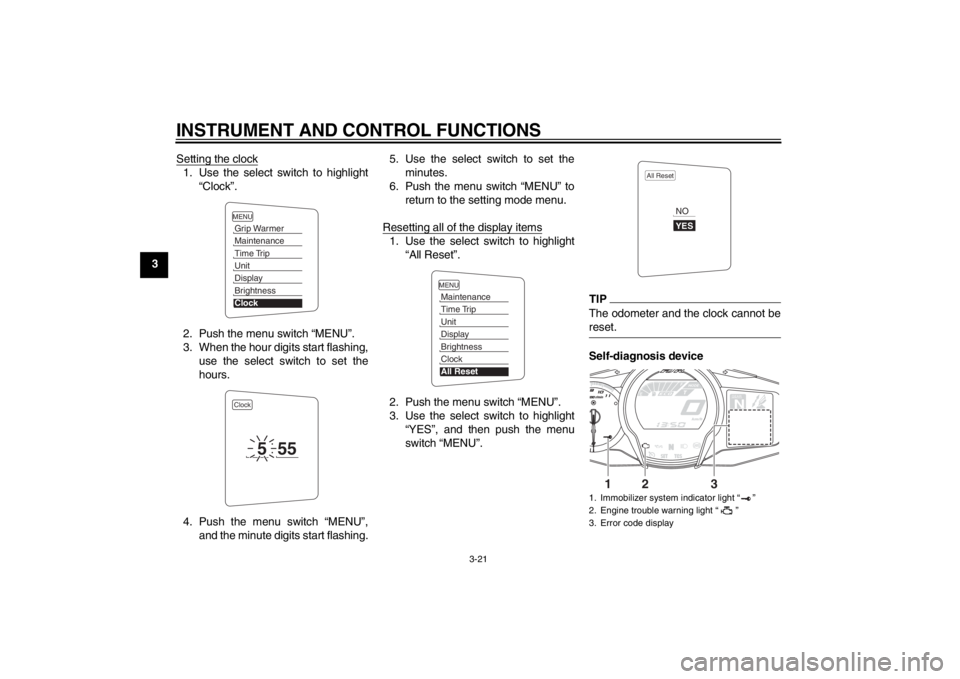
3Setting the clock
1. Use the select switch to highlight
“Clock”.
2. Push the menu switch “MENU”.
3. When the hour digits start flashing, use the select switch to set the
hours.
4. Push the menu switch “MENU”, and the minute digits start flashing. 5. Use the select switch to set the
minutes.
6. Push the menu switch “MENU” to return to the setting mode menu.
Resetting all of the display items
1. Use the select switch to highlight “All Reset”.
2. Push the menu switch “MENU”.
3. Use the select switch to highlight “YES”, and then push the menu
switch “MENU”.
TIPThe odometer and the clock cannot be
reset.Self-diagnosis device
MENUGrip WarmerMaintenanceTime TripUnitDisplayBrightnessClockClock
5
55
MENUMaintenanceTime TripUnitDisplayBrightnessClockAll Reset
1. Immobilizer system indicator light “ ”
2. Engine trouble warning light “ ”
3. Error code display
All Reset
YESNO
GEARN
25
A.TEMP ˚C
Lo
C.TEMP ˚C
0:06
TIME TRIP
1
2
3
U1MCE0E0.book Page 21 Thursday, July 19, 2012 6:59 PM
Page 41 of 118
INSTRUMENT AND CONTROL FUNCTIONS
3-26
3
EAU26824
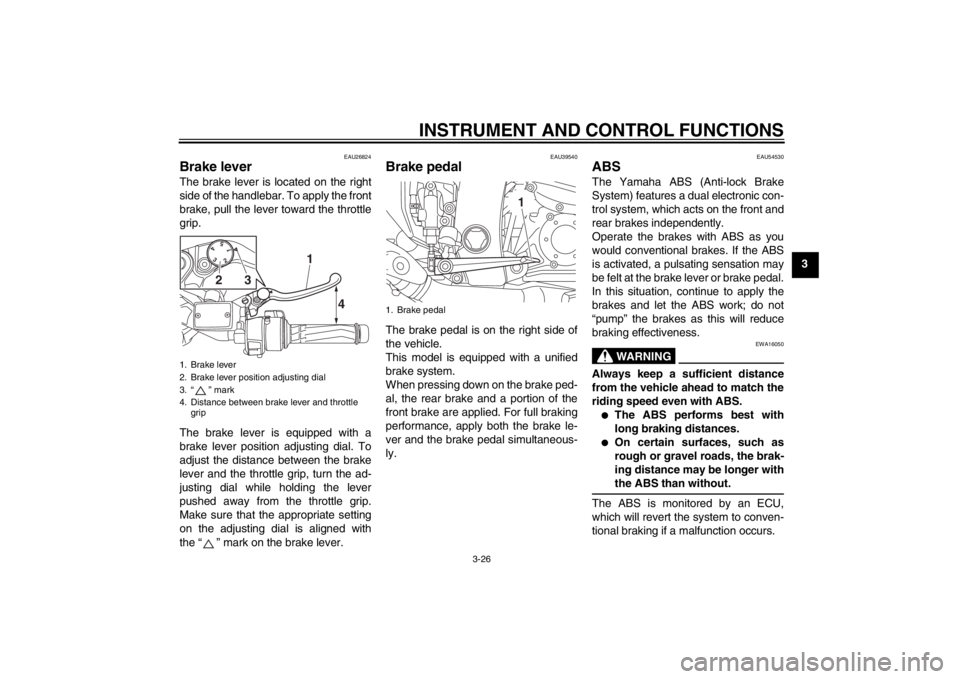
Brake lever The brake lever is located on the right
side of the handlebar. To apply the front
brake, pull the lever toward the throttle
grip.
The brake lever is equipped with a
brake lever position adjusting dial. To
adjust the distance between the brake
lever and the throttle grip, turn the ad-
justing dial while holding the lever
pushed away from the throttle grip.
Make sure that the appropriate setting
on the adjusting dial is aligned with
the “ ” mark on the brake lever.
EAU39540
Brake pedal The brake pedal is on the right side of
the vehicle.
This model is equipped with a unified
brake system.
When pressing down on the brake ped-
al, the rear brake and a portion of the
front brake are applied. For full braking
performance, apply both the brake le-
ver and the brake pedal simultaneous-
ly.
EAU54530
ABS The Yamaha ABS (Anti-lock Brake
System) features a dual electronic con-
trol system, which acts on the front and
rear brakes independently.
Operate the brakes with ABS as you
would conventional brakes. If the ABS
is activated, a pulsating sensation may
be felt at the brake lever or brake pedal.
In this situation, continue to apply the
brakes and let the ABS work; do not
“pump” the brakes as this will reduce
braking effectiveness.
WARNING
EWA16050
Always keep a sufficient distance
from the vehicle ahead to match the
riding speed even with ABS.●
The ABS performs best with
long braking distances.
●
On certain surfaces, such as
rough or gravel roads, the brak-
ing distance may be longer with
the ABS than without.
The ABS is monitored by an ECU,
which will revert the system to conven-
tional braking if a malfunction occurs.
1. Brake lever
2. Brake lever position adjusting dial
3. “ ” mark
4. Distance between brake lever and throttle grip
15
43
2
4
1
3
2
1. Brake pedal
1
U1MCE0E0.book Page 26 Thursday, July 19, 2012 6:59 PM
Page 44 of 118
INSTRUMENT AND CONTROL FUNCTIONS
3-29
3To reset the traction control system
Turn the key to “OFF”. Wait at least 1
second, then turn the key back to “ON”.
The “TCS” indicator/warning light
should go off and the system will be en-
abled. The engine trouble warning light
should go off after the motorcycle
reaches at least 20 km/h (12 mi/h). If
the “TCS” indicator/warning light and/or
engine trouble warning light still remain
on after resetting, the motorcycle may
still be ridden; however, have a
Yamaha dealer check the motorcycle as soon as possible.
EAU13074
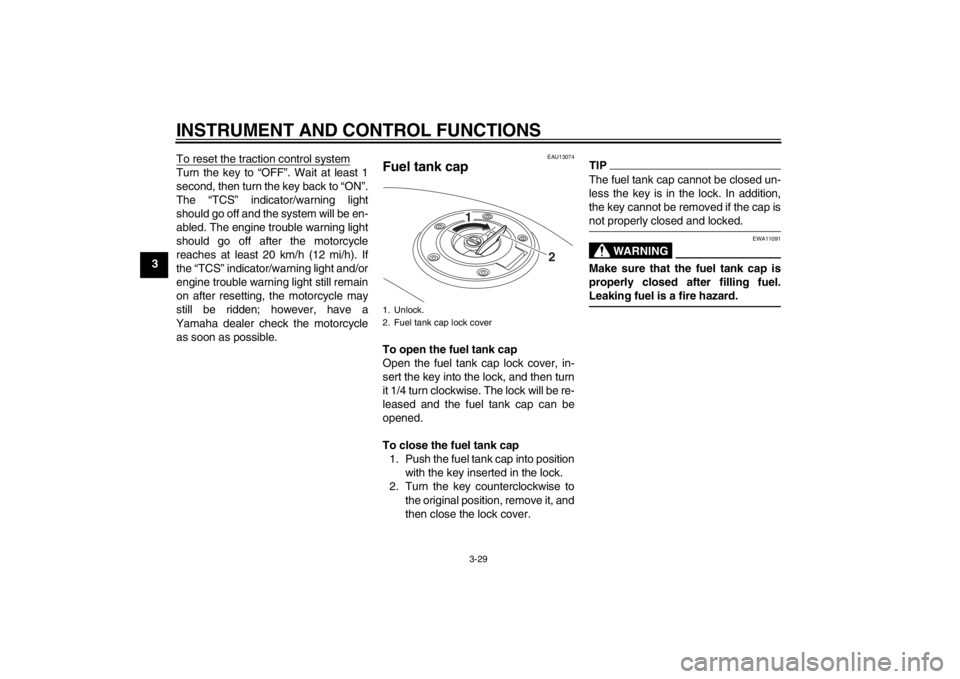
Fuel tank cap To open the fuel tank cap
Open the fuel tank cap lock cover, in-
sert the key into the lock, and then turn
it 1/4 turn clockwise. The lock will be re-
leased and the fuel tank cap can be
opened.
To close the fuel tank cap 1. Push the fuel tank cap into position with the key inserted in the lock.
2. Turn the key counterclockwise to the original position, remove it, and
then close the lock cover.
TIPThe fuel tank cap cannot be closed un-
less the key is in the lock. In addition,
the key cannot be removed if the cap is
not properly closed and locked.
WARNING
EWA11091
Make sure that the fuel tank cap is
properly closed after filling fuel.
Leaking fuel is a fire hazard.
1. Unlock.
2. Fuel tank cap lock cover
2
1
U1MCE0E0.book Page 29 Thursday, July 19, 2012 6:59 PM
Page 46 of 118
INSTRUMENT AND CONTROL FUNCTIONS
3-31
3
EAUB1300
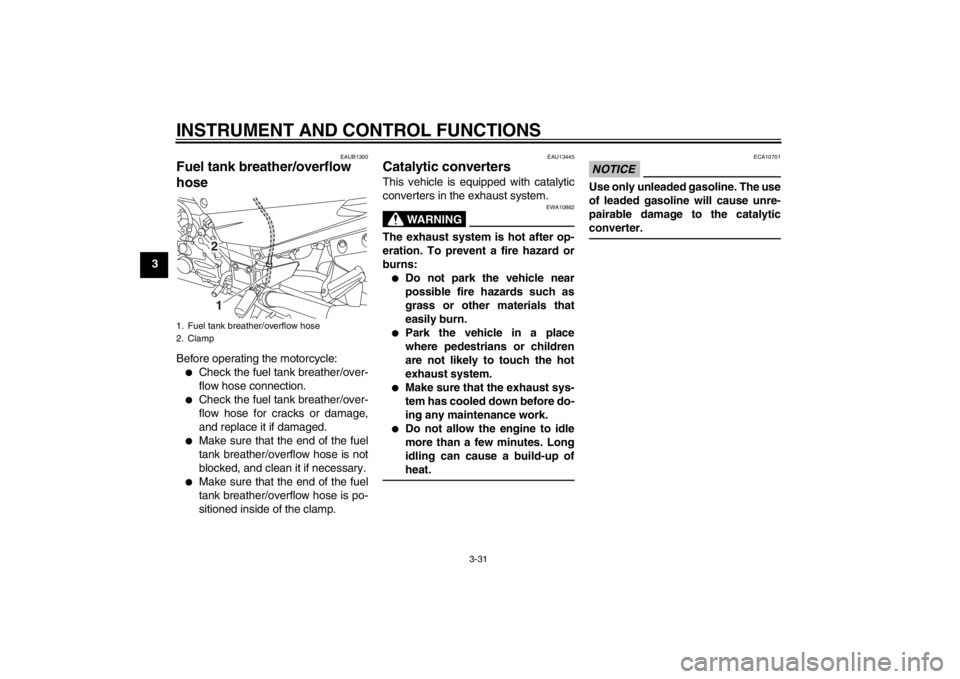
Fuel tank breather/overflow
hose Before operating the motorcycle:●
Check the fuel tank breather/over-
flow hose connection.
●
Check the fuel tank breather/over-
flow hose for cracks or damage,
and replace it if damaged.
●
Make sure that the end of the fuel
tank breather/overflow hose is not
blocked, and clean it if necessary.
●
Make sure that the end of the fuel
tank breather/overflow hose is po-
sitioned inside of the clamp.
EAU13445
Catalytic converters This vehicle is equipped with catalytic
converters in the exhaust system.
WARNING
EWA10862
The exhaust system is hot after op-
eration. To prevent a fire hazard or
burns:●
Do not park the vehicle near
possible fire hazards such as
grass or other materials that
easily burn.
●
Park the vehicle in a place
where pedestrians or children
are not likely to touch the hot
exhaust system.
●
Make sure that the exhaust sys-
tem has cooled down before do-
ing any maintenance work.
●
Do not allow the engine to idle
more than a few minutes. Long
idling can cause a build-up of
heat.
NOTICE
ECA10701
Use only unleaded gasoline. The use
of leaded gasoline will cause unre-
pairable damage to the catalytic
converter.
1. Fuel tank breather/overflow hose
2. Clamp
21
U1MCE0E0.book Page 31 Thursday, July 19, 2012 6:59 PM
Page 47 of 118
INSTRUMENT AND CONTROL FUNCTIONS
3-32
3
EAU39495
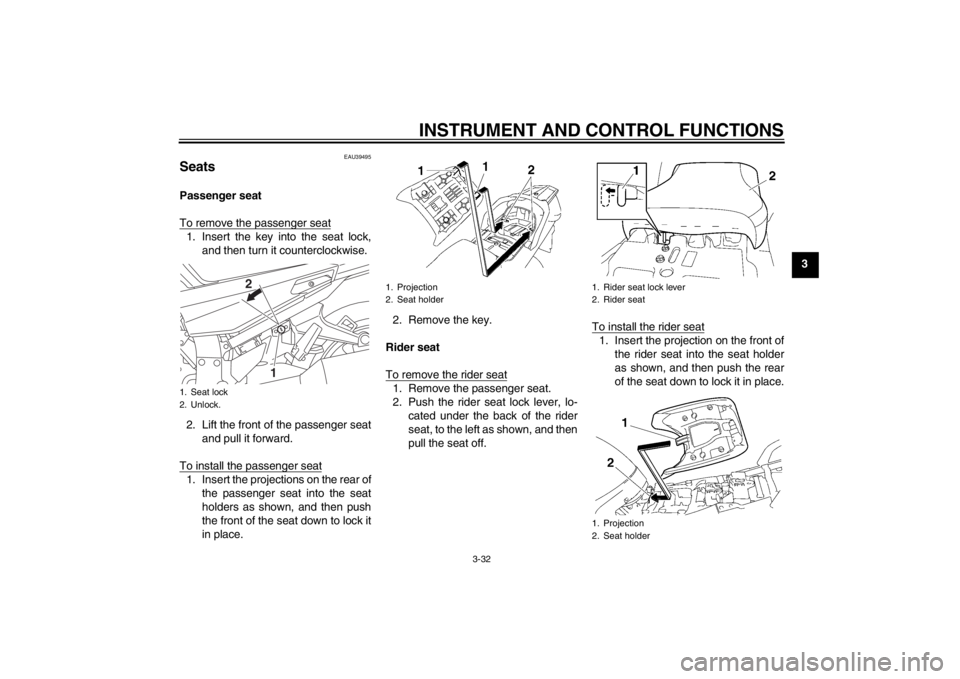
Seats Passenger seat
To remove the passenger seat1. Insert the key into the seat lock,and then turn it counterclockwise.
2. Lift the front of the passenger seat and pull it forward.
To install the passenger seat1. Insert the projections on the rear of the passenger seat into the seat
holders as shown, and then push
the front of the seat down to lock it
in place. 2. Remove the key.
Rider seat
To remove the rider seat
1. Remove the passenger seat.
2. Push the rider seat lock lever, lo- cated under the back of the rider
seat, to the left as shown, and then
pull the seat off. To install the rider seat
1. Insert the projection on the front of
the rider seat into the seat holder
as shown, and then push the rear
of the seat down to lock it in place.
1. Seat lock
2. Unlock.
1
2
1. Projection
2. Seat holder
1. Rider seat lock lever
2. Rider seat
1. Projection
2. Seat holder
U1MCE0E0.book Page 32 Thursday, July 19, 2012 6:59 PM
Page 49 of 118
INSTRUMENT AND CONTROL FUNCTIONS
3-34
3
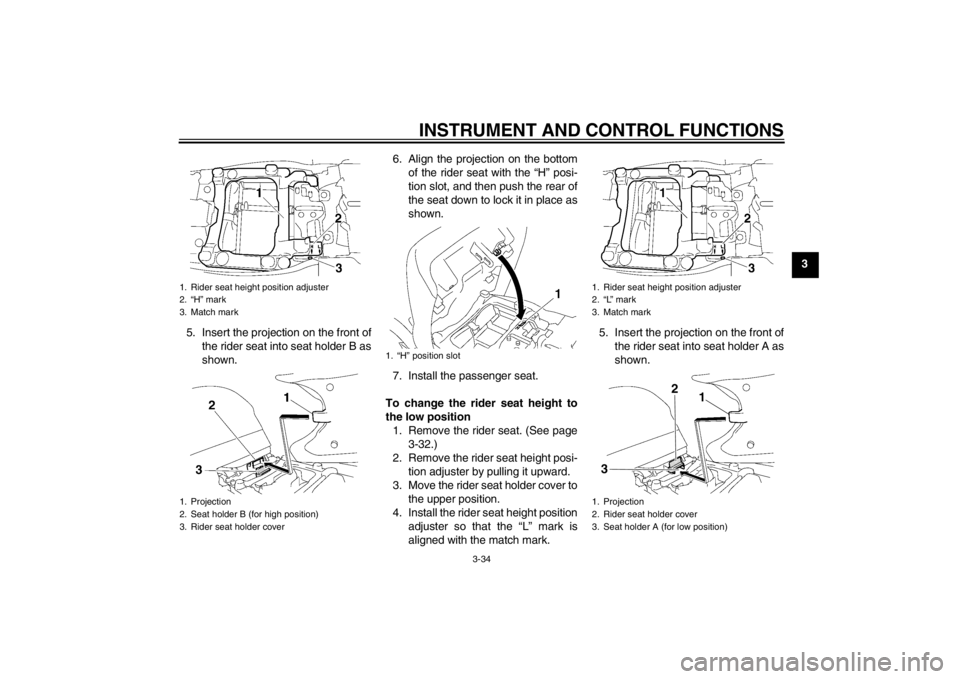
5. Insert the projection on the front of the rider seat into seat holder B as
shown. 6. Align the projection on the bottom
of the rider seat with the “H” posi-
tion slot, and then push the rear of
the seat down to lock it in place as
shown.
7. Install the passenger seat.
To change the rider seat height to
the low position 1. Remove the rider seat. (See page 3-32.)
2. Remove the rider seat height posi- tion adjuster by pulling it upward.
3. Move the rider seat holder cover to the upper position.
4. Install the rider seat height position adjuster so that the “L” mark is
aligned with the match mark. 5. Insert the projection on the front of
the rider seat into seat holder A as
shown.
1. Rider seat height position adjuster
2. “H” mark
3. Match mark
1. Projection
2. Seat holder B (for high position)
3. Rider seat holder cover
1. “H” position slot
1. Rider seat height position adjuster
2. “L” mark
3. Match mark
1. Projection
2. Rider seat holder cover
3. Seat holder A (for low position)
1
2
3
U1MCE0E0.book Page 34 Thursday, July 19, 2012 6:59 PM
Page 50 of 118
INSTRUMENT AND CONTROL FUNCTIONS
3-35
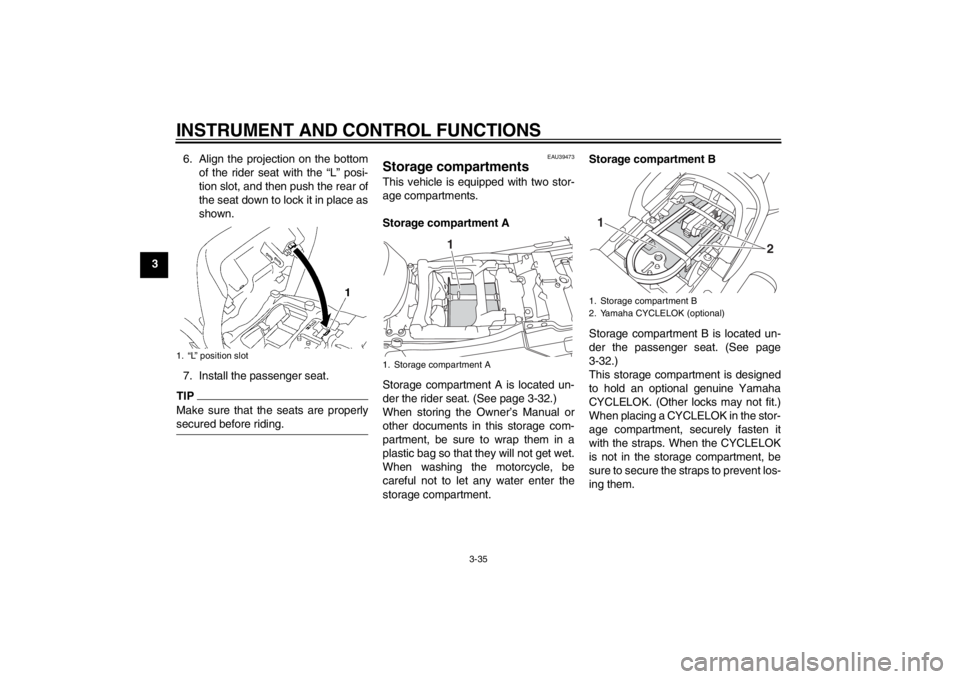
36. Align the projection on the bottom
of the rider seat with the “L” posi-
tion slot, and then push the rear of
the seat down to lock it in place as
shown.
7. Install the passenger seat.
TIPMake sure that the seats are properly
secured before riding.
EAU39473
Storage compartments This vehicle is equipped with two stor-
age compartments.
Storage compartment A
Storage compartment A is located un-
der the rider seat. (See page 3-32.)
When storing the Owner’s Manual or
other documents in this storage com-
partment, be sure to wrap them in a
plastic bag so that they will not get wet.
When washing the motorcycle, be
careful not to let any water enter the
storage compartment. Storage compartment B
Storage compartment B is located un-
der the passenger seat. (See page
3-32.)
This storage compartment is designed
to hold an optional genuine Yamaha
CYCLELOK. (Other locks may not fit.) When placing a CYCLELOK in the stor-
age compartment, securely fasten it
with the straps. When the CYCLELOK
is not in the storage compartment, be
sure to secure the straps to prevent los-
ing them.
1. “L” position slot
1. Storage compartment A
1
1. Storage compartment B
2. Yamaha CYCLELOK (optional)
2
1
U1MCE0E0.book Page 35 Thursday, July 19, 2012 6:59 PM