maintenance YAMAHA FJR1300A 2013 Owners Manual
[x] Cancel search | Manufacturer: YAMAHA, Model Year: 2013, Model line: FJR1300A, Model: YAMAHA FJR1300A 2013Pages: 118, PDF Size: 3.28 MB
Page 6 of 118

TABLE OF CONTENTSSAFETY INFORMATION ..................1-1
DESCRIPTION ..................................2-1
Left view ..........................................2-1
Right view ........................................2-2
Controls and instruments.................2-3
INSTRUMENT AND CONTROL
FUNCTIONS .......................................3-1
Immobilizer system .........................3-1
Main switch/steering lock ................3-2
Indicator lights and warning lights ............................................3-4
Cruise control system .....................3-6
Multi-function meter unit .................3-9
D-mode (drive mode) ....................3-22
Handlebar switches ......................3-23
Clutch lever ...................................3-25
Shift pedal .....................................3-25
Brake lever ...................................3-26
Brake pedal ..................................3-26
ABS ..............................................3-26
Traction control system ................3-27
Fuel tank cap ................................3-29
Fuel ...............................................3-30
Fuel tank breather/overflow
hose ..........................................3-31
Catalytic converters ......................3-31
Seats ............................................3-32
Adjusting the rider seat height ......3-33
Storage compartments .................3-35 Accessory box .............................. 3-36
Adjusting the headlight beams ..... 3-37
Handlebar position ....................... 3-37
Opening and closing the cowling
vents ......................................... 3-37
Rear view mirrors ......................... 3-39
Adjusting the front fork ................. 3-39
Adjusting the shock absorber assembly ................................... 3-41
Sidestand ..................................... 3-42
Ignition circuit cut-off system ........ 3-43
Auxiliary DC jack .......................... 3-45
FOR YOUR SAFETY –
PRE-OPERATION CHECKS ............. 4-1
OPERATION AND IMPORTANT
RIDING POINTS ................................. 5-1
Starting the engine ......................... 5-1
Shifting ........................................... 5-2
Tips for reducing fuel consumption ............................... 5-3
Engine break-in .............................. 5-3
Parking ........................................... 5-4
PERIODIC MAINTENANCE AND
ADJUSTMENT ................................... 6-1
Owner’s tool kit ............................... 6-2
Periodic maintenance chart for the emission control system ............. 6-3 General maintenance and
lubrication chart .......................... 6-4
Removing and installing panels ..... 6-8
Checking the spark plugs ............ 6-11
Engine oil and oil filter cartridge ... 6-12
Final gear oil ................................ 6-14
Coolant ........................................ 6-16
Cleaning the air filter element ...... 6-17
Checking the engine idling speed ........................................ 6-18
Checking the throttle grip free
play ........................................... 6-19
Valve clearance ........................... 6-19
Tires ............................................. 6-19
Cast wheels ................................. 6-22
Clutch lever .................................. 6-22
Checking the brake lever free play ........................................... 6-23
Brake light switches ..................... 6-23
Checking the front and rear brake pads .......................................... 6-24
Checking the brake and clutch fluid levels ................................. 6-24
Changing the brake and clutch fluids ......................................... 6-26
Checking and lubricating the
cables ....................................... 6-26
Checking and lubricating the throttle grip and cable ............... 6-26
Checking and lubricating the brake and shift pedals .............. 6-27U1MCE0E0.book Page 1 Thursday, July 19, 2012 6:59 PM
Page 8 of 118

1-1
1
SAFETY INFORMATION
EAU1028A
Be a Responsible Owner
As the vehicle’s owner, you are respon-
sible for the safe and proper operation
of your motorcycle.
Motorcycles are single-track vehicles.
Their safe use and operation are de-
pendent upon the use of proper riding
techniques as well as the expertise of
the operator. Every operator should
know the following requirements before
riding this motorcycle.
He or she should:●
Obtain thorough instructions from
a competent source on all aspects
of motorcycle operation.
●
Observe the warnings and mainte-
nance requirements in this Own-
er’s Manual.
●
Obtain qualified training in safe
and proper riding techniques.
●
Obtain professional technical ser-
vice as indicated in this Owner’s
Manual and/or when made neces-
sary by mechanical conditions.
●
Never operate a motorcycle with-
out proper training or instruction.
Take a training course. Beginners
should receive training from a cer-
tified instructor. Contact an autho-
rized motorcycle dealer to find out
about the training courses nearest
you.
Safe Riding
Perform the pre-operation checks each
time you use the vehicle to make sure it
is in safe operating condition. Failure to
inspect or maintain the vehicle properly
increases the possibility of an accident
or equipment damage. See page 4-1
for a list of pre-operation checks.
●
This motorcycle is designed to car-
ry the operator and a passenger.
●
The failure of motorists to detect
and recognize motorcycles in traf-
fic is the predominating cause of
automobile/motorcycle accidents.
Many accidents have been caused
by an automobile driver who did
not see the motorcycle. Making yourself conspicuous appears to
be very effective in reducing the
chance of this type of accident.
Therefore:
Wear a brightly colored jacket.
Use extra caution when you are approaching and passing
through intersections, since in-
tersections are the most likely
places for motorcycle accidents
to occur.
Ride where other motorists can see you. Avoid riding in another
motorist’s blind spot.
Never maintain a motorcycle without proper knowledge. Con-
tact an authorized motorcycle
dealer to inform you on basic
motorcycle maintenance. Cer-
tain maintenance can only be
carried out by certified staff.
U1MCE0E0.book Page 1 Thursday, July 19, 2012 6:59 PM
Page 31 of 118
INSTRUMENT AND CONTROL FUNCTIONS
3-16
3
●
The “L/100km” display shows the
amount of fuel necessary to travel
100 km.
●
For the UK only: The “MPG” dis-
play shows the distance that can
be traveled on 1.0 Imp.gal of fuel.
TIPIf traveling at speeds under 10 km/h, “_
_._” will be displayed.NOTICE
ECA15473
If there is a malfunction, “– –.–” will
be continuously displayed. Have a
Yamaha dealer check the vehicle.Setting mode
TIP●
The transmission must be in neu-
tral and the vehicle must be
stopped to change settings in this
mode.
●
Shifting the transmission into gear
and starting off, or turning the key
to “OFF”, saves all settings made,
then exits the setting mode.
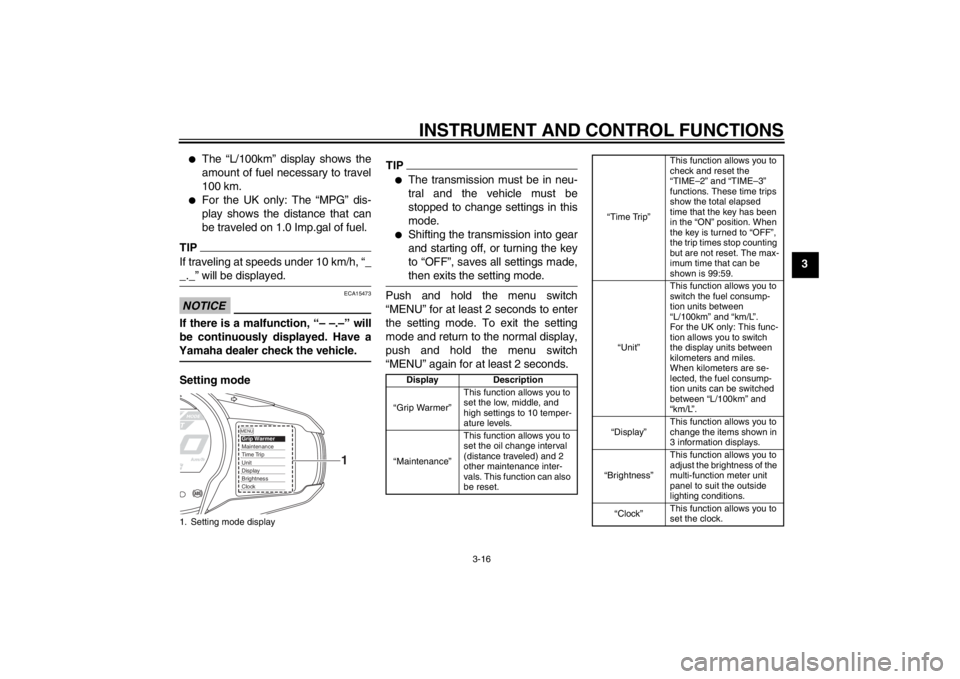
Push and hold the menu switch
“MENU” for at least 2 seconds to enter
the setting mode. To exit the setting
mode and return to the normal display,
push and hold the menu switch
“MENU” again for at least 2 seconds.
1. Setting mode display
MENUGrip WarmerMaintenanceTime TripUnitDisplayBrightnessClock
1
Display Description
“Grip Warmer” This function allows you to
set the low, middle, and
high settings to 10 temper-
ature levels.
“Maintenance” This function allows you to
set the oil change interval
(distance traveled) and 2
other maintenance inter-
vals. This function can also
be reset.
“Time Trip”This function allows you to
check and reset the
“TIME–2” and “TIME–3”
functions. These time trips
show the total elapsed
time that the key has been
in the “ON” position. When
the key is turned to “OFF”,
the trip times stop counting
but are not reset. The max-
imum time that can be
shown is 99:59.
“Unit” This function allows you to
switch the fuel consump-
tion units between
“L/100km” and “km/L”.
For the UK only: This func-
tion allows you to switch
the display units between
kilometers and miles.
When kilometers are se-
lected, the fuel consump-
tion units can be switched
between “L/100km” and
“km/L”.
“Display” This function allows you to
change the items shown in
3 information displays.
“Brightness” This function allows you to
adjust the brightness of the
multi-function meter unit
panel to suit the outside
lighting conditions.
“Clock” This function allows you to
set the clock.
U1MCE0E0.book Page 16 Thursday, July 19, 2012 6:59 PM
Page 32 of 118
INSTRUMENT AND CONTROL FUNCTIONS
3-17
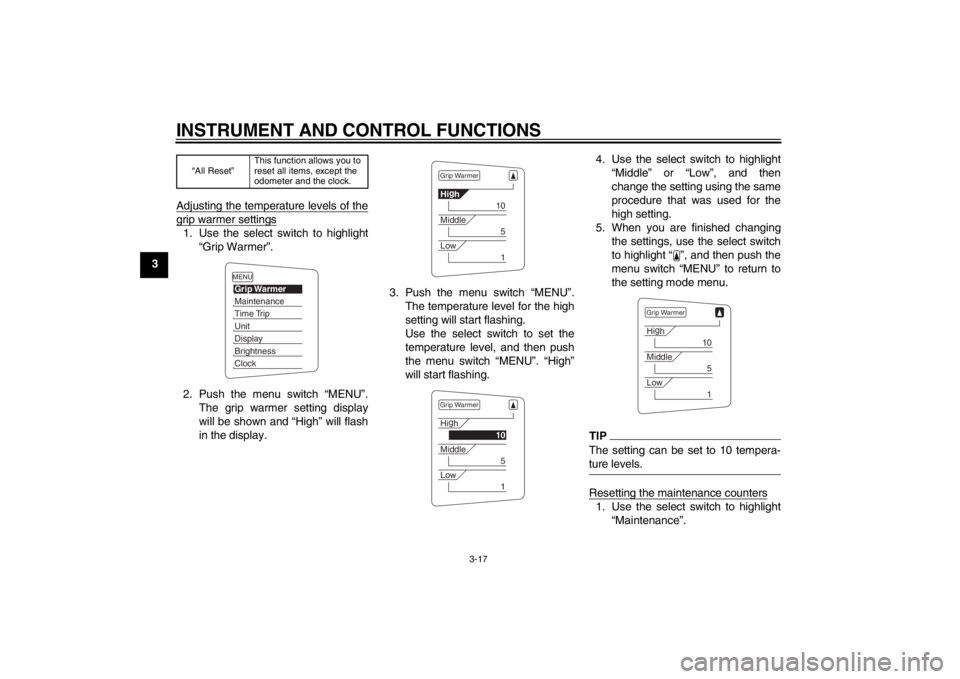
3Adjusting the temperature levels of the
grip warmer settings1. Use the select switch to highlight
“Grip Warmer”.
2. Push the menu switch “MENU”. The grip warmer setting display
will be shown and “High” will flash
in the display. 3. Push the menu switch “MENU”.
The temperature level for the high
setting will start flashing.
Use the select switch to set the
temperature level, and then push
the menu switch “MENU”. “High”
will start flashing. 4. Use the select switch to highlight
“Middle” or “Low”, and then
change the setting using the same
procedure that was used for the
high setting.
5. When you are finished changing the settings, use the select switch
to highlight “ ”, and then push the
menu switch “MENU” to return to
the setting mode menu.
TIPThe setting can be set to 10 tempera-
ture levels.Resetting the maintenance counters1. Use the select switch to highlight“Maintenance”.
“All Reset” This function allows you to
reset all items, except the
odometer and the clock.
MENUGrip WarmerMaintenanceTime TripUnitDisplayBrightnessClock
Grip WarmerHi
g
h
10
Middle
5
Low
1
Grip WarmerHi g
h
10
Middle
5
Low
1
Grip WarmerHi g
h
10
Middle
5
Low
1
U1MCE0E0.book Page 17 Thursday, July 19, 2012 6:59 PM
Page 33 of 118
INSTRUMENT AND CONTROL FUNCTIONS
3-18
3
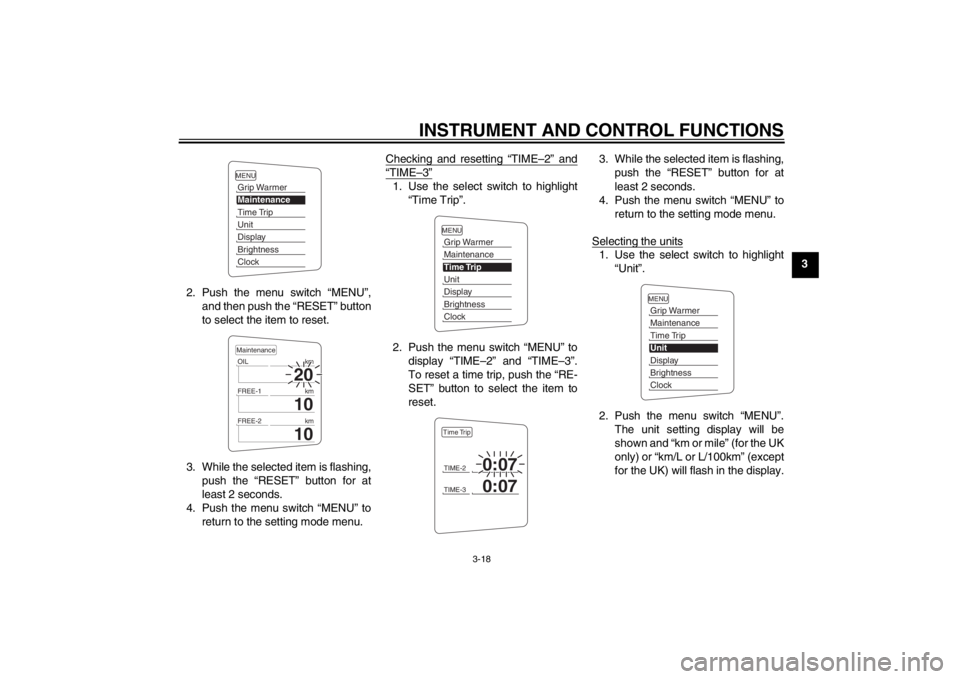
2. Push the menu switch “MENU”, and then push the “RESET” button
to select the item to reset.
3. While the selected item is flashing, push the “RESET” button for at
least 2 seconds.
4. Push the menu switch “MENU” to return to the setting mode menu. Checking and resetting “TIME–2” and
“TIME–3”1. Use the select switch to highlight
“Time Trip”.
2. Push the menu switch “MENU” to display “TIME–2” and “TIME–3”.
To reset a time trip, push the “RE-
SET” button to select the item to
reset. 3. While the selected item is flashing,
push the “RESET” button for at
least 2 seconds.
4. Push the menu switch “MENU” to return to the setting mode menu.
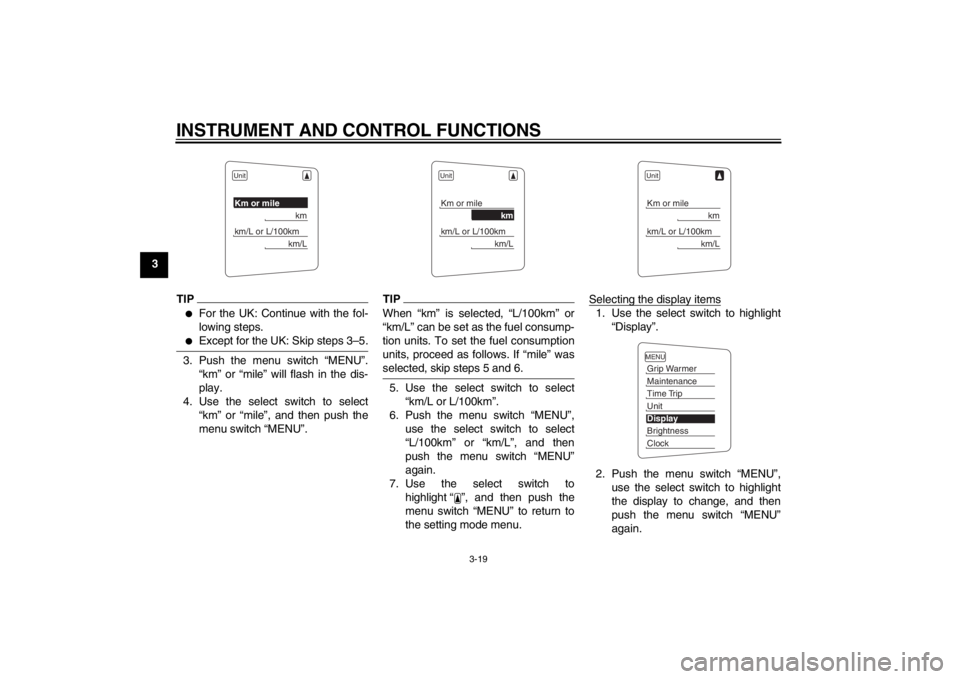
Selecting the units
1. Use the select switch to highlight “Unit”.
2. Push the menu switch “MENU”. The unit setting display will be
shown and “km or mile” (for the UK
only) or “km/L or L/100km” (except
for the UK) will flash in the display.
MENUGrip WarmerMaintenanceTime TripUnitDisplayBrightnessClock
20
OIL km
10
FREE-1km
10
FREE-2kmMaintenance
MENUGrip WarmerMaintenanceTime TripUnitDisplayBrightnessClockTIME-2
0:07
TIME-3
0:07
Time Trip
MENUGrip WarmerMaintenanceTime TripUnitDisplayBrightnessClock
U1MCE0E0.book Page 18 Thursday, July 19, 2012 6:59 PM
Page 34 of 118
INSTRUMENT AND CONTROL FUNCTIONS
3-19
3
TIP●
For the UK: Continue with the fol-
lowing steps.
●
Except for the UK: Skip steps 3–5.
3. Push the menu switch “MENU”.“km” or “mile” will flash in the dis-
play.
4. Use the select switch to select “km” or “mile”, and then push the
menu switch “MENU”.
TIPWhen “km” is selected, “L/100km” or
“km/L” can be set as the fuel consump-
tion units. To set the fuel consumption
units, proceed as follows. If “mile” was
selected, skip steps 5 and 6.5. Use the select switch to select“km/L or L/100km”.
6. Push the menu switch “MENU”, use the select switch to select
“L/100km” or “km/L”, and then
push the menu switch “MENU”
again.
7. Use the select switch to highlight “ ”, and then push the
menu switch “MENU” to return to
the setting mode menu. Selecting the display items
1. Use the select switch to highlight
“Display”.
2. Push the menu switch “MENU”, use the select switch to highlight
the display to change, and then
push the menu switch “MENU”
again.
UnitKm or mile
km
km/L or L/100km
km/L
UnitKm or mile
km
km/L or L/100km
km/L
UnitKm or mile
km
km/L or L/100km
km/L
MENUGrip WarmerMaintenanceTime TripUnitDisplayBrightnessClock
U1MCE0E0.book Page 19 Thursday, July 19, 2012 6:59 PM
Page 35 of 118
INSTRUMENT AND CONTROL FUNCTIONS
3-20
3
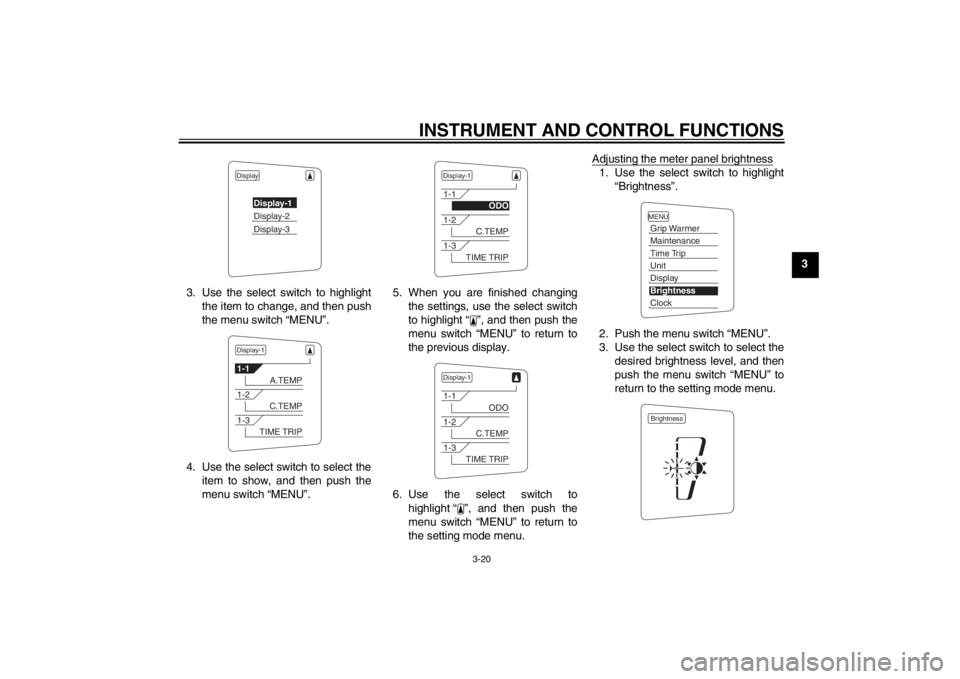
3. Use the select switch to highlight the item to change, and then push
the menu switch “MENU”.
4. Use the select switch to select the item to show, and then push the
menu switch “MENU”. 5. When you are finished changing
the settings, use the select switch
to highlight “ ”, and then push the
menu switch “MENU” to return to
the previous display.
6. Use the select switch to highlight “ ”, and then push the
menu switch “MENU” to return to
the setting mode menu. Adjusting the meter panel brightness
1. Use the select switch to highlight
“Brightness”.
2. Push the menu switch “MENU”.
3. Use the select switch to select the desired brightness level, and then
push the menu switch “MENU” to
return to the setting mode menu.
Display
Display-1Display-2Display-3
Display-11-1
A.TEMP
1-2
C.TEMP
1-3
TIME TRIP
Display-11-1
ODO
1-2
C.TEMP
1-3
TIME TRIP
Display-11-1
ODO
1-2
C.TEMP
1-3
TIME TRIP
MENUGrip WarmerMaintenanceTime TripUnitDisplayBrightnessClockBrightness
U1MCE0E0.book Page 20 Thursday, July 19, 2012 6:59 PM
Page 36 of 118
INSTRUMENT AND CONTROL FUNCTIONS
3-21
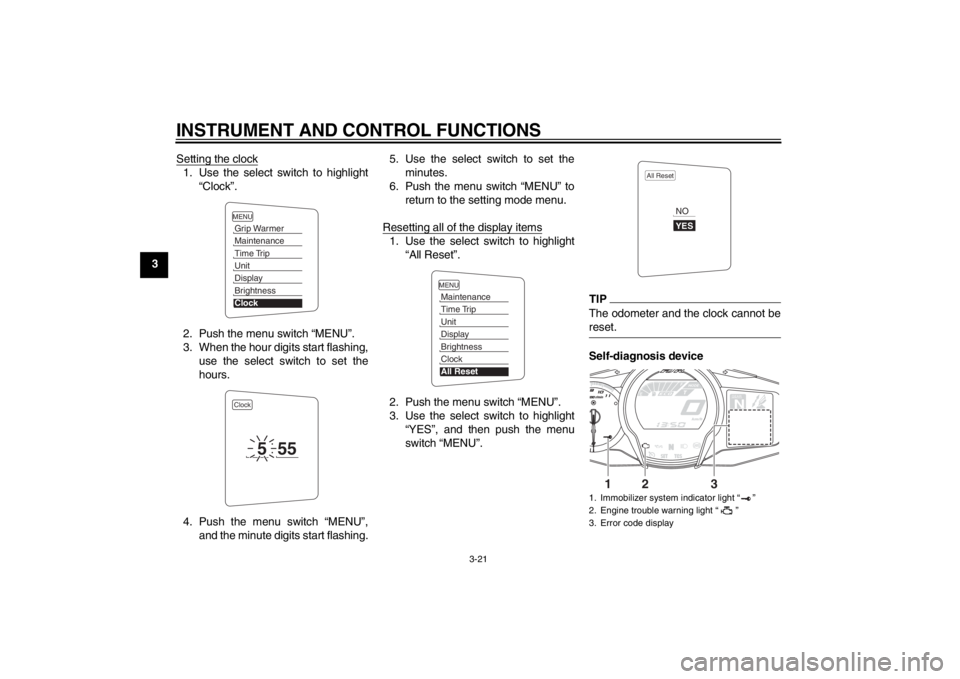
3Setting the clock
1. Use the select switch to highlight
“Clock”.
2. Push the menu switch “MENU”.
3. When the hour digits start flashing, use the select switch to set the
hours.
4. Push the menu switch “MENU”, and the minute digits start flashing. 5. Use the select switch to set the
minutes.
6. Push the menu switch “MENU” to return to the setting mode menu.
Resetting all of the display items
1. Use the select switch to highlight “All Reset”.
2. Push the menu switch “MENU”.
3. Use the select switch to highlight “YES”, and then push the menu
switch “MENU”.
TIPThe odometer and the clock cannot be
reset.Self-diagnosis device
MENUGrip WarmerMaintenanceTime TripUnitDisplayBrightnessClockClock
5
55
MENUMaintenanceTime TripUnitDisplayBrightnessClockAll Reset
1. Immobilizer system indicator light “ ”
2. Engine trouble warning light “ ”
3. Error code display
All Reset
YESNO
GEARN
25
A.TEMP ˚C
Lo
C.TEMP ˚C
0:06
TIME TRIP
1
2
3
U1MCE0E0.book Page 21 Thursday, July 19, 2012 6:59 PM
Page 45 of 118
INSTRUMENT AND CONTROL FUNCTIONS
3-30
3
EAU13221
Fuel Make sure there is sufficient gasoline in
the tank.
WARNING
EWA10881
Gasoline and gasoline vapors are
extremely flammable. To avoid fires
and explosions and to reduce the
risk of injury when refueling, follow
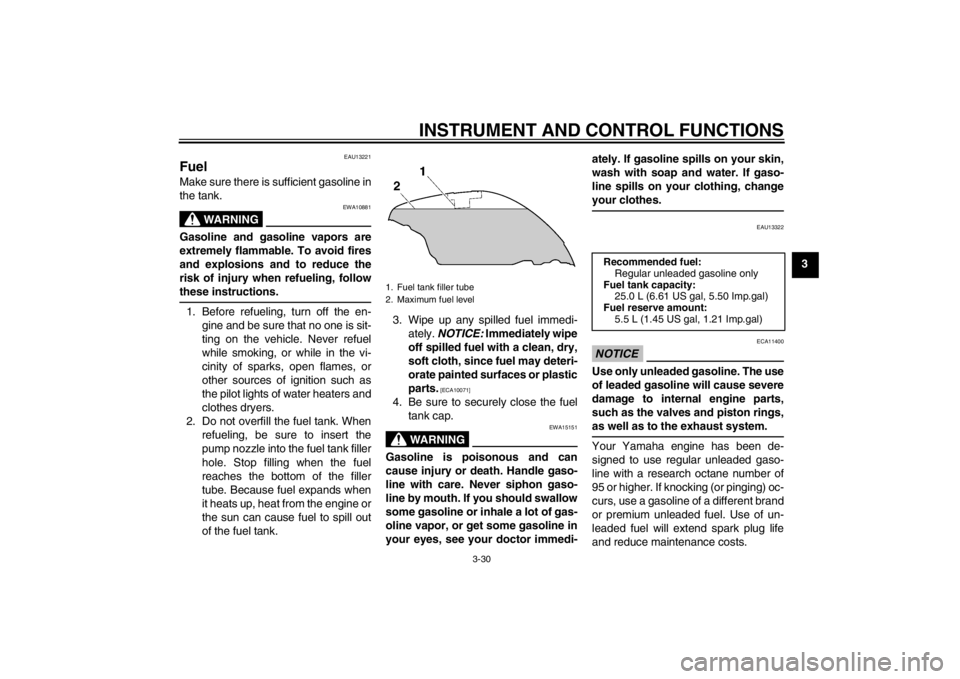
these instructions.1. Before refueling, turn off the en-gine and be sure that no one is sit-
ting on the vehicle. Never refuel
while smoking, or while in the vi-
cinity of sparks, open flames, or
other sources of ignition such as
the pilot lights of water heaters and
clothes dryers.
2. Do not overfill the fuel tank. When refueling, be sure to insert the
pump nozzle into the fuel tank filler
hole. Stop filling when the fuel
reaches the bottom of the filler
tube. Because fuel expands when
it heats up, heat from the engine or
the sun can cause fuel to spill out
of the fuel tank. 3. Wipe up any spilled fuel immedi-
ately. NOTICE: Immediately wipe
off spilled fuel with a clean, dry,
soft cloth, since fuel may deteri-
orate painted surfaces or plastic
parts.
[ECA10071]
4. Be sure to securely close the fuel tank cap.
WARNING
EWA15151
Gasoline is poisonous and can
cause injury or death. Handle gaso-
line with care. Never siphon gaso-
line by mouth. If you should swallow
some gasoline or inhale a lot of gas-
oline vapor, or get some gasoline in
your eyes, see your doctor immedi- ately. If gasoline spills on your skin,
wash with soap and water. If gaso-
line spills on your clothing, change
your clothes.
EAU13322
NOTICE
ECA11400
Use only unleaded gasoline. The use
of leaded gasoline will cause severe
damage to internal engine parts,
such as the valves and piston rings,
as well as to the exhaust system.Your Yamaha engine has been de-
signed to use regular unleaded gaso-
line with a research octane number of
95 or higher. If knocking (or pinging) oc-
curs, use a gasoline of a different brand
or premium unleaded fuel. Use of un-
leaded fuel will extend spark plug life
and reduce maintenance costs.
1. Fuel tank filler tube
2. Maximum fuel level
Recommended fuel:
Regular unleaded gasoline only
Fuel tank capacity: 25.0 L (6.61 US gal, 5.50 Imp.gal)
Fuel reserve amount: 5.5 L (1.45 US gal, 1.21 Imp.gal)
U1MCE0E0.book Page 30 Thursday, July 19, 2012 6:59 PM
Page 46 of 118
INSTRUMENT AND CONTROL FUNCTIONS
3-31
3
EAUB1300
Fuel tank breather/overflow
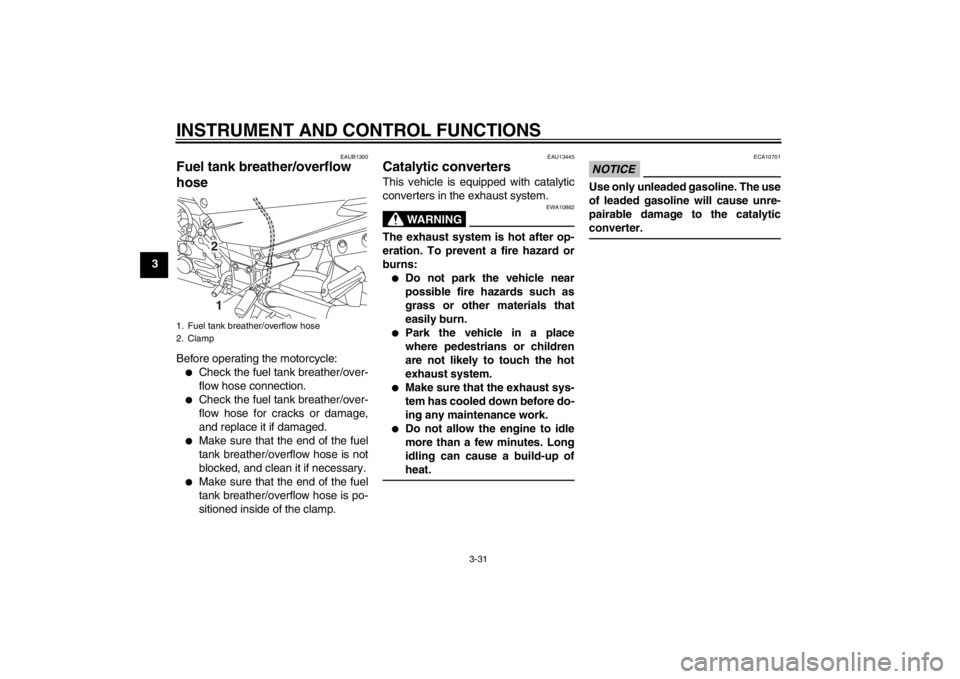
hose Before operating the motorcycle:●
Check the fuel tank breather/over-
flow hose connection.
●
Check the fuel tank breather/over-
flow hose for cracks or damage,
and replace it if damaged.
●
Make sure that the end of the fuel
tank breather/overflow hose is not
blocked, and clean it if necessary.
●
Make sure that the end of the fuel
tank breather/overflow hose is po-
sitioned inside of the clamp.
EAU13445
Catalytic converters This vehicle is equipped with catalytic
converters in the exhaust system.
WARNING
EWA10862
The exhaust system is hot after op-
eration. To prevent a fire hazard or
burns:●
Do not park the vehicle near
possible fire hazards such as
grass or other materials that
easily burn.
●
Park the vehicle in a place
where pedestrians or children
are not likely to touch the hot
exhaust system.
●
Make sure that the exhaust sys-
tem has cooled down before do-
ing any maintenance work.
●
Do not allow the engine to idle
more than a few minutes. Long
idling can cause a build-up of
heat.
NOTICE
ECA10701
Use only unleaded gasoline. The use
of leaded gasoline will cause unre-
pairable damage to the catalytic
converter.
1. Fuel tank breather/overflow hose
2. Clamp
21
U1MCE0E0.book Page 31 Thursday, July 19, 2012 6:59 PM