turn signal YAMAHA FJR1300A 2013 Owners Manual
[x] Cancel search | Manufacturer: YAMAHA, Model Year: 2013, Model line: FJR1300A, Model: YAMAHA FJR1300A 2013Pages: 118, PDF Size: 3.28 MB
Page 7 of 118

TABLE OF CONTENTS
Checking and lubricating the brake and clutch levers ............. 6-27
Checking and lubricating the centerstand and sidestand ........ 6-28
Lubricating the rear suspension ... 6-29
Lubricating the swingarm pivots ... 6-29
Checking the front fork ................. 6-29
Checking the steering ................... 6-30
Checking the wheel bearings ....... 6-30
Battery .......................................... 6-31
Replacing the fuses ...................... 6-32
Headlight bulb .............................. 6-34
Front turn signal light .................... 6-34
Replacing a rear turn signal light
bulb or a tail/brake light bulb ..... 6-34
Replacing the license plate light bulb ........................................... 6-35
Auxiliary light ................................ 6-36
Troubleshooting ............................ 6-36
Troubleshooting charts ................. 6-37
MOTORCYCLE CARE AND
STORAGE .......................................... 7-1
Matte color caution ......................... 7-1
Care ................................................ 7-1
Storage ...........................................7-4
SPECIFICATIONS ............................. 8-1
CONSUMER INFORMATION ............. 9-1
Identification numbers .................... 9-1
U1MCE0E0.book Page 2 Thursday, July 19, 2012 6:59 PM
Page 9 of 118
SAFETY INFORMATION
1-2
1
●
Many accidents involve inexperi-
enced operators. In fact, many op-
erators who have been involved in
accidents do not even have a cur-
rent motorcycle license. Make sure that you are qualified and that you only lend your mo-
torcycle to other qualified opera-
tors.
Know your skills and limits. Staying within your limits may
help you to avoid an accident.
We recommend that you prac- tice riding your motorcycle
where there is no traffic until you
have become thoroughly famil-
iar with the motorcycle and all of
its controls.
●
Many accidents have been caused
by error of the motorcycle opera-
tor. A typical error made by the op-
erator is veering wide on a turn
due to excessive speed or under-
cornering (insufficient lean angle
for the speed). Always obey the speed limit and never travel faster than warrant-
ed by road and traffic conditions. Always signal before turning or
changing lanes. Make sure that
other motorists can see you.
●
The posture of the operator and
passenger is important for proper
control. The operator should keep both hands on the handlebar and
both feet on the operator foot-
rests during operation to main-
tain control of the motorcycle.
The passenger should always hold onto the operator, the seat
strap or grab bar, if equipped,
with both hands and keep both
feet on the passenger footrests.
Never carry a passenger unless
he or she can firmly place both
feet on the passenger footrests.
●
Never ride under the influence of
alcohol or other drugs.
●
This motorcycle is designed for on-
road use only. It is not suitable for
off-road use. Protective Apparel
The majority of fatalities from motorcy-
cle accidents are the result of head in-
juries. The use of a safety helmet is the
single most critical factor in the preven-
tion or reduction of head injuries.
●
Always wear an approved helmet.
●
Wear a face shield or goggles.
Wind in your unprotected eyes
could contribute to an impairment
of vision that could delay seeing a
hazard.
●
The use of a jacket, heavy boots,
trousers, gloves, etc., is effective in
preventing or reducing abrasions
or lacerations.
●
Never wear loose-fitting clothes,
otherwise they could catch on the
control levers, footrests, or wheels
and cause injury or an accident.
●
Always wear protective clothing
that covers your legs, ankles, and
feet. The engine or exhaust sys-
tem become very hot during or af-
ter operation and can cause burns.
●
A passenger should also observe
the above precautions.
U1MCE0E0.book Page 2 Thursday, July 19, 2012 6:59 PM
Page 12 of 118

SAFETY INFORMATION
1-5
1tor and may limit control ability,
therefore, such accessories are
not recommended.
●
Use caution when adding electri-
cal accessories. If electrical acces-
sories exceed the capacity of the
motorcycle’s electrical system, an
electric failure could result, which
could cause a dangerous loss of
lights or engine power.
Aftermarket Tires and Rims
The tires and rims that came with your
motorcycle were designed to match the
performance capabilities and to provide
the best combination of handling, brak-
ing, and comfort. Other tires, rims, siz-
es, and combinations may not be
appropriate. Refer to page 6-19 for tire
specifications and more information on
replacing your tires.
Transporting the Motorcycle
Be sure to observe following instruc-
tions before transporting the motorcy-
cle in another vehicle.
●
Remove all loose items from the
motorcycle.
●
Check that the fuel cock (if
equipped) is in the “OFF” position
and that there are no fuel leaks.
●
Point the front wheel straight
ahead on the trailer or in the truck
bed, and choke it in a rail to pre-
vent movement.
●
Shift the transmission in gear (for
models with a manual transmis-
sion).
●
Secure the motorcycle with tie-
downs or suitable straps that are
attached to solid parts of the mo-
torcycle, such as the frame or up-
per front fork triple clamp (and not,
for example, to rubber-mounted
handlebars or turn signals, or parts
that could break). Choose the lo-
cation for the straps carefully so
the straps will not rub against
painted surfaces during transport.
●
The suspension should be com-
pressed somewhat by the tie-
downs, if possible, so that the mo-
torcycle will not bounce excessive-
ly during transport.
U1MCE0E0.book Page 5 Thursday, July 19, 2012 6:59 PM
Page 17 of 118
INSTRUMENT AND CONTROL FUNCTIONS
3-2
3
●
Keep other immobilizer system
keys away from the main switch
as they may cause signal inter-
ference.
EAU10472
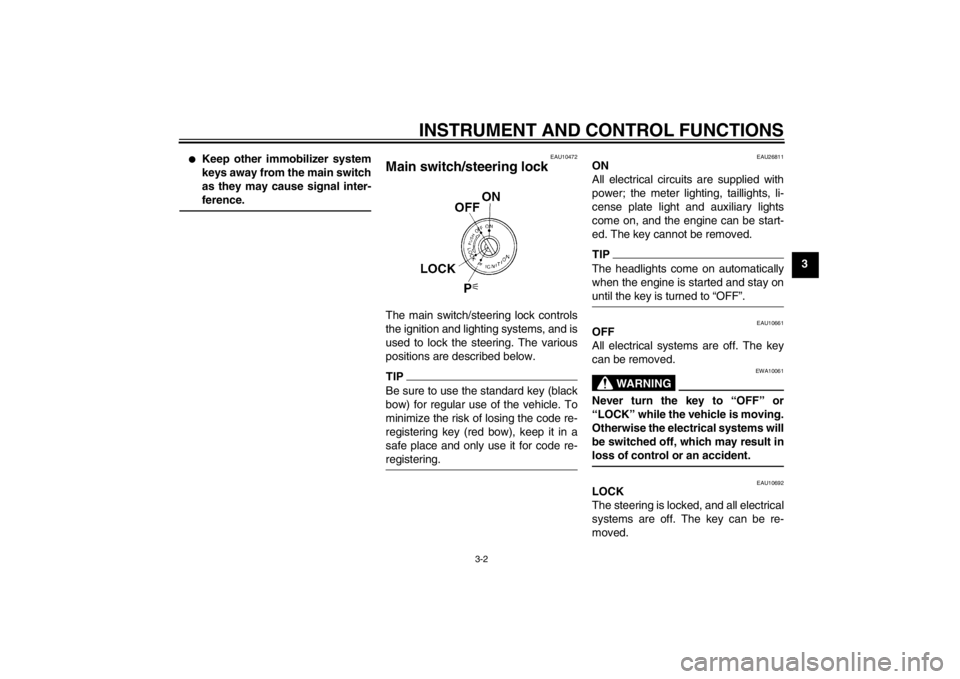
Main switch/steering lock The main switch/steering lock controls
the ignition and lighting systems, and is
used to lock the steering. The various
positions are described below.TIPBe sure to use the standard key (black
bow) for regular use of the vehicle. To
minimize the risk of losing the code re-
registering key (red bow), keep it in a
safe place and only use it for code re-
registering.
EAU26811
ON
All electrical circuits are supplied with
power; the meter lighting, taillights, li-
cense plate light and auxiliary lights
come on, and the engine can be start-
ed. The key cannot be removed.TIPThe headlights come on automatically
when the engine is started and stay on
until the key is turned to “OFF”.
EAU10661
OFF
All electrical systems are off. The key
can be removed.
WARNING
EWA10061
Never turn the key to “OFF” or
“LOCK” while the vehicle is moving.
Otherwise the electrical systems will
be switched off, which may result in
loss of control or an accident.
EAU10692
LOCK
The steering is locked, and all electrical
systems are off. The key can be re-
moved.
U1MCE0E0.book Page 2 Thursday, July 19, 2012 6:59 PM
Page 18 of 118
INSTRUMENT AND CONTROL FUNCTIONS
3-3
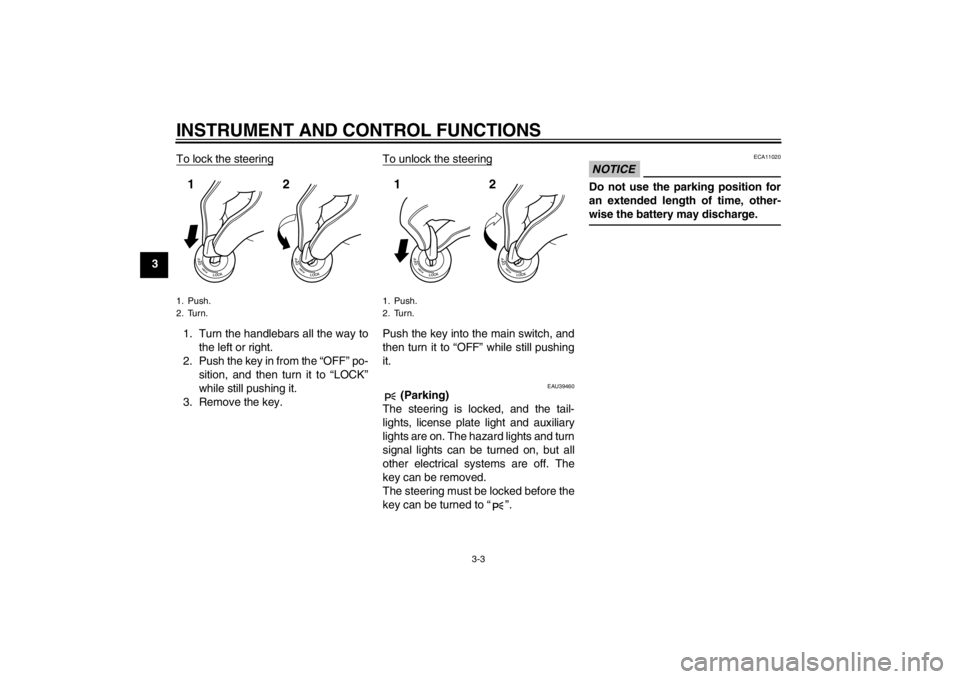
3To lock the steering
1. Turn the handlebars all the way to
the left or right.
2. Push the key in from the “OFF” po- sition, and then turn it to “LOCK”
while still pushing it.
3. Remove the key. To unlock the steering
Push the key into the main switch, and
then turn it to “OFF” while still pushing
it.
EAU39460
(Parking)
The steering is locked, and the tail-
lights, license plate light and auxiliary
lights are on. The hazard lights and turn
signal lights can be turned on, but all
other electrical systems are off. The
key can be removed.
The steering must be locked before the
key can be turned to “ ”.
NOTICE
ECA11020
Do not use the parking position for
an extended length of time, other-
wise the battery may discharge.
1. Push.
2. Turn.12
1. Push.
2. Turn.12
U1MCE0E0.book Page 3 Thursday, July 19, 2012 6:59 PM
Page 19 of 118
INSTRUMENT AND CONTROL FUNCTIONS
3-4
3
EAU49392
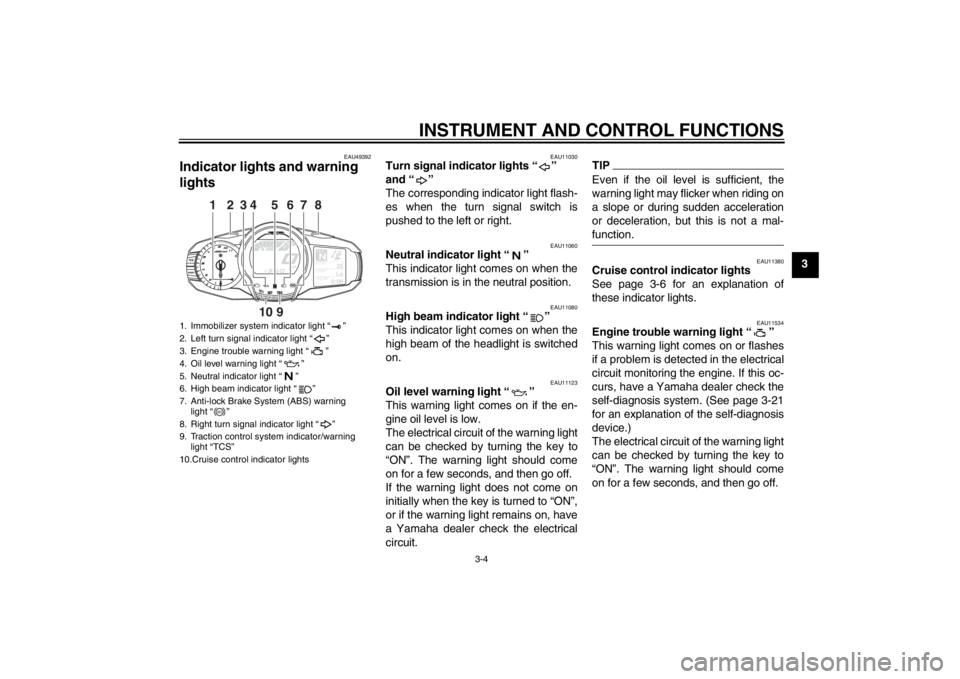
Indicator lights and warning
lights
EAU11030
Turn signal indicator lights “ ”
and “ ”
The corresponding indicator light flash-
es when the turn signal switch is
pushed to the left or right.
EAU11060
Neutral indicator light “ ”
This indicator light comes on when the
transmission is in the neutral position.
EAU11080
High beam indicator light “ ”
This indicator light comes on when the
high beam of the headlight is switched
on.
EAU11123
Oil level warning light “ ”
This warning light comes on if the en-
gine oil level is low.
The electrical circuit of the warning light
can be checked by turning the key to
“ON”. The warning light should come
on for a few seconds, and then go off.
If the warning light does not come on
initially when the key is turned to “ON”,
or if the warning light remains on, have
a Yamaha dealer check the electrical
circuit.
TIPEven if the oil level is sufficient, the
warning light may flicker when riding on
a slope or during sudden acceleration
or deceleration, but this is not a mal-
function.
EAU11380
Cruise control indicator lights
See page 3-6 for an explanation of
these indicator lights.
EAU11534
Engine trouble warning light “ ”
This warning light comes on or flashes
if a problem is detected in the electrical
circuit monitoring the engine. If this oc-
curs, have a Yamaha dealer check the
self-diagnosis system. (See page 3-21
for an explanation of the self-diagnosis
device.)
The electrical circuit of the warning light
can be checked by turning the key to
“ON”. The warning light should come
on for a few seconds, and then go off.
1. Immobilizer system indicator light “ ”
2. Left turn signal indicator light “ ”
3. Engine trouble warning light “ ”
4. Oil level warning light “ ”
5. Neutral indicator light “ ”
6. High beam indicator light “ ”
7. Anti-lock Brake System (ABS) warning light “ ”
8. Right turn signal indicator light “ ”
9. Traction control system indicator/warning light “TCS”
10.Cruise control indicator lights
GEARN
25
A.TEMP ˚C
Lo
C.TEMP˚C
0:06
TIME TRIP
1
2
8
3
7
4
9
10
6
5
ABS
U1MCE0E0.book Page 4 Thursday, July 19, 2012 6:59 PM
Page 29 of 118
INSTRUMENT AND CONTROL FUNCTIONS
3-14
3
TRIP-F
→ Display–1 → Display–2 →
Display–3 → TRIP-F
To reset a tripmeter, use the select
switch to select the information display
that contains the tripmeter. Push the
“RESET” button briefly so that the trip-
meter flashes, and then push the “RE-
SET” button again for at least 2
seconds while the tripmeter is flashing.
If you do not reset the fuel reserve trip-
meter manually, it will reset itself auto-
matically and the display will return to
the prior mode after refueling and trav-
eling 5 km (3 mi).
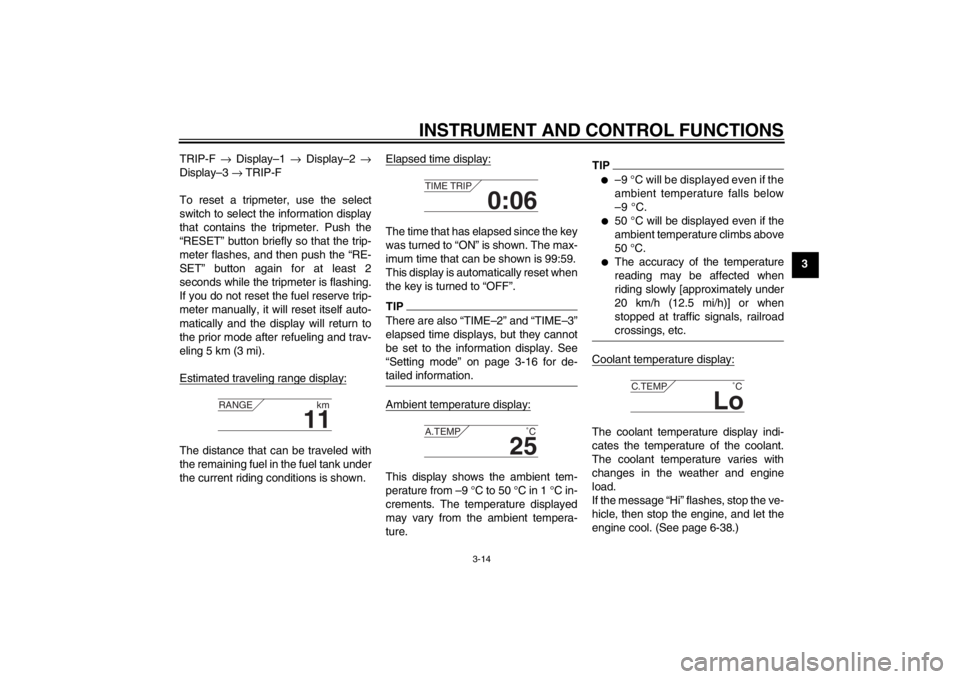
Estimated traveling range display:
The distance that can be traveled with
the remaining fuel in the fuel tank under
the current riding conditions is shown. Elapsed time display:
The time that has elapsed since the key
was turned to “ON” is shown. The max-
imum time that can be shown is 99:59.
This display is automatically reset when
the key is turned to “OFF”.TIPThere are also “TIME–2” and “TIME–3”
elapsed time displays, but they cannot
be set to the information display. See
“Setting mode” on page 3-16 for de-
tailed information.Ambient temperature display:This display shows the ambient tem-
perature from –9 °C to 50 °C in 1 °C in-
crements. The temperature displayed
may vary from the ambient tempera-
ture.
TIP●
–9 °C will be displayed even if the
ambient temperature falls below
–9 °C.
●
50 °C will be displayed even if the
ambient temperature climbs above
50 °C.
●
The accuracy of the temperature
reading may be affected when
riding slowly [approximately under
20 km/h (12.5 mi/h)] or when
stopped at traffic signals, railroad
crossings, etc.
Coolant temperature display:The coolant temperature display indi-
cates the temperature of the coolant.
The coolant temperature varies with
changes in the weather and engine
load.
If the message “Hi” flashes, stop the ve-
hicle, then stop the engine, and let the
engine cool. (See page 6-38.)
11
RANGE
km
0:06
TIME TRIP
25
A.TEMP ˚C
Lo
C.TEMP˚C
U1MCE0E0.book Page 14 Thursday, July 19, 2012 6:59 PM
Page 37 of 118
INSTRUMENT AND CONTROL FUNCTIONS
3-22
3
This model is equipped with a self-diag-
nosis device for various electrical cir-
cuits. If a problem is detected in any of
those circuits, the engine trouble warn-
ing light will come on and the informa-
tion display will indicate an error code.
If the information display indicates any
error codes, note the code number, and
then have a Yamaha dealer check the
vehicle.
The self-diagnosis device also detects
problems in the immobilizer system cir-
cuits.
If a problem is detected in the immobi-
lizer system circuits, the immobilizer
system indicator light will flash and the
information display will indicate an error
code when the key is turned to “ON”.
TIPIf the information display indicates error
code 52, this could be caused by tran-
sponder interference. If this error ap-
pears, try the following.1. Use the code re-registering key to
start the engine.
TIPMake sure there are no other immobi-
lizer keys close to the main switch, and
do not keep more than one immobilizer
key on the same key ring! Immobilizer
system keys may cause signal interfer-
ence, which may prevent the engine
from starting.2. If the engine starts, turn it off, andtry starting the engine with the
standard keys.
3. If one or both of the standard keys do not start the engine, take the
vehicle, the code re-registering
key and both standard keys to a
Yamaha dealer and have the stan- dard keys re-registered.NOTICE
ECA11590
If the display indicates an error
code, the vehicle should be checked
as soon as possible in order to avoid
engine damage.
EAU49431
D-mode (drive mode) D-mode is an electronically controlled
engine performance system with two
mode selections (touring mode “T” and
sports mode “S”).
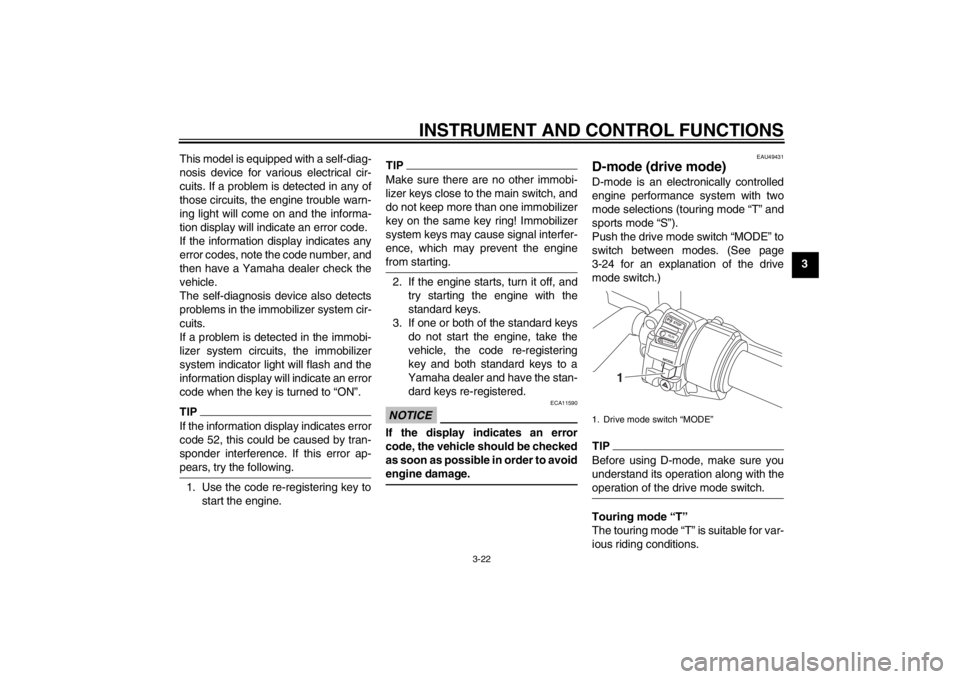
Push the drive mode switch “MODE” to
switch between modes. (See page
3-24 for an explanation of the drive
mode switch.)TIPBefore using D-mode, make sure you
understand its operation along with the
operation of the drive mode switch.Touring mode “T”
The touring mode “T” is suitable for var-
ious riding conditions.1. Drive mode switch “MODE”
STOPM ODERUNSTART
1
U1MCE0E0.book Page 22 Thursday, July 19, 2012 6:59 PM
Page 38 of 118
INSTRUMENT AND CONTROL FUNCTIONS
3-23
3This mode allows the rider to enjoy
smooth drivability from the low-speed
range to the high-speed range.
Sports mode “S”
This mode offers a sportier engine re-
sponse in the low- to mid-speed range
compared to the touring mode.
EAU1234B
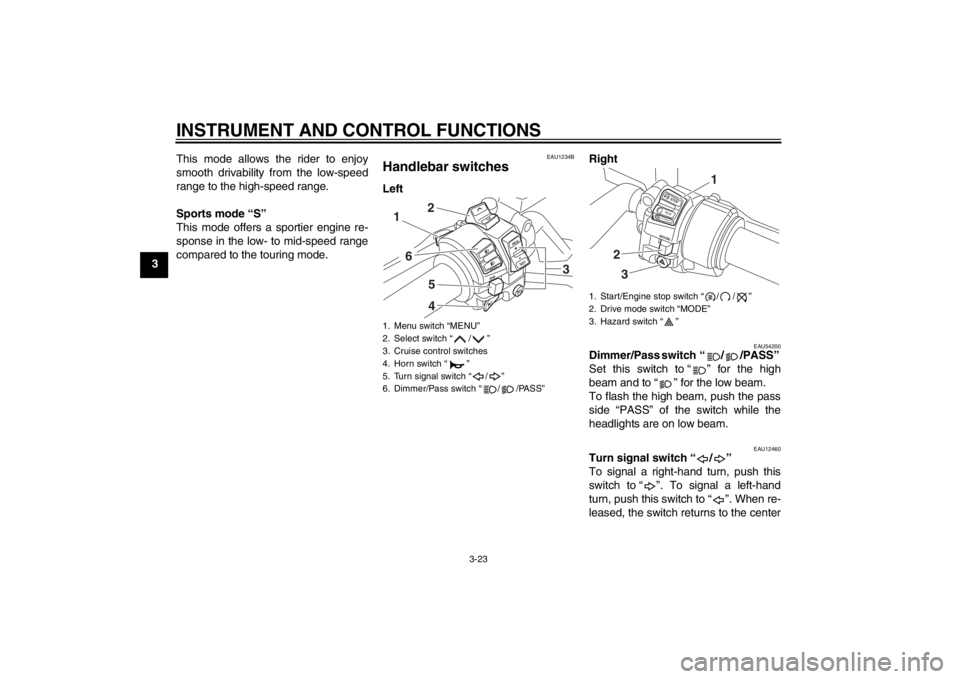
Handlebar switches Left
Right
EAU54200
Dimmer/Pass switch “ / /PASS”
Set this switch to “ ” for the high
beam and to “ ” for the low beam.
To flash the high beam, push the pass
side “PASS” of the switch while the
headlights are on low beam.
EAU12460
Turn signal switch “ / ”
To signal a right-hand turn, push this
switch to “ ”. To signal a left-hand
turn, push this switch to “ ”. When re-
leased, the switch returns to the center
1. Menu switch “MENU”
2. Select switch “ / ”
3. Cruise control switches
4. Horn switch “ ”
5. Turn signal switch “ / ”
6. Dimmer/Pass switch “ / /PASS”
R
ESSET
PA S S
1
6
542
3
1. Start/Engine stop switch “ / / ”
2. Drive mode switch “MODE”
3. Hazard switch “ ”
STOPMODERUNSTART
32
1
U1MCE0E0.book Page 23 Thursday, July 19, 2012 6:59 PM
Page 39 of 118
INSTRUMENT AND CONTROL FUNCTIONS
3-24
3
position. To cancel the turn signal
lights, push the switch in after it has re-
turned to the center position.
EAU12500
Horn switch “ ”
Press this switch to sound the horn.
EAU54210
Start/Engine stop switch “ / / ”
To crank the engine with the starter, set
this switch to “ ”, and then push
the “ ” side of the switch. See page
5-1 for starting instructions prior to
starting the engine.
Set this switch to “ ” to stop the en-
gine in case of an emergency, such as
when the vehicle overturns or when the
throttle cable is stuck.
EAU42341
The engine trouble warning light and
ABS warning light may come on when
the key is turned to “ON” and the start
switch is pushed, but this does not indi-
cate a malfunction.
EAU12733
Hazard switch “ ”
With the key in the “ON” or “ ” posi-
tion, use this switch to turn on the haz-
ard lights (simultaneous flashing of all
turn signal lights).
The hazard lights are used in case of
an emergency or to warn other drivers
when your vehicle is stopped where it
might be a traffic hazard.NOTICE
ECA10061
Do not use the hazard lights for an
extended length of time with the en-
gine not running, otherwise the bat-
tery may discharge.
EAU12780
Cruise control switches
See page 3-6 for an explanation of the
cruise control system.
EAU54230
Menu switch “MENU”
This switch is used to perform selec-
tions in the function display and setting
mode display of the multi-function
meter unit.
See “Multi-function meter unit” on page
3-9 for detailed information.
EAU54220
Select switch “ / ”
This switch is used to perform selec-
tions in the function display and setting
mode display of the multi-function
meter unit.
See “Multi-function meter unit” on page
3-9 for detailed information.
EAU54690
Drive mode switch “MODE”
WARNING
EWA15340
Do not change the D-mode while the
vehicle is moving.Using this switch changes the drive
mode to touring mode “T” or sports
mode “S”.
The throttle grip must be completely
closed in order to change the drive
mode.
The selected mode is shown on the
drive mode display. (See page 3-12.)
The drive mode cannot be changed
while the cruise control system is oper-
ating.
U1MCE0E0.book Page 24 Thursday, July 19, 2012 6:59 PM