ECO mode YAMAHA FJR1300A 2014 Owners Manual
[x] Cancel search | Manufacturer: YAMAHA, Model Year: 2014, Model line: FJR1300A, Model: YAMAHA FJR1300A 2014Pages: 118, PDF Size: 3.29 MB
Page 12 of 118

SAFETY INFORMATION
1-5
1operator and may limit control
ability, therefore, such accesso-
ries are not recommended.
Use caution when adding electri-
cal accessories. If electrical ac-
cessories exceed the capacity of
the motorcycle’s electrical sys-
tem, an electric failure could re-
sult, which could cause a
dangerous loss of lights or engine
power.
Aftermarket Tires an d Rims
The tires and rims that came with your
motorcycle were designed to match
the performance capabilities and to
provide the best combination of han-
dling, braking, and comfort. Other
tires, rims, sizes, and combinations
may not be appropriate. Refer to page
6-19 for tire specifications and more in-
formation on replacing your tires.
Transportin g the Motorcycle
Be sure to observe following instruc-
tions before transporting the motorcy-
cle in another vehicle. Remove all loose items from the
motorcycle.
Check that the fuel cock (if
equipped) is in the “OFF” position
and that there are no fuel leaks.
Point the front wheel straight
ahead on the trailer or in the truck
bed, and choke it in a rail to pre-
vent movement.
Shift the transmission in gear (for
models with a manual transmis-
sion).
Secure the motorcycle with tie-
downs or suitable straps that are
attached to solid parts of the mo-
torcycle, such as the frame or up-
per front fork triple clamp (and not,
for example, to rubber-mounted
handlebars or turn signals, or
parts that could break). Choose
the location for the straps carefully
so the straps will not rub against
painted surfaces during transport.
The suspension should be com-
pressed somewhat by the tie-
downs, if possible, so that the mo-
torcycle will not bounce exces-
sively during transport.
U1MCE1E0.book Page 5 Thursday, August 8, 2013 9:03 AM
Page 21 of 118
INSTRUMENT AND CONTROL FUNCTIONS
3-6
3
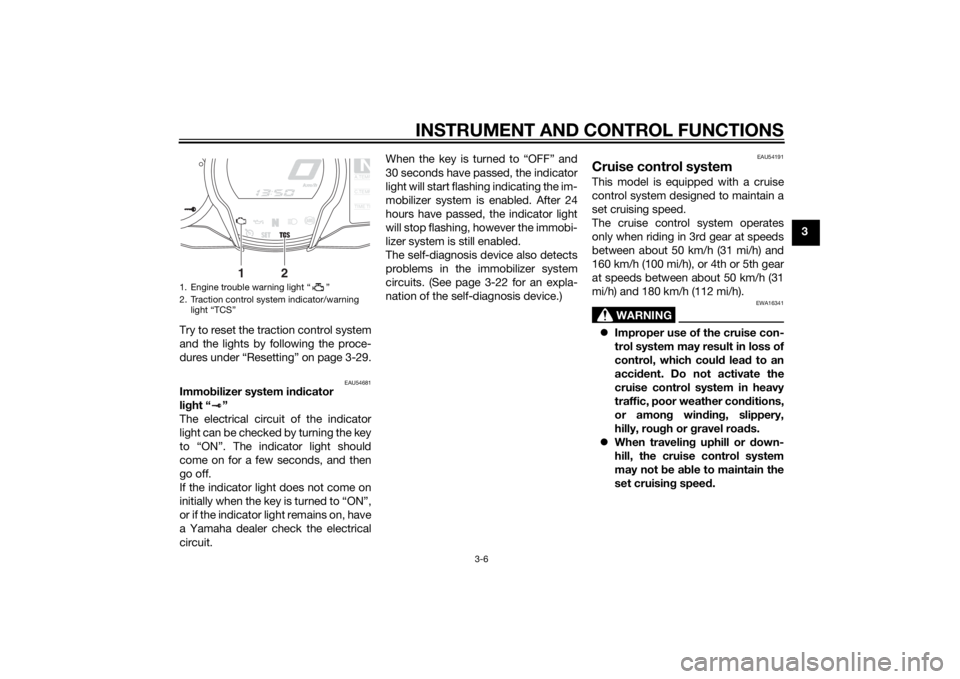
Try to reset the traction control system
and the lights by following the proce-
dures under “Resetting” on page 3-29.
EAU54681
Immo bilizer system in dicator
lig ht “ ”
The electrical circuit of the indicator
light can be checked by turning the key
to “ON”. The indicator light should
come on for a few seconds, and then
go off.
If the indicator light does not come on
initially when the key is turned to “ON”,
or if the indicator light remains on, have
a Yamaha dealer check the electrical
circuit. When the key is turned to “OFF” and
30 seconds have passed, the indicator
light will start flashing indicating the im-
mobilizer system is enabled. After 24
hours have passed, the indicator light
will stop flashing, however the immobi-
lizer system is still enabled.
The self-diagnosis device also detects
problems in the immobilizer system
circuits. (See page 3-22 for an expla-
nation of the self-diagnosis device.)
EAU54191
Cruise control systemThis model is equipped with a cruise
control system designed to maintain a
set cruising speed.
The cruise control system operates
only when riding in 3rd gear at speeds
between about 50 km/h (31 mi/h) and
160 km/h (100 mi/h), or 4th or 5th gear
at speeds between about 50 km/h (31
mi/h) and 180 km/h (112 mi/h).
WARNING
EWA16341
Improper use of the cruise con-
trol system may result in loss of
control, which coul d lea d to an
acci dent. Do not activate the
cruise control system in heavy
traffic, poor weather con ditions,
or amon g win din g, slippery,
hilly, rou gh or g ravel roa ds.
When travelin g uphill or d own-
hill, the cruise control system
may not be ab le to maintain the
set cruising speed.
1. Engine trouble warning light “ ”
2. Traction control system indicator/warning
light “TCS”
NA.TEM
P
C.TEM
P
TIME T
R
2
1
U1MCE1E0.book Page 6 Thursday, August 8, 2013 9:03 AM
Page 25 of 118
INSTRUMENT AND CONTROL FUNCTIONS
3-10
3
EAU54252
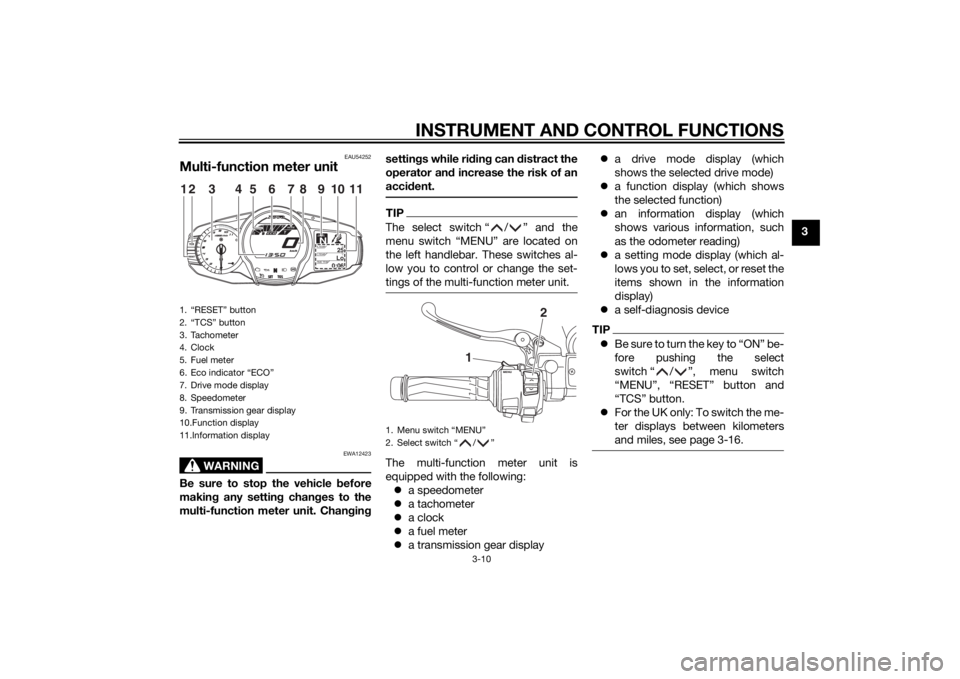
Multi-function meter unit
WARNING
EWA12423
Be sure to stop the vehicle before
makin g any settin g chan ges to the
multi-function meter unit. Chan gin g settin
gs while ri din g can distract the
operator an d increase the risk of an
acci dent.
TIPThe select switch “ / ” and the
menu switch “MENU” are located on
the left handlebar. These switches al-
low you to control or change the set-
tings of the multi-function meter unit.The multi-function meter unit is
equipped with the following:
a speedometer
a tachometer
a clock
a fuel meter
a transmission gear display
a drive mode display (which
shows the selected drive mode)
a function display (which shows
the selected function)
an information display (which
shows various information, such
as the odometer reading)
a setting mode display (which al-
lows you to set, select, or reset the
items shown in the information
display)
a self-diagnosis device
TIPBe sure to turn the key to “ON” be-
fore pushing the select
switch “ / ”, menu switch
“MENU”, “RESET” button and
“TCS” button.
For the UK only: To switch the me-
ter displays between kilometers
and miles, see page 3-16.
1. “RESET” button
2. “TCS” button
3. Tachometer
4. Clock
5. Fuel meter
6. Eco indicator “ECO”
7. Drive mode display
8. Speedometer
9. Transmission gear display
10.Function display
11.Information display
GEARN
25
A.TEMP ˚C
Lo
C.TEMP˚C
0:06
TIME TRIP
12
3
11
4
5
8
7
6
9
10
1. Menu switch “MENU”
2. Select switch “ / ”
1
2
U1MCE1E0.book Page 10 Thursday, August 8, 2013 9:03 AM
Page 29 of 118
INSTRUMENT AND CONTROL FUNCTIONS
3-14
3
“TRIP-1” and “TRIP-2” show the dis-
tance traveled since they were last set
to zero.
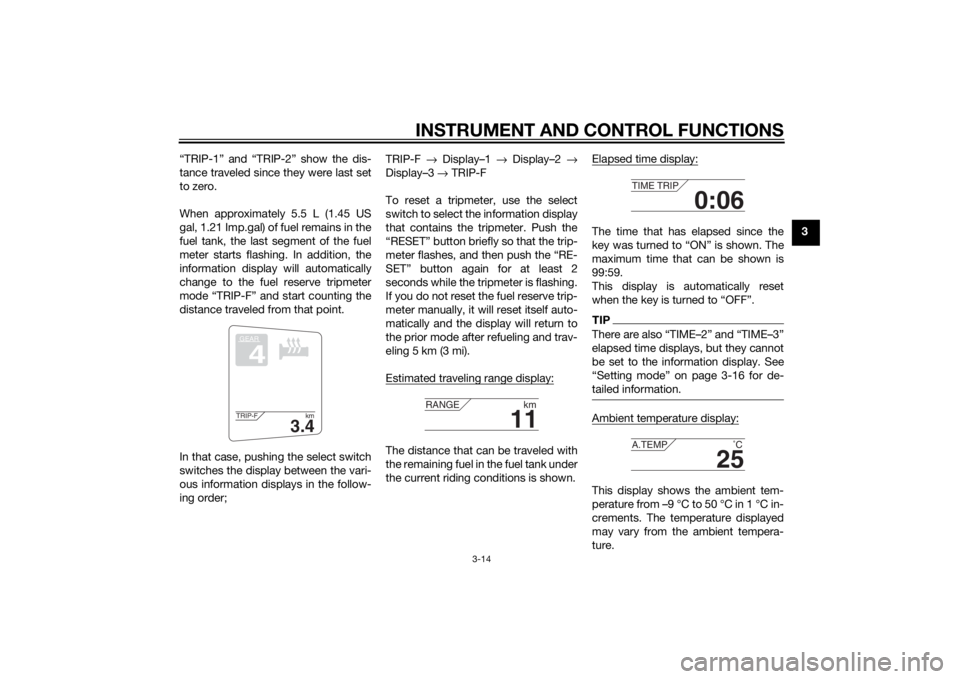
When approximately 5.5 L (1.45 US
gal, 1.21 Imp.gal) of fuel remains in the
fuel tank, the last segment of the fuel
meter starts flashing. In addition, the
information display will automatically
change to the fuel reserve tripmeter
mode “TRIP-F” and start counting the
distance traveled from that point.
In that case, pushing the select switch
switches the display between the vari-
ous information displays in the follow-
ing order; TRIP-F
→ Display–1 → Display–2 →
Display–3 → TRIP-F
To reset a tripmeter, use the select
switch to select the information display
that contains the tripmeter. Push the
“RESET” button briefly so that the trip-
meter flashes, and then push the “RE-
SET” button again for at least 2
seconds while the tripmeter is flashing.
If you do not reset the fuel reserve trip-
meter manually, it will reset itself auto-
matically and the display will return to
the prior mode after refueling and trav-
eling 5 km (3 mi).
Estimated traveling range display:
The distance that can be traveled with
the remaining fuel in the fuel tank under
the current riding conditions is shown. Elapsed time display:
The time that has elapsed since the
key was turned to “ON” is shown. The
maximum time that can be shown is
99:59.
This display is automatically reset
when the key is turned to “OFF”.TIPThere are also “TIME–2” and “TIME–3”
elapsed time displays, but they cannot
be set to the information display. See
“Setting mode” on page 3-16 for de-
tailed information.Ambient temperature display:This display shows the ambient tem-
perature from –9 °C to 50 °C in 1 °C in-
crements. The temperature displayed
may vary from the ambient tempera-
ture.
GEAR4
3.4
TRIP-F
km
11
RANGEkm
0:06
TIME TRIP
25
A.TEMP ˚C
U1MCE1E0.book Page 14 Thursday, August 8, 2013 9:03 AM
Page 30 of 118
INSTRUMENT AND CONTROL FUNCTIONS
3-15
3
TIP–9 °C will be displayed even if the
ambient temperature falls below
–9 °C.
50 °C will be displayed even if the
ambient temperature climbs
above 50 °C.
The accuracy of the temperature
reading may be affected when rid-
ing slowly [approximately under
20 km/h (12.5 mi/h)] or when
stopped at traffic signals, railroad
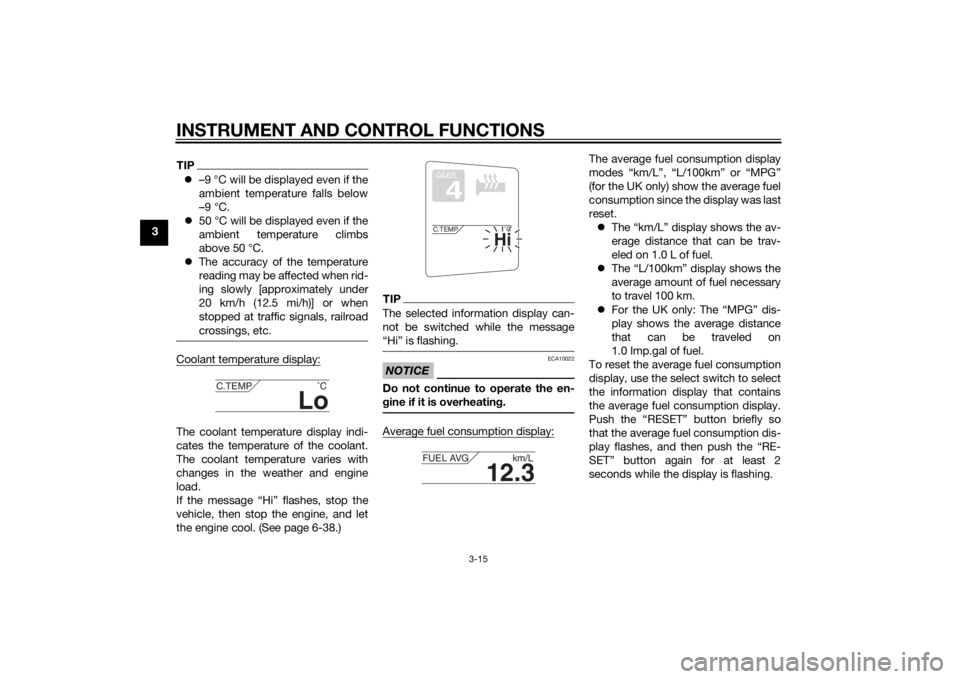
crossings, etc.Coolant temperature display:The coolant temperature display indi-
cates the temperature of the coolant.
The coolant temperature varies with
changes in the weather and engine
load.
If the message “Hi” flashes, stop the
vehicle, then stop the engine, and let
the engine cool. (See page 6-38.)
TIPThe selected information display can-
not be switched while the message
“Hi” is flashing.NOTICE
ECA10022
Do not continue to operate the en-
gine if it is overheatin g.Average fuel consumption display:
The average fuel consumption display
modes “km/L”, “L/100km” or “MPG”
(for the UK only) show the average fuel
consumption since the display was last
reset.
The “km/L” display shows the av-
erage distance that can be trav-
eled on 1.0 L of fuel.
The “L/100km” display shows the
average amount of fuel necessary
to travel 100 km.
For the UK only: The “MPG” dis-
play shows the average distance
that can be traveled on
1.0 Imp.gal of fuel.
To reset the average fuel consumption
display, use the select switch to select
the information display that contains
the average fuel consumption display.
Push the “RESET” button briefly so
that the average fuel consumption dis-
play flashes, and then push the “RE-
SET” button again for at least 2
seconds while the display is flashing.
Lo
C.TEMP ˚C
GEAR4
Hi
C.TEMP˚C
12.3
FUEL AVG km/L
U1MCE1E0.book Page 15 Thursday, August 8, 2013 9:03 AM
Page 31 of 118
INSTRUMENT AND CONTROL FUNCTIONS
3-16
3
TIPAfter resetting the average fuel con-
sumption display, “_ _._” will be shown
for that display until the vehicle has
traveled 1 km (0.6 mi).NOTICE
ECA15474
If there is a malfunction, “– –.–” will
be continuously d isplayed. Have a
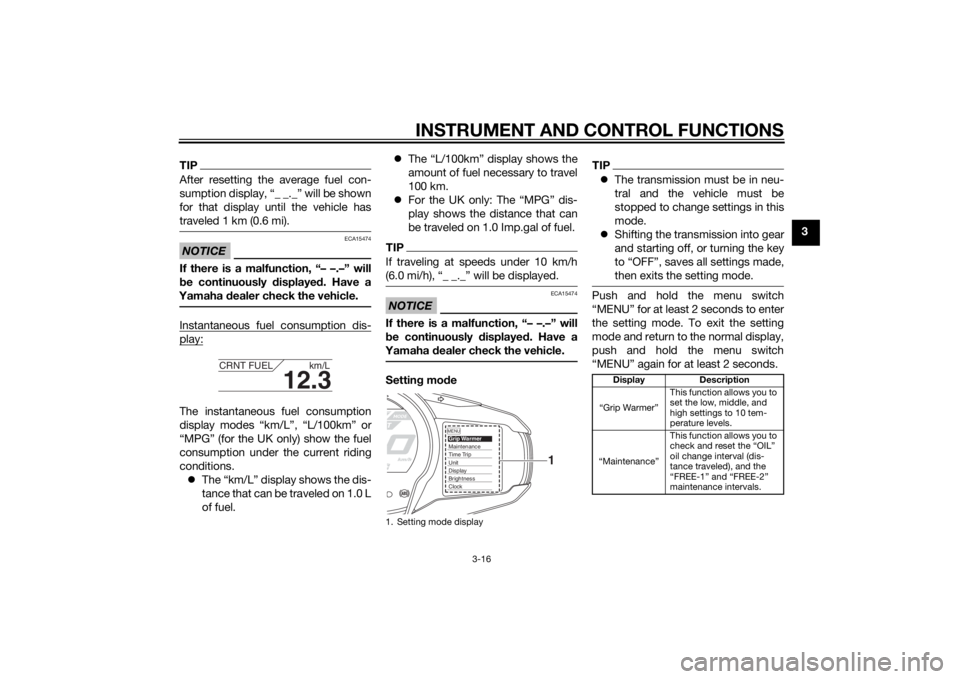
Yamaha dealer check the vehicle.Instantaneous fuel consumption dis-play:The instantaneous fuel consumption
display modes “km/L”, “L/100km” or
“MPG” (for the UK only) show the fuel
consumption under the current riding
conditions.
The “km/L” display shows the dis-
tance that can be traveled on 1.0 L
of fuel.
The “L/100km” display shows the
amount of fuel necessary to travel
100 km.
For the UK only: The “MPG” dis-
play shows the distance that can
be traveled on 1.0 Imp.gal of fuel.
TIPIf traveling at speeds under 10 km/h
(6.0 mi/h), “_ _._” will be displayed.NOTICE
ECA15474
If there is a malfunction, “– –.–” will
be continuously displaye d. Have a
Yamaha dealer check the vehicle.Settin g mo de
TIP The transmission must be in neu-
tral and the vehicle must be
stopped to change settings in this
mode.
Shifting the transmission into gear
and starting off, or turning the key
to “OFF”, saves all settings made,
then exits the setting mode.Push and hold the menu switch
“MENU” for at least 2 seconds to enter
the setting mode. To exit the setting
mode and return to the normal display,
push and hold the menu switch
“MENU” again for at least 2 seconds.
12.3
CRNT FUEL km/L
1. Setting mode display
MENUGrip WarmerMaintenanceTime TripUnitDisplayBrightnessClock
1
Display Description
“Grip Warmer” This function allows you to
set the low, middle, and
high settings to 10 tem-
perature levels.
“Maintenance” This function allows you to
check and reset the “OIL”
oil change interval (dis-
tance traveled), and the
“FREE-1” and “FREE-2”
maintenance intervals.
U1MCE1E0.book Page 16 Thursday, August 8, 2013 9:03 AM
Page 33 of 118
INSTRUMENT AND CONTROL FUNCTIONS
3-18
3
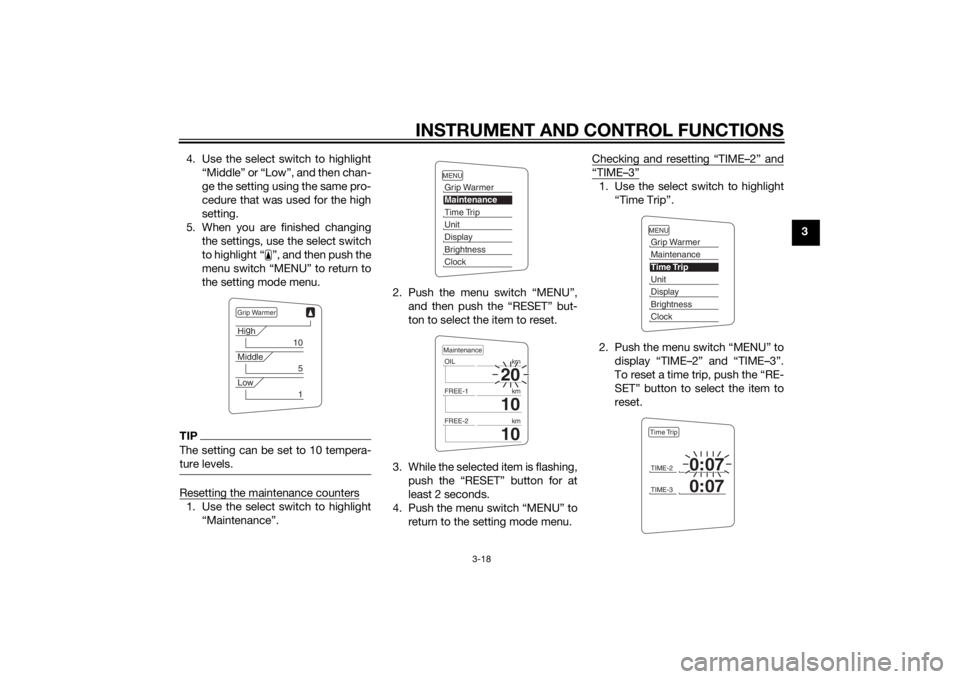
4. Use the select switch to highlight
“Middle” or “Low”, and then chan-
ge the setting using the same pro-
cedure that was used for the high
setting.
5. When you are finished changing the settings, use the select switch
to highlight “ ”, and then push the
menu switch “MENU” to return to
the setting mode menu.
TIPThe setting can be set to 10 tempera-
ture levels.Resetting the maintenance counters1. Use the select switch to highlight“Maintenance”. 2. Push the menu switch “MENU”,
and then push the “RESET” but-
ton to select the item to reset.
3. While the selected item is flashing, push the “RESET” button for at
least 2 seconds.
4. Push the menu switch “MENU” to return to the setting mode menu. Checking and resetting “TIME–2” and
“TIME–3”1. Use the select switch to highlight
“Time Trip”.
2. Push the menu switch “MENU” to display “TIME–2” and “TIME–3”.
To reset a time trip, push the “RE-
SET” button to select the item to
reset.
Grip WarmerHig
h
10
Middle
5
Low
1
MENUGrip WarmerMaintenanceTime TripUnitDisplayBrightnessClock
20
OIL km
10
FREE-1km
10
FREE-2kmMaintenance
MENUGrip WarmerMaintenanceTime TripUnitDisplayBrightnessClockTIME-2
0:07
TIME-3
0:07
Time Trip
U1MCE1E0.book Page 18 Thursday, August 8, 2013 9:03 AM
Page 34 of 118
INSTRUMENT AND CONTROL FUNCTIONS
3-19
33. While the selected item is flashing,
push the “RESET” button for at
least 2 seconds.
4. Push the menu switch “MENU” to return to the setting mode menu.
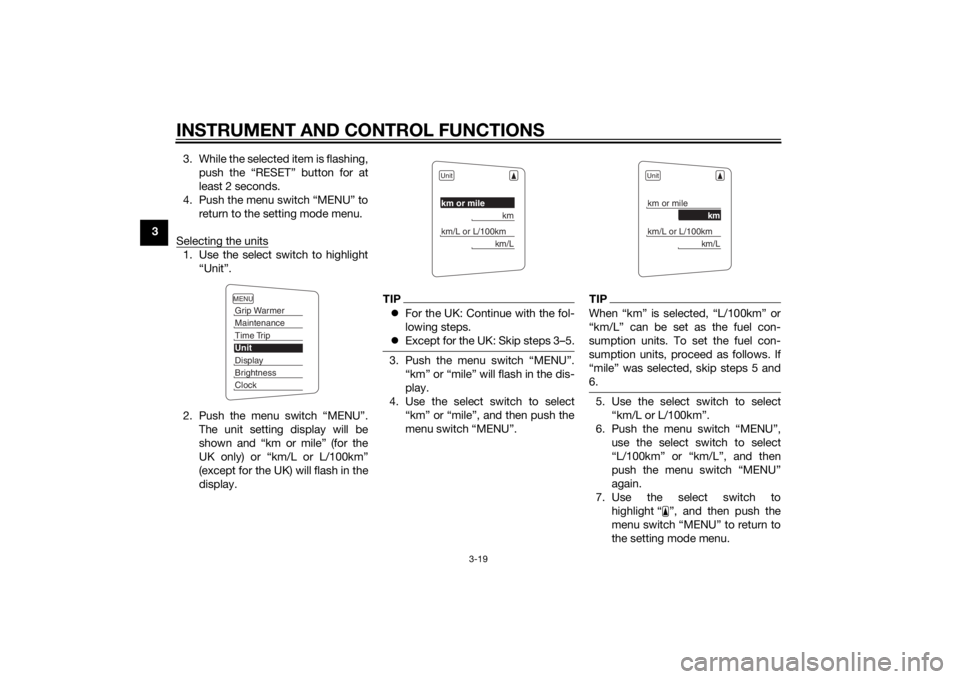
Selecting the units
1. Use the select switch to highlight “Unit”.
2. Push the menu switch “MENU”. The unit setting display will be
shown and “km or mile” (for the
UK only) or “km/L or L/100km”
(except for the UK) will flash in the
display.
TIPFor the UK: Continue with the fol-
lowing steps.
Except for the UK: Skip steps 3–5.3. Push the menu switch “MENU”.
“km” or “mile” will flash in the dis-
play.
4. Use the select switch to select “km” or “mile”, and then push the
menu switch “MENU”.
TIPWhen “km” is selected, “L/100km” or
“km/L” can be set as the fuel con-
sumption units. To set the fuel con-
sumption units, proceed as follows. If
“mile” was selected, skip steps 5 and
6.5. Use the select switch to select“km/L or L/100km”.
6. Push the menu switch “MENU”, use the select switch to select
“L/100km” or “km/L”, and then
push the menu switch “MENU”
again.
7. Use the select switch to highlight “ ”, and then push the
menu switch “MENU” to return to
the setting mode menu.
MENUGrip WarmerMaintenanceTime TripUnitDisplayBrightnessClock
Unitkm or mile
km
km/L or L/100km
km/L
Unitkm or mile
km
km/L or L/100km
km/L
U1MCE1E0.book Page 19 Thursday, August 8, 2013 9:03 AM
Page 64 of 118
OPERATION AND IMPORTANT RIDING POINTS
5-1
5
EAU15952
Read the Owner’s Manual carefully to
become familiar with all controls. If
there is a control or function you do not
understand, ask your Yamaha dealer.
WARNING
EWA10272
Failure to familiarize yourself with
the controls can lead to loss of con-
trol, which coul d cause an acci dent
or injury.
EAU47151
TIPThis model is equipped with: a lean angle sensor to stop the en-
gine in case of a turnover. In this
case, the multi-function meter unit
indicates error code 30, but this is
not a malfunction. Turn the key to
“OFF” and then to “ON” to clear
the error code. Failing to do so will
prevent the engine from starting
even though the engine will crank
when pushing the start switch.
an engine auto-stop system. The
engine stops automatically if left
idling for 20 minutes. In this case,
the multi-function meter unit indi-
cates error code 70, but this is not
a malfunction. Push the start
switch to clear the error code and
to restart the engine.
EAU54171
Startin g the en gineIn order for the ignition circuit cut-off
system to enable starting, one of the
following conditions must be met:
The transmission is in the neutral
position.
The transmission is in gear with
the clutch lever pulled and the
sidestand up.
See page 3-43 for more informa-
tion.
1. Turn the key to “ON” and make sure that the start/engine stop
switch is set to “ ”.
The following warning lights and
indicator lights should come on for
a few seconds, then go off. Oil level warning light
Engine trouble warning light
Traction control system indi-
cator/warning light
Cruise control indicator lights
Immobilizer system indicator
light
U1MCE1E0.book Page 1 Thursday, August 8, 2013 9:03 AM
Page 89 of 118

PERIODIC MAINTENANCE AND ADJUSTMENT
6-22
6
“
b roken in”. Therefore, it is a d-
visa ble before doin g any hi gh-
spee d ri din g to ri de conserva-
tively for approximately 100 km
(60 mi) after installin g a new tire.
The tires must be warmed up
b efore a hi gh-spee d run.
Always a djust the tire air pres-
sure accor din g to the operatin g
con ditions.
EAU21963
Cast wheelsTo maximize the performance, durabil-
ity, and safe operation of your vehicle,
note the following points regarding the
specified wheels.
The wheel rims should be
checked for cracks, bends, warp-
age or other damage before each
ride. If any damage is found, have
a Yamaha dealer replace the
wheel. Do not attempt even the
smallest repair to the wheel. A de-
formed or cracked wheel must be
replaced.
The wheel should be balanced
whenever either the tire or wheel
has been changed or replaced. An
unbalanced wheel can result in
poor performance, adverse han-
dling characteristics, and a short-
ened tire life.
EAU22074
Clutch leverSince this model is equipped with a hy-
draulic clutch, adjusting the clutch le-
ver free play is not needed. However, it
is necessary to check the clutch fluid
level and check the hydraulic system
for leakage before each ride. (See page
6-24.) If the clutch lever free play does
become excessive, and shifting be-
comes rough or clutch slippage oc-
curs, causing poor acceleration, there
may be air in the clutch system. If there
is air in the hydraulic system, have a
Yamaha dealer bleed the system be-
fore operating the motorcycle.
U1MCE1E0.book Page 22 Thursday, August 8, 2013 9:03 AM