display YAMAHA FJR1300A 2016 User Guide
[x] Cancel search | Manufacturer: YAMAHA, Model Year: 2016, Model line: FJR1300A, Model: YAMAHA FJR1300A 2016Pages: 120, PDF Size: 3.41 MB
Page 34 of 120
Instrument and control functions
3-20
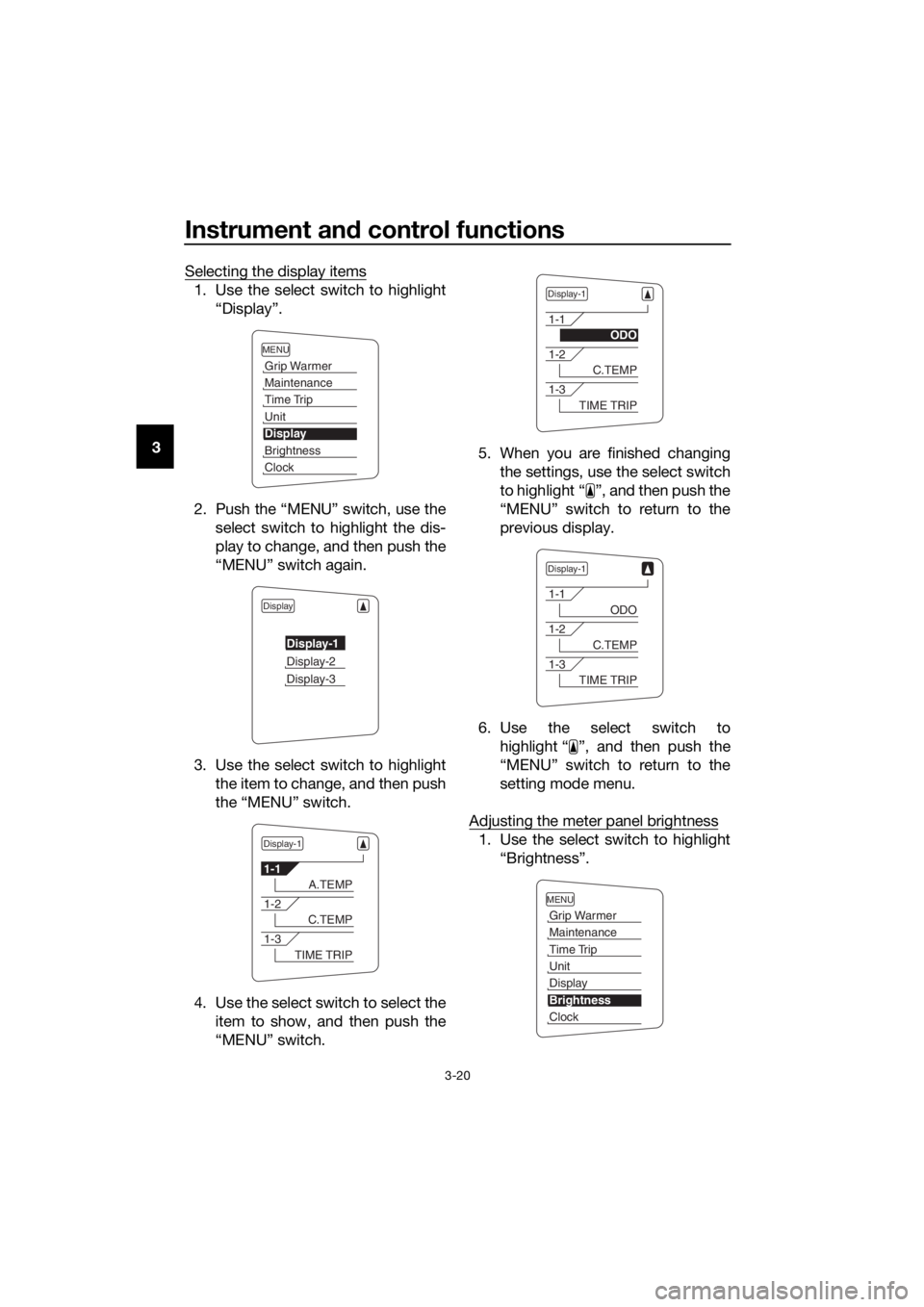
3 Selecting the display items
1. Use the select switch to highlight
“Display”.
2. Push the “MENU” switch, use the select switch to highlight the dis-
play to change, and then push the
“MENU” switch again.
3. Use the select switch to highlight the item to change, and then push
the “MENU” switch.
4. Use the select switch to select the item to show, and then push the
“MENU” switch. 5. When you are finished changing
the settings, use the select switch
to highlight “ ”, and then push the
“MENU” switch to return to the
previous display.
6. Use the select switch to highlight “ ”, and then push the
“MENU” switch to return to the
setting mode menu.
Adjusting the meter panel brightness
1. Use the select switch to highlight “Brightness”.
MENU
Grip Warmer
Maintenance
Time Trip
Unit
Display
Brightness
Clock
Display
Display-1
Display-2
Display-3
Display-1
1-1
A.TEMP
1-2
C.TEMP
1-3
TIME TRIP
Display-1
1-1
ODO
1-2
C.TEMP
1-3
TIME TRIP
Display-1
1-1
ODO
1-2
C.TEMP
1-3
TIME TRIP
MENU
Grip Warmer
Maintenance
Time Trip
Unit
Display
Brightness
Clock
UB88E0E0.book Page 20 Friday, October 16, 2015 11:59 AM
Page 35 of 120
Instrument and control functions
3-21
3
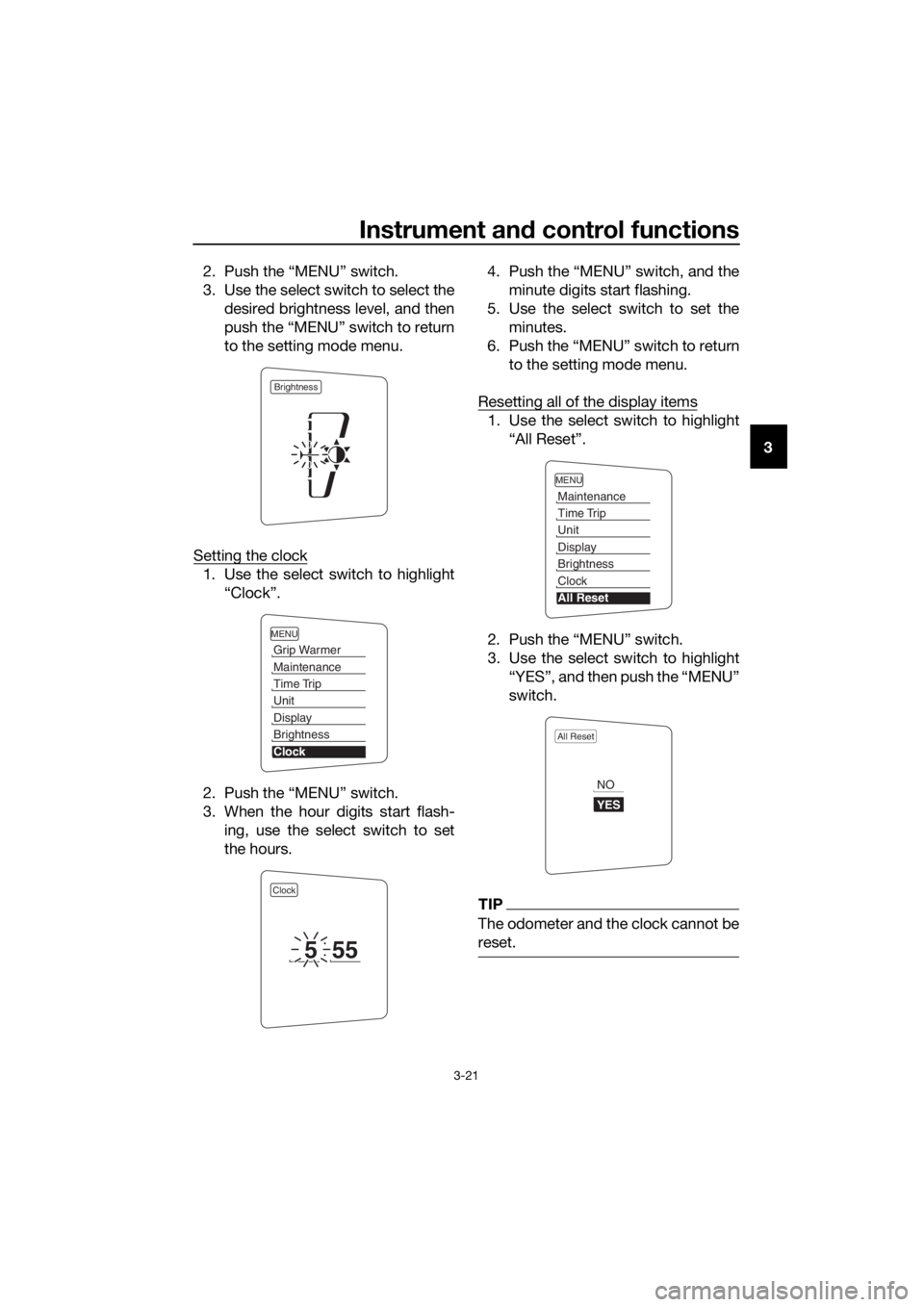
2. Push the “MENU” switch.
3. Use the select switch to select the
desired brightness level, and then
push the “MENU” switch to return
to the setting mode menu.
Setting the clock
1. Use the select switch to highlight “Clock”.
2. Push the “MENU” switch.
3. When the hour digits start flash- ing, use the select switch to set
the hours. 4. Push the “MENU” switch, and the
minute digits start flashing.
5. Use the select switch to set the minutes.
6. Push the “MENU” switch to return to the setting mode menu.
Resetting all of the display items
1. Use the select switch to highlight “All Reset”.
2. Push the “MENU” switch.
3. Use the select switch to highlight “YES”, and then push the “MENU”
switch.
TIP
The odometer and the clock cannot be
reset.
Brightness
MENU
Grip Warmer
Maintenance
Time Trip
Unit
Display
Brightness
Clock
Clock
555
MENU
Maintenance
Time Trip
Unit
Display
Brightness
Clock
All Reset
All Reset
YES
NO
UB88E0E0.book Page 21 Friday, October 16, 2015 11:59 AM
Page 37 of 120
Instrument and control functions
3-23
3
EAU12461Turn si gnal switch “ / ”
To signal a right-hand turn, push this
switch to “ ”. To signal a left-hand
turn, push this switch to “ ”. When
released, the switch returns to the cen-
ter position. To cancel the turn signal
lights, push the switch in after it has re-
turned to the center position.
EAU12501Horn switch “ ”
Press this switch to sound the horn.
EAU54212Stop/Run/Start switch “ / / ”
To crank the engine with the starter,
set this switch to “ ”, and then push
the switch down towards “ ”. See
page 5-2 for starting instructions prior
to starting the engine.
Set this switch to “ ” to stop the en-
gine in case of an emergency, such as
when the vehicle overturns or when the
throttle cable is stuck.
EAU12735Hazar d switch “ ”
With the key in the “ON” or “ ” posi-
tion, use this switch to turn on the haz-
ard lights (simultaneous flashing of all
turn signal lights).
The hazard lights are used in case of an
emergency or to warn other drivers
when your vehicle is stopped where it
might be a traffic hazard.
NOTICE
ECA10062
Do not use the hazar d lig hts for an
exten ded len gth of time with the en-
g ine not runnin g, otherwise the bat-
tery may dischar ge.
EAU12781Cruise control switches
See page 3-7 for an explanation of the
cruise control system.
EAU54231Menu switch “MENU”
This switch is used to perform selec-
tions in the function display and setting
mode display of the multi-function me-
ter unit.
See “Multi-function meter unit” on
page 3-10 for detailed information.
EAU54221Select switch “ / ”
This switch is used to perform selec-
tions in the function display and setting
mode display of the multi-function me-
ter unit.
See “Multi-function meter unit” on
page 3-10 for detailed information.
EAU54691Drive mo de switch “MODE”
WARNING
EWA15341
Do not chan ge the D-mod e while the
vehicle is movin g.
Using this switch changes the drive
mode to touring mode “T” or sports
mode “S”.
The throttle grip must be completely
closed in order to change the drive
mode.
The selected mode is shown on the
drive mode display. (See page 3-12.)
The drive mode cannot be changed
while the cruise control system is oper-
ating.
UB88E0E0.book Page 23 Friday, October 16, 2015 11:59 AM