clock YAMAHA FJR1300AS 2013 Owners Manual
[x] Cancel search | Manufacturer: YAMAHA, Model Year: 2013, Model line: FJR1300AS, Model: YAMAHA FJR1300AS 2013Pages: 122, PDF Size: 3.34 MB
Page 26 of 122
INSTRUMENT AND CONTROL FUNCTIONS
3-11
3
EAU55411
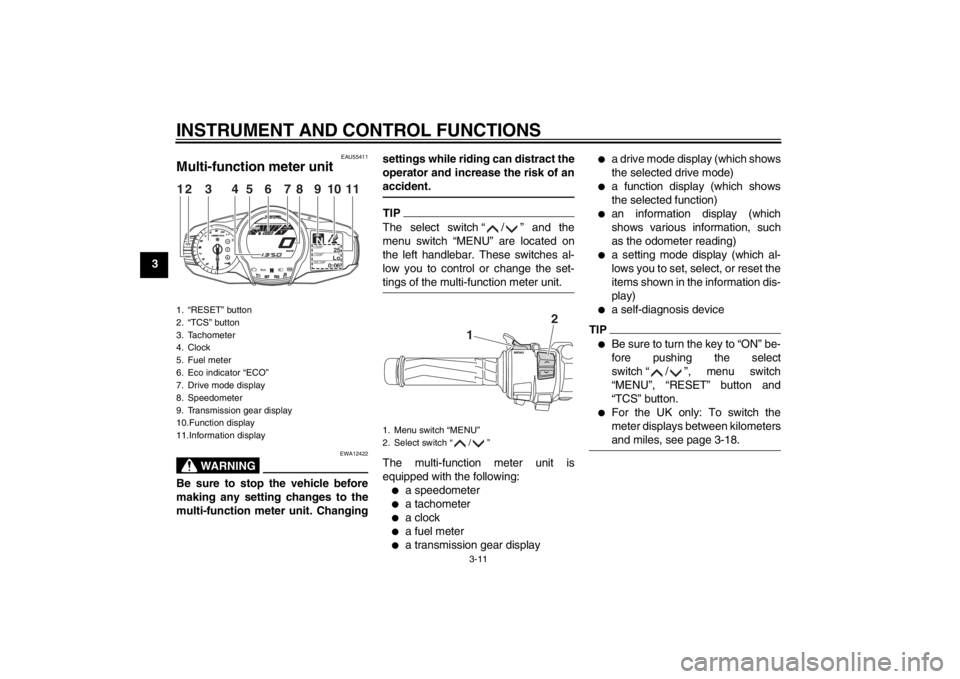
Multi-function meter unit
WARNING
EWA12422
Be sure to stop the vehicle before
making any setting changes to the
multi-function meter unit. Changingsettings while riding can distract the
operator and increase the risk of an
accident.
TIPThe select switch “ / ” and the
menu switch “MENU” are located on
the left handlebar. These switches al-
low you to control or change the set-
tings of the multi-function meter unit.The multi-function meter unit is
equipped with the following:●
a speedometer
●
a tachometer
●
a clock
●
a fuel meter
●
a transmission gear display
●
a drive mode display (which shows
the selected drive mode)
●
a function display (which shows
the selected function)
●
an information display (which
shows various information, such
as the odometer reading)
●
a setting mode display (which al-
lows you to set, select, or reset the
items shown in the information dis-
play)
●
a self-diagnosis device
TIP●
Be sure to turn the key to “ON” be-
fore pushing the select
switch “ / ”, menu switch
“MENU”, “RESET” button and
“TCS” button.
●
For the UK only: To switch the
meter displays between kilometers
and miles, see page 3-18.
1. “RESET” button
2. “TCS” button
3. Tachometer
4. Clock
5. Fuel meter
6. Eco indicator “ECO”
7. Drive mode display
8. Speedometer
9. Transmission gear display
10.Function display
11.Information display
GEARN
25
A.TEMP
˚C
Lo
C.TEMP˚C
0:06
TIME TRIP
12
3
11
4
5
8
7
6
9
10
1. Menu switch “MENU”
2. Select switch “ / ”
1
2
U1MDE0E0.book Page 11 Friday, February 15, 2013 1:26 PM
Page 33 of 122
INSTRUMENT AND CONTROL FUNCTIONS
3-18
3
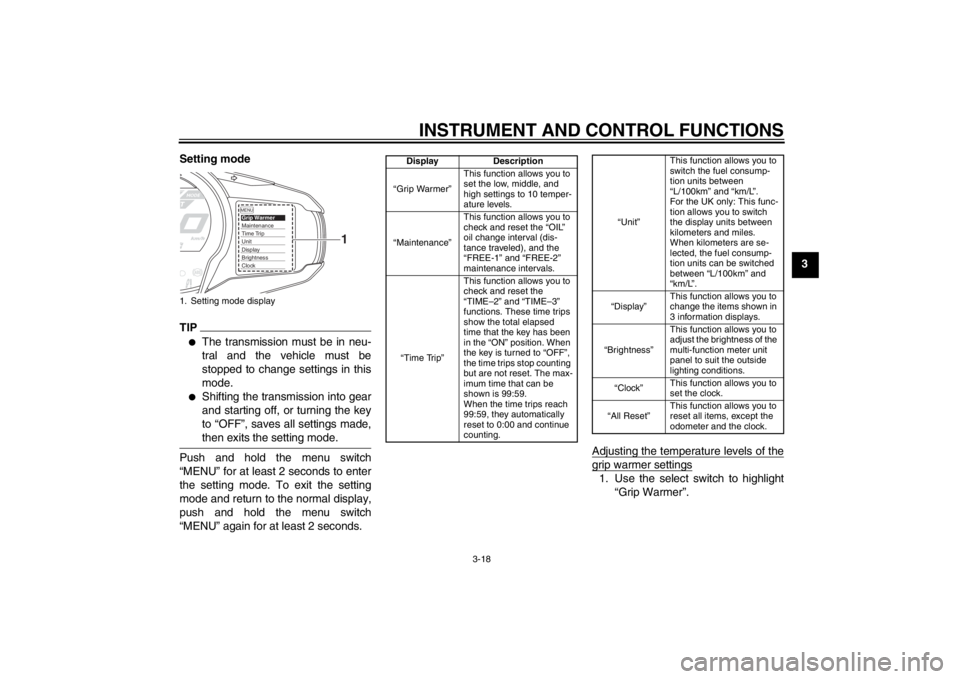
Setting mode
TIP●
The transmission must be in neu-
tral and the vehicle must be
stopped to change settings in this
mode.
●
Shifting the transmission into gear
and starting off, or turning the key
to “OFF”, saves all settings made,
then exits the setting mode.
Push and hold the menu switch
“MENU” for at least 2 seconds to enter
the setting mode. To exit the setting
mode and return to the normal display,
push and hold the menu switch
“MENU” again for at least 2 seconds.
Adjusting the temperature levels of the
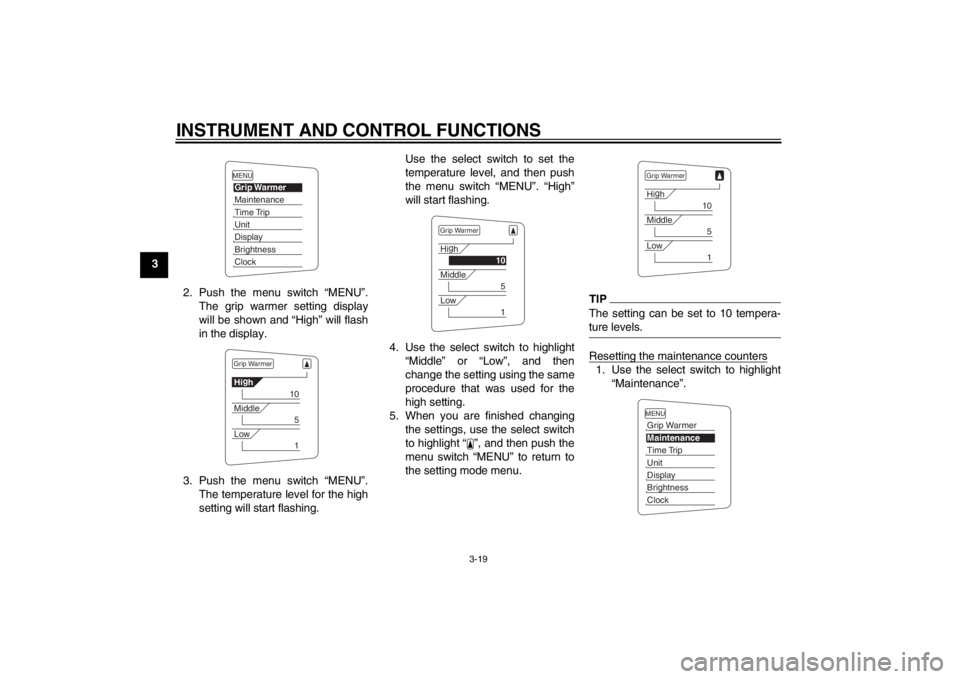
grip warmer settings1. Use the select switch to highlight
“Grip Warmer”.
1. Setting mode display
MENUGrip WarmerMaintenanceTime TripUnitDisplayBrightnessClock
1
Display Description
“Grip Warmer” This function allows you to
set the low, middle, and
high settings to 10 temper-
ature levels.
“Maintenance” This function allows you to
check and reset the “OIL”
oil change interval (dis-
tance traveled), and the
“FREE-1” and “FREE-2”
maintenance intervals.
“Time Trip” This function allows you to
check and reset the
“TIME–2” and “TIME–3”
functions. These time trips
show the total elapsed
time that the key has been
in the “ON” position. When
the key is turned to “OFF”,
the time trips stop counting
but are not reset. The max-
imum time that can be
shown is 99:59.
When the time trips reach
99:59, they automatically
reset to 0:00 and continue
counting.
“Unit”
This function allows you to
switch the fuel consump-
tion units between
“L/100km” and “km/L”.
For the UK only: This func-
tion allows you to switch
the display units between
kilometers and miles.
When kilometers are se-
lected, the fuel consump-
tion units can be switched
between “L/100km” and
“km/L”.
“Display” This function allows you to
change the items shown in
3 information displays.
“Brightness” This function allows you to
adjust the brightness of the
multi-function meter unit
panel to suit the outside
lighting conditions.
“Clock” This function allows you to
set the clock.
“All Reset” This function allows you to
reset all items, except the
odometer and the clock.
U1MDE0E0.book Page 18 Friday, February 15, 2013 1:26 PM
Page 34 of 122
INSTRUMENT AND CONTROL FUNCTIONS
3-19
32. Push the menu switch “MENU”.The grip warmer setting display
will be shown and “High” will flash
in the display.
3. Push the menu switch “MENU”. The temperature level for the high
setting will start flashing. Use the select switch to set the
temperature level, and then push
the menu switch “MENU”. “High”
will start flashing.
4. Use the select switch to highlight “Middle” or “Low”, and then
change the setting using the same
procedure that was used for the
high setting.
5. When you are finished changing the settings, use the select switch
to highlight “ ”, and then push the
menu switch “MENU” to return to
the setting mode menu.
TIPThe setting can be set to 10 tempera-
ture levels.Resetting the maintenance counters1. Use the select switch to highlight“Maintenance”.
MENUGrip WarmerMaintenanceTime TripUnitDisplayBrightnessClockGrip WarmerHig
h
10
Middle
5
Low
1
Grip WarmerHi g
h
10
Middle
5
Low
1
Grip WarmerHi g
h
10
Middle
5
Low
1
MENUGrip WarmerMaintenanceTime TripUnitDisplayBrightnessClock
U1MDE0E0.book Page 19 Friday, February 15, 2013 1:26 PM
Page 35 of 122
INSTRUMENT AND CONTROL FUNCTIONS
3-20
3
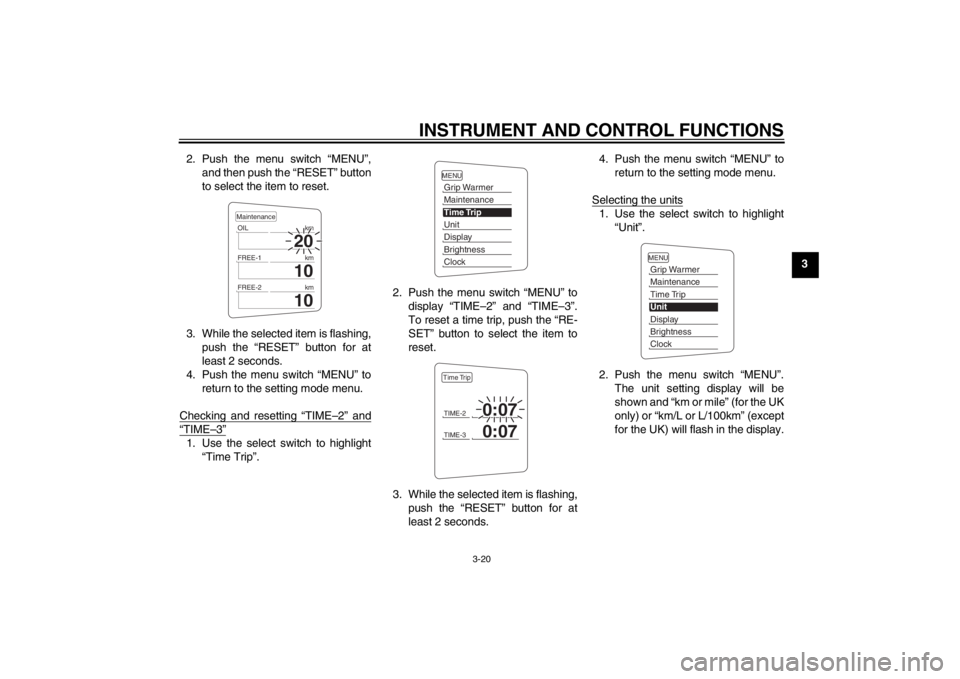
2. Push the menu switch “MENU”,
and then push the “RESET” button
to select the item to reset.
3. While the selected item is flashing, push the “RESET” button for at
least 2 seconds.
4. Push the menu switch “MENU” to return to the setting mode menu.
Checking and resetting “TIME–2” and
“TIME–3”1. Use the select switch to highlight “Time Trip”. 2. Push the menu switch “MENU” to
display “TIME–2” and “TIME–3”.
To reset a time trip, push the “RE-
SET” button to select the item to
reset.
3. While the selected item is flashing, push the “RESET” button for at
least 2 seconds. 4. Push the menu switch “MENU” to
return to the setting mode menu.
Selecting the units
1. Use the select switch to highlight “Unit”.
2. Push the menu switch “MENU”. The unit setting display will be
shown and “km or mile” (for the UK
only) or “km/L or L/100km” (except
for the UK) will flash in the display.
20
OIL km
10
FREE-1km
10
FREE-2kmMaintenance
MENUGrip WarmerMaintenanceTime TripUnitDisplayBrightnessClockTIME-2
0:07
TIME-3
0:07
Time Trip
MENUGrip WarmerMaintenanceTime TripUnitDisplayBrightnessClock
U1MDE0E0.book Page 20 Friday, February 15, 2013 1:26 PM
Page 36 of 122
INSTRUMENT AND CONTROL FUNCTIONS
3-21
3
TIP●
For the UK: Continue with the fol-
lowing steps.
●
Except for the UK: Skip steps 3–5.
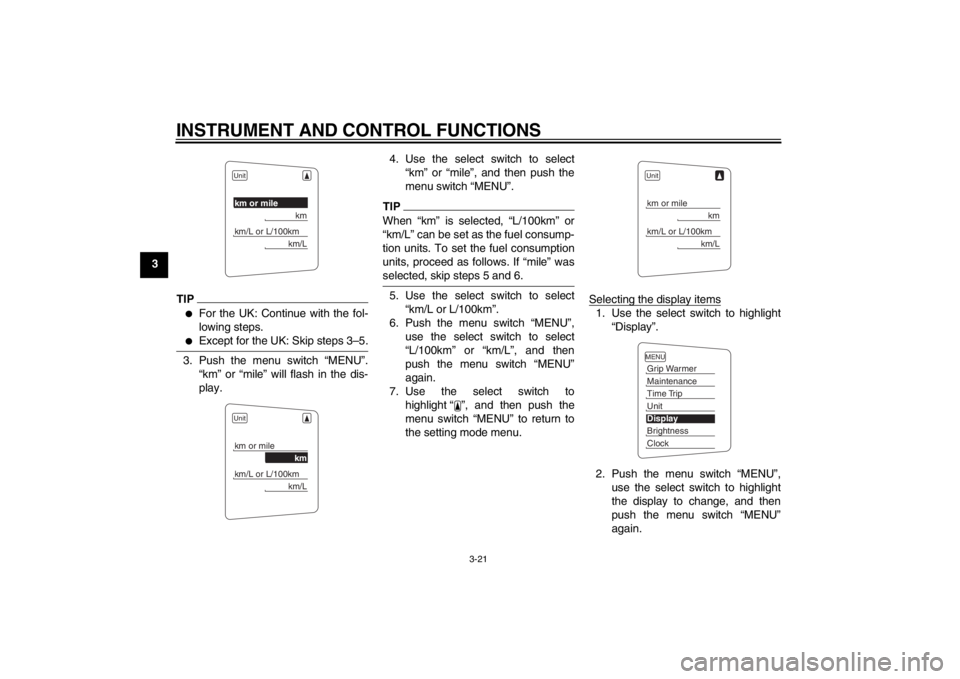
3. Push the menu switch “MENU”.“km” or “mile” will flash in the dis-
play. 4. Use the select switch to select
“km” or “mile”, and then push the
menu switch “MENU”.
TIPWhen “km” is selected, “L/100km” or
“km/L” can be set as the fuel consump-
tion units. To set the fuel consumption
units, proceed as follows. If “mile” was
selected, skip steps 5 and 6.5. Use the select switch to select“km/L or L/100km”.
6. Push the menu switch “MENU”, use the select switch to select
“L/100km” or “km/L”, and then
push the menu switch “MENU”
again.
7. Use the select switch to highlight “ ”, and then push the
menu switch “MENU” to return to
the setting mode menu. Selecting the display items
1. Use the select switch to highlight
“Display”.
2. Push the menu switch “MENU”, use the select switch to highlight
the display to change, and then
push the menu switch “MENU”
again.
Unitkm or mile
km
km/L or L/100km
km/L
Unitkm or mile
km
km/L or L/100km
km/L
Unitkm or mile
km
km/L or L/100km
km/L
MENUGrip WarmerMaintenanceTime TripUnitDisplayBrightnessClock
U1MDE0E0.book Page 21 Friday, February 15, 2013 1:26 PM
Page 37 of 122
INSTRUMENT AND CONTROL FUNCTIONS
3-22
3
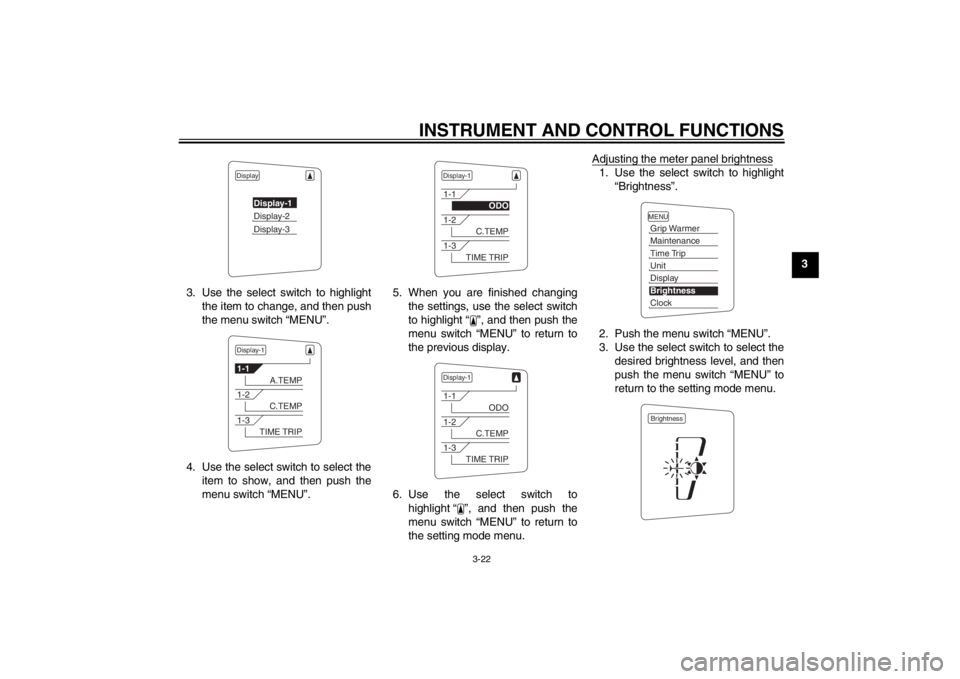
3. Use the select switch to highlight the item to change, and then push
the menu switch “MENU”.
4. Use the select switch to select the item to show, and then push the
menu switch “MENU”. 5. When you are finished changing
the settings, use the select switch
to highlight “ ”, and then push the
menu switch “MENU” to return to
the previous display.
6. Use the select switch to highlight “ ”, and then push the
menu switch “MENU” to return to
the setting mode menu. Adjusting the meter panel brightness
1. Use the select switch to highlight
“Brightness”.
2. Push the menu switch “MENU”.
3. Use the select switch to select the desired brightness level, and then
push the menu switch “MENU” to
return to the setting mode menu.
Display
Display-1Display-2Display-3
Display-11-1
A.TEMP
1-2
C.TEMP
1-3
TIME TRIP
Display-11-1
ODO
1-2
C.TEMP
1-3
TIME TRIP
Display-11-1
ODO
1-2
C.TEMP
1-3
TIME TRIP
MENUGrip WarmerMaintenanceTime TripUnitDisplayBrightnessClockBrightness
U1MDE0E0.book Page 22 Friday, February 15, 2013 1:26 PM
Page 38 of 122
INSTRUMENT AND CONTROL FUNCTIONS
3-23
3Setting the clock
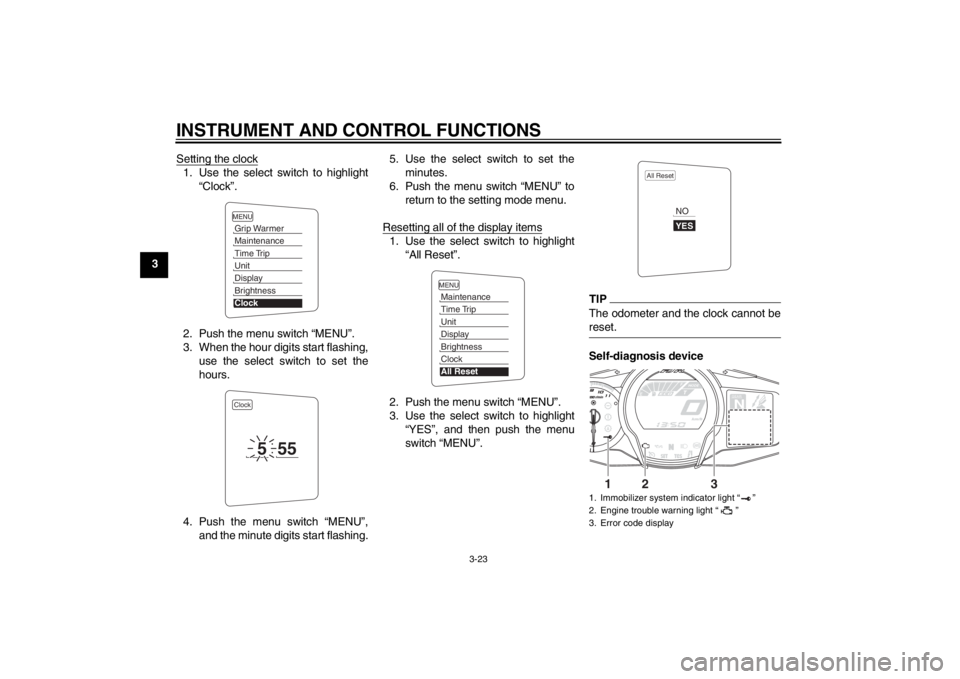
1. Use the select switch to highlight
“Clock”.
2. Push the menu switch “MENU”.
3. When the hour digits start flashing, use the select switch to set the
hours.
4. Push the menu switch “MENU”, and the minute digits start flashing. 5. Use the select switch to set the
minutes.
6. Push the menu switch “MENU” to return to the setting mode menu.
Resetting all of the display items
1. Use the select switch to highlight “All Reset”.
2. Push the menu switch “MENU”.
3. Use the select switch to highlight “YES”, and then push the menu
switch “MENU”.
TIPThe odometer and the clock cannot be
reset.Self-diagnosis device
MENUGrip WarmerMaintenanceTime TripUnitDisplayBrightnessClockClock
5
55
MENUMaintenanceTime TripUnitDisplayBrightnessClockAll Reset
1. Immobilizer system indicator light “ ”
2. Engine trouble warning light “ ”
3. Error code display
All Reset
YESNO
GEARN
25
A.TEMP ˚C
Lo
C.TEMP ˚C
0:06
TIME TRIP
1
2
3
U1MDE0E0.book Page 23 Friday, February 15, 2013 1:26 PM
Page 47 of 122
INSTRUMENT AND CONTROL FUNCTIONS
3-32
3
To reset the traction control system
Turn the key to “OFF”. Wait at least 1
second, then turn the key back to “ON”.
The “TCS” indicator/warning light
should go off and the system will be en-
abled. The engine trouble warning light
should go off after the motorcycle
reaches at least 20 km/h (12 mi/h). If
the “TCS” indicator/warning light and/or
engine trouble warning light still remain
on after resetting, the motorcycle may
still be ridden; however, have a
Yamaha dealer check the motorcycle as soon as possible.
EAU13074
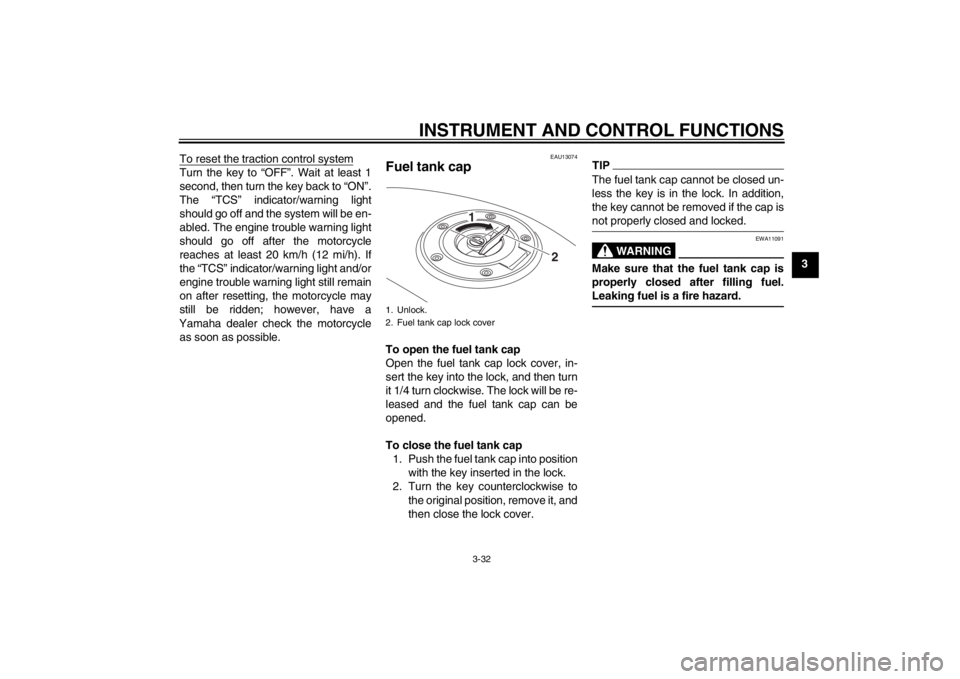
Fuel tank cap To open the fuel tank cap
Open the fuel tank cap lock cover, in-
sert the key into the lock, and then turn
it 1/4 turn clockwise. The lock will be re-
leased and the fuel tank cap can be
opened.
To close the fuel tank cap 1. Push the fuel tank cap into position with the key inserted in the lock.
2. Turn the key counterclockwise to the original position, remove it, and
then close the lock cover.
TIPThe fuel tank cap cannot be closed un-
less the key is in the lock. In addition,
the key cannot be removed if the cap is
not properly closed and locked.
WARNING
EWA11091
Make sure that the fuel tank cap is
properly closed after filling fuel.
Leaking fuel is a fire hazard.
1. Unlock.
2. Fuel tank cap lock cover
2
1
U1MDE0E0.book Page 32 Friday, February 15, 2013 1:26 PM
Page 50 of 122
INSTRUMENT AND CONTROL FUNCTIONS
3-35
3
EAU39495
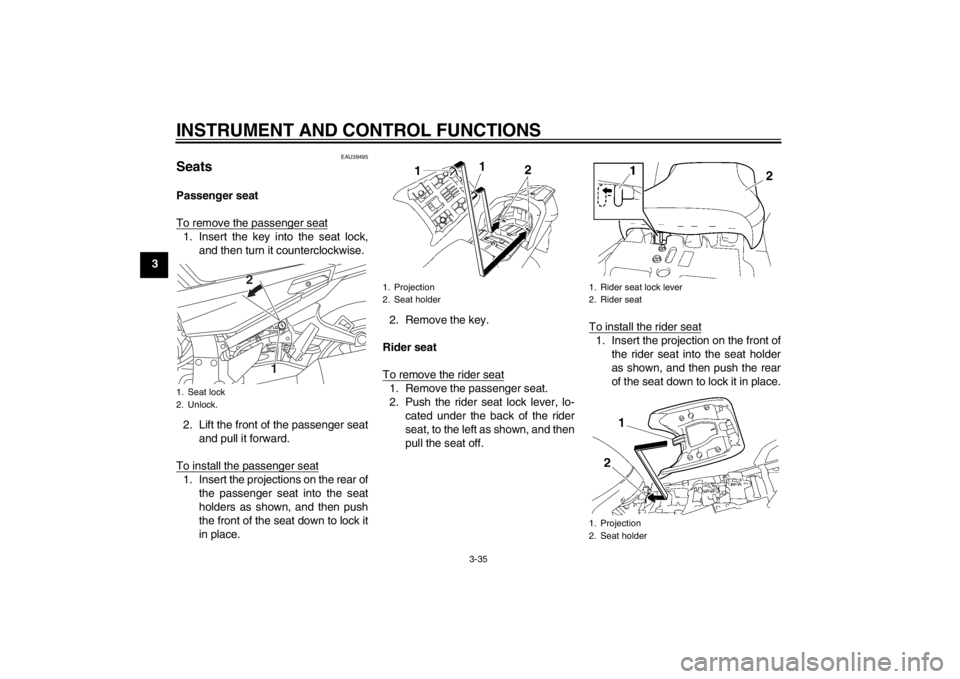
Seats Passenger seat
To remove the passenger seat1. Insert the key into the seat lock,and then turn it counterclockwise.
2. Lift the front of the passenger seat and pull it forward.
To install the passenger seat1. Insert the projections on the rear of the passenger seat into the seat
holders as shown, and then push
the front of the seat down to lock it
in place. 2. Remove the key.
Rider seat
To remove the rider seat
1. Remove the passenger seat.
2. Push the rider seat lock lever, lo- cated under the back of the rider
seat, to the left as shown, and then
pull the seat off. To install the rider seat
1. Insert the projection on the front of
the rider seat into the seat holder
as shown, and then push the rear
of the seat down to lock it in place.
1. Seat lock
2. Unlock.
1
2
1. Projection
2. Seat holder
1. Rider seat lock lever
2. Rider seat
1. Projection
2. Seat holder
U1MDE0E0.book Page 35 Friday, February 15, 2013 1:26 PM
Page 103 of 122
![YAMAHA FJR1300AS 2013 Owners Manual PERIODIC MAINTENANCE AND ADJUSTMENT
6-31
6
is turned to “OFF”, then con-
nect the positive lead before
connecting the negative lead.
[ECA16840]
4. After installation, make sure that
the battery le](/img/51/49673/w960_49673-102.png "YAMAHA FJR1300AS 2013 Owners Manual PERIODIC MAINTENANCE AND ADJUSTMENT
6-31
6
is turned to “OFF”, then con-
nect the positive lead before
connecting the negative lead.
[ECA16840]
4. After installation, make sure that
the battery le")
PERIODIC MAINTENANCE AND ADJUSTMENT
6-31
6
is turned to “OFF”, then con-
nect the positive lead before
connecting the negative lead.
[ECA16840]
4. After installation, make sure that
the battery leads are properly con-
nected to the battery terminals.NOTICE
ECA16530
Always keep the battery charged.
Storing a discharged battery can
cause permanent battery damage.
EAU54512
Replacing the fuses The fuse boxes and individual fuses are
located under panel A. (See page 6-8.)
If a fuse is blown, replace it as follows.1. Main fuse 1
2. Spare fuse
3. Cruise control fuse
4. Brake light fuse
5. Fuse box
6. Main fuse 2
5
1
3
4
2
5 26
1. ABS motor fuse
2. ABS solenoid fuse
3. Fuel injection system fuse
4. Backup fuse (for clock and immobilizer sys-
tem)
5. Electronic throttle valve fuse
6. Headlight fuse
7. Spare fuse
8. YCC-S motor control fuse
9. Suspension fuse
10.Signaling system fuse
11.Auxiliary DC jack fuse
12.ABS control unit fuse
13.Ignition fuse
14.Right radiator fan fuse
15.Left radiator fan fuse
16.Hazard fuse
17.Windshield motor fuse
15
7
11
101213
14
7
17
16
8
1
9
2
3456
7
7
U1MDE0E0.book Page 31 Friday, February 15, 2013 1:26 PM