display YAMAHA FJR1300AS 2013 Owners Manual
[x] Cancel search | Manufacturer: YAMAHA, Model Year: 2013, Model line: FJR1300AS, Model: YAMAHA FJR1300AS 2013Pages: 122, PDF Size: 3.34 MB
Page 25 of 122
INSTRUMENT AND CONTROL FUNCTIONS
3-10
3
stalls, or the sidestand is lowered, then
the “ ” indicator light will go off (the
“SET” indicator light will not flash).
If the cruise control system is automati-
cally deactivated, please stop and con-
firm that your vehicle is in good
operating condition.
Before using the cruise control system
again, activate it using the power
switch.
TIPIn some cases, the cruise control sys-
tem may not be able to maintain the set
cruising speed when the vehicle is trav-
eling uphill or downhill.●
When the vehicle is traveling up-
hill, the actual traveling speed may
become lower than the set cruising
speed. If this occurs, accelerate to
the desired traveling speed using
the throttle.
●
When the vehicle is traveling
downhill, the actual traveling
speed may become higher than
the set cruising speed. If this oc-
curs, the setting switch cannot be
used to adjust the set cruising
speed. To reduce the traveling speed, apply the brakes. When the
brakes are applied, the cruise con-
trol system will become deactivat-
ed.
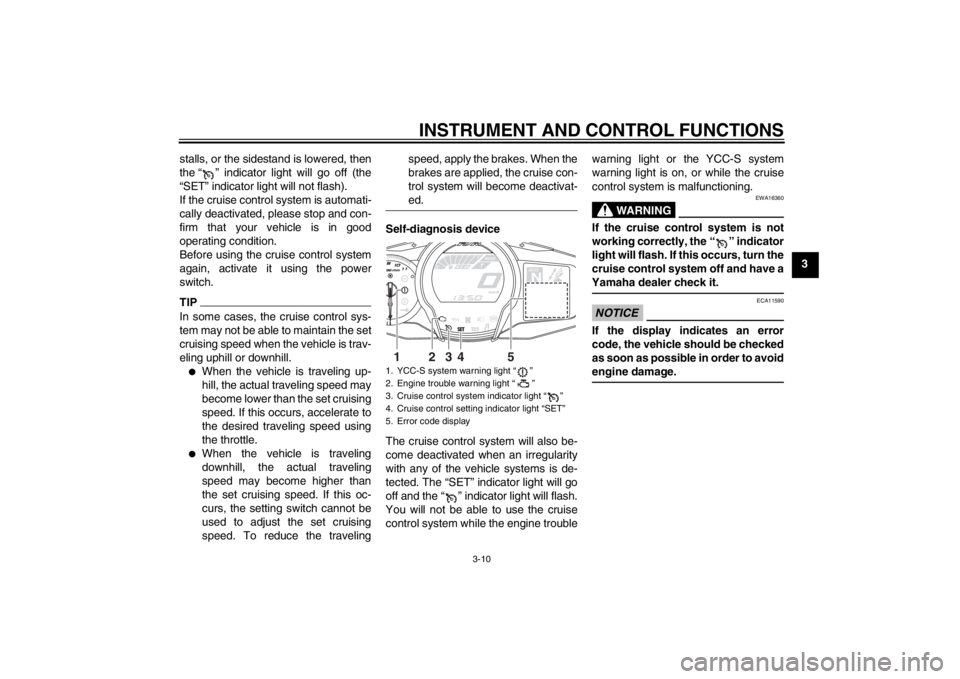
Self-diagnosis device
The cruise control system will also be-
come deactivated when an irregularity
with any of the vehicle systems is de-
tected. The “SET” indicator light will go
off and the “ ” indicator light will flash.
You will not be able to use the cruise
control system while the engine trouble
warning light or the YCC-S system
warning light is on, or while the cruise
control system is malfunctioning.
WARNING
EWA16360
If the cruise control system is not
working correctly, the “ ” indicator
light will flash. If this occurs, turn the
cruise control system off and have a
Yamaha dealer check it.NOTICE
ECA11590
If the display indicates an error
code, the vehicle should be checked
as soon as possible in order to avoid
engine damage.
1. YCC-S system warning light “ ”
2. Engine trouble warning light “ ”
3. Cruise control system indicator light “ ”
4. Cruise control setting indicator light “SET”
5. Error code display
GEARN
25
A.TEMP
˚C
Lo
C.TEMP ˚C
0:06
TIME TRIP
3
4
5
2
1
U1MDE0E0.book Page 10 Friday, February 15, 2013 1:26 PM
Page 26 of 122
INSTRUMENT AND CONTROL FUNCTIONS
3-11
3
EAU55411
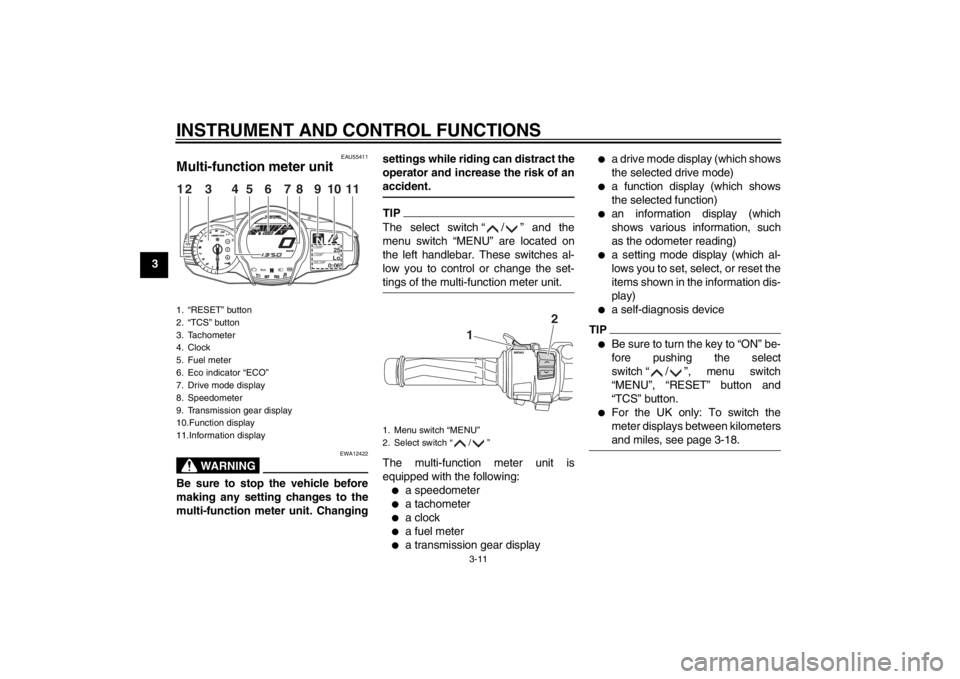
Multi-function meter unit
WARNING
EWA12422
Be sure to stop the vehicle before
making any setting changes to the
multi-function meter unit. Changingsettings while riding can distract the
operator and increase the risk of an
accident.
TIPThe select switch “ / ” and the
menu switch “MENU” are located on
the left handlebar. These switches al-
low you to control or change the set-
tings of the multi-function meter unit.The multi-function meter unit is
equipped with the following:●
a speedometer
●
a tachometer
●
a clock
●
a fuel meter
●
a transmission gear display
●
a drive mode display (which shows
the selected drive mode)
●
a function display (which shows
the selected function)
●
an information display (which
shows various information, such
as the odometer reading)
●
a setting mode display (which al-
lows you to set, select, or reset the
items shown in the information dis-
play)
●
a self-diagnosis device
TIP●
Be sure to turn the key to “ON” be-
fore pushing the select
switch “ / ”, menu switch
“MENU”, “RESET” button and
“TCS” button.
●
For the UK only: To switch the
meter displays between kilometers
and miles, see page 3-18.
1. “RESET” button
2. “TCS” button
3. Tachometer
4. Clock
5. Fuel meter
6. Eco indicator “ECO”
7. Drive mode display
8. Speedometer
9. Transmission gear display
10.Function display
11.Information display
GEARN
25
A.TEMP
˚C
Lo
C.TEMP˚C
0:06
TIME TRIP
12
3
11
4
5
8
7
6
9
10
1. Menu switch “MENU”
2. Select switch “ / ”
1
2
U1MDE0E0.book Page 11 Friday, February 15, 2013 1:26 PM
Page 27 of 122
INSTRUMENT AND CONTROL FUNCTIONS
3-12
3
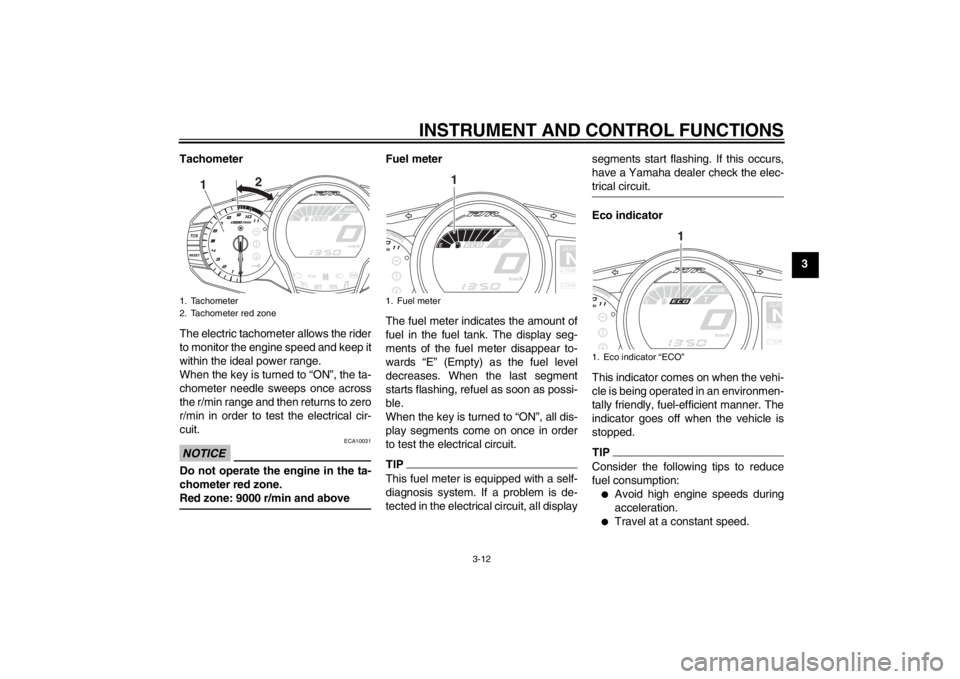
Tachometer
The electric tachometer allows the rider
to monitor the engine speed and keep it
within the ideal power range.
When the key is turned to “ON”, the ta-
chometer needle sweeps once across
the r/min range and then returns to zero
r/min in order to test the electrical cir-
cuit.
NOTICE
ECA10031
Do not operate the engine in the ta-
chometer red zone.
Red zone: 9000 r/min and above
Fuel meter
The fuel meter indicates the amount of
fuel in the fuel tank. The display seg-
ments of the fuel meter disappear to-
wards “E” (Empty) as the fuel level
decreases. When the last segment
starts flashing, refuel as soon as possi-
ble.
When the key is turned to “ON”, all dis-
play segments come on once in order
to test the electrical circuit.TIPThis fuel meter is equipped with a self-
diagnosis system. If a problem is de-
tected in the electrical circuit, all display segments start flashing. If this occurs,
have a Yamaha dealer check the elec-
trical circuit.
Eco indicator
This indicator comes on when the vehi-
cle is being operated in an environmen-
tally friendly, fuel-efficient manner. The
indicator goes off when the vehicle is
stopped.TIPConsider the following tips to reduce
fuel consumption:●
Avoid high engine speeds during
acceleration.
●
Travel at a constant speed.
1. Tachometer
2. Tachometer red zone
1
2
1. Fuel meter
GEARNA.TEM
P
C.TEM
P
1
1. Eco indicator “ECO”
GEARNA.TEM
P
C.TEM
P
1
U1MDE0E0.book Page 12 Friday, February 15, 2013 1:26 PM
Page 28 of 122
INSTRUMENT AND CONTROL FUNCTIONS
3-13
3
●
Select the transmission gear that
is appropriate for the vehicle
speed.
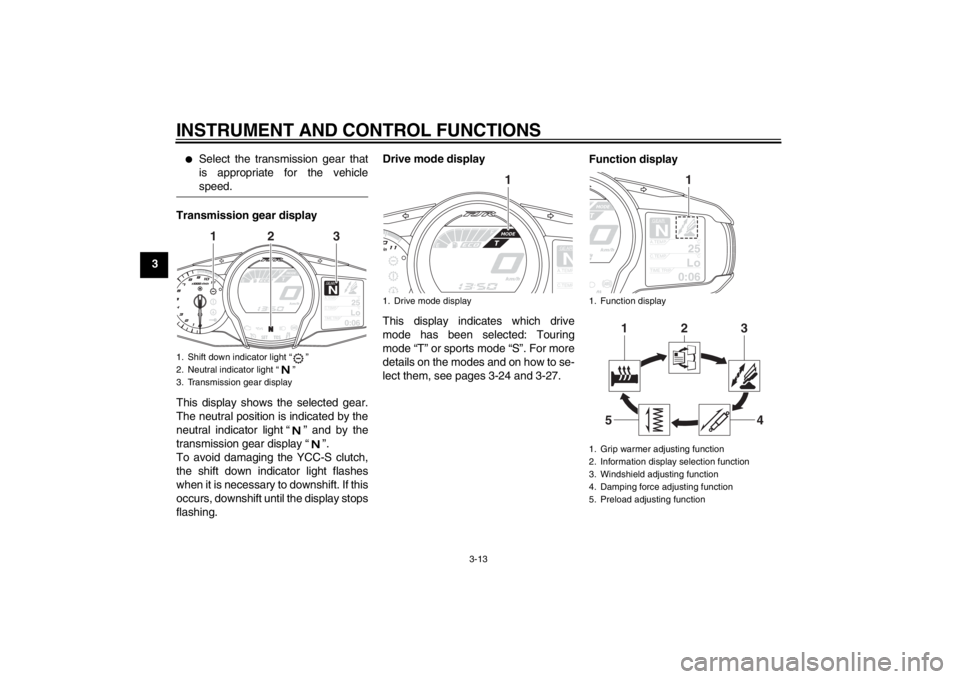
Transmission gear display
This display shows the selected gear.
The neutral position is indicated by the
neutral indicator light “ ” and by the
transmission gear display “ ”.
To avoid damaging the YCC-S clutch,
the shift down indicator light flashes
when it is necessary to downshift. If this
occurs, downshift until the display stops
flashing.Drive mode display
This display indicates which drive
mode has been selected: Touring
mode “T” or sports mode “S”. For more
details on the modes and on how to se-
lect them, see pages 3-24 and 3-27.
Function display1. Shift down indicator light “ ”
2. Neutral indicator light “ ”
3. Transmission gear display
GEARN
25
A.TEMP
˚C
Lo
C.TEMP˚C
0:06
TIME TRIP
2
1
3
1. Drive mode display
GEARNA.TEM
P
C.TEM
P
1
1. Function display
1. Grip warmer adjusting function
2. Information display selection function
3. Windshield adjusting function
4. Damping force adjusting function
5. Preload adjusting function
GEARN
25
A.TEMP˚C
Lo
C.TEMP˚C
0:06
TIME TRIP
12
1
3
4
5
U1MDE0E0.book Page 13 Friday, February 15, 2013 1:26 PM
Page 29 of 122
INSTRUMENT AND CONTROL FUNCTIONS
3-14
3
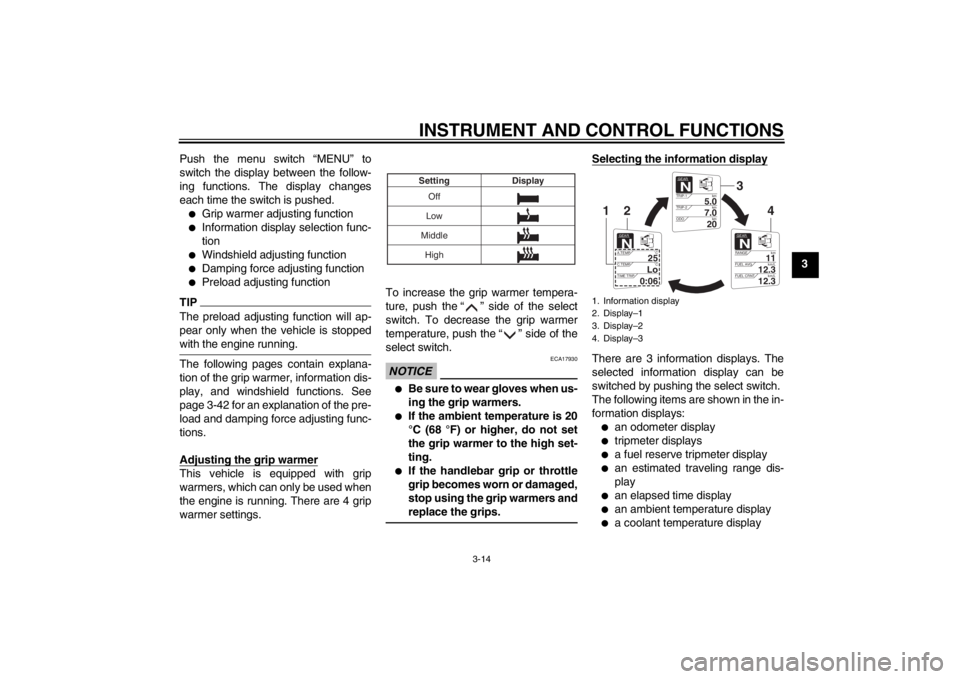
Push the menu switch “MENU” to
switch the display between the follow-
ing functions. The display changes
each time the switch is pushed.
●
Grip warmer adjusting function
●
Information display selection func-
tion
●
Windshield adjusting function
●
Damping force adjusting function
●
Preload adjusting function
TIPThe preload adjusting function will ap-
pear only when the vehicle is stopped
with the engine running.The following pages contain explana-
tion of the grip warmer, information dis-
play, and windshield functions. See
page 3-42 for an explanation of the pre-
load and damping force adjusting func-
tions.
Adjusting the grip warmerThis vehicle is equipped with grip
warmers, which can only be used when
the engine is running. There are 4 grip
warmer settings. To increase the grip warmer tempera-
ture, push the “ ” side of the select
switch. To decrease the grip warmer
temperature, push the “ ” side of the
select switch.
NOTICE
ECA17930
●
Be sure to wear gloves when us-
ing the grip warmers.
●
If the ambient temperature is 20
°C (68 °F) or higher, do not set
the grip warmer to the high set-
ting.
●
If the handlebar grip or throttle
grip becomes worn or damaged,
stop using the grip warmers and
replace the grips.
Selecting the information displayThere are 3 information displays. The
selected information display can be
switched by pushing the select switch.
The following items are shown in the in-
formation displays:●
an odometer display
●
tripmeter displays
●
a fuel reserve tripmeter display
●
an estimated traveling range dis-
play
●
an elapsed time display
●
an ambient temperature display
●
a coolant temperature display
Off
Low
Middle Display
Setting
High
1. Information display
2. Display–1
3. Display–2
4. Display–3
GEARN
5.0
TRIP-1 km
7.0
TRIP-2km
km
20
ODO
GEARN
11
RANGE km
12.3
FUEL AVG km/L
km/L
12.3
FUEL CRNT
GEARN
25
A.TEMP ˚C
Lo
C.TEMP ˚C
0:06
TIME TRIP
3
4
2
1
U1MDE0E0.book Page 14 Friday, February 15, 2013 1:26 PM
Page 30 of 122
INSTRUMENT AND CONTROL FUNCTIONS
3-15
3
●
an average fuel consumption dis-
play
●
an instantaneous fuel consump-
tion display
The items shown in each information
display can be selected.
To set or select the items shown, see
page 3-18.
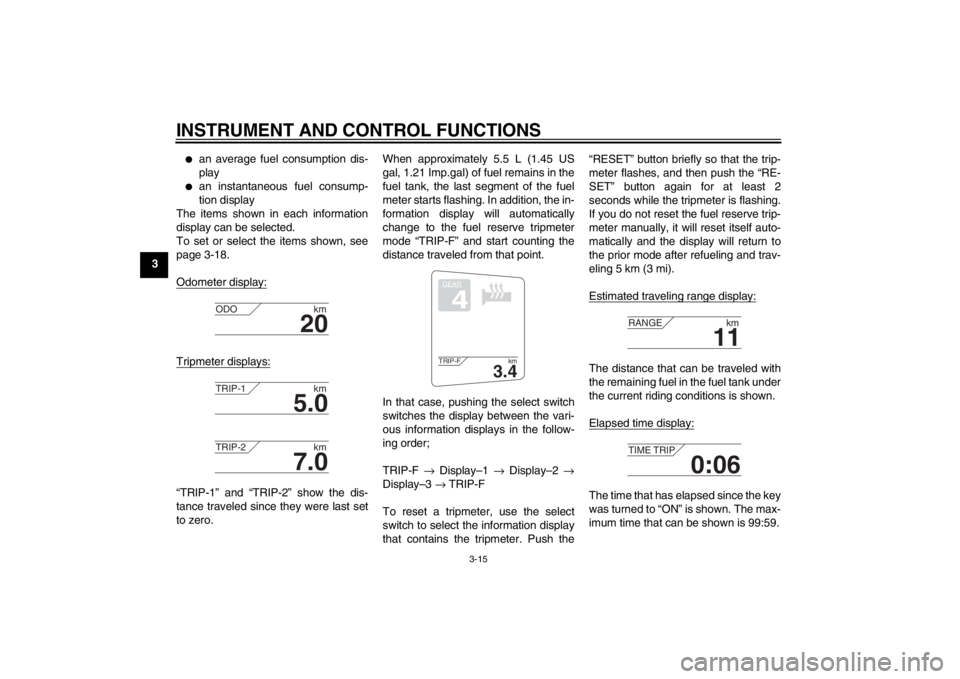
Odometer display:
Tripmeter displays:“TRIP-1” and “TRIP-2” show the dis-
tance traveled since they were last set
to zero. When approximately 5.5 L (1.45 US
gal, 1.21 Imp.gal) of fuel remains in the
fuel tank, the last segment of the fuel
meter starts flashing. In addition, the in-
formation display will automatically
change to the fuel reserve tripmeter
mode “TRIP-F” and start counting the
distance traveled from that point.
In that case, pushing the select switch
switches the display between the vari-
ous information displays in the follow-
ing order;
TRIP-F
→ Display–1 → Display–2 →
Display–3 → TRIP-F
To reset a tripmeter, use the select
switch to select the information display
that contains the tripmeter. Push the “RESET” button briefly so that the trip-
meter flashes, and then push the “RE-
SET” button again for at least 2
seconds while the tripmeter is flashing.
If you do not reset the fuel reserve trip-
meter manually, it will reset itself auto-
matically and the display will return to
the prior mode after refueling and trav-
eling 5 km (3 mi).
Estimated traveling range display:
The distance that can be traveled with
the remaining fuel in the fuel tank under
the current riding conditions is shown.
Elapsed time display:The time that has elapsed since the key
was turned to “ON” is shown. The max-
imum time that can be shown is 99:59.
20
ODO
km
5.0
TRIP-1km
7.0
TRIP-2km
GEAR4
3.4
TRIP-F km
11
RANGEkm
0:06
TIME TRIP
U1MDE0E0.book Page 15 Friday, February 15, 2013 1:26 PM
Page 31 of 122
INSTRUMENT AND CONTROL FUNCTIONS
3-16
3
This display is automatically reset when
the key is turned to “OFF”.
TIPThere are also “TIME–2” and “TIME–3”
elapsed time displays, but they cannot
be set to the information display. See
“Setting mode” on page 3-18 for de-
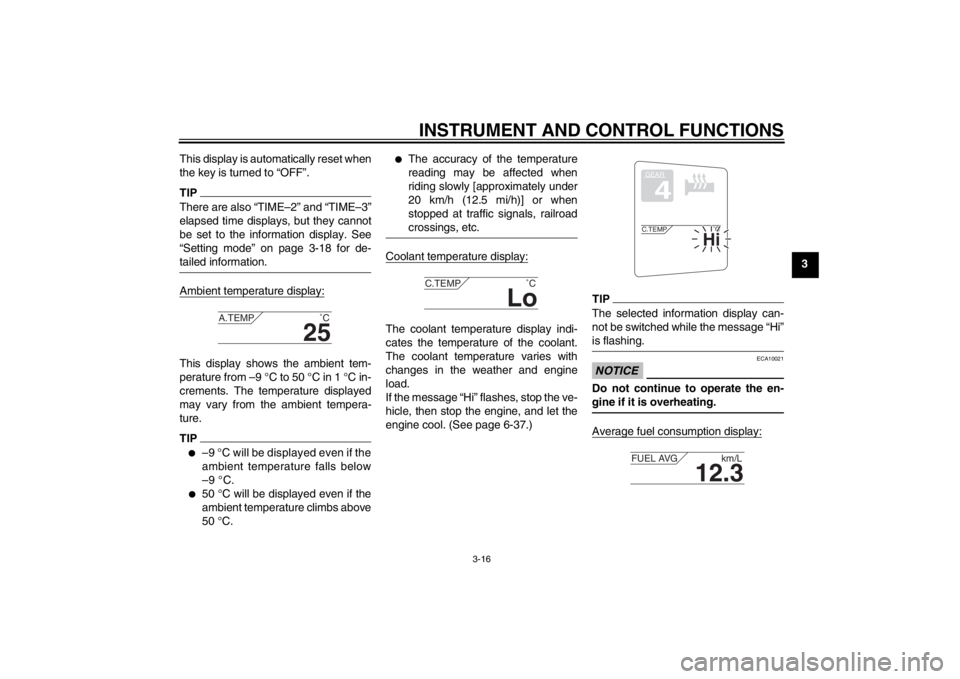
tailed information.Ambient temperature display:This display shows the ambient tem-
perature from –9 °C to 50 °C in 1 °C in-
crements. The temperature displayed
may vary from the ambient tempera-
ture.TIP●
–9 °C will be displayed even if the
ambient temperature falls below
–9 °C.
●
50 °C will be displayed even if the
ambient temperature climbs above
50 °C.
●
The accuracy of the temperature
reading may be affected when
riding slowly [approximately under
20 km/h (12.5 mi/h)] or when
stopped at traffic signals, railroad
crossings, etc.
Coolant temperature display:The coolant temperature display indi-
cates the temperature of the coolant.
The coolant temperature varies with
changes in the weather and engine
load.
If the message “Hi” flashes, stop the ve-
hicle, then stop the engine, and let the
engine cool. (See page 6-37.)
TIPThe selected information display can-
not be switched while the message “Hi”
is flashing.NOTICE
ECA10021
Do not continue to operate the en-
gine if it is overheating.Average fuel consumption display:
25
A.TEMP
˚C
Lo
C.TEMP˚C
GEAR4
Hi
C.TEMP˚C
12.3
FUEL AVG km/L
U1MDE0E0.book Page 16 Friday, February 15, 2013 1:26 PM
Page 32 of 122
INSTRUMENT AND CONTROL FUNCTIONS
3-17
3The average fuel consumption display
modes “km/L”, “L/100km” or “MPG” (for
the UK only) show the average fuel
consumption since the display was last
reset.
●
The “km/L” display shows the av-
erage distance that can be trav-
eled on 1.0 L of fuel.
●
The “L/100km” display shows the
average amount of fuel necessary
to travel 100 km.
●
For the UK only: The “MPG” dis-
play shows the average distance
that can be traveled on 1.0 Imp.gal
of fuel.
To reset the average fuel consumption
display, use the select switch to select
the information display that contains
the average fuel consumption display.
Push the “RESET” button briefly so that
the average fuel consumption display
flashes, and then push the “RESET”
button again for at least 2 seconds
while the display is flashing.
TIPAfter resetting the average fuel con-
sumption display, “_ _._” will be shown
for that display until the vehicle has
traveled 1 km (0.6 mi).NOTICE
ECA15473
If there is a malfunction, “– –.–” will
be continuously displayed. Have a
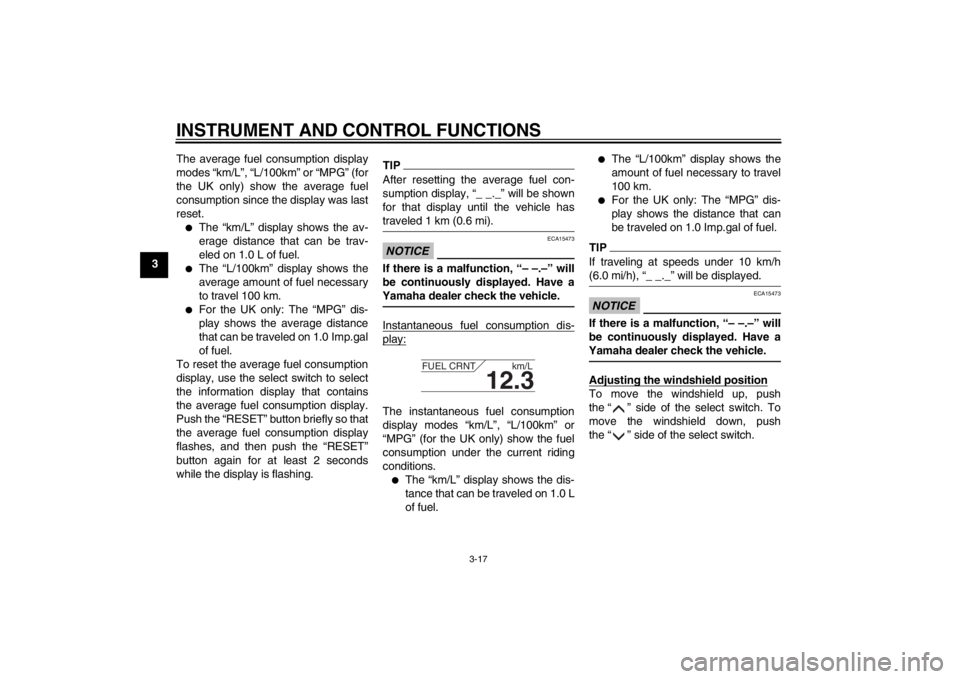
Yamaha dealer check the vehicle.Instantaneous fuel consumption dis-play:The instantaneous fuel consumption
display modes “km/L”, “L/100km” or
“MPG” (for the UK only) show the fuel
consumption under the current riding
conditions.●
The “km/L” display shows the dis-
tance that can be traveled on 1.0 L
of fuel.
●
The “L/100km” display shows the
amount of fuel necessary to travel
100 km.
●
For the UK only: The “MPG” dis-
play shows the distance that can
be traveled on 1.0 Imp.gal of fuel.
TIPIf traveling at speeds under 10 km/h
(6.0 mi/h), “_ _._” will be displayed.NOTICE
ECA15473
If there is a malfunction, “– –.–” will
be continuously displayed. Have a
Yamaha dealer check the vehicle.Adjusting the windshield positionTo move the windshield up, push
the “ ” side of the select switch. To
move the windshield down, push
the “ ” side of the select switch.
12.3
FUEL CRNT km/L
U1MDE0E0.book Page 17 Friday, February 15, 2013 1:26 PM
Page 33 of 122
INSTRUMENT AND CONTROL FUNCTIONS
3-18
3
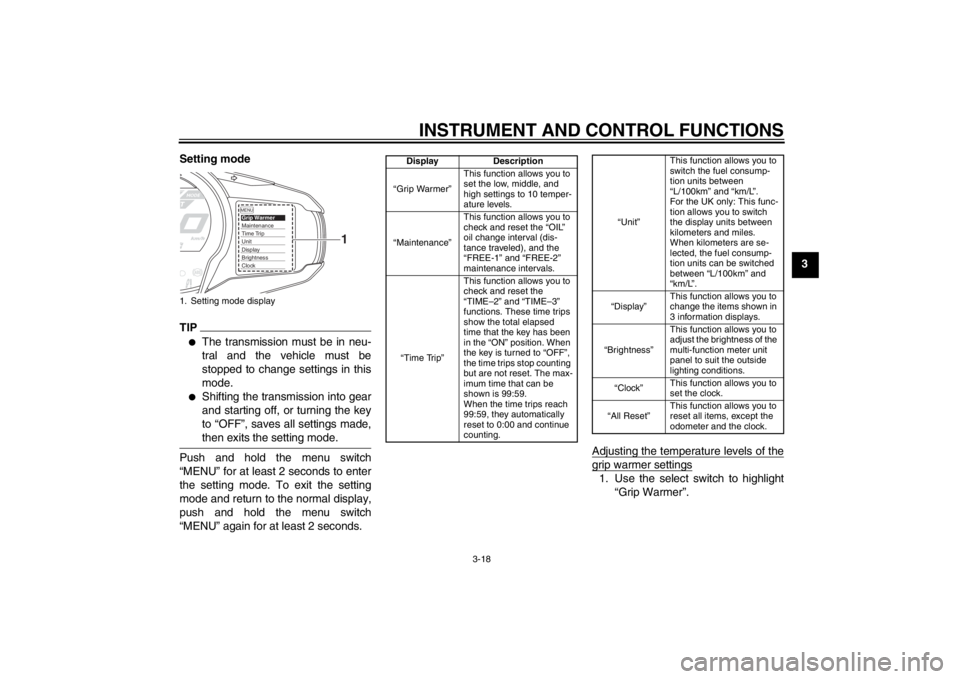
Setting mode
TIP●
The transmission must be in neu-
tral and the vehicle must be
stopped to change settings in this
mode.
●
Shifting the transmission into gear
and starting off, or turning the key
to “OFF”, saves all settings made,
then exits the setting mode.
Push and hold the menu switch
“MENU” for at least 2 seconds to enter
the setting mode. To exit the setting
mode and return to the normal display,
push and hold the menu switch
“MENU” again for at least 2 seconds.
Adjusting the temperature levels of the
grip warmer settings1. Use the select switch to highlight
“Grip Warmer”.
1. Setting mode display
MENUGrip WarmerMaintenanceTime TripUnitDisplayBrightnessClock
1
Display Description
“Grip Warmer” This function allows you to
set the low, middle, and
high settings to 10 temper-
ature levels.
“Maintenance” This function allows you to
check and reset the “OIL”
oil change interval (dis-
tance traveled), and the
“FREE-1” and “FREE-2”
maintenance intervals.
“Time Trip” This function allows you to
check and reset the
“TIME–2” and “TIME–3”
functions. These time trips
show the total elapsed
time that the key has been
in the “ON” position. When
the key is turned to “OFF”,
the time trips stop counting
but are not reset. The max-
imum time that can be
shown is 99:59.
When the time trips reach
99:59, they automatically
reset to 0:00 and continue
counting.
“Unit”
This function allows you to
switch the fuel consump-
tion units between
“L/100km” and “km/L”.
For the UK only: This func-
tion allows you to switch
the display units between
kilometers and miles.
When kilometers are se-
lected, the fuel consump-
tion units can be switched
between “L/100km” and
“km/L”.
“Display” This function allows you to
change the items shown in
3 information displays.
“Brightness” This function allows you to
adjust the brightness of the
multi-function meter unit
panel to suit the outside
lighting conditions.
“Clock” This function allows you to
set the clock.
“All Reset” This function allows you to
reset all items, except the
odometer and the clock.
U1MDE0E0.book Page 18 Friday, February 15, 2013 1:26 PM
Page 34 of 122
INSTRUMENT AND CONTROL FUNCTIONS
3-19
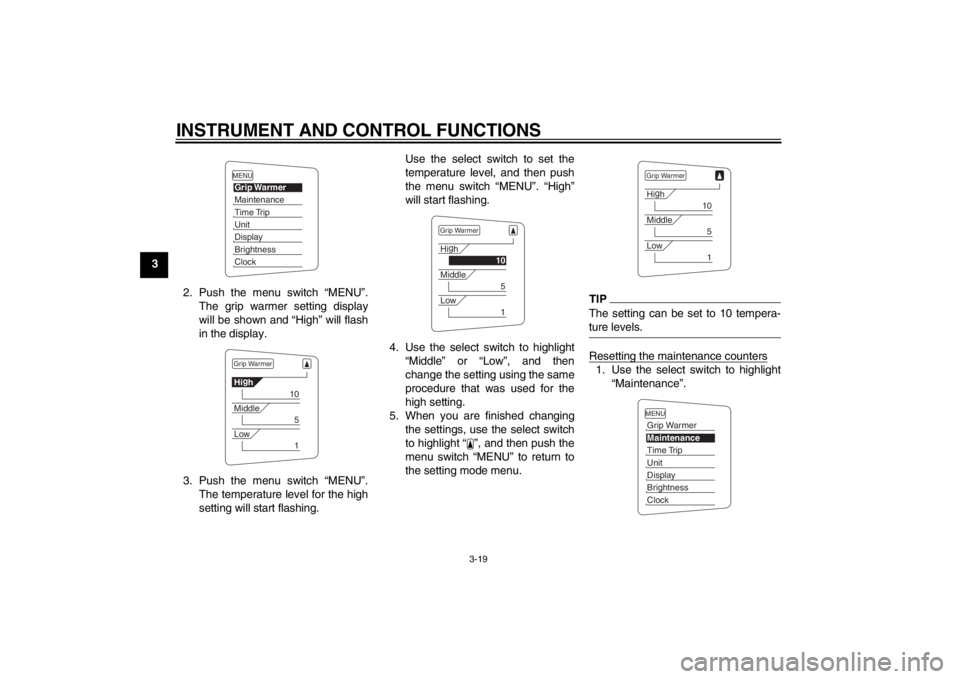
32. Push the menu switch “MENU”.The grip warmer setting display
will be shown and “High” will flash
in the display.
3. Push the menu switch “MENU”. The temperature level for the high
setting will start flashing. Use the select switch to set the
temperature level, and then push
the menu switch “MENU”. “High”
will start flashing.
4. Use the select switch to highlight “Middle” or “Low”, and then
change the setting using the same
procedure that was used for the
high setting.
5. When you are finished changing the settings, use the select switch
to highlight “ ”, and then push the
menu switch “MENU” to return to
the setting mode menu.
TIPThe setting can be set to 10 tempera-
ture levels.Resetting the maintenance counters1. Use the select switch to highlight“Maintenance”.
MENUGrip WarmerMaintenanceTime TripUnitDisplayBrightnessClockGrip WarmerHig
h
10
Middle
5
Low
1
Grip WarmerHi g
h
10
Middle
5
Low
1
Grip WarmerHi g
h
10
Middle
5
Low
1
MENUGrip WarmerMaintenanceTime TripUnitDisplayBrightnessClock
U1MDE0E0.book Page 19 Friday, February 15, 2013 1:26 PM