engine YAMAHA FX SVHO 2019 User Guide
[x] Cancel search | Manufacturer: YAMAHA, Model Year: 2019, Model line: FX SVHO, Model: YAMAHA FX SVHO 2019Pages: 116, PDF Size: 12.33 MB
Page 30 of 116
Description
24
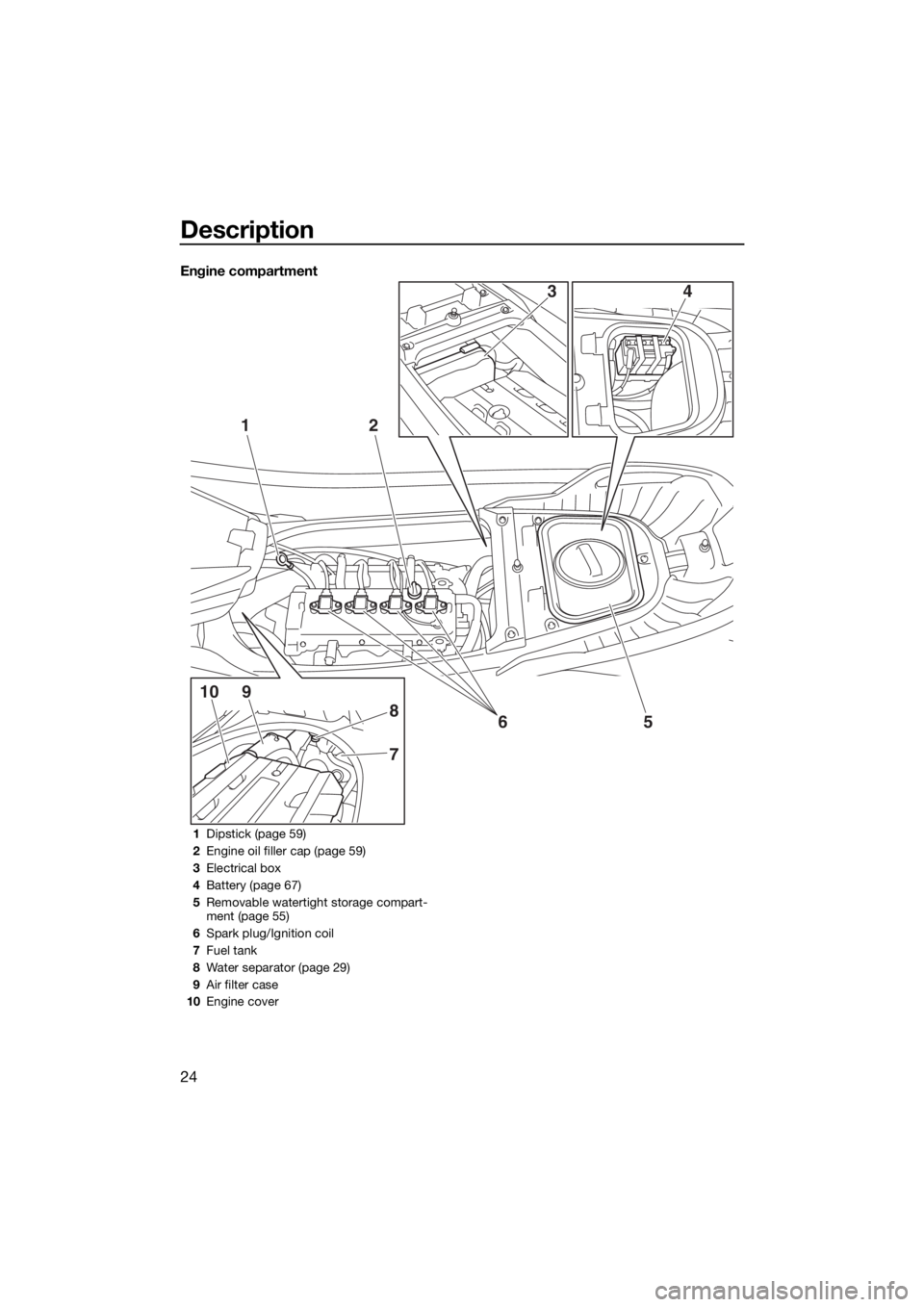
Engine compartment
12
5
7
8
910
6
43
1Dipstick (page 59)
2Engine oil filler cap (page 59)
3Electrical box
4Battery (page 67)
5Removable watertight storage compart-
ment (page 55)
6Spark plug/Ignition coil
7Fuel tank
8Water separator (page 29)
9Air filter case
10Engine cover
UF3X70E0.book Page 24 Friday, August 24, 2018 9:23 AM
Page 31 of 116
Control function operation
25
EJU31026
Watercraft control functionsEJU45090Yamaha Security System
The Yamaha Security System functions to
help prevent unauthorized use or theft of the
watercraft. The lock and unlock modes of the
security system can be selected using the
engine lock screen of the multifunction infor-
mation center. The engine cannot be started
if the lock mode of the security system is se-
lected. The engine can only be started if the
unlock mode is selected.
TIP:
The Yamaha Security System setting can
only be selected while the engine is stopped.
EJU45100Yamaha Security System setting
The Yamaha Security System setting can be
confirmed by the lock or unlock mode indica-
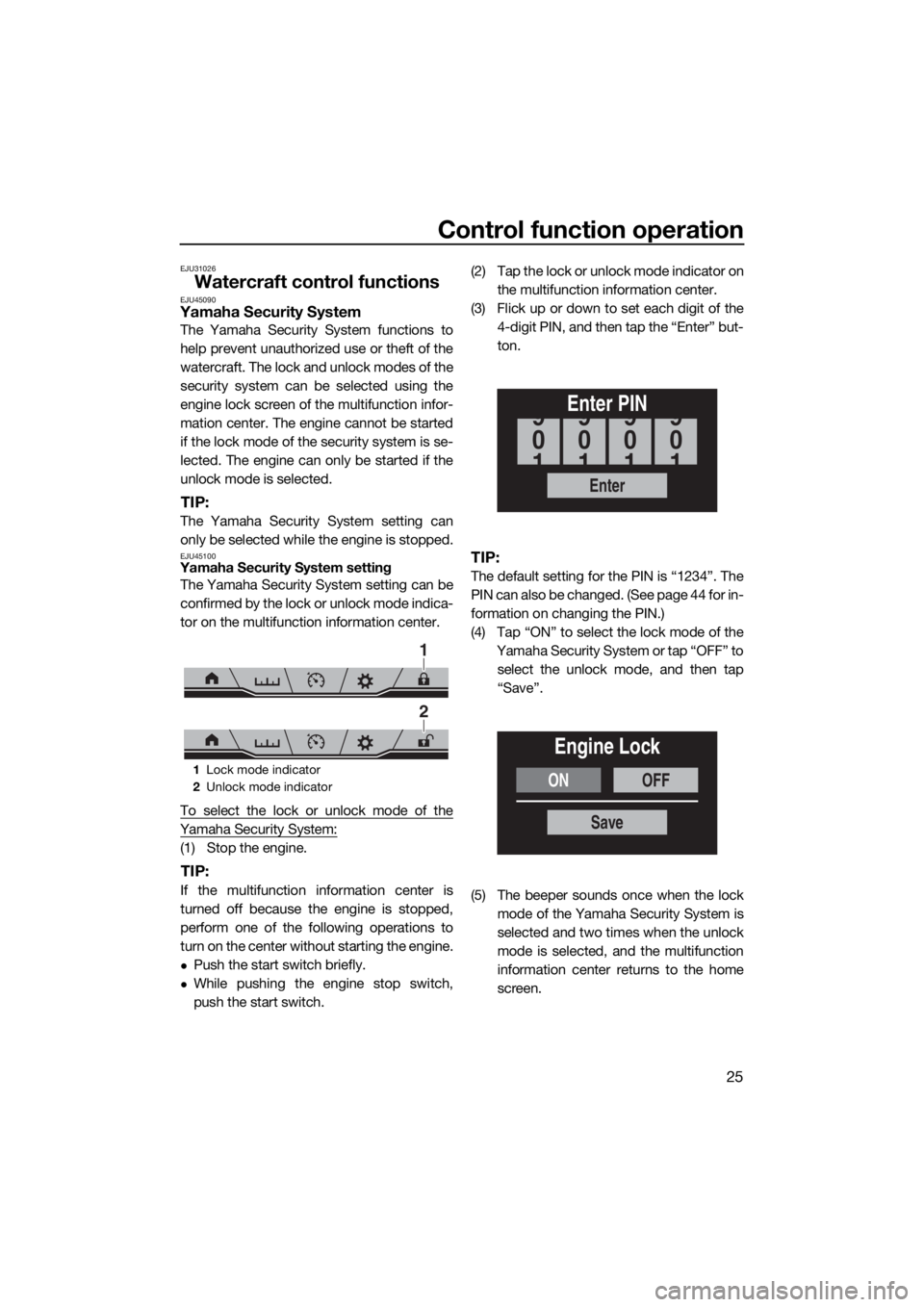
tor on the multifunction information center.
To select the lock or unlock mode of the
Yamaha Security System:
(1) Stop the engine.
TIP:
If the multifunction information center is
turned off because the engine is stopped,
perform one of the following operations to
turn on the center without starting the engine.
Push the start switch briefly.
While pushing the engine stop switch,
push the start switch.(2) Tap the lock or unlock mode indicator on
the multifunction information center.
(3) Flick up or down to set each digit of the
4-digit PIN, and then tap the “Enter” but-
ton.
TIP:
The default setting for the PIN is “1234”. The
PIN can also be changed. (See page 44 for in-
formation on changing the PIN.)
(4) Tap “ON” to select the lock mode of the
Yamaha Security System or tap “OFF” to
select the unlock mode, and then tap
“Save”.
(5) The beeper sounds once when the lock
mode of the Yamaha Security System is
selected and two times when the unlock
mode is selected, and the multifunction
information center returns to the home
screen.
1Lock mode indicator
2Unlock mode indicator
1
2
Enter
Enter PIN
0
9
1
0
9
1
0
9
1
0
9
1
ONOFF
Engine Lock
Save
UF3X70E0.book Page 25 Friday, August 24, 2018 9:23 AM
Page 32 of 116
Control function operation
26
EJU31153Engine stop switch “ ”
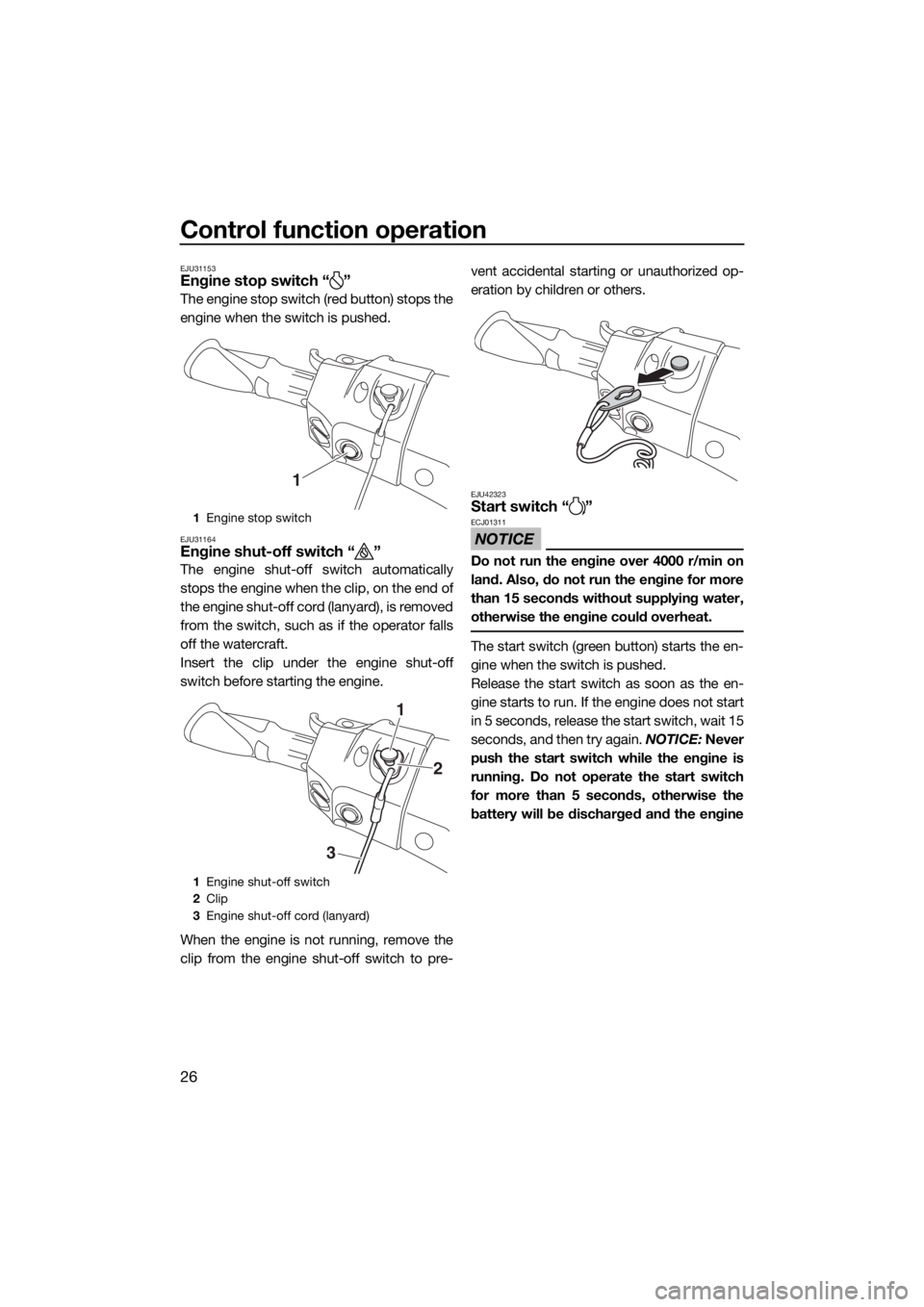
The engine stop switch (red button) stops the
engine when the switch is pushed.
EJU31164Engine shut-off switch “ ”
The engine shut-off switch automatically
stops the engine when the clip, on the end of
the engine shut-off cord (lanyard), is removed
from the switch, such as if the operator falls
off the watercraft.
Insert the clip under the engine shut-off
switch before starting the engine.
When the engine is not running, remove the
clip from the engine shut-off switch to pre-vent accidental starting or unauthorized op-
eration by children or others.
EJU42323Start switch “ ”
NOTICE
ECJ01311
Do not run the engine over 4000 r/min on
land. Also, do not run the engine for more
than 15 seconds without supplying water,
otherwise the engine could overheat.
The start switch (green button) starts the en-
gine when the switch is pushed.
Release the start switch as soon as the en-
gine starts to run. If the engine does not start
in 5 seconds, release the start switch, wait 15
seconds, and then try again. NOTICE: Never
push the start switch while the engine is
running. Do not operate the start switch
for more than 5 seconds, otherwise the
battery will be discharged and the engine
1Engine stop switch
1Engine shut-off switch
2Clip
3Engine shut-off cord (lanyard)
1
1
2
3
UF3X70E0.book Page 26 Friday, August 24, 2018 9:23 AM
Page 33 of 116
![YAMAHA FX SVHO 2019 User Guide Control function operation
27
will not start. Also, the starter motor could
be damaged.
[ECJ01041]
The engine will not start under any of the fol-
lowing conditions:
Lock mode of the Yamaha Securi](/img/51/49888/w960_49888-32.png "YAMAHA FX SVHO 2019 User Guide Control function operation
27
will not start. Also, the starter motor could
be damaged.
[ECJ01041]
The engine will not start under any of the fol-
lowing conditions:
Lock mode of the Yamaha Securi")
Control function operation
27
will not start. Also, the starter motor could
be damaged.
[ECJ01041]
The engine will not start under any of the fol-
lowing conditions:
Lock mode of the Yamaha Security System
has been selected. (See page 25 for
Yamaha Security System setting proce-
dures.)
Clip is removed from the engine shut-off
switch.
Throttle lever is squeezed.
Throttle lever is malfunctioning.
RiDE lever is squeezed.
RiDE lever is malfunctioning.EJU31212Throttle lever
The throttle lever increases the engine speed
when the lever is squeezed.
The throttle lever returns automatically to its
fully closed (idle) position when released.
EJU43342RiDE lever
When the RiDE lever is squeezed, the reverse
gate lowers and the watercraft starts moving
in reverse. If the watercraft is moving forward,
the watercraft gradually slows down until it
stops, and then the watercraft starts moving
in reverse.
When the RiDE lever is released, it automati-
cally returns to its fully closed (idle) position
and the reverse gate moves to the neutral po-
sition.
EJU31262Steering system
By turning the handlebars in the direction you
wish to travel, the angle of the jet thrust noz-
1Start switch
1Throttle lever
1
1
1RiDE lever
1
UF3X70E0.book Page 27 Friday, August 24, 2018 9:23 AM
Page 34 of 116
Control function operation
28
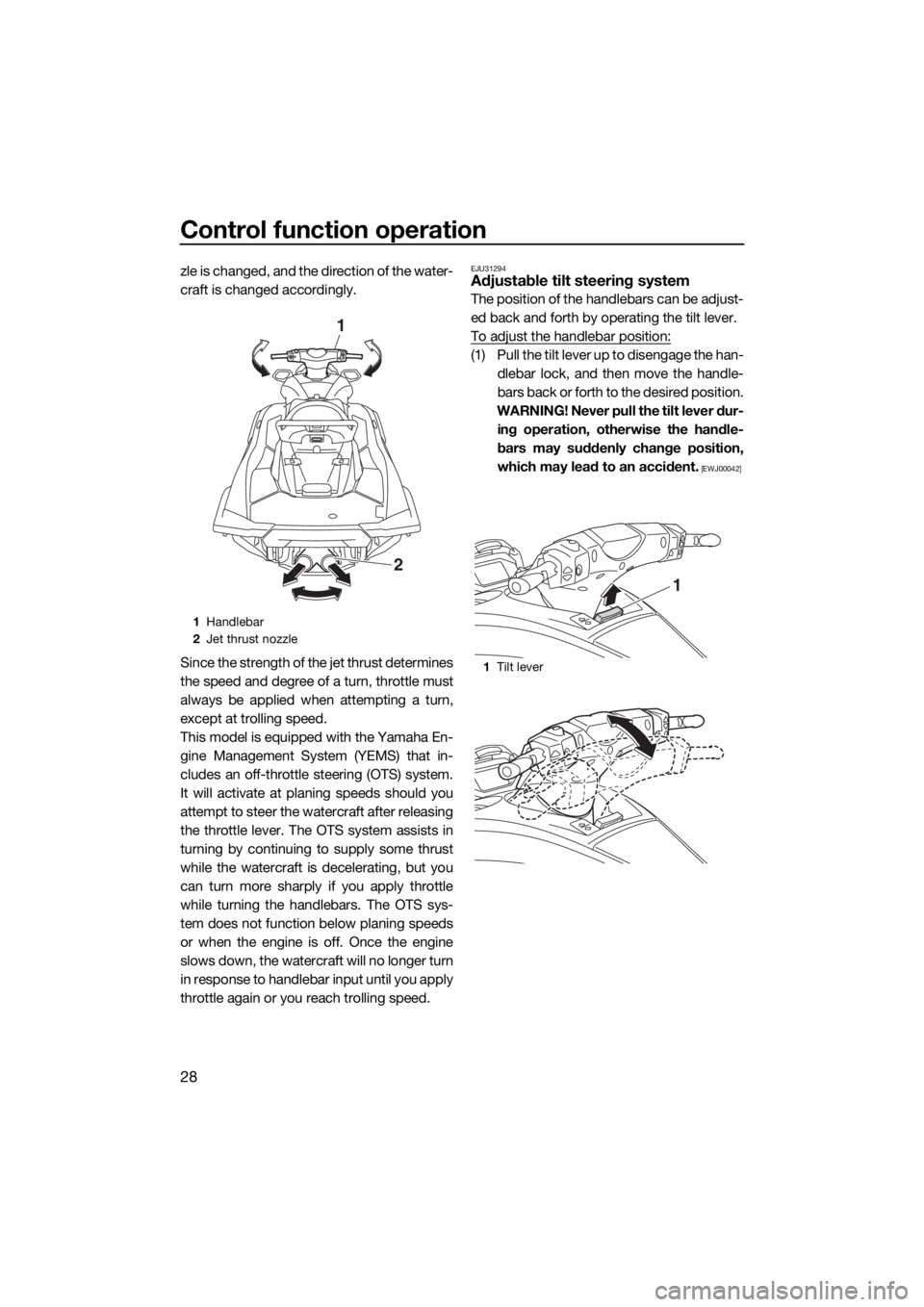
zle is changed, and the direction of the water-
craft is changed accordingly.
Since the strength of the jet thrust determines
the speed and degree of a turn, throttle must
always be applied when attempting a turn,
except at trolling speed.
This model is equipped with the Yamaha En-
gine Management System (YEMS) that in-
cludes an off-throttle steering (OTS) system.
It will activate at planing speeds should you
attempt to steer the watercraft after releasing
the throttle lever. The OTS system assists in
turning by continuing to supply some thrust
while the watercraft is decelerating, but you
can turn more sharply if you apply throttle
while turning the handlebars. The OTS sys-
tem does not function below planing speeds
or when the engine is off. Once the engine
slows down, the watercraft will no longer turn
in response to handlebar input until you apply
throttle again or you reach trolling speed.EJU31294Adjustable tilt steering system
The position of the handlebars can be adjust-
ed back and forth by operating the tilt lever.
To adjust the handlebar position:
(1) Pull the tilt lever up to disengage the han-
dlebar lock, and then move the handle-
bars back or forth to the desired position.
WARNING! Never pull the tilt lever dur-
ing operation, otherwise the handle-
bars may suddenly change position,
which may lead to an accident.
[EWJ00042]
1Handlebar
2Jet thrust nozzle
1
2
1Tilt lever
1
UF3X70E0.book Page 28 Friday, August 24, 2018 9:23 AM
Page 35 of 116
Control function operation
29
(2) Make sure that the tilt lever returns to its
original position and that the handlebars
are securely locked in place.
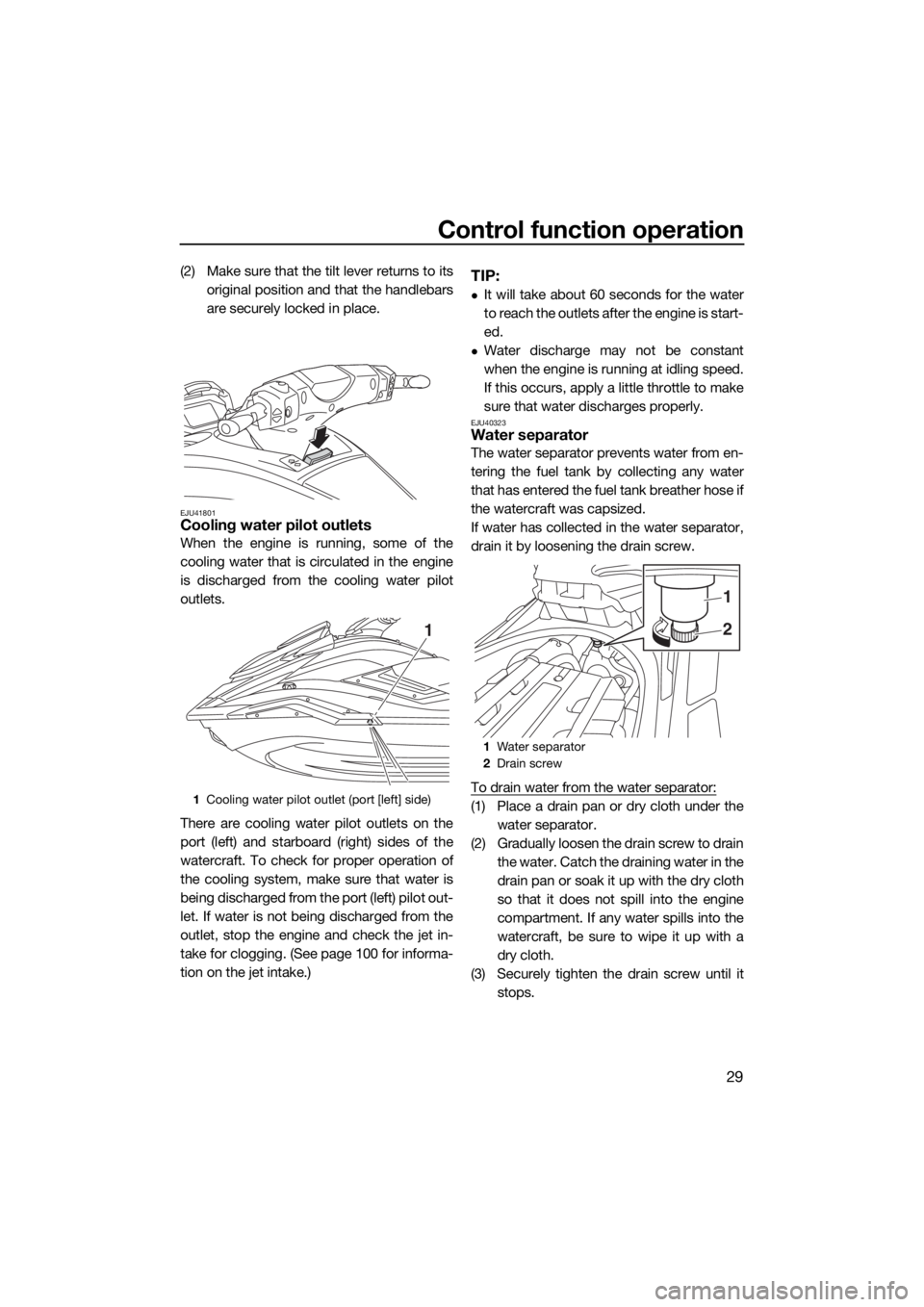
EJU41801Cooling water pilot outlets
When the engine is running, some of the
cooling water that is circulated in the engine
is discharged from the cooling water pilot
outlets.
There are cooling water pilot outlets on the
port (left) and starboard (right) sides of the
watercraft. To check for proper operation of
the cooling system, make sure that water is
being discharged from the port (left) pilot out-
let. If water is not being discharged from the
outlet, stop the engine and check the jet in-
take for clogging. (See page 100 for informa-
tion on the jet intake.)
TIP:
It will take about 60 seconds for the water
to reach the outlets after the engine is start-
ed.
Water discharge may not be constant
when the engine is running at idling speed.
If this occurs, apply a little throttle to make
sure that water discharges properly.
EJU40323Water separator
The water separator prevents water from en-
tering the fuel tank by collecting any water
that has entered the fuel tank breather hose if
the watercraft was capsized.
If water has collected in the water separator,
drain it by loosening the drain screw.
To drain water from the water separator:
(1) Place a drain pan or dry cloth under the
water separator.
(2) Gradually loosen the drain screw to drain
the water. Catch the draining water in the
drain pan or soak it up with the dry cloth
so that it does not spill into the engine
compartment. If any water spills into the
watercraft, be sure to wipe it up with a
dry cloth.
(3) Securely tighten the drain screw until it
stops.1Cooling water pilot outlet (port [left] side)
1
1Water separator
2Drain screw
2
1
UF3X70E0.book Page 29 Friday, August 24, 2018 9:23 AM
Page 36 of 116
Watercraft operation
30
EJU40014
Watercraft operation functions
EJU43154Shift system
WARNING
EWJ01773
Make sure that there are no obstacles or
people behind you before shifting into
reverse.
Do not touch the reverse gate while the
RiDE lever is being operated, otherwise
you could be pinched.
If the RiDE lever and throttle lever are
being operated at the same time, do not
release only the RiDE lever. Otherwise,
the watercraft could accelerate more
quickly than expected, which may lead
to an accident.
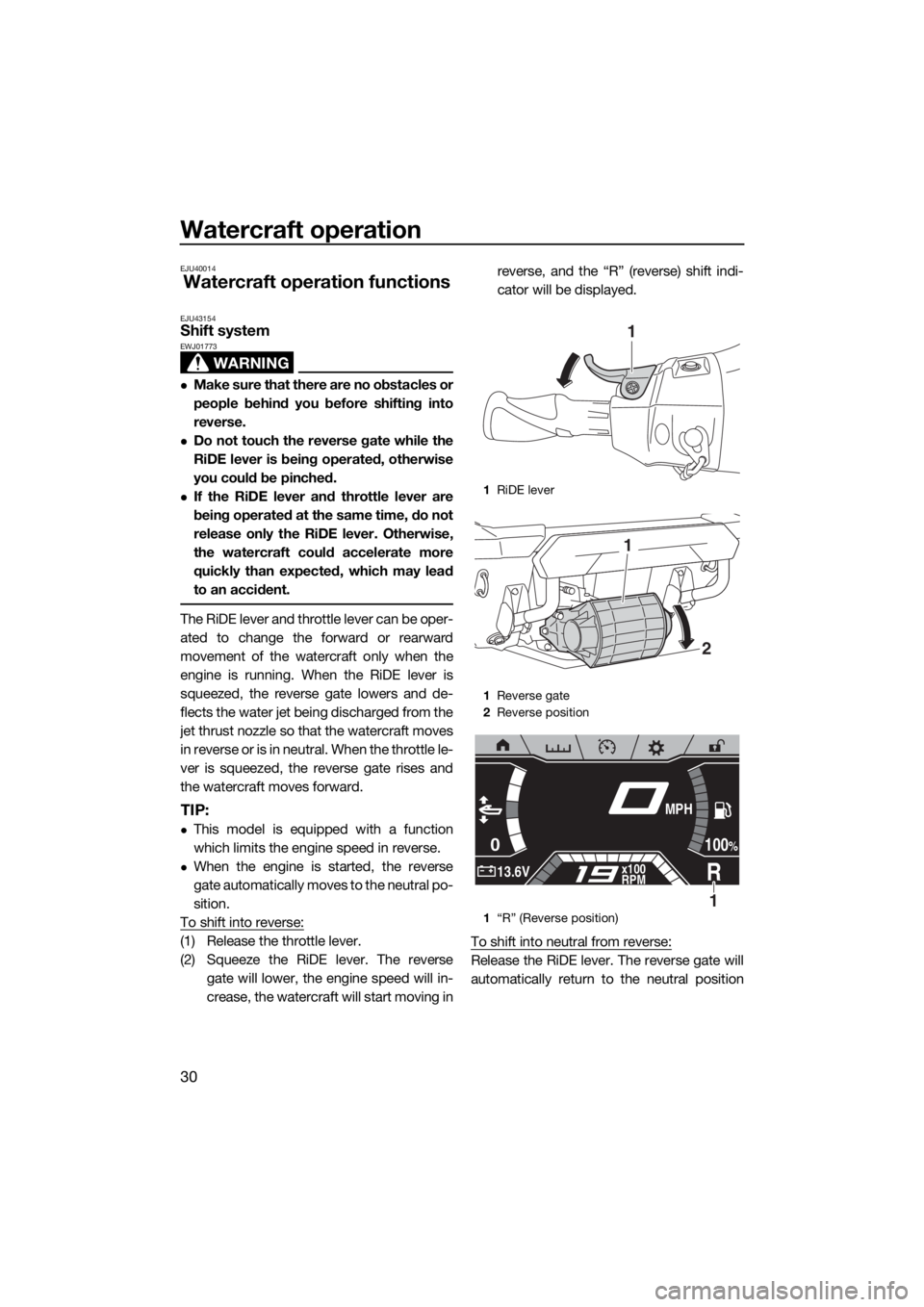
The RiDE lever and throttle lever can be oper-
ated to change the forward or rearward
movement of the watercraft only when the
engine is running. When the RiDE lever is
squeezed, the reverse gate lowers and de-
flects the water jet being discharged from the
jet thrust nozzle so that the watercraft moves
in reverse or is in neutral. When the throttle le-
ver is squeezed, the reverse gate rises and
the watercraft moves forward.
TIP:
This model is equipped with a function
which limits the engine speed in reverse.
When the engine is started, the reverse
gate automatically moves to the neutral po-
sition.
To shift into reverse:
(1) Release the throttle lever.
(2) Squeeze the RiDE lever. The reverse
gate will lower, the engine speed will in-
crease, the watercraft will start moving inreverse, and the “R” (reverse) shift indi-
cator will be displayed.
To shift into neutral from reverse:
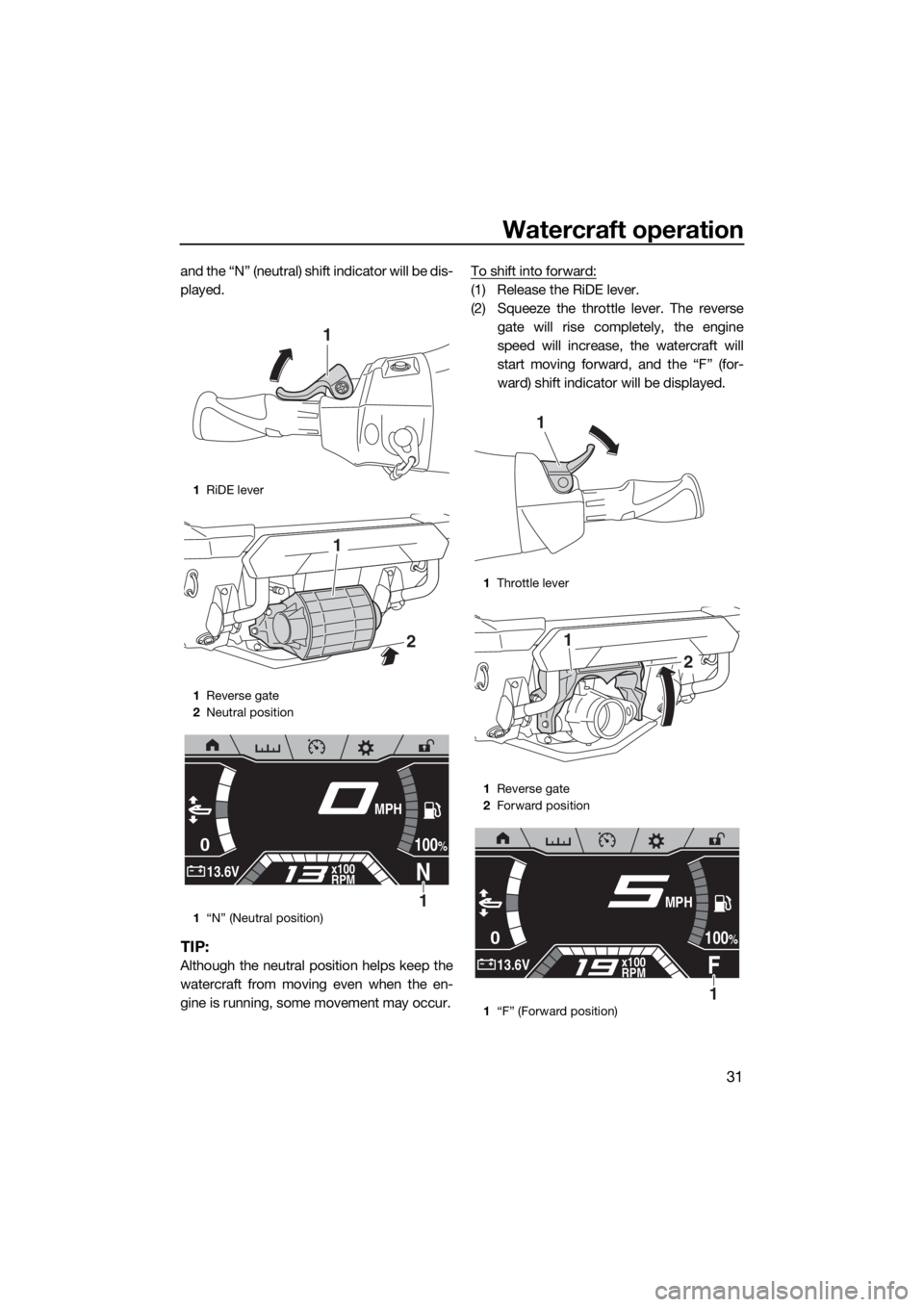
Release the RiDE lever. The reverse gate will
automatically return to the neutral position
1RiDE lever
1Reverse gate
2Reverse position
1“R” (Reverse position)
1
2
1
0
R13.6Vx100
RPM
100%
MPH
1
UF3X70E0.book Page 30 Friday, August 24, 2018 9:23 AM
Page 37 of 116
Watercraft operation
31
and the “N” (neutral) shift indicator will be dis-
played.
TIP:
Although the neutral position helps keep the
watercraft from moving even when the en-
gine is running, some movement may occur.To shift into forward:
(1) Release the RiDE lever.
(2) Squeeze the throttle lever. The reverse
gate will rise completely, the engine
speed will increase, the watercraft will
start moving forward, and the “F” (for-
ward) shift indicator will be displayed.
1RiDE lever
1Reverse gate
2Neutral position
1“N” (Neutral position)
1
2
1
0
N13.6Vx100
RPM
100%
MPH
1
1Throttle lever
1Reverse gate
2Forward position
1“F” (Forward position)
1
2
1
0
F13.6Vx100
RPM
100%
MPH
1
UF3X70E0.book Page 31 Friday, August 24, 2018 9:23 AM
Page 40 of 116
Watercraft operation
34
EJU40002
Watercraft operation modes
EJU45061Reverse assist
The reverse assist is a function for temporar-
ily increasing the engine speed when moving
in reverse, such as to enter the water
smoothly when launching the watercraft from
a trailer.
This function operates after the engine is
started and only if the watercraft is not shifted
into forward.
TIP:
Once the watercraft is shifted into forward af-
ter the engine is started, the reverse assist
cannot be operated.
Activating and deactivating the reverse
assist
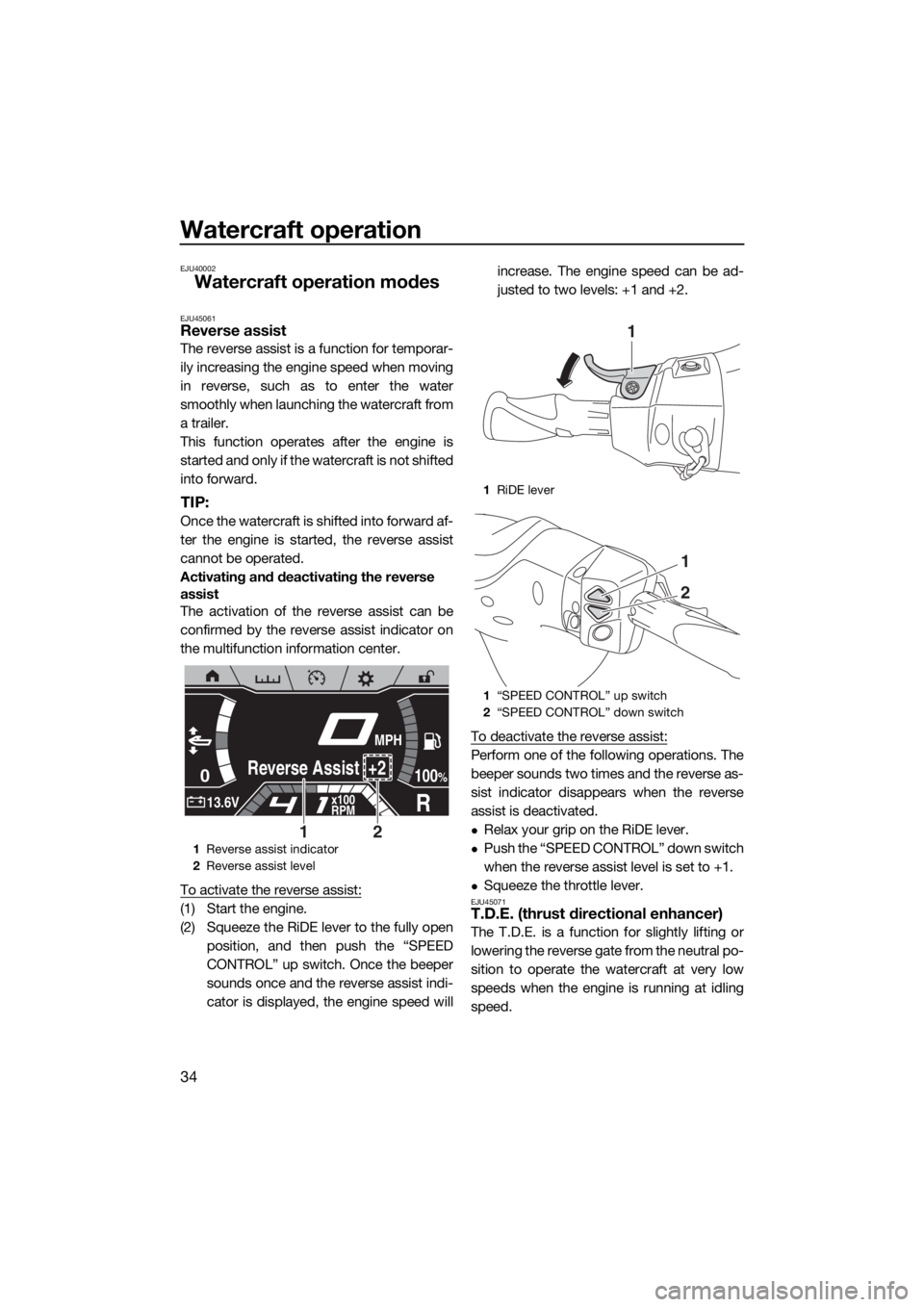
The activation of the reverse assist can be
confirmed by the reverse assist indicator on
the multifunction information center.
To activate the reverse assist:
(1) Start the engine.
(2) Squeeze the RiDE lever to the fully open
position, and then push the “SPEED
CONTROL” up switch. Once the beeper
sounds once and the reverse assist indi-
cator is displayed, the engine speed willincrease. The engine speed can be ad-
justed to two levels: +1 and +2.
To deactivate the reverse assist:
Perform one of the following operations. The
beeper sounds two times and the reverse as-
sist indicator disappears when the reverse
assist is deactivated.
Relax your grip on the RiDE lever.
Push the “SPEED CONTROL” down switch
when the reverse assist level is set to +1.
Squeeze the throttle lever.EJU45071T.D.E. (thrust directional enhancer)
The T.D.E. is a function for slightly lifting or
lowering the reverse gate from the neutral po-
sition to operate the watercraft at very low
speeds when the engine is running at idling
speed.
1Reverse assist indicator
2Reverse assist level
0
R13.6Vx100
RPM
100%Reverse Assist +2
MPH
21
1RiDE lever
1“SPEED CONTROL” up switch
2“SPEED CONTROL” down switch
1
1
2
UF3X70E0.book Page 34 Friday, August 24, 2018 9:23 AM
Page 41 of 116
Watercraft operation
35
This function can be used only when the wa-
tercraft is in neutral.
TIP:
While the watercraft is shifted into forward,
the “TRIM/T.D.E.” switches control the elec-
tric trim system. (See page 32 for information
on the electric trim system.)
Activating and deactivating the T.D.E.
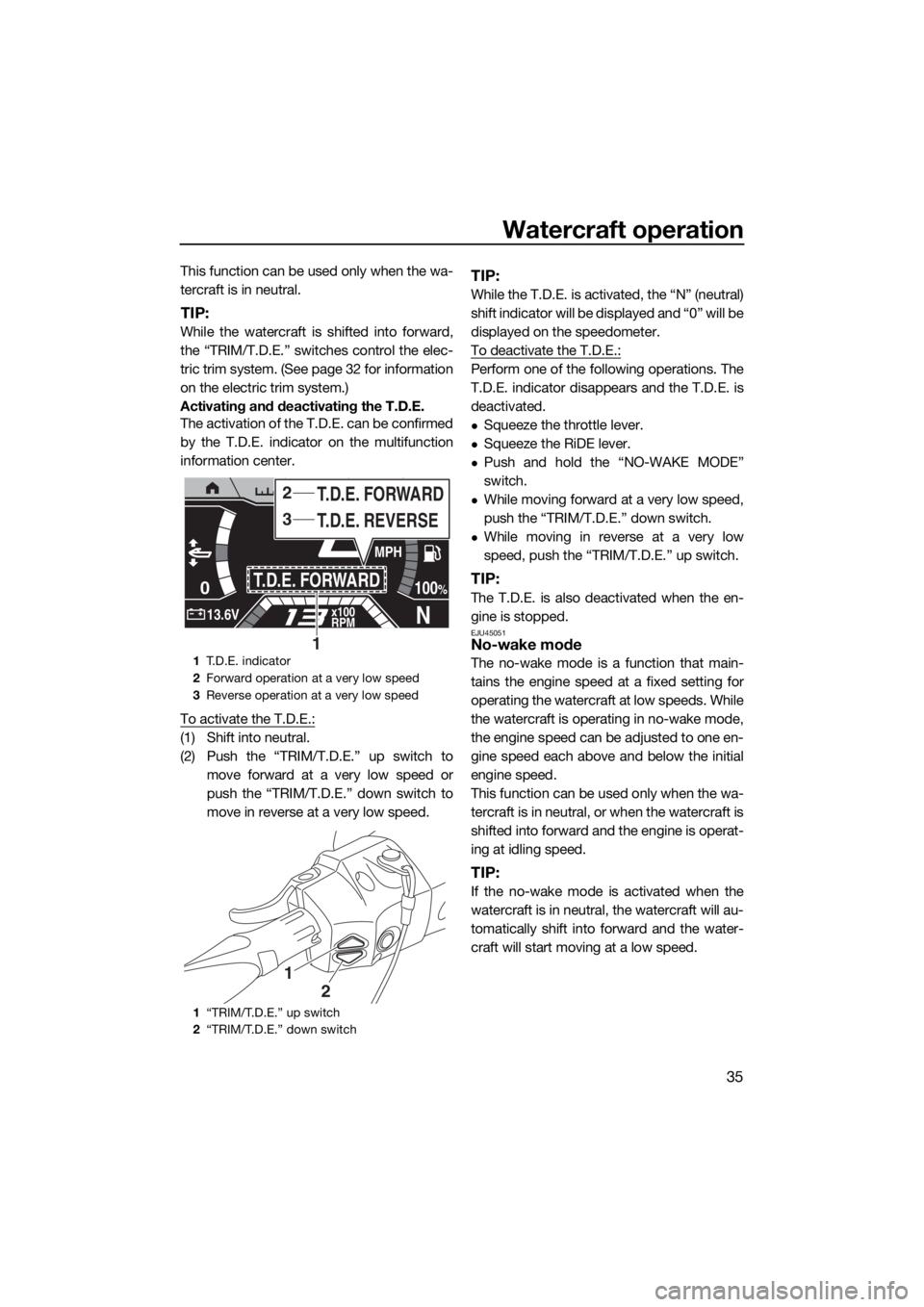
The activation of the T.D.E. can be confirmed
by the T.D.E. indicator on the multifunction
information center.
To activate the T.D.E.:
(1) Shift into neutral.
(2) Push the “TRIM/T.D.E.” up switch to
move forward at a very low speed or
push the “TRIM/T.D.E.” down switch to
move in reverse at a very low speed.
TIP:
While the T.D.E. is activated, the “N” (neutral)
shift indicator will be displayed and “0” will be
displayed on the speedometer.
To deactivate the T.D.E.:
Perform one of the following operations. The
T.D.E. indicator disappears and the T.D.E. is
deactivated.
Squeeze the throttle lever.
Squeeze the RiDE lever.
Push and hold the “NO-WAKE MODE”
switch.
While moving forward at a very low speed,
push the “TRIM/T.D.E.” down switch.
While moving in reverse at a very low
speed, push the “TRIM/T.D.E.” up switch.
TIP:
The T.D.E. is also deactivated when the en-
gine is stopped.
EJU45051No-wake mode
The no-wake mode is a function that main-
tains the engine speed at a fixed setting for
operating the watercraft at low speeds. While
the watercraft is operating in no-wake mode,
the engine speed can be adjusted to one en-
gine speed each above and below the initial
engine speed.
This function can be used only when the wa-
tercraft is in neutral, or when the watercraft is
shifted into forward and the engine is operat-
ing at idling speed.
TIP:
If the no-wake mode is activated when the
watercraft is in neutral, the watercraft will au-
tomatically shift into forward and the water-
craft will start moving at a low speed.
1T.D.E. indicator
2Forward operation at a very low speed
3Reverse operation at a very low speed
1“TRIM/T.D.E.” up switch
2“TRIM/T.D.E.” down switch
0
N13.6Vx100
RPM
100%T.D.E. FORWARD
MPH
T.D.E. REVERSE T.D.E. FORWARD3
2
1
1
2
UF3X70E0.book Page 35 Friday, August 24, 2018 9:23 AM