fuel YAMAHA GRIZZLY 700 2017 Owners Manual
[x] Cancel search | Manufacturer: YAMAHA, Model Year: 2017, Model line: GRIZZLY 700, Model: YAMAHA GRIZZLY 700 2017Pages: 174, PDF Size: 4.45 MB
Page 8 of 174

EBU17421
TABLE OF CONTENTS
LOCATION OF THE WARNING AND
SPECIFICATION LABELS .............................. 1-1
SAFETY INFORMATION ................................ 2-1
DESCRIPTION................................................ 3-1Left view ...................................................... 3-1
Right view.................................................... 3-1
Controls and instruments............................ 3-2
INSTRUMENT AND CONTROL
FUNCTIONS ................................................... 4-1 Main switch ................................................. 4-1
Indicator lights and warning lights .............. 4-2
Multi-function display ................................. 4-5
Handlebar switches .................................... 4-8
Throttle lever ............................................. 4-13
Speed limiter ............................................. 4-14
Front brake lever ....................................... 4-15
Brake pedal and rear brake lever .............. 4-15
Drive select lever ....................................... 4-16
Fuel tank cap............................................. 4-16
Fuel ........................................................... 4-16
Seat ........................................................... 4-18 Storage compartments ............................. 4-19
Front carrier .............................................. 4-23
Rear carrier ............................................... 4-23
Adjusting the front and rear shock
absorber assemblies ............................. 4-23
Trailer hitch (YFM70GPSH / YFM70GPLH).......................................... 4-24
Auxiliary DC jack....................................... 4-24
PRE-OPERATION CHECKS .......................... 5-1 Fuel ............................................................. 5-3
Engine oil .................................................... 5-3
Final gear oil ............................................... 5-3
Differential gear oil ...................................... 5-3
Coolant ....................................................... 5-3
Front and rear brakes ................................. 5-3
Throttle lever ............................................... 5-4
Tires ............................................................ 5-4
Chassis fasteners ....................................... 5-6
Instruments, lights and switches ................ 5-7
OPERATION .................................................. 6-1 Starting the engine ..................................... 6-1U2UD61E0.book Page 1 Monday, April 25, 2016 10:55 AM
Page 17 of 174
1-7
1
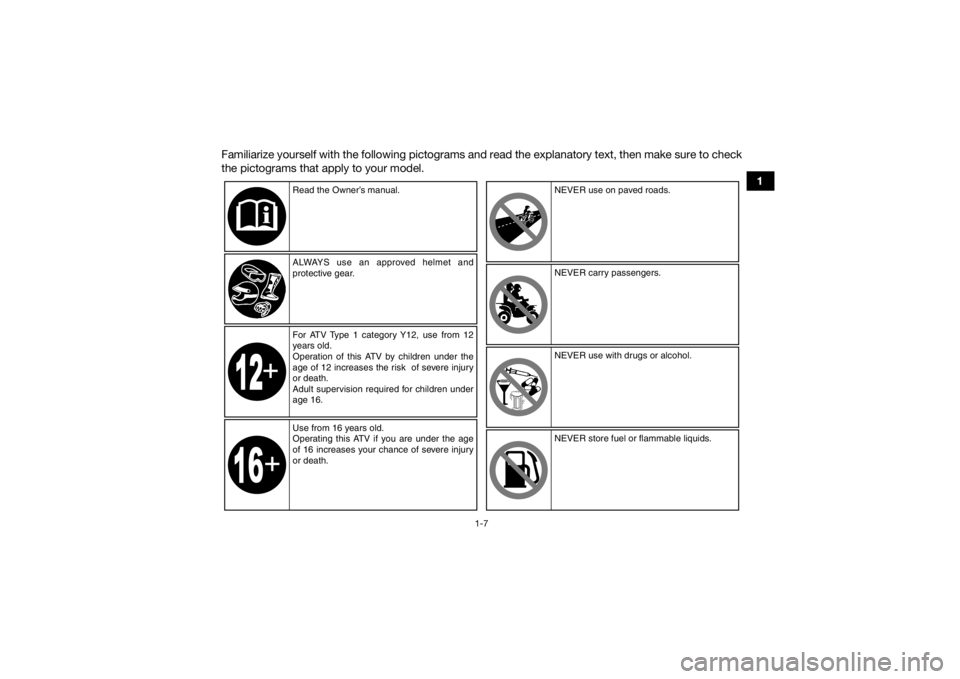
Familiarize yourself with the following pictograms and read the explanatory text, then make sure to check
the pictograms that apply to your model.
Read the Owner’s manual.
ALWAYS use an approved helmet and
protective gear.
For ATV Type 1 category Y12, use from 12
years old.
Operation of this ATV by children under the
age of 12 increases the risk of severe injury
or death.
Adult supervision required for children under
age 16.
Use from 16 years old.
Operating this ATV if you are under the age
of 16 increases your chance of severe injury
or death. NEVER use on paved roads.
NEVER carry passengers.
NEVER use with drugs or alcohol.
NEVER store fuel or flammable liquids.
U2UD61E0.book Page 7 Monday, April 25, 2016 10:55 AM
Page 28 of 174

2-4
2
Never maintain an ATV without proper knowl-
edge. Contact an authorized ATV dealer to in-
form you on basic ATV maintenance. Certain
maintenance can only be carried out by certified
staff.
In the event of an accident 1. If serious injuries are incurred, you may be safer staying next to your vehicle; it may
shield you from oncoming riders. Depending
on your injuries and position in the trail; you
must make a judgment call as to whether you
should move to a position off the trail. If you
have sustained head, neck, or back injuries,
or cannot feel your limbs, you should not
move. Keep your helmet on and remain mo-
tionless. Lie down next to your vehicle and
wait for help.
2. If less serious injuries are incurred and you can walk, then move to a position off the trail.
Check yourself for injuries and apply first aid
as needed.
3. If your injuries are light, when safe to do so, move your vehicle off the trail to avoid colli-
sions with oncoming riders. Check for injuries
and apply first aid as necessary. If you can
physically operate your vehicle, inspect your vehicle. If the vehicle is in safe operating con-
dition and you can safely operate it, restart it
and ride gently back to camp or other known
location where you can receive medical at-
tention. If necessary, contact your riding party
or local authorities to let them know where
you are and what has happened.
In the event of a breakdown 1. If your vehicle will not restart or is not in safe operating condition, turn off the main switch
and engine stop switch. If the breakdown oc-
curs at twilight or night, leave the main switch
on so that your lights may warn other riders of
your stopped vehicle.
2. Get out of danger. Check for oncoming vehi- cles and when safe, push your vehicle to the
side of the trail or even off the main trail to
avoid any possible collisions with oncoming
riders. If you cannot move your vehicle by
yourself, when safe, walk to the nearest van-
tage point and signal an oncoming rider to
help you push your vehicle to a safe place off
the trail.
3. Inspect your vehicle for any immediate haz- ardous conditions. The most obvious hazard-
ous conditions are leaking fuel and
U2UD61E0.book Page 4 Monday, April 25, 2016 10:55 AM
Page 29 of 174

2-5
2
ungrounded or broken wiring. Visually check
for broken wiring and leaking fuel. Leaking
fuel can be confirmed by the odor of gasoline.
4. Once immediate safety hazards are con- firmed not to exist, you may remove your hel-
met to more closely inspect your vehicle.
Check for external signs of wear, broken
parts, fluid leaks, cracks in the frame, sus-
pension damage, wheel damage, and so on.
Fuel, oil, and coolant usually give off a notice-
able odor.
5. If your vehicle will not restart or if it is unsafe to ride, then turn off all vehicle systems (en-
gine stop switch, main switch, and fuel cock),
and then signal or go for help.
Aftermarket Parts, Accessories, and Modifica-
tions
While you may find aftermarket products similar in
design and quality to genuine Yamaha accesso-
ries, recognize that some aftermarket accessories
or modifications are not suitable because of po-
tential safety hazards to you or others. Installing
aftermarket products or having other modifica-
tions performed to your vehicle that change any of
the vehicle’s design or operation characteristics
can put you and others at greater risk of serious injury or death. You are responsible for injuries re-
lated to changes in the vehicle. Keep the following
guidelines in mind, as well as those provided un-
der “Loading” when mounting accessories.
Never install accessories that would impair the
performance of your ATV. Carefully inspect the
accessory before using it to make sure that it
does not in any way reduce ground clearance,
limit suspension travel, steering travel or control
operation.
Accessories fitted to the ATV can create insta-
bility due to improper weight distribution.
Bulky or large accessories may seriously affect
the stability of the ATV.
Certain accessories can displace the operator
from his or her normal riding position. This im-
proper position limits the freedom of movement
of the operator and may limit control ability,
therefore, such accessories are not recom-
mended.
Use caution when adding electrical accesso-
ries. If electrical accessories exceed the capac-
ity of the ATV’s electrical system, an electric
failure could result, which could cause a dan-
gerous loss of lights or engine power.
U2UD61E0.book Page 5 Monday, April 25, 2016 10:55 AM
Page 31 of 174
3-1
3
EBU17681
DESCRIPTION
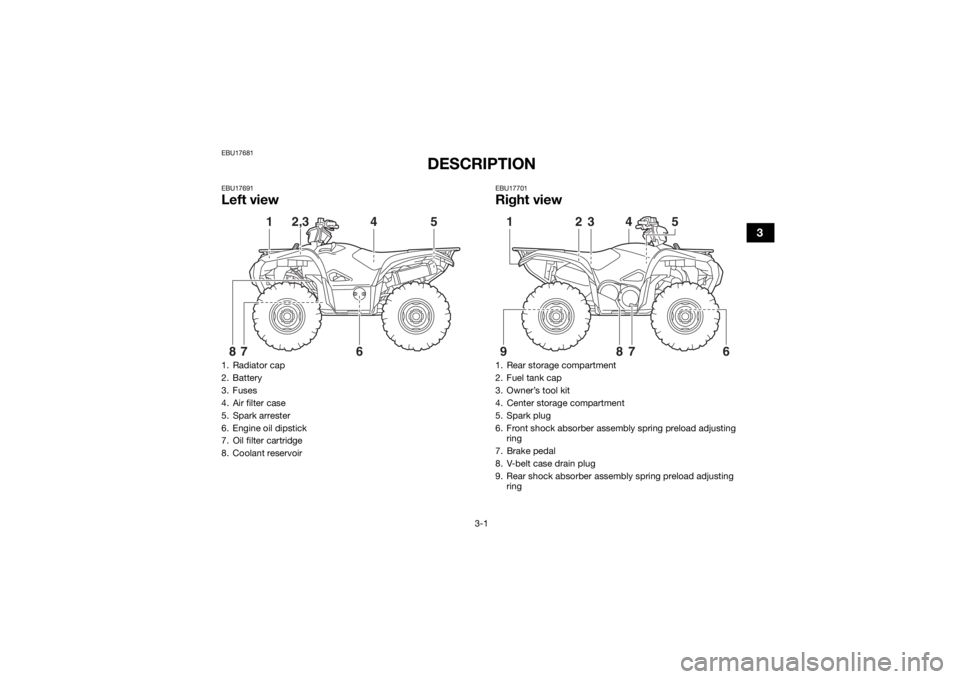
EBU17691Left view
EBU17701Right view
1. Radiator cap
2. Battery
3. Fuses
4. Air filter case
5. Spark arrester
6. Engine oil dipstick
7. Oil filter cartridge
8. Coolant reservoir
5
1
2,3
4
6
7
8
1. Rear storage compartment
2. Fuel tank cap
3. Owner’s tool kit
4. Center storage compartment
5. Spark plug
6. Front shock absorber assembly spring preload adjusting ring
7. Brake pedal
8. V-belt case drain plug
9. Rear shock absorber assembly spring preload adjusting ring
5
1
6
9
2
3
4
78
U2UD61E0.book Page 1 Monday, April 25, 2016 10:55 AM
Page 37 of 174
4-5
4
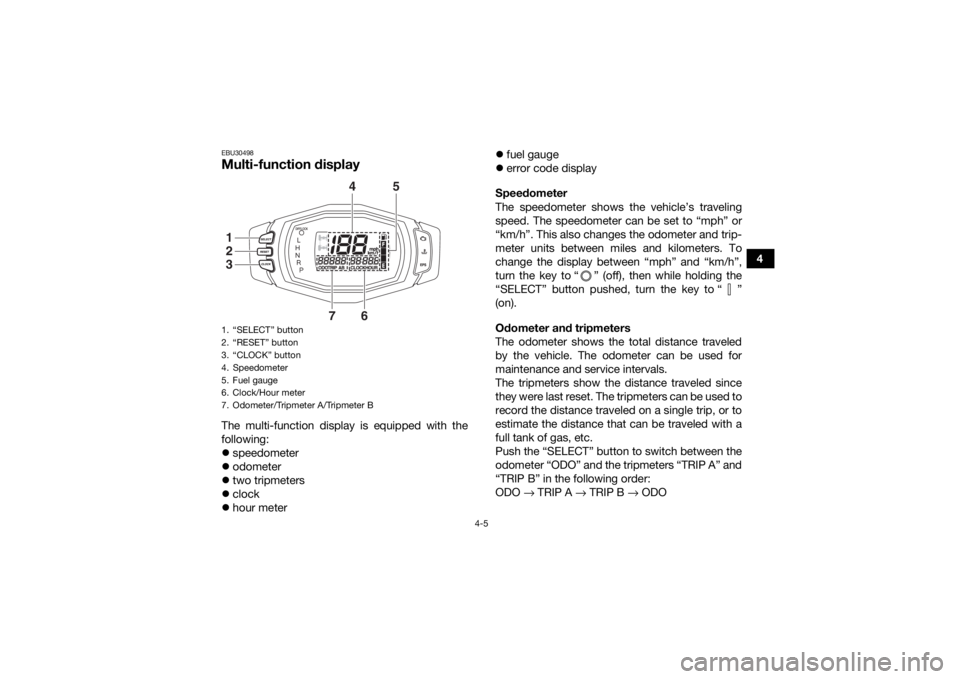
EBU30498Multi-function display The multi-function display is equipped with the
following:
speedometer
odometer
two tripmeters
clock
hour meter
fuel gauge
error code display
Speedometer
The speedometer shows the vehicle’s traveling
speed. The speedometer can be set to “mph” or
“km/h”. This also changes the odometer and trip-
meter units between miles and kilometers. To
change the display between “mph” and “km/h”,
turn the key to “ ” (off), then while holding the
“SELECT” button pushed, turn the key to “ ”
(on).
Odometer and tripmeters
The odometer shows the total distance traveled
by the vehicle. The odometer can be used for
maintenance and service intervals.
The tripmeters show the distance traveled since
they were last reset. The tripmeters can be used to
record the distance traveled on a single trip, or to
estimate the distance that can be traveled with a
full tank of gas, etc.
Push the “SELECT” button to switch between the
odometer “ODO” and the tripmeters “TRIP A” and
“TRIP B” in the following order:
ODO → TRIP A → TRIP B → ODO1. “SELECT” button
2. “RESET” button
3. “CLOCK” button
4. Speedometer
5. Fuel gauge
6. Clock/Hour meter
7. Odometer/Tripmeter A/Tripmeter B
4
5
7
6
123
U2UD61E0.book Page 5 Monday, April 25, 2016 10:55 AM
Page 38 of 174
4-6
4To reset a tripmeter, set the display to the tripme-
ter you want to reset, then push the “RESET” but-
ton for three seconds.
TIP
The odometer will lock at 99999.
The tripmeters will reset and continue counting
after 9999.9 is reached. Clock and hour meter
The clock displays time in 12-hour format.
The hour meter shows the total time the engine
has been running.
Push the “CLOCK” button to switch between the
clock “CLOCK” and the hour meter mode
“HOUR” in the following order:
CLOCK → HOUR → CLOCK
To set the clock1. Set the display to the clock.
2. Push both the “SELECT” button and “RE- SET” button for three seconds. The hour dig-
its will start flashing.
3. Push the “RESET” button to set the hours.
4. Push the “SELECT” button, and the minute digits will start flashing.
5. Push the “RESET” button to set the minutes. 6. Push the “SELECT” button and then release
it to start the clock.
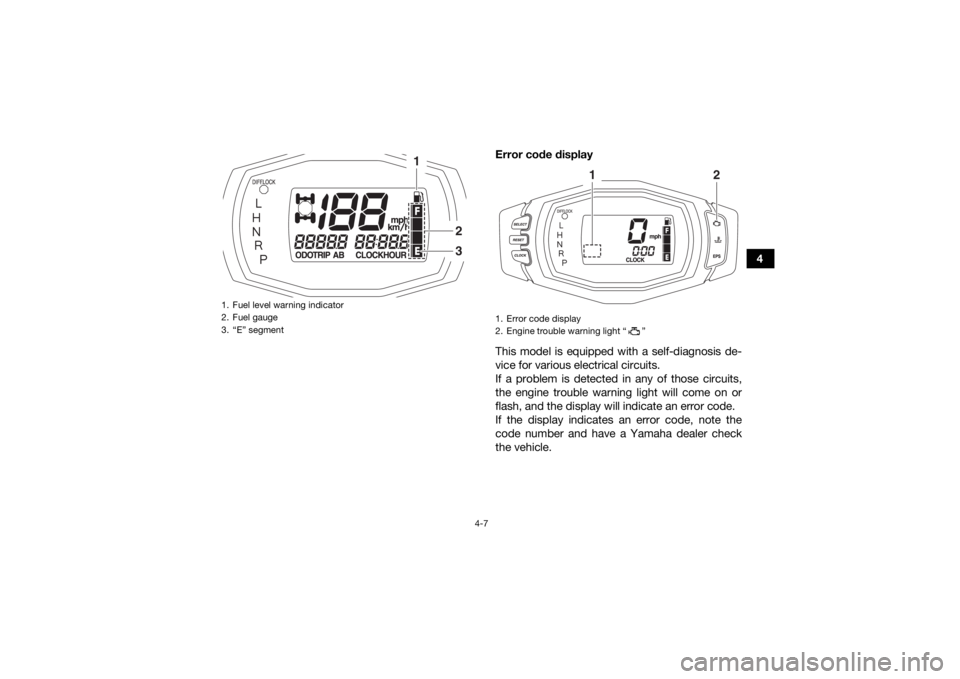
Fuel gauge
The fuel gauge indicates the amount of fuel in the
fuel tank. The display segments of the fuel gauge
disappear from “F” (full) towards “E” (empty) as
the fuel level decreases. When the “E” segment
disappears and the fuel level warning indicator
flashes, refuel as soon as possible.
TIPThe fuel gauge is equipped with a self-diagnosis
system. If the fuel gauge electrical circuit is not
working correctly, all display segments and the
fuel level warning indicator will flash repeatedly. If
this occurs, have a Yamaha dealer check the ve-
hicle.
U2UD61E0.book Page 6 Monday, April 25, 2016 10:55 AM
Page 39 of 174
4-7
4
Error code display
This model is equipped with a self-diagnosis de-
vice for various electrical circuits.
If a problem is detected in any of those circuits,
the engine trouble warning light will come on or
flash, and the display will indicate an error code.
If the display indicates an error code, note the
code number and have a Yamaha dealer check
the vehicle.
1. Fuel level warning indicator
2. Fuel gauge
3. “E” segment
1
23
1. Error code display
2. Engine trouble warning light “ ”
1
2
U2UD61E0.book Page 7 Monday, April 25, 2016 10:55 AM
Page 48 of 174
4-16
4
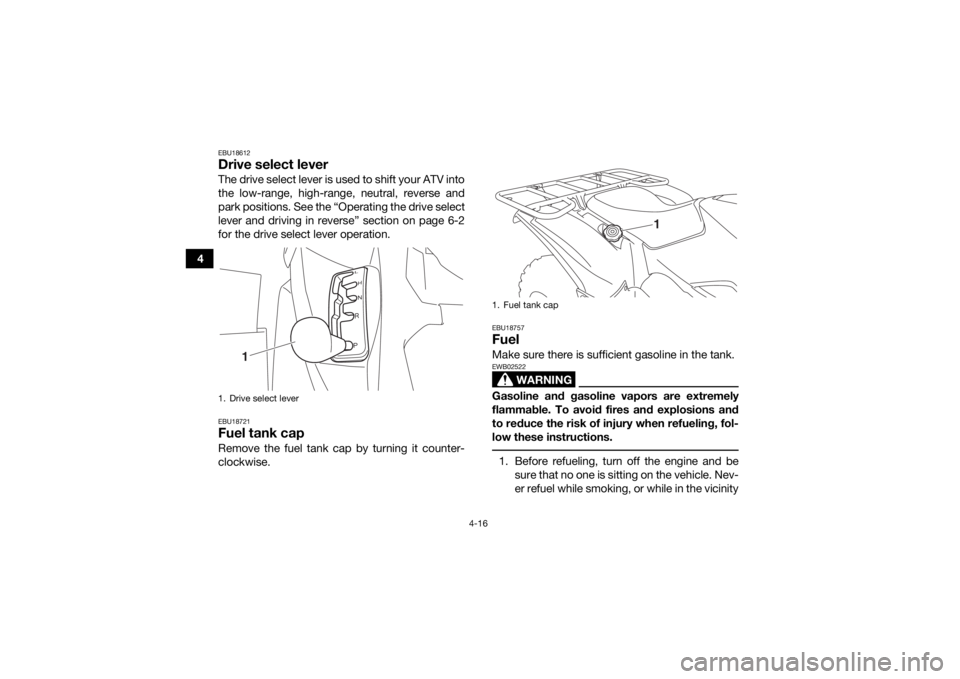
EBU18612Drive select leverThe drive select lever is used to shift your ATV into
the low-range, high-range, neutral, reverse and
park positions. See the “Operating the drive select
lever and driving in reverse” section on page 6-2
for the drive select lever operation.EBU18721Fuel tank capRemove the fuel tank cap by turning it counter-
clockwise.
EBU18757FuelMake sure there is sufficient gasoline in the tank.
WARNING
EWB02522Gasoline and gasoline vapors are extremely
flammable. To avoid fires and explosions and
to reduce the risk of injury when refueling, fol-
low these instructions. 1. Before refueling, turn off the engine and besure that no one is sitting on the vehicle. Nev-
er refuel while smoking, or while in the vicinity
1. Drive select lever
1
1. Fuel tank cap
1
U2UD61E0.book Page 16 Monday, April 25, 2016 10:55 AM
Page 49 of 174
4-17
4
of sparks, open flames, or other sources of
ignition such as the pilot lights of water heat-
ers and clothes dryers.
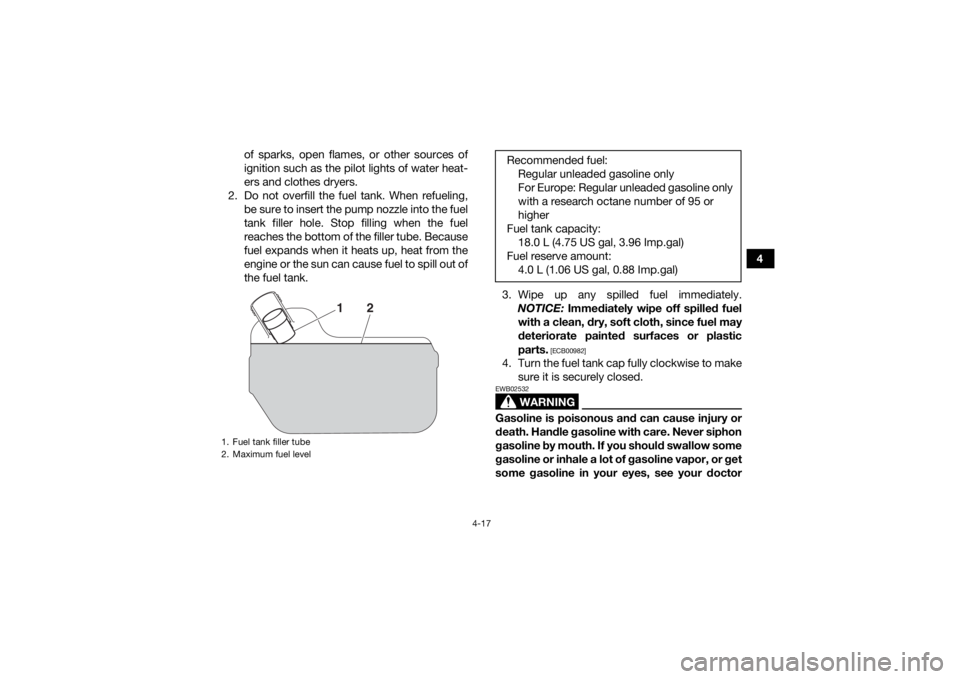
2. Do not overfill the fuel tank. When refueling, be sure to insert the pump nozzle into the fuel
tank filler hole. Stop filling when the fuel
reaches the bottom of the filler tube. Because
fuel expands when it heats up, heat from the
engine or the sun can cause fuel to spill out of
the fuel tank.
3. Wipe up any spilled fuel immediately.NOTICE: Immediately wipe off spilled fuel
with a clean, dry, soft cloth, since fuel may
deteriorate painted surfaces or plastic
parts.
[ECB00982]
4. Turn the fuel tank cap fully clockwise to make sure it is securely closed.
WARNING
EWB02532Gasoline is poisonous and can cause injury or
death. Handle gasoline with care. Never siphon
gasoline by mouth. If you should swallow some
gasoline or inhale a lot of gasoline vapor, or get
some gasoline in your eyes, see your doctor
1. Fuel tank filler tube
2. Maximum fuel level
2
1
Recommended fuel:Regular unleaded gasoline only
For Europe: Regular unleaded gasoline only
with a research octane number of 95 or
higher
Fuel tank capacity: 18.0 L (4.75 US gal, 3.96 Imp.gal)
Fuel reserve amount: 4.0 L (1.06 US gal, 0.88 Imp.gal)
U2UD61E0.book Page 17 Monday, April 25, 2016 10:55 AM