light YAMAHA KODIAK 700 2022 User Guide
[x] Cancel search | Manufacturer: YAMAHA, Model Year: 2022, Model line: KODIAK 700, Model: YAMAHA KODIAK 700 2022Pages: 174, PDF Size: 4.74 MB
Page 29 of 174

5-2
5
YFM700FWBD
EBU17992Low-range indicator light “ ” (YFM700FWBD)
This indicator light comes on when the transmis-
sion is in the low-range position.EBU17982High-range indicator light “ ” (YFM700FWBD)
This indicator light comes on when the transmis-
sion is in the high-range position.EBU17861Neutral indicator light “ ”
This indicator light comes on when the transmis-
sion is in the neutral position.EBU17831Reverse indicator light “ ”
This indicator light comes on when the transmis-
sion is in the reverse position.EBU38270Park indicator light “ ” (YFM700FWB) / “ ”
(YFM700FWBD)
This indicator light comes on when the transmis-
sion is in the park position.
1. Differential gear lo
ck indicator light “ ”
2. Low-range indicator light “L”
3. High-range indicator light “H”
4. Neutral indicator light “N”
5. Reverse indicator light “R”
6. Park indicator light “ ”
7. Four-wheel drive icon “ ”
8. Differential gear lock icon “ ”
9. Electric Power Steering warning light “EPS”
10.High beam indicator light “ ”
11.Battery voltage warning light “ ”
12.Coolant temperature warning light “ ”
13.Engine trouble warning light “ ”1
7,8
23456
910111213
UB5K64E0.book Page 2 Thursday, September 16, 2021 9:00 AM
Page 30 of 174

5-3
5
EBU27982High beam indicator light “ ”
(YFM700FWBD)
This indicator light comes on when the high beam
of the headlight is switched on.EBU38261Battery voltage warning light “ ”
(YFM700FWBD)
This warning light comes on if the detected battery
voltage is less than 10 volts, or greater than 18
volts.EBU38290Coolant temperature warning light “ ”
This warning light comes on when the engine
overheats.
The electrical circuit of the warning light can be
checked by turning the key to “ ” (on). The
warning light should come on for a few seconds,
and then go off. If the warning light does not come
on initially when the key is turned to “ ” (on), or
if the warning light remains on, have a Yamaha
dealer check the vehicle.
NOTICEECB02040The engine may overheat if the vehicle is
overloaded. If this happens, reduce the load
to specification.
After restarting, make sure that the warning
light is out. Continuous use while this warn-
ing light is on may cause damage to the en-
gine. (YFM700FWB)
If the light comes on during operation, stop the ve-
hicle as soon as it is safe to do so and allow the
engine to cool down for about 10 minutes. (See
page 9-67.)
(YFM700FWBD)
The warning light comes on in red when the en-
gine is overheating. If the red light comes on, stop
the vehicle as soon as it is safe to do so and allow
the engine to idle for about 10 minutes. If the
warning light does not go off, stop the engine and
allow it to cool. (See page 9-67.)
UB5K64E0.book Page 3 Thursday, September 16, 2021 9:00 AM
Page 31 of 174

5-4
5
TIPWhen the key is turned to “ ” (on), the warning
light will come on in purple. EBU29933Fuel level warning light “ ” (YFM700FWB)
This warning light comes on when the fuel level
drops below approximately 4.0 L (1.06 US gal,
0.88 Imp.gal). When this occurs, refuel as soon as
possible.
The electrical circuit of the warning light can be
checked by setting the engine stop switch to “ ”
and turning the key to “ ” (on). The warning light
should come on for a few seconds, and then go
off.
If the warning light does not come on initially when
the key is turned to “ ” (on), or if the warning
light remains on, have a Yamaha dealer check the
electrical circuit.EBU27289Engine trouble warning light “ ”
The electrical circuit of the warning light can be
checked by turning the key to “ ” (on). The
warning light should come on for a few seconds,
and then go off.If the warning light does not come on initially when
the key is turned to “ ” (on), or if the warning
light remains on, have a Yamaha dealer check the
vehicle.
(YFM700FWB)
This warning light comes on or flashes when an
electrical circuit monitoring the engine is not work-
ing correctly. When this occurs, have a Yamaha
dealer check the self-diagnostic system.
(YFM700FWBD)
This warning light comes on or flashes if a problem
is detected in the electrical circuit monitoring the
engine. When this occurs, the display will indicate
an error code (see page 5-11). Have a Yamaha
dealer check the self-diagnostic system.
EBU30512Electric Power Steering warning light “EPS”
(YFM700FWBD)
This warning light comes on when the key is
turned to “ ” (on), and then goes off once the
engine is started. If the warning light remains on or
comes on after the engine is started, the EPS sys-
UB5K64E0.book Page 4 Thursday, September 16, 2021 9:00 AM
Page 32 of 174

5-5
5tem may not be working correctly. When this oc-
curs, have a Yamaha dealer check the EPS
system.
The electrical circuit of the warning light can be
checked by turning the key to “ ” (on). If the
warning light does not come on, have a Yamaha
dealer check the electrical circuit.
TIP
If the engine is stopped using the engine stop
switch and the key is in the “ ” (on) position,
the EPS warning light comes on to indicate that
the power assistance for the steering is not
functioning.
If the steering load is too heavy (i.e., excessive
steering use when the ATV is traveling at a slow
speed), the power assist is reduced to protect
the EPS motor from overheating. EBU38280Four-wheel drive indicators
Four-wheel drive indicator light “ ”
(YFM700FWB)
This indicator light comes on when the drivetrain
is set to “4WD” (four-wheel drive).
TIPDue to the synchronizing mechanism in the differ-
ential gear case, the light may not come on until
the ATV starts moving. Four-wheel drive icon “ ” (YFM700FWBD)
This icon comes on when the drivetrain is set to
“4WD” (four-wheel drive).TIPDue to the synchronizing mechanism in the differ-
ential gear case, the indicator may not come on
until the ATV starts moving. Differential gear lock icon “ ” and indicator
light “ ” (YFM700FWBD)
This icon and this indicator light come on when
the drivetrain is set to “4WD” with the differential
gear locked.TIPWhen the On-Command differential gear lock
switch is set to “LOCK” or “4WD”, the “ ” icon
and the “ ” indicator light will flash until the dif-
UB5K64E0.book Page 5 Thursday, September 16, 2021 9:00 AM
Page 38 of 174

5-11
52. Use the “RESET” button to set the brightness
level.
3. Push the “SELECT” button to confirm the se- lected brightness level and exit the brightness
control mode.
Error code display
This model is equipped with a self-diagnostic de-
vice for various electrical circuits.
If a problem is detected in any of those circuits,
the engine trouble warning light will come on or
flash, and the display will indicate an error code. If the display indicates an error code, note the
code number and have a Yamaha dealer check
the vehicle.
NOTICEECB00812If the multi-function display indicates an error
code, the vehicle should be checked as soon
as possible in order to avoid engine damage.
1. Error code display
2. Engine trouble warning light “ ”
2
1
UB5K64E0.book Page 11 Thursday, September 16, 2021 9:00 AM
Page 39 of 174

5-12
5
EBU18068Handlebar switchesYFM700FWBYFM700FWBD1. Light switch “ / /OFF”
2. Engine stop switch “ / ”
3. Start switch “ ”
4. Horn switch “ ”
5. Winch switch “OUT/IN”
34521
1. Light switch
Page 40 of 174

5-13
5YFM700FWBD
EBU18081Engine stop switch “ / ”
Set this switch to “ ” before starting the engine.
The engine stop switch controls the ignition and
stops the engine when it is running. Use this
switch to stop the engine in an emergency situa-
tion. The engine will not start or run when this
switch is set to “ ”.
EBU18102Start switch “ ”
Push this switch to crank the engine with the start-
er. See the starting instructions on page 7-1 prior
to starting the engine.EBU34123Light switch “ / /OFF”
Set this switch to “ ” to turn on the left and right
headlights (low beams) and the taillight. Set the
switch to “ ” to turn on the left and right head-
lights (high beams), the handlebar-mounted light
(YFM700FWBD), and the taillight. Set the switch
to “OFF” to turn off all the lights.NOTICEECB00046Do not use the headlights with the engine
turned off for an extended period of time. The
battery may discharge to the point that the
starter will not have enough power to crank the
engine. If this should happen, remove the bat-
tery and recharge it. (See page 9-53.) EBU18171Horn switch “ ”
Press the switch to sound the horn.
1. On-Command drive switch “2WD/4WD”
2. On-Command drive switch “4WD/LOCK”
3. Drive switch lock lever
2WD
4WD
LOCK4WD
3
3
2
1
UB5K64E0.book Page 13 Thursday, September 16, 2021 9:00 AM
Page 43 of 174

5-16
5
The ATV handles differently in four-wheel drive
than in differential gear lock in some circum-
stances. Changing from four-wheel drive to
differential gear lock or vice versa while mov-
ing may cause the ATV to handle differently un-
expectedly. This could distract the operator
and increase the risk of losing control and
causing an accident.
To access the “4WD/LOCK” switch, set the
“2WD/4WD” switch to “4WD”, and then move the
drive switch lock lever to the right.
TIP
When the switch is set to “LOCK” or “4WD”, the
differential gear lock icon and indicator light will
flash until the differential gear is completely
locked or unlocked.
When the icon and indicator light are flashing,
turning the handlebar back and forth will help
the differential gear lock to engage or disen-
gage.
Riding before the differential gear is properly en-
gaged or disengaged (e.g., when the icon and
indicator light are flashing) will cause the vehicle
speed to be limited until the differential gear is
completely engaged or disengaged.
When the ATV is in four-wheel-drive differential
gear lock, the maximum traveling speed is limit-
ed to 35 km/h (22 mi/h). However, if conditions
require full engine power to be available, push
and hold the override switch to disable the dif-
ferential gear lock speed limiter. (See page
5-14.)
1. On-Command drive switch “4WD/LOCK”
2. Drive switch lock lever
LOCK4WD
1
2
UB5K64E0.book Page 16 Thursday, September 16, 2021 9:00 AM
Page 49 of 174
5-22
5
of sparks, open flames, or other sources of
ignition such as the pilot lights of water heat-
ers and clothes dryers.
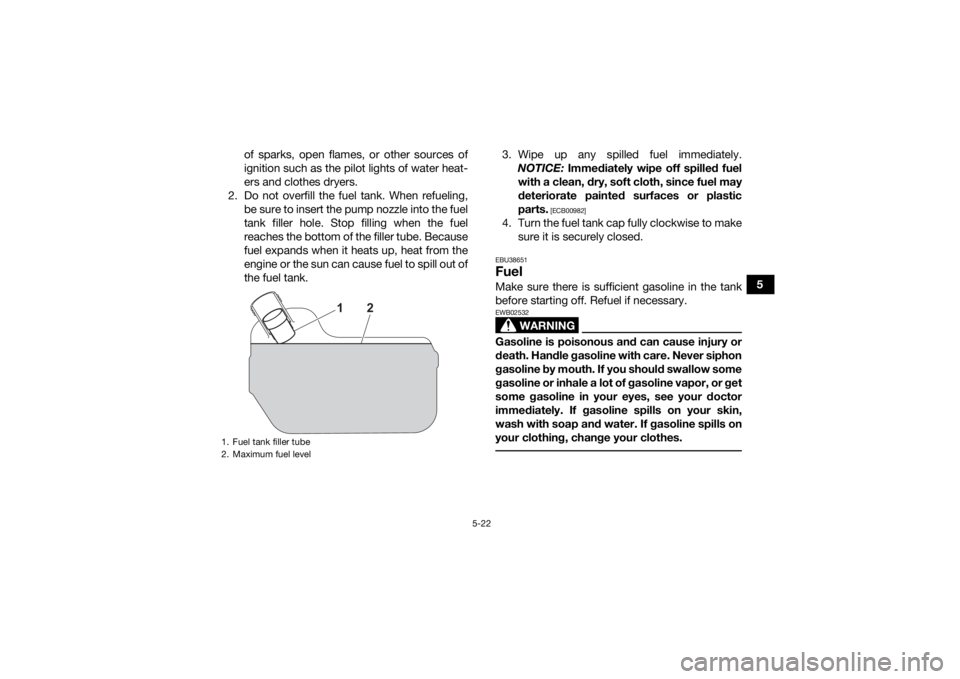
2. Do not overfill the fuel tank. When refueling, be sure to insert the pump nozzle into the fuel
tank filler hole. Stop filling when the fuel
reaches the bottom of the filler tube. Because
fuel expands when it heats up, heat from the
engine or the sun can cause fuel to spill out of
the fuel tank. 3. Wipe up any spilled fuel immediately.
NOTICE: Immediately wipe off spilled fuel
with a clean, dry, soft cloth, since fuel may
deteriorate painted surfaces or plastic
parts.
[ECB00982]
4. Turn the fuel tank cap fully clockwise to make sure it is securely closed.EBU38651FuelMake sure there is sufficient gasoline in the tank
before starting off. Refuel if necessary.
WARNING
EWB02532Gasoline is poisonous and can cause injury or
death. Handle gasoline with care. Never siphon
gasoline by mouth. If you should swallow some
gasoline or inhale a lot of gasoline vapor, or get
some gasoline in your eyes, see your doctor
immediately. If gasoline spills on your skin,
wash with soap and water. If gasoline spills on
your clothing, change your clothes.
1. Fuel tank filler tube
2. Maximum fuel level
2
1
UB5K64E0.book Page 22 Thursday, September 16, 2021 9:00 AM
Page 57 of 174

5-30
5
EBU19187Auxiliary DC jackNOTICEECB03760Do not use any single electrical accessory or
combination of accessories that require more
than the stated capacity at any one time. This
may overload the circuit and cause the fuse to
blow.
TIPWhen using a winch or other electrical accesso-
ries, the power taken from the DC jack must be re-
duced accordingly. A 12-V accessory, such as a work light or radio
with the proper adapter, can be used when the
main switch is turned on. However, to prevent bat-
tery drain, use when the engine is running and the
headlights are turned off.1. Start the engine.
2. Turn the headlights off.
3. Make sure the accessory is powered off.
4. Open the auxiliary DC jack cap.
5. Insert the accessory power plug into the jack.
6. Turn the accessory on.TIP Turn off the accessory before plugging into/un-
plugging from the jack.
When the auxiliary DC jack is not being used,
cover it with the cap.
1. Auxiliary DC jack cap
2. Auxiliary DC jackAuxiliary DC jack system capacity:
8.0 A (96 W)
21
UB5K64E0.book Page 30 Thursday, September 16, 2021 9:00 AM