lock YAMAHA MT-25 2016 Owners Manual
[x] Cancel search | Manufacturer: YAMAHA, Model Year: 2016, Model line: MT-25, Model: YAMAHA MT-25 2016Pages: 96, PDF Size: 5.16 MB
Page 6 of 96
Table of contentsSafety information............................ 1-1
Description....................................... 2-1
Left view ......................................... 2-1
Right view ....................................... 2-2
Controls and instruments ............... 2-3
Instrument and control functions... 3-1
Main switch/steering lock............... 3-1
Indicator lights and warning
lights............................................ 3-2
Multi-function meter unit ................ 3-4
Handlebar switches ...................... 3-10
Clutch lever .................................. 3-11
Shift pedal .................................... 3-12
Brake lever.................................... 3-12
Brake pedal .................................. 3-12
Fuel tank cap ................................ 3-13
Fuel ............................................... 3-13
Fuel tank breather hose and
overflow hose ............................ 3-15
Catalytic converter ....................... 3-15
Seats ............................................ 3-16
Helmet holders ............................. 3-17
Storage compartment .................. 3-18
Adjusting the shock absorber
assembly ................................... 3-18
Luggage strap holders ................. 3-19
Sidestand ..................................... 3-19
Ignition circuit cut-off system ....... 3-20For your safety – pre-operation
checks............................................... 4-1
Operation and important riding
points................................................. 5-1
Starting the engine .......................... 5-1
Shifting ............................................ 5-2
Tips for reducing fuel
consumption ................................ 5-3
Engine break-in ............................... 5-3
Parking ............................................ 5-4
Periodic maintenance and
adjustment........................................ 6-1
Owner’s tool kit ............................... 6-1
Periodic maintenance chart for
the emission control system ........ 6-3
General maintenance and
lubrication chart ........................... 6-4
Checking the spark plugs ............... 6-8
Engine oil and oil filter cartridge...... 6-9
Coolant.......................................... 6-12
Replacing the air filter element
and cleaning the check hose..... 6-13
Checking the throttle grip
free play ..................................... 6-15
Valve clearance ............................. 6-15
Tires .............................................. 6-15
Cast wheels................................... 6-17
Adjusting the clutch lever
free play ..................................... 6-17Checking the brake lever
free play..................................... 6-18
Brake light switches ..................... 6-19
Checking the front and rear
brake pads ................................ 6-19
Checking the brake fluid level ...... 6-20
Changing the brake fluid .............. 6-21
Drive chain slack........................... 6-21
Cleaning and lubricating the
drive chain ................................. 6-23
Checking and lubricating the
cables ........................................ 6-24
Checking and lubricating the
throttle grip and cable ............... 6-24
Checking and lubricating the
brake and shift pedals............... 6-24
Checking and lubricating the
brake and clutch levers ............. 6-25
Checking and lubricating the
sidestand................................... 6-26
Lubricating the swingarm
pivots......................................... 6-26
Checking the front fork ................. 6-26
Checking the steering................... 6-27
Checking the wheel bearings ....... 6-27
Battery .......................................... 6-28
Replacing the fuses ...................... 6-29
Replacing the headlight bulb ........ 6-30
Auxiliary light ................................ 6-31
Tail/brake light .............................. 6-31UB04E0E0.book Page 1 Wednesday, September 2, 2015 3:51 PM
Page 13 of 96
Description
2-1
2
EAU10411
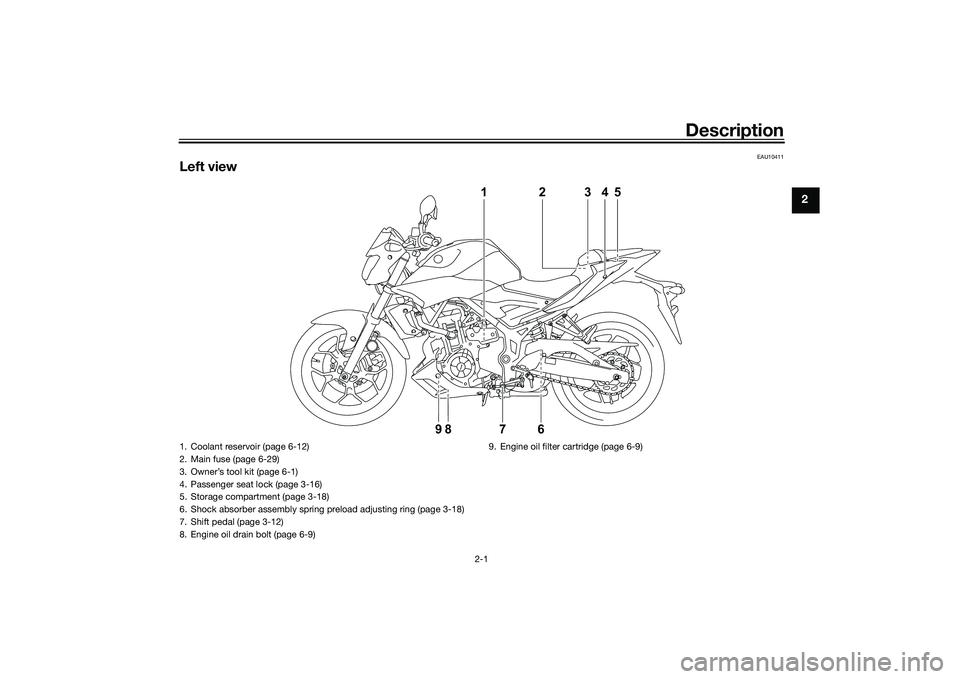
Left view
1
762345
98
1. Coolant reservoir (page 6-12)
2. Main fuse (page 6-29)
3. Owner’s tool kit (page 6-1)
4. Passenger seat lock (page 3-16)
5. Storage compartment (page 3-18)
6. Shock absorber assembly spring preload adjusting ring (page 3-18)
7. Shift pedal (page 3-12)
8. Engine oil drain bolt (page 6-9)9. Engine oil filter cartridge (page 6-9)
UB04E0E0.book Page 1 Wednesday, September 2, 2015 3:51 PM
Page 15 of 96
Description
2-3
2
EAU10431
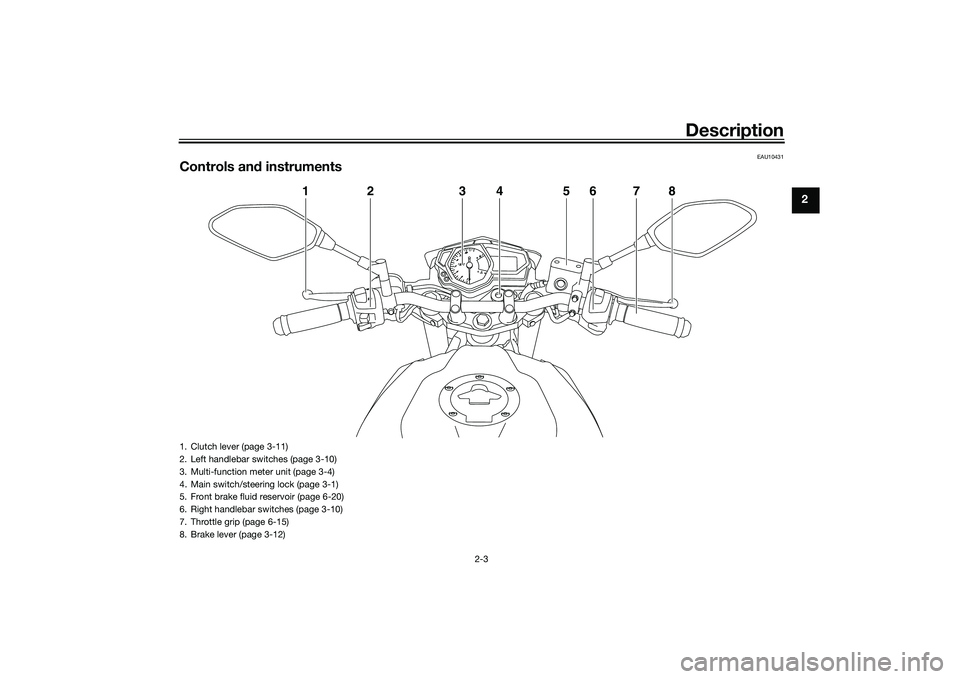
Controls and instruments
1
2
3
4
5
6
7
8
1. Clutch lever (page 3-11)
2. Left handlebar switches (page 3-10)
3. Multi-function meter unit (page 3-4)
4. Main switch/steering lock (page 3-1)
5. Front brake fluid reservoir (page 6-20)
6. Right handlebar switches (page 3-10)
7. Throttle grip (page 6-15)
8. Brake lever (page 3-12)
UB04E0E0.book Page 3 Wednesday, September 2, 2015 3:51 PM
Page 16 of 96
Instrument and control functions
3-1
3
EAU10462
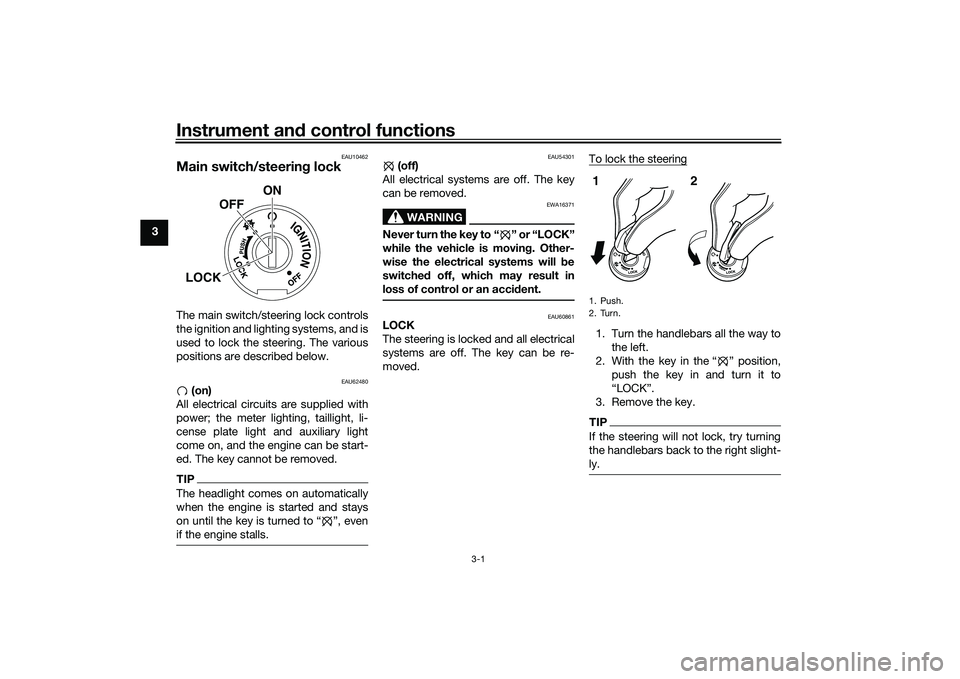
Main switch/steering lockThe main switch/steering lock controls
the ignition and lighting systems, and is
used to lock the steering. The various
positions are described below.
EAU62480
(on)
All electrical circuits are supplied with
power; the meter lighting, taillight, li-
cense plate light and auxiliary light
come on, and the engine can be start-
ed. The key cannot be removed.
TIPThe headlight comes on automatically
when the engine is started and stays
on until the key is turned to Ž, even
if the engine stalls.
EAU54301
(off)
All electrical systems are off. The key
can be removed.
WARNING
EWA16371
Never turn the key to “ ” or “LOCK”
while the vehicle is moving. Other-
wise the electrical systems will be
switched off, which may result in
loss of control or an accident.
EAU60861
LOCK
The steering is locked and all electrical
systems are off. The key can be re-
moved.To lock the steering
1. Turn the handlebars all the way to
the left.
2. With the key in the “ ” position,
push the key in and turn it to
“LOCK”.
3. Remove the key.TIPIf the steering will not lock, try turning
the handlebars back to the right slight-
ly.
ON
OFF
LOCK
1. Push.
2. Turn.12
UB04E0E0.book Page 1 Wednesday, September 2, 2015 3:51 PM
Page 17 of 96
Instrument and control functions
3-2
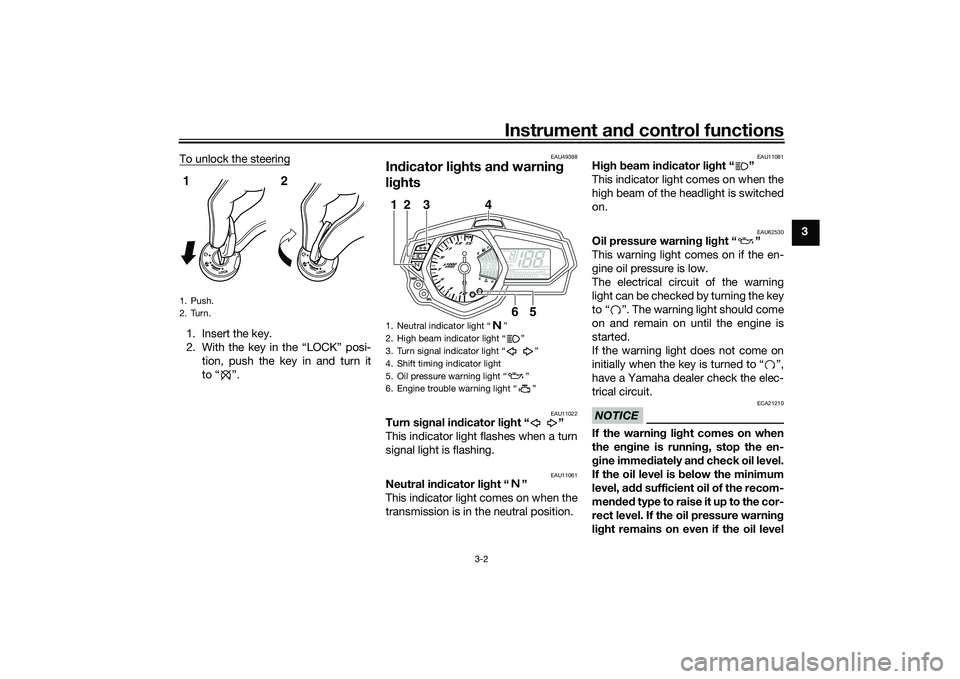
3 To unlock the steering
1. Insert the key.
2. With the key in the “LOCK” posi-
tion, push the key in and turn it
to “ ”.
EAU49398
Indicator lights and warning
lights
EAU11022
Turn signal indicator light “ ”
This indicator light flashes when a turn
signal light is flashing.
EAU11061
Neutral indicator light “ ”
This indicator light comes on when the
transmission is in the neutral position.
EAU11081
High beam indicator light “ ”
This indicator light comes on when the
high beam of the headlight is switched
on.
EAU62530
Oil pressure warning light “ ”
This warning light comes on if the en-
gine oil pressure is low.
The electrical circuit of the warning
light can be checked by turning the key
to “ ”. The warning light should come
on and remain on until the engine is
started.
If the warning light does not come on
initially when the key is turned to “ ”,
have a Yamaha dealer check the elec-
trical circuit.NOTICE
ECA21210
If the warning light comes on when
the engine is running, stop the en-
gine immediately and check oil level.
If the oil level is below the minimum
level, add sufficient oil of the recom-
mended t y p e t o r a i s e i t u p t o t h e c o r -
rect level. If the oil pressure warning
light remains on even if the oil level
1. Push.
2. Turn.12
1. Neutral indicator light Ž
2. High beam indicator light Ž
3. Turn signal indicator light Ž
4. Shift timing indicator light
5. Oil pressure warning light Ž
6. Engine trouble warning light Ž
6
5
3
1
2
4
UB04E0E0.book Page 2 Wednesday, September 2, 2015 3:51 PM
Page 19 of 96
Instrument and control functions
3-4
3
EAU62765
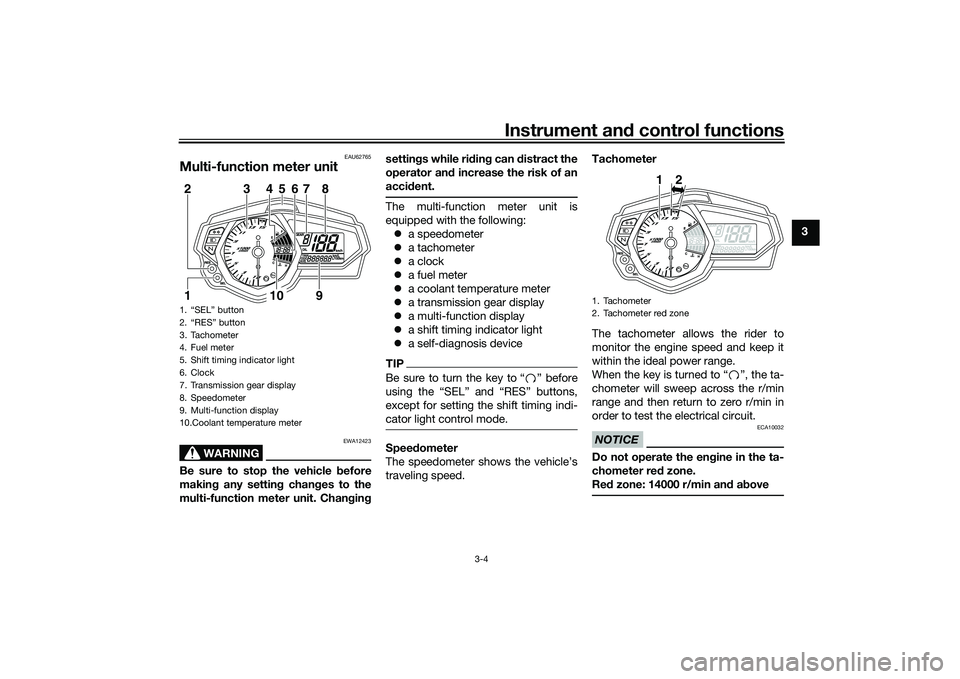
Multi-function meter unit
WARNING
EWA12423
Be sure to stop the vehicle before
making any setting changes to the
multi-function meter unit. Changingsettings while riding can distract the
operator and increase the risk of an
accident.
The multi-function meter unit is
equipped with the following:
a speedometer
a tachometer
a clock
a fuel meter
a coolant temperature meter
a transmission gear display
a multi-function display
a shift timing indicator light
a self-diagnosis deviceTIPBe sure to turn the key to Ž before
except for setting the shift timing indi-
cator light control mode.Speedometer
The speedometer shows the vehicle’s
traveling speed.Tachometer
The tachometer allows the rider to
monitor the engine speed and keep it
within the ideal power range.
When the key is turned to “ ”, the ta-
chometer will sweep across the r/min
range and then return to zero r/min in
order to test the electrical circuit.
NOTICE
ECA10032
Do not operate the engine in the ta-
chometer red zone.
Red zone: 14000 r/min and above
1. “SEL” button
2. “RES” button
3. Tachometer
4. Fuel meter
5. Shift timing indicator light
6. Clock
7. Transmission gear display
8. Speedometer
9. Multi-function display
10.Coolant temperature meter
10
9
1
3
2
4
6
5
7
8
1. Tachometer
2. Tachometer red zone
12
UB04E0E0.book Page 4 Wednesday, September 2, 2015 3:51 PM
Page 20 of 96
Instrument and control functions
3-5
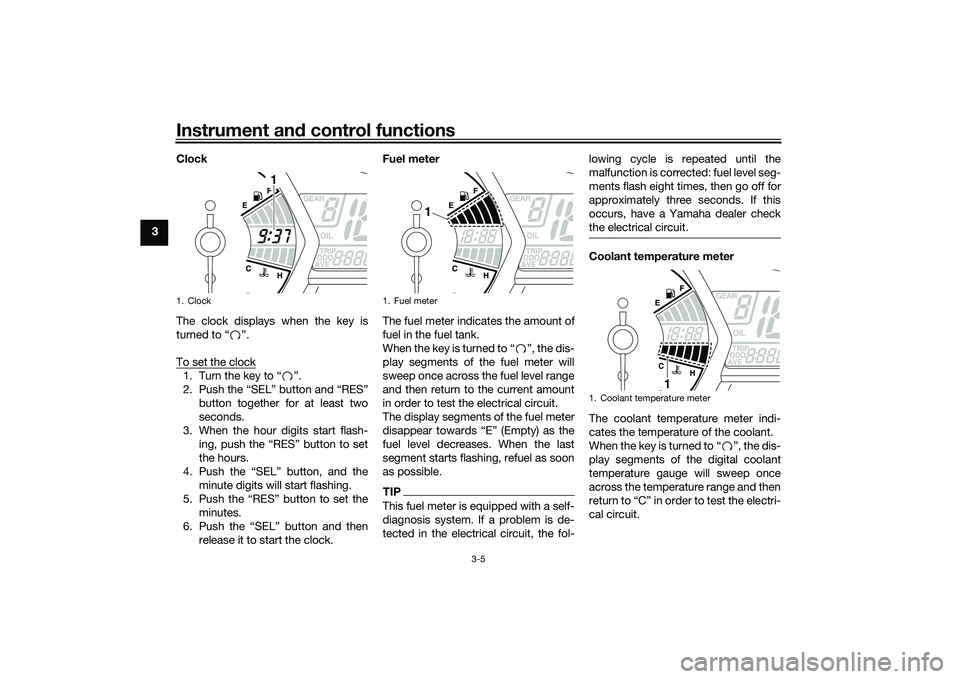
3Clock
The clock displays when the key is
turned to “ ”.
To set the clock
1. Turn the key to “ ”.
2. Push the “SEL” button and “RES”
button together for at least two
seconds.
3. When the hour digits start flash-
ing, push the “RES” button to set
the hours.
4. Push the “SEL” button, and the
minute digits will start flashing.
5. Push the “RES” button to set the
minutes.
6. Push the “SEL” button and then
release it to start the clock.Fuel meter
The fuel meter indicates the amount of
fuel in the fuel tank.
When the key is turned to “ ”, the dis-
play segments of the fuel meter will
sweep once across the fuel level range
and then return to the current amount
in order to test the electrical circuit.
The display segments of the fuel meter
disappear towards “E” (Empty) as the
fuel level decreases. When the last
segment starts flashing, refuel as soon
as possible.
TIPThis fuel meter is equipped with a self-
diagnosis system. If a problem is de-
tected in the electrical circuit, the fol-lowing cycle is repeated until the
malfunction is corrected: fuel level seg-
ments flash eight times, then go off for
approximately three seconds. If this
occurs, have a Yamaha dealer check
the electrical circuit.
Coolant temperature meter
The coolant temperature meter indi-
cates the temperature of the coolant.
When the key is turned to “ ”, the dis-
play segments of the digital coolant
temperature gauge will sweep once
across the temperature range and then
return to “C” in order to test the electri-
cal circuit.
1. Clock
1
1. Fuel meter
1
1. Coolant temperature meter
1
UB04E0E0.book Page 5 Wednesday, September 2, 2015 3:51 PM
Page 22 of 96
Instrument and control functions
3-7
3stantaneous fuel consumption and av-
erage fuel consumption modes in the
following order:
TRIP F → km/L or L/100 km → AVE_
_._ km/L or AVE_ _._ L/100 km → OIL
TRIP → ODO → TRIP 1 → TRIP 2 →
TRIP F
To reset a tripmeter, select it by push-
ing the “SEL” button, and then push
the “RES” button for at least one sec-
ond.
If you do not reset the fuel reserve trip-
meter manually, it resets itself auto-
matically and the display returns to the
prior mode after refueling and traveling
5 km (3 mi).
TIPThe odometer will lock at 999999.
The tripmeters will reset and con-
tinue counting after 9999.9 is
reached.
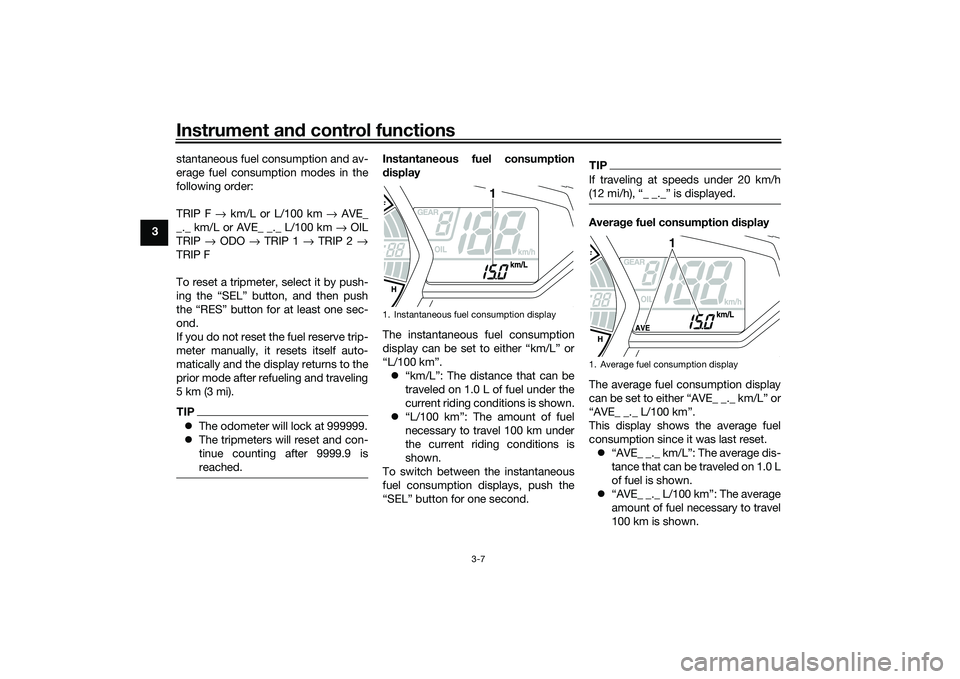
Instantaneous fuel consumption
display
The instantaneous fuel consumption
display can be set to either “km/L” or
“L/100 km”.
“km/L”: The distance that can be
traveled on 1.0 L of fuel under the
current riding conditions is shown.
“L/100 km”: The amount of fuel
necessary to travel 100 km under
the current riding conditions is
shown.
To switch between the instantaneous
fuel consumption displays, push the
“SEL” button for one second.
TIPIf traveling at speeds under 20 km/h
Average fuel consumption display
The average fuel consumption display
can be set to either “AVE_ _._ km/L” or
“AVE_ _._ L/100 km”.
This display shows the average fuel
consumption since it was last reset.
“AVE_ _._ km/L”: The average dis-
tance that can be traveled on 1.0 L
of fuel is shown.
“AVE_ _._ L/100 km”: The average
amount of fuel necessary to travel
100 km is shown.
1. Instantaneous fuel consumption display
1
1. Average fuel consumption display
1
UB04E0E0.book Page 7 Wednesday, September 2, 2015 3:51 PM
Page 28 of 96
Instrument and control functions
3-13
3
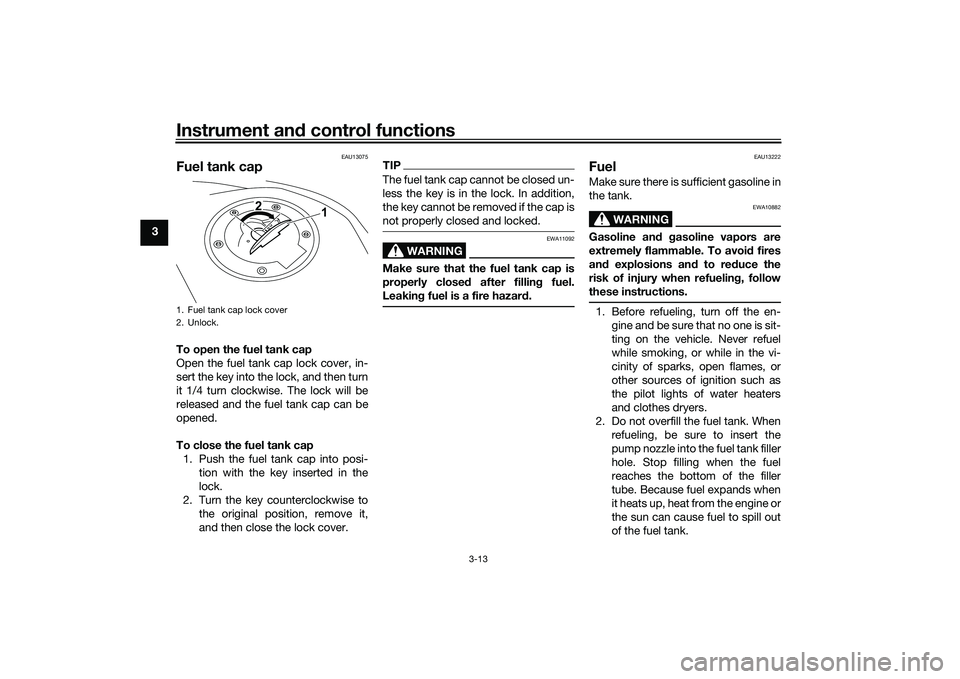
EAU13075
Fuel tank capTo open the fuel tank cap
Open the fuel tank cap lock cover, in-
sert the key into the lock, and then turn
it 1/4 turn clockwise. The lock will be
released and the fuel tank cap can be
opened.
To close the fuel tank cap
1. Push the fuel tank cap into posi-
tion with the key inserted in the
lock.
2. Turn the key counterclockwise to
the original position, remove it,
and then close the lock cover.
TIPThe fuel tank cap cannot be closed un-
less the key is in the lock. In addition,
the key cannot be removed if the cap is
not properly closed and locked.
WARNING
EWA11092
Make sure that the fuel tank cap is
properly closed after filling fuel.
Leaking fuel is a fire hazard.
EAU13222
FuelMake sure there is sufficient gasoline in
the tank.
WARNING
EWA10882
Gasoline and gasoline vapors are
extremely flammable. To avoid fires
and explosions and to reduce the
risk of injury when refueling, follow
these instructions.1. Before refueling, turn off the en-
gine and be sure that no one is sit-
ting on the vehicle. Never refuel
while smoking, or while in the vi-
cinity of sparks, open flames, or
other sources of ignition such as
the pilot lights of water heaters
and clothes dryers.
2. Do not overfill the fuel tank. When
refueling, be sure to insert the
pump nozzle into the fuel tank filler
hole. Stop filling when the fuel
reaches the bottom of the filler
tube. Because fuel expands when
it heats up, heat from the engine or
the sun can cause fuel to spill out
of the fuel tank.
1. Fuel tank cap lock cover
2. Unlock.
1 2
UB04E0E0.book Page 13 Wednesday, September 2, 2015 3:51 PM
Page 30 of 96
Instrument and control functions
3-15
3
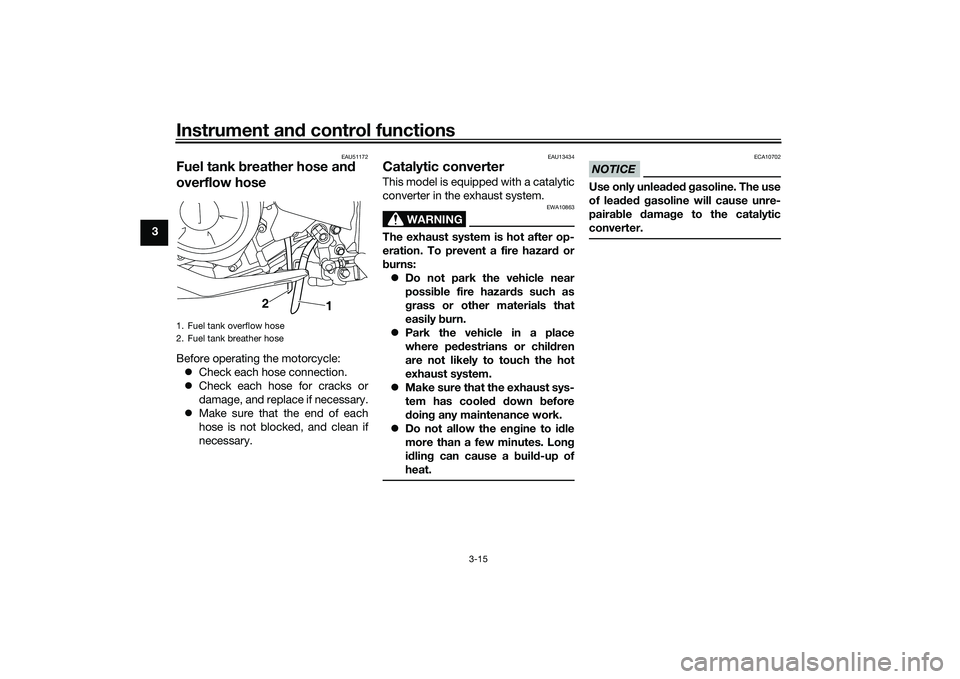
EAU51172
Fuel tank breather hose and
overflow hoseBefore operating the motorcycle:
Check each hose connection.
Check each hose for cracks or
damage, and replace if necessary.
Make sure that the end of each
hose is not blocked, and clean if
necessary.
EAU13434
Catalytic converterThis model is equipped with a catalytic
converter in the exhaust system.
WARNING
EWA10863
The exhaust system is hot after op-
eration. To prevent a fire hazard or
burns:
Do not park the vehicle near
possible fire hazards such as
grass or other materials that
easily burn.
Park the vehicle in a place
where pedestrians or children
are not likely to touch the hot
exhaust system.
Make sure that the exhaust sys-
tem has cooled down before
doing any maintenance work.
Do not allow the engine to idle
more than a few minutes. Long
idling can cause a build-up of
heat.
NOTICE
ECA10702
Use only unleaded gasoline. The use
of leaded gasoline will cause unre-
pairable damage to the catalytic
converter.
1. Fuel tank overflow hose
2. Fuel tank breather hose
2
1
UB04E0E0.book Page 15 Wednesday, September 2, 2015 3:51 PM