wheel YAMAHA RHINO 700 2013 User Guide
[x] Cancel search | Manufacturer: YAMAHA, Model Year: 2013, Model line: RHINO 700, Model: YAMAHA RHINO 700 2013Pages: 188, PDF Size: 4.9 MB
Page 44 of 188
4-14
●
“4WD” (four-wheel drive): Power is sup-
plied to the rear and front wheels.
●
“LOCK” (four-wheel drive with the differen-
tial gear locked): Power is supplied to the
rear and front wheels with the differential
gear locked. Unlike the “4WD” mode, all
wheels turn at the same speed regardless
of traction.
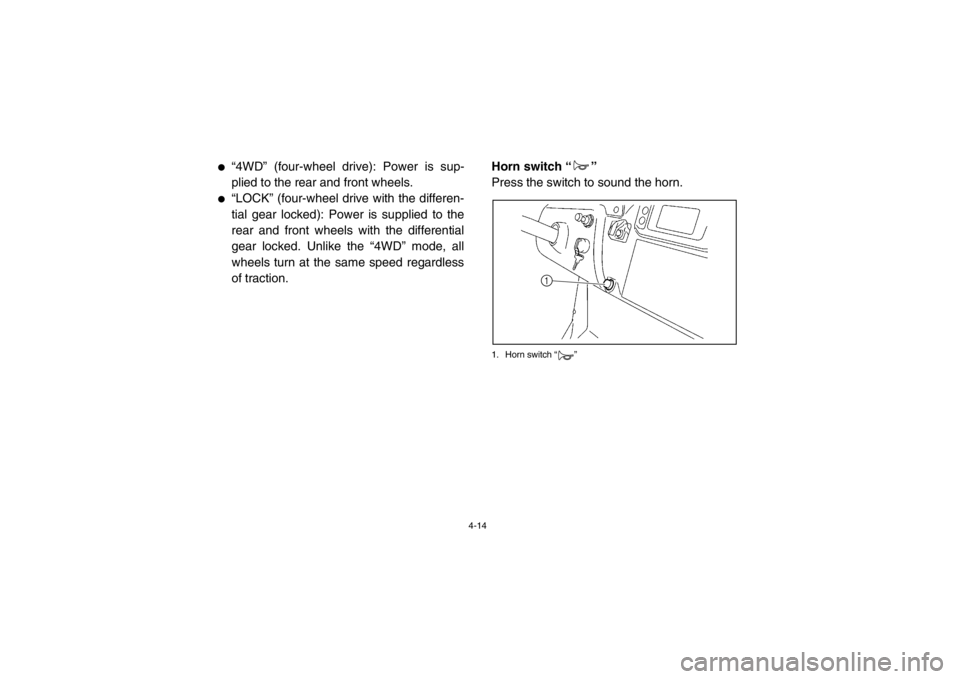
EVU01280Horn switch “ ”
Press the switch to sound the horn.1. Horn switch “ ”
1
1RB7A_EE.book Page 14 Tuesday, April 24, 2012 9:07 AM
Page 54 of 188
4-24
The rear wheels need to be removed to adjust
the rear shock absorber assemblies. (See
pages 8-44–8-46 for wheel removal and in-
stallation procedures.)
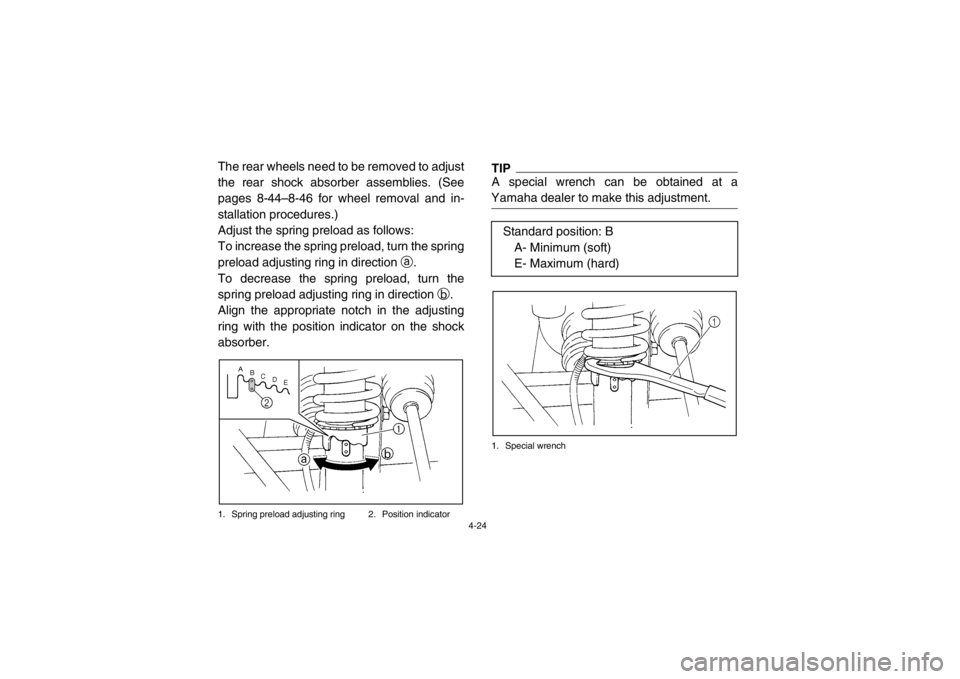
Adjust the spring preload as follows:
To increase the spring preload, turn the spring
preload adjusting ring in direction a.
To decrease the spring preload, turn the
spring preload adjusting ring in direction b.
Align the appropriate notch in the adjusting
ring with the position indicator on the shock
absorber.1. Spring preload adjusting ring 2. Position indicator
TIPA special wrench can be obtained at a
Yamaha dealer to make this adjustment.1. Special wrench
Standard position: B A- Minimum (soft)
E- Maximum (hard)
1RB7A_EE.book Page 24 Tuesday, April 24, 2012 9:07 AM
Page 69 of 188

5-2
1
2
3
45
6
7
8
9
10
11
12
13
14
Final gear oil/
Differential gear oil
Check for leakage. 5-7, 8-15–8-21
Accelerator pedal Check for proper accelerator pedal operation. 5-7
Seat belts Check for proper operation and belt wear. 5-7–5-8
Steering Check for proper operation. 5-8
Fittings and fasteners Check all fittings and fasteners. 5-8
Instruments, lights and
switches Check operation, and correct if necessary. 5-8, 8-55–8-60
Wheels and tires Check tire pressure and for wear and damage. 5-9–5-10, 8-44–8-46
Axle boots Check for damage. 8-23–8-24
ITEM ROUTINE PAGE
1RB7A_EE.book Page 2 Tuesday, April 24, 2012 9:07 AM
Page 75 of 188

5-8
A crash can damage the restraint systems in
your vehicle. A damaged restraint system
may not properly protect the person using it,
resulting in serious injury or death in a crash.
To help make sure your restraint systems are
working properly after a crash, have them in-
spected and any necessary replacements
made as soon as possible.EVU01230Steering
Park on level ground. Turn the steering wheel
right and left. Check for excessive free play,
abnormal noises, or a rough feeling. Have a
Yamaha dealer repair as necessary for proper
operation.EVU00470Fittings and fasteners
Always check the tightness of chassis fittings
and fasteners before a ride. Take the vehicle
to a Yamaha dealer or refer to the Service
Manual for correct tightening torque.Instruments, lights and switches
Check that all instruments, lights and switches
are working properly. Correct if necessary.
Control cables
When riding in cold weather, always make
sure all control cables work smoothly before
you begin riding.
WARNING! Control cables
can freeze in cold weather and you could
be unable to control the vehicle.1RB7A_EE.book Page 8 Tuesday, April 24, 2012 9:07 AM
Page 83 of 188
6-6
5B410009On-Command four-wheel-drive switch and
differential gear lock switch
You may notice that the vehicle handles dif-
ferently in “2WD”, “4WD”, and “LOCK”. For
example, you should expect that the vehicle
will require more effort to turn in “LOCK”. Al-
ways stop the vehicle before changing be-
tween “2WD” and “4WD” or “4WD” and
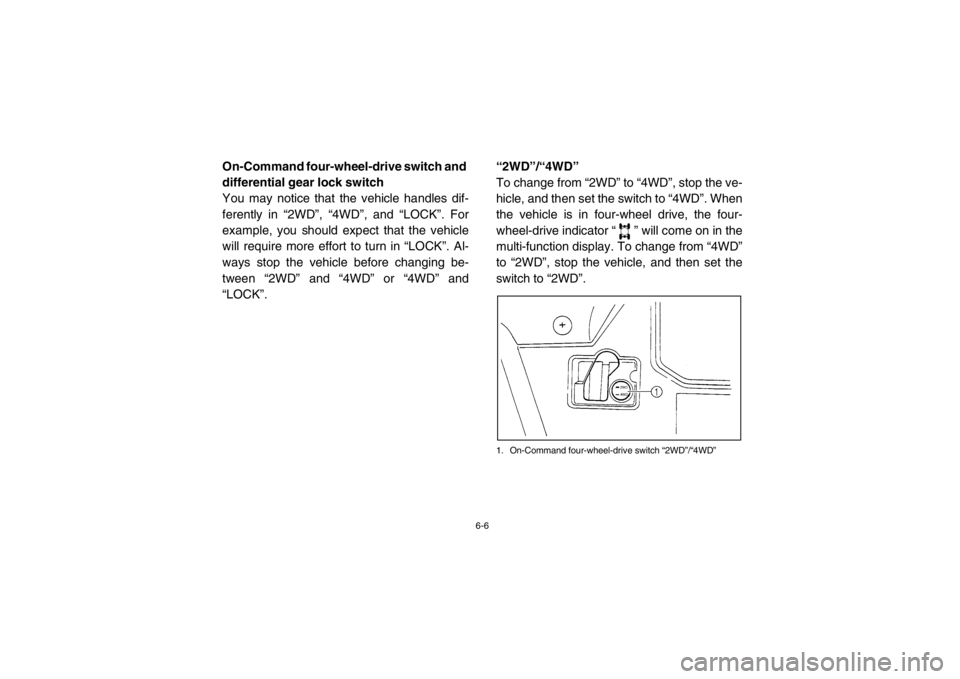
“LOCK”.“2WD”/“4WD”
To change from “2WD” to “4WD”, stop the ve-
hicle, and then set the switch to “4WD”. When
the vehicle is in four-wheel drive, the four-
wheel-drive indicator “ ” will come on in the
multi-function display. To change from “4WD”
to “2WD”, stop the vehicle, and then set the
switch to “2WD”.
1. On-Command four-wheel-drive switch “2WD”/“4WD”
1RB7A_EE.book Page 6 Tuesday, April 24, 2012 9:07 AM
Page 84 of 188
6-7
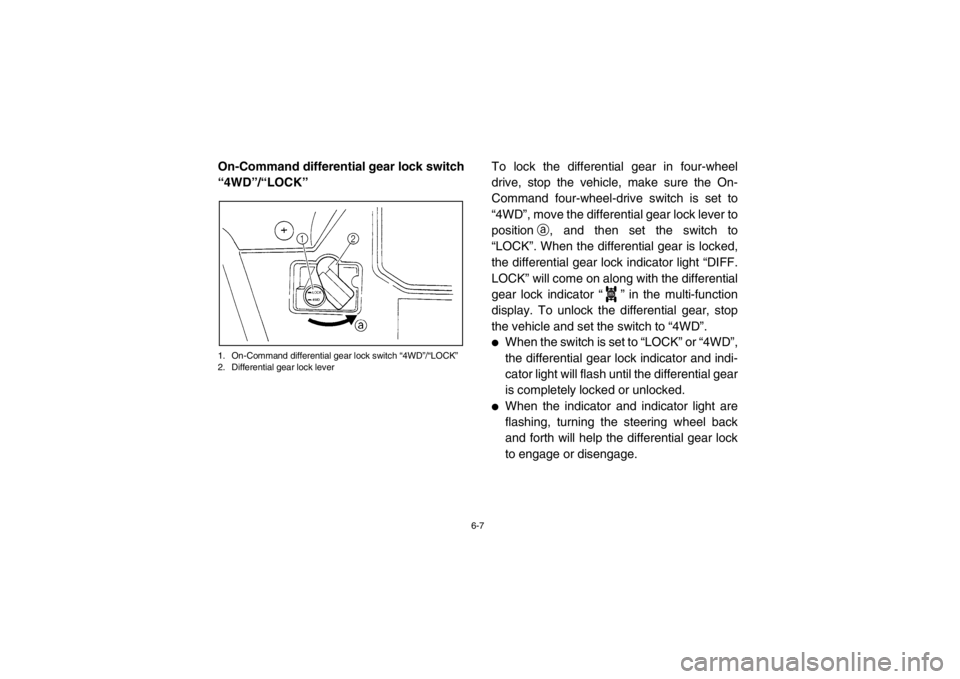
On-Command differential gear lock switch
“4WD”/“LOCK”1. On-Command differential gear lock switch “4WD”/“LOCK”
2. Differential gear lock lever
To lock the differential gear in four-wheel
drive, stop the vehicle, make sure the On-
Command four-wheel-drive switch is set to
“4WD”, move the differential gear lock lever to
positiona, and then set the switch to
“LOCK”. When the differential gear is locked,
the differential gear lock indicator light “DIFF.
LOCK” will come on along with the differential
gear lock indicator “ ” in the multi-function
display. To unlock the differential gear, stop
the vehicle and set the switch to “4WD”.●
When the switch is set to “LOCK” or “4WD”,
the differential gear lock indicator and indi-
cator light will flash until the differential gear
is completely locked or unlocked.
●
When the indicator and indicator light are
flashing, turning the steering wheel back
and forth will help the differential gear lock
to engage or disengage.
DIFF.
LOCK
1RB7A_EE.book Page 7 Tuesday, April 24, 2012 9:07 AM
Page 90 of 188

7-2
Doing things with a Rhino that some people
do for thrills in other vehicles (such as side-
ways sliding, skidding, back-wheel sliding, or
donuts) have led to side rollovers. These roll-
overs can result in crushed limbs and other
serious injuries or death to drivers or passen-
gers.
As the owner/operator, it is your responsibility
to protect yourself and your passenger from
accidents, including rollovers. The Rhino has
many features, including a protective struc-
ture and seat belts, to help protect occupants,
but the best way to avoid injuries is to avoid
accidents. There is a risk of injury or death in
any accident, even with these safety features.1RB7A_EE.book Page 2 Tuesday, April 24, 2012 9:07 AM
Page 100 of 188
7-12
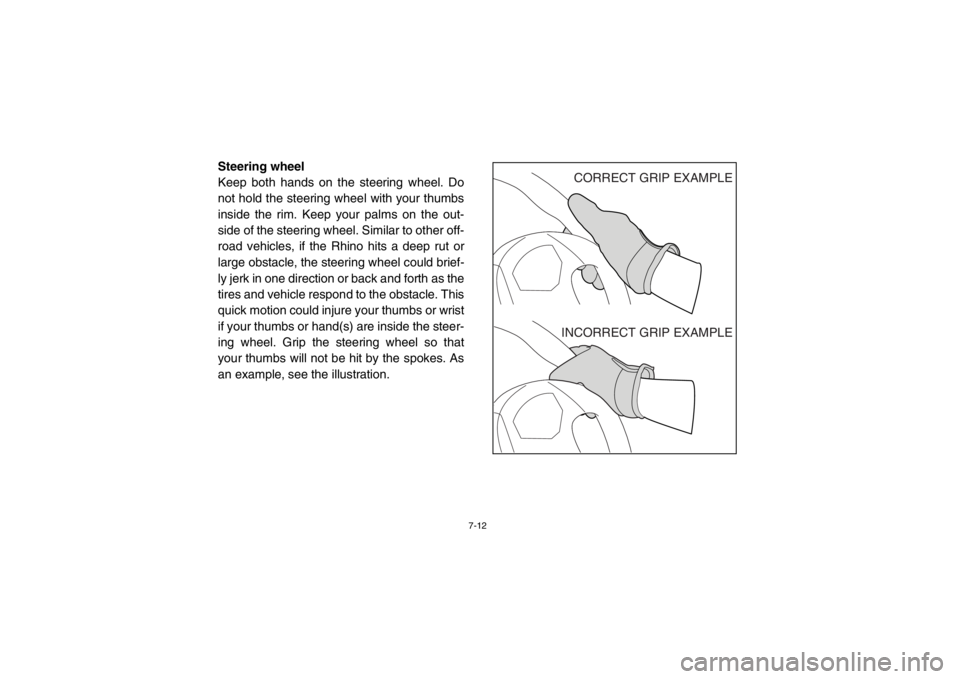
Steering wheel
Keep both hands on the steering wheel. Do
not hold the steering wheel with your thumbs
inside the rim. Keep your palms on the out-
side of the steering wheel. Similar to other off-
road vehicles, if the Rhino hits a deep rut or
large obstacle, the steering wheel could brief-
ly jerk in one direction or back and forth as the
tires and vehicle respond to the obstacle. This
quick motion could injure your thumbs or wrist
if your thumbs or hand(s) are inside the steer-
ing wheel. Grip the steering wheel so that
your thumbs will not be hit by the spokes. As
an example, see the illustration.
CORRECT GRIP EXAMPLE
INCORRECT GRIP EXAMPLE
1RB7A_EE.book Page 12 Tuesday, April 24, 2012 9:07 AM
Page 102 of 188
7-14
Wear eye protection when operating or riding
the vehicle to reduce the risk of a serious ac-
cident or injury. Eye protection, such as a face
shield or goggles, may reduce the risk of for-
eign material getting in your eyes and help
prevent loss of vision.
Practice for new Rhino users
You should become familiar with the perfor-
mance characteristics of the vehicle in a large,
flat area that is free of obstacles and other ve-
hicles. Practice controlling the accelerator
pedal, brakes, steering, and drive select lever.
Drive at slow speeds with gradual accelera-
tion and turning. Practice smooth throttle ap-
plication. Practice slowing down before
turning. Practice maintaining a steady throttle
through the turn. Avoid higher speeds until
you are thoroughly familiar with the operation
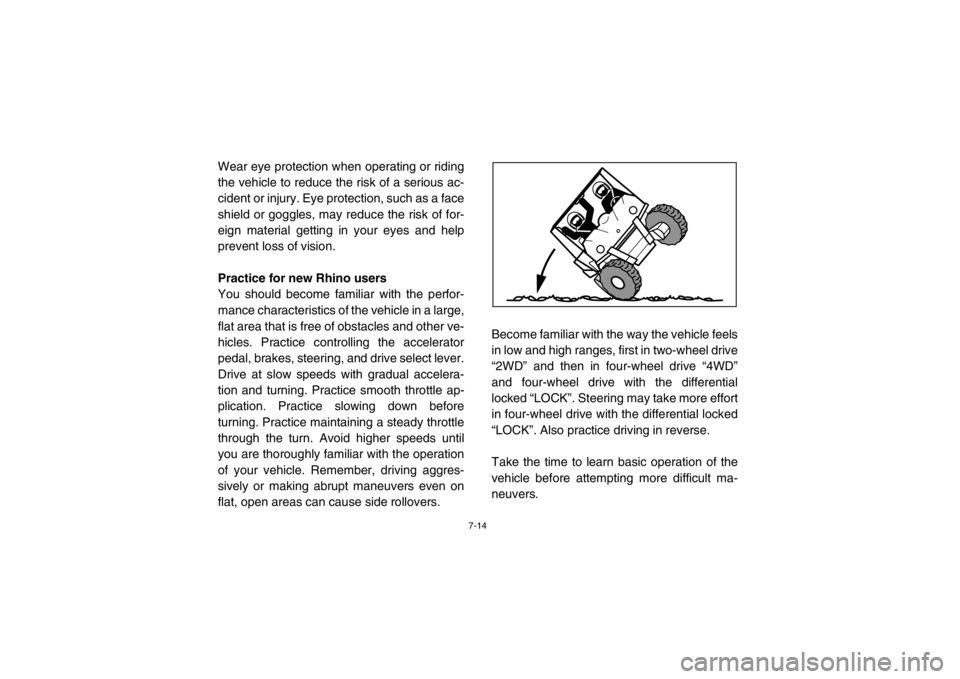
of your vehicle. Remember, driving aggres-
sively or making abrupt maneuvers even on
flat, open areas can cause side rollovers.Become familiar with the way the vehicle feels
in low and high ranges, first in two-wheel drive
“2WD” and then in four-wheel drive “4WD”
and four-wheel drive with the differential
locked “LOCK”. Steering may take more effort
in four-wheel drive with the differential locked
“LOCK”. Also practice driving in reverse.
Take the time to learn basic operation of the
vehicle before attempting more difficult ma-
neuvers.1RB7A_EE.book Page 14 Tuesday, April 24, 2012 9:07 AM
Page 103 of 188

7-15
Getting ready to ride
Perform the Pre-Operation Checks on pages
5-1–5-10. Follow the instructions starting on
pages 6-2–6-3 to start the engine.Turning
Use care in turns – turning the steering wheel
too far or too fast can result in loss of control
or a rollover. Slow down before entering turns.
When making tight turns from a standstill or at
slow speeds, avoid sudden or hard accelera-
tion. Driving aggressively or making abrupt
maneuvers even on flat, open areas can
cause side rollovers. Avoid sideways sliding,
skidding, or back-wheel sliding, and never do
donuts. If you feel the Rhino begin to slide
sideways or the back wheels slide during a
turn, steer into the direction of the slide, if pos-
sible, and gradually let off the accelerator ped-
al to regain directional control and avoid
rollover. For example, if you feel the back of
the vehicle start to slide to your right, steer to
the right.1RB7A_EE.book Page 15 Tuesday, April 24, 2012 9:07 AM