engine YAMAHA RHINO 700 2013 Owner's Manual
[x] Cancel search | Manufacturer: YAMAHA, Model Year: 2013, Model line: RHINO 700, Model: YAMAHA RHINO 700 2013Pages: 188, PDF Size: 4.9 MB
Page 80 of 188

6-3
●
The engine can be started in any gear
if the brake pedal is applied. However,
it is recommended to shift into neutral
before starting the engine.
4. With your foot off the accelerator pedal, start the engine by turning the key to
“START”.
If the engine fails to start, release the key, and
then try starting it again. Wait a few seconds
before the next attempt. Each attempt should
be as short as possible, to preserve battery
energy. NOTICE: Do not crank the engine
more than 5 seconds on each attempt, or
starter damage could occur. Wait at least 5
seconds between each operation of the
electric starter to let it cool.
Do not turn the key to the “START” position
with the engine running; otherwise, damage
to the electric starter may result.
TIPFor maximum engine life, never accelerate
hard when the engine is cold!
1RB7A_EE.book Page 3 Tuesday, April 24, 2012 9:07 AM
Page 81 of 188
6-4
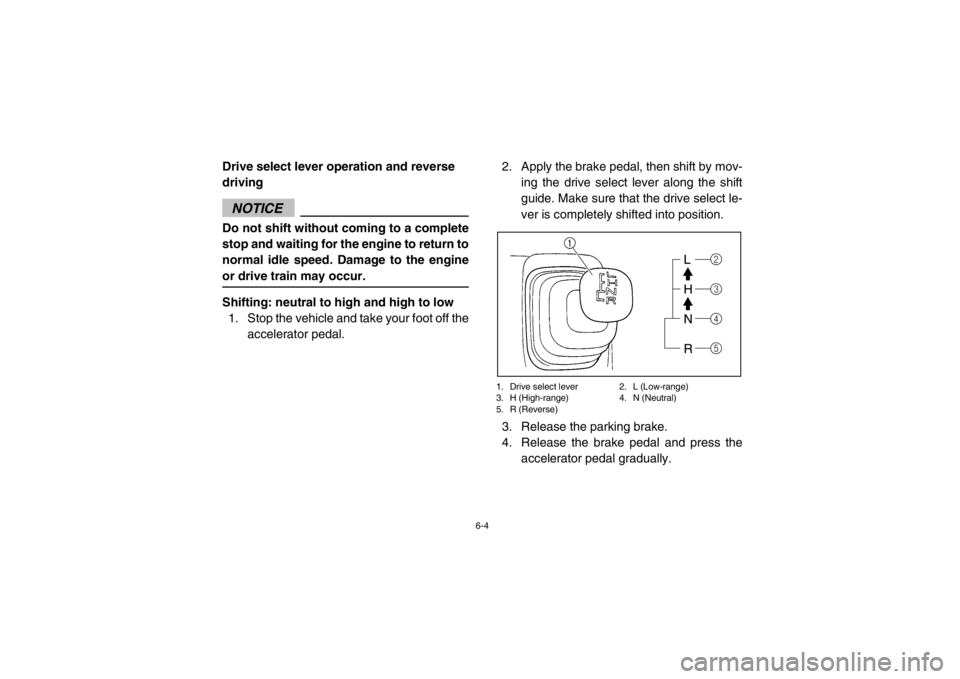
Drive select lever operation and reverse
drivingNOTICEDo not shift without coming to a complete
stop and waiting for the engine to return to
normal idle speed. Damage to the engine
or drive train may occur.Shifting: neutral to high and high to low1. Stop the vehicle and take your foot off the
accelerator pedal. 2. Apply the brake pedal, then shift by mov-
ing the drive select lever along the shift
guide. Make sure that the drive select le-
ver is completely shifted into position.
1. Drive select lever 2. L (Low-range)
3. H (High-range) 4. N (Neutral)
5. R (Reverse)3. Release the parking brake.
4. Release the brake pedal and press theaccelerator pedal gradually.
2
5 4
3
1RB7A_EE.book Page 4 Tuesday, April 24, 2012 9:07 AM
Page 82 of 188
6-5
Shifting: neutral to reverse
WARNING
Before you shift into reverse, make sure
there are no obstacles or people behind
you. When it is safe to proceed, go slowly.
Hitting an obstacle or person could result
in serious injury or death.1. Stop the vehicle, take your foot off the ac-celerator pedal, and check behind you.
2. Apply the brake pedal.
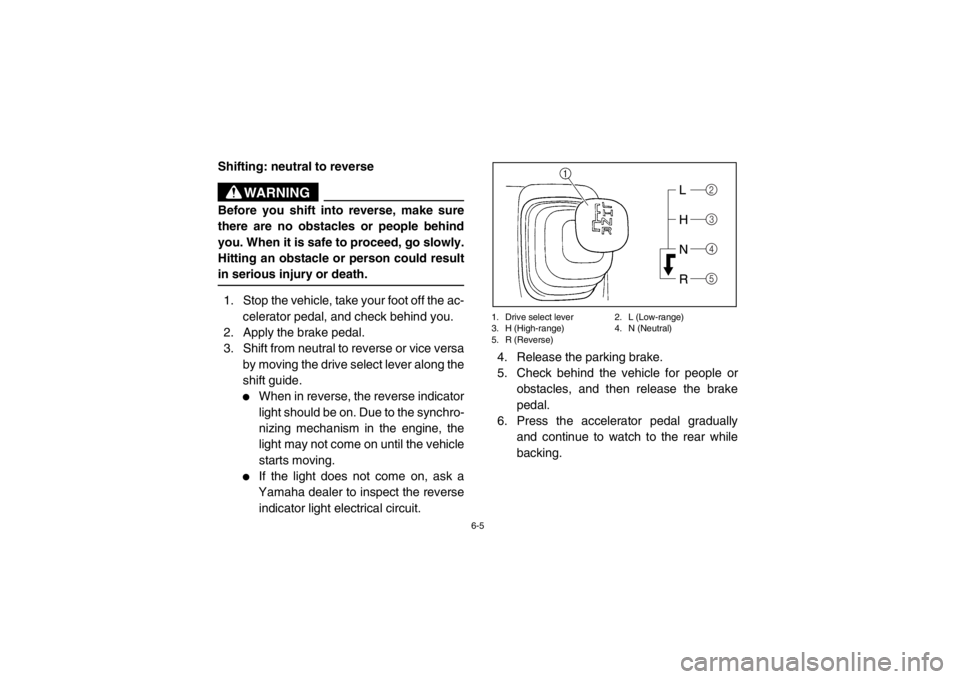
3. Shift from neutral to reverse or vice versa
by moving the drive select lever along the
shift guide.
●
When in reverse, the reverse indicator
light should be on. Due to the synchro-
nizing mechanism in the engine, the
light may not come on until the vehicle
starts moving.
●
If the light does not come on, ask a
Yamaha dealer to inspect the reverse
indicator light electrical circuit.
1. Drive select lever 2. L (Low-range)
3. H (High-range) 4. N (Neutral)
5. R (Reverse)4. Release the parking brake.
5. Check behind the vehicle for people or obstacles, and then release the brake
pedal.
6. Press the accelerator pedal gradually
and continue to watch to the rear while
backing.
2
5 4
3
1RB7A_EE.book Page 5 Tuesday, April 24, 2012 9:07 AM
Page 85 of 188

6-8
●
Driving before the differential gear is prop-
erly engaged or disengaged (e.g., when the
indicator and indicator light are flashing) will
cause the engine speed to be limited until
the differential gear is completely engaged
or disengaged.
EVU01210Parking
When parking, stop the engine and shift the
drive select lever into the neutral position. Ap-
ply the parking brake to help prevent the vehi-
cle from rolling. See pages 7-18–7-19 for
more information on parking and parking on a
slope.
1RB7A_EE.book Page 8 Tuesday, April 24, 2012 9:07 AM
Page 103 of 188

7-15
Getting ready to ride
Perform the Pre-Operation Checks on pages
5-1–5-10. Follow the instructions starting on
pages 6-2–6-3 to start the engine.Turning
Use care in turns – turning the steering wheel
too far or too fast can result in loss of control
or a rollover. Slow down before entering turns.
When making tight turns from a standstill or at
slow speeds, avoid sudden or hard accelera-
tion. Driving aggressively or making abrupt
maneuvers even on flat, open areas can
cause side rollovers. Avoid sideways sliding,
skidding, or back-wheel sliding, and never do
donuts. If you feel the Rhino begin to slide
sideways or the back wheels slide during a
turn, steer into the direction of the slide, if pos-
sible, and gradually let off the accelerator ped-
al to regain directional control and avoid
rollover. For example, if you feel the back of
the vehicle start to slide to your right, steer to
the right.1RB7A_EE.book Page 15 Tuesday, April 24, 2012 9:07 AM
Page 104 of 188

7-16
If you think or feel that the vehicle may tip or
roll, keep your body completely inside the pro-
tective structure of the vehicle:●
Brace yourself by pressing your feet firmly
on the floorboards and keep a firm grip on
the steering wheel or handholds.
●
Do not put your hands or feet outside of the
vehicle for any reason. Do not try to stop a
tipover using your arm or leg.Accelerating
With the engine idling in neutral and your foot
on the brake, shift the drive select lever into
low or high.
NOTICE: Do not shift from low
to high or vice versa without coming to a
complete stop and waiting for the engine
to return to normal idle speed – damage to
the engine or drive train may occur. Then
release the parking brake. Press the accel-
erator pedal slowly and smoothly. The centrif-
ugal clutch will engage and the vehicle will
begin to accelerate.
Avoid higher speeds and sudden or hard ac-
celeration until you are thoroughly familiar
with the operation of your vehicle. Avoid sud-
den or hard acceleration in any turn.
1RB7A_EE.book Page 16 Tuesday, April 24, 2012 9:07 AM
Page 105 of 188

7-17
Braking
When slowing down or stopping, take your
foot off the accelerator pedal and press the
brake pedal smoothly. Improper use of the
brakes can cause the tires to lose traction, re-
ducing control of the vehicle and increasing
the possibility of an accident.
Braking ability is affected by type of terrain. In
most cases, gradual application of the brakes
is more effective than abrupt braking, particu-
larly on loose surfaces, such as gravel. Al-
ways allow for greater braking distance on
rough, loose, or slippery surfaces.Engine braking
Engine compression braking is designed to
assist you when operating your Rhino off-
road. With this feature, the engine helps slow
the vehicle down after you take your foot off
the accelerator. Engine braking is more no-
ticeable in four-wheel drive. Application of ve-
hicle brakes provides additional stopping
power.1RB7A_EE.book Page 17 Tuesday, April 24, 2012 9:07 AM
Page 106 of 188

7-18
Leaving the vehicle
Do not get out of the vehicle while the engine
is running and the drive select lever is in any
gear. There is a risk of injury because:●
Children or others may accidentally press
the accelerator pedal.
●
Objects tossed into the vehicle may strike
the accelerator pedal.
●
The parking brake may not keep the vehi-
cle from accelerating.
Unwanted vehicle movement can cause seri-
ous injury or death, and it may be dangerous
to try to stop the vehicle. Parking on a flat area
When parking on a flat area, stop the engine
and shift the drive select lever into the neutral
position. Apply the parking brake to help pre-
vent the vehicle from rolling.
Parking on a slope
The parking brake acts only on the rear
wheels when in “2WD”. For the parking brake
to take effect on all four wheels, shift to
“LOCK” before stopping the engine.
If you park on a hill that is too steep the vehi-
cle may roll out of control. Never park on hills
that are so steep you cannot walk up them
easily. If you must park on an incline follow
these instructions:
1. Bring the vehicle to a stop by applying the
brake pedal.
2. Put the vehicle in “LOCK”.
3. Turn the key to “OFF”.
1RB7A_EE.book Page 18 Tuesday, April 24, 2012 9:07 AM
Page 109 of 188

7-21
Uphill
Do not attempt to climb hills until you have
mastered basic maneuvers on flat ground.
Drive straight up hills, and avoid crossing the
side of a hill, which increases your risk of roll-
over. Practice first on gentle slopes before at-
tempting steeper hills. Always check the
terrain carefully before attempting any hill.
To climb a hill, you need traction, momentum,
and steady throttle. For more traction and
control for climbing steeper and/or rougher
slopes, shift into low gear and select “4WD” or
“LOCK”. Travel fast enough to maintain mo-
mentum, but not so fast that you cannot react
to changes in the terrain as you climb.Slow down when you reach the crest of the hill
if you cannot see clearly what is on the other
side – there could be another person, an ob-
stacle, or a sharp drop-off.
If you start to lose traction or momentum
when climbing, and decide you will be unable
to continue, use the brakes to stop. Do not at-
tempt to turn the vehicle around. With your
foot on the brake pedal, look behind you and
plan your descent. Shift the drive select lever
into reverse so you can use engine braking to
slow your descent. Release the brake and be-
gin to coast down the hill. Use engine braking
as much as possible, gently applying the
brakes when necessary.1RB7A_EE.book Page 21 Tuesday, April 24, 2012 9:07 AM
Page 110 of 188

7-22
Downhill
Check the terrain carefully before going
downhill. When possible, choose a path that
lets you drive your vehicle straight downhill.
Choose your path carefully and drive slowly
enough to be able to react to obstacles that
you encounter.
For more traction and control, before going
down steeper and/or rougher slopes, shift into
low gear and select “4WD” or “LOCK”. Engine
braking will help you go downhill slowly. Go as
slowly as possible. If you begin to go too fast,
apply the brakes gently. Avoid hard applica-
tion of the brakes, which could cause the vehi-
cle to slide.If you are sliding or skidding, try to steer in the
direction the vehicle is sliding, to regain con-
trol. For example, if you feel the back of the
vehicle start to slide to your right, steer to the
right.
If you must turn on the hill to avoid an obsta-
cle, do so slowly and carefully. If the vehicle
starts to tip, immediately steer in the downhill
direction if there are no obstacles in your path.
As you regain proper balance, gradually steer
again in the direction you want to go.1RB7A_EE.book Page 22 Tuesday, April 24, 2012 9:07 AM