light YAMAHA TRACER 900 2017 User Guide
[x] Cancel search | Manufacturer: YAMAHA, Model Year: 2017, Model line: TRACER 900, Model: YAMAHA TRACER 900 2017Pages: 114, PDF Size: 5.27 MB
Page 24 of 114
Instrument and control functions
3-9
1
23
4
5
6
7
8
9
10
11
12 is appropriate for the vehicle
speed.
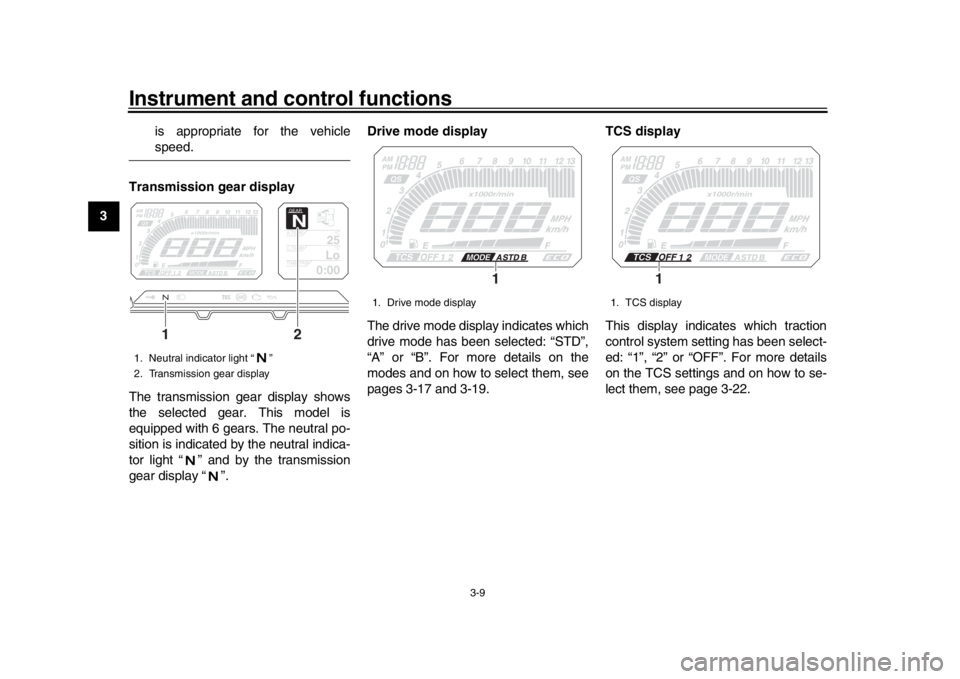
Transmission gear display
The transmission gear display shows
the selected gear. This model is
equipped with 6 gears. The neutral po-
sition is indicated by the neutral indica-
tor light “ ” and by the transmission
gear display “ ”. Drive mode display
The drive mode display indicates which
drive mode has been selected: “STD”,
“A” or “B”. For more details on the
modes and on how to select them, see
pages 3-17 and 3-19.
TCS display
This display indicates which traction
control system setting has been select-
ed: “1”, “2” or “OFF”. For more details
on the TCS settings and on how to se-
lect them, see page 3-22.
1. Neutral indicator light “ ”
2. Transmission gear display
GEARN
25
A.TEMP
°C
Lo
C.TEMP °C
0:00
TIME TRIP
1
2
1. Drive mode display
1
1. TCS display
1
2PP-9-E3.book 9 ページ 2016年9月13日 火曜日 午前9時7分
Page 28 of 114
Instrument and control functions
3-13
1
23
4
5
6
7
8
9
10
11
12 This mode allows you to set, select, or
reset the items shown in the informa-
tion display.
TIP
The transmission must be in neu-
tral and the vehicle must be
stopped to change settings in this
mode.
Shifting the transmission into gear
or turning the key to “OFF” will exit
the setting mode and all changeswill be saved.
Push and hold the menu switch
“MENU” for 2 seconds to enter the set-
ting mode. To exit the setting mode and
return to the normal display, push and
hold the menu switch again for 2 sec-
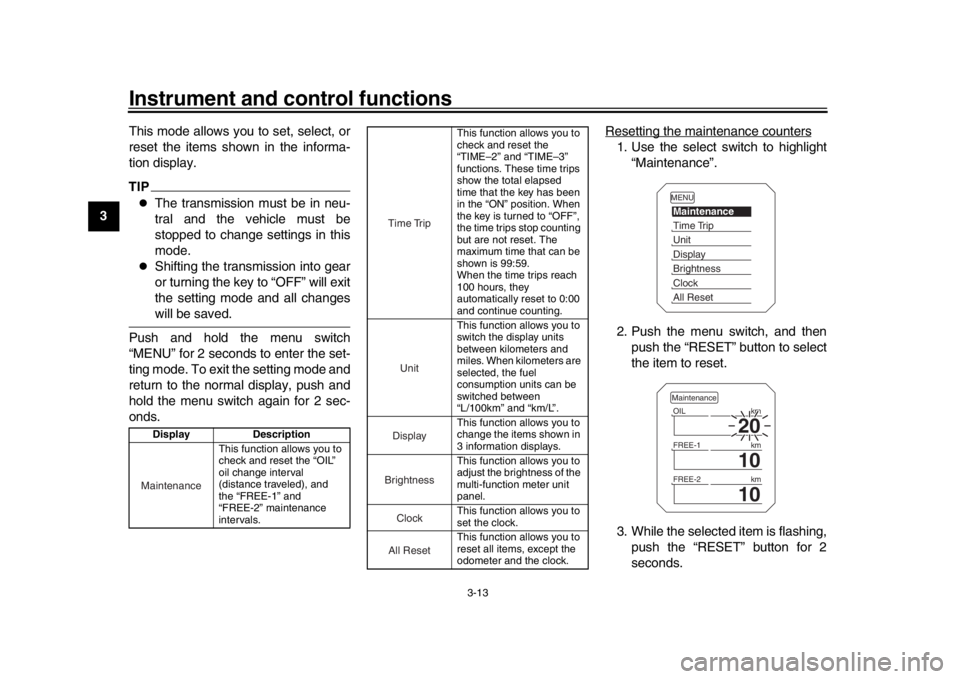
onds. Resetting the maintenance counters
1. Use the select switch to highlight
“Maintenance”.
2. Push the menu switch, and then push the “RESET” button to select
the item to reset.
3. While the selected item is flashing, push the “RESET” button for 2
seconds.
Display Description
This function allows you to
check and reset the “OIL”
oil change interval
(distance traveled), and
the “FREE-1” and
“FREE-2” maintenance
intervals.Maintenance
This function allows you to
check and reset the
“TIME–2” and “TIME–3”
functions. These time trips
show the total elapsed
time that the key has been
in the “ON” position. When
the key is turned to “OFF”,
the time trips stop counting
but are not reset. The
maximum time that can be
shown is 99:59.
When the time trips reach
100 hours, they
automatically reset to 0:00
and continue counting.
This function allows you to
switch the display units
between kilometers and
miles. When kilometers are
selected, the fuel
consumption units can be
switched between
“L/100km” and “km/L”.
This function allows you to
change the items shown in
3 information displays.
This function allows you to
adjust the brightness of the
multi-function meter unit
panel.
This function allows you to
set the clock.
This function allows you to
reset all items, except the
odometer and the clock.
Time TripUnitDisplayBrightnessCloc
k
All Reset
MENUMaintenanceTime TripUnitDisplayBrightnessClockAll Reset
20
OIL km
10
FREE-1 km
10
FREE-2kmMaintenance
2PP-9-E3.book 13 ページ 2016年9月13日 火曜日 午前9時7分
Page 29 of 114
Instrument and control functions
3-14
1
234
5
6
7
8
9
10
11
12
4. Push the menu switch to return to
the setting mode menu.
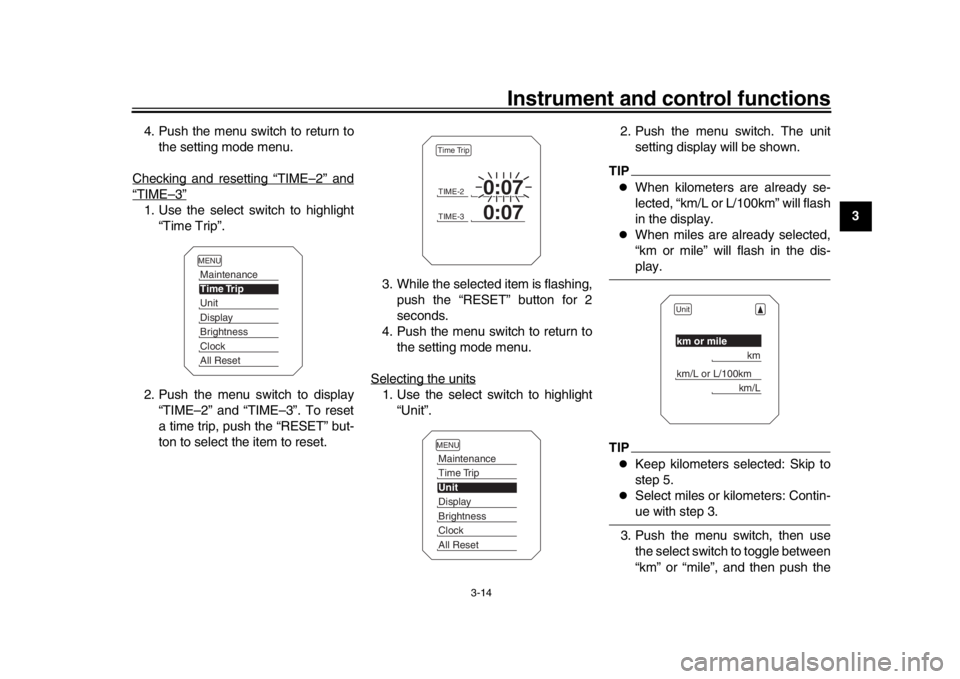
Checking and resetting “TIME
–2” and
“TIME
–3”
1. Use the select switch to highlight “Time Trip”.
2. Push the menu switch to display “TIME–2” and “TIME–3”. To reset
a time trip, push the “RESET” but-
ton to select the item to reset. 3. While the selected item is flashing,
push the “RESET” button for 2
seconds.
4. Push the menu switch to return to the setting mode menu.
Selecting the units
1. Use the select switch to highlight “Unit”. 2. Push the menu switch. The unit
setting display will be shown.
TIP
When kilometers are already se-
lected, “km/L or L/100km” will flash
in the display.
When miles are already selected,
“km or mile” will flash in the dis-play.
TIP
Keep kilometers selected: Skip to
step 5.
Select miles or kilometers: Contin-ue with step 3.
3. Push the menu switch, then use the select switch to toggle between
“km” or “mile”, and then push the
MENUMaintenanceTime TripUnitDisplayBrightnessClockAll Reset
TIME-2
0:07
TIME-3
0:07
Time TripMENUMaintenanceTime TripUnitDisplayBrightnessClockAll Reset
Unitkm or mile
km
km/L or L/100km
km/L
2PP-9-E3.book 14 ページ 2016年9月13日 火曜日 午前9時7分
Page 30 of 114
Instrument and control functions
3-15
1
23
4
5
6
7
8
9
10
11
12 menu switch to confirm the selec-
tion.
TIP
When kilometers are selected,
“L/100km” or “km/L” can be set as
the fuel consumption display units.
Continue with step 4.
When miles are selected, the fuel
consumption display units will beset to “MPG”. Skip to step 6.
4. Use the select switch to move from “km or mile” to “km/L or L/100km”.
5. Push the menu switch, then use the select switch to toggle between
“km/L” and “L/100km”, and then
push the menu switch to confirm
the selection.
6. Use the select switch to highlight “ ”, and then push the menu
switch to return to the setting mode
menu.
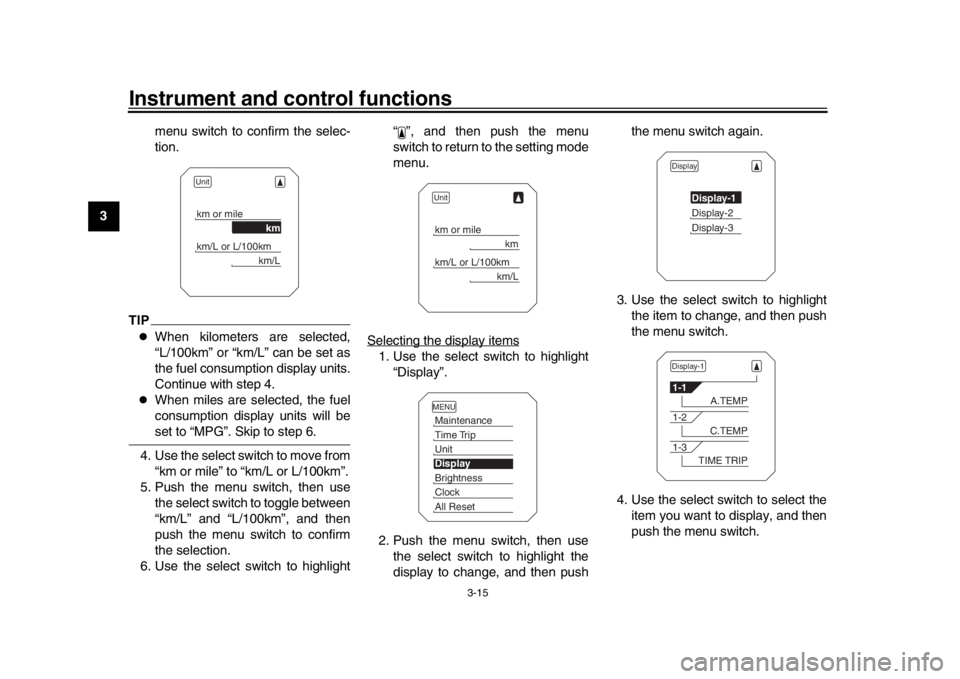
Selecting the display items
1. Use the select switch to highlight “Display”.
2. Push the menu switch, then use the select switch to highlight the
display to change, and then push the menu switch again.
3. Use the select switch to highlight the item to change, and then push
the menu switch.
4. Use the select switch to select the item you want to display, and then
push the menu switch.
Unitkm or mile
km
km/L or L/100km
km/L
Unitkm or mile
km
km/L or L/100km
km/L
MENUMaintenanceTime TripUnitDisplayBrightnessClockAll Reset
Display
Display-1Display-2Display-3
Display-11-1
A.TEMP
1-2
C.TEMP
1-3
TIME TRIP
2PP-9-E3.book 15 ページ 2016年9月13日 火曜日 午前9時7分
Page 31 of 114
Instrument and control functions
3-16
1
234
5
6
7
8
9
10
11
12
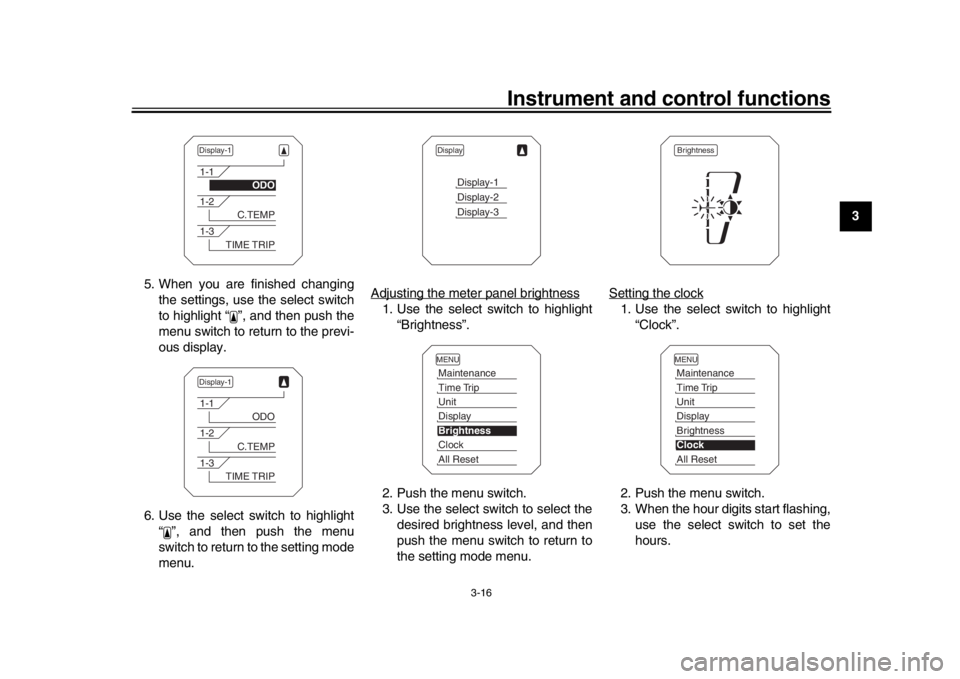
5. When you are finished changing
the settings, use the select switch
to highlight “ ”, and then push the
menu switch to return to the previ-
ous display.
6. Use the select switch to highlight “ ”, and then push the menu
switch to return to the setting mode
menu. Adjusting the meter panel brightness
1. Use the select switch to highlight
“Brightness”.
2. Push the menu switch.
3. Use the select switch to select the desired brightness level, and then
push the menu switch to return to
the setting mode menu. Setting the clock
1. Use the select switch to highlight
“Clock”.
2. Push the menu switch.
3. When the hour digits start flashing, use the select switch to set the
hours.
Display-11-1
ODO
1-2
C.TEMP
1-3
TIME TRIP
Display-11-1
ODO
1-2
C.TEMP
1-3
TIME TRIP
Display
Display-1Display-2Display-3
MENUMaintenanceTime TripUnitDisplayBrightnessClockAll Reset
BrightnessMENUMaintenanceTime TripUnitDisplayBrightnessClockAll Reset
2PP-9-E3.book 16 ページ 2016年9月13日 火曜日 午前9時7分
Page 32 of 114
Instrument and control functions
3-17
1
23
4
5
6
7
8
9
10
11
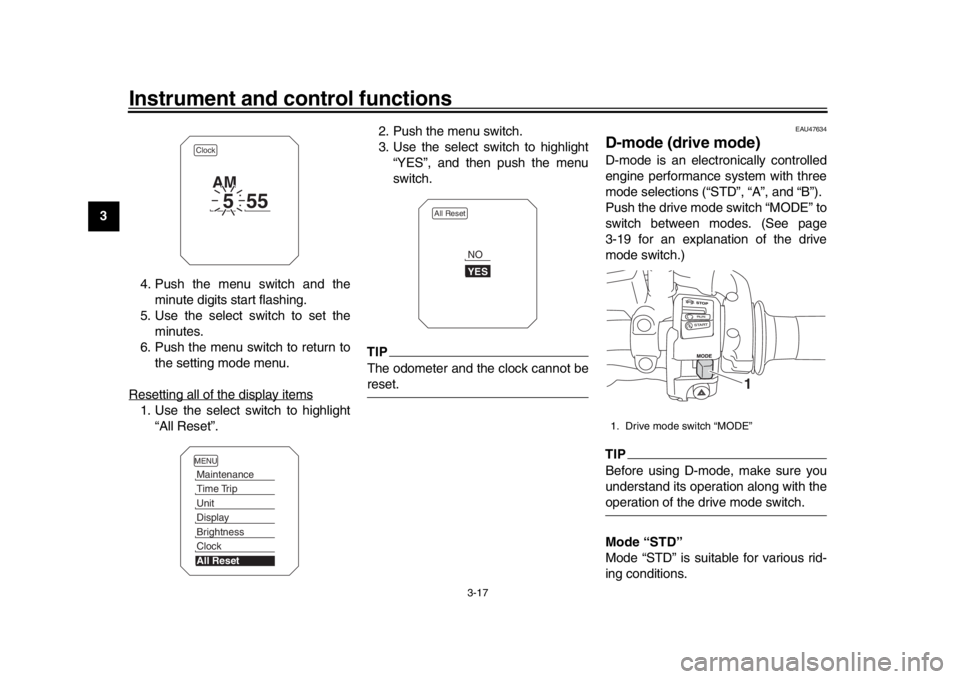
12 4. Push the menu switch and the
minute digits start flashing.
5. Use the select switch to set the minutes.
6. Push the menu switch to return to the setting mode menu.
Resetting all of the display items
1. Use the select switch to highlight “All Reset”. 2. Push the menu switch.
3. Use the select switch to highlight
“YES”, and then push the menu
switch.
TIPThe odometer and the clock cannot bereset.
EAU47634
D-mode (drive mode)D-mode is an electronically controlled
engine performance system with three
mode selections (“STD”, “A”, and “B”).
Push the drive mode switch “MODE” to
switch between modes. (See page
3-19 for an explanation of the drive
mode switch.)TIPBefore using D-mode, make sure you
understand its operation along with theoperation of the drive mode switch.
Mode “STD”
Mode “STD” is suitable for various rid-
ing conditions.
Clock
5
55
AM
MENUMaintenanceTime TripUnitDisplayBrightnessClockAll Reset
All Reset
YESNO
1. Drive mode switch “MODE”
1
2PP-9-E3.book 17 ページ 2016年9月13日 火曜日 午前9時7分
Page 33 of 114
Instrument and control functions
3-18
1
234
5
6
7
8
9
10
11
12
This mode allows the rider to enjoy
smooth and sporty drivability from the
low-speed range to the high-speed
range.
Mode “A”
Mode “A” offers a sportier engine re-
sponse in the low- to mid-speed range
compared to mode “STD”.
Mode “B”
Mode “B” offers response that is some-
what less sharp compared to mode
“STD” for riding situations that require
especially sensitive throttle operation.
EAU1234M
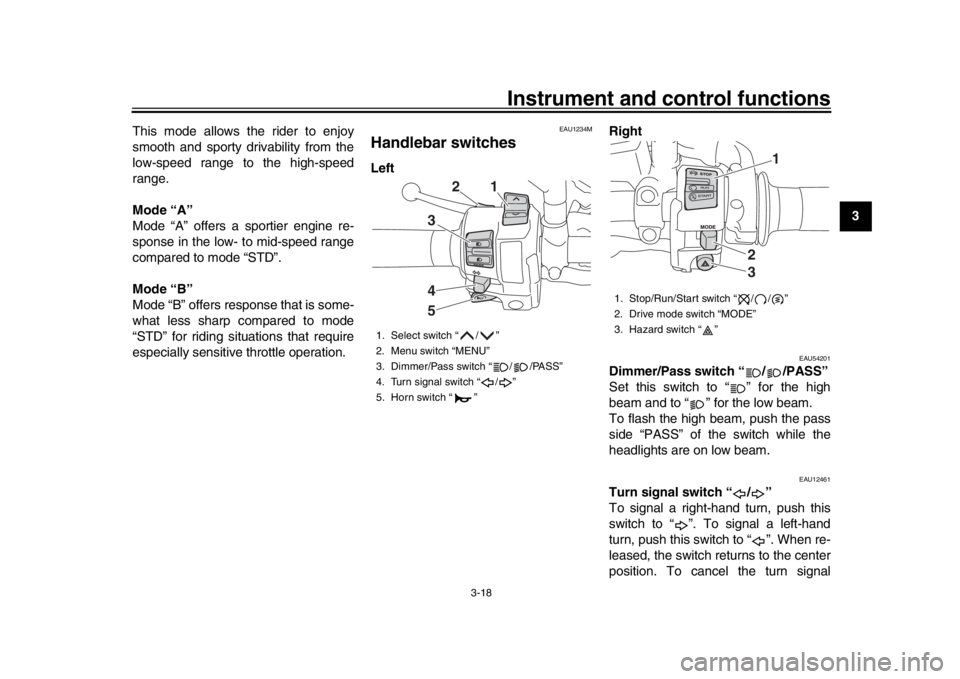
Handlebar switchesLeft
Right
EAU54201
Dimmer/Pass switch “ / /PASS”
Set this switch to “ ” for the high
beam and to “ ” for the low beam.
To flash the high beam, push the pass
side “PASS” of the switch while the
headlights are on low beam.
EAU12461
Turn signal switch “ / ”
To signal a right-hand turn, push this
switch to “ ”. To signal a left-hand
turn, push this switch to “ ”. When re-
leased, the switch returns to the center
position. To cancel the turn signal
1. Select switch “ / ”
2. Menu switch “MENU”
3. Dimmer/Pass switch “ / /PASS”
4. Turn signal switch “ / ”
5. Horn switch “ ”
2
1
345
1. Stop/Run/Start switch “ / / ”
2. Drive mode switch “MODE”
3. Hazard switch “ ”
1
23
2PP-9-E3.book 18 ページ 2016年9月13日 火曜日 午前9時7分
Page 34 of 114
Instrument and control functions
3-19
1
23
4
5
6
7
8
9
10
11
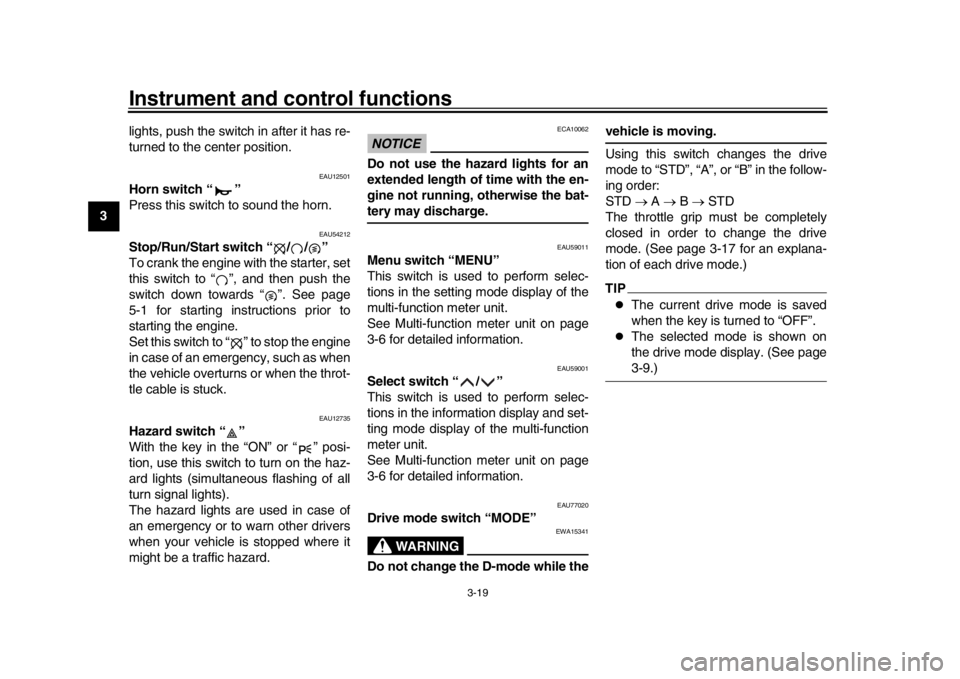
12 lights, push the switch in after it has re-
turned to the center position.
EAU12501
Horn switch “ ”
Press this switch to sound the horn.
EAU54212
Stop/Run/Start switch “ / / ”
To crank the engine with the starter, set
this switch to “ ”, and then push the
switch down towards “ ”. See page
5-1 for starting instructions prior to
starting the engine.
Set this switch to “ ” to stop the engine
in case of an emergency, such as when
the vehicle overturns or when the throt-
tle cable is stuck.
EAU12735
Hazard switch “ ”
With the key in the “ON” or “ ” posi-
tion, use this switch to turn on the haz-
ard lights (simultaneous flashing of all
turn signal lights).
The hazard lights are used in case of
an emergency or to warn other drivers
when your vehicle is stopped where it
might be a traffic hazard.
NOTICE
ECA10062
Do not use the hazard lights for an
extended length of time with the en-
gine not running, otherwise the bat-tery may discharge.
EAU59011
Menu switch “MENU”
This switch is used to perform selec-
tions in the setting mode display of the
multi-function meter unit.
See Multi-function meter unit on page
3-6 for detailed information.
EAU59001
Select switch “ / ”
This switch is used to perform selec-
tions in the information display and set-
ting mode display of the multi-function
meter unit.
See Multi-function meter unit on page
3-6 for detailed information.
EAU77020
Drive mode switch “MODE”
WARNING
EWA15341
Do not change the D-mode while the
vehicle is moving.
Using this switch changes the drive
mode to “STD”, “A”, or “B” in the follow-
ing order:
STD
A B STD
The throttle grip must be completely
closed in order to change the drive
mode. (See page 3-17 for an explana-
tion of each drive mode.)TIP
The current drive mode is saved
when the key is turned to “OFF”.
The selected mode is shown on
the drive mode display. (See page3-9.)
2PP-9-E3.book 19 ページ 2016年9月13日 火曜日 午前9時7分
Page 37 of 114
Instrument and control functions
3-22
1
234
5
6
7
8
9
10
11
12
TIP
The ABS performs a self-diagno-
sis test each time the vehicle first
starts off after the key is turned to
“ON” and the vehicle has traveled
at a speed of 10 km/h (6 mi/h) or
higher. During this test, a “clicking”
noise can be heard from the hy-
draulic control unit, and if the brake
lever or brake pedal is even slight-
ly applied, a vibration can be felt at
the lever and pedal, but these do
not indicate a malfunction.
This ABS has a test mode which
allows the owner to experience the
pulsation at the brake lever or
brake pedal when the ABS is oper-
ating. However, special tools are
required, so please consult yourYamaha dealer.
NOTICE
ECA20100
Be careful not to damage the wheel
sensor or wheel sensor rotor; other-
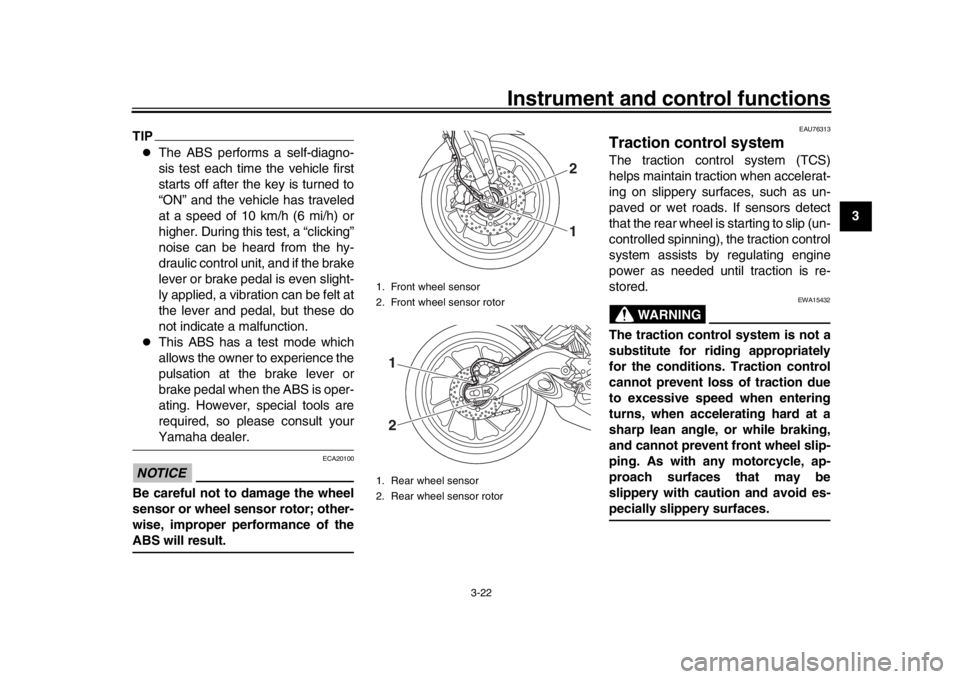
wise, improper performance of theABS will result.
EAU76313
Traction control systemThe traction control system (TCS)
helps maintain traction when accelerat-
ing on slippery surfaces, such as un-
paved or wet roads. If sensors detect
that the rear wheel is starting to slip (un-
controlled spinning), the traction control
system assists by regulating engine
power as needed until traction is re-
stored.
WARNING
EWA15432
The traction control system is not a
substitute for riding appropriately
for the conditions. Traction control
cannot prevent loss of traction due
to excessive speed when entering
turns, when accelerating hard at a
sharp lean angle, or while braking,
and cannot prevent front wheel slip-
ping. As with any motorcycle, ap-
proach surfaces that may be
slippery with caution and avoid es-pecially slippery surfaces.
1. Front wheel sensor
2. Front wheel sensor rotor
1. Rear wheel sensor
2. Rear wheel sensor rotor
21
12
2PP-9-E3.book 22 ページ 2016年9月13日 火曜日 午前9時7分
Page 38 of 114
Instrument and control functions
3-23
1
23
4
5
6
7
8
9
10
11
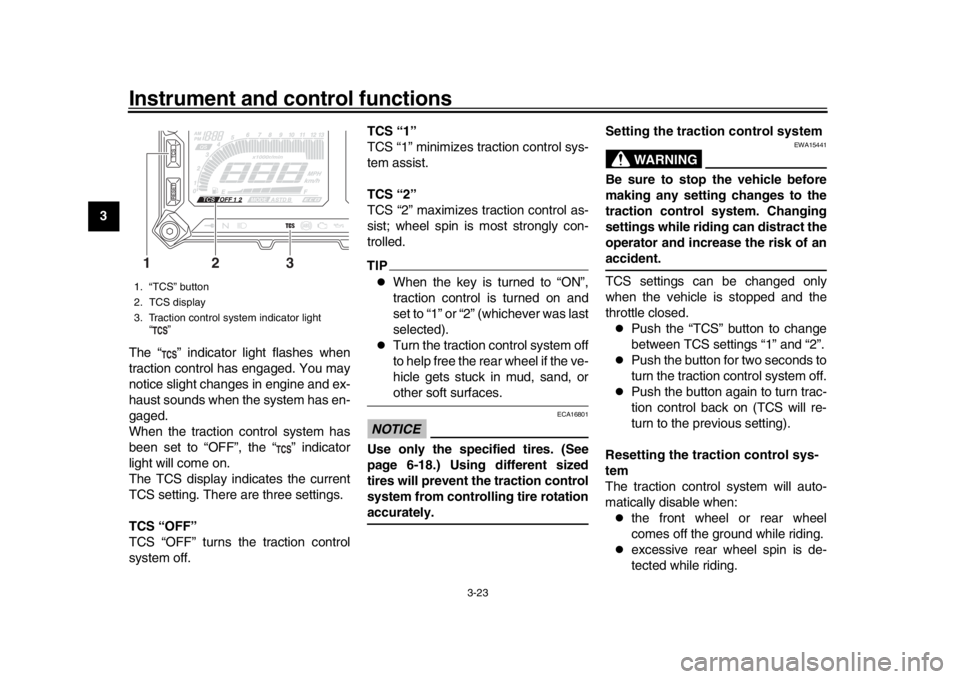
12 The “ ” indicator light flashes when
traction control has engaged. You may
notice slight changes in engine and ex-
haust sounds when the system has en-
gaged.
When the traction control system has
been set to “OFF”, the “ ” indicator
light will come on.
The TCS display indicates the current
TCS setting. There are three settings.
TCS “OFF”
TCS “OFF” turns the traction control
system off. TCS “1”
TCS “1” minimizes traction control sys-
tem assist.
TCS “2”
TCS “2” maximizes traction control as-
sist; wheel spin is most strongly con-
trolled.
TIP
When the key is turned to “ON”,
traction control is turned on and
set to “1” or “2” (whichever was last
selected).
Turn the traction control system off
to help free the rear wheel if the ve-
hicle gets stuck in mud, sand, orother soft surfaces.
NOTICE
ECA16801
Use only the specified tires. (See
page 6-18.) Using different sized
tires will prevent the traction control
system from controlling tire rotationaccurately.
Setting the traction control system
WARNING
EWA15441
Be sure to stop the vehicle before
making any setting changes to the
traction control system. Changing
settings while riding can distract the
operator and increase the risk of anaccident.
TCS settings can be changed only
when the vehicle is stopped and the
throttle closed.
Push the “TCS” button to change
between TCS settings “1” and “2”.
Push the button for two seconds to
turn the traction control system off.
Push the button again to turn trac-
tion control back on (TCS will re-
turn to the previous setting).
Resetting the traction control sys-
tem
The traction control system will auto-
matically disable when:
the front wheel or rear wheel
comes off the ground while riding.
excessive rear wheel spin is de-
tected while riding.
1. “TCS” button
2. TCS display
3. Traction control system indicator light “”13
2
2PP-9-E3.book 23 ページ 2016年9月13日 火曜日 午前9時7分