lock YAMAHA TRACER 900 2018 User Guide
[x] Cancel search | Manufacturer: YAMAHA, Model Year: 2018, Model line: TRACER 900, Model: YAMAHA TRACER 900 2018Pages: 114, PDF Size: 7.51 MB
Page 29 of 114
Instrument and control functions
3-14
3
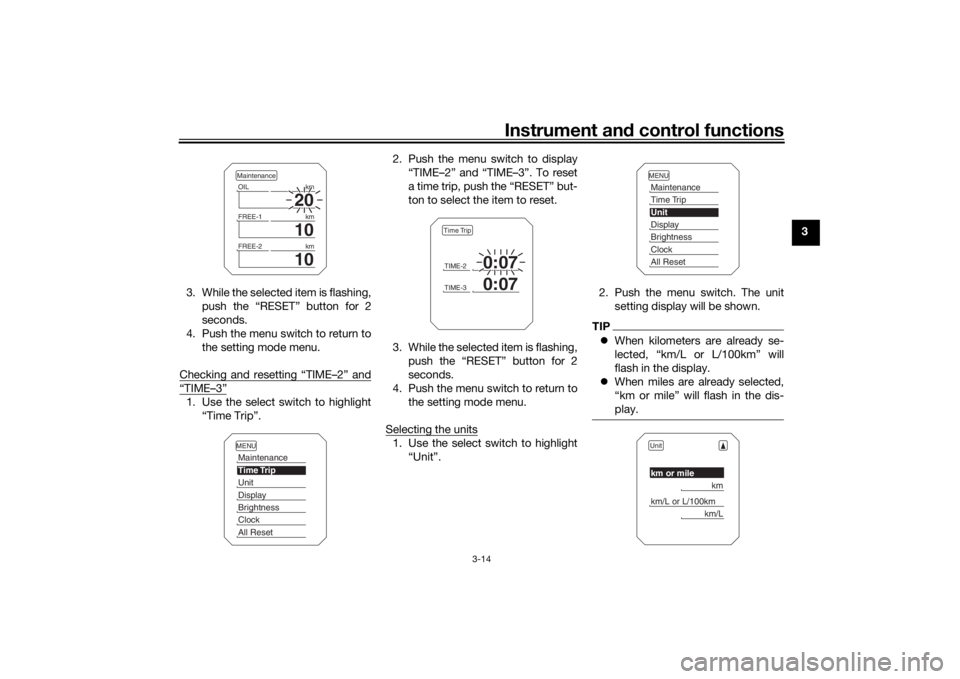
3. While the selected item is flashing, push the “RESET” button for 2
seconds.
4. Push the menu switch to return to the setting mode menu.
Checking and resetting “TIME–2” and
“TIME–3”1. Use the select switch to highlight “Time Trip”. 2. Push the menu switch to display
“TIME–2” and “TIME–3”. To reset
a time trip, push the “RESET” but-
ton to select the item to reset.
3. While the selected item is flashing, push the “RESET” button for 2
seconds.
4. Push the menu switch to return to the setting mode menu.
Selecting the units
1. Use the select switch to highlight “Unit”. 2. Push the menu switch. The unit
setting display will be shown.
TIPWhen kilometers are already se-
lected, “km/L or L/100km” will
flash in the display.
When miles are already selected,
“km or mile” will flash in the dis-
play.
20
OIL km
10
FREE-1km
10
FREE-2kmMaintenanceMENUMaintenanceTime TripUnitDisplayBrightnessClockAll Reset
TIME-2
0:07
TIME-3
0:07
Time Trip
MENUMaintenanceTime TripUnitDisplayBrightnessClockAll ResetUnitkm or mile
km
km/L or L/100km
km/L
UB5CE0E0.book Page 14 Wednesday, December 20, 2017 11:08 AM
Page 30 of 114
Instrument and control functions
3-15
3
TIP Keep kilometers selected: Skip to
step 5.
Select miles or kilometers: Contin-
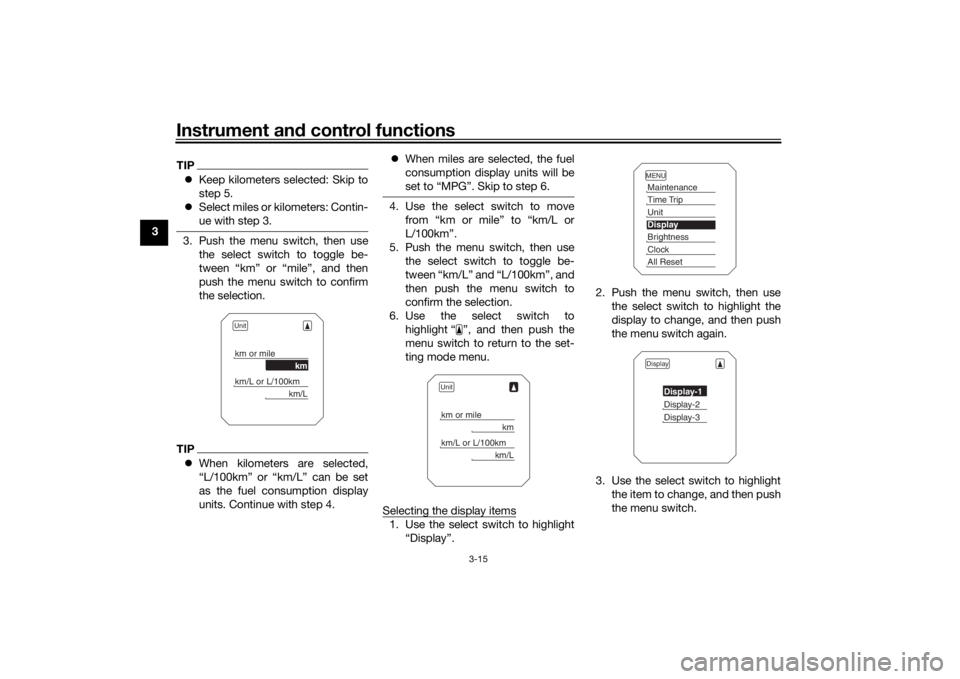
ue with step 3.3. Push the menu switch, then use
the select switch to toggle be-
tween “km” or “mile”, and then
push the menu switch to confirm
the selection.TIPWhen kilometers are selected,
“L/100km” or “km/L” can be set
as the fuel consumption display
units. Continue with step 4.
When miles are selected, the fuel
consumption display units will be
set to “MPG”. Skip to step 6.
4. Use the select switch to move
from “km or mile” to “km/L or
L/100km”.
5. Push the menu switch, then use the select switch to toggle be-
tween “km/L” and “L/100km”, and
then push the menu switch to
confirm the selection.
6. Use the select switch to highlight “ ”, and then push the
menu switch to return to the set-
ting mode menu.
Selecting the display items1. Use the select switch to highlight “Display”. 2. Push the menu switch, then use
the select switch to highlight the
display to change, and then push
the menu switch again.
3. Use the select switch to highlight the item to change, and then push
the menu switch.
Unitkm or mile
km
km/L or L/100km
km/L
Unitkm or mile
km
km/L or L/100km
km/L
MENUMaintenanceTime TripUnitDisplayBrightnessClockAll ResetDisplay
Display-1Display-2Display-3
UB5CE0E0.book Page 15 Wednesday, December 20, 2017 11:08 AM
Page 31 of 114
Instrument and control functions
3-16
3
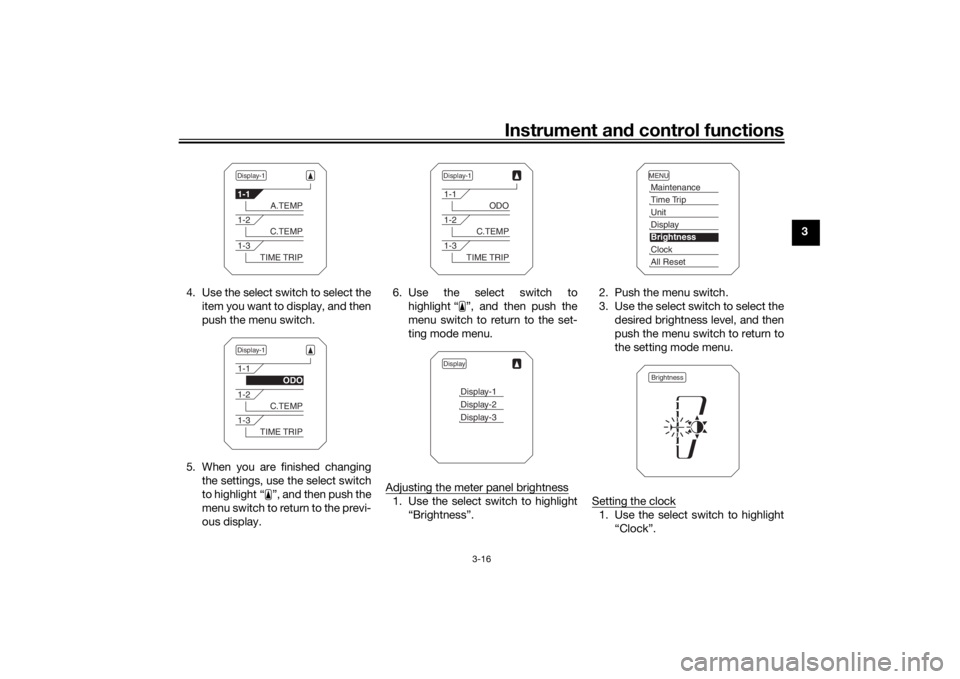
4. Use the select switch to select the item you want to display, and then
push the menu switch.
5. When you are finished changing the settings, use the select switch
to highlight “ ”, and then push the
menu switch to return to the previ-
ous display. 6. Use the select switch to
highlight “ ”, and then push the
menu switch to return to the set-
ting mode menu.
Adjusting the meter panel brightness
1. Use the select switch to highlight “Brightness”. 2. Push the menu switch.
3. Use the select switch to select the
desired brightness level, and then
push the menu switch to return to
the setting mode menu.
Setting the clock
1. Use the select switch to highlight “Clock”.
Display-11-1
A.TEMP
1-2
C.TEMP
1-3
TIME TRIP
Display-11-1
ODO
1-2
C.TEMP
1-3
TIME TRIP
Display-11-1
ODO
1-2
C.TEMP
1-3
TIME TRIP
Display
Display-1Display-2Display-3
MENUMaintenanceTime TripUnitDisplayBrightnessClockAll ResetBrightness
UB5CE0E0.book Page 16 Wednesday, December 20, 2017 11:08 AM
Page 32 of 114
Instrument and control functions
3-17
3
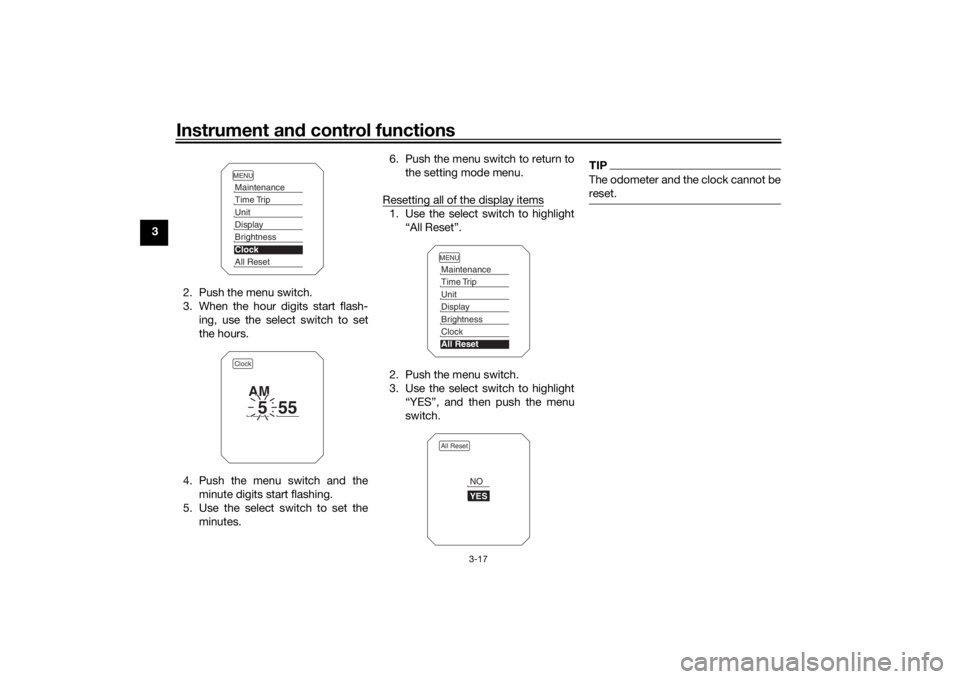
2. Push the menu switch.
3. When the hour digits start flash-ing, use the select switch to set
the hours.
4. Push the menu switch and the minute digits start flashing.
5. Use the select switch to set the minutes. 6. Push the menu switch to return to
the setting mode menu.
Resetting all of the display items
1. Use the select switch to highlight “All Reset”.
2. Push the menu switch.
3. Use the select switch to highlight “YES”, and then push the menu
switch.
TIPThe odometer and the clock cannot be
reset.
MENUMaintenanceTime TripUnitDisplayBrightnessClockAll ResetClock
5
55
AM
MENUMaintenanceTime TripUnitDisplayBrightnessClockAll ResetAll Reset
YESNO
UB5CE0E0.book Page 17 Wednesday, December 20, 2017 11:08 AM
Page 36 of 114
Instrument and control functions
3-21
3
EAU26826
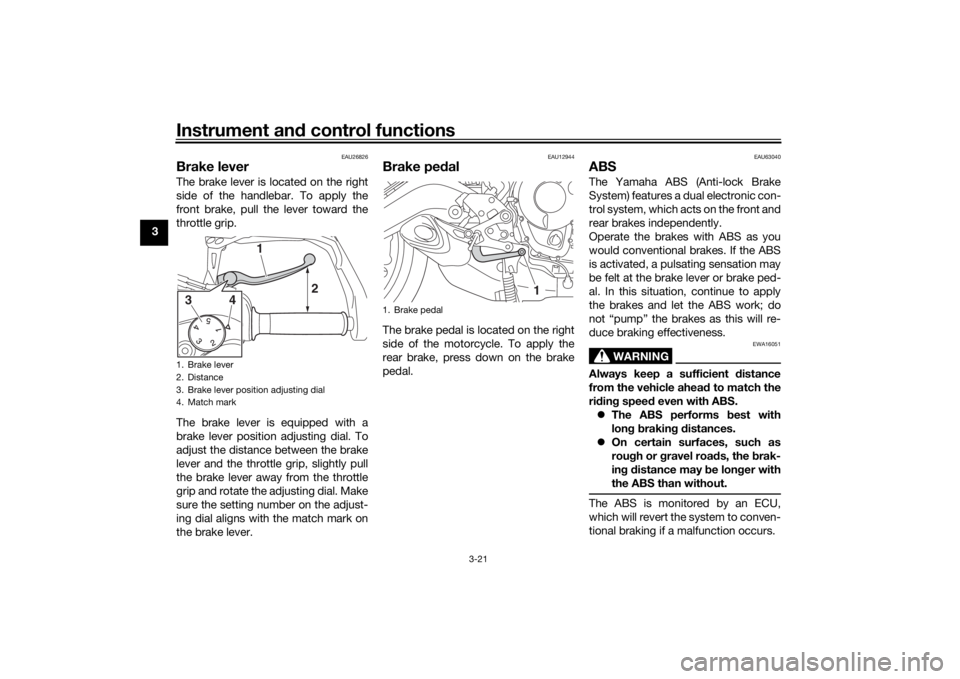
Brake leverThe brake lever is located on the right
side of the handlebar. To apply the
front brake, pull the lever toward the
throttle grip.
The brake lever is equipped with a
brake lever position adjusting dial. To
adjust the distance between the brake
lever and the throttle grip, slightly pull
the brake lever away from the throttle
grip and rotate the adjusting dial. Make
sure the setting number on the adjust-
ing dial aligns with the match mark on
the brake lever.
EAU12944
Brake ped alThe brake pedal is located on the right
side of the motorcycle. To apply the
rear brake, press down on the brake
pedal.
EAU63040
ABSThe Yamaha ABS (Anti-lock Brake
System) features a dual electronic con-
trol system, which acts on the front and
rear brakes independently.
Operate the brakes with ABS as you
would conventional brakes. If the ABS
is activated, a pulsating sensation may
be felt at the brake lever or brake ped-
al. In this situation, continue to apply
the brakes and let the ABS work; do
not “pump” the brakes as this will re-
duce braking effectiveness.
WARNING
EWA16051
Always keep a sufficient d istance
from the vehicle ahea d to match the
ri din g spee d even with ABS.
The ABS performs best with
lon g b rakin g d istances.
On certain surfaces, such as
rou gh or g ravel roa ds, the b rak-
in g d istance may be lon ger with
the ABS than without.The ABS is monitored by an ECU,
which will revert the system to conven-
tional braking if a malfunction occurs.
1. Brake lever
2. Distance
3. Brake lever position adjusting dial
4. Match mark
2
3
4
1
1. Brake pedal
1
UB5CE0E0.book Page 21 Wednesday, December 20, 2017 11:08 AM
Page 39 of 114
Instrument and control functions
3-24
3
excessive rear wheel spin is de-
tected while riding.
either wheel is rotated with the key
turned to “ON” (such as when per-
forming maintenance).
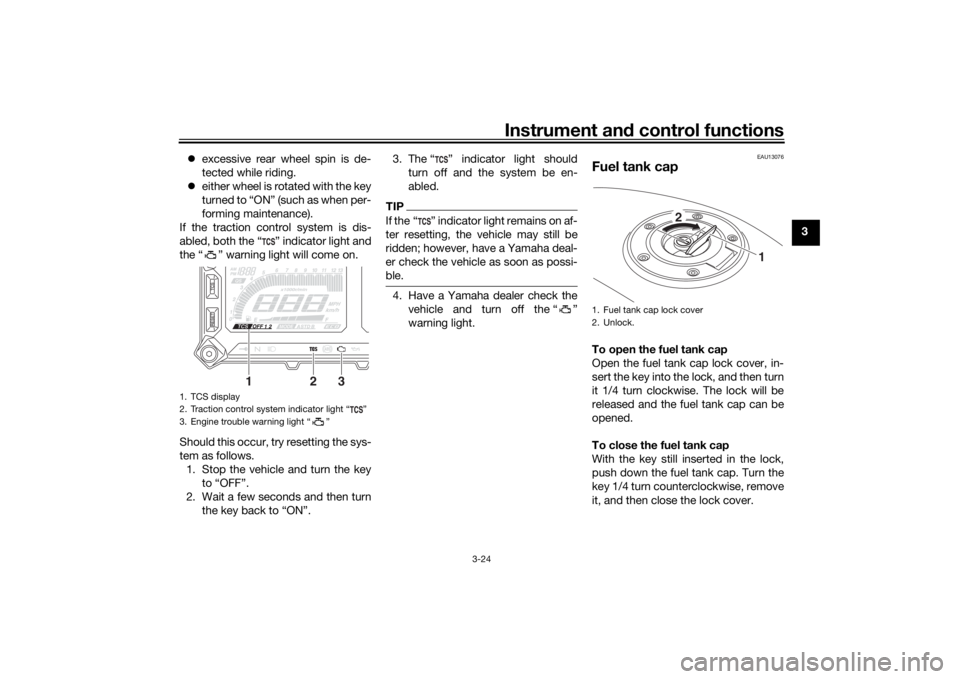
If the traction control system is dis-
abled, both the “ ” indicator light and
the “ ” warning light will come on.
Should this occur, try resetting the sys-
tem as follows. 1. Stop the vehicle and turn the key to “OFF”.
2. Wait a few seconds and then turn the key back to “ON”. 3. The “ ” indicator light should
turn off and the system be en-
abled.
TIPIf the “ ” indicator light remains on af-
ter resetting, the vehicle may still be
ridden; however, have a Yamaha deal-
er check the vehicle as soon as possi-
ble.4. Have a Yamaha dealer check thevehicle and turn off the “ ”
warning light.
EAU13076
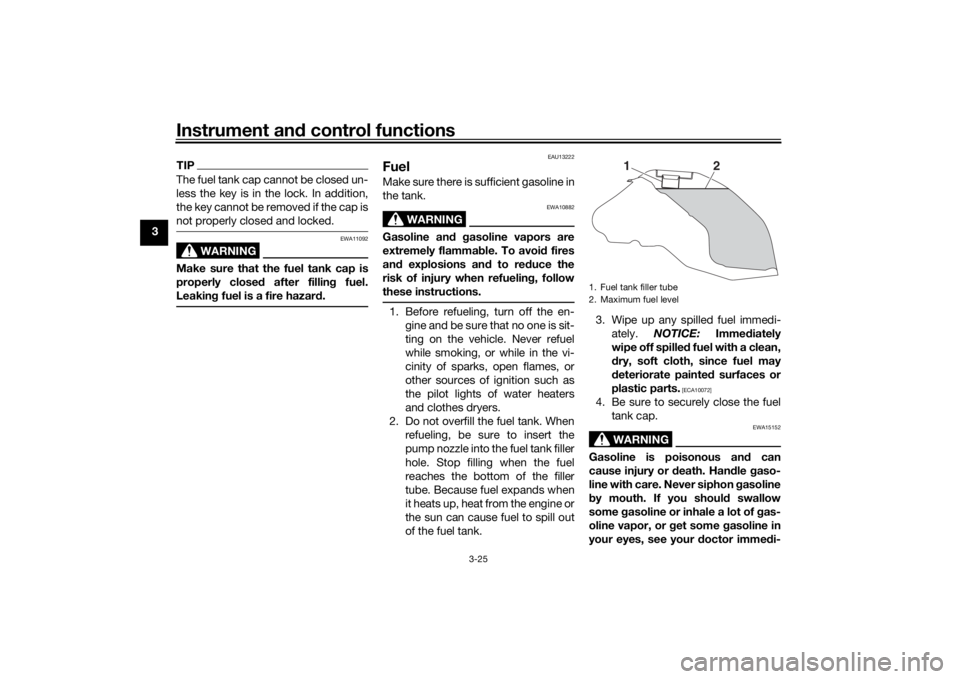
Fuel tank capTo open the fuel tank cap
Open the fuel tank cap lock cover, in-
sert the key into the lock, and then turn
it 1/4 turn clockwise. The lock will be
released and the fuel tank cap can be
opened.
To close the fuel tank cap
With the key still inserted in the lock,
push down the fuel tank cap. Turn the
key 1/4 turn counterclockwise, remove
it, and then close the lock cover.
1. TCS display
2. Traction control system indicator light “ ”
3. Engine trouble warning light “ ”
12
3
1. Fuel tank cap lock cover
2. Unlock.
1
2
UB5CE0E0.book Page 24 Wednesday, December 20, 2017 11:08 AM
Page 40 of 114
Instrument and control functions
3-25
3
TIPThe fuel tank cap cannot be closed un-
less the key is in the lock. In addition,
the key cannot be removed if the cap is
not properly closed and locked.
WARNING
EWA11092
Make sure that the fuel tank cap is
properly close d after fillin g fuel.
Leakin g fuel is a fire hazar d.
EAU13222
FuelMake sure there is sufficient gasoline in
the tank.
WARNING
EWA10882
Gasoline an d g asoline vapors are
extremely flamma ble. To avoi d fires
an d explosions an d to re duce the
risk of injury when refuelin g, follow
these instructions.1. Before refueling, turn off the en- gine and be sure that no one is sit-
ting on the vehicle. Never refuel
while smoking, or while in the vi-
cinity of sparks, open flames, or
other sources of ignition such as
the pilot lights of water heaters
and clothes dryers.
2. Do not overfill the fuel tank. When refueling, be sure to insert the
pump nozzle into the fuel tank filler
hole. Stop filling when the fuel
reaches the bottom of the filler
tube. Because fuel expands when
it heats up, heat from the engine or
the sun can cause fuel to spill out
of the fuel tank. 3. Wipe up any spilled fuel immedi-
ately. NOTICE: Immediately
wipe off spille d fuel with a clean,
d ry, soft cloth, since fuel may
d eteriorate painted surfaces or
plastic parts.
[ECA10072]
4. Be sure to securely close the fuel tank cap.
WARNING
EWA15152
Gasoline is poisonous an d can
cause injury or death. Han dle gaso-
line with care. Never siphon gasoline
b y mouth. If you shoul d swallow
some gasoline or inhale a lot of g as-
oline vapor, or g et some gasoline in
your eyes, see your doctor imme di-1. Fuel tank filler tube
2. Maximum fuel level
1
2
UB5CE0E0.book Page 25 Wednesday, December 20, 2017 11:08 AM
Page 42 of 114
Instrument and control functions
3-27
3
EAU72972
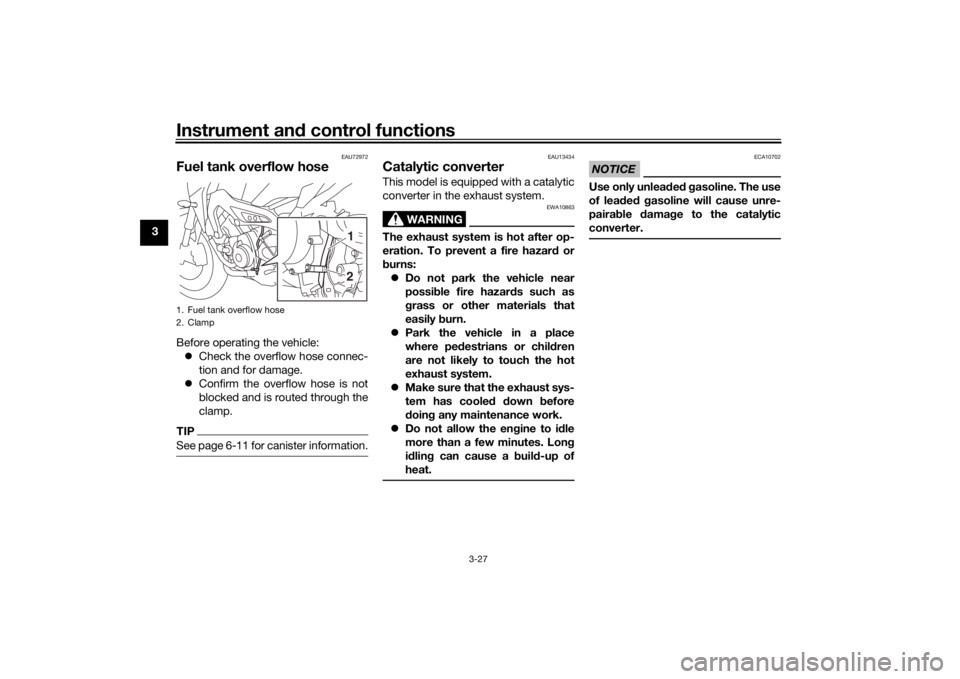
Fuel tank overflow hoseBefore operating the vehicle:
Check the overflow hose connec-
tion and for damage.
Confirm the overflow hose is not
blocked and is routed through the
clamp.TIPSee page 6-11 for canister information.
EAU13434
Catalytic converterThis model is equipped with a catalytic
converter in the exhaust system.
WARNING
EWA10863
The exhaust system is hot after op-
eration. To prevent a fire hazar d or
b urns:
Do not park the vehicle near
possi ble fire hazard s such as
g rass or other materials that
easily burn.
Park the vehicle in a place
where ped estrians or chil dren
are not likely to touch the hot
exhaust system.
Make sure that the exhaust sys-
tem has coole d down before
d oin g any maintenance work.
Do not allow the en gine to i dle
more than a few minutes. Lon g
i d lin g can cause a b uild-up of
heat.
NOTICE
ECA10702
Use only unlea ded g asoline. The use
of lead ed g asoline will cause unre-
pairab le damag e to the catalytic
converter.
1. Fuel tank overflow hose
2. Clamp
21
UB5CE0E0.book Page 27 Wednesday, December 20, 2017 11:08 AM
Page 43 of 114
Instrument and control functions
3-28
3
EAU65800
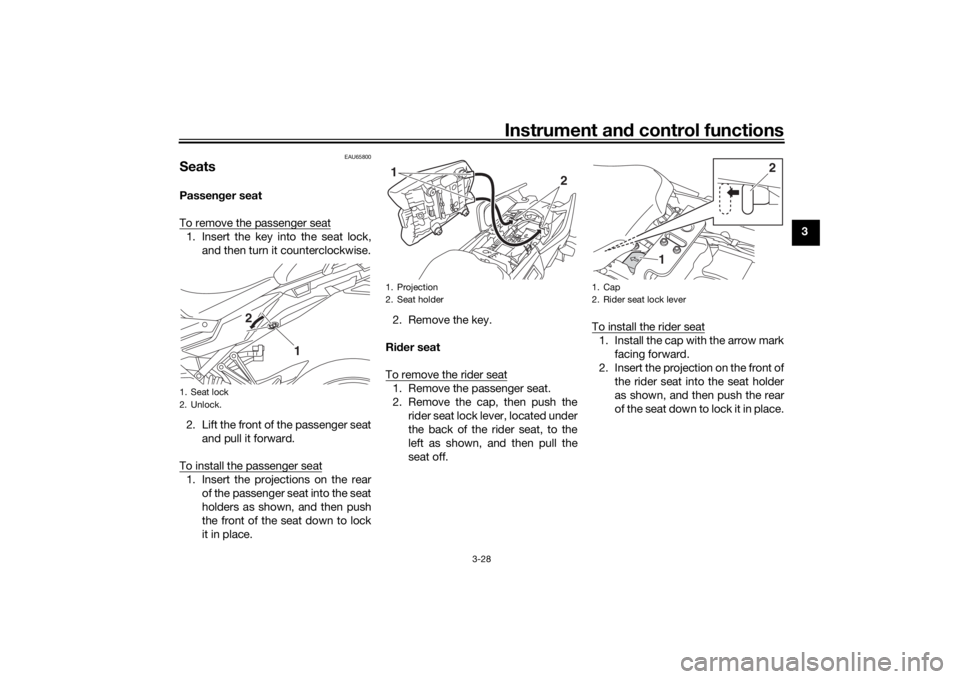
SeatsPassen ger seat
To remove the passenger seat1. Insert the key into the seat lock, and then turn it counterclockwise.
2. Lift the front of the passenger seat and pull it forward.
To install the passenger seat1. Insert the projections on the rear of the passenger seat into the seat
holders as shown, and then push
the front of the seat down to lock
it in place. 2. Remove the key.
Ri der seat
To remove the rider seat
1. Remove the passenger seat.
2. Remove the cap, then push the rider seat lock lever, located under
the back of the rider seat, to the
left as shown, and then pull the
seat off. To install the rider seat
1. Install the cap with the arrow mark
facing forward.
2. Insert the projection on the front of the rider seat into the seat holder
as shown, and then push the rear
of the seat down to lock it in place.
1. Seat lock
2. Unlock.
1
2
1. Projection
2. Seat holder
2
1
1. Cap
2. Rider seat lock lever
2
1
UB5CE0E0.book Page 28 Wednesday, December 20, 2017 11:08 AM
Page 45 of 114
Instrument and control functions
3-30
3
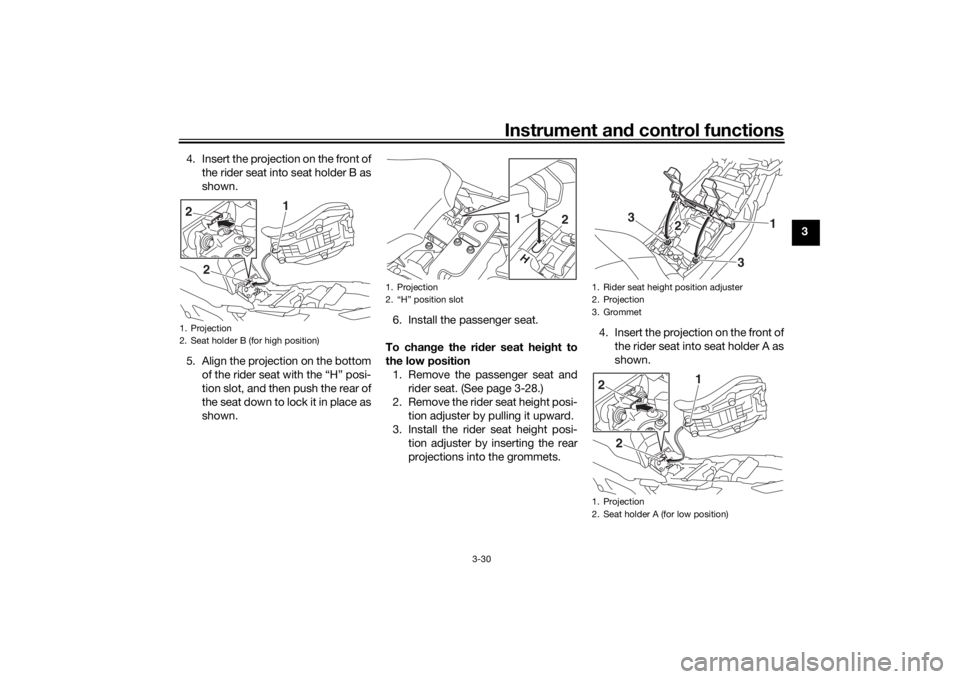
4. Insert the projection on the front of
the rider seat into seat holder B as
shown.
5. Align the projection on the bottom of the rider seat with the “H” posi-
tion slot, and then push the rear of
the seat down to lock it in place as
shown. 6. Install the passenger seat.
To chan ge the ri der seat hei ght to
the low position 1. Remove the passenger seat and rider seat. (See page 3-28.)
2. Remove the rider seat height posi- tion adjuster by pulling it upward.
3. Install the rider seat height posi- tion adjuster by inserting the rear
projections into the grommets. 4. Insert the projection on the front of
the rider seat into seat holder A as
shown.
1. Projection
2. Seat holder B (for high position)
2 1
2
1. Projection
2. “H” position slot
1
2
1. Rider seat height position adjuster
2. Projection
3. Grommet
1. Projection
2. Seat holder A (for low position)
1
2
3
3
2 1
2
UB5CE0E0.book Page 30 Wednesday, December 20, 2017 11:08 AM