maintenance YAMAHA TRICITY 2014 Owner's Guide
[x] Cancel search | Manufacturer: YAMAHA, Model Year: 2014, Model line: TRICITY, Model: YAMAHA TRICITY 2014Pages: 84, PDF Size: 2.19 MB
Page 66 of 84
PERIODIC MAINTENANCE AND ADJUSTMENT
6-27
6battery tends to discharge more quick-
ly if the vehicle is equipped with op-
tional electrical accessories.
NOTICE
ECA16522
To char
ge a VRLA (Valve Re gulate d
Lea d Aci d) battery, a special (con-
stant-volta ge) battery char ger is re-
quire d. Usin g a conventional battery
char ger will damag e the b attery.To store the b attery
1. If the vehicle will not be used for more than one month, remove the
battery, fully charge it, and then
place it in a cool, dry place.
NOTICE: When removin g the
b attery, be sure the key is
turne d to “OFF”, then discon-
nect the neg ative lead b efore
d isconnectin g the positive lea d.
[ECA16303]
2. If the battery will be stored for
more than two months, check it at
least once a month and fully
charge it if necessary.
3. Fully charge the battery before in- stallation. NOTICE: When install-
in g the b attery, be sure the key is turne
d to “OFF”, then connect
the positive lea d before con-
nectin g the ne gative lea d.
[ECA16841]
4. After installation, make sure that
the battery leads are properly con-
nected to the battery terminals.NOTICE
ECA16531
Always keep the b attery charged .
Storin g a d ischar ged battery can
cause permanent battery damag e.
EAU60981
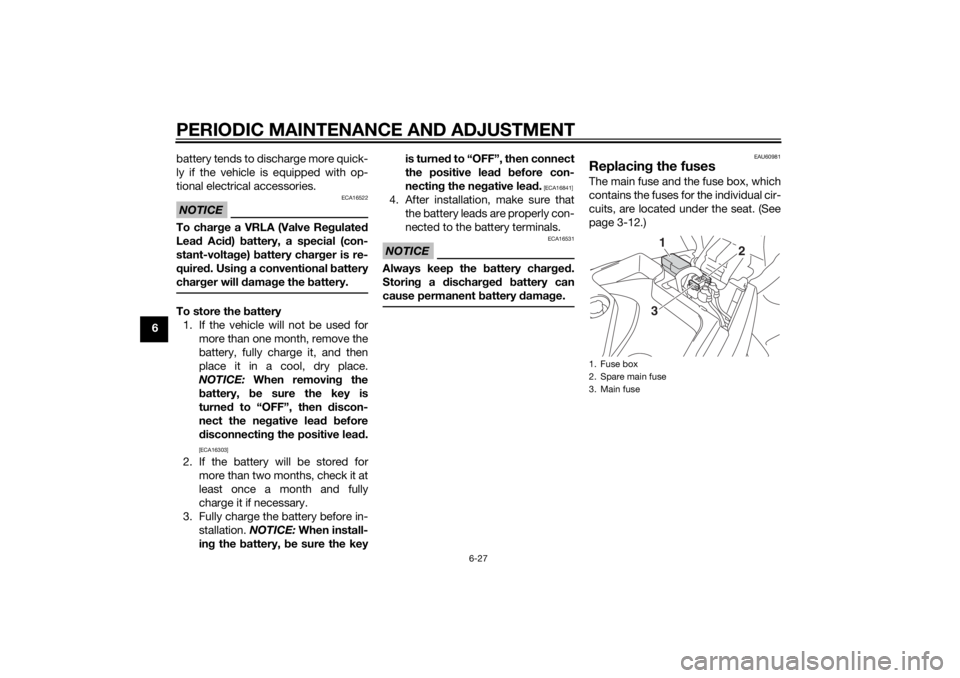
Replacin g the fusesThe main fuse and the fuse box, which
contains the fuses for the individual cir-
cuits, are located under the seat. (See
page 3-12.)1. Fuse box
2. Spare main fuse
3. Main fuse
1
2
3
U2CME0E0.book Page 27 Friday, May 2, 2014 2:55 PM
Page 67 of 84
PERIODIC MAINTENANCE AND ADJUSTMENT
6-28
6
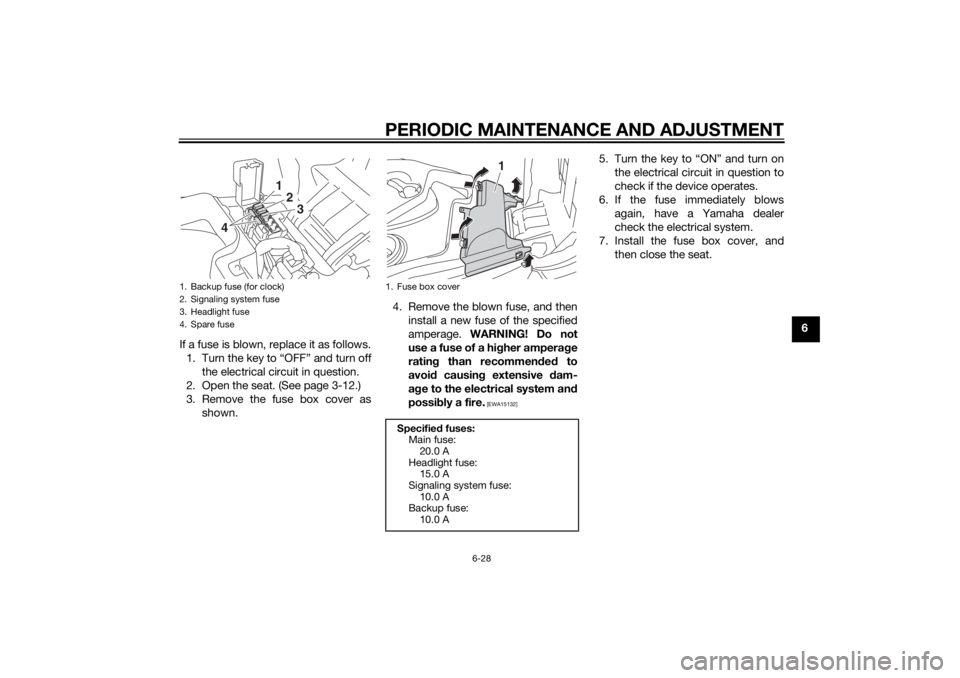
If a fuse is blown, replace it as follows. 1. Turn the key to “OFF” and turn off the electrical circuit in question.
2. Open the seat. (See page 3-12.)
3. Remove the fuse box cover as shown. 4. Remove the blown fuse, and then
install a new fuse of the specified
amperage. WARNING! Do not
use a fuse of a hi gher ampera ge
ratin g than recommen ded to
avoi d causin g extensive dam-
a g e to the electrical system an d
possi bly a fire.
[EWA15132]
5. Turn the key to “ON” and turn on
the electrical circuit in question to
check if the device operates.
6. If the fuse immediately blows again, have a Yamaha dealer
check the electrical system.
7. Install the fuse box cover, and then close the seat.
1. Backup fuse (for clock)
2. Signaling system fuse
3. Headlight fuse
4. Spare fuse
123
4
1. Fuse box cover
Specified fuses:
Main fuse: 20.0 A
Headlight fuse: 15.0 A
Signaling system fuse:
10.0 A
Backup fuse: 10.0 A
1
U2CME0E0.book Page 28 Friday, May 2, 2014 2:55 PM
Page 68 of 84
PERIODIC MAINTENANCE AND ADJUSTMENT
6-29
6
EAU23765
Replacing the hea dlig ht bul bThis model is equipped with a halogen
bulb headlight. If the headlight bulb
burns out, replace it as follows.NOTICE
ECA10651
Take care not to d amage the follow-
in g parts:
Hea dlig ht bul b
Do not touch the g lass part of
the hea dlig ht bul b to keep it free
from oil, otherwise the transpar-
ency of the glass, the luminosity
of the b ulb, an d the bul b life will
b e ad versely affected . Thor-
ou ghly clean off any dirt an d fin-
g erprints on the head lig ht bul b
usin g a cloth moistened with al-
cohol or thinner.
Hea dlig ht lens
Do not affix any type of tinted
film or stickers to the hea dlig ht
lens.
Do not use a hea dlig ht bul b of a
watta ge hi gher than specifie d.
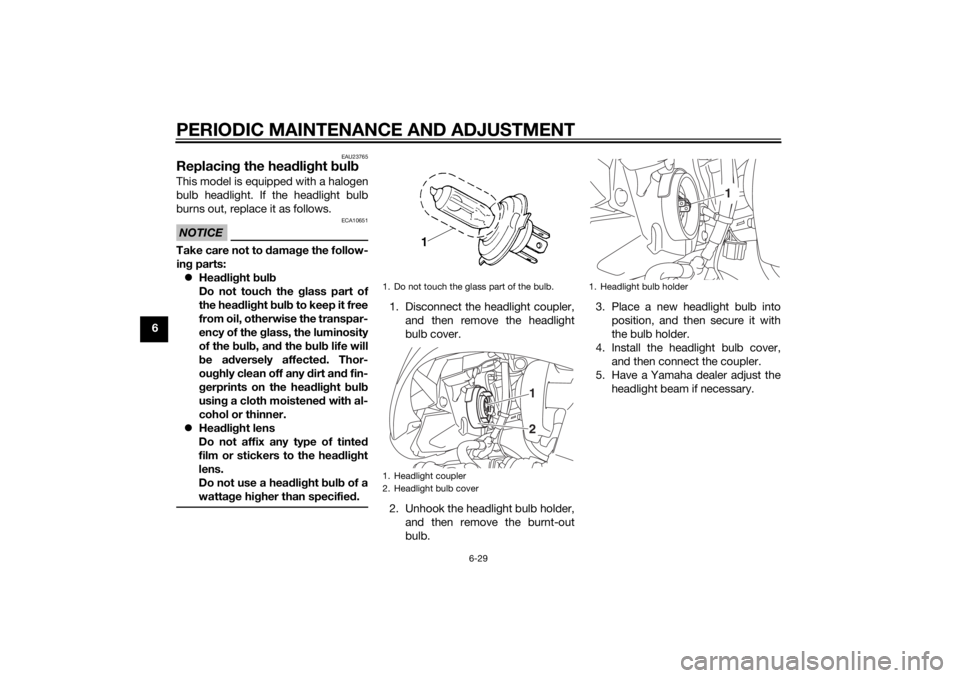
1. Disconnect the headlight coupler,
and then remove the headlight
bulb cover.
2. Unhook the headlight bulb holder, and then remove the burnt-out
bulb. 3. Place a new headlight bulb into
position, and then secure it with
the bulb holder.
4. Install the headlight bulb cover, and then connect the coupler.
5. Have a Yamaha dealer adjust the headlight beam if necessary.1. Do not touch the glass part of the bulb.
1. Headlight coupler
2. Headlight bulb cover
12
1. Headlight bulb holder
1
U2CME0E0.book Page 29 Friday, May 2, 2014 2:55 PM
Page 69 of 84
PERIODIC MAINTENANCE AND ADJUSTMENT
6-30
6
EAU24182
Tail/brake li ghtThis model is equipped with an LED-
type tail/brake light.
If the tail/brake light does not come on,
have a Yamaha dealer check it.
EAU61170
Turn si gnal li ght bul bIf a turn signal light does not come on,
have a Yamaha dealer check its electri-
cal circuit or replace the bulb.
EAU54501
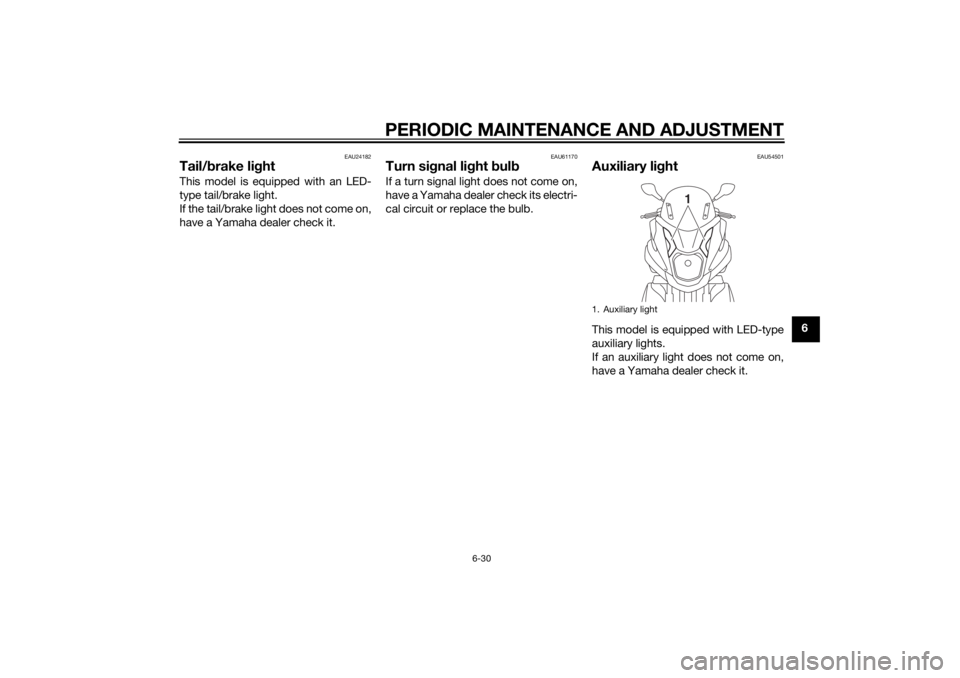
Auxiliary li ghtThis model is equipped with LED-type
auxiliary lights.
If an auxiliary light does not come on,
have a Yamaha dealer check it.1. Auxiliary light
1
U2CME0E0.book Page 30 Friday, May 2, 2014 2:55 PM
Page 70 of 84
PERIODIC MAINTENANCE AND ADJUSTMENT
6-31
6
EAU60700
Troubleshootin gAlthough Yamaha vehicles receive a
thorough inspection before shipment
from the factory, trouble may occur
during operation. Any problem in the
fuel, compression, or ignition systems,
for example, can cause poor starting
and loss of power.
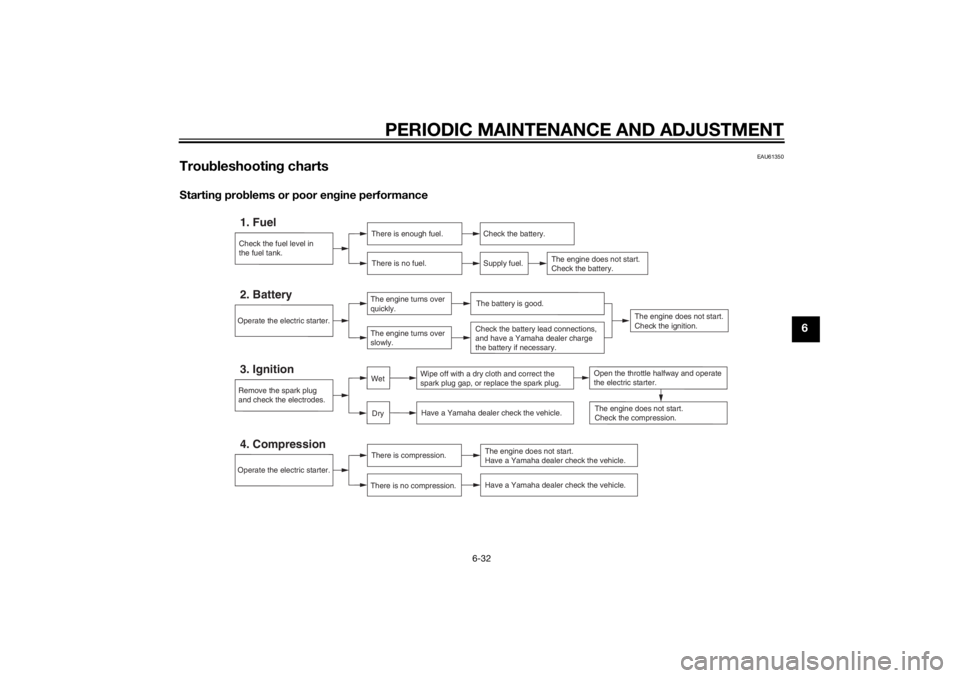
The following troubleshooting charts
represent quick and easy procedures
for checking these vital systems your-
self. However, should your vehicle re-
quire any repair, take it to a Yamaha
dealer, whose skilled technicians have
the necessary tools, experience, and
know-how to service the vehicle prop-
erly.
Use only genuine Yamaha replace-
ment parts. Imitation parts may look
like Yamaha parts, but they are often
inferior, have a shorter service life and
can lead to expensive repair bills.
WARNING
EWA15142
When checkin g the fuel system, do
not smoke, an d make sure there are
no open flames or sparks in the ar-
ea, inclu din g pilot lig hts from water heaters or furnaces. Gasoline or
g
asoline vapors can i gnite or ex-
plod e, causin g severe injury or prop-
erty dama ge.U2CME0E0.book Page 31 Friday, May 2, 2014 2:55 PM
Page 71 of 84
PERIODIC MAINTENANCE AND ADJUSTMENT
6-32
6
EAU61350
Troubleshootin g chartsStartin g prob lems or poor en gine performance
Check the fuel level in
the fuel tank.1. Fuel
There is enough fuel.
There is no fuel.
Check the battery.
Supply fuel.
The engine does not start.
Check the battery.
The engine does not start.
Have a Yamaha dealer check the vehicle.
Operate the electric starter.4. Compression
There is compression.
There is no compression.
Remove the spark plug
and check the electrodes.3. Ignition
Wipe off with a dry cloth and correct the
spark plug gap, or replace the spark plug. Have a Yamaha dealer check the vehicle.
Have a Yamaha dealer check the vehicle.
The engine does not start.
Check the compression.
The engine does not start.
Check the ignition.
Operate the electric starter.2. Battery
The engine turns over
quickly.
The engine turns over
slowly.
The battery is good.Check the battery lead connections,
and have a Yamaha dealer charge
the battery if necessary.
DryWet
Open the throttle halfway and operate
the electric starter.
U2CME0E0.book Page 32 Friday, May 2, 2014 2:55 PM
Page 72 of 84
PERIODIC MAINTENANCE AND ADJUSTMENT
6-33
6En
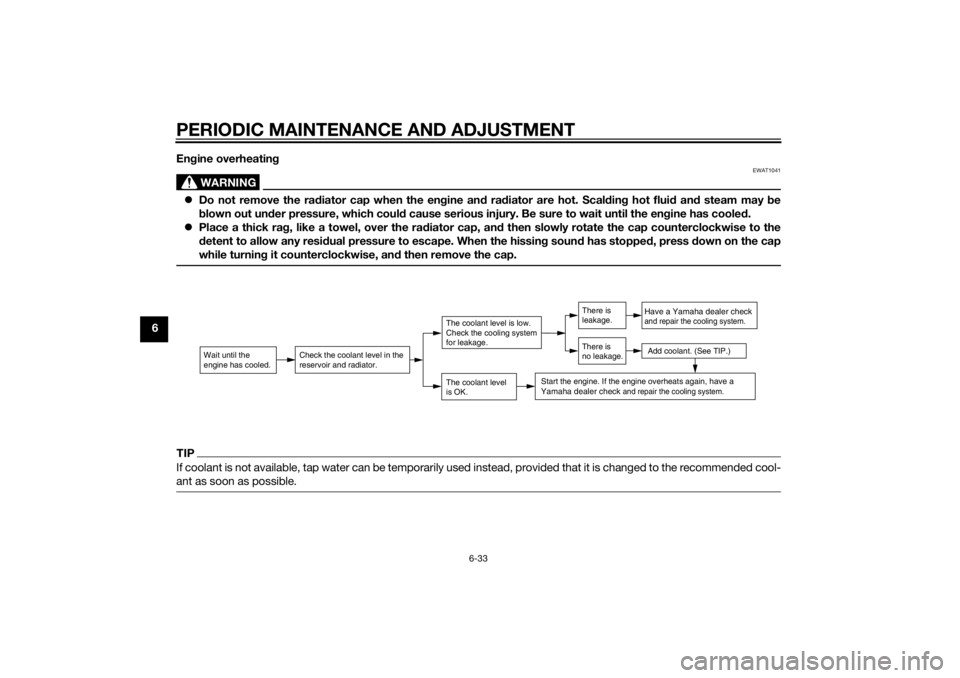
gine overheatin g
WARNING
EWAT1041
Do not remove the ra diator cap when the en gine an d ra diator are hot. Scal din g hot flui d an d steam may be
b lown out un der pressure, which coul d cause serious injury. Be sure to wait until the en gine has coole d.
Place a thick ra g, like a towel, over the ra diator cap, an d then slowly rotate the cap counterclockwise to the
d etent to allow any resi dual pressure to escape. When the hissin g soun d has stoppe d, press d own on the cap
while turnin g it counterclockwise, an d then remove the cap.TIPIf coolant is not available, tap water can be temporarily used instead, provided that it is changed to the recommended cool-
ant as soon as possible.
Wait until the
engine has cooled.
Check the coolant level in the
reservoir and radiator.
The coolant level
is OK.The coolant level is low.
Check the cooling system
for leakage.
Have a Yamaha dealer checkand repair the cooling system.Add coolant. (See TIP.)
Start the engine. If the engine overheats again,
have a
Yamaha dealer check
and repair the cooling system.
There is
leakage.
There is
no leakage.
U2CME0E0.book Page 33 Friday, May 2, 2014 2:55 PM
Page 82 of 84

10-1
10
INDEXAAcceleration and deceleration ................ 5-2
Air filter and V-belt case air filter elements ............................................. 6-14
Auxiliary DC connector ......................... 3-17
Auxiliary light......................................... 6-30BBattery .................................................. 6-26
Brake fluid, changing ............................ 6-22
Brake fluid level, checking .................... 6-20
Brake lever, front .................................... 3-8
Brake lever, rear...................................... 3-9
Brake levers, lubricating ....................... 6-23
Braking.................................................... 5-3CCables, checking and lubricating ......... 6-22
Care ........................................................ 7-1
Catalytic converter ................................ 3-11
Centerstand and sidestand, checking and lubricating .................................... 6-23
Coolant ................................................. 6-13
Coolant temperature warning light ......... 3-3DDimmer switch ........................................ 3-8EEngine break-in....................................... 5-3
Engine oil and oil strainer...................... 6-10
Engine serial number .............................. 9-1
Engine trouble warning light ................... 3-3FFinal transmission oil ............................ 6-12
Front and rear brake pads, checking.... 6-20
Front brake lever free play, checking ... 6-19
Front fork, checking .............................. 6-24 Fuel ....................................................... 3-10
Fuel consumption, tips for reducing ...... 5-3
Fuel tank cap .......................................... 3-9
Fuses, replacing ................................... 6-27
HHandlebar switches ................................ 3-8
Headlight bulb, replacing ..................... 6-29
High beam indicator light ....................... 3-2
Horn switch ............................................ 3-8IIdentification numbers ............................ 9-1
Ignition circuit cut-off system ............... 3-15
Indicator lights and warning lights ......... 3-2KKeyhole shutter ...................................... 3-2LLeaning system, checking .................... 6-26
Luggage hook ...................................... 3-14MMain switch/steering lock....................... 3-1
Maintenance and lubrication, periodic ... 6-4
Maintenance, emission control
system.................................................. 6-3
Matte color, caution ............................... 7-1
Model label ............................................. 9-1
Multi-function meter unit ........................ 3-4PPanel, removing and installing ............... 6-8
Parking ................................................... 5-4
Part locations ......................................... 2-1
Passenger footrest ............................... 3-13RRear brake lever free play, checking .... 6-19
SSafe-riding points....................................1-5
Safety information ...................................1-1
Seat .......................................................3-12
Self-diagnosis device..............................3-3
Sidestand ..............................................3-14
Spark plug, checking ..............................6-8
Specifications .........................................8-1
Starting off ..............................................5-2
Starting the engine ..................................5-1
Start switch .............................................3-8
Steering, checking ................................6-25
Steering tie rod, checking .....................6-25
Storage ...................................................7-4
Storage compartment ...........................3-13TTail/brake light ......................................6-30
Throttle grip and cable, checking and
lubricating ...........................................6-22
Throttle grip free play, checking ...........6-16
Tires ......................................................6-17
Tool kit ....................................................6-2
Troubleshooting ....................................6-31
Troubleshooting charts .........................6-32
Turn signal indicator lights ......................3-2
Turn signal light bulb.............................6-30
Turn signal switch ...................................3-8VValve clearance .....................................6-16
Vehicle identification number ..................9-1WWheel bearings, checking .....................6-25
Wheels ..................................................6-18
U2CME0E0.book Page 1 Friday, May 2, 2014 2:55 PM