lock YAMAHA TRICITY 2014 Owners Manual
[x] Cancel search | Manufacturer: YAMAHA, Model Year: 2014, Model line: TRICITY, Model: YAMAHA TRICITY 2014Pages: 84, PDF Size: 2.19 MB
Page 6 of 84

TABLE OF CONTENTSSAFETY INFORMATION.................. 1-1
Further safe-riding points ............... 1-5
DESCRIPTION .................................. 2-1
Left view ......................................... 2-1
Right view ....................................... 2-2
Controls and instruments ............... 2-3
INSTRUMENT AND CONTROL
FUNCTIONS ...................................... 3-1
Main switch/steering lock............... 3-1
Keyhole shutter .............................. 3-2
Indicator lights and warning lights............................................ 3-2
Self-diagnosis device ..................... 3-3
Multi-function meter unit ................ 3-4
Handlebar switches ........................ 3-8
Front brake lever ............................ 3-8
Rear brake lever ............................. 3-9
Fuel tank cap .................................. 3-9
Fuel ............................................... 3-10
Catalytic converter ....................... 3-11
Seat .............................................. 3-12
Passenger footrest ....................... 3-13
Storage compartment .................. 3-13
Luggage hook............................... 3-14
Sidestand ..................................... 3-14
Ignition circuit cut-off system ....... 3-15
Auxiliary DC connector ................. 3-17 FOR YOUR SAFETY –
PRE-OPERATION CHECKS
............. 4-1
OPERATION AND IMPORTANT
RIDING POINTS ................................ 5-1
Starting the engine .......................... 5-1
Starting off ...................................... 5-2
Acceleration and deceleration ........ 5-2
Braking ............................................ 5-3
Tips for reducing fuel consumption ................................ 5-3
Engine break-in ............................... 5-3
Parking ............................................ 5-4
PERIODIC MAINTENANCE AND
ADJUSTMENT ................................... 6-1
Owner’s tool kit ............................... 6-2
Periodic maintenance chart for the
emission control system .............. 6-3
General maintenance and
lubrication chart ........................... 6-4
Removing and installing the panel ............................................ 6-8
Checking the spark plug ................. 6-8
Engine oil and oil strainer .............. 6-10
Final transmission oil..................... 6-12
Coolant.......................................... 6-13
Air filter and V-belt case air filter elements .................................... 6-14
Checking the throttle grip free play ............................................ 6-16 Valve clearance............................. 6-16
Tires .............................................. 6-17
Cast wheels .................................. 6-18
Checking the front brake lever
free play..................................... 6-19
Checking the rear brake lever free play..................................... 6-19
Checking the front and rear
brake pads ................................ 6-20
Checking the brake fluid level ...... 6-20
Changing the brake fluid .............. 6-22
Checking and lubricating the cables ........................................ 6-22
Checking and lubricating the
throttle grip and cable ............... 6-22
Lubricating the front and rear brake levers ............................... 6-23
Checking and lubricating the centerstand and sidestand........ 6-23
Checking the front fork ................. 6-24
Checking the steering................... 6-25
Checking the wheel bearings ....... 6-25
Checking the steering tie rod ....... 6-25
Checking the leaning system ....... 6-26
Battery .......................................... 6-26
Replacing the fuses ...................... 6-27
Replacing the headlight bulb ........ 6-29
Tail/brake light .............................. 6-30
Turn signal light bulb .................... 6-30
Auxiliary light ................................ 6-30
Troubleshooting............................ 6-31U2CME0E0.book Page 1 Friday, May 2, 2014 2:55 PM
Page 16 of 84
DESCRIPTION
2-3
2
EAU10431
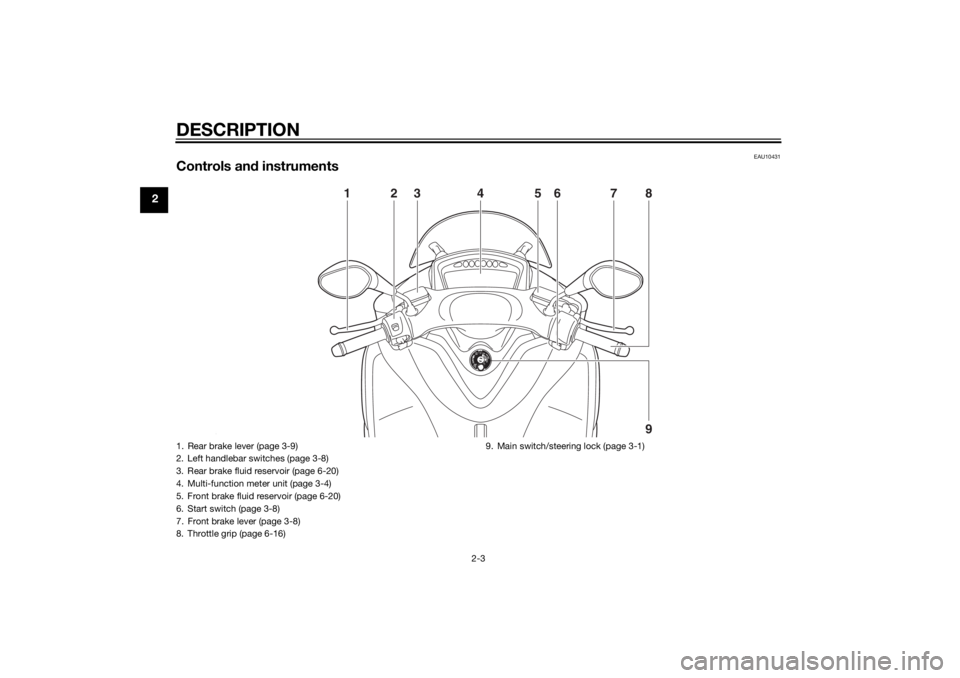
Controls and instruments
2
1
9 87
3
26 5
4
ZAU0E0631. Rear brake lever (page 3-9)
2. Left handlebar switches (page 3-8)
3. Rear brake fluid reservoir (page 6-20)
4. Multi-function meter unit (page 3-4)
5. Front brake fluid reservoir (page 6-20)
6. Start switch (page 3-8)
7. Front brake lever (page 3-8)
8. Throttle grip (page 6-16) 9. Main switch/steering lock (page 3-1)U2CME0E0.book Page 3 Friday, May 2, 2014 2:55 PM
Page 17 of 84
INSTRUMENT AND CONTROL FUNCTIONS
3-1
3
EAUN0263
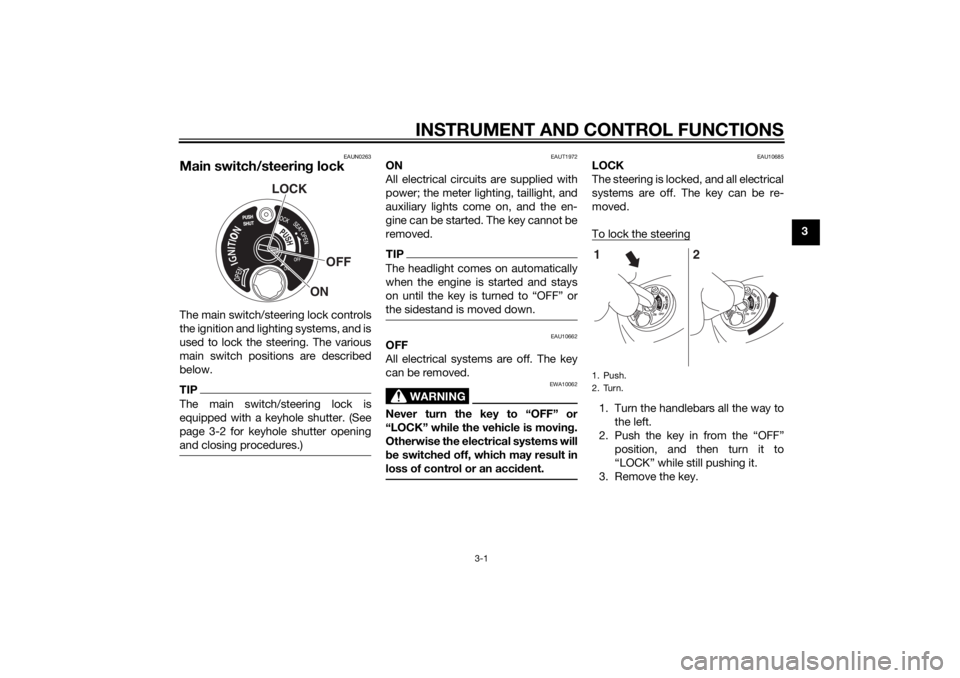
Main switch/steering lockThe main switch/steering lock controls
the ignition and lighting systems, and is
used to lock the steering. The various
main switch positions are described
below.TIPThe main switch/steering lock is
equipped with a keyhole shutter. (See
page 3-2 for keyhole shutter opening
and closing procedures.)
EAUT1972
ON
All electrical circuits are supplied with
power; the meter lighting, taillight, and
auxiliary lights come on, and the en-
gine can be started. The key cannot be
removed.TIPThe headlight comes on automatically
when the engine is started and stays
on until the key is turned to “OFF” or
the sidestand is moved down.
EAU10662
OFF
All electrical systems are off. The key
can be removed.
WARNING
EWA10062
Never turn the key to “OFF” or
“LOCK” while the vehicle is movin g.
Otherwise the electrical systems will
b e switched off, which may result in
loss of control or an acci dent.
EAU10685
LOCK
The steering is locked, and all electrical
systems are off. The key can be re-
moved.
To lock the steering1. Turn the handlebars all the way to
the left.
2. Push the key in from the “OFF” position, and then turn it to
“LOCK” while still pushing it.
3. Remove the key.
LOCK
OFF
ON
1. Push.
2. Turn.
ON OFF
ONOFF
12
U2CME0E0.book Page 1 Friday, May 2, 2014 2:55 PM
Page 18 of 84
INSTRUMENT AND CONTROL FUNCTIONS
3-2
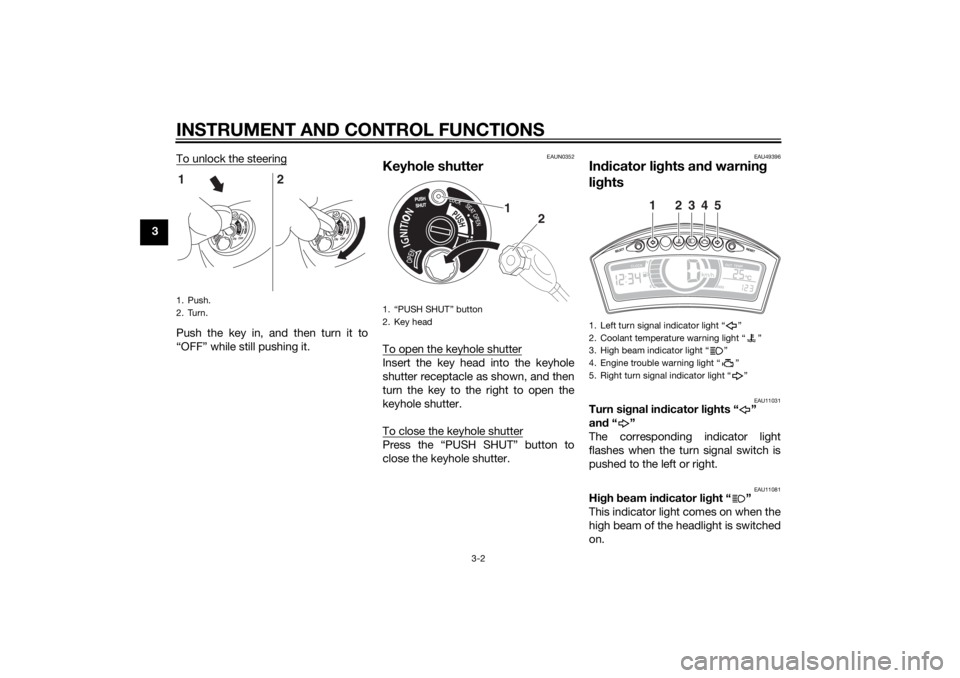
3To unlock the steering
Push the key in, and then turn it to
“OFF” while still pushing it.
EAUN0352
Keyhole shutterTo open the keyhole shutterInsert the key head into the keyhole
shutter receptacle as shown, and then
turn the key to the right to open the
keyhole shutter.
To close the keyhole shutterPress the “PUSH SHUT” button to
close the keyhole shutter.
EAU49396
In
dicator li ghts an d warnin g
li g hts
EAU11031
Turn si gnal in dicator li ghts “ ”
an d“”
The corresponding indicator light
flashes when the turn signal switch is
pushed to the left or right.
EAU11081
Hi gh beam in dicator li ght “ ”
This indicator light comes on when the
high beam of the headlight is switched
on.
1. Push.
2. Turn.
ON OFF
ONOFF
12
1. “PUSH SHUT” button
2. Key head
1
2
1. Left turn signal indicator light “ ”
2. Coolant temperature warning light “ ”
3. High beam indicator light “ ”
4. Engine trouble warning light “ ”
5. Right turn signal indicator light “ ”
1
2
3
4
5
U2CME0E0.book Page 2 Friday, May 2, 2014 2:55 PM
Page 20 of 84
INSTRUMENT AND CONTROL FUNCTIONS
3-4
3
EAUU1730
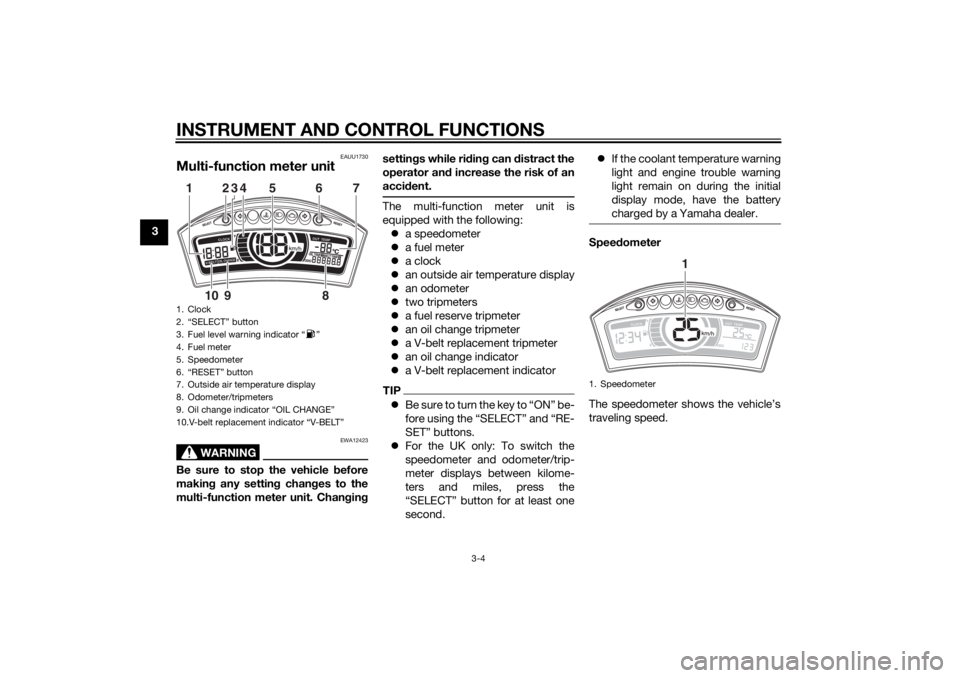
Multi-function meter unit
WARNING
EWA12423
Be sure to stop the vehicle before
makin g any settin g chan ges to the
multi-function meter unit. Chan gin g settin
gs while ri din g can d istract the
operator an d increase the risk of an
acci dent.
The multi-function meter unit is
equipped with the following:
a speedometer
a fuel meter
a clock
an outside air temperature display
an odometer
two tripmeters
a fuel reserve tripmeter
an oil change tripmeter
a V-belt replacement tripmeter
an oil change indicator
a V-belt replacement indicatorTIPBe sure to turn the key to “ON” be-
fore using the “SELECT” and “RE-
SET” buttons.
For the UK only: To switch the
speedometer and odometer/trip-
meter displays between kilome-
ters and miles, press the
“SELECT” button for at least one
second.
If the coolant temperature warning
light and engine trouble warning
light remain on during the initial
display mode, have the battery
charged by a Yamaha dealer.
Speed ometer
The speedometer shows the vehicle’s
traveling speed.
1. Clock
2. “SELECT” button
3. Fuel level warning indicator “ ”
4. Fuel meter
5. Speedometer
6. “RESET” button
7. Outside air temperature display
8. Odometer/tripmeters
9. Oil change indicator “OIL CHANGE”
10.V-belt replacement indicator “V-BELT”1
234
7
5
68
9
10
1. Speedometer
1
U2CME0E0.book Page 4 Friday, May 2, 2014 2:55 PM
Page 21 of 84
INSTRUMENT AND CONTROL FUNCTIONS
3-5
3
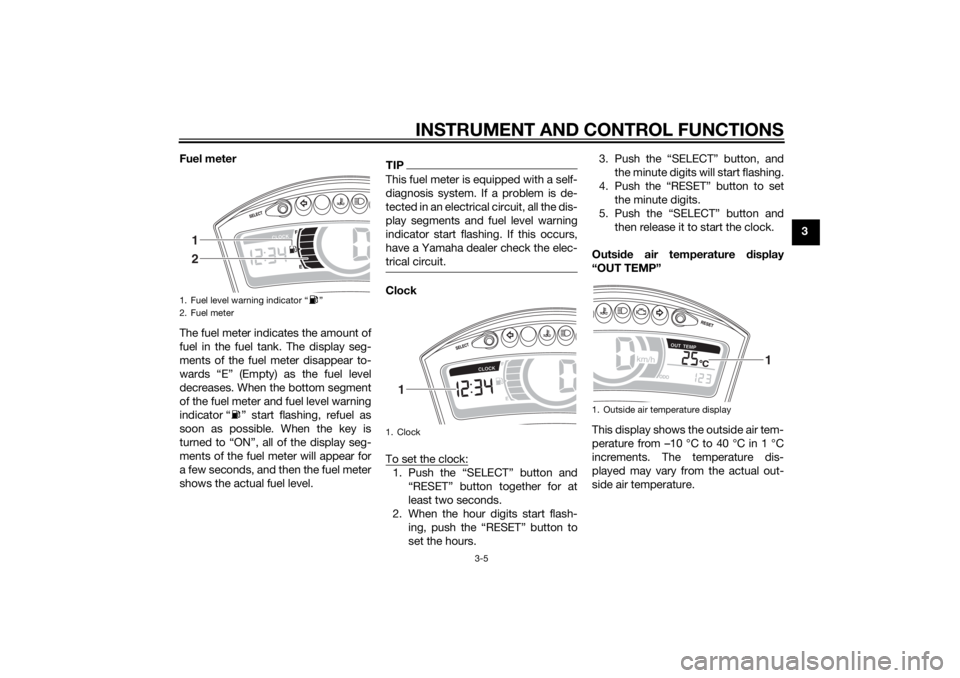
Fuel meter
The fuel meter indicates the amount of
fuel in the fuel tank. The display seg-
ments of the fuel meter disappear to-
wards “E” (Empty) as the fuel level
decreases. When the bottom segment
of the fuel meter and fuel level warning
indicator “ ” start flashing, refuel as
soon as possible. When the key is
turned to “ON”, all of the display seg-
ments of the fuel meter will appear for
a few seconds, and then the fuel meter
shows the actual fuel level.
TIPThis fuel meter is equipped with a self-
diagnosis system. If a problem is de-
tected in an electrical circuit, all the dis-
play segments and fuel level warning
indicator start flashing. If this occurs,
have a Yamaha dealer check the elec-
trical circuit.Clock
To set the clock:1. Push the “SELECT” button and
“RESET” button together for at
least two seconds.
2. When the hour digits start flash- ing, push the “RESET” button to
set the hours. 3. Push the “SELECT” button, and
the minute digits will start flashing.
4. Push the “RESET” button to set the minute digits.
5. Push the “SELECT” button and then release it to start the clock.
Outsid e air temperature display
“OUT TEMP”
This display shows the outside air tem-
perature from –10 °C to 40 °C in 1 °C
increments. The temperature dis-
played may vary from the actual out-
side air temperature.
1. Fuel level warning indicator “ ”
2. Fuel meter
12
1. Clock
1
1. Outside air temperature display
1
U2CME0E0.book Page 5 Friday, May 2, 2014 2:55 PM
Page 25 of 84
INSTRUMENT AND CONTROL FUNCTIONS
3-9
3
EAUS1963
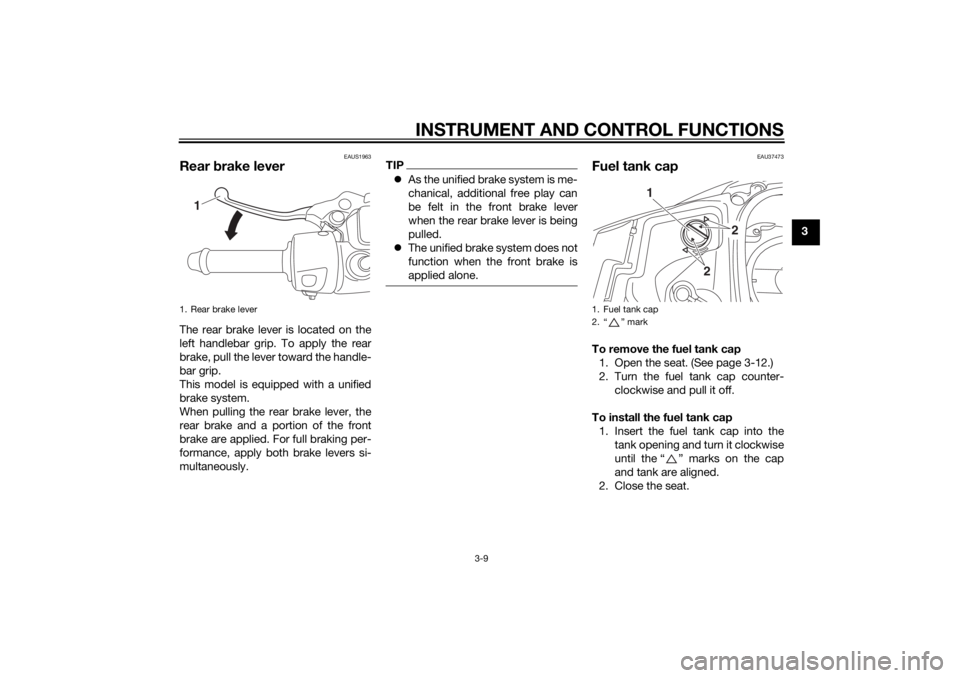
Rear brake leverThe rear brake lever is located on the
left handlebar grip. To apply the rear
brake, pull the lever toward the handle-
bar grip.
This model is equipped with a unified
brake system.
When pulling the rear brake lever, the
rear brake and a portion of the front
brake are applied. For full braking per-
formance, apply both brake levers si-
multaneously.
TIP As the unified brake system is me-
chanical, additional free play can
be felt in the front brake lever
when the rear brake lever is being
pulled.
The unified brake system does not
function when the front brake is
applied alone.
EAU37473
Fuel tank capTo remove the fuel tank cap
1. Open the seat. (See page 3-12.)
2. Turn the fuel tank cap counter- clockwise and pull it off.
To install the fuel tank cap 1. Insert the fuel tank cap into the tank opening and turn it clockwise
until the “ ” marks on the cap
and tank are aligned.
2. Close the seat.
1. Rear brake lever
1
1. Fuel tank cap
2. “ ” mark
2
2
1
U2CME0E0.book Page 9 Friday, May 2, 2014 2:55 PM
Page 28 of 84
INSTRUMENT AND CONTROL FUNCTIONS
3-12
3
NOTICE
ECA10702
Use only unleaded g asoline. The use
of lead ed g asoline will cause unre-
pairab le damag e to the catalytic
converter.
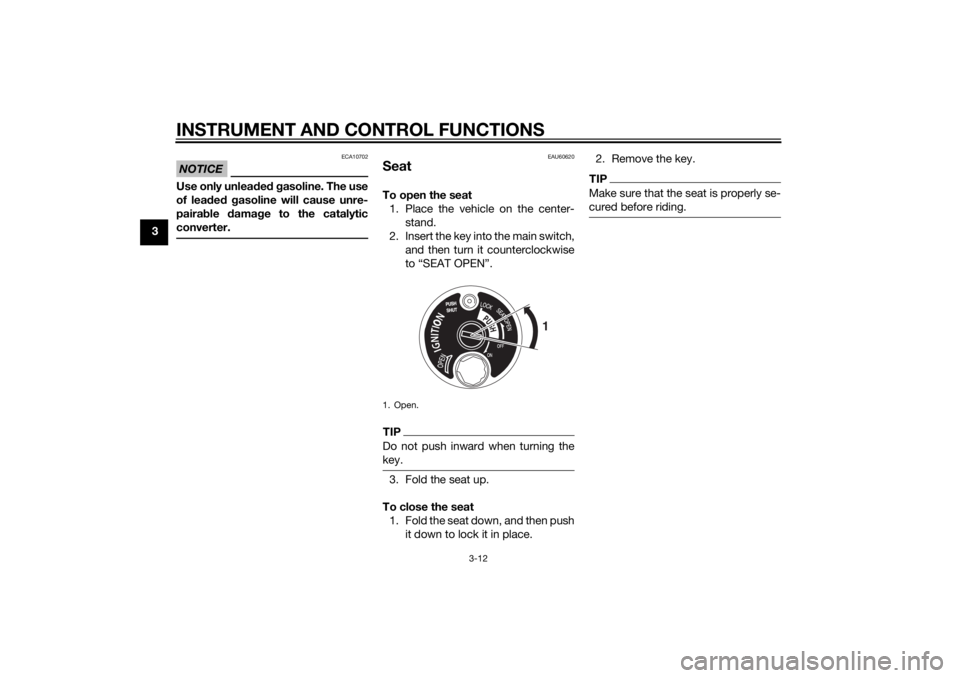
EAU60620
SeatTo open the seat 1. Place the vehicle on the center- stand.
2. Insert the key into the main switch, and then turn it counterclockwise
to “SEAT OPEN”.TIPDo not push inward when turning the
key.3. Fold the seat up.
To close the seat 1. Fold the seat down, and then push it down to lock it in place. 2. Remove the key.
TIPMake sure that the seat is properly se-
cured before riding.
1. Open.
1
U2CME0E0.book Page 12 Friday, May 2, 2014 2:55 PM
Page 60 of 84
PERIODIC MAINTENANCE AND ADJUSTMENT
6-21
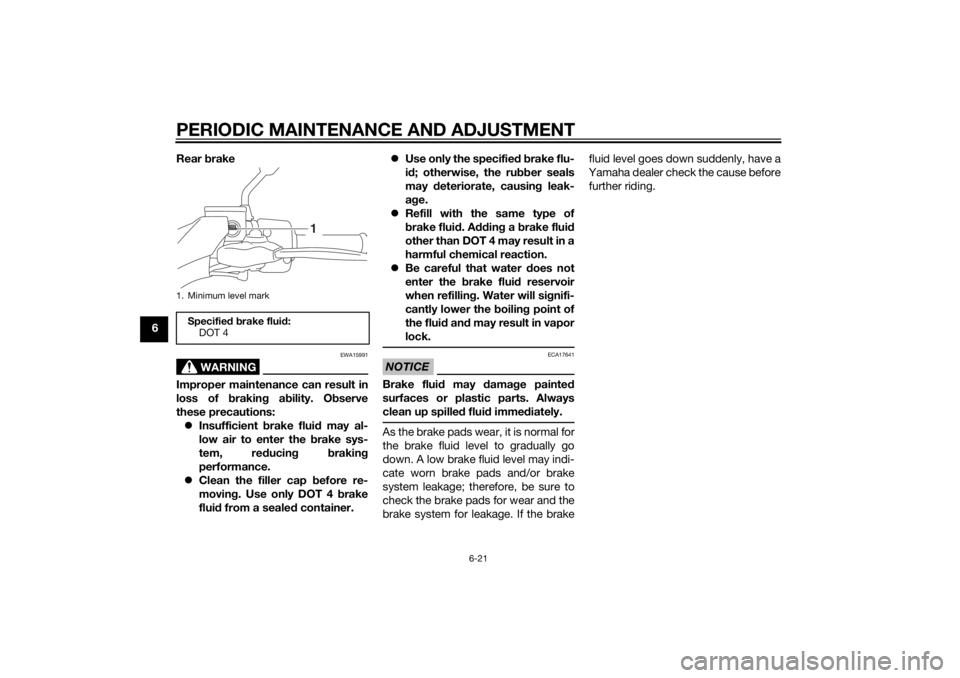
6Rear
brake
WARNING
EWA15991
Improper maintenance can result in
loss of brakin g a bility. O bserve
these precautions: Insufficient brake flui d may al-
low air to enter the b rake sys-
tem, re ducin g brakin g
performance.
Clean the filler cap before re-
moving . Use only DOT 4 b rake
flui d from a seale d container.
Use only the specified b rake flu-
i d ; otherwise, the ru bber seals
may deteriorate, causin g leak-
a g e.
Refill with the same type of
brake flui d. A ddin g a brake flui d
other than DOT 4 may result in a
harmful chemical reaction.
Be careful that water does not
enter the brake flui d reservoir
when refillin g. Water will si gnifi-
cantly lower the boilin g point of
the flui d an d may result in vapor
lock.
NOTICE
ECA17641
Brake flui d may damag e painted
surfaces or plastic parts. Always
clean up spille d flui d imme diately.As the brake pads wear, it is normal for
the brake fluid level to gradually go
down. A low brake fluid level may indi-
cate worn brake pads and/or brake
system leakage; therefore, be sure to
check the brake pads for wear and the
brake system for leakage. If the brake fluid level goes down suddenly, have a
Yamaha dealer check the cause before further riding.
1. Minimum level markSpecifie d b rake flui d:
DOT 4
1
U2CME0E0.book Page 21 Friday, May 2, 2014 2:55 PM
Page 67 of 84
PERIODIC MAINTENANCE AND ADJUSTMENT
6-28
6
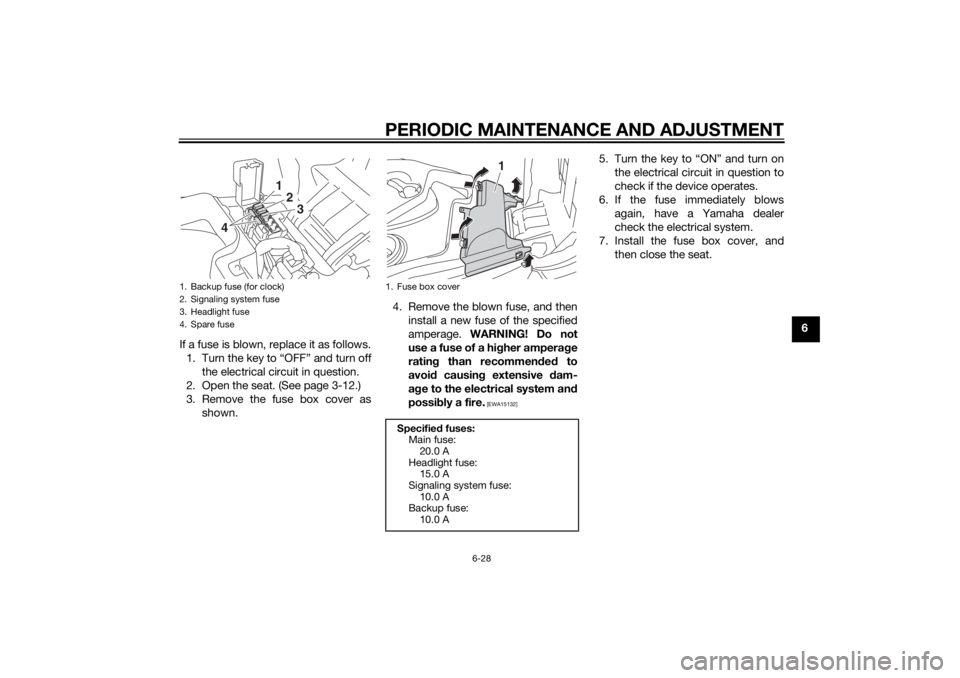
If a fuse is blown, replace it as follows. 1. Turn the key to “OFF” and turn off the electrical circuit in question.
2. Open the seat. (See page 3-12.)
3. Remove the fuse box cover as shown. 4. Remove the blown fuse, and then
install a new fuse of the specified
amperage. WARNING! Do not
use a fuse of a hi gher ampera ge
ratin g than recommen ded to
avoi d causin g extensive dam-
a g e to the electrical system an d
possi bly a fire.
[EWA15132]
5. Turn the key to “ON” and turn on
the electrical circuit in question to
check if the device operates.
6. If the fuse immediately blows again, have a Yamaha dealer
check the electrical system.
7. Install the fuse box cover, and then close the seat.
1. Backup fuse (for clock)
2. Signaling system fuse
3. Headlight fuse
4. Spare fuse
123
4
1. Fuse box cover
Specified fuses:
Main fuse: 20.0 A
Headlight fuse: 15.0 A
Signaling system fuse:
10.0 A
Backup fuse: 10.0 A
1
U2CME0E0.book Page 28 Friday, May 2, 2014 2:55 PM