warning YAMAHA VMAX 2016 User Guide
[x] Cancel search | Manufacturer: YAMAHA, Model Year: 2016, Model line: VMAX, Model: YAMAHA VMAX 2016Pages: 112, PDF Size: 3.25 MB
Page 25 of 112

Instrument and control functions
3-10
3
Coolant temperature meter
The coolant temperature meter indi-
cates the temperature of the coolant.
The coolant temperature varies with
changes in the weather and engine
load. If the coolant temperature meter
and the coolant temperature warning
indicator flash, stop the vehicle and let
the engine cool. (See page 6-42.)NOTICE
ECA10022
Do not continue to operate the en-
g
ine if it is overheatin g.Select mo de
The various functions of this multi-
function display are adjusted in the Se-
lect mode.TIP The transmission must be in neu-
tral to change settings in this mo-
de.
Shifting the transmission into gear
saves all settings made, then can-
cels the Select mode and displays
the Normal mode in all screens.
Depending on the screen, pushing
“RESET” saves settings or can-
cels the Select mode to display
the Normal mode.
Push and hold “SELECT” and “RE-
SET” for three seconds to enter the Se-
lect mode.
The following items can be set/adjust-
ed in this mode:
brightness
shift timing indicator light
clock
stopwatch
countdown clock
system status
maintenance countersTIPTo return to the Normal mode, push
“SELECT” to scroll to “ ”, then push
“RESET”.
Adjusting the brightnessThis function allows you to adjust the
brightness of the tachometer panel
and speedometer (“Meter panel”), the
tachometer needle (“Needle”), and the
multi-function display (“Display”).
1. Push “SELECT” to highlight “Brightness”.
2. Push “RESET”, then push “SE- LECT” to scroll through the func-
tions and to highlight an item.
3. Push “RESET”; the brightness lev- el segments for the selected item
starts flashing.
4. Push “SELECT” to highlight the desired brightness level.
5. Push “RESET” to set the bright- ness level.
U2CEE1E0.book Page 10 Thursday, November 19, 2015 10:32 AM
Page 30 of 112
Instrument and control functions
3-15
3 Checking and resetting the system sta-
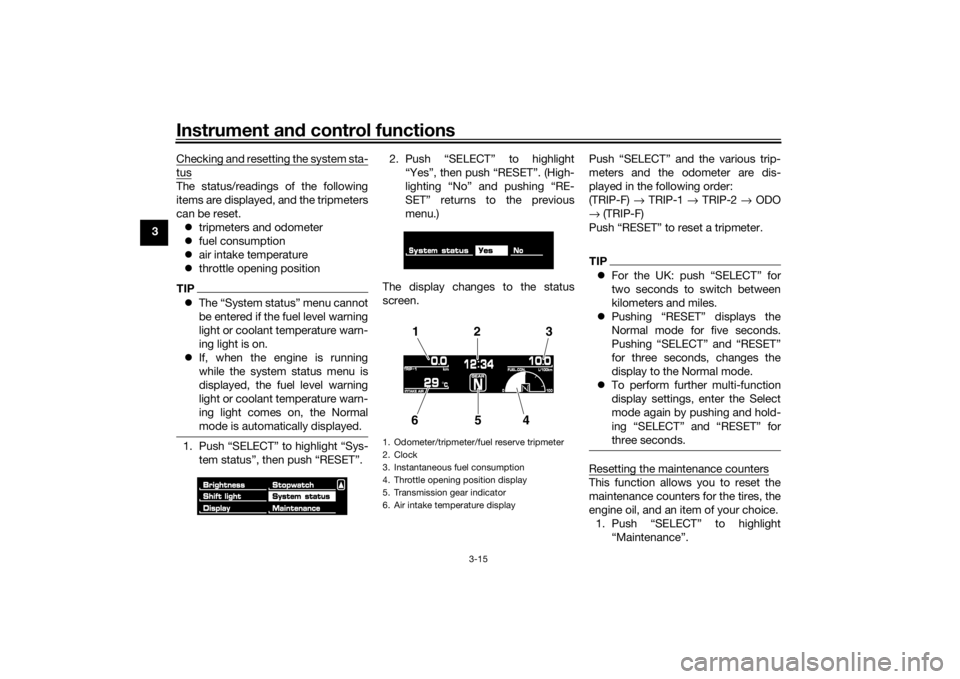
tusThe status/readings of the following
items are displayed, and the tripmeters
can be reset.
tripmeters and odometer
fuel consumption
air intake temperature
throttle opening positionTIPThe “System status” menu cannot
be entered if the fuel level warning
light or coolant temperature warn-
ing light is on.
If, when the engine is running
while the system status menu is
displayed, the fuel level warning
light or coolant temperature warn-
ing light comes on, the Normal
mode is automatically displayed.1. Push “SELECT” to highlight “Sys-
tem status”, then push “RESET”. 2. Push “SELECT” to highlight
“Yes”, then push “RESET”. (High-
lighting “No” and pushing “RE-
SET” returns to the previous
menu.)
The display changes to the status
screen. Push “SELECT” and the various trip-
meters and the odometer are dis-
played in the following order:
(TRIP-F)
→ TRIP-1 → TRIP-2 → ODO
→ (TRIP-F)
Push “RESET” to reset a tripmeter.
TIP For the UK: push “SELECT” for
two seconds to switch between
kilometers and miles.
Pushing “RESET” displays the
Normal mode for five seconds.
Pushing “SELECT” and “RESET”
for three seconds, changes the
display to the Normal mode.
To perform further multi-function
display settings, enter the Select
mode again by pushing and hold-
ing “SELECT” and “RESET” for
three seconds.Resetting the maintenance countersThis function allows you to reset the
maintenance counters for the tires, the
engine oil, and an item of your choice.
1. Push “SELECT” to highlight “Maintenance”.
1. Odometer/tripmeter/fuel reserve tripmeter
2. Clock
3. Instantaneous fuel consumption
4. Throttle opening position display
5. Transmission gear indicator
6. Air intake temperature display
12 3
654
U2CEE1E0.book Page 15 Thursday, November 19, 2015 10:32 AM
Page 31 of 112

Instrument and control functions
3-16
3
2. Push “RESET”.
3. Push “SELECT” to highlight the
item to reset.
4. Push “RESET” to reset the item.
TIP The bottom area was left blank for
another item the rider cares to
check the distance of since it has
been changed, replaced or
checked (i.e., air filter element, en-
gine parts, etc.).
Letters and numbers cannot be
entered in the blank area.5. Push “SELECT” to scroll to “ ”. 6. Push “RESET” to return to the pre-
vious menu.
Self-d iagnosis device
TIPThe display indicates error codes only
in the Normal mode.
This model is equipped with a self-di-
agnosis device for various electrical
circuits.
If a problem is detected in any of those
circuits, the engine trouble warning
light comes on and the display indi-
cates an error code.
If the display indicates any error codes,
note the code number and have a
Yamaha dealer check the vehicle.
The self-diagnosis device also detects
problems in the immobilizer system
circuits.
If a problem is detected in any of the
immobilizer system circuits, the immo-
bilizer system indicator light flashes
and the display indicates an error co-
de.TIPIf the display indicates error code 52,
this could be caused by transponder
interference. If this error code appears,
try the following.1. Use the code re-registering key to
start the engine.
1. Immobilizer system indicator light
2. Engine trouble warning light “ ”
1. Error code display
2
1
1
U2CEE1E0.book Page 16 Thursday, November 19, 2015 10:32 AM
Page 33 of 112

Instrument and control functions
3-18
3
EAU12461
Turn si gnal switch “ / ”
To signal a right-hand turn, push this
switch to “ ”. To signal a left-hand
turn, push this switch to “ ”. When
released, the switch returns to the cen-
ter position. To cancel the turn signal
lights, push the switch in after it has re-
turned to the center position.
EAU12501
Horn switch “ ”
Press this switch to sound the horn.
EAU12661
En gine stop switch “ / ”
Set this switch to “ ” before starting
the engine. Set this switch to “ ” to
stop the engine in case of an emergen-
cy, such as when the vehicle overturns
or when the throttle cable is stuck.
EAU12713
Start switch “ ”
Push this switch to crank the engine
with the starter. See page 5-1 for start-
ing instructions prior to starting the en-
gine.
EAU42342
The engine trouble warning light and
ABS warning light may come on when
the key is turned to “ON” and the start
switch is pushed, but this does not in-
dicate a malfunction.
EAU12735
Hazar d switch “ ”
With the key in the “ON” or “ ” posi-
tion, use this switch to turn on the haz-
ard lights (simultaneous flashing of all
turn signal lights).
The hazard lights are used in case of an
emergency or to warn other drivers
when your vehicle is stopped where it
might be a traffic hazard.NOTICE
ECA10062
Do not use the hazar d lig hts for an
exten ded len gth of time with the en-
g ine not runnin g, otherwise the bat-
tery may d ischarge.
EAU12832
Clutch leverThe clutch lever is located on the left
side of the handlebar. To disengage
the clutch, pull the lever toward the
handlebar grip. To engage the clutch,
release the lever. The lever should be
pulled rapidly and released slowly for
smooth clutch operation.
The clutch lever is equipped with a
clutch lever position adjusting dial. To
adjust the distance between the clutch
lever and the handlebar grip, turn the
adjusting dial while holding the lever
pushed away from the handlebar grip.1. Clutch lever
2. Clutch lever position adjusting dial
3. Arrow mark
4. Distance between clutch lever and handle-
bar grip
4
1
2
3
U2CEE1E0.book Page 18 Thursday, November 19, 2015 10:32 AM
Page 35 of 112

Instrument and control functions
3-20
3
be sure to set it by aligning a groove on
the adjusting knob with the “ ” mark
on the brake lever.
EAU12944
Brake ped
alThe brake pedal is located on the right
side of the motorcycle. To apply the
rear brake, press down on the brake
pedal.
EAU51672
ABSThe Yamaha ABS (Anti-lock Brake
System) features a dual electronic con-
trol system, which acts on the front and
rear brakes independently.
Operate the brakes with ABS as you
would conventional brakes. If the ABS
is activated, a pulsating sensation may
be felt at the brake lever or brake ped-
al. In this situation, continue to apply
the brakes and let the ABS work; do
not “pump” the brakes as this will re-
duce braking effectiveness.
WARNING
EWA16051
Always keep a sufficient d istance
from the vehicle ahead to match the
ri din g speed even with ABS.
The ABS performs b est with
lon g b rakin g d istances.
On certain surfaces, such as
roug h or g ravel roa ds, the b rak-
in g d istance may be lon ger with
the ABS than without.The ABS is monitored by an ECU,
which will revert the system to conven-
tional braking if a malfunction occurs.
1. Brake pedal
1
U2CEE1E0.book Page 20 Thursday, November 19, 2015 10:32 AM
Page 37 of 112

Instrument and control functions
3-22
3
2. Insert the key into the lock, and
then turn it 1/4 turn clockwise. The
lock will be released and the fuel
tank cap can be removed.
To install the fuel tank cap 1. Insert the fuel tank cap into the tank opening with the key inserted
in the lock and with the mark on
the cap aligned with the mark on
the fuel tank. 2. Turn the key counterclockwise to
the original position, and then re-
move it.
3. Return the backrest to the original position.
TIPThe fuel tank cap cannot be installed
unless the key is in the lock. In addi-
tion, the key cannot be removed if the
cap is not properly installed and
locked.
WARNING
EWA10132
Make sure that the fuel tank cap is
properly installe d before ri din g.
Leakin g fuel is a fire hazar d.
EAU13213
FuelMake sure there is sufficient gasoline in
the tank.
WARNING
EWA10882
Gasoline an d gasoline vapors are
extremely flammab le. To avoid fires
an d explosions an d to re duce the
risk of injury when refuelin g, follow
these instructions.1. Before refueling, turn off the en- gine and be sure that no one is sit-
ting on the vehicle. Never refuel
while smoking, or while in the vi-
cinity of sparks, open flames, or
other sources of ignition such as
the pilot lights of water heaters
and clothes dryers.
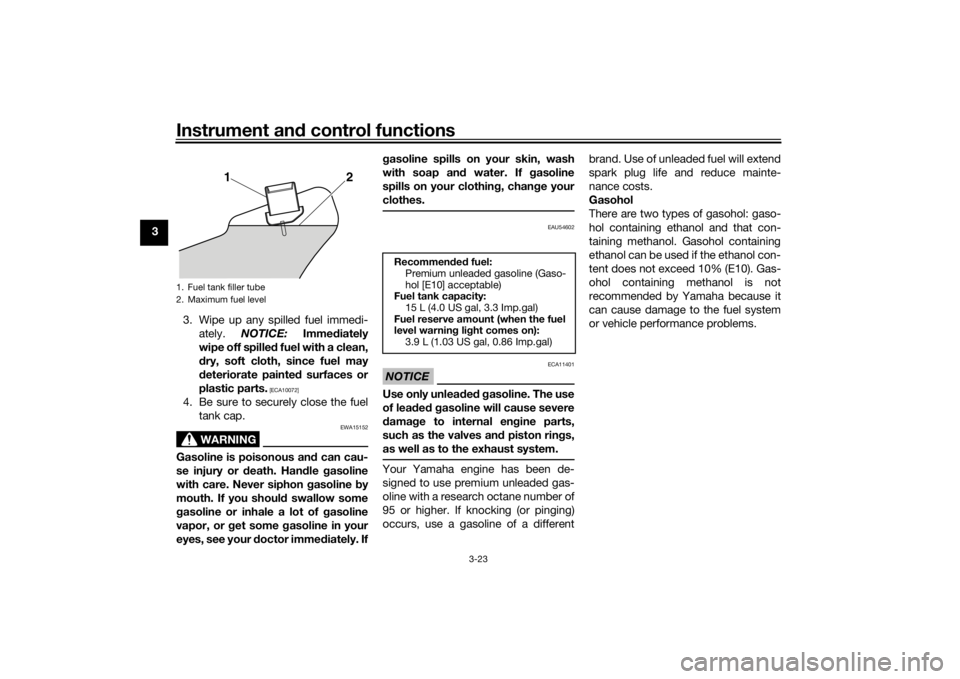
2. Do not overfill the fuel tank. Stop filling when the fuel reaches the
bottom of the filler tube. Because
fuel expands when it heats up,
heat from the engine or the sun
can cause fuel to spill out of the
fuel tank.
1. Unlock.
1
1. Match marks
1
U2CEE1E0.book Page 22 Thursday, November 19, 2015 10:32 AM
Page 38 of 112
Instrument and control functions
3-23
3
3. Wipe up any spilled fuel immedi-ately. NOTICE: Immediately
wipe off spille d fuel with a clean,
d ry, soft cloth, since fuel may
d eteriorate painted surfaces or
plastic parts.
[ECA10072]
4. Be sure to securely close the fuel tank cap.
WARNING
EWA15152
Gasoline is poisonous an d can cau-
se injury or death. Han dle gasoline
with care. Never siphon gasoline by
mouth. If you should swallow some
g asoline or inhale a lot of g asoline
vapor, or g et some gasoline in your
eyes, see your d octor immediately. If g
asoline spills on your skin, wash
with soap an d water. If g asoline
spills on your clothin g, chan ge your
clothes.
EAU54602
NOTICE
ECA11401
Use only unlea ded g asoline. The use
of lea ded g asoline will cause severe
d amag e to internal en gine parts,
such as the valves an d piston rin gs,
as well as to the exhaust system.Your Yamaha engine has been de-
signed to use premium unleaded gas-
oline with a research octane number of
95 or higher. If knocking (or pinging)
occurs, use a gasoline of a different brand. Use of unleaded fuel will extend
spark plug life and reduce mainte-
nance costs.
Gasohol
There are two types of gasohol: gaso-
hol containing ethanol and that con-
taining methanol. Gasohol containing
ethanol can be used if the ethanol con-
tent does not exceed 10% (E10). Gas-
ohol containing methanol is not
recommended by Yamaha because it
can cause damage to the fuel system
or vehicle performance problems.
1. Fuel tank filler tube
2. Maximum fuel level
12
Recommen
ded fuel:
Premium unleaded gasoline (Gaso-
hol [E10] acceptable)
Fuel tank capacity:
15 L (4.0 US gal, 3.3 Imp.gal)
Fuel reserve amount (when the fuel
level warnin g lig ht comes on):
3.9 L (1.03 US gal, 0.86 Imp.gal)
U2CEE1E0.book Page 23 Thursday, November 19, 2015 10:32 AM
Page 39 of 112
Instrument and control functions
3-24
3
EAU51172
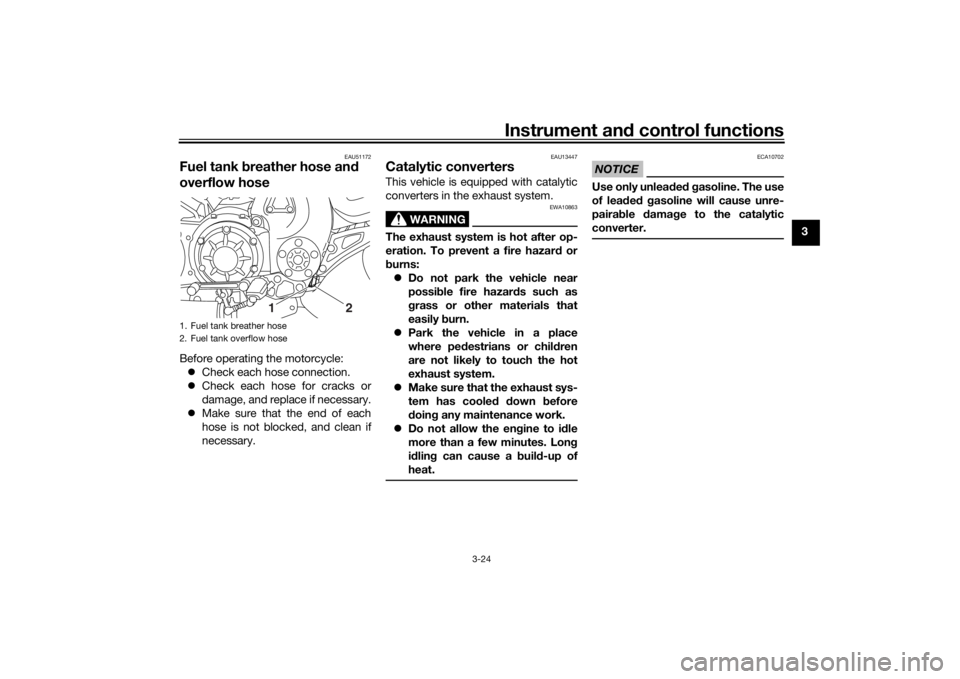
Fuel tank breather hose an d
overflow hoseBefore operating the motorcycle:
Check each hose connection.
Check each hose for cracks or
damage, and replace if necessary.
Make sure that the end of each
hose is not blocked, and clean if
necessary.
EAU13447
Catalytic converters This vehicle is equipped with catalytic
converters in the exhaust system.
WARNING
EWA10863
The exhaust system is hot after op-
eration. To prevent a fire hazar d or
b urns:
Do not park the vehicle near
possi ble fire hazar ds such as
g rass or other materials that
easily burn.
Park the vehicle in a place
where pe destrians or child ren
are not likely to touch the hot
exhaust system.
Make sure that the exhaust sys-
tem has cooled down before
d oin g any maintenance work.
Do not allow the en gine to id le
more than a few minutes. Lon g
i d lin g can cause a buil d-up of
heat.
NOTICE
ECA10702
Use only unlea ded g asoline. The use
of lea ded g asoline will cause unre-
paira ble damag e to the catalytic
converter.
1. Fuel tank breather hose
2. Fuel tank overflow hose
12
U2CEE1E0.book Page 24 Thursday, November 19, 2015 10:32 AM
Page 41 of 112
Instrument and control functions
3-26
3
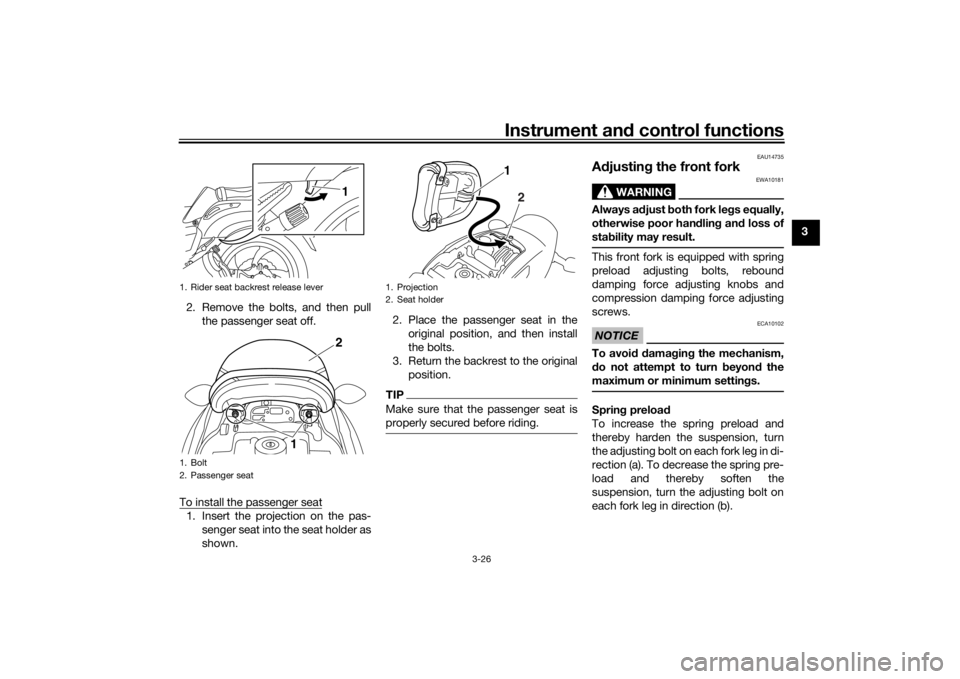
2. Remove the bolts, and then pull the passenger seat off.
To install the passenger seat
1. Insert the projection on the pas- senger seat into the seat holder as
shown. 2. Place the passenger seat in the
original position, and then install
the bolts.
3. Return the backrest to the original position.
TIPMake sure that the passenger seat is
properly secured before riding.
EAU14735
Adjustin g the front fork
WARNING
EWA10181
Always a djust both fork le gs equally,
otherwise poor han dlin g an d loss of
stab ility may result.This front fork is equipped with spring
preload adjusting bolts, rebound
damping force adjusting knobs and
compression damping force adjusting
screws.NOTICE
ECA10102
To avoi d d amag ing the mechanism,
d o not attempt to turn beyon d the
maximum or minimum settin gs.Sprin g preloa d
To increase the spring preload and
thereby harden the suspension, turn
the adjusting bolt on each fork leg in di-
rection (a). To decrease the spring pre-
load and thereby soften the
suspension, turn the adjusting bolt on
each fork leg in direction (b).
1. Rider seat backrest release lever
1. Bolt
2. Passenger seat
12
1
1. Projection
2. Seat holder
1
2
U2CEE1E0.book Page 26 Thursday, November 19, 2015 10:32 AM
Page 45 of 112
Instrument and control functions
3-30
3
TIPTo obtain a precise adjustment, it is
advisable to check the actual total
number of clicks or turns of each
damping force adjusting mechanism.
This adjustment range may not exactly
match the specifications listed due to
small differences in production.
WARNING
EWA10222
This shock a bsor ber assem bly con-
tains hig hly pressurize d nitro gen
g as. Rea d an d un derstan d the fol-
lowin g information before han dlin g
the shock ab sorber assem bly.
Do not tamper with or attempt
to open the cylin der assem bly.
Do not su bject the shock a b-
sor ber assem bly to an open
flame or other hi gh heat source.
This may cause the unit to ex-
plod e due to excessive gas
pressure.
Do not d eform or damag e the
cylin der in any way. Cylin der
d amag e will result in poor
d ampin g performance.
Do not dispose of a d amaged or
worn-out shock ab sorber as-
se
m bly yourself. Take the shock
a b sor ber assem bly to a Yamaha
d ealer for any service.
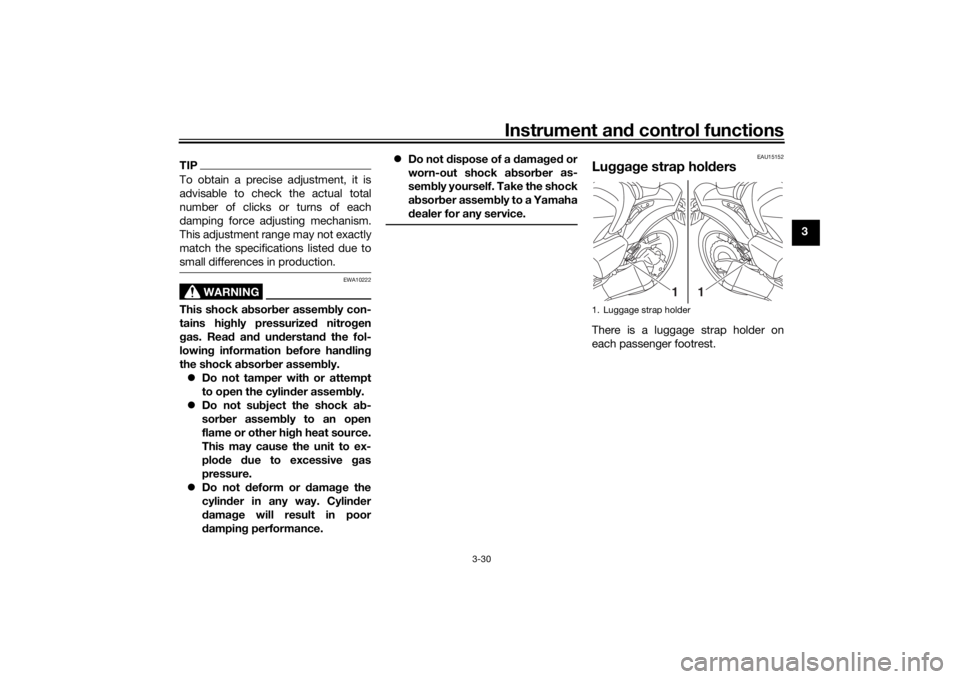
EAU15152
Lu gga ge strap hol dersThere is a luggage strap holder on
each passenger footrest.1. Luggage strap holder
1
1
U2CEE1E0.book Page 30 Thursday, November 19, 2015 10:32 AM