lock YAMAHA WR 250F 2017 Workshop Manual
[x] Cancel search | Manufacturer: YAMAHA, Model Year: 2017, Model line: WR 250F, Model: YAMAHA WR 250F 2017Pages: 432, PDF Size: 14.14 MB
Page 274 of 432
CLUTCH
6-45
EAS2GBB266REMOVING THE CLUTCH
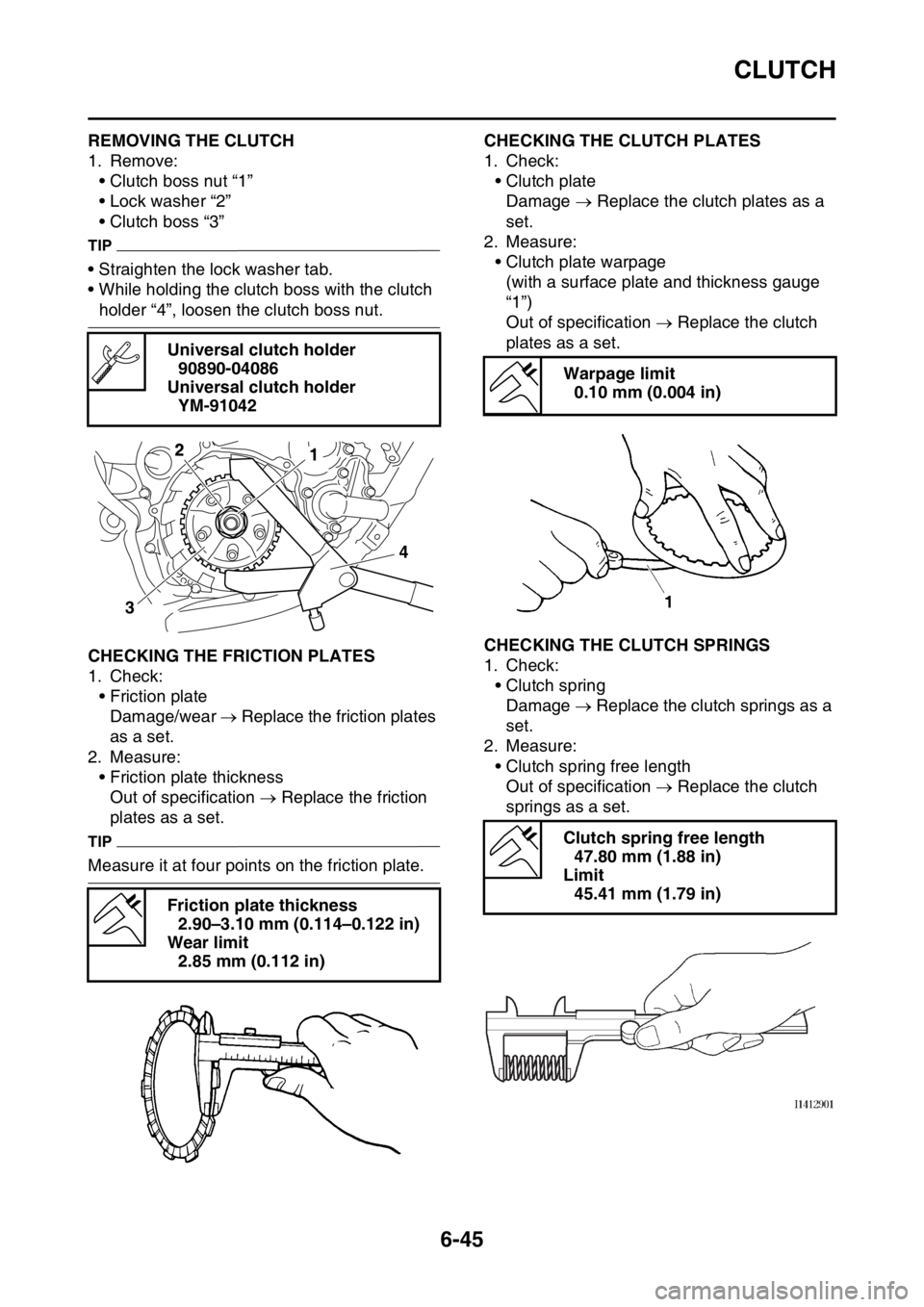
1. Remove:
• Clutch boss nut “1”
• Lock washer “2”
• Clutch boss “3”
TIP
• Straighten the lock washer tab.
• While holding the clutch boss with the clutch
holder “4”, loosen the clutch boss nut.
EAS2GBB267CHECKING THE FRICTION PLATES
1. Check:
• Friction plate
Damage/wear Replace the friction plates
as a set.
2. Measure:
• Friction plate thickness
Out of specification Replace the friction
plates as a set.
TIP
Measure it at four points on the friction plate.
EAS2GBB268CHECKING THE CLUTCH PLATES
1. Check:
• Clutch plate
Damage Replace the clutch plates as a
set.
2. Measure:
• Clutch plate warpage
(with a surface plate and thickness gauge
“1”)
Out of specification Replace the clutch
plates as a set.
EAS2GBB269CHECKING THE CLUTCH SPRINGS
1. Check:
• Clutch spring
Damage Replace the clutch springs as a
set.
2. Measure:
• Clutch spring free length
Out of specification Replace the clutch
springs as a set. Universal clutch holder
90890-04086
Universal clutch holder
YM-91042
Friction plate thickness
2.90–3.10 mm (0.114–0.122 in)
Wear limit
2.85 mm (0.112 in)
34
12
Warpage limit
0.10 mm (0.004 in)
Clutch spring free length
47.80 mm (1.88 in)
Limit
45.41 mm (1.79 in)
Page 277 of 432
CLUTCH
6-48
2. Install:
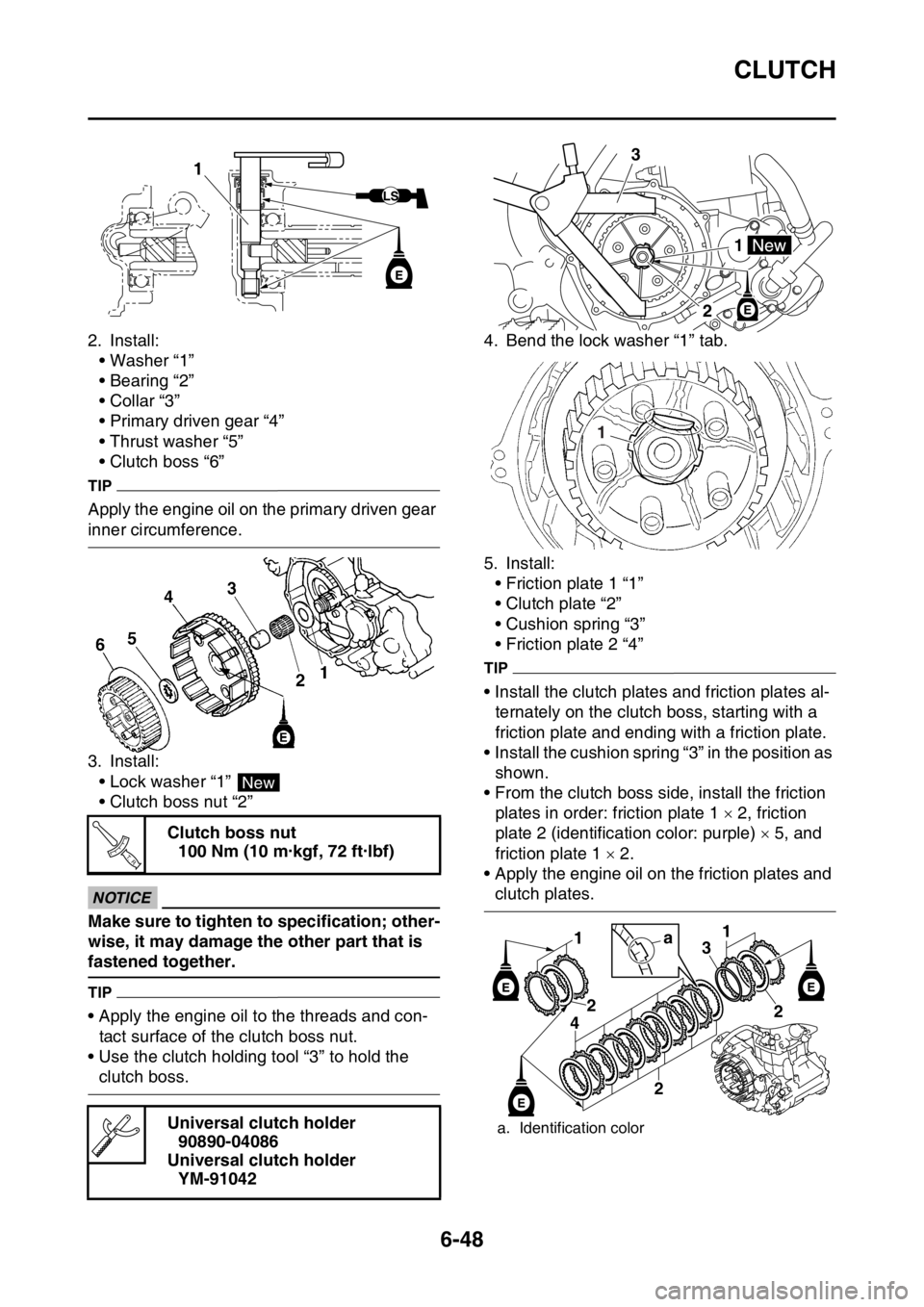
• Washer “1”
• Bearing “2”
• Collar “3”
• Primary driven gear “4”
• Thrust washer “5”
• Clutch boss “6”
TIP
Apply the engine oil on the primary driven gear
inner circumference.
3. Install:
• Lock washer “1”
• Clutch boss nut “2”
ECA
NOTICE
Make sure to tighten to specification; other-
wise, it may damage the other part that is
fastened together.
TIP
• Apply the engine oil to the threads and con-
tact surface of the clutch boss nut.
• Use the clutch holding tool “3” to hold the
clutch boss.4. Bend the lock washer “1” tab.
5. Install:
• Friction plate 1 “1”
• Clutch plate “2”
• Cushion spring “3”
• Friction plate 2 “4”
TIP
• Install the clutch plates and friction plates al-
ternately on the clutch boss, starting with a
friction plate and ending with a friction plate.
• Install the cushion spring “3” in the position as
shown.
• From the clutch boss side, install the friction
plates in order: friction plate 1 2, friction
plate 2 (identification color: purple) 5, and
friction plate 1 2.
• Apply the engine oil on the friction plates and
clutch plates. Clutch boss nut
100 Nm (10 m·kgf, 72 ft·lbf)
Universal clutch holder
90890-04086
Universal clutch holder
YM-91042
1
New
T R..
a. Identification color
3
21
1
1
2
4
2
1
3
2
a
Page 282 of 432
KICKSTATER
6-53
3. Install:
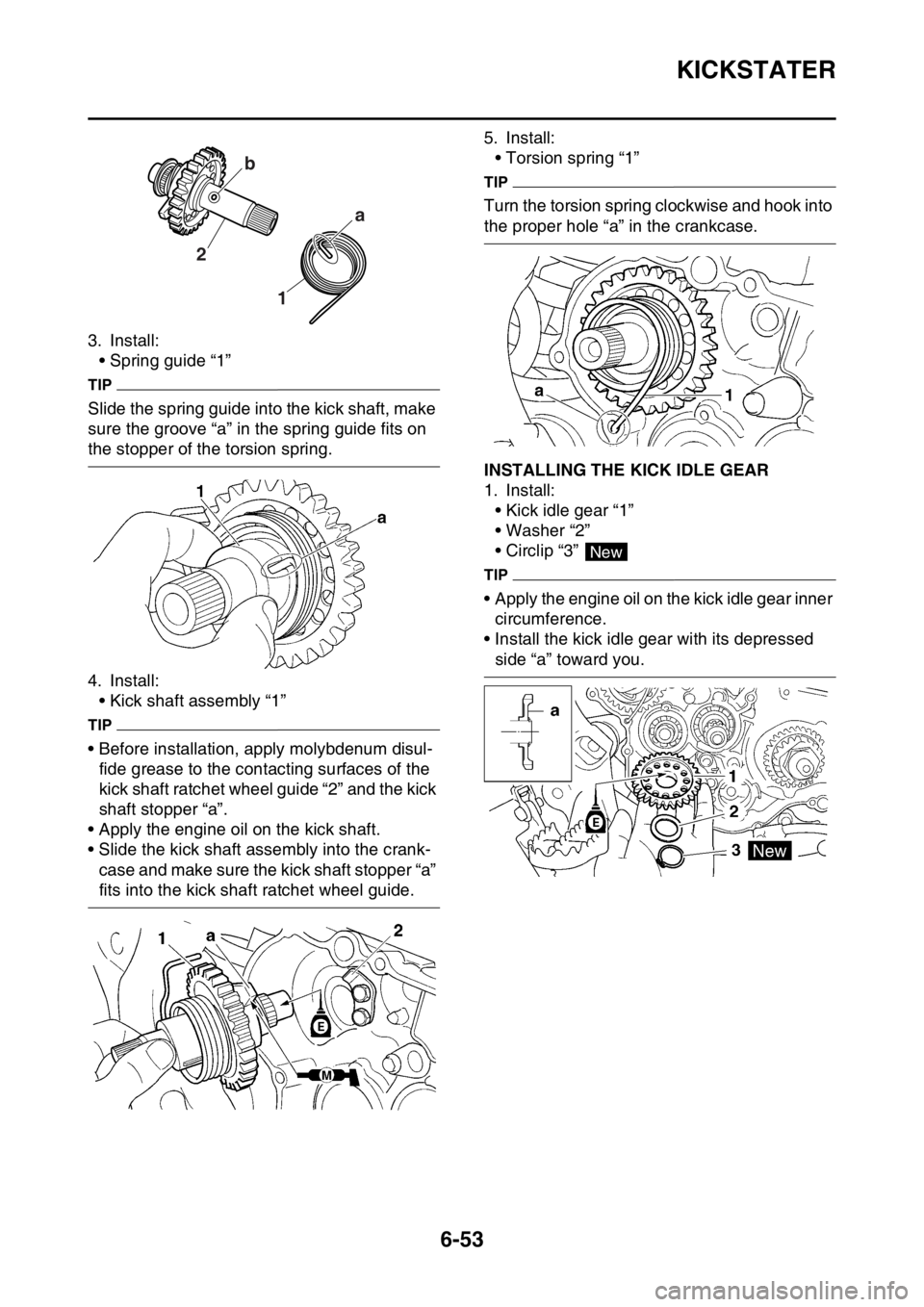
• Spring guide “1”
TIP
Slide the spring guide into the kick shaft, make
sure the groove “a” in the spring guide fits on
the stopper of the torsion spring.
4. Install:
• Kick shaft assembly “1”
TIP
• Before installation, apply molybdenum disul-
fide grease to the contacting surfaces of the
kick shaft ratchet wheel guide “2” and the kick
shaft stopper “a”.
• Apply the engine oil on the kick shaft.
• Slide the kick shaft assembly into the crank-
case and make sure the kick shaft stopper “a”
fits into the kick shaft ratchet wheel guide.5. Install:
• Torsion spring “1”
TIP
Turn the torsion spring clockwise and hook into
the proper hole “a” in the crankcase.
EAS2GBB286INSTALLING THE KICK IDLE GEAR
1. Install:
• Kick idle gear “1”
• Washer “2”
• Circlip “3”
TIP
• Apply the engine oil on the kick idle gear inner
circumference.
• Install the kick idle gear with its depressed
side “a” toward you.
1 2a b
New
Page 285 of 432
SHIFT SHAFT
6-56
EAS2GBB288REMOVING THE SHIFT GUIDE AND SHIFT
LEVER ASSEMBLY
1. Remove:
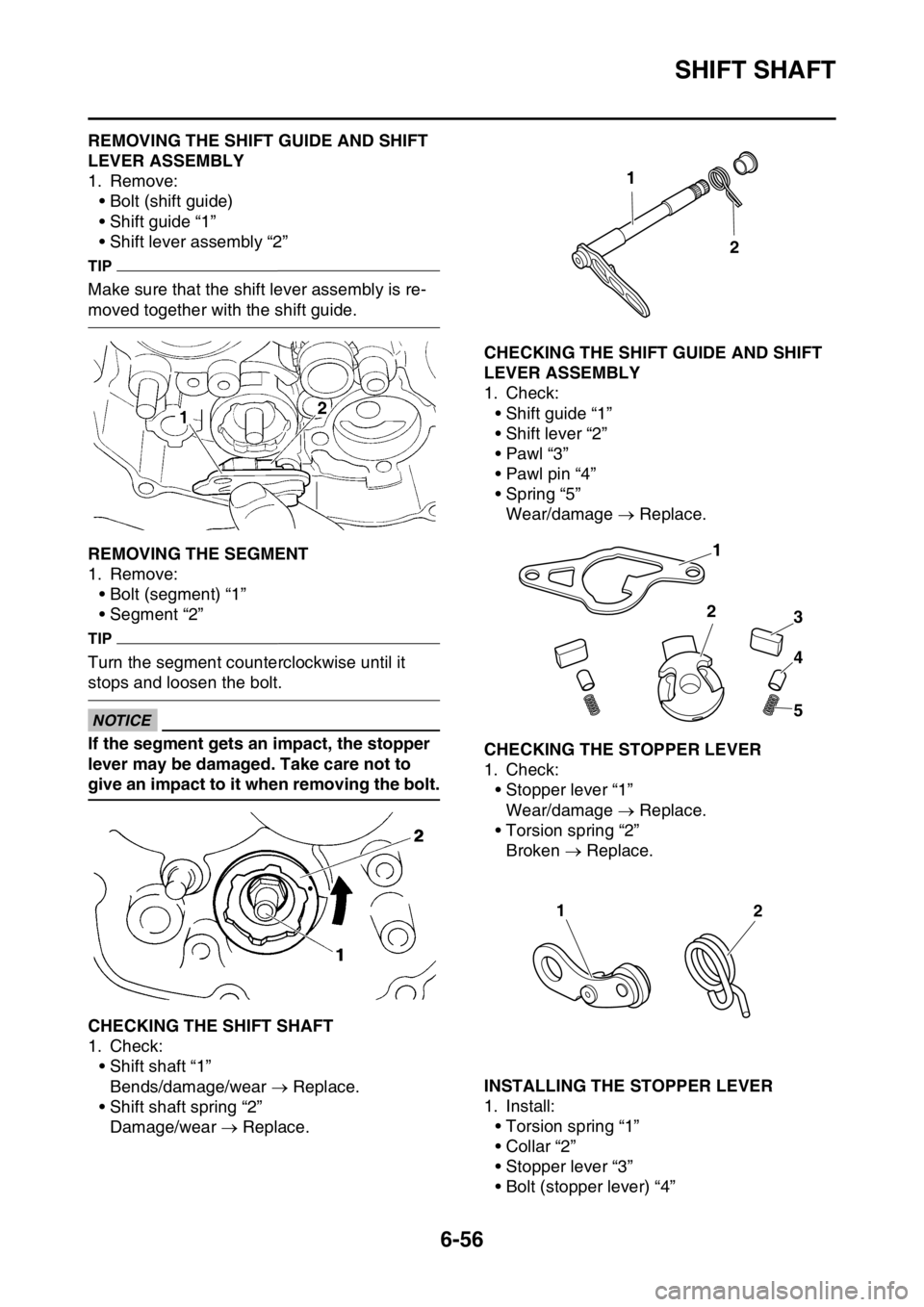
• Bolt (shift guide)
• Shift guide “1”
• Shift lever assembly “2”
TIP
Make sure that the shift lever assembly is re-
moved together with the shift guide.
EAS2GBB289REMOVING THE SEGMENT
1. Remove:
• Bolt (segment) “1”
• Segment “2”
TIP
Turn the segment counterclockwise until it
stops and loosen the bolt.
ECA
NOTICE
If the segment gets an impact, the stopper
lever may be damaged. Take care not to
give an impact to it when removing the bolt.
EAS2GBB290CHECKING THE SHIFT SHAFT
1. Check:
• Shift shaft “1”
Bends/damage/wear Replace.
• Shift shaft spring “2”
Damage/wear Replace.
EAS2GBB291CHECKING THE SHIFT GUIDE AND SHIFT
LEVER ASSEMBLY
1. Check:
• Shift guide “1”
• Shift lever “2”
•Pawl “3”
• Pawl pin “4”
• Spring “5”
Wear/damage Replace.
EAS2GBB292CHECKING THE STOPPER LEVER
1. Check:
• Stopper lever “1”
Wear/damage Replace.
• Torsion spring “2”
Broken Replace.
EAS2GBB293INSTALLING THE STOPPER LEVER
1. Install:
• Torsion spring “1”
• Collar “2”
• Stopper lever “3”
• Bolt (stopper lever) “4”
1
2
1
2
3
4
5
12
Page 297 of 432
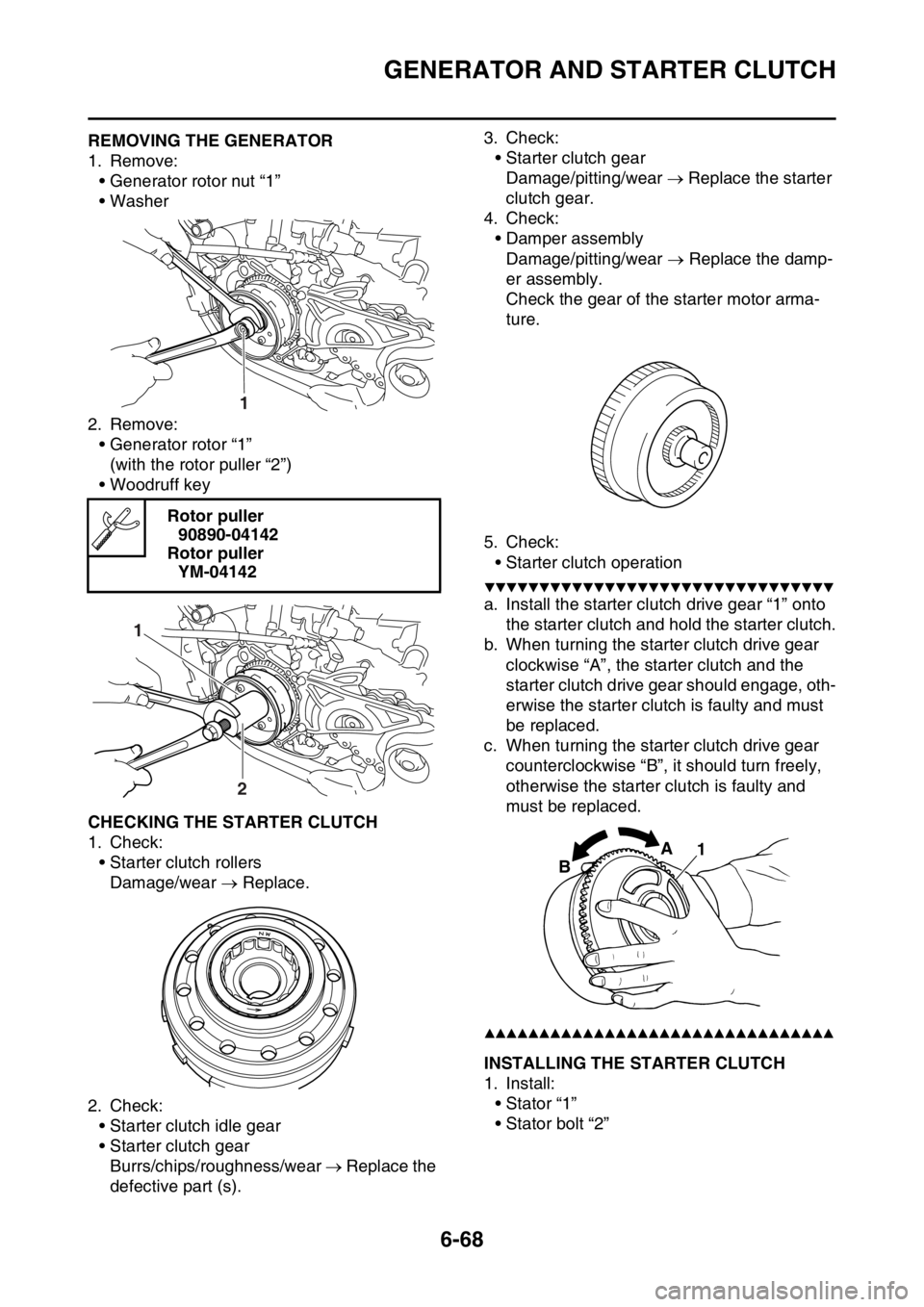
GENERATOR AND STARTER CLUTCH
6-68
EAS2GBB306REMOVING THE GENERATOR
1. Remove:
• Generator rotor nut “1”
• Washer
2. Remove:
• Generator rotor “1”
(with the rotor puller “2”)
• Woodruff key
EAS2GBB307CHECKING THE STARTER CLUTCH
1. Check:
• Starter clutch rollers
Damage/wear Replace.
2. Check:
• Starter clutch idle gear
• Starter clutch gear
Burrs/chips/roughness/wear Replace the
defective part (s).3. Check:
• Starter clutch gear
Damage/pitting/wear Replace the starter
clutch gear.
4. Check:
• Damper assembly
Damage/pitting/wear Replace the damp-
er assembly.
Check the gear of the starter motor arma-
ture.
5. Check:
• Starter clutch operation
▼▼▼▼▼▼▼▼▼▼▼▼▼▼▼▼▼▼▼▼▼▼▼▼▼▼▼▼▼▼▼▼
a. Install the starter clutch drive gear “1” onto
the starter clutch and hold the starter clutch.
b. When turning the starter clutch drive gear
clockwise “A”, the starter clutch and the
starter clutch drive gear should engage, oth-
erwise the starter clutch is faulty and must
be replaced.
c. When turning the starter clutch drive gear
counterclockwise “B”, it should turn freely,
otherwise the starter clutch is faulty and
must be replaced.
▲▲▲▲▲▲▲▲▲▲▲▲▲▲▲▲▲▲▲▲▲▲▲▲▲▲▲▲▲▲▲▲
EAS2GBB308INSTALLING THE STARTER CLUTCH
1. Install:
• Stator “1”
• Stator bolt “2” Rotor puller
90890-04142
Rotor puller
YM-04142
1
1
2
1 A
B
Page 371 of 432

FUEL INJECTION SYSTEM
9-35
6. Condition
The current conditions are displayed. (Detected/Recovered)
7. Symptom
The symptoms of the detected malfunction are displayed.
8. Diagnosis code
The diagnosis codes related to the detected malfunction are displayed.
9. FFD (only for models that can display freeze frame data)
The mark “ ” is displayed when the freeze frame data is available.
10.ECU conduction time (hour: minute: second)
The total ECU conduction time (total hours the vehicle’s start switch was ON) when the malfunc-
tion was detected is displayed.
11.Number of main switch operation after detection
The number of times the meter light comes on by pushing the start switch between the malfunction
detection and code reading is displayed.
12.Number of occurrences
The number of malfunction occurrences between the malfunction detection and code reading is
displayed.
EAS2GBB377TROUBLESHOOTING DETAILS
This section describes the measures per fault code number displayed on the diagnostic tool. Check
and service the items or components that are the probable cause of the malfunction following the or-
der given.
After the check and service of the malfunctioning part have been completed, reset the diagnostic tool
display according to the reinstatement method.
Fault code No.:
Fault code number displayed on the diagnostic tool when the engine failed to work normally.
Diagnostic code No.:
Diagnostic code number to be used when the diagnostic mode is operated.
Fault code No. 12
ItemCrankshaft position sensor: no normal signals are received
from the crankshaft position sensor.
Fail-safe systemUnable to start engine
Unable to drive vehicle
Diagnostic code No.—
Diagnostic tool display—
Procedure—
ItemProbable cause of malfunc-
tion and checkMaintenance jobConfirmation of service
completion
1 Connection of crankshaft po-
sition sensor coupler.
Check the locking condition
of the coupler.
Disconnect the coupler and
check the pins (bent or bro-
ken terminals and locking
condition of the pins).Improperly connected
Connect the coupler securely
or repair/replace the wire har-
ness.Crank the engine.
Fault code number is not dis-
played Service is finished.
Fault code number is dis-
played Go to item 2.
Page 372 of 432

FUEL INJECTION SYSTEM
9-36
2 Connection of wire harness
ECU coupler.
Check the locking condition
of the coupler.
Disconnect the coupler and
check the pins (bent or bro-
ken terminals and locking
condition of the pins).Improperly connected
Connect the coupler securely
or repair/replace the wire har-
ness.Crank the engine.
Fault code number is not dis-
played Service is finished.
Fault code number is dis-
played Go to item 3.
3 Wire harness continuity. Open or short circuit Re-
place the wire harness.
Between the crankshaft posi-
tion sensor coupler and ECU
coupler.
black/blue–black/blue
gray–grayCrank the engine.
Fault code number is not dis-
played Service is finished.
Fault code number is dis-
played Go to item 4.
4 Installed condition of crank-
shaft position sensor.
Check for looseness or
pinching.
Check the gap between the
crankshaft position sensor
and the pickup rotor.Improperly installed sensor
Reinstall or replace the
sensor.
Refer to “GENERATOR AND
STARTER CLUTCH” on
page 6-66.Crank the engine.
Fault code number is not dis-
played Service is finished.
Fault code number is dis-
played Go to item 5.
5 Defective crankshaft position
sensor.Check the crankshaft position
sensor.
Refer to “CHECKING THE
CRANKSHAFT POSITION
SENSOR” on page 9-75.Crank the engine.
Fault code number is not dis-
played Service is finished.
Fault code number is dis-
played Go to item 6.
6 Malfunction in ECU. Replace the ECU. Fault code No. 12
ItemCrankshaft position sensor: no normal signals are received
from the crankshaft position sensor.
Page 373 of 432

FUEL INJECTION SYSTEM
9-37
TIP
• If fault code numbers 13 and 14 are both displayed, perform the checks and maintenance jobs for
fault code number 13 first.
• Before troubleshooting, disconnect the starter motor lead from the starter relay.
Fault code No. 13
Item Intake air pressure sensor: open or short circuit detected.
Fail-safe systemAble to start engine
Able to drive vehicle
Diagnostic code No.03
Diagnostic tool displayDisplays the intake air pressure.
ProcedureOperate the throttle while pushing the start switch.(If the display
value changes, the performance is OK.)
ItemProbable cause of malfunc-
tion and checkMaintenance jobConfirmation of service
completion
1 Connection of intake air pres-
sure sensor coupler.
Check the locking condition
of the coupler.
Disconnect the coupler and
check the pins (bent or bro-
ken terminals and locking
condition of the pins).Improperly connected
Connect the coupler securely
or repair/replace the wire har-
ness.Push the start switch.
Fault code number is not dis-
played Service is finished.
Fault code number is dis-
played Go to item 2.
2 Connection of wire harness
ECU coupler.
Check the locking condition
of the coupler.
Disconnect the coupler and
check the pins (bent or bro-
ken terminals and locking
condition of the pins).Improperly connected
Connect the coupler securely
or repair/replace the wire har-
ness.Push the start switch.
Fault code number is not dis-
played Service is finished.
Fault code number is dis-
played Go to item 3.
3 Wire harness continuity. Open or short circuit Re-
place the wire harness.
Between intake air pressure
sensor coupler and ECU cou-
pler.
black/blue–black/blue
pink–pink
blue–bluePush the start switch.
Fault code number is not dis-
played Service is finished.
Fault code number is dis-
played Go to item 4.
4 Installed condition of intake
air pressure sensor.
Check for looseness or
pinching.Improperly installed sensor
Reinstall or replace the
sensor.Push the start switch.
Fault code number is not dis-
played Service is finished.
Fault code number is dis-
played Go to item 5.
Page 375 of 432

FUEL INJECTION SYSTEM
9-39
TIP
Before troubleshooting, disconnect the starter motor lead from the starter relay. 2 Defective intake air pressure
sensor.Execute the diagnostic mode.
(Code No. 03)
When engine is stopped:
Atmospheric pressure at the
current altitude and weather
conditions is indicated.
At sea level: Approx. 101 kPa
1000 m above sea level: Ap-
prox. 90 kPa
2000 m above sea level: Ap-
prox. 80 kPa
3000 m above sea level: Ap-
prox. 70 kPa
When engine is cranking:
Make sure that the indication
value changes.
The value does not change
when engine is cranking.
Check the intake air pressure
sensor.
Replace if defective.
Refer to “CHECKING THE
INTAKE AIR PRESSURE
SENSOR” on page 9-80.
Fault code No. 15
Item Throttle position sensor: open or short circuit detected.
Fail-safe systemAble to start engine
Able to drive vehicle
Diagnostic code No.01
Diagnostic tool displayThrottle position sensor signal
• 11–14 (fully closed position)
• 109–116 (fully open position)
Procedure• Check with throttle valve fully closed.
• Check with throttle valve fully open.
ItemProbable cause of malfunc-
tion and checkMaintenance jobConfirmation of service
completion
1 Connection of throttle posi-
tion sensor coupler.
Check the locking condition
of the coupler.
Disconnect the coupler and
check the pins (bent or bro-
ken terminals and locking
condition of the pins).Improperly connected
Connect the coupler securely
or repair/replace the wire har-
ness.Push the start switch.
Fault code number is not dis-
played Service is finished.
Fault code number is dis-
played Go to item 2. Fault code No. 14
ItemIntake air pressure sensor: hose system malfunction (clogged
or detached hose).
Page 376 of 432

FUEL INJECTION SYSTEM
9-40
2 Connection of wire harness
ECU coupler.
Check the locking condition
of the coupler.
Disconnect the coupler and
check the pins (bent or bro-
ken terminals and locking
condition of the pins).Improperly connected
Connect the coupler securely
or repair/replace the wire har-
ness.Push the start switch.
Fault code number is not dis-
played Service is finished.
Fault code number is dis-
played Go to item 3.
3 Wire harness continuity. Open or short circuit Re-
place the wire harness.
Between throttle position
sensor coupler and ECU cou-
pler.
black/blue–black/blue
yellow–yellow
blue–bluePush the start switch.
Fault code number is not dis-
played Service is finished.
Fault code number is dis-
played Go to item 4.
4 Installed condition of throttle
position sensor.
Check for looseness or
pinching.Improperly installed sensor
Reinstall or replace the
sensor.
Refer to “ADJUSTING THE
THROTTLE POSITION SEN-
SOR” on page 8-11.Push the start switch.
Fault code number is not dis-
played Service is finished.
Fault code number is dis-
played Go to item 5.
5 Applied voltage of throttle po-
sition sensor lead.Check the applied voltage.
(black/blue–blue)
Refer to “CHECKING THE
THROTTLE POSITION SEN-
SOR” on page 9-79.Push the start switch.
Fault code number is not dis-
played Service is finished.
Fault code number is dis-
played Go to item 6.
Location of discon-
nected leadOutput
voltage
Disconnected
ground lead5 V
Disconnected out-
put lead0 V
Disconnected
power supply lead0 V
6 Defective throttle position
sensor.Check throttle position sen-
sor signal.
Execute the diagnostic mode.
(Code No. 01)
When the throttle valve is fully
closed:
A value of 11–14 is indicated.
When throttle valve is fully
open:
A value of 109–116 is indicat-
ed.
An indicated value is out of
the specified range. Re-
place the throttle position
sensor.Push the start switch.
Fault code number is not dis-
played Service is finished.
Fault code number is dis-
played Go to item 7. Fault code No. 15
Item Throttle position sensor: open or short circuit detected.