belt YAMAHA XMAX 125 2013 Owners Manual
[x] Cancel search | Manufacturer: YAMAHA, Model Year: 2013, Model line: XMAX 125, Model: YAMAHA XMAX 125 2013Pages: 96, PDF Size: 4.83 MB
Page 6 of 96

TABLE OF CONTENTSSAFETY INFORMATION ..................1-1
Further safe-riding points ................1-5
DESCRIPTION ..................................2-1
Left view ..........................................2-1
Right view ........................................2-3
Controls and instruments.................2-5
INSTRUMENT AND CONTROL
FUNCTIONS.......................................3-1
Immobilizer system .........................3-1
Main switch/steering lock ................3-2
Indicator lights and
warning lights ..............................3-4
Speedometer ..................................3-5
Tachometer ....................................3-6
Multi-function display ......................3-6
Anti-theft alarm (optional) .............3-11
Handlebar switches ......................3-11
Front brake lever ..........................3-12
Rear brake lever ...........................3-13
ABS (for ABS models) ..................3-13
Fuel tank cap ................................3-14
Fuel ...............................................3-15
Catalytic converters ......................3-16
Securing bracket ...........................3-17
Seat ..............................................3-17
Storage compartments .................3-18
Travel trunk ..................................3-19
Adjusting the shock absorber
assemblies ................................3-20Sidestand ..................................... 3-21
Ignition circuit cut-off system ........ 3-21
Auxiliary DC jack .......................... 3-23
FOR YOUR SAFETY –
PRE-OPERATION CHECKS............. 4-1
OPERATION AND IMPORTANT
RIDING POINTS................................. 5-1
Starting the engine ......................... 5-1
Starting off ...................................... 5-2
Acceleration and deceleration ........ 5-3
Braking ........................................... 5-3
Tips for reducing fuel
consumption ............................... 5-4
Engine break-in .............................. 5-4
Parking ........................................... 5-5
PERIODIC MAINTENANCE AND
ADJUSTMENT................................... 6-1
Owner’s tool kit ............................... 6-2
Periodic maintenance chart for the
emission control system ............. 6-3
General maintenance and
lubrication chart .......................... 6-4
Removing and installing
the cowling and panel ................. 6-8
Checking the spark plug ................. 6-9
Engine oil ..................................... 6-10
Final transmission oil .................... 6-13
Coolant ......................................... 6-14Air filter and V-belt case air filter
elements ................................... 6-16
Adjusting the throttle grip free
play ........................................... 6-17
Valve clearance ........................... 6-18
Tires ............................................. 6-18
Cast wheels ................................. 6-20
Checking the front and
rear brake lever free play ......... 6-21
Checking the front and
rear brake pads ........................ 6-21
Checking the brake fluid level ...... 6-22
Changing the brake fluid .............. 6-24
Checking and lubricating
the cables ................................. 6-24
Checking and lubricating
the throttle grip and cable ......... 6-24
Lubricating the front and
rear brake levers ...................... 6-25
Checking and lubricating the
centerstand and sidestand ....... 6-25
Checking the front fork ................. 6-26
Checking the steering .................. 6-27
Checking the wheel bearings ....... 6-27
Battery ......................................... 6-27
Replacing the fuses ..................... 6-29
Replacing a headlight bulb .......... 6-30
Replacing a front turn signal light
bulb ........................................... 6-31
Replacing a tail/brake light bulb or
a rear turn signal light bulb ....... 6-31U2ABE2E0.book Page 1 Thursday, August 30, 2012 2:36 PM
Page 14 of 96
DESCRIPTION
2-1
2
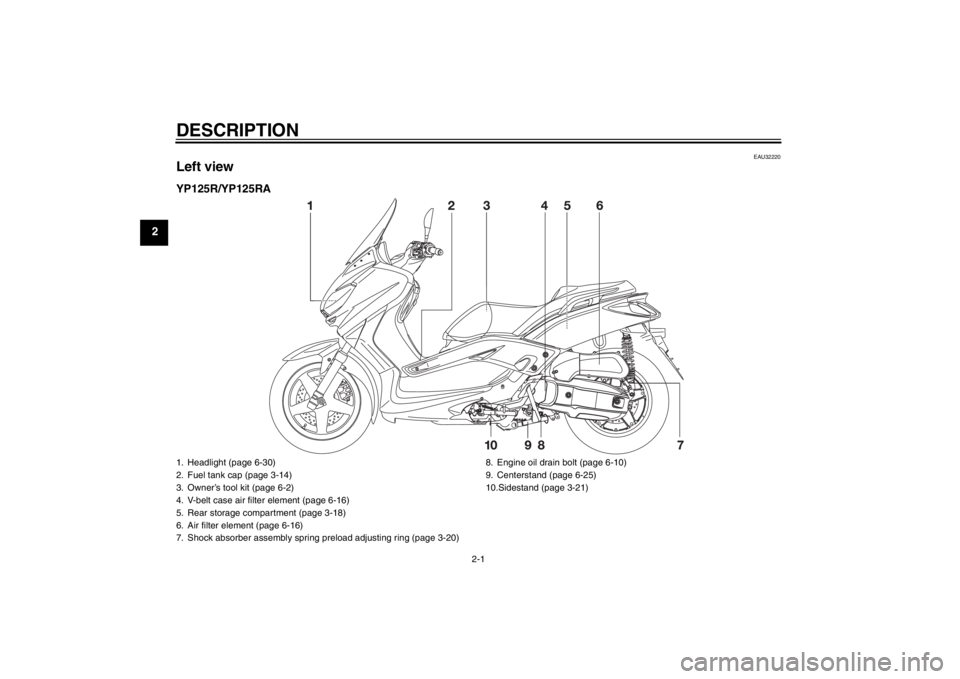
EAU32220
Left viewYP125R/YP125RA1. Headlight (page 6-30)
2. Fuel tank cap (page 3-14)
3. Owner’s tool kit (page 6-2)
4. V-belt case air filter element (page 6-16)
5. Rear storage compartment (page 3-18)
6. Air filter element (page 6-16)
7. Shock absorber assembly spring preload adjusting ring (page 3-20)8. Engine oil drain bolt (page 6-10)
9. Centerstand (page 6-25)
10.Sidestand (page 3-21)U2ABE2E0.book Page 1 Thursday, August 30, 2012 2:36 PM
Page 15 of 96
DESCRIPTION
2-2
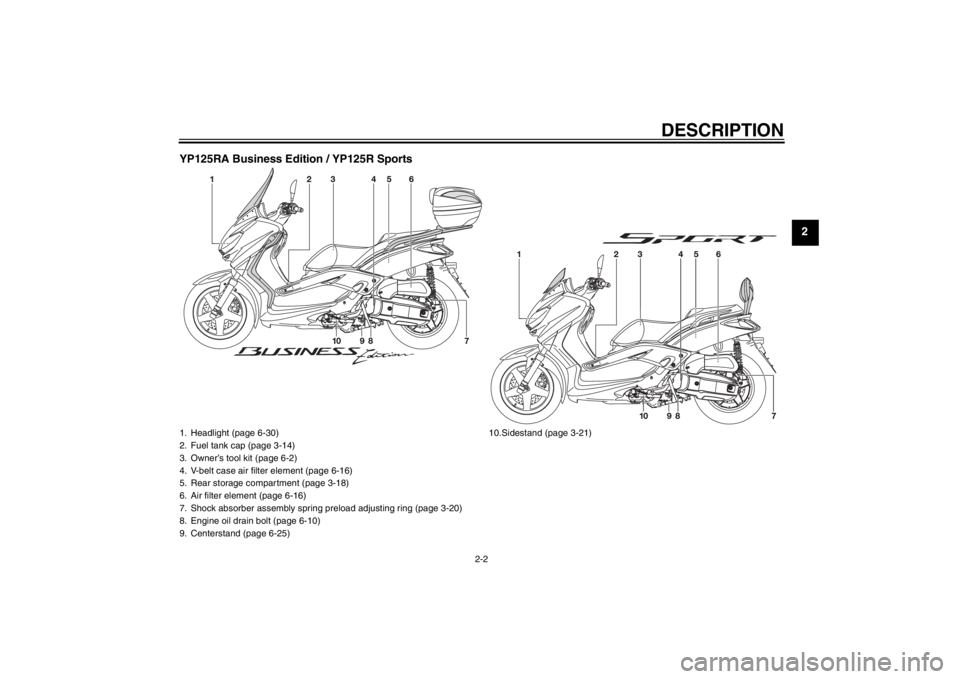
2 YP125RA Business Edition / YP125R Sports
1. Headlight (page 6-30)
2. Fuel tank cap (page 3-14)
3. Owner’s tool kit (page 6-2)
4. V-belt case air filter element (page 6-16)
5. Rear storage compartment (page 3-18)
6. Air filter element (page 6-16)
7. Shock absorber assembly spring preload adjusting ring (page 3-20)
8. Engine oil drain bolt (page 6-10)
9. Centerstand (page 6-25)10.Sidestand (page 3-21)
U2ABE2E0.book Page 2 Thursday, August 30, 2012 2:36 PM
Page 25 of 96
INSTRUMENT AND CONTROL FUNCTIONS
3-7
3
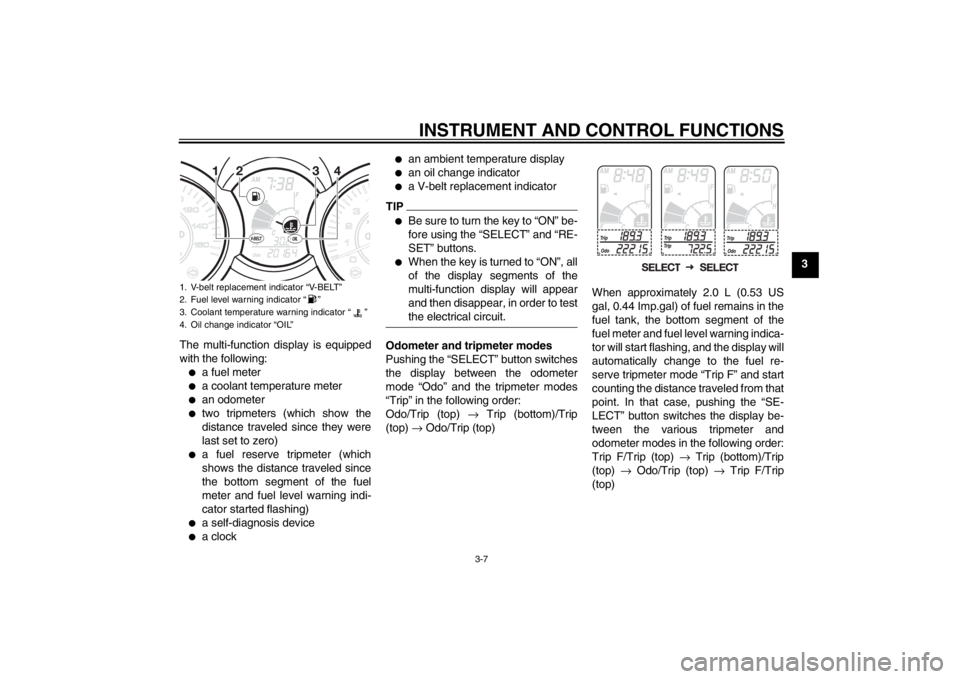
The multi-function display is equipped
with the following:
●
a fuel meter
●
a coolant temperature meter
●
an odometer
●
two tripmeters (which show the
distance traveled since they were
last set to zero)
●
a fuel reserve tripmeter (which
shows the distance traveled since
the bottom segment of the fuel
meter and fuel level warning indi-
cator started flashing)
●
a self-diagnosis device
●
a clock
●
an ambient temperature display
●
an oil change indicator
●
a V-belt replacement indicator
TIP●
Be sure to turn the key to “ON” be-
fore using the “SELECT” and “RE-
SET” buttons.
●
When the key is turned to “ON”, all
of the display segments of the
multi-function display will appear
and then disappear, in order to test
the electrical circuit.
Odometer and tripmeter modes
Pushing the “SELECT” button switches
the display between the odometer
mode “Odo” and the tripmeter modes
“Trip” in the following order:
Odo/Trip (top) → Trip (bottom)/Trip
(top) → Odo/Trip (top)When approximately 2.0 L (0.53 US
gal, 0.44 Imp.gal) of fuel remains in the
fuel tank, the bottom segment of the
fuel meter and fuel level warning indica-
tor will start flashing, and the display will
automatically change to the fuel re-
serve tripmeter mode “Trip F” and start
counting the distance traveled from that
point. In that case, pushing the “SE-
LECT” button switches the display be-
tween the various tripmeter and
odometer modes in the following order:
Trip F/Trip (top) → Trip (bottom)/Trip
(top) → Odo/Trip (top) → Trip F/Trip
(top)
1. V-belt replacement indicator “V-BELT”
2. Fuel level warning indicator “ ”
3. Coolant temperature warning indicator “ ”
4. Oil change indicator “OIL”
U2ABE2E0.book Page 7 Thursday, August 30, 2012 2:36 PM
Page 27 of 96
INSTRUMENT AND CONTROL FUNCTIONS
3-9
3 been reached), the indicator must be
reset after the oil change for the next
periodic oil change to be indicated at
the correct time. (See page 6-10.)
The electrical circuit of the indicator can
be checked according to the following
procedure.
1. Turn the key to “ON”.
2. Check that the indicator comes on
for a few seconds and then goes
off.
3. If the indicator does not come on,
have a Yamaha dealer check the
electrical circuit.
V-belt replacement indicator “V-
BELT”
This indicator flashes every 18000 km
(10500 mi) when the V-belt needs to be
replaced.
The electrical circuit of the indicator can
be checked according to the following
procedure.
1. Turn the key to “ON”.
2. Check that the indicator comes on
for a few seconds and then goes
off.3. If the indicator does not come on,
have a Yamaha dealer check the
electrical circuit.
Self-diagnosis device
This model is equipped with a self-diag-
nosis device for various electrical cir-
cuits.
If a problem is detected in any of those
circuits, the multi-function display will
indicate an error code.
If the multi-function display indicates
such an error code, note the code num-
ber, and then have a Yamaha dealer
check the vehicle.
NOTICE
ECA11790
If the multi-function display indi-
cates an error code, the vehicle
should be checked as soon as pos-
sible in order to avoid engine dam-
age.The self-diagnosis device also detects
problems in the immobilizer system cir-
cuits.
If a problem is detected in the immobi-
lizer system circuits, the immobilizer
system indicator light will flash and themulti-function display will indicate an
error code when the key is turned to
“ON”.
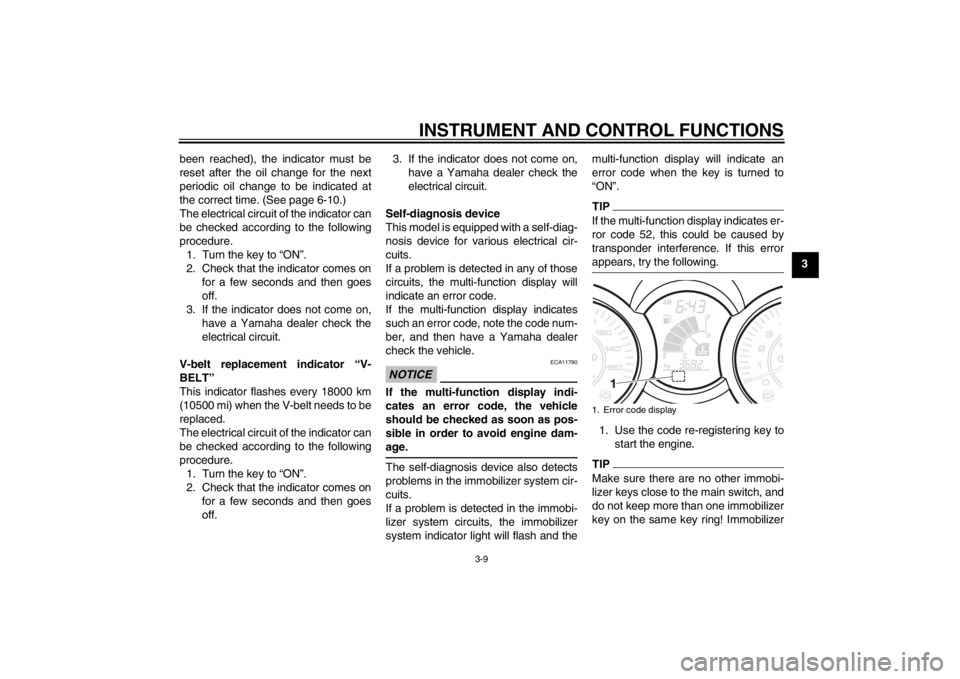
TIPIf the multi-function display indicates er-
ror code 52, this could be caused by
transponder interference. If this error
appears, try the following.1. Use the code re-registering key to
start the engine.TIPMake sure there are no other immobi-
lizer keys close to the main switch, and
do not keep more than one immobilizer
key on the same key ring! Immobilizer1. Error code display
U2ABE2E0.book Page 9 Thursday, August 30, 2012 2:36 PM
Page 44 of 96
OPERATION AND IMPORTANT RIDING POINTS
5-1
5
EAU15951
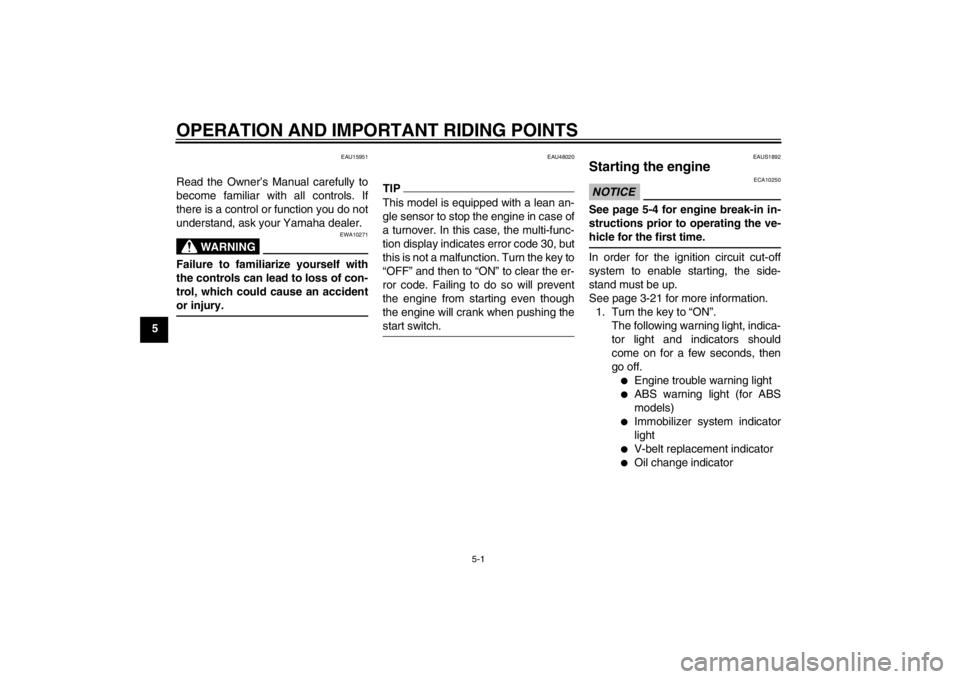
Read the Owner’s Manual carefully to
become familiar with all controls. If
there is a control or function you do not
understand, ask your Yamaha dealer.
WARNING
EWA10271
Failure to familiarize yourself with
the controls can lead to loss of con-
trol, which could cause an accident
or injury.
EAU48020
TIPThis model is equipped with a lean an-
gle sensor to stop the engine in case of
a turnover. In this case, the multi-func-
tion display indicates error code 30, but
this is not a malfunction. Turn the key to
“OFF” and then to “ON” to clear the er-
ror code. Failing to do so will prevent
the engine from starting even though
the engine will crank when pushing the
start switch.
EAUS1892
Starting the engine NOTICE
ECA10250
See page 5-4 for engine break-in in-
structions prior to operating the ve-
hicle for the first time.In order for the ignition circuit cut-off
system to enable starting, the side-
stand must be up.
See page 3-21 for more information.
1. Turn the key to “ON”.
The following warning light, indica-
tor light and indicators should
come on for a few seconds, then
go off.
●
Engine trouble warning light
●
ABS warning light (for ABS
models)
●
Immobilizer system indicator
light
●
V-belt replacement indicator
●
Oil change indicator
U2ABE2E0.book Page 1 Thursday, August 30, 2012 2:36 PM
Page 52 of 96

PERIODIC MAINTENANCE AND ADJUSTMENT
6-4
6
EAU17718
General maintenance and lubrication chart NO. ITEM CHECK OR MAINTENANCE JOBODOMETER READING
ANNUAL
CHECK 1000 km
(600 mi)6000 km
(3500 mi)12000 km
(7000 mi)18000 km
(10500 mi)24000 km
(14000 mi)
1 Air filter element Replace.√√
2V-belt case air filter
element Clean.√√√√
3*Front brake Check operation, fluid level and
vehicle for fluid leakage.√√√√√√
Replace brake pads. Whenever worn to the limit
4*Rear brake Check operation, fluid level and
vehicle for fluid leakage.√√√√√√
Replace brake pads. Whenever worn to the limit
5*Brake hoses Check for cracks or damage.
Check for correct routing and
clamping.√√√√√
Replace. Every 4 years
6*Brake fluid Replace. Every 2 years
7*Wheels Check runout and for damage.√√√√
8*Tires Check tread depth and for dam-
age.
Replace if necessary.
Check air pressure.
Correct if necessary.√√√√√
9*Wheel bearings Check bearing for looseness or
damage.√√√√
U2ABE2E0.book Page 4 Thursday, August 30, 2012 2:36 PM
Page 54 of 96
PERIODIC MAINTENANCE AND ADJUSTMENT
6-6
6
EAU38262
TIP●
Engine air filter and V-belt air filters
This model’s engine air filter is equipped with a disposable oil-coated paper element, which must not be cleaned with
compressed air to avoid damaging it.
The engine air filter element needs to be replaced and the V-belt air filter elements need to be serviced more frequent-
ly when riding in unusually wet or dusty areas.
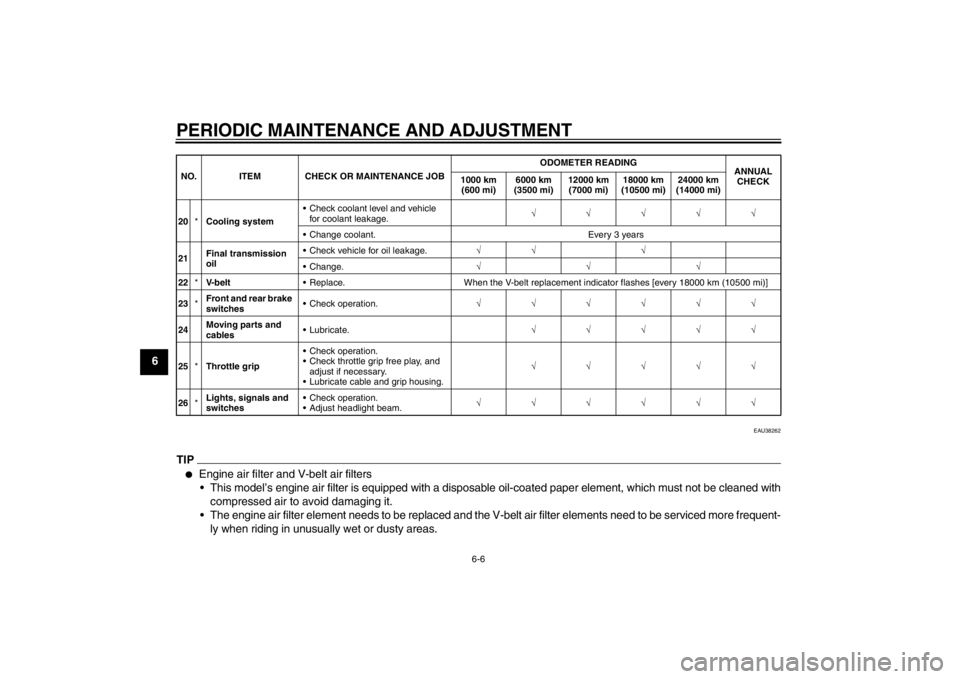
20*Cooling system Check coolant level and vehicle
for coolant leakage.√√√√√
Change coolant. Every 3 years
21Final transmission
oil Check vehicle for oil leakage.√√ √
Change.√√√
22*V- b e l t Replace. When the V-belt replacement indicator flashes [every 18000 km (10500 mi)]
23*Front and rear brake
switches Check operation.√√√√√√
24Moving parts and
cables Lubricate.√√√√√
25*Throttle grip Check operation.
Check throttle grip free play, and
adjust if necessary.
Lubricate cable and grip housing.√√√√√
26*Lights, signals and
switches Check operation.
Adjust headlight beam.√√√√√√ NO. ITEM CHECK OR MAINTENANCE JOBODOMETER READING
ANNUAL
CHECK 1000 km
(600 mi)6000 km
(3500 mi)12000 km
(7000 mi)18000 km
(10500 mi)24000 km
(14000 mi)U2ABE2E0.book Page 6 Thursday, August 30, 2012 2:36 PM
Page 64 of 96
PERIODIC MAINTENANCE AND ADJUSTMENT
6-16
6
EAUM2242
Air filter and V-belt case air fil-
ter elements The air filter element should be re-
placed and the V-belt case air filter ele-
ment should be cleaned at the intervals
specified in the periodic maintenance
and lubrication chart. Service the air fil-
ter elements more frequently if you are
riding in unusually wet or dusty areas.
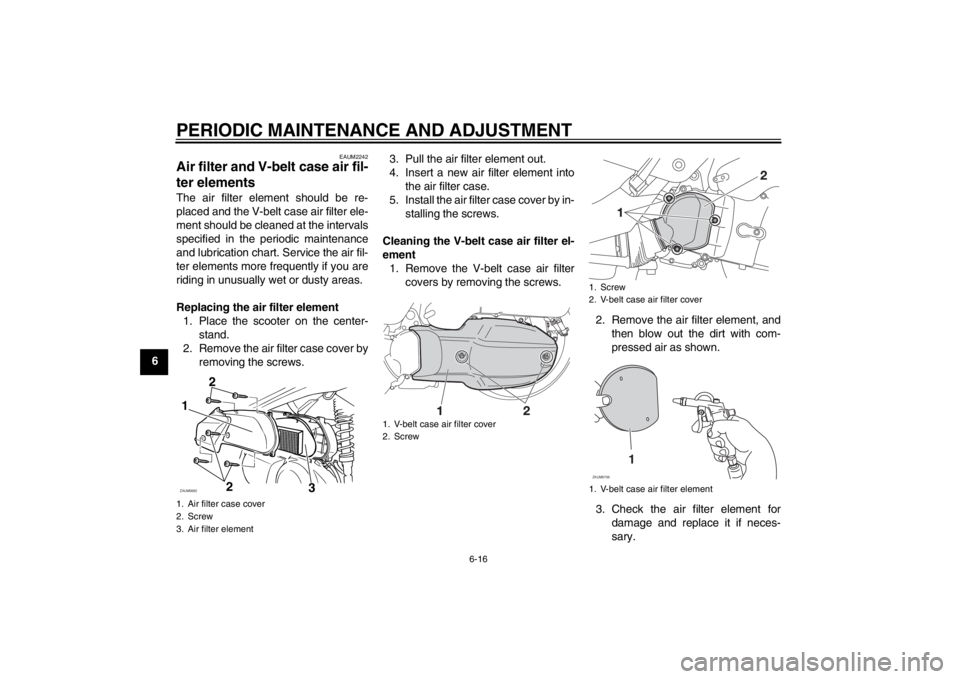
Replacing the air filter element
1. Place the scooter on the center-
stand.
2. Remove the air filter case cover by
removing the screws.3. Pull the air filter element out.
4. Insert a new air filter element into
the air filter case.
5. Install the air filter case cover by in-
stalling the screws.
Cleaning the V-belt case air filter el-
ement
1. Remove the V-belt case air filter
covers by removing the screws.
2. Remove the air filter element, and
then blow out the dirt with com-
pressed air as shown.
3. Check the air filter element for
damage and replace it if neces-
sary.1. Air filter case cover
2. Screw
3. Air filter element1
2 2ZAUM0662
3
1. V-belt case air filter cover
2. Screw
1. Screw
2. V-belt case air filter cover
1. V-belt case air filter element
1
ZAUM0706
U2ABE2E0.book Page 16 Thursday, August 30, 2012 2:36 PM
Page 65 of 96
PERIODIC MAINTENANCE AND ADJUSTMENT
6-17
6 4. Install the air filter element with the
colored side facing outward.
5. Install the V-belt case air filter cov-
ers by installing the screws.
NOTICE: Make sure that each fil-
ter element is properly seated in
its case. The engine should nev-
er be operated without the filter
elements installed, otherwise
the piston(s) and/or cylinder(s)
may become excessively worn.
[ECA10531]EAU48432
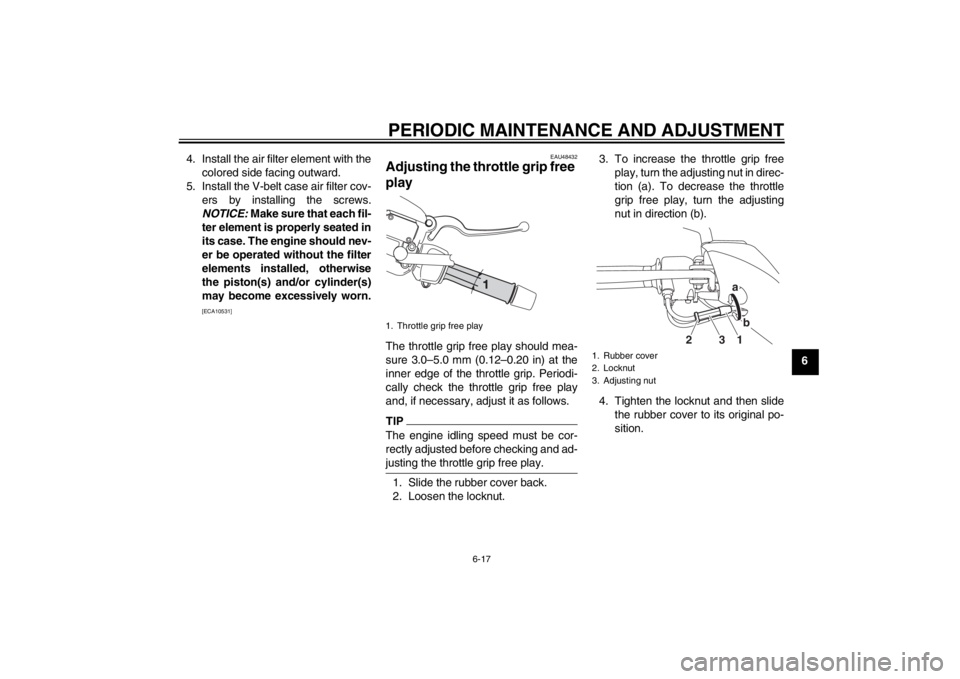
Adjusting the throttle grip free
play The throttle grip free play should mea-
sure 3.0–5.0 mm (0.12–0.20 in) at the
inner edge of the throttle grip. Periodi-
cally check the throttle grip free play
and, if necessary, adjust it as follows.TIPThe engine idling speed must be cor-
rectly adjusted before checking and ad-
justing the throttle grip free play.1. Slide the rubber cover back.
2. Loosen the locknut.3. To increase the throttle grip free
play, turn the adjusting nut in direc-
tion (a). To decrease the throttle
grip free play, turn the adjusting
nut in direction (b).
4. Tighten the locknut and then slide
the rubber cover to its original po-
sition.1. Throttle grip free play
1. Rubber cover
2. Locknut
3. Adjusting nut
1b a
3 2
U2ABE2E0.book Page 17 Thursday, August 30, 2012 2:36 PM