lock YAMAHA XMAX 125 2013 Owners Manual
[x] Cancel search | Manufacturer: YAMAHA, Model Year: 2013, Model line: XMAX 125, Model: YAMAHA XMAX 125 2013Pages: 96, PDF Size: 4.83 MB
Page 6 of 96

TABLE OF CONTENTSSAFETY INFORMATION ..................1-1
Further safe-riding points ................1-5
DESCRIPTION ..................................2-1
Left view ..........................................2-1
Right view ........................................2-3
Controls and instruments.................2-5
INSTRUMENT AND CONTROL
FUNCTIONS.......................................3-1
Immobilizer system .........................3-1
Main switch/steering lock ................3-2
Indicator lights and
warning lights ..............................3-4
Speedometer ..................................3-5
Tachometer ....................................3-6
Multi-function display ......................3-6
Anti-theft alarm (optional) .............3-11
Handlebar switches ......................3-11
Front brake lever ..........................3-12
Rear brake lever ...........................3-13
ABS (for ABS models) ..................3-13
Fuel tank cap ................................3-14
Fuel ...............................................3-15
Catalytic converters ......................3-16
Securing bracket ...........................3-17
Seat ..............................................3-17
Storage compartments .................3-18
Travel trunk ..................................3-19
Adjusting the shock absorber
assemblies ................................3-20Sidestand ..................................... 3-21
Ignition circuit cut-off system ........ 3-21
Auxiliary DC jack .......................... 3-23
FOR YOUR SAFETY –
PRE-OPERATION CHECKS............. 4-1
OPERATION AND IMPORTANT
RIDING POINTS................................. 5-1
Starting the engine ......................... 5-1
Starting off ...................................... 5-2
Acceleration and deceleration ........ 5-3
Braking ........................................... 5-3
Tips for reducing fuel
consumption ............................... 5-4
Engine break-in .............................. 5-4
Parking ........................................... 5-5
PERIODIC MAINTENANCE AND
ADJUSTMENT................................... 6-1
Owner’s tool kit ............................... 6-2
Periodic maintenance chart for the
emission control system ............. 6-3
General maintenance and
lubrication chart .......................... 6-4
Removing and installing
the cowling and panel ................. 6-8
Checking the spark plug ................. 6-9
Engine oil ..................................... 6-10
Final transmission oil .................... 6-13
Coolant ......................................... 6-14Air filter and V-belt case air filter
elements ................................... 6-16
Adjusting the throttle grip free
play ........................................... 6-17
Valve clearance ........................... 6-18
Tires ............................................. 6-18
Cast wheels ................................. 6-20
Checking the front and
rear brake lever free play ......... 6-21
Checking the front and
rear brake pads ........................ 6-21
Checking the brake fluid level ...... 6-22
Changing the brake fluid .............. 6-24
Checking and lubricating
the cables ................................. 6-24
Checking and lubricating
the throttle grip and cable ......... 6-24
Lubricating the front and
rear brake levers ...................... 6-25
Checking and lubricating the
centerstand and sidestand ....... 6-25
Checking the front fork ................. 6-26
Checking the steering .................. 6-27
Checking the wheel bearings ....... 6-27
Battery ......................................... 6-27
Replacing the fuses ..................... 6-29
Replacing a headlight bulb .......... 6-30
Replacing a front turn signal light
bulb ........................................... 6-31
Replacing a tail/brake light bulb or
a rear turn signal light bulb ....... 6-31U2ABE2E0.book Page 1 Thursday, August 30, 2012 2:36 PM
Page 18 of 96
DESCRIPTION
2-5
2
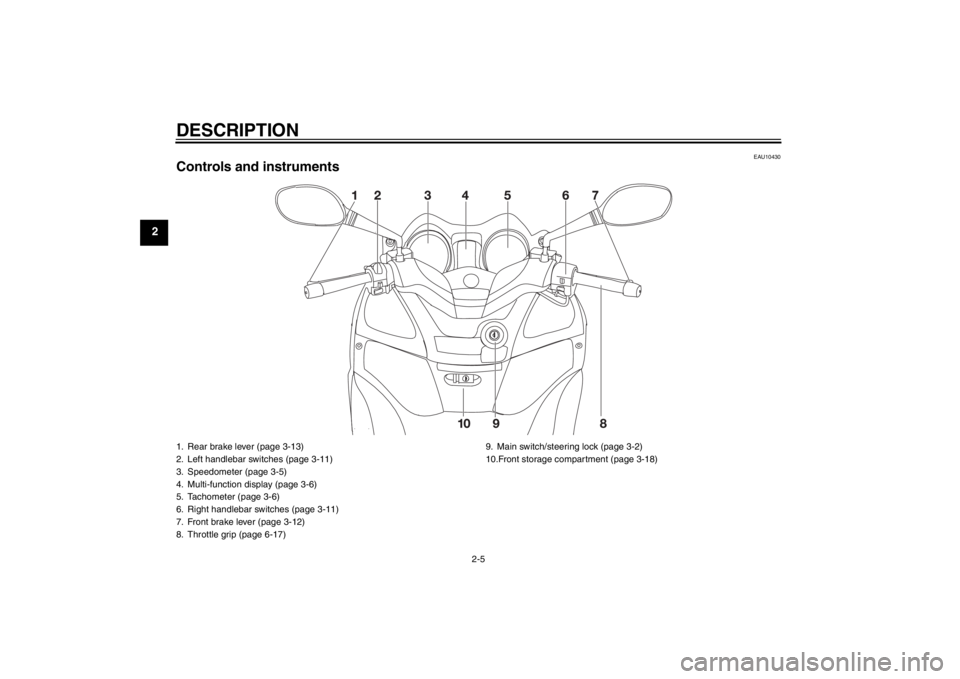
EAU10430
Controls and instruments1. Rear brake lever (page 3-13)
2. Left handlebar switches (page 3-11)
3. Speedometer (page 3-5)
4. Multi-function display (page 3-6)
5. Tachometer (page 3-6)
6. Right handlebar switches (page 3-11)
7. Front brake lever (page 3-12)
8. Throttle grip (page 6-17)9. Main switch/steering lock (page 3-2)
10.Front storage compartment (page 3-18)U2ABE2E0.book Page 5 Thursday, August 30, 2012 2:36 PM
Page 20 of 96
INSTRUMENT AND CONTROL FUNCTIONS
3-2
3
●
Keep other immobilizer system
keys away from the main switch
as they may cause signal inter-
ference.
EAU10472
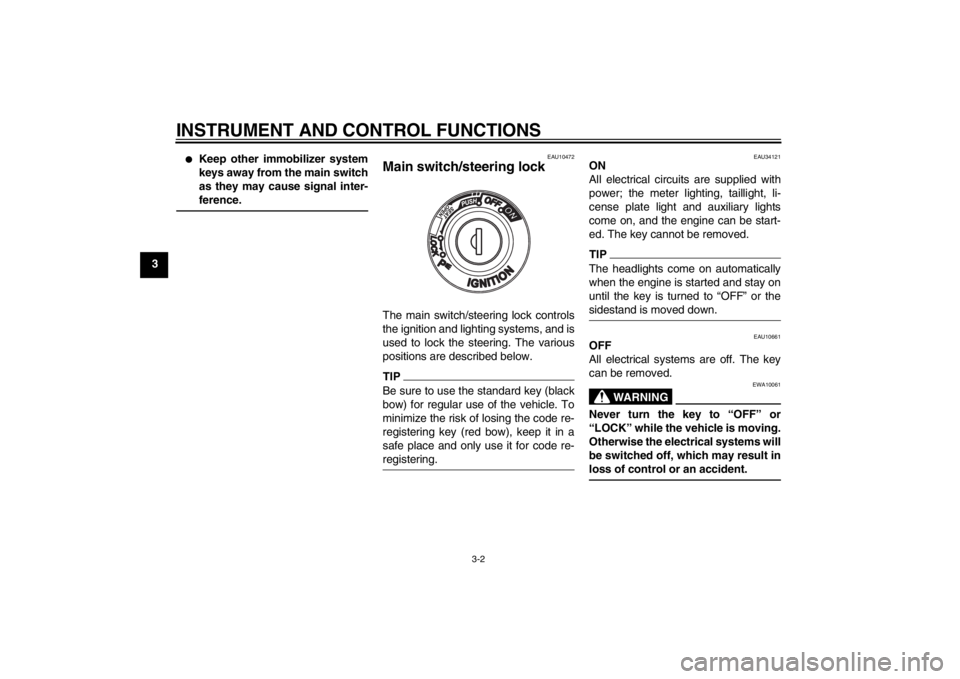
Main switch/steering lock The main switch/steering lock controls
the ignition and lighting systems, and is
used to lock the steering. The various
positions are described below.TIPBe sure to use the standard key (black
bow) for regular use of the vehicle. To
minimize the risk of losing the code re-
registering key (red bow), keep it in a
safe place and only use it for code re-
registering.
EAU34121
ON
All electrical circuits are supplied with
power; the meter lighting, taillight, li-
cense plate light and auxiliary lights
come on, and the engine can be start-
ed. The key cannot be removed.TIPThe headlights come on automatically
when the engine is started and stay on
until the key is turned to “OFF” or the
sidestand is moved down.
EAU10661
OFF
All electrical systems are off. The key
can be removed.
WARNING
EWA10061
Never turn the key to “OFF” or
“LOCK” while the vehicle is moving.
Otherwise the electrical systems will
be switched off, which may result in
loss of control or an accident.
U2ABE2E0.book Page 2 Thursday, August 30, 2012 2:36 PM
Page 21 of 96
INSTRUMENT AND CONTROL FUNCTIONS
3-3
3
EAU10684
LOCK
The steering is locked, and all electrical
systems are off. The key can be re-
moved.
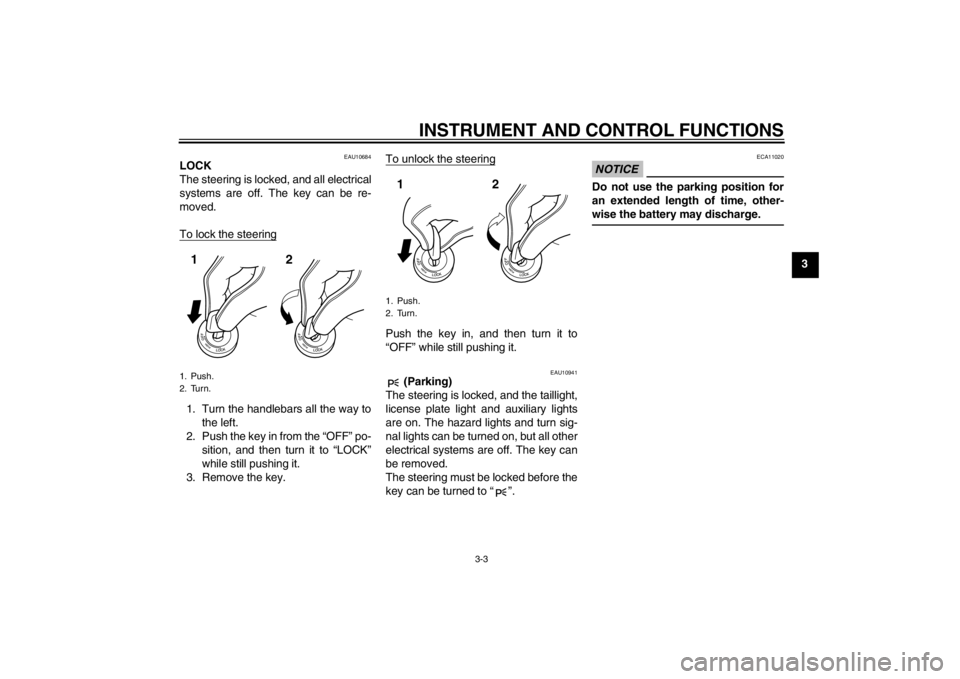
To lock the steering1. Turn the handlebars all the way to
the left.
2. Push the key in from the “OFF” po-
sition, and then turn it to “LOCK”
while still pushing it.
3. Remove the key.To unlock the steering
Push the key in, and then turn it to
“OFF” while still pushing it.
EAU10941
(Parking)
The steering is locked, and the taillight,
license plate light and auxiliary lights
are on. The hazard lights and turn sig-
nal lights can be turned on, but all other
electrical systems are off. The key can
be removed.
The steering must be locked before the
key can be turned to “ ”.
NOTICE
ECA11020
Do not use the parking position for
an extended length of time, other-
wise the battery may discharge.
1. Push.
2. Turn.12
1. Push.
2. Turn.12
U2ABE2E0.book Page 3 Thursday, August 30, 2012 2:36 PM
Page 22 of 96
INSTRUMENT AND CONTROL FUNCTIONS
3-4
3
EAU49392
Indicator lights and warning
lights
EAU11030
Turn signal indicator lights “ ”
and “ ”
The corresponding indicator light flash-
es when the turn signal switch is
pushed to the left or right.
EAU11080
High beam indicator light “ ”
This indicator light comes on when the
high beam of the headlight is switched
on.
EAU43023
Engine trouble warning light “ ”
This warning light comes on if an elec-
trical circuit monitoring the engine is not
working correctly. If this occurs, have a
Yamaha dealer check the self-diagno-
sis system.
The electrical circuit of the warning light
can be checked by turning the key to
“ON”. The warning light should come
on for a few seconds, and then go off.
If the warning light does not come on
initially when the key is turned to “ON”,
or if the warning light remains on, have
a Yamaha dealer check the electrical
circuit.TIPThis warning light will come on when
the key is turned to “ON” and the start
switch is pushed, but this does not indi-
cate a malfunction.
EAU43032
ABS warning light “ ” (for ABS
models) NOTICE
ECA10831
If the ABS warning light comes on or
flashes while riding, the ABS may
not work correctly. If this occurs,
have a Yamaha dealer check the
electrical circuit.See page 3-13 for an explanation of the
ABS.
The electrical circuit of the warning light
can be checked by setting the engine
stop switch to “ ” and turning the key
to “ON”. The warning light should come
on for a few seconds, and then go off.
If the warning light does not come on
initially when the key is turned to “ON”,
or if the warning light remains on, have
a Yamaha dealer check the electrical
circuit.
WARNING
EWA11350
When the ABS warning light comes
on or flashes while riding, the brake
system reverts to conventional brak-
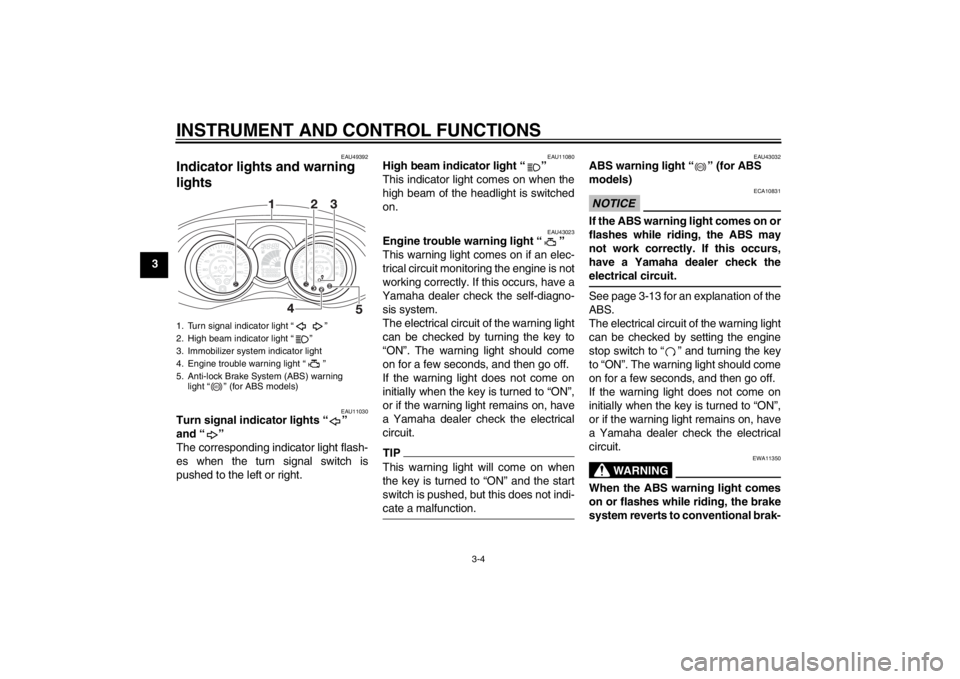
1. Turn signal indicator light “ ”
2. High beam indicator light “ ”
3. Immobilizer system indicator light
4. Engine trouble warning light “ ”
5. Anti-lock Brake System (ABS) warning
light “ ” (for ABS models)
ABS
ABS
U2ABE2E0.book Page 4 Thursday, August 30, 2012 2:36 PM
Page 23 of 96
INSTRUMENT AND CONTROL FUNCTIONS
3-5
3 ing. Therefore, be careful not to
cause the wheel to lock during emer-
gency braking.
TIPThe ABS warning light may come on
while accelerating the engine with the
scooter on its centerstand, but this
does not indicate a malfunction.
EAU38624
Immobilizer system indicator light
The electrical circuit of the indicator
light can be checked by turning the key
to “ON”. The indicator light should
come on for a few seconds, and then
go off.
If the indicator light does not come on
initially when the key is turned to “ON”,
or if the indicator light remains on, have
a Yamaha dealer check the electrical
circuit.
When the key is turned to “OFF” and 30
seconds have passed, the indicator
light will start flashing indicating the im-
mobilizer system is enabled. After 24
hours have passed, the indicator light
will stop flashing, however the immobi-
lizer system is still enabled.The self-diagnosis device also detects
problems in the immobilizer system cir-
cuits. (See page 3-9 for an explanation
of the self-diagnosis device.)
EAUS1860
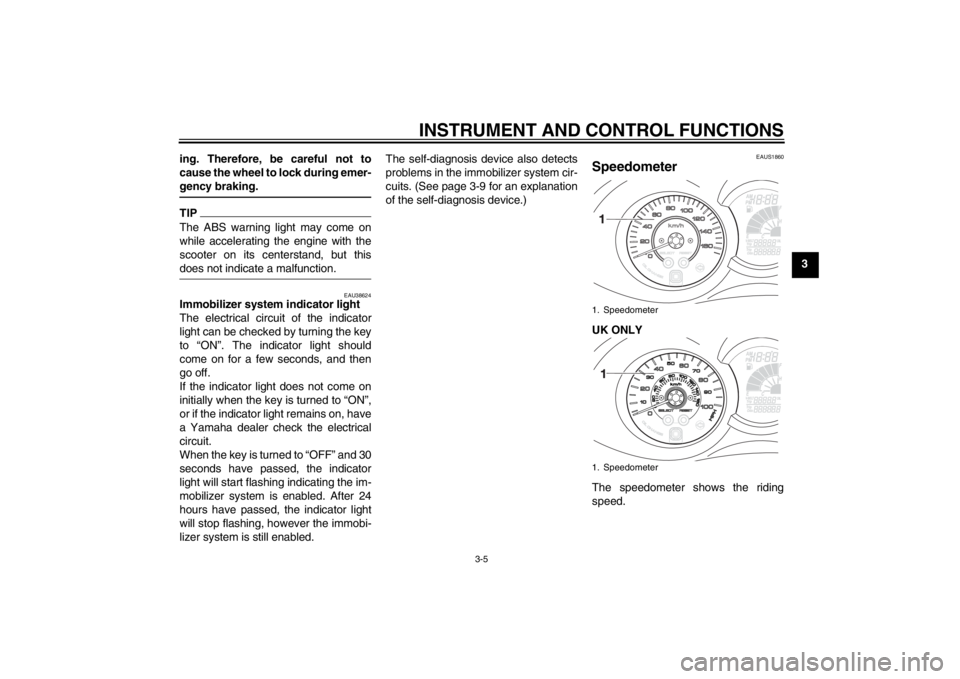
Speedometer UK ONLY
The speedometer shows the riding
speed.1. Speedometer
1. Speedometer
U2ABE2E0.book Page 5 Thursday, August 30, 2012 2:36 PM
Page 24 of 96
INSTRUMENT AND CONTROL FUNCTIONS
3-6
3When the key is turned to “ON”, the
speedometer needle will sweep once
across the speed range and then return
to zero in order to test the electrical cir-
cuit.
EAU11872
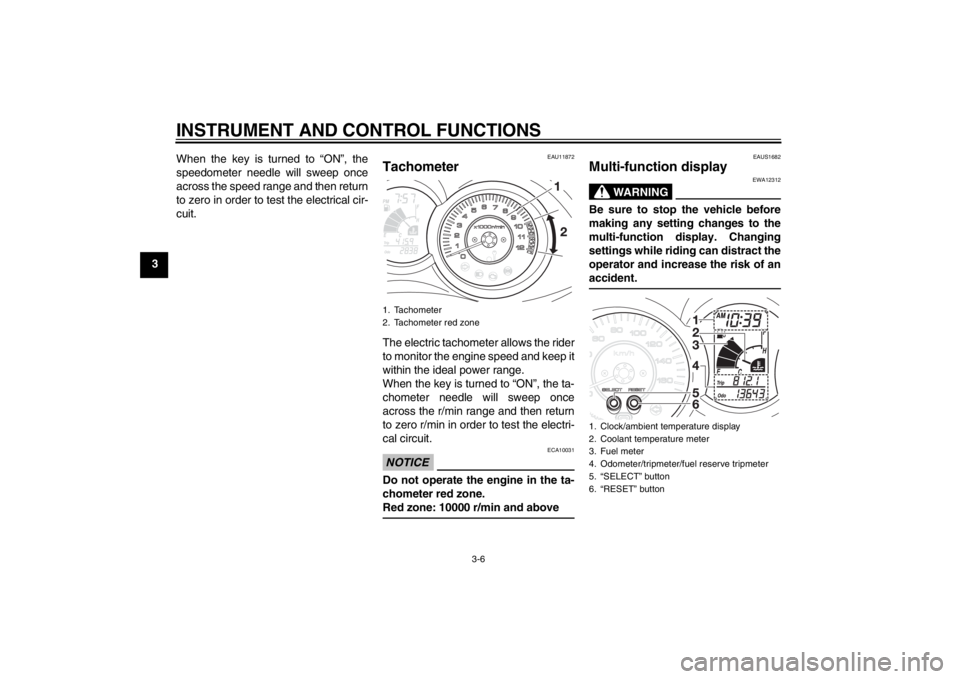
Tachometer The electric tachometer allows the rider
to monitor the engine speed and keep it
within the ideal power range.
When the key is turned to “ON”, the ta-
chometer needle will sweep once
across the r/min range and then return
to zero r/min in order to test the electri-
cal circuit.NOTICE
ECA10031
Do not operate the engine in the ta-
chometer red zone.
Red zone: 10000 r/min and above
EAUS1682
Multi-function display
WARNING
EWA12312
Be sure to stop the vehicle before
making any setting changes to the
multi-function display. Changing
settings while riding can distract the
operator and increase the risk of an
accident.
1. Tachometer
2. Tachometer red zone
1. Clock/ambient temperature display
2. Coolant temperature meter
3. Fuel meter
4. Odometer/tripmeter/fuel reserve tripmeter
5. “SELECT” button
6. “RESET” button
U2ABE2E0.book Page 6 Thursday, August 30, 2012 2:36 PM
Page 25 of 96
INSTRUMENT AND CONTROL FUNCTIONS
3-7
3
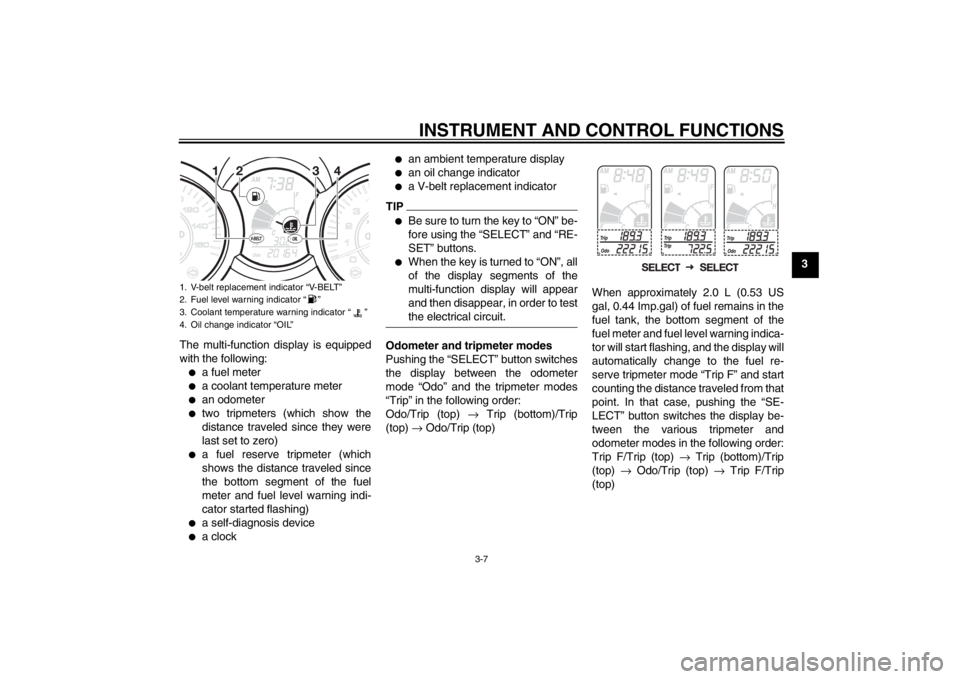
The multi-function display is equipped
with the following:
●
a fuel meter
●
a coolant temperature meter
●
an odometer
●
two tripmeters (which show the
distance traveled since they were
last set to zero)
●
a fuel reserve tripmeter (which
shows the distance traveled since
the bottom segment of the fuel
meter and fuel level warning indi-
cator started flashing)
●
a self-diagnosis device
●
a clock
●
an ambient temperature display
●
an oil change indicator
●
a V-belt replacement indicator
TIP●
Be sure to turn the key to “ON” be-
fore using the “SELECT” and “RE-
SET” buttons.
●
When the key is turned to “ON”, all
of the display segments of the
multi-function display will appear
and then disappear, in order to test
the electrical circuit.
Odometer and tripmeter modes
Pushing the “SELECT” button switches
the display between the odometer
mode “Odo” and the tripmeter modes
“Trip” in the following order:
Odo/Trip (top) → Trip (bottom)/Trip
(top) → Odo/Trip (top)When approximately 2.0 L (0.53 US
gal, 0.44 Imp.gal) of fuel remains in the
fuel tank, the bottom segment of the
fuel meter and fuel level warning indica-
tor will start flashing, and the display will
automatically change to the fuel re-
serve tripmeter mode “Trip F” and start
counting the distance traveled from that
point. In that case, pushing the “SE-
LECT” button switches the display be-
tween the various tripmeter and
odometer modes in the following order:
Trip F/Trip (top) → Trip (bottom)/Trip
(top) → Odo/Trip (top) → Trip F/Trip
(top)
1. V-belt replacement indicator “V-BELT”
2. Fuel level warning indicator “ ”
3. Coolant temperature warning indicator “ ”
4. Oil change indicator “OIL”
U2ABE2E0.book Page 7 Thursday, August 30, 2012 2:36 PM
Page 28 of 96
INSTRUMENT AND CONTROL FUNCTIONS
3-10
3system keys may cause signal interfer-
ence, which may prevent the engine
from starting.
2. If the engine starts, turn it off, and
try starting the engine with the
standard keys.
3. If one or both of the standard keys
do not start the engine, take the
vehicle, the code re-registering
key and both standard keys to a
Yamaha dealer and have the stan-
dard keys re-registered.
If the multi-function display indicates
any error codes, note the code number,
and then have a Yamaha dealer check
the vehicle.
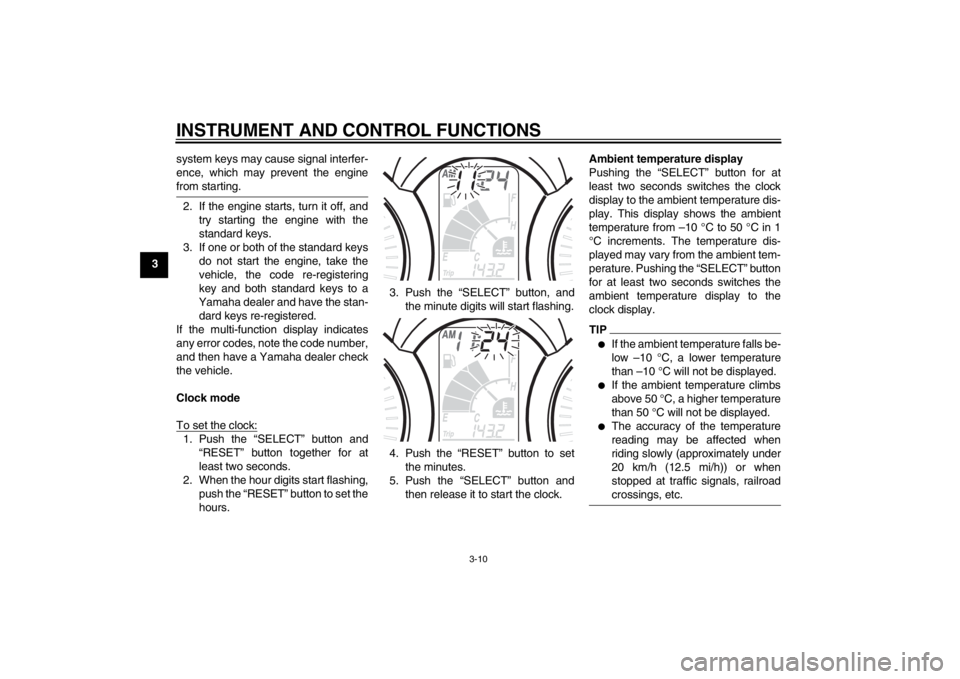
Clock mode
To set the clock:1. Push the “SELECT” button and
“RESET” button together for at
least two seconds.
2. When the hour digits start flashing,
push the “RESET” button to set the
hours.3. Push the “SELECT” button, and
the minute digits will start flashing.
4. Push the “RESET” button to set
the minutes.
5. Push the “SELECT” button and
then release it to start the clock.Ambient temperature display
Pushing the “SELECT” button for at
least two seconds switches the clock
display to the ambient temperature dis-
play. This display shows the ambient
temperature from –10 °C to 50 °C in 1
°C increments. The temperature dis-
played may vary from the ambient tem-
perature. Pushing the “SELECT” button
for at least two seconds switches the
ambient temperature display to the
clock display.
TIP●
If the ambient temperature falls be-
low –10 °C, a lower temperature
than –10 °C will not be displayed.
●
If the ambient temperature climbs
above 50 °C, a higher temperature
than 50 °C will not be displayed.
●
The accuracy of the temperature
reading may be affected when
riding slowly (approximately under
20 km/h (12.5 mi/h)) or when
stopped at traffic signals, railroad
crossings, etc.
U2ABE2E0.book Page 10 Thursday, August 30, 2012 2:36 PM
Page 31 of 96
INSTRUMENT AND CONTROL FUNCTIONS
3-13
3
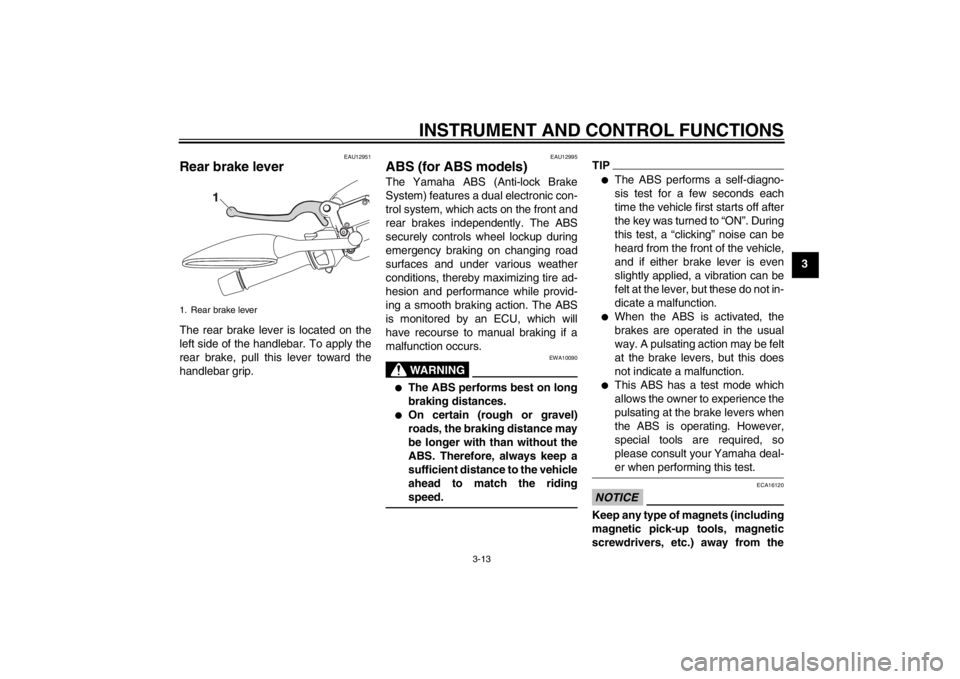
EAU12951
Rear brake lever The rear brake lever is located on the
left side of the handlebar. To apply the
rear brake, pull this lever toward the
handlebar grip.
EAU12995
ABS (for ABS models) The Yamaha ABS (Anti-lock Brake
System) features a dual electronic con-
trol system, which acts on the front and
rear brakes independently. The ABS
securely controls wheel lockup during
emergency braking on changing road
surfaces and under various weather
conditions, thereby maximizing tire ad-
hesion and performance while provid-
ing a smooth braking action. The ABS
is monitored by an ECU, which will
have recourse to manual braking if a
malfunction occurs.
WARNING
EWA10090
●
The ABS performs best on long
braking distances.
●
On certain (rough or gravel)
roads, the braking distance may
be longer with than without the
ABS. Therefore, always keep a
sufficient distance to the vehicle
ahead to match the riding
speed.
TIP●
The ABS performs a self-diagno-
sis test for a few seconds each
time the vehicle first starts off after
the key was turned to “ON”. During
this test, a “clicking” noise can be
heard from the front of the vehicle,
and if either brake lever is even
slightly applied, a vibration can be
felt at the lever, but these do not in-
dicate a malfunction.
●
When the ABS is activated, the
brakes are operated in the usual
way. A pulsating action may be felt
at the brake levers, but this does
not indicate a malfunction.
●
This ABS has a test mode which
allows the owner to experience the
pulsating at the brake levers when
the ABS is operating. However,
special tools are required, so
please consult your Yamaha deal-
er when performing this test.
NOTICE
ECA16120
Keep any type of magnets (including
magnetic pick-up tools, magnetic
screwdrivers, etc.) away from the
1. Rear brake lever
U2ABE2E0.book Page 13 Thursday, August 30, 2012 2:36 PM