battery YAMAHA XMAX 125 2020 User Guide
[x] Cancel search | Manufacturer: YAMAHA, Model Year: 2020, Model line: XMAX 125, Model: YAMAHA XMAX 125 2020Pages: 114, PDF Size: 13.55 MB
Page 29 of 114
Stop and Start System
4-2
4
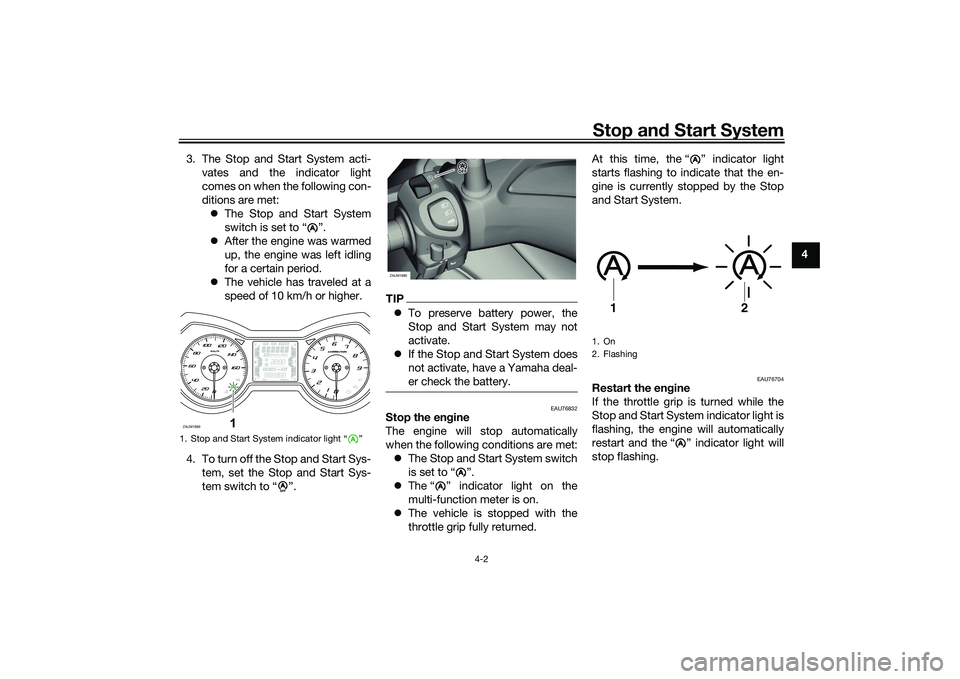
3. The Stop and Start System acti-
vates and the indicator light
comes on when the following con-
ditions are met: The Stop and Start System
switch is set to “ ”.
After the engine was warmed
up, the engine was left idling
for a certain period.
The vehicle has traveled at a
speed of 10 km/h or higher.
4. To turn off the Stop and Start Sys- tem, set the Stop and Start Sys-
tem switch to “ ”.
TIPTo preserve battery power, the
Stop and Start System may not
activate.
If the Stop and Start System does
not activate, have a Yamaha deal-
er check the battery.
EAU76832
Stop the en gine
The engine will stop automatically
when the following conditions are met: The Stop and Start System switch
is set to “ ”.
The “ ” indicator light on the
multi-function meter is on.
The vehicle is stopped with the
throttle grip fully returned. At this time, the “ ” indicator light
starts flashing to indicate that the en-
gine is currently stopped by the Stop
and Start System.
EAU76704
Restart the en
gine
If the throttle grip is turned while the
Stop and Start System indicator light is
flashing, the engine will automatically
restart and the “ ” indicator light will
stop flashing.
1. Stop and Start System indicator light “ ”
A
ZAUM1889
1
A
AAAA
A
ZAUM1890
AA
A
1. On
2. Flashing
A
1
2
A
UB9YE0E0.book Page 2 Wednesday, January 6, 2021 3:03 PM
Page 39 of 114
Instrument and control functions
5-8
5
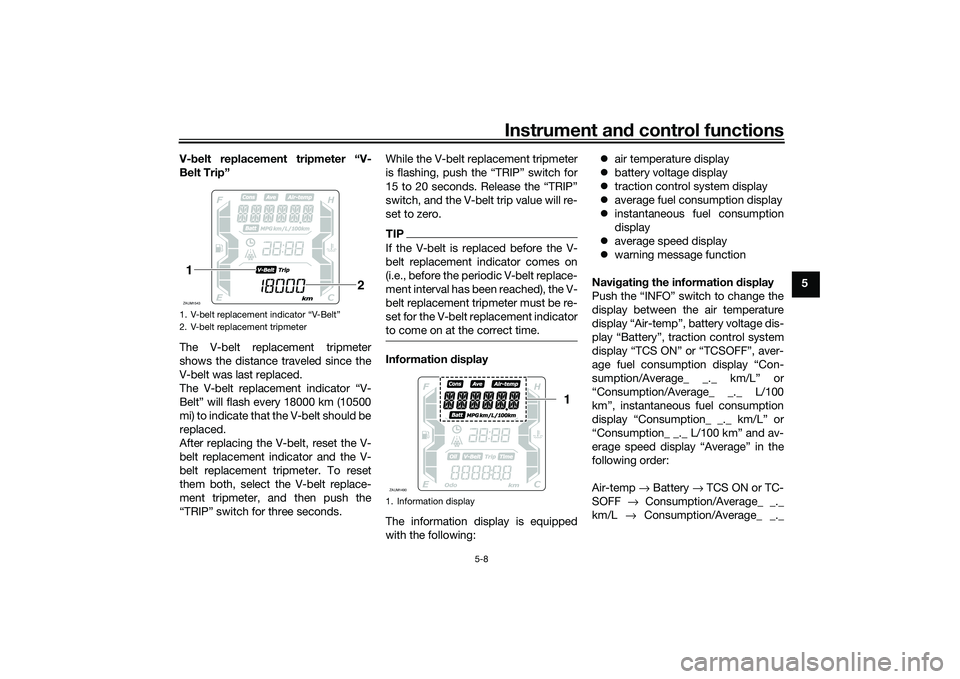
V-
belt replacement tripmeter “V-
Belt Trip”
The V-belt replacement tripmeter
shows the distance traveled since the
V-belt was last replaced.
The V-belt replacement indicator “V-
Belt” will flash every 18000 km (10500
mi) to indicate that the V-belt should be
replaced.
After replacing the V-belt, reset the V-
belt replacement indicator and the V-
belt replacement tripmeter. To reset
them both, select the V-belt replace-
ment tripmeter, and then push the
“TRIP” switch for three seconds. While the V-belt replacement tripmeter
is flashing, push the “TRIP” switch for
15 to 20 seconds. Release the “TRIP”
switch, and the V-belt trip value will re-
set to zero.
TIPIf the V-belt is replaced before the V-
belt replacement indicator comes on
(i.e., before the periodic V-belt replace-
ment interval has been reached), the V-
belt replacement tripmeter must be re-
set for the V-belt replacement indicator
to come on at the correct time.Information
display
The information display is equipped
with the following:
air temperature display
battery voltage display
traction control system display
average fuel consumption display
instantaneous fuel consumption
display
average speed display
warning message function
Navi gatin g the information d isplay
Push the “INFO” switch to change the
display between the air temperature
display “Air-temp”, battery voltage dis-
play “Battery”, traction control system
display “TCS ON” or “TCSOFF”, aver-
age fuel consumption display “Con-
sumption/Average_ _._ km/L” or
“Consumption/Average_ _._ L/100
km”, instantaneous fuel consumption
display “Consumption_ _._ km/L” or
“Consumption_ _._ L/100 km” and av-
erage speed display “Average” in the
following order:
Air-temp → Battery → TCS ON or TC-
SOFF → Consumption/Average_ _._
km/L → Consumption/Average_ _._
1. V-belt replacement indicator “V-Belt”
2. V-belt replacement tripmeterZAUM15431
2
1. Information displayZAUM1490
1
UB9YE0E0.book Page 8 Wednesday, January 6, 2021 3:03 PM
Page 40 of 114
Instrument and control functions
5-9
5 L/100 km →
Consumption_ _._ km/L
→ Consumption_ _._ L/100 km → Av-
erage → Air-temp
For the UK:
Push the “TRIP” switch to change the
display between the air temperature
display “Air-temp”, battery voltage dis-
play “Battery”, traction control system
display “TCS ON” or “TCSOFF”, aver-
age fuel consumption display “Con-
sumption/Average_ _._ km/L”,
“Consumption/Average_ _._ L/100
km” or “Consumption/Average_ _
_._MPG”, instantaneous fuel con-
sumption display “Consumption_ _._
km/L”, “Consumption_ _._ L/100 km”
or “Consumption_ _ _._MPG” and av-
erage speed display “Average” in the
following order:
Air-temp → Battery → TCS ON or TC-
SOFF → Consumption/Average_ _._
km/L → Consumption/Average_ _._
L/100 km → Consumption/Average_ _
_._ MPG → Consumption_ _._ km/L →
Consumption_ _._ L/100 km →
Consumption_ _ _._ MPG → Average
→ Air-temp
TIP When kilometers are selected for
the display units, “Consump-
tion/Average_ _ _._MPG” and
“Consumption_ _ _._MPG” are not
displayed.
When miles are selected for the
display units, “Consump-
tion/Average_ _._ km/L”, “Con-
sumption/Average_ _._ L/100
km”, “Consumption_ _._ km/L”,
and “Consumption_ _._ L/100 km”
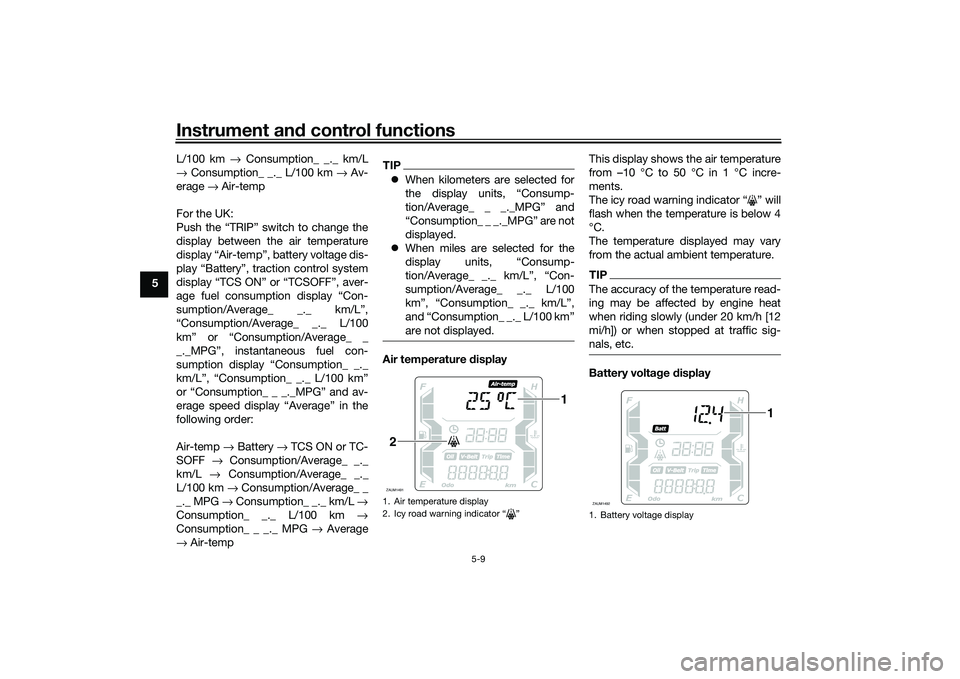
are not displayed.Air temperature d isplay This display shows the air temperature
from –10 °C to 50 °C in 1 °C incre-
ments.
The icy road warning indicator “ ” will
flash when the temperature is below 4
°C.
The temperature displayed may vary
from the actual ambient temperature.
TIPThe accuracy of the temperature read-
ing may be affected by engine heat
when riding slowly (under 20 km/h [12
mi/h]) or when stopped at traffic sig-
nals, etc.Battery volta
ge display
1. Air temperature display
2. Icy road warning indicator “ ”ZAUM1491
1
2
1. Battery voltage displayZAUM1492
1
UB9YE0E0.book Page 9 Wednesday, January 6, 2021 3:03 PM
Page 41 of 114
Instrument and control functions
5-10
5
This display shows the current charge
state of the battery.
TIP
If the engine turns over slowly
when using the start switch, have
a Yamaha dealer charge the bat-
tery.
If “---” appears in the battery volt-
age display, have a Yamaha deal-
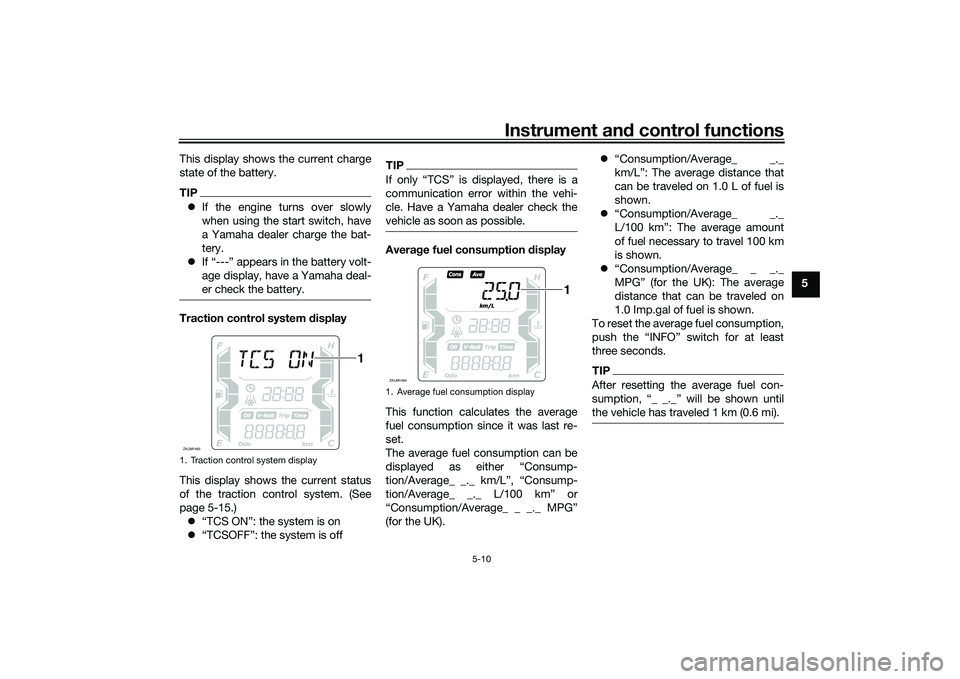
er check the battery.Traction control system display
This display shows the current status
of the traction control system. (See
page 5-15.) “TCS ON”: the system is on
“TCSOFF”: the system is off
TIPIf only “TCS” is displayed, there is a
communication error within the vehi-
cle. Have a Yamaha dealer check the
vehicle as soon as possible.Avera ge fuel consumption display
This function calculates the average
fuel consumption since it was last re-
set.
The average fuel consumption can be
displayed as either “Consump-
tion/Average_ _._ km/L”, “Consump-
tion/Average_ _._ L/100 km” or
“Consumption/Average_ _ _._ MPG”
(for the UK).
“Consumption/Average_ _._
km/L”: The average distance that
can be traveled on 1.0 L of fuel is
shown.
“Consumption/Average_ _._
L/100 km”: The average amount
of fuel necessary to travel 100 km
is shown.
“Consumption/Average_ _ _._
MPG” (for the UK): The average
distance that can be traveled on
1.0 Imp.gal of fuel is shown.
To reset the average fuel consumption,
push the “INFO” switch for at least
three seconds.
TIPAfter resetting the average fuel con-
sumption, “_ _._” will be shown until
the vehicle has traveled 1 km (0.6 mi).
1. Traction control system displayZAUM1493
1
1. Average fuel consumption displayZAUM1494
1
UB9YE0E0.book Page 10 Wednesday, January 6, 2021 3:03 PM
Page 63 of 114

Operation and important ri din g points
7-2
7
EAU86741
Startin g the en gineThe ignition circuit cut-off system will
enable starting only when the side-
stand is up.
To start the engine1. Turn the main switch on.
2. Confirm the indicator and warning light(s) come on for a few sec-
onds, and then go off. (See page
5-1.)TIPDo not start the engine if the en-
gine trouble warning light remains
on.
The ABS warning light should
come on and stay on until the ve-
hicle reaches a speed of 10 km/h
(6 mi/h).NOTICE
ECA24110
If a warnin g or in dicator li ght does
not work as d escribed a bove, have a
Yamaha dealer check the vehicle.3. Close the throttle completely.
4. While applying the front or rear
brake, push the start switch. 5. Release the start switch when the
engine starts, or after 5 seconds.
Wait 10 seconds before pressing
the switch again to allow battery
voltage to restore.
NOTICE
ECA11043
For maximum en gine life, never ac-
celerate har d when the en gine is
col d!
EAUM4280
TIPThis model is equipped with a lean an-
gle sensor to stop the engine in case of
a turnover. In this case, the malfunction
Indicator light will come on but this is
not a malfunction. Turn the vehicle
power off and then back on again to
cancel the Indicator light. Failing to do
so will prevent the engine from starting
even though the engine will crank
when pushing the start switch.
UB9YE0E0.book Page 2 Wednesday, January 6, 2021 3:03 PM
Page 92 of 114
Periodic maintenance an d a djustment
8-26
8
EAU23292
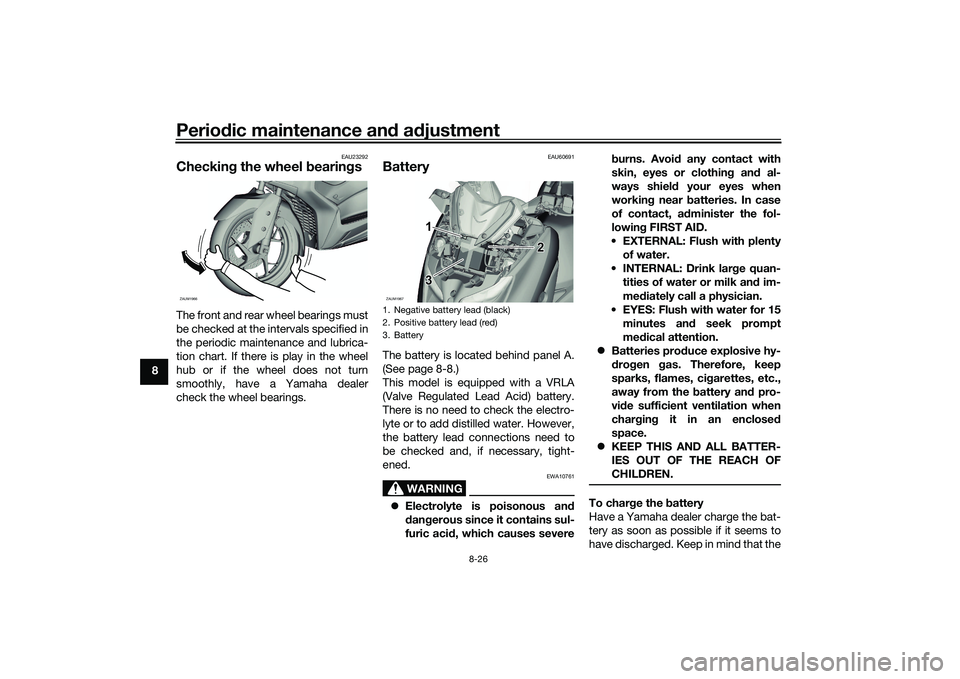
Checkin g the wheel b earingsThe front and rear wheel bearings must
be checked at the intervals specified in
the periodic maintenance and lubrica-
tion chart. If there is play in the wheel
hub or if the wheel does not turn
smoothly, have a Yamaha dealer
check the wheel bearings.
EAU60691
BatteryThe battery is located behind panel A.
(See page 8-8.)
This model is equipped with a VRLA
(Valve Regulated Lead Acid) battery.
There is no need to check the electro-
lyte or to add distilled water. However,
the battery lead connections need to
be checked and, if necessary, tight-
ened.
WARNING
EWA10761
Electrolyte is poisonous an d
d an gerous since it contains sul-
furic aci d, which causes severe b
urns. Avoi d any contact with
skin, eyes or clothin g an d al-
ways shiel d your eyes when
workin g near b atteries. In case
of contact, ad minister the fol-
lowin g FIRST AID.
EXTERNAL: Flush with plenty of water.
INTERNAL: Drink lar ge quan-
tities of water or milk an d im-
me diately call a physician.
EYES: Flush with water for 15 minutes an d seek prompt
me dical attention.
Batteries pro duce explosive hy-
d ro gen gas. Therefore, keep
sparks, flames, ci garettes, etc.,
away from the battery an d pro-
vi de sufficient ventilation when
char gin g it in an enclose d
space.
KEEP THIS AND ALL BATTER-
IES OUT OF THE REACH OF
CHILDREN.
To char ge the battery
Have a Yamaha dealer charge the bat-
tery as soon as possible if it seems to
ha v e di s c ha r g e d. Ke e p in m in d t ha t t he
ZAUM1966
1. Negative battery lead (black)
2. Positive battery lead (red)
3. BatteryZAUM1967
3 3
3 2
21
1
UB9YE0E0.book Page 26 Wednesday, January 6, 2021 3:03 PM
Page 93 of 114
Periodic maintenance an d a djustment
8-27
8
battery tends to discharge more quick-
ly if the vehicle is equipped with op-
tional electrical accessories.
NOTICE
ECA16522
To char
ge a VRLA (Valve Re gulate d
Lea d Aci d) battery, a special (con-
stant-volta ge) battery char ger is re-
quire d. Usin g a conventional b attery
char ger will damag e the battery.To store the battery
1. If the vehicle will not be used for more than one month, remove the
battery, fully charge it, and then
place it in a cool, dry place.
NOTICE: When removin g the
b attery, be sure to turn the main
switch off, then disconnect the
ne gative lead before discon-
nectin g the positive lea d.
[ECA16304]
2. If the battery will be stored for
more than two months, check it at
least once a month and fully char-
ge it if necessary.
3. Fully charge the battery before installation. NOTICE: When in-
stallin g the battery, be sure to
turn the main switch off, then connect the positive lea
d b efore
connectin g the ne gative lea d.
[ECA16842]
4. After installation, make sure that
the battery leads are properly con-
nected to the battery terminals.NOTICE
ECA16531
Always keep the b attery charged .
Storin g a dischar ged battery can
cause permanent b attery damag e.
EAUN2581
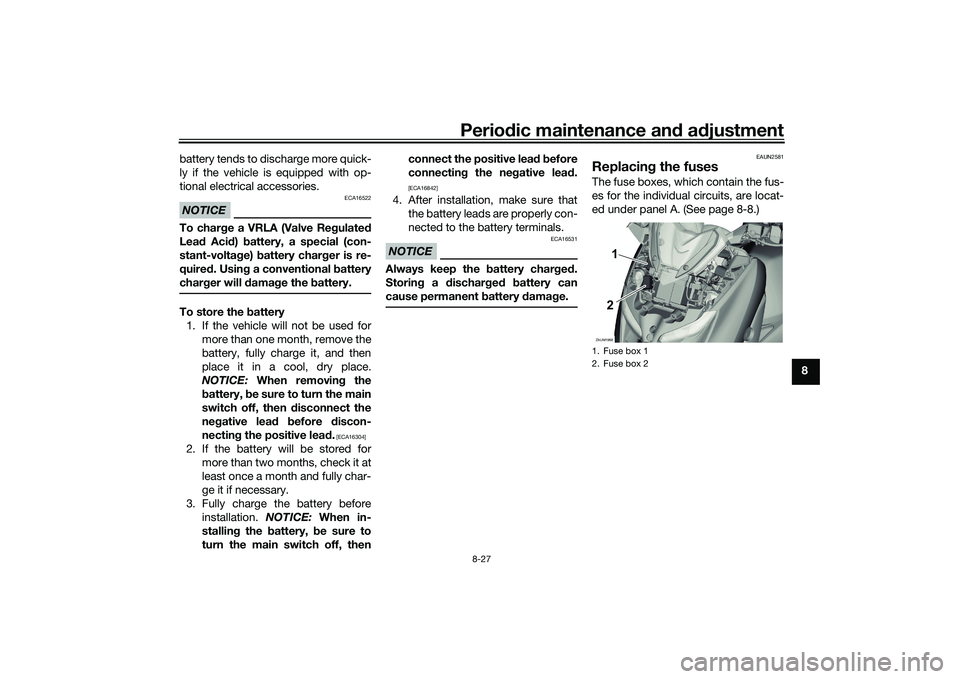
Replacin g the fusesThe fuse boxes, which contain the fus-
es for the individual circuits, are locat-
ed under panel A. (See page 8-8.)1. Fuse box 1
2. Fuse box 2ZAUM19682 2
21
1
UB9YE0E0.book Page 27 Wednesday, January 6, 2021 3:03 PM
Page 97 of 114
Periodic maintenance an d a djustment
8-31
8
EAU60701
Trou bleshootin gAlthough Yamaha vehicles receive a
thorough inspection before shipment
from the factory, trouble may occur
during operation. Any problem in the
fuel, compression, or ignition systems,
for example, can cause poor starting
and loss of power.
The following troubleshooting charts
represent quick and easy procedures
for checking these vital systems your-
self. However, should your vehicle re-
quire any repair, take it to a Yamaha
dealer, whose skilled technicians have
the necessary tools, experience, and
know-how to service the vehicle prop-
erly.
Use only genuine Yamaha replace-
ment parts. Imitation parts may look
like Yamaha parts, but they are often
inferior, have a shorter service life and
can lead to expensive repair bills.
WARNING
EWA15142
When checkin g the fuel system, d o
not smoke, an d make sure there are
no open flames or sparks in the ar-
ea, inclu din g pilot li ghts from water heaters or furnaces. Gasoline or
g
asoline vapors can i gnite or ex-
plo de, causin g severe injury or prop-
erty damag e.
EAU76551
Smart key system trou bleshootin g
Please check the following items when
the smart key system does not work. Is the smart key turned on? (See
page 3-5.)
Is the smart key battery dis-
charged? (See page 3-6.)
Is the smart key battery installed
correctly? (See page 3-6.)
Is the smart key being used in a lo-
cation with strong radio waves or
other electromagnetic noise? (See
page 3-1.)
Are you using the smart key that is
registered to the vehicle?
Is the vehicle battery discharged?
When the vehicle battery is dis-
charged, the smart key system will
not operate. Please have the vehi-
cle battery charged or replaced.
(See page 8-26.) If the smart key system does not work
after checking the above items, have a
Yamaha dealer check the smart key
system.
TIPSee Emergency mode on page 8-34
for information on starting the engine
without the smart key.
UB9YE0E0.book Page 31 Wednesday, January 6, 2021 3:03 PM
Page 98 of 114
Periodic maintenance an d a djustment
8-32
8
EAU86350
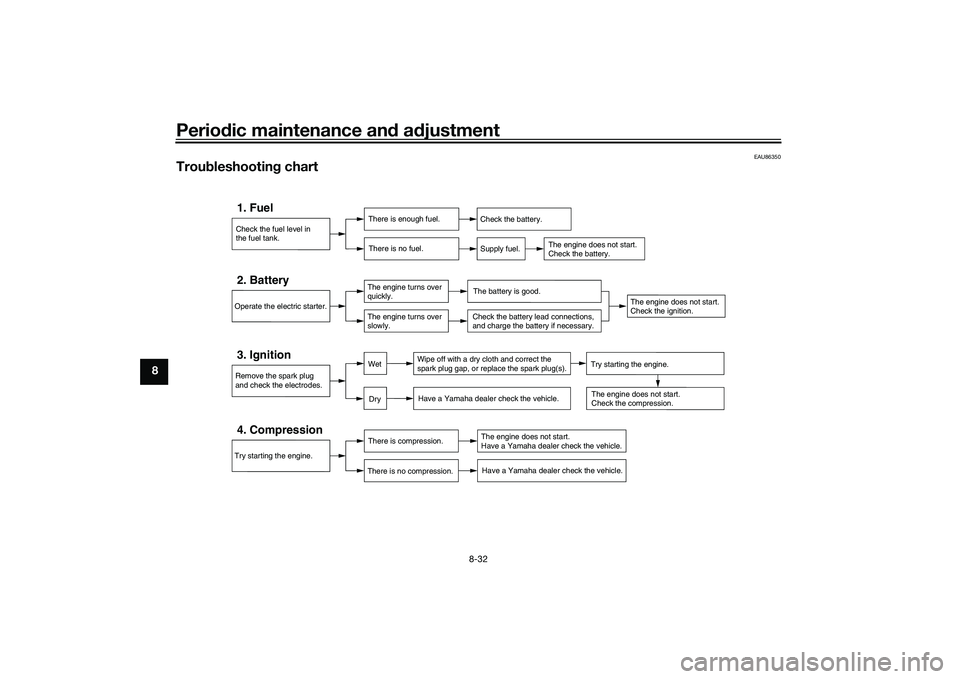
Trou bleshootin g chart
Check the fuel level in
the fuel tank.1. Fuel
There is enough fuel.
There is no fuel.
Check the battery.
Supply fuel.
The engine does not start.
Check the battery.
Try starting the engine.4. Compression
There is compression.
There is no compression.
The engine does not start.
Have a Yamaha dealer check the vehicle.Have a Yamaha dealer check the vehicle.
Remove the spark plug
and check the electrodes.3. Ignition
Wipe off with a dry cloth and correct the
spark plug gap, or replace the spark plug(s). Have a Yamaha dealer check the vehicle.
The engine does not start.
Check the compression.
Operate the electric starter.2. Battery
The engine turns over
quickly.
The engine turns over
slowly.
The battery is good.
DryWet
Try starting the engine.
Check the battery lead connections,
and charge the battery if necessary.
The engine does not start.
Check the ignition.
UB9YE0E0.book Page 32 Wednesday, January 6, 2021 3:03 PM
Page 100 of 114
Periodic maintenance an d a djustment
8-34
8
EAU76561
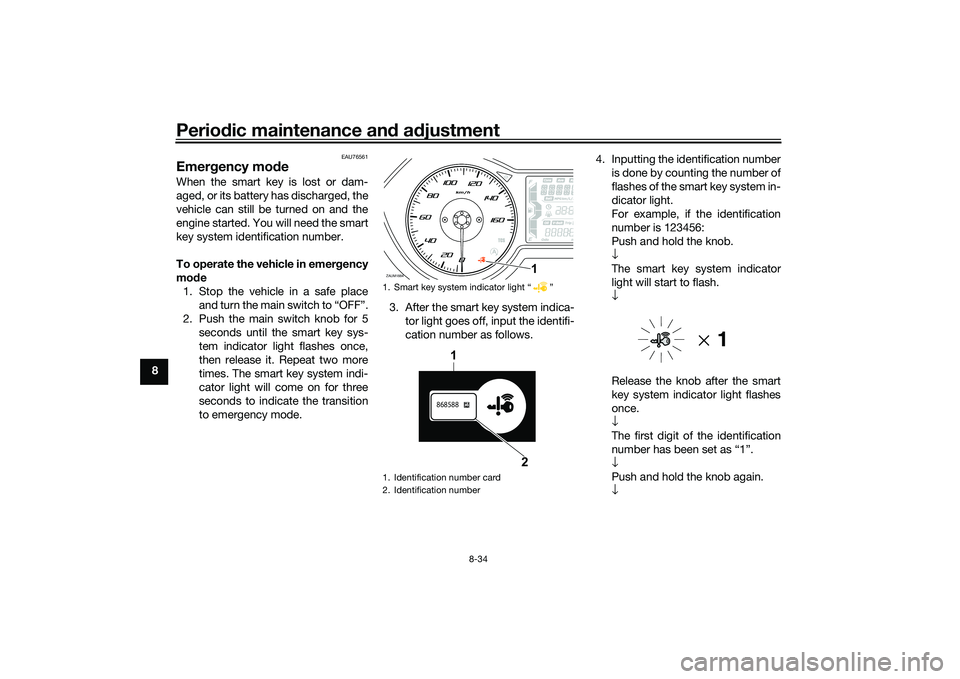
Emer gency mo de When the smart key is lost or dam-
aged, or its battery has discharged, the
vehicle can still be turned on and the
engine started. You will need the smart
key system identification number.
To operate the vehicle in emer gency
mo de
1. Stop the vehicle in a safe place and turn the main switch to “OFF”.
2. Push the main switch knob for 5 seconds until the smart key sys-
tem indicator light flashes once,
then release it. Repeat two more
times. The smart key system indi-
cator light will come on for three
seconds to indicate the transition
to emergency mode. 3. After the smart key system indica-
tor light goes off, input the identifi-
cation number as follows. 4. Inputting the identification number
is done by counting the number of
flashes of the smart key system in-
dicator light.
For example, if the identification
number is 123456:
Push and hold the knob.
↓
The smart key system indicator
light will start to flash.
↓
Release the knob after the smart
key system indicator light flashes
once.
↓
The first digit of the identification
number has been set as “1”.
↓
Push and hold the knob again.
↓
1. Smart key system indicator light “ ”
1. Identification number card
2. Identification numberZAUM1884
1
868588
1
2
UB9YE0E0.book Page 34 Wednesday, January 6, 2021 3:03 PM