fuel YAMAHA XSR 900 2020 Owners Manual
[x] Cancel search | Manufacturer: YAMAHA, Model Year: 2020, Model line: XSR 900, Model: YAMAHA XSR 900 2020Pages: 102, PDF Size: 7.74 MB
Page 6 of 102

Table of contentsSafety information........................... 1-1
Description ....................................... 2-1
Left view ......................................... 2-1
Right view ....................................... 2-2
Controls and instruments................ 2-3
Instrument and co ntrol functions... 3-1
Immobilizer system ..... .................... 3-1
Main switch/steering lock................ 3-2
Indicator lights and warning
lights ............................................ 3-3
Multi-function meter unit ................. 3-5
D-mode (drive mode).................... 3-12
Handlebar switches ...................... 3-12
Clutch lever................................... 3-14
Shift pedal..... ............................ .... 3-14
Brake lever ................................... 3-15
Brake pedal .................................. 3-15
ABS .............................................. 3-15
Traction control syst em ................ 3-16
Fuel tank cap ................................ 3-18
Fuel............................................... 3-18
Fuel tank overflow hose................ 3-20
Catalytic converter ........................ 3-21
Seat .............................................. 3-21
Storage compartment ................... 3-22
Adjusting the front fork.................. 3-22
Adjusting the shock absorber assembly ................................... 3-24
Luggage strap holders . ................. 3-25Auxiliary DC connector................. 3-26
Sidestand ..................................... 3-26
Ignition circuit cut-
off system ........ 3-27
For your safety – pre-operation
checks .............................................. 4-1
Operation and important riding
points ................................................ 5-1
Engine break-in .............................. 5-1
Starting the engine ......................... 5-2
Shifting ........................................... 5-3
Tips for reducing fuel consumption ............................... 5-3
Parking ........................................... 5-4
Periodic maintenance and
adjustment ....................................... 6-1
Tool kit............................................ 6-2
Periodic maintenance charts .......... 6-3
Periodic maintenance chart for the emission control system ............. 6-3
General maintenance and
lubrication chart .......................... 6-5
Checking the spark plugs ............... 6-9
Canister ........................................ 6-10
Engine oil ..................................... 6-10
Why Yamalube ............................. 6-13
Coolant ......................................... 6-13
Air filter element ........................... 6-14 Checking the engine idling
speed............ ............................ 6-15
Checking the throttle grip free play ........................................... 6-15
Valve clearance ........................... 6-15
Tires ............................................. 6-16
Cast wheels ................................. 6-18
Adjusting the clutch lever free
play ........................................... 6-18
Checking the brake lever free play ........................................... 6-19
Brake light switches ..................... 6-20
Checking the front and rear brake pads................................ 6-20
Checking the brake fluid level ...... 6-21
Changing the brake fluid .............. 6-22
Drive chain slack.......................... 6-22
Cleaning and lubricating the drive chain ................................ 6-24
Checking and lubricating the
cables ....................................... 6-25
Checking and lubricating the throttle grip and cable ............... 6-25
Checking and lubricating the brake and shift pedals .............. 6-25
Checking and lubricating the brake and clutch levers ............ 6-26
Checking and lubricating the
sidestand .................................. 6-27
Lubricating the swingarm pivots ........................................ 6-27BAE-28199-E1.book 1 ページ 2019年8月23日 金曜日 午後3時56分
Page 12 of 102

Safety information
1-5
1
2
3
4
5
6
7
8
9
10
11
12
Check that the fuel cock (if
equipped) is in the off position and
that there are no fuel leaks.
Shift the transmission into gear (for
models with a manual transmis-
sion).
Secure the motorcycle with
tie-downs or suitable straps that
are attached to solid parts of the
motorcycle, such as the frame or
upper front fork triple clamp (and
not, for example, to rubber-mount-
ed handlebars or turn signals, or
parts that could break). Choose
the location for the straps carefully
so the straps will not rub against
painted surfaces during transport.
The suspension should be com-
pressed somewhat by the
tie-downs, if possible, so that the
motorcycle will not bounce exces-
sively during transport.
BAE-28199-E1.book 5 ページ 2019年8月23日 金曜日 午後3時56分
Page 14 of 102
Description
2-2
12
3
4
5
6
7
8
9
10
11
12
EAU10421
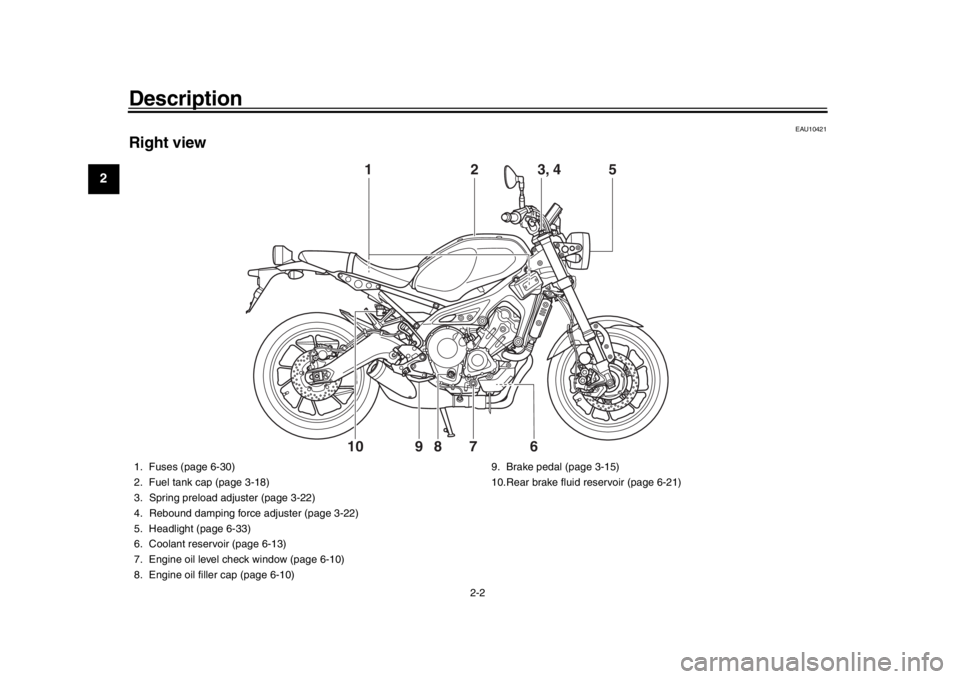
Right view
2
5
8
7
9
6
10
1
3, 4
1. Fuses (page 6-30)
2. Fuel tank cap (page 3-18)
3. Spring preload adjuster (page 3-22)
4. Rebound damping force adjuster (page 3-22)
5. Headlight (page 6-33)
6. Coolant reservoir (page 6-13)
7. Engine oil level check window (page 6-10)
8. Engine oil filler cap (page 6-10) 9. Brake pedal (page 3-15)
10.Rear brake fluid reservoir (page 6-21)
BAE-28199-E1.book 2 ページ 2019年8月23日 金曜日 午後3時56分
Page 20 of 102
Instrument and control functions
3-5
1
23
4
5
6
7
8
9
10
11
12
EAUM3622
Immobilizer system indicator light
“”
When the vehicle is turned off and 30
seconds have passed, the indicator
light will flash steadily to indicate the im-
mobilizer system is enabled. After 24
hours have passed, the indicator light
will stop flashing, however the immobi-
lizer system is still enabled.TIPWhen the vehicle is turned on, the light
will come on for a few seconds, and go
off. Otherwise, have a Yamaha dealercheck the vehicle.
Troubleshooting
If a problem is detected in the immobi-
lizer system, the light will flash in a pat-
tern. If the immobilizer system indicator
light flashes in the pattern, slowly 5
times then quickly 2 ti mes, this could be
caused by transponder interference. If
this occurs, try the following. 1. Make sure there are no other im- mobilizer keys close to the main
switch. Other immobilizer system
keys may cause signal interfer- ence and prevent the engine from
starting.
2. Use the code re-registering key to start the engine.
3. If the engine starts, turn it off, and try starting the engine with the
standard keys.
4. If one or more of the standard keys do not start the engine, take the
vehicle and all keys to a Yamaha
dealer to have the standard keys
re-registered.
EAU73258
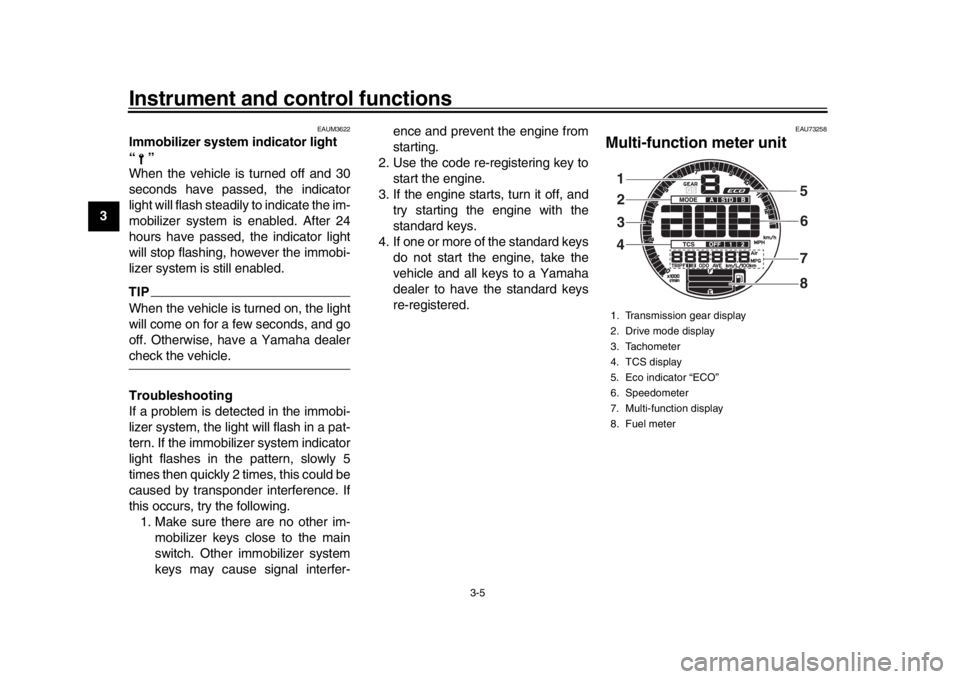
Multi-function meter unit1. Transmission gear display
2. Drive mode display
3. Tachometer
4. TCS display
5. Eco indicator “ECO”
6. Speedometer
7. Multi-function display
8. Fuel meter1
32
4 5
6
8
7
BAE-28199-E1.book 5 ページ 2019年8月23日 金曜日 午後3時56分
Page 21 of 102
Instrument and control functions
3-6
1
234
5
6
7
8
9
10
11
12
WARNING
EWA12423
Be sure to stop the vehicle before
making any setting changes to the
multi-function meter unit. Changing
settings while riding can distract the
operator and increase the risk of anaccident.
The multi-function meter unit is
equipped with the following:
a speedometer
a tachometer
a fuel meter
an eco indicator
a transmission gear display
a drive mode display
a traction control system display
a multi-function display
TIP
The “QS” icon does not function.
The multi-function meter unit can
be switched between kilometers
and miles. Set the multi-function
display to the odometer mode or a
tripmeter mode, and then press
the bottom set button until the dis-play changes.
Speedometer
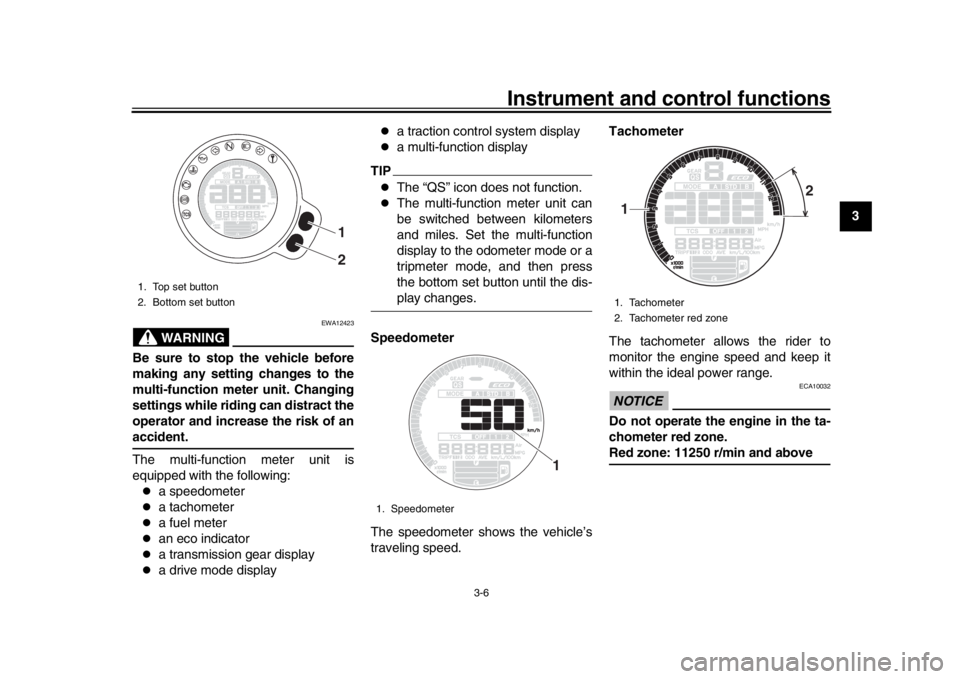
The speedometer shows the vehicle’s
traveling speed. Tachometer
The tachometer allows the rider to
monitor the engine speed and keep it
within the ideal power range.
NOTICE
ECA10032
Do not operate the engine in the ta-
chometer red zone.Red zone: 11250 r/min and above
1. Top set button
2. Bottom set button
1
2
1. Speedometer
1
1. Tachometer
2. Tachometer red zone1 2
BAE-28199-E1.book 6 ページ 2019年8月23日 金曜日 午後3時56分
Page 22 of 102
Instrument and control functions
3-7
1
23
4
5
6
7
8
9
10
11
12 Fuel meter
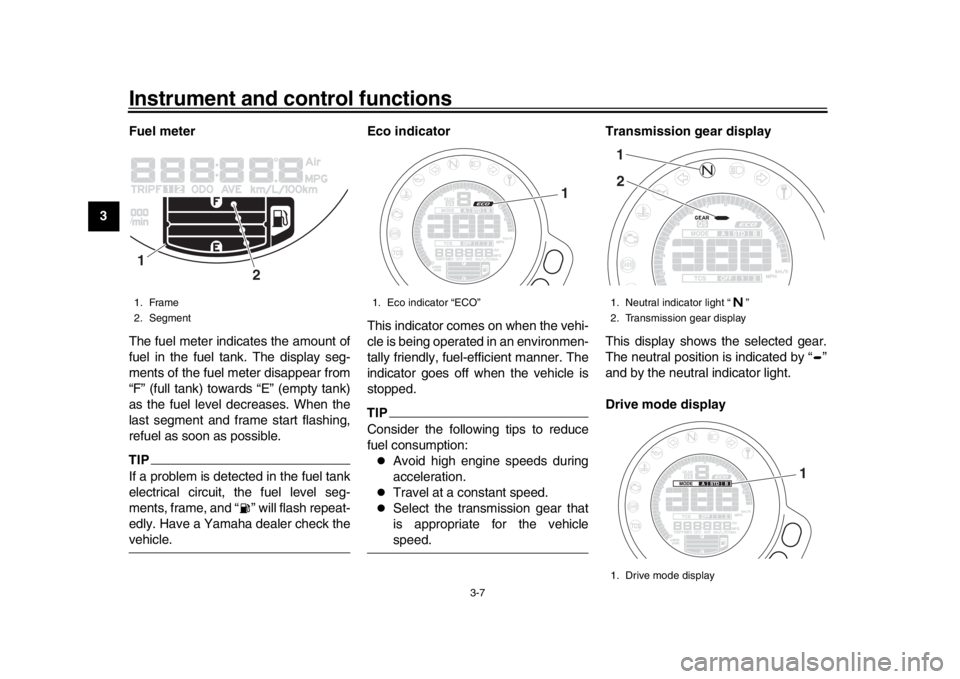
The fuel meter indicates the amount of
fuel in the fuel tank. The display seg-
ments of the fuel meter disappear from
“F” (full tank) towards “E” (empty tank)
as the fuel level decreases. When the
last segment and frame start flashing,
refuel as soon as possible.
TIPIf a problem is detected in the fuel tank
electrical circuit, the fuel level seg-
ments, frame, and “ ” will flash repeat-
edly. Have a Yamaha dealer check thevehicle.
Eco indicator
This indicator comes on when the vehi-
cle is being operated in an environmen-
tally friendly, fuel-efficient manner. The
indicator goes off when the vehicle is
stopped.
TIPConsider the following tips to reduce
fuel consumption:
Avoid high engine speeds during
acceleration.
Travel at a constant speed.
Select the transmission gear that
is appropriate for the vehiclespeed.Transmission gear display
This display shows the selected gear.
The neutral position is indicated by “ ”
and by the neutral indicator light.
Drive mode display
1. Frame
2. Segment1
2
1. Eco indicator “ECO”
1
1. Neutral indicator light “ ”
2. Transmission gear display
1. Drive mode display12
1
BAE-28199-E1.book 7 ページ 2019年8月23日 金曜日 午後3時56分
Page 23 of 102
Instrument and control functions
3-8
1
234
5
6
7
8
9
10
11
12
This display indicates which drive
mode has been selected: “STD”, “A” or
“B”. For more details on the modes and
on how to select them, see pages 3-12
and 3-14.
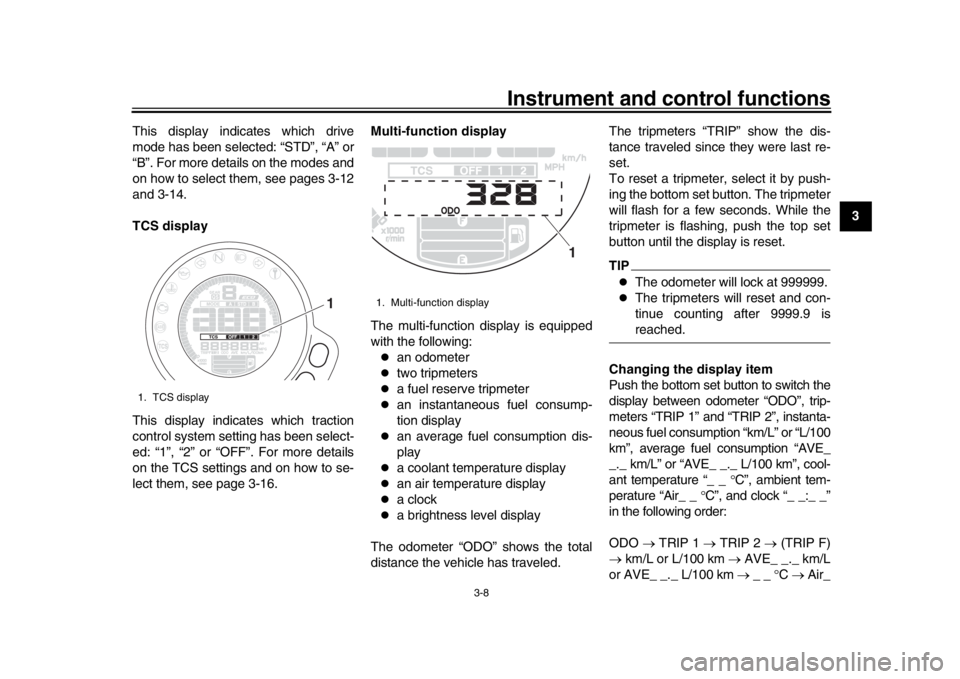
TCS display
This display indicates which traction
control system setting has been select-
ed: “1”, “2” or “OFF”. For more details
on the TCS settings and on how to se-
lect them, see page 3-16.
Multi-function display
The multi-function display is equipped
with the following:
an odometer
two tripmeters
a fuel reserve tripmeter
an instantaneous fuel consump-
tion display
an average fuel consumption dis-
play
a coolant temperature display
an air temperature display
a clock
a brightness level display
The odometer “ODO” shows the total
distance the vehicle has traveled. The tripmeters “TRIP” show the dis-
tance traveled since they were last re-
set.
To reset a tripmeter, select it by push-
ing the bottom set button. The tripmeter
will flash for a few seconds. While the
tripmeter is flashing, push the top set
button until the display is reset.
TIP
The odometer will lock at 999999.
The tripmeters will reset and con-
tinue counting after 9999.9 isreached.
Changing the display item
Push the bottom set button to switch the
display between odometer “ODO”, trip-
meters “TRIP 1” and “TRIP 2”, instanta-
neous fuel consumption “km/L” or “L/100
km”, average fuel consumption “AVE_
_._ km/L” or “AVE_ _. _ L/100 km”, cool-
ant temperature “_ _ C”, ambient tem-
perature “Air_ _ C”, and clock “_ _:_ _”
in the following order:
ODO TRIP 1 TRIP 2 (TRIP F)
km/L or L/100 km AVE_ _._ km/L
or AVE_ _._ L/100 km _ _ C Air_
1. TCS display
1
1. Multi-function display
1
BAE-28199-E1.book 8 ページ 2019年8月23日 金曜日 午後3時56分
Page 24 of 102
Instrument and control functions
3-9
1
23
4
5
6
7
8
9
10
11
12 _
C Clock _ _ :_ _ ODO
When using miles:
ODO TRIP 1 TRIP 2 (TRIP F)
MPG AVE_ _._ MPG _ _ C
Air_ _ C Clock _ _ :_ _ ODO
TIP
Push the top set button to switch
the display in the reverse order.
The fuel reserve tripmeter “TRIPF” appears only when low on fuel.
When low on fuel, the display automat-
ically changes to “TRIP F” and starts
counting the distance traveled from that
point.
If you do not reset the fuel reserve trip-
meter manually, after refueling and
traveling 5 km (3 mi) it resets automati-
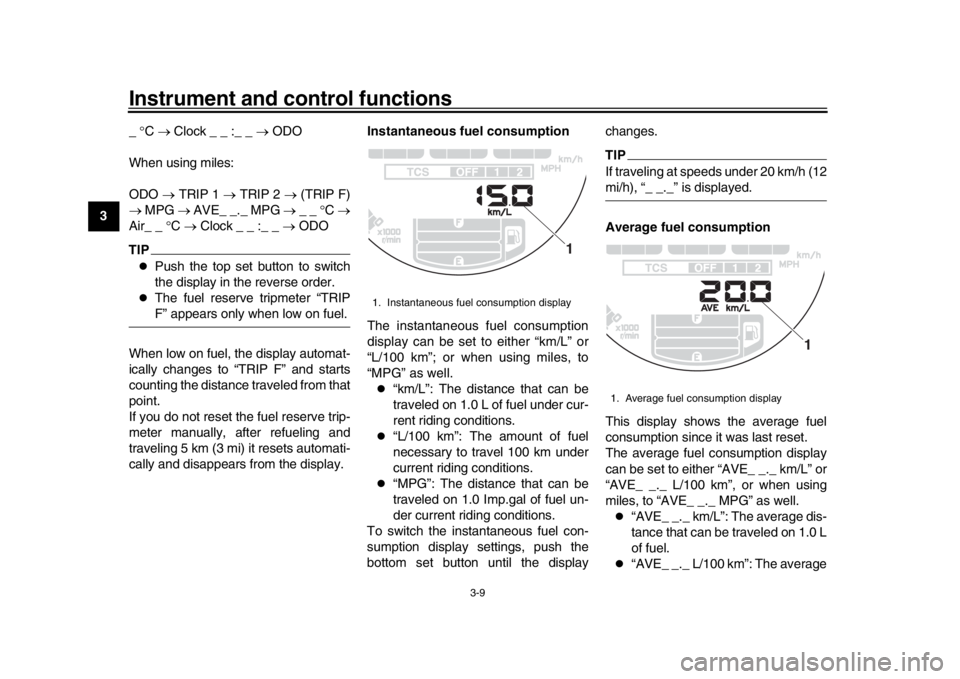
cally and disappears from the display. Instantaneous fuel consumption
The instantaneous fuel consumption
display can be set to either “km/L” or
“L/100 km”; or when using miles, to
“MPG” as well.
“km/L”: The distance that can be
traveled on 1.0 L of fuel under cur-
rent riding conditions.
“L/100 km”: The amount of fuel
necessary to travel 100 km under
current riding conditions.
“MPG”: The distance that can be
traveled on 1.0 Imp.gal of fuel un-
der current riding conditions.
To switch the instantaneous fuel con-
sumption display settings, push the
bottom set button until the display changes.
TIPIf traveling at speeds under 20 km/h (12mi/h), “_ _._” is displayed.
Average fuel consumption
This display shows the average fuel
consumption since it was last reset.
The average fuel consumption display
can be set to either “AVE_ _._ km/L” or
“AVE_ _._ L/100 km”, or when using
miles, to “AVE_ _._ MPG” as well.
“AVE_ _._ km/L”: The average dis-
tance that can be traveled on 1.0 L
of fuel.
“AVE_ _._ L/100 km”: The average
1. Instantaneous fuel consumption display
1
1. Average fuel consumption display
1
BAE-28199-E1.book 9 ページ 2019年8月23日 金曜日 午後3時56分
Page 25 of 102
Instrument and control functions
3-10
1
234
5
6
7
8
9
10
11
12
amount of fuel necessary to travel
100 km.
“AVE_ _._ MPG”: The average
distance that can be traveled on
1.0 Imp.gal of fuel.
To switch the average fuel consump-
tion display settings, push the bottom
set button until the display changes.
To reset the average fuel consumption,
select it by pushing the bottom set but-
ton. The average fuel consumption dis-
play will flash for a few seconds. While
the display is flashing, push the top set
button until the display is reset.
TIPAfter resetting the average fuel con-
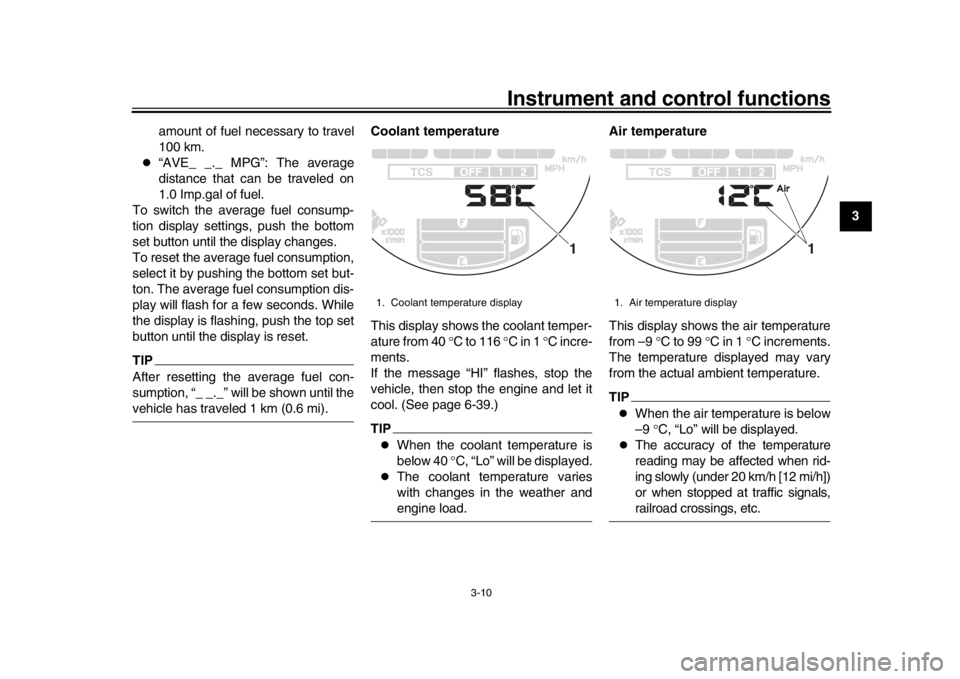
sumption, “_ _._” will be shown until thevehicle has traveled 1 km (0.6 mi). Coolant temperature
This display shows the coolant temper-
ature from 40
C to 116 C in 1 C incre-
ments.
If the message “HI” flashes, stop the
vehicle, then stop the engine and let it
cool. (See page 6-39.)
TIP
When the coolant temperature is
below 40 C, “Lo” will be displayed.
The coolant temperature varies
with changes in the weather andengine load. Air temperature
This display shows the air temperature
from –9
C to 99 C in 1 C increments.
The temperature displayed may vary
from the actual ambient temperature.
TIP
When the air temperature is below
–9 C, “Lo” will be displayed.
The accuracy of the temperature
reading may be affected when rid-
ing slowly (under 20 km/h [12 mi/h])
or when stopped at traffic signals,railroad crossings, etc.
1. Coolant temperature display
1
1. Air temperature display
1
BAE-28199-E1.book 10 ページ 2019年8月23日 金曜日 午後3時56分
Page 33 of 102
Instrument and control functions
3-18
1
234
5
6
7
8
9
10
11
12
EAU13077
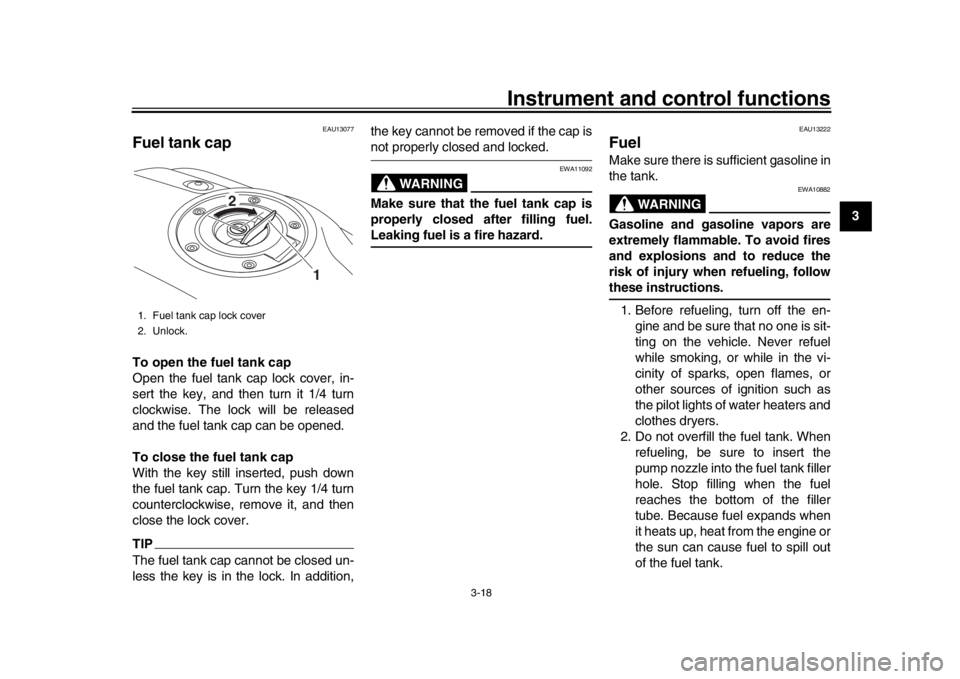
Fuel tank capTo open the fuel tank cap
Open the fuel tank cap lock cover, in-
sert the key, and then turn it 1/4 turn
clockwise. The lock will be released
and the fuel tank cap can be opened.
To close the fuel tank cap
With the key still inserted, push down
the fuel tank cap. Turn the key 1/4 turn
counterclockwise, remove it, and then
close the lock cover.TIPThe fuel tank cap cannot be closed un-
less the key is in the lock. In addition, the key cannot be removed if the cap is
not properly closed and locked.
WARNING
EWA11092
Make sure that the fuel tank cap is
properly closed after filling fuel.Leaking fuel is a fire hazard.
EAU13222
FuelMake sure there is sufficient gasoline in
the tank.
WARNING
EWA10882
Gasoline and gasoline vapors are
extremely flammable. To avoid fires
and explosions and to reduce the
risk of injury when refueling, followthese instructions.
1. Before refueling, turn off the en- gine and be sure that no one is sit-
ting on the vehicle. Never refuel
while smoking, or while in the vi-
cinity of sparks, open flames, or
other sources of ignition such as
the pilot lights of water heaters and
clothes dryers.
2. Do not overfill the fuel tank. When refueling, be sure to insert the
pump nozzle into the fuel tank filler
hole. Stop filling when the fuel
reaches the bottom of the filler
tube. Because fuel expands when
it heats up, heat from the engine or
the sun can cause fuel to spill out
of the fuel tank.
1. Fuel tank cap lock cover
2. Unlock.
1
2
BAE-28199-E1.book 18 ページ 2019年8月23日 金曜日 午後3時56分