lock YAMAHA YXZ1000R 2017 Owner's Manual
[x] Cancel search | Manufacturer: YAMAHA, Model Year: 2017, Model line: YXZ1000R, Model: YAMAHA YXZ1000R 2017Pages: 218, PDF Size: 5.08 MB
Page 83 of 218
4-45
4
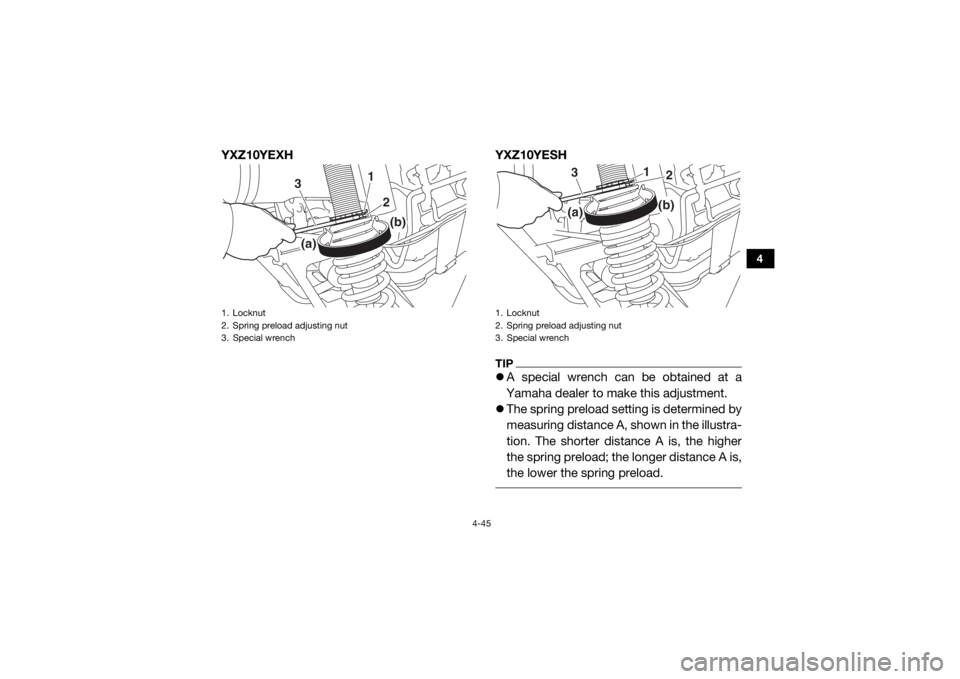
YXZ10YEXHYXZ10YESH
TIPA special wrench can be obtained at a
Yamaha dealer to make this adjustment.
The spring preload setting is determined by
measuring distance A, shown in the illustra-
tion. The shorter distance A is, the higher
the spring preload; the longer distance A is,
the lower the spring preload.
1. Locknut
2. Spring preload adjusting nut
3. Special wrench
1
3
2
(a)
(b)
1. Locknut
2. Spring preload adjusting nut
3. Special wrench
1
3
2
(a)
(b)
UB577AE0.book Page 45 Wednesday, June 8, 2016 9:35 AM
Page 85 of 218
![YAMAHA YXZ1000R 2017 Owners Manual 4-47
4
3. Tighten the locknut to the specifiedtorque. NOTICE: Always tighten the
locknut against the adjusting nut, and
then tighten it to the specified torque.
[ECB00082]
Crossover setting (YXZ10YE](/img/51/53892/w960_53892-84.png "YAMAHA YXZ1000R 2017 Owners Manual 4-47
4
3. Tighten the locknut to the specifiedtorque. NOTICE: Always tighten the
locknut against the adjusting nut, and
then tighten it to the specified torque.
[ECB00082]
Crossover setting (YXZ10YE")
4-47
4
3. Tighten the locknut to the specifiedtorque. NOTICE: Always tighten the
locknut against the adjusting nut, and
then tighten it to the specified torque.
[ECB00082]
Crossover setting (YXZ10YESH)
The crossover setting adjusts the timing when
the shock absorber transitions from the soft
spring to the hard spring.TIP It is recommended to adjust the crossover
setting a similar distance whenever the
spring preload is adjusted.
The crossover setting is measured from the
bottom of the spring preload adjusting ring
to the bottom of the crossover adjusting
ring.
1. Loosen the crossover locknut as shown.
Tightening torque:
Locknut:41 N·m (4.1 kgf·m, 30 lb·ft)
1. Distance B
2. Crossover locknut
3. Crossover adjusting nut
2
3
1
UB577AE0.book Page 47 Wednesday, June 8, 2016 9:35 AM
Page 86 of 218
4-48
4
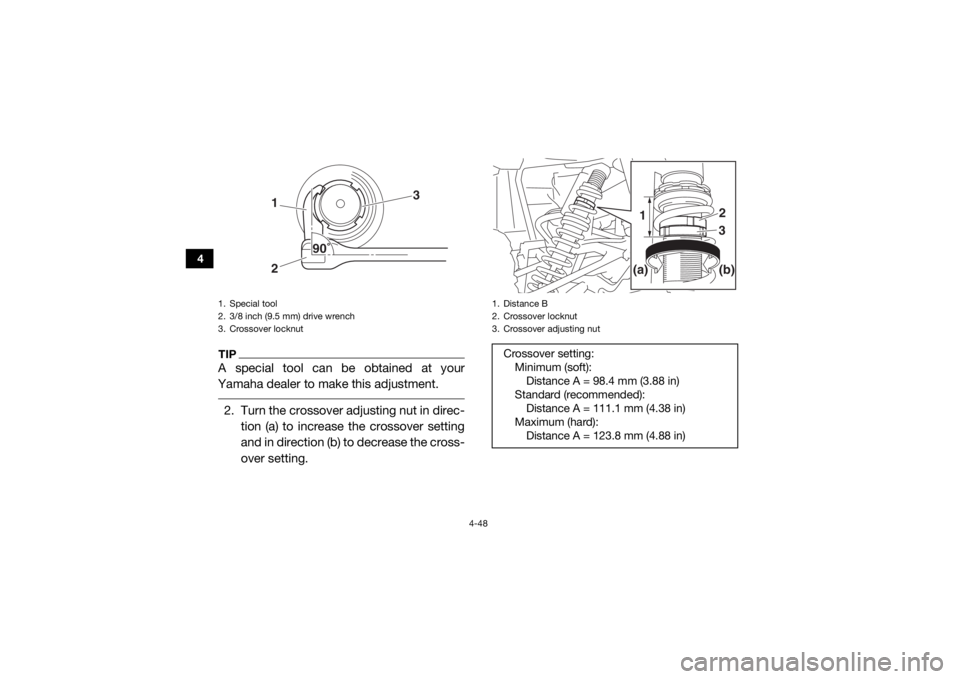
TIPA special tool can be obtained at your
Yamaha dealer to make this adjustment. 2. Turn the crossover adjusting nut in direc- tion (a) to increase the crossover setting
and in direction (b) to decrease the cross-
over setting.1. Special tool
2. 3/8 inch (9.5 mm) drive wrench
3. Crossover locknut
12
3
90
1. Distance B
2. Crossover locknut
3. Crossover adjusting nutCrossover setting:Minimum (soft):Distance A = 98.4 mm (3.88 in)
Standard (recommended): Distance A = 111.1 mm (4.38 in)
Maximum (hard): Distance A = 123.8 mm (4.88 in)
2
3
1(b)
(a)
UB577AE0.book Page 48 Wednesday, June 8, 2016 9:35 AM
Page 87 of 218
![YAMAHA YXZ1000R 2017 Owners Manual 4-49
4
3. Tighten the locknut to the specifiedtorque. NOTICE: Always tighten the
locknut against the adjusting nut, and
then tighten it to the specified torque.
[ECB00082]
Rebound damping force (YXZ](/img/51/53892/w960_53892-86.png "YAMAHA YXZ1000R 2017 Owners Manual 4-49
4
3. Tighten the locknut to the specifiedtorque. NOTICE: Always tighten the
locknut against the adjusting nut, and
then tighten it to the specified torque.
[ECB00082]
Rebound damping force (YXZ")
4-49
4
3. Tighten the locknut to the specifiedtorque. NOTICE: Always tighten the
locknut against the adjusting nut, and
then tighten it to the specified torque.
[ECB00082]
Rebound damping force (YXZ10YEXH)
Turn the rebound damping force adjusting
screw in direction (a) to increase the rebound
damping force and thereby harden the damp-
ing, and in direction (b) to decrease the re-
bound damping force and thereby soften the
damping.
Tightening torque: Locknut:41 N·m (4.1 kgf·m, 30 lb·ft)1. Special tool
2. Torque wrench
3. Crossover locknut
21
3
90
1. Rebound damping force adjusting screw
1(a)
(b)
UB577AE0.book Page 49 Wednesday, June 8, 2016 9:35 AM
Page 100 of 218

5-7
5
EBU31800Seat beltsMake sure that the seat belts are not frayed,
torn, stretched, or damaged. The seat belts
must move smoothly when pulled out and re-
tract on its own when released. The seat belts
must also lock up when quickly pulled out.
The latch plate should click securely into the
buckle and release when the release button is
pushed firmly. Wash off any dirt or mud that
could affect operation. Have a Yamaha dealer
repair as necessary for proper operation.
A crash can damage the restraint systems in
your vehicle. A damaged restraint system
may not properly protect the person using it,
resulting in serious injury or death in a crash.
To help make sure your restraint systems are
working properly after a crash, have them in-
spected and any necessary replacements
made as soon as possible.
EBU31810Passenger handholdCheck that the handhold bar and its supports
are in good condition. Confirm that the lock-
ing pins are securely fastened, and then push
and pull on the handhold to make sure that it
is not loose.EBU31820SteeringPark on level ground. Turn the steering wheel
right and left. Check for excessive free play,
abnormal noises, or a rough feeling. Have a
Yamaha dealer repair as necessary for proper operation.EBU36691Drive select lever and shift paddlesThe drive select lever and shift paddles
should move smoothly and return to their
original position.
UB577AE0.book Page 7 Wednesday, June 8, 2016 9:35 AM
Page 110 of 218
6-7
6
5. Check behind you, then release the brakepedal and press the accelerator pedal
gradually.
6. Continue to watch to the rear while driv- ing in reverse.EBU36733Launch system operationThe launch system allows you to start off at a
higher engine speed, and thus have a higher
initial acceleration rate than normal operation.
Only use the launch system on level ground
with a clear and safe path ahead of you.TIPThe launch system will be prevented from op-
erating if any of the following conditions are
present:
the engine is not warmed up or is overheat-
ing.
the driver seat belt is not latched.
the differential gear is locked (“DIFF LOCK”
is selected) or the differential gear lock indi-
cator is flashing.
the parking brake is applied.
an engine or system malfunction is detect-
ed (a warning light is on).
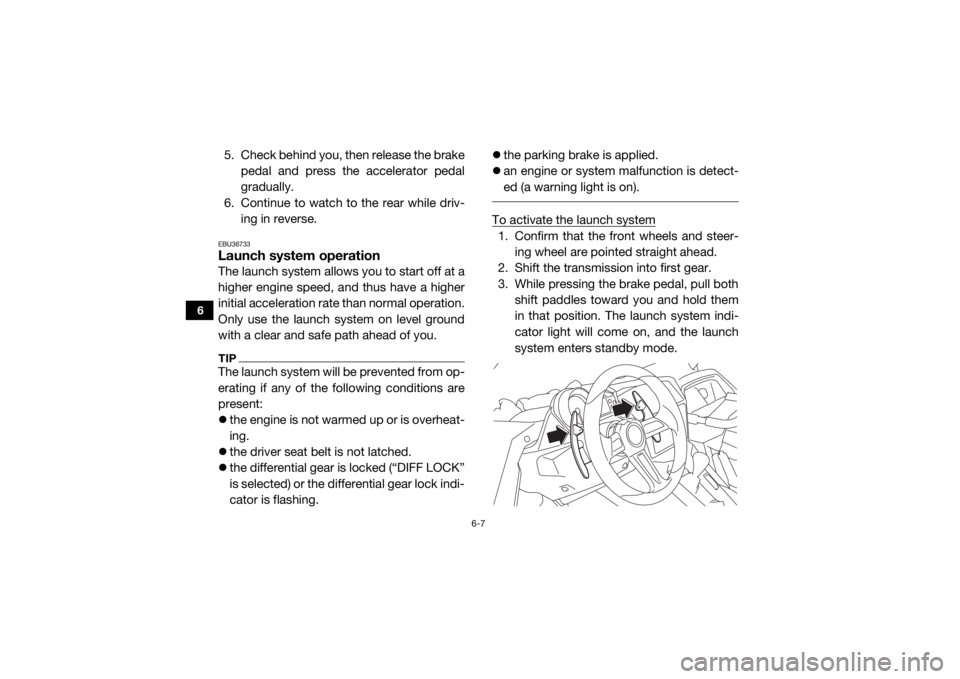
To activate the launch system1. Confirm that the front wheels and steer-
ing wheel are pointed straight ahead.
2. Shift the transmission into first gear.
3. While pressing the brake pedal, pull both
shift paddles toward you and hold them
in that position. The launch system indi-
cator light will come on, and the launch
system enters standby mode.
UB577AE0.book Page 7 Wednesday, June 8, 2016 9:35 AM
Page 112 of 218

6-9
6
EBU35061Selecting the drive modeThe vehicle handles differently in each of the drive modes: “2WD”, “4WD” and “DIFF LOCK”. For
example, the vehicle requires more effort to turn in “DIFF LOCK” than in “2WD”. Always stop the
vehicle before changing the position of th e On-Command drive knob. The drive mode icon
changes according to the selected drive mode. The drive mode icon and the “DIFF LOCK” indi-
cator light come on as follows:
Knob position Indication Drive mode
(none)
“2WD” (two-wheel drive): Drive power is supplied to the rear
wheels only.
“4WD” (four-wheel drive): Drive power is supplied to the
front and rear wheels.
“DIFF LOCK” (four-wheel drive with the differential gear
locked): Drive power is supplied to the front and rear wheels
and the differential gear is locked.
Unlike in four-wheel drive, all wheels turn at the same
speed.
UB577AE0.book Page 9 Wednesday, June 8, 2016 9:35 AM
Page 113 of 218

6-10
6
TIPWhen the knob is set to “DIFF LOCK” or “4WD ”, the drive mode icon and the indicator light
will flash until the differential gear is completely locked or unlocked.
Turning the steering wheel back and forth will help the differential gear lock to engage or dis-
engage.
To protect the drivetrain from damage, vehicle speed is limited until the differential gear lock
has properly transitioned. UB577AE0.book Page 10 Wednesday, June 8, 2016 9:35 AM
Page 123 of 218
7-9
7
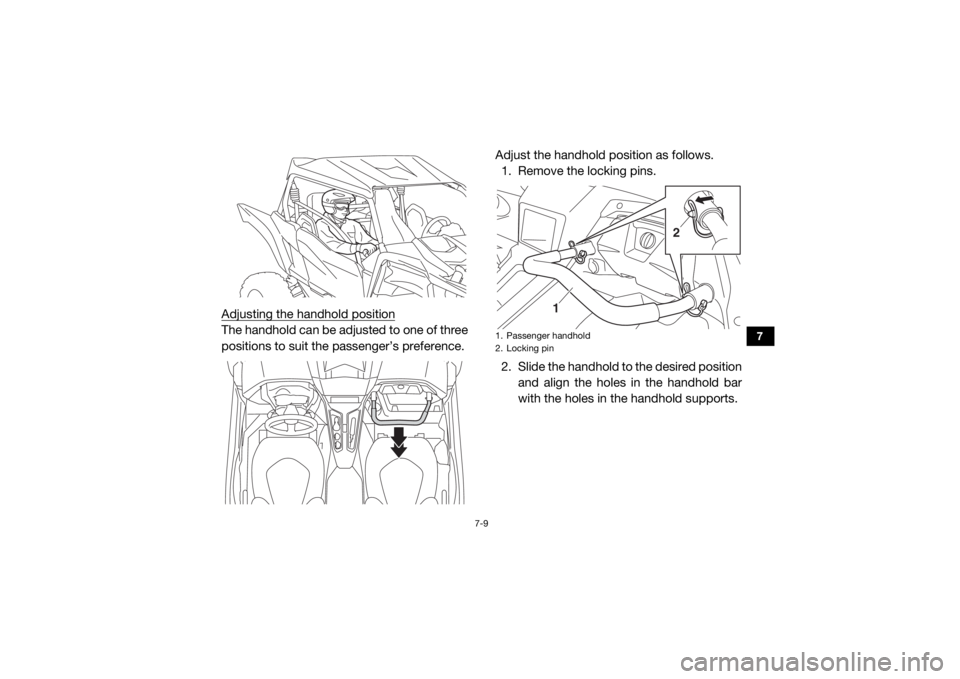
Adjusting the handhold positionThe handhold can be adjusted to one of three
positions to suit the passenger’s preference.Adjust the handhold position as follows.
1. Remove the locking pins.
2. Slide the handhold to the desired position
and align the holes in the handhold bar
with the holes in the handhold supports.
1. Passenger handhold
2. Locking pin
1
2
UB577AE0.book Page 9 Wednesday, June 8, 2016 9:35 AM
Page 128 of 218

7-14
7
Become familiar with the way the vehicle han-
dles in the various drive modes. Start off with
two-wheel drive “2WD”, then four-wheel drive
“4WD”, and finally four-wheel drive with the
differential locked “DIFF LOCK”. Steering
may take more effort in four-wheel drive with
the differential locked “DIFF LOCK”. Also
practice driving in reverse.TIPTake the time to learn basic operation of the
vehicle before driving at higher speeds or at-
tempting more difficult maneuvers.
Getting ready to ride
Perform the pre-operation checks on page
5-1. Follow the instructions on page 6-2 when
starting the engine.
Turning
Use care in turns — turning the steering wheel
too far or too fast can result in loss of control
or a rollover. Slow down before entering
turns. When making tight turns from a stand-
still or at slow speeds, avoid sudden or hard
acceleration. Driving aggressively or making
abrupt maneuvers even on flat, open areas
can cause side rollovers. Avoid sideways slid-
ing, skidding, or back-wheel sliding, and nev-
er do donuts. If you feel the vehicle begin to
slide sideways or the back wheels slide dur-
ing a turn, steer into the direction of the slide,
if possible, and gradually let off the accelera-
tor pedal to regain directional control and
avoid rollover. For example, if you feel the
back of the vehicle start to slide to your right,
steer to the right.
UB577AE0.book Page 14 Wednesday, June 8, 2016 9:35 AM