lock YAMAHA YZ450F 2011 Owner's Manual
[x] Cancel search | Manufacturer: YAMAHA, Model Year: 2011, Model line: YZ450F, Model: YAMAHA YZ450F 2011Pages: 230, PDF Size: 14.09 MB
Page 77 of 230
3-21
CHASSIS
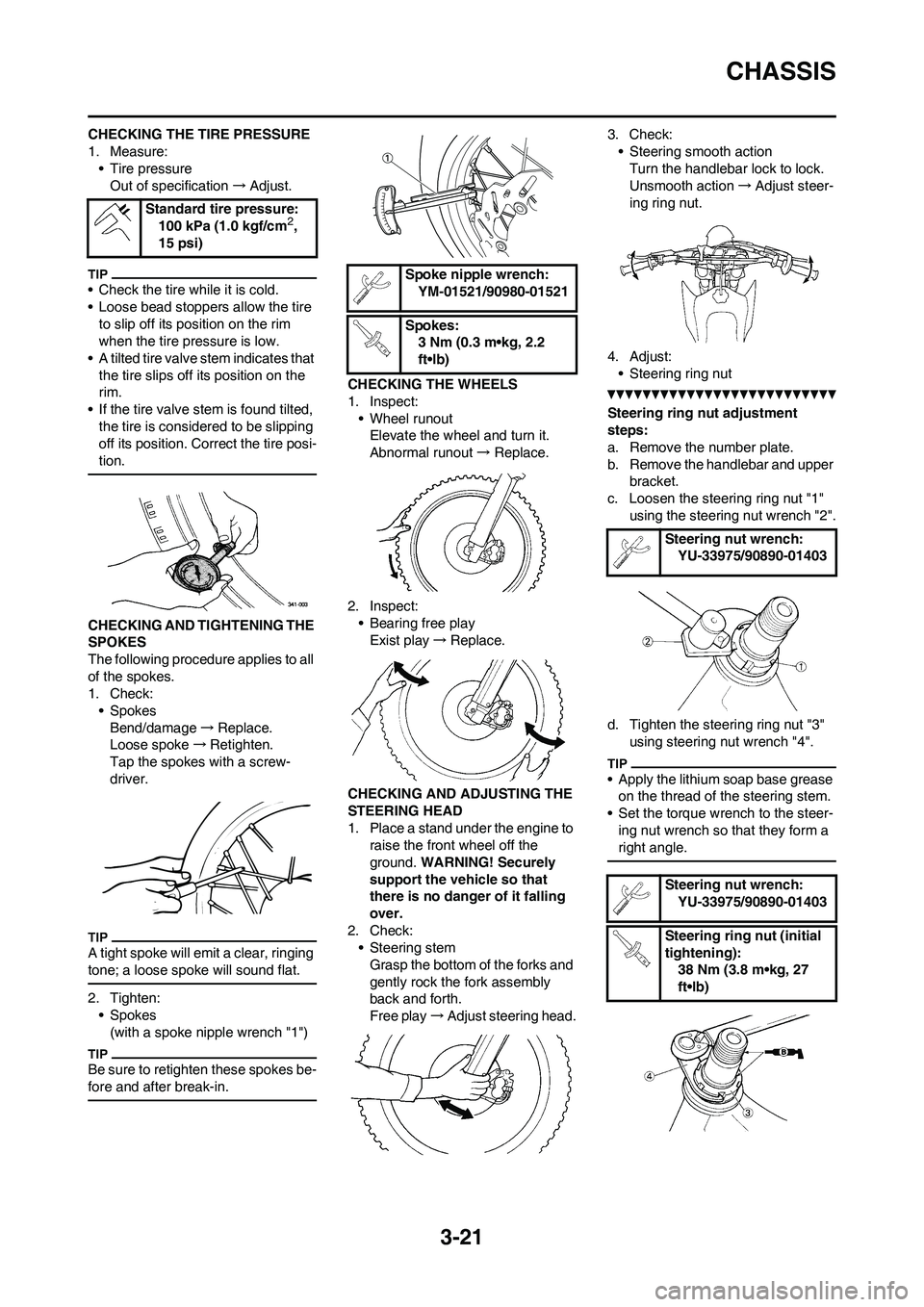
CHECKING THE TIRE PRESSURE
1. Measure:
• Tire pressure
Out of specification→Adjust.
• Check the tire while it is cold.
• Loose bead stoppers allow the tire
to slip off its position on the rim
when the tire pressure is low.
• A tilted tire valve stem indicates that
the tire slips off its position on the
rim.
• If the tire valve stem is found tilted,
the tire is considered to be slipping
off its position. Correct the tire posi-
tion.
CHECKING AND TIGHTENING THE
SPOKES
The following procedure applies to all
of the spokes.
1. Check:
• Spokes
Bend/damage→Replace.
Loose spoke→Retighten.
Tap the spokes with a screw-
driver.
A tight spoke will emit a clear, ringing
tone; a loose spoke will sound flat.
2. Tighten:
• Spokes
(with a spoke nipple wrench "1")
Be sure to retighten these spokes be-
fore and after break-in.
CHECKING THE WHEELS
1. Inspect:
• Wheel runout
Elevate the wheel and turn it.
Abnormal runout→ Replace.
2. Inspect:
• Bearing free play
Exist play→Replace.
CHECKING AND ADJUSTING THE
STEERING HEAD
1. Place a stand under the engine to
raise the front wheel off the
ground. WARNING! Securely
support the vehicle so that
there is no danger of it falling
over.
2. Check:
• Steering stem
Grasp the bottom of the forks and
gently rock the fork assembly
back and forth.
Free play→Adjust steering head.3. Check:
• Steering smooth action
Turn the handlebar lock to lock.
Unsmooth action→Adjust steer-
ing ring nut.
4. Adjust:
• Steering ring nut
Steering ring nut adjustment
steps:
a. Remove the number plate.
b. Remove the handlebar and upper
bracket.
c. Loosen the steering ring nut "1"
using the steering nut wrench "2".
d. Tighten the steering ring nut "3"
using steering nut wrench "4".
• Apply the lithium soap base grease
on the thread of the steering stem.
• Set the torque wrench to the steer-
ing nut wrench so that they form a
right angle.
Standard tire pressure:
100 kPa (1.0 kgf/cm2,
15 psi)
Spoke nipple wrench:
YM-01521/90980-01521
Spokes:
3 Nm (0.3 m•kg, 2.2
ft•lb)
Steering nut wrench:
YU-33975/90890-01403
Steering nut wrench:
YU-33975/90890-01403
Steering ring nut (initial
tightening):
38 Nm (3.8 m•kg, 27
ft•lb)
Page 78 of 230
3-22
CHASSIS
e. Loosen the steering ring nut one
turn.
f. Retighten the steering ring nut us-
ing the steering nut wrench.
Avoid over-tightening.
g. Check the steering stem by turn-
ing it lock to lock. If there is any
binding, remove the steering stem
assembly and inspect the steer-
ing bearings.
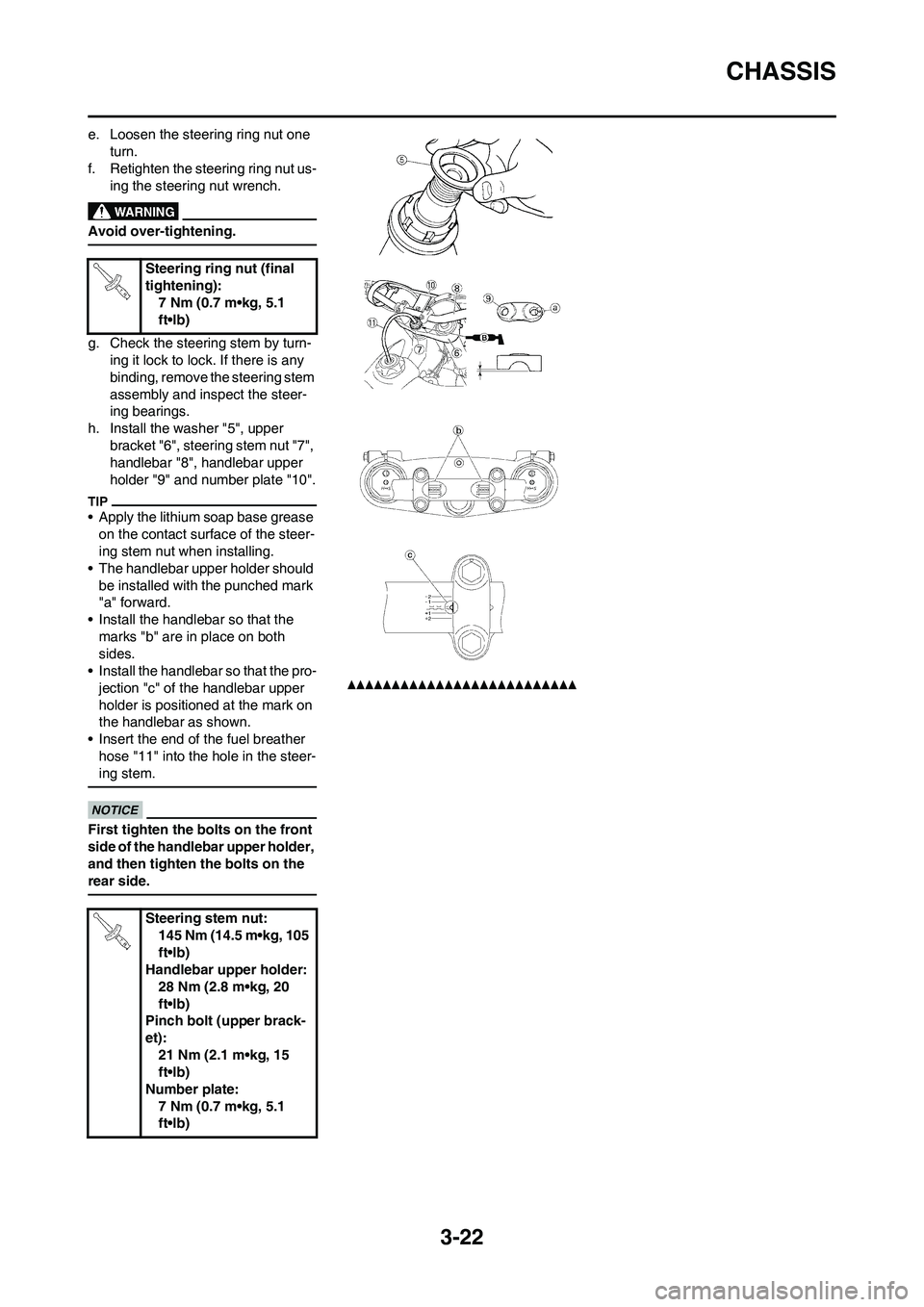
h. Install the washer "5", upper
bracket "6", steering stem nut "7",
handlebar "8", handlebar upper
holder "9" and number plate "10".
• Apply the lithium soap base grease
on the contact surface of the steer-
ing stem nut when installing.
• The handlebar upper holder should
be installed with the punched mark
"a" forward.
• Install the handlebar so that the
marks "b" are in place on both
sides.
• Install the handlebar so that the pro-
jection "c" of the handlebar upper
holder is positioned at the mark on
the handlebar as shown.
• Insert the end of the fuel breather
hose "11" into the hole in the steer-
ing stem.
First tighten the bolts on the front
side of the handlebar upper holder,
and then tighten the bolts on the
rear side.
Steering ring nut (final
tightening):
7 Nm (0.7 m•kg, 5.1
ft•lb)
Steering stem nut:
145 Nm (14.5 m•kg, 105
ft•lb)
Handlebar upper holder:
28 Nm (2.8 m•kg, 20
ft•lb)
Pinch bolt (upper brack-
et):
21 Nm (2.1 m•kg, 15
ft•lb)
Number plate:
7 Nm (0.7 m•kg, 5.1
ft•lb)
Page 86 of 230
4-5
EXHAUST PIPE AND SILENCER
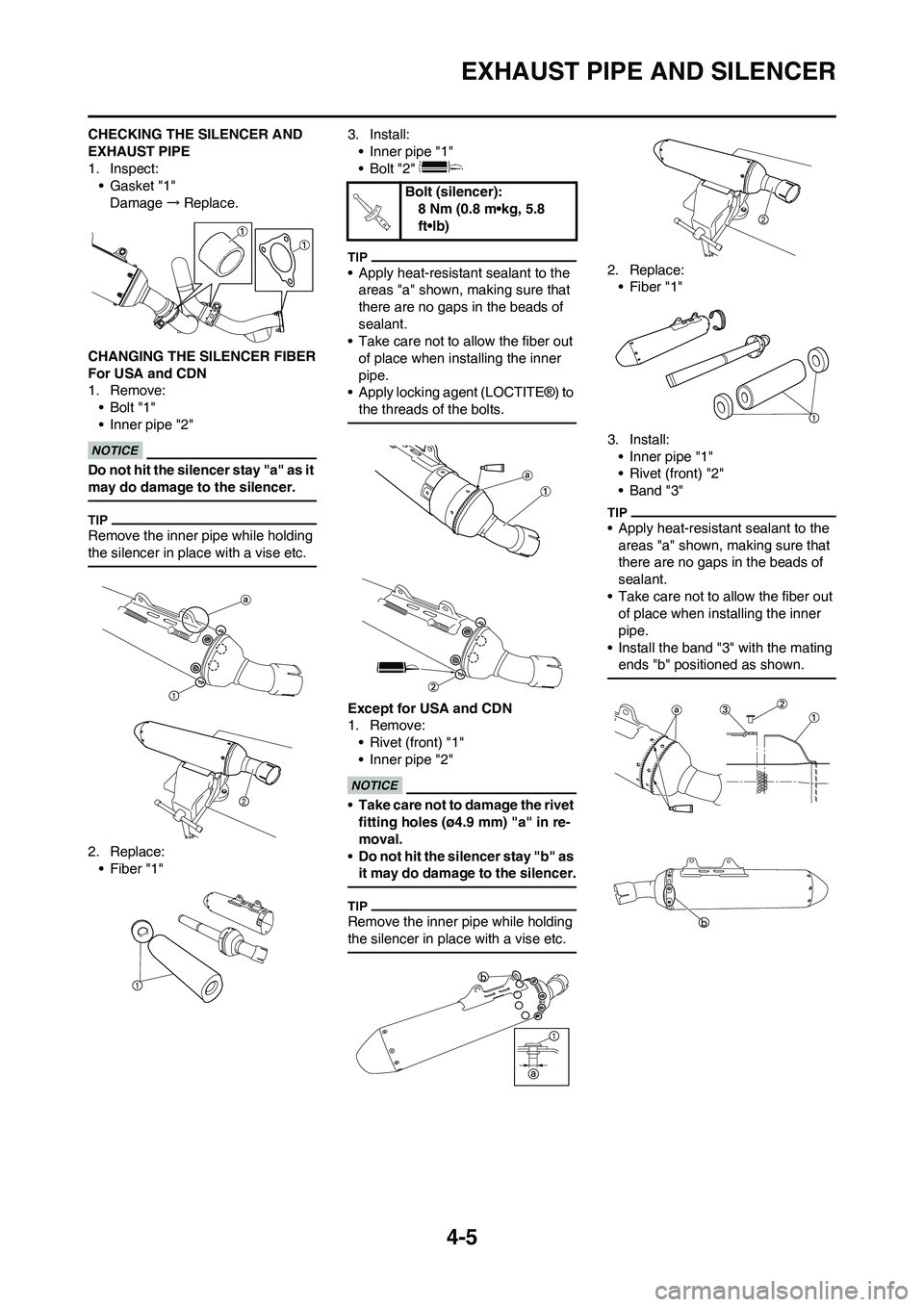
CHECKING THE SILENCER AND
EXHAUST PIPE
1. Inspect:
• Gasket "1"
Damage→Replace.
CHANGING THE SILENCER FIBER
For USA and CDN
1. Remove:
•Bolt "1"
• Inner pipe "2"
Do not hit the silencer stay "a" as it
may do damage to the silencer.
Remove the inner pipe while holding
the silencer in place with a vise etc.
2. Replace:
• Fiber "1" 3. Install:
• Inner pipe "1"
• Bolt "2"
• Apply heat-resistant sealant to the
areas "a" shown, making sure that
there are no gaps in the beads of
sealant.
• Take care not to allow the fiber out
of place when installing the inner
pipe.
• Apply locking agent (LOCTITE®) to
the threads of the bolts.
Except for USA and CDN
1. Remove:
• Rivet (front) "1"
• Inner pipe "2"
•Take care not to damage the rivet
fitting holes (ø4.9 mm) "a" in re-
moval.
•Do not hit the silencer stay "b" as
it may do damage to the silencer.
Remove the inner pipe while holding
the silencer in place with a vise etc.
2. Replace:
• Fiber "1"
3. Install:
• Inner pipe "1"
• Rivet (front) "2"
• Band "3"
• Apply heat-resistant sealant to the
areas "a" shown, making sure that
there are no gaps in the beads of
sealant.
• Take care not to allow the fiber out
of place when installing the inner
pipe.
• Install the band "3" with the mating
ends "b" positioned as shown.
Bolt (silencer):
8 Nm (0.8 m•kg, 5.8
ft•lb)
Page 90 of 230
4-9
RADIATOR
HANDLING NOTE
Do not remove the radiator cap
when the engine and radiator are
hot. Scalding hot fluid and steam
may be blown out under pressure,
which could cause serious injury.
When the engine has cooled, open
the radiator cap by the following
procedure:
Place a thick rag, like a towel, over
the radiator cap, slowly rotate the
cap counterclockwise to the de-
tent. This procedure allows any re-
sidual pressure to escape. When
the hissing sound has stopped,
press down on the cap while turn-
ing counterclockwise and remove
it.
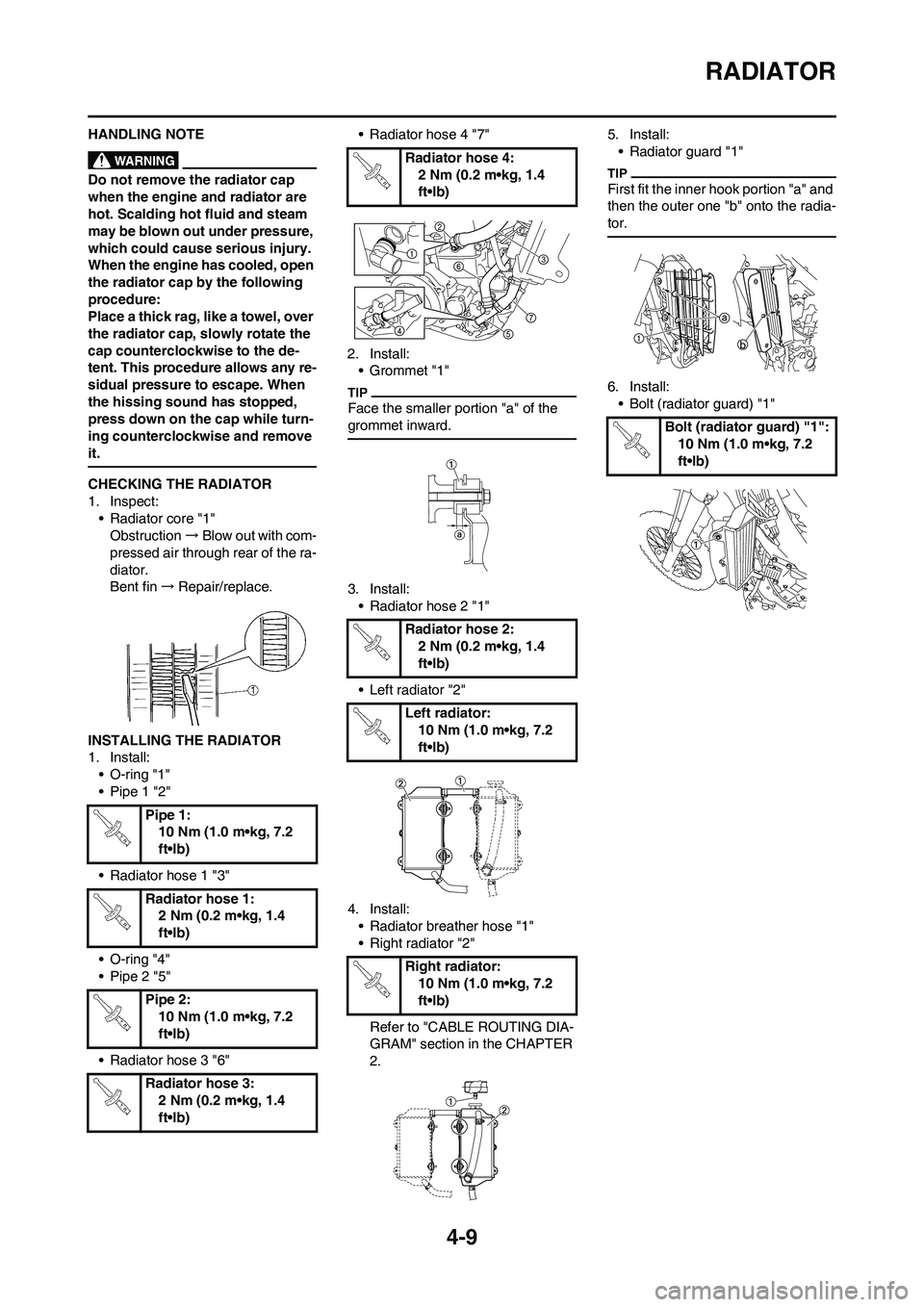
CHECKING THE RADIATOR
1. Inspect:
• Radiator core "1"
Obstruction→Blow out with com-
pressed air through rear of the ra-
diator.
Bent fin→Repair/replace.
INSTALLING THE RADIATOR
1. Install:
• O-ring "1"
• Pipe 1 "2"
• Radiator hose 1 "3"
• O-ring "4"
• Pipe 2 "5"
• Radiator hose 3 "6"• Radiator hose 4 "7"
2. Install:
• Grommet "1"
Face the smaller portion "a" of the
grommet inward.
3. Install:
• Radiator hose 2 "1"
• Left radiator "2"
4. Install:
• Radiator breather hose "1"
• Right radiator "2"
Refer to "CABLE ROUTING DIA-
GRAM" section in the CHAPTER
2.5. Install:
• Radiator guard "1"
First fit the inner hook portion "a" and
then the outer one "b" onto the radia-
tor.
6. Install:
• Bolt (radiator guard) "1"
Pipe 1:
10 Nm (1.0 m•kg, 7.2
ft•lb)
Radiator hose 1:
2 Nm (0.2 m•kg, 1.4
ft•lb)
Pipe 2:
10 Nm (1.0 m•kg, 7.2
ft•lb)
Radiator hose 3:
2 Nm (0.2 m•kg, 1.4
ft•lb)
Radiator hose 4:
2 Nm (0.2 m•kg, 1.4
ft•lb)
Radiator hose 2:
2 Nm (0.2 m•kg, 1.4
ft•lb)
Left radiator:
10 Nm (1.0 m•kg, 7.2
ft•lb)
Right radiator:
10 Nm (1.0 m•kg, 7.2
ft•lb)
Bolt (radiator guard) "1":
10 Nm (1.0 m•kg, 7.2
ft•lb)
Page 93 of 230
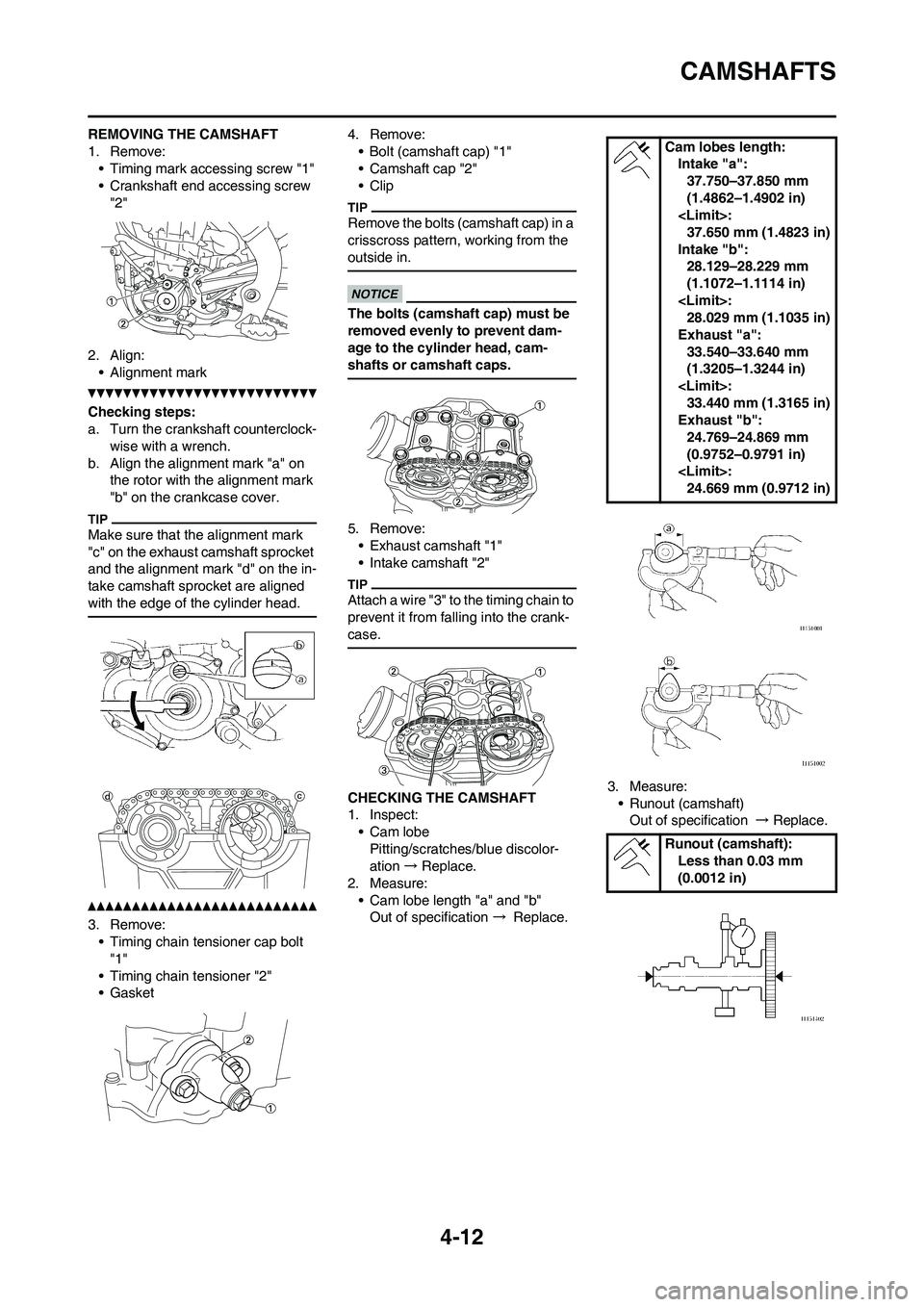
4-12
CAMSHAFTS
REMOVING THE CAMSHAFT
1. Remove:
• Timing mark accessing screw "1"
• Crankshaft end accessing screw
"2"
2. Align:
• Alignment mark
Checking steps:
a. Turn the crankshaft counterclock-
wise with a wrench.
b. Align the alignment mark "a" on
the rotor with the alignment mark
"b" on the crankcase cover.
Make sure that the alignment mark
"c" on the exhaust camshaft sprocket
and the alignment mark "d" on the in-
take camshaft sprocket are aligned
with the edge of the cylinder head.
3. Remove:
• Timing chain tensioner cap bolt
"1"
• Timing chain tensioner "2"
• Gasket4. Remove:
• Bolt (camshaft cap) "1"
• Camshaft cap "2"
• Clip
Remove the bolts (camshaft cap) in a
crisscross pattern, working from the
outside in.
The bolts (camshaft cap) must be
removed evenly to prevent dam-
age to the cylinder head, cam-
shafts or camshaft caps.
5. Remove:
• Exhaust camshaft "1"
• Intake camshaft "2"
Attach a wire "3" to the timing chain to
prevent it from falling into the crank-
case.
CHECKING THE CAMSHAFT
1. Inspect:
• Cam lobe
Pitting/scratches/blue discolor-
ation → Replace.
2. Measure:
• Cam lobe length "a" and "b"
Out of specification → Replace.3. Measure:
• Runout (camshaft)
Out of specification → Replace.
Cam lobes length:
Intake "a":
37.750–37.850 mm
(1.4862–1.4902 in)
37.650 mm (1.4823 in)
Intake "b":
28.129–28.229 mm
(1.1072–1.1114 in)
28.029 mm (1.1035 in)
Exhaust "a":
33.540–33.640 mm
(1.3205–1.3244 in)
33.440 mm (1.3165 in)
Exhaust "b":
24.769–24.869 mm
(0.9752–0.9791 in)
24.669 mm (0.9712 in)
Runout (camshaft):
Less than 0.03 mm
(0.0012 in)
Page 94 of 230
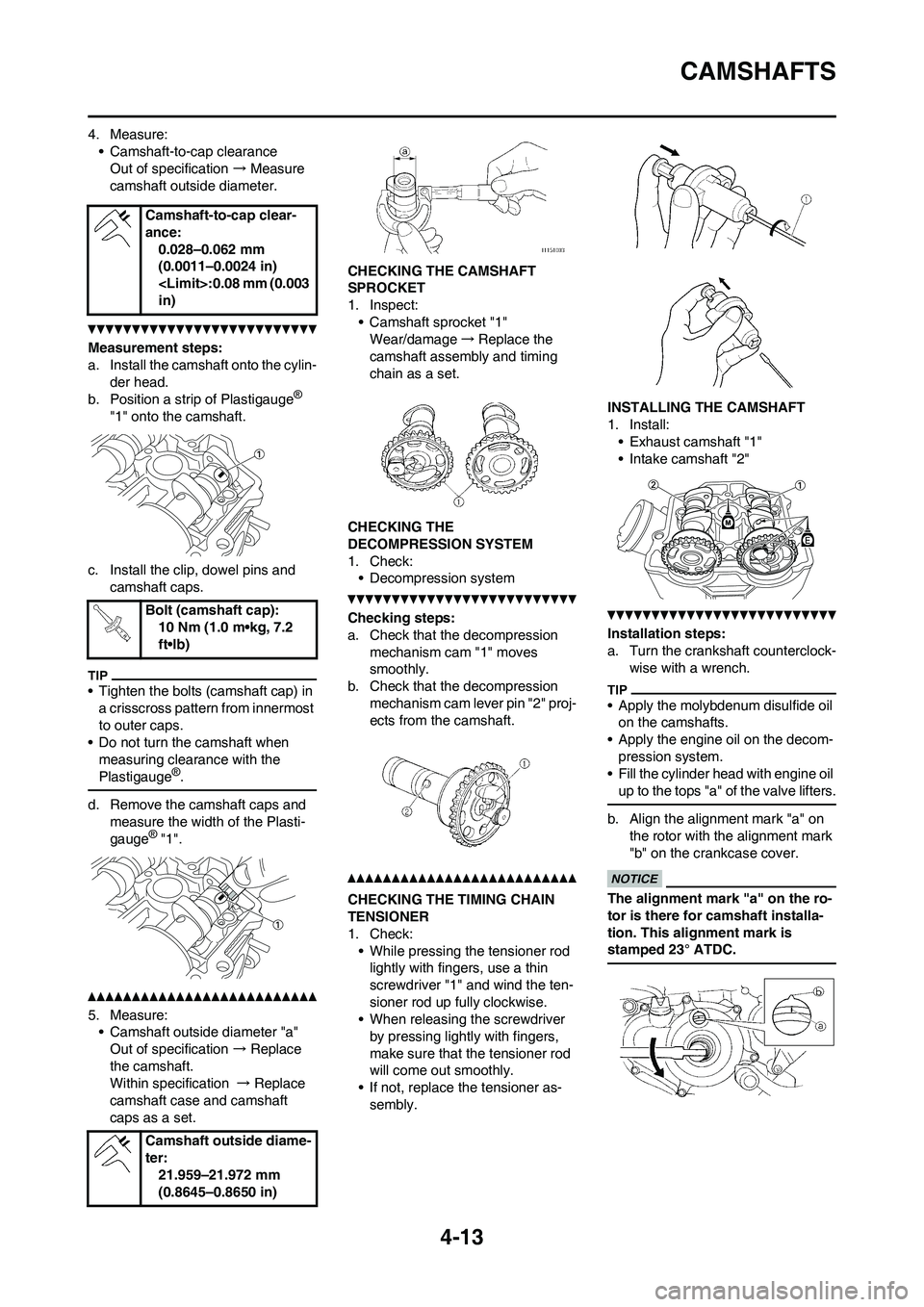
4-13
CAMSHAFTS
4. Measure:• Camshaft-to-cap clearanceOut of specification → Measure
camshaft outside diameter.
Measurement steps:
a. Install the camshaft onto the cylin- der head.
b. Position a strip of Plastigauge
®
"1" onto the camshaft.
c. Install the clip, dowel pins and camshaft caps.
• Tighten the bolts (camshaft cap) in a crisscross pattern from innermost
to outer caps.
• Do not turn the camshaft when
measuring clearance with the
Plastigauge
®.
d. Remove the camshaft caps and measure the width of the Plasti-
gauge
® "1".
5. Measure:• Camshaft outside diameter "a"
Out of specification → Replace
the camshaft.
Within specification → Replace
camshaft case and camshaft
caps as a set. CHECKING THE CAMSHAFT
SPROCKET
1. Inspect:
• Camshaft sprocket "1"Wear/damage →Replace the
camshaft assemb ly and timing
chain as a set.
CHECKING THE
DECOMPRESSION SYSTEM
1. Check: • Decompression system
Checking steps:
a. Check that the decompression
mechanism cam "1" moves
smoothly.
b. Check that the decompression
mechanism cam lever pin "2" proj-
ects from the camshaft.
CHECKING THE TIMING CHAIN
TENSIONER
1. Check:• While pressing the tensioner rod lightly with fingers, use a thin
screwdriver "1" and wind the ten-
sioner rod up fully clockwise.
• When releasing the screwdriver
by pressing lightly with fingers,
make sure that the tensioner rod
will come out smoothly.
• If not, replace the tensioner as- sembly. INSTALLING THE CAMSHAFT
1. Install:
• Exhaust camshaft "1"
• Intake camshaft "2"
Installation steps:
a. Turn the crankshaft counterclock- wise with a wrench.
• Apply the molybdenum disulfide oil on the camshafts.
• Apply the engine oil on the decom- pression system.
• Fill the cylinder head with engine oil
up to the tops "a" of the valve lifters.
b. Align the alignment mark "a" on the rotor with the alignment mark
"b" on the crankcase cover.
The alignment mark "a" on the ro-
tor is there for camshaft installa-
tion. This alignment mark is
stamped 23° ATDC.
Camshaft-to-cap clear-
ance:
0.028–0.062 mm
(0.0011–0.0024 in)
in)
Bolt (camshaft cap): 10 Nm (1.0 m•kg, 7.2
ft•lb)
Camshaft outside diame-
ter: 21.959–21.972 mm
(0.8645–0.8650 in)
Page 95 of 230
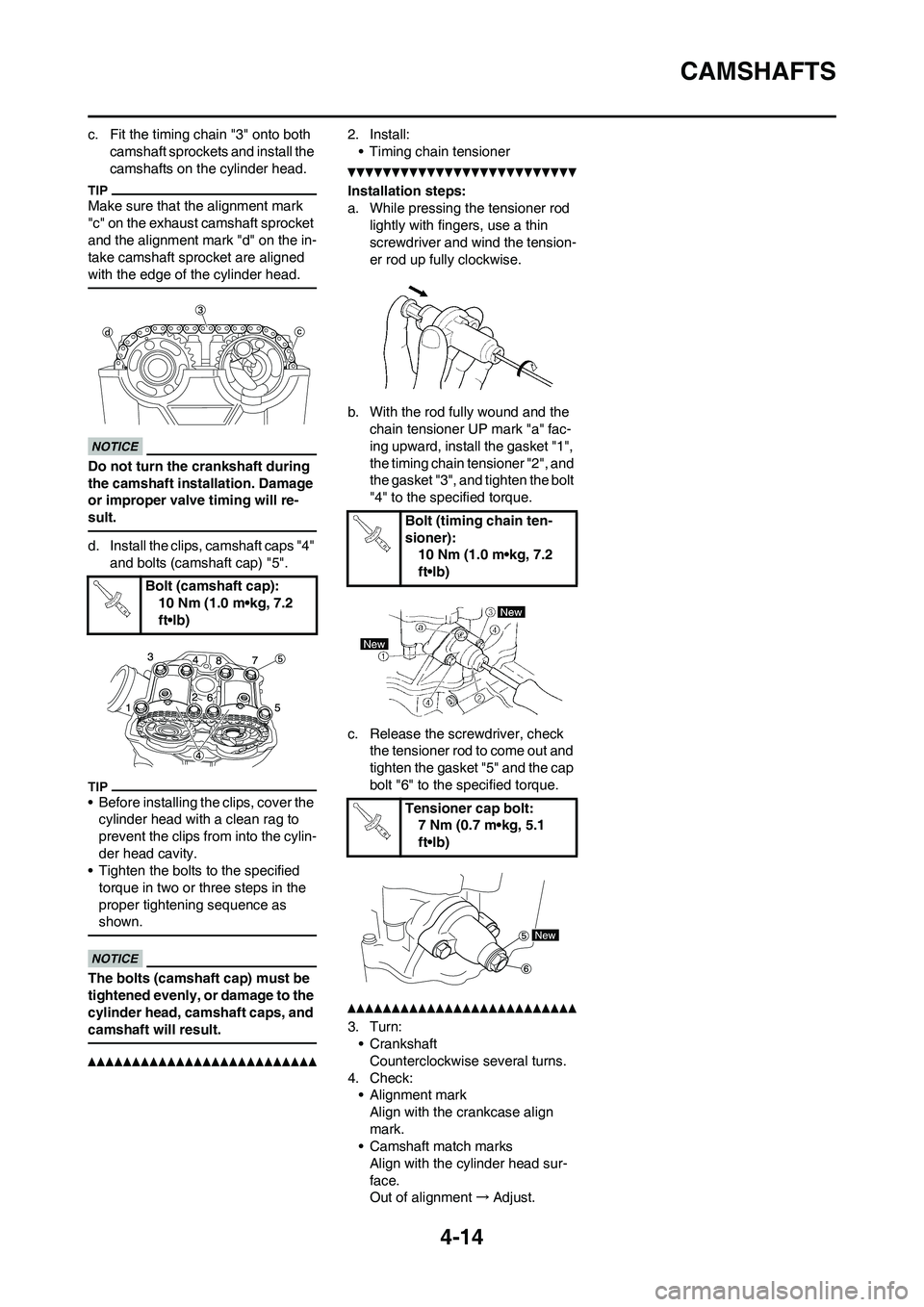
4-14
CAMSHAFTS
c. Fit the timing chain "3" onto both camshaft sprockets and install the
camshafts on the cylinder head.
Make sure that the alignment mark
"c" on the exhaust camshaft sprocket
and the alignment mark "d" on the in-
take camshaft sprocket are aligned
with the edge of the cylinder head.
Do not turn the crankshaft during
the camshaft insta llation. Damage
or improper valve timing will re-
sult.
d. Install the clips, camshaft caps "4"
and bolts (camshaft cap) "5".
• Before installing the clips, cover the cylinder head with a clean rag to
prevent the clips from into the cylin-
der head cavity.
• Tighten the bolts to the specified
torque in two or three steps in the
proper tightening sequence as
shown.
The bolts (camshaft cap) must be
tightened evenly, or damage to the
cylinder head, camshaft caps, and
camshaft will result.
2. Install:• Timing chain tensioner
Installation steps:
a. While pressing the tensioner rod lightly with fingers, use a thin
screwdriver and wind the tension-
er rod up fully clockwise.
b. With the rod fully wound and the chain tensioner UP mark "a" fac-
ing upward, install the gasket "1",
the timing chain tensioner "2", and
the gasket "3", and tighten the bolt
"4" to the specified torque.
c. Release the screwdriver, check the tensioner rod to come out and
tighten the gasket "5" and the cap
bolt "6" to the specified torque.
3. Turn:• Crankshaft
Counterclockwise several turns.
4. Check: • Alignment mark
Align with the crankcase align
mark.
• Camshaft match marks
Align with the cylinder head sur-
face.
Out of alignment →Adjust.
Bolt (camshaft cap):
10 Nm (1.0 m•kg, 7.2
ft•lb)
Bolt (timing chain ten-
sioner):10 Nm (1.0 m•kg, 7.2
ft•lb)
Tensioner cap bolt: 7 Nm (0.7 m•kg, 5.1
ft•lb)
Page 116 of 230
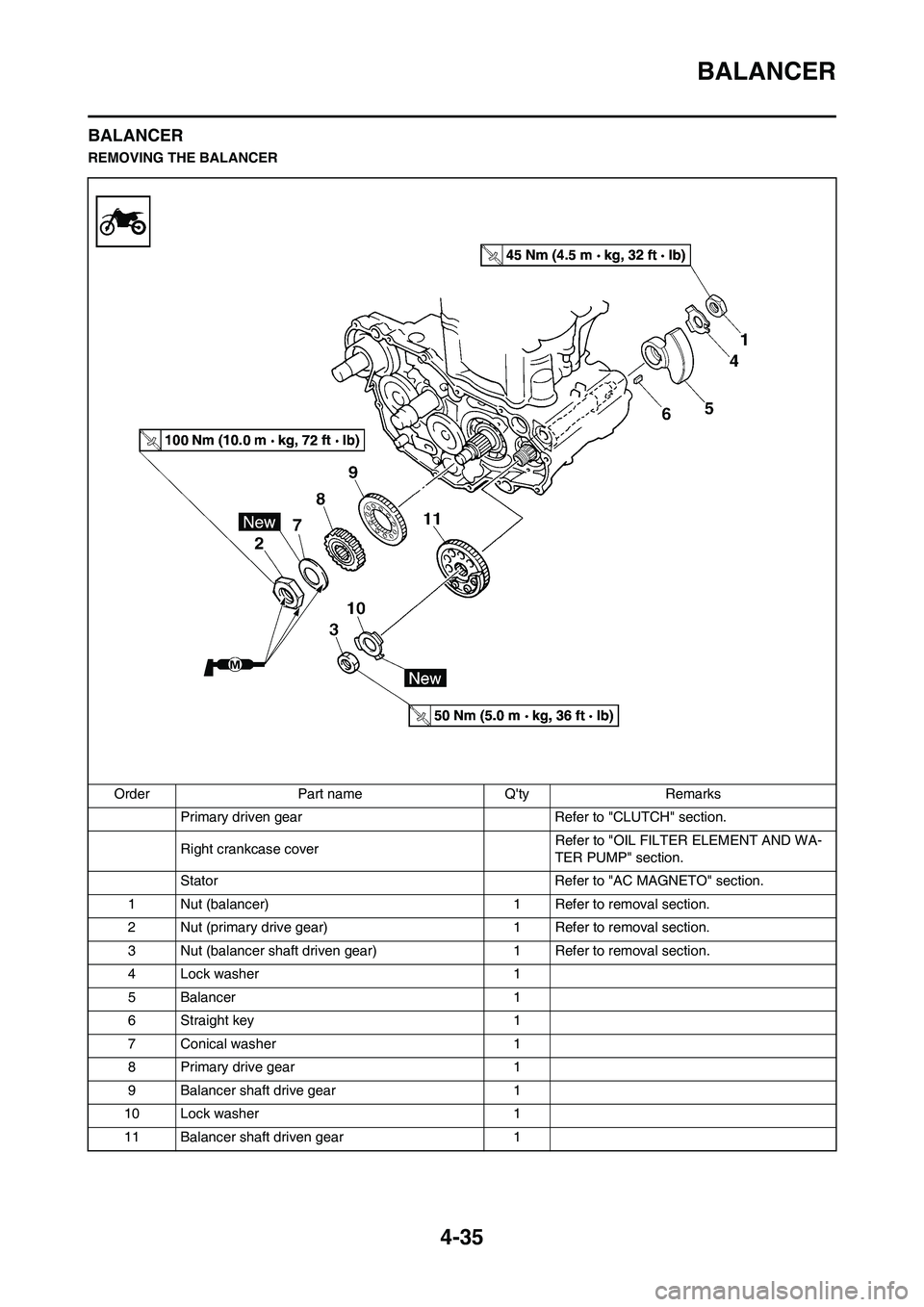
4-35
BALANCER
BALANCER
REMOVING THE BALANCER
Order Part name Q'ty Remarks
Primary driven gear Refer to "CLUTCH" section.
Right crankcase cover Refer to "OIL FILTER ELEMENT AND WA-
TER PUMP" section.
Stator Refer to "AC MAGNETO" section.
1 Nut (balancer) 1 Refer to removal section.
2 Nut (primary drive gear) 1 Refer to removal section.
3 Nut (balancer shaft driven gear) 1 Refer to removal section.
4 Lock washer 1
5 Balancer 1
6 Straight key 1
7 Conical washer 1
8 Primary drive gear 1
9 Balancer shaft drive gear 1
10 Lock washer 1
11 Balancer shaft driven gear 1
Page 117 of 230
4-36
BALANCER
REMOVING THE BALANCER
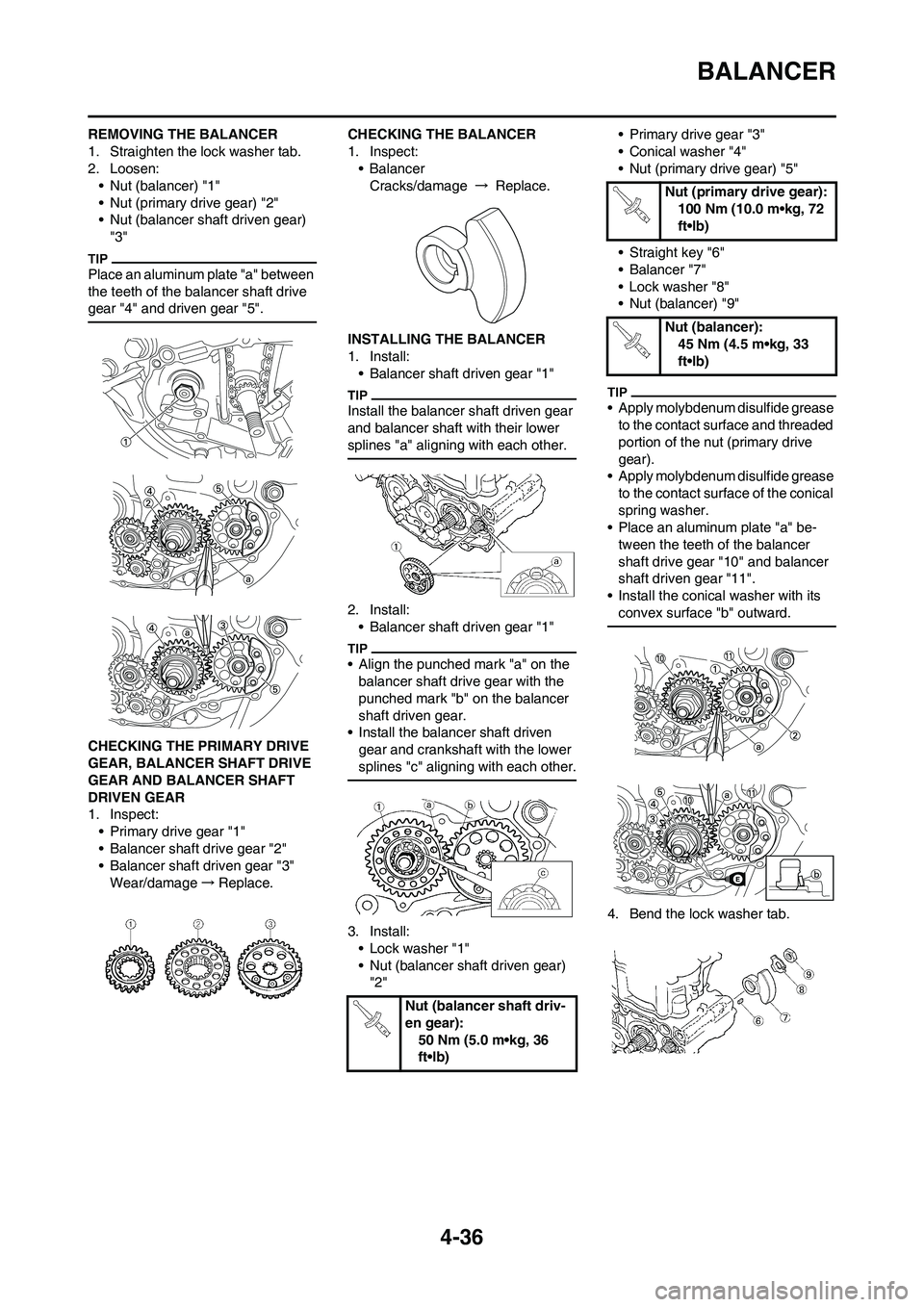
1. Straighten the lock washer tab.
2. Loosen:
• Nut (balancer) "1"
• Nut (primary drive gear) "2"
• Nut (balancer shaft driven gear)
"3"
Place an aluminum plate "a" between
the teeth of the balancer shaft drive
gear "4" and driven gear "5".
CHECKING THE PRIMARY DRIVE
GEAR, BALANCER SHAFT DRIVE
GEAR AND BALANCER SHAFT
DRIVEN GEAR
1. Inspect:
• Primary drive gear "1"
• Balancer shaft drive gear "2"
• Balancer shaft driven gear "3"
Wear/damage→Replace.CHECKING THE BALANCER
1. Inspect:
• Balancer
Cracks/damage → Replace.
INSTALLING THE BALANCER
1. Install:
• Balancer shaft driven gear "1"
Install the balancer shaft driven gear
and balancer shaft with their lower
splines "a" aligning with each other.
2. Install:
• Balancer shaft driven gear "1"
• Align the punched mark "a" on the
balancer shaft drive gear with the
punched mark "b" on the balancer
shaft driven gear.
• Install the balancer shaft driven
gear and crankshaft with the lower
splines "c" aligning with each other.
3. Install:
• Lock washer "1"
• Nut (balancer shaft driven gear)
"2"• Primary drive gear "3"
• Conical washer "4"
• Nut (primary drive gear) "5"
• Straight key "6"
• Balancer "7"
• Lock washer "8"
• Nut (balancer) "9"
• Apply molybdenum disulfide grease
to the contact surface and threaded
portion of the nut (primary drive
gear).
• Apply molybdenum disulfide grease
to the contact surface of the conical
spring washer.
• Place an aluminum plate "a" be-
tween the teeth of the balancer
shaft drive gear "10" and balancer
shaft driven gear "11".
• Install the conical washer with its
convex surface "b" outward.
4. Bend the lock washer tab.
Nut (balancer shaft driv-
en gear):
50 Nm (5.0 m•kg, 36
ft•lb)
Nut (primary drive gear):
100 Nm (10.0 m•kg, 72
ft•lb)
Nut (balancer):
45 Nm (4.5 m•kg, 33
ft•lb)
Page 123 of 230
4-42
KICK SHAFT AND SHIFT SHAFT
REMOVING THE KICK SHAFT
ASSEMBLY
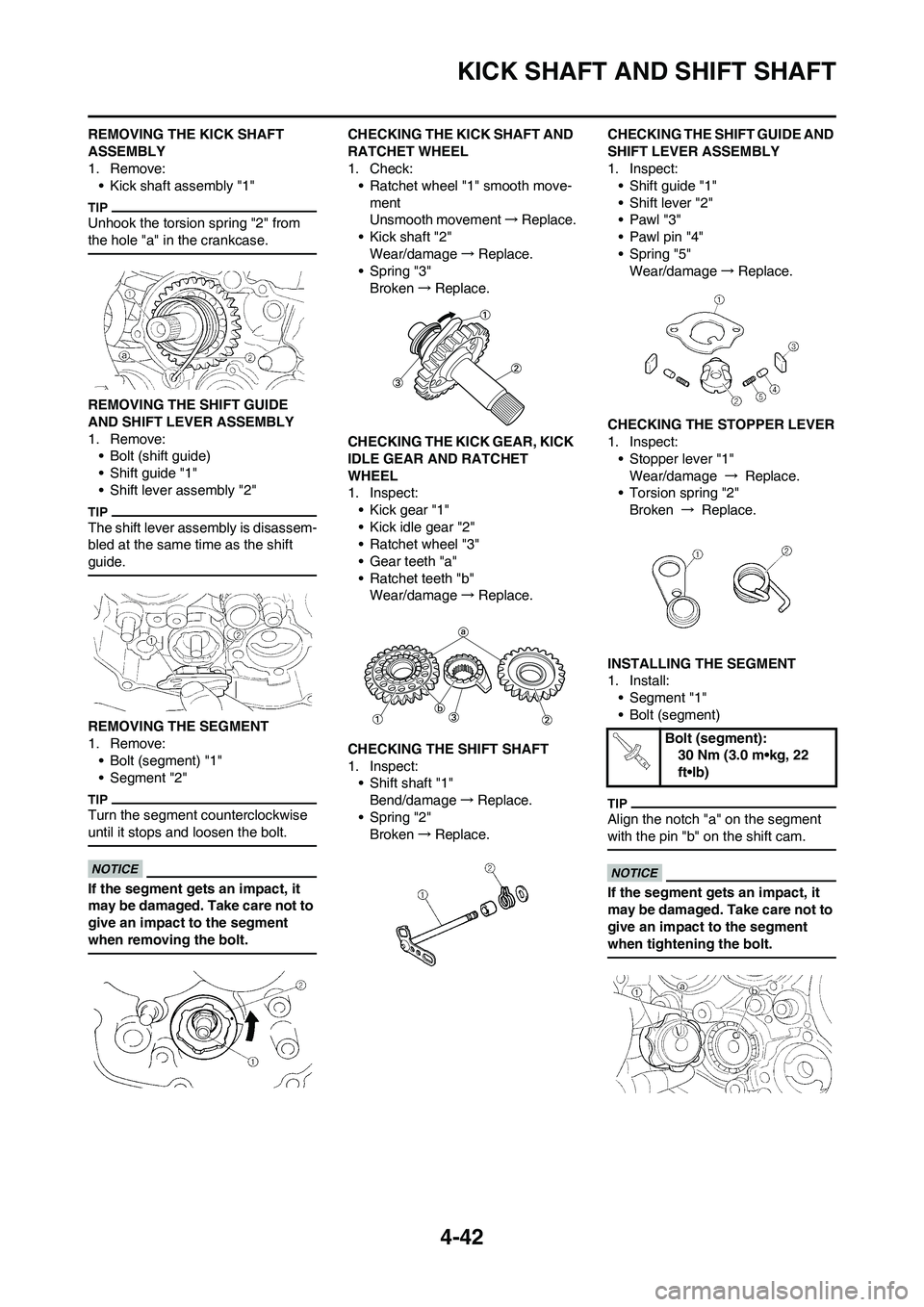
1. Remove:
• Kick shaft assembly "1"
Unhook the torsion spring "2" from
the hole "a" in the crankcase.
REMOVING THE SHIFT GUIDE
AND SHIFT LEVER ASSEMBLY
1. Remove:
• Bolt (shift guide)
• Shift guide "1"
• Shift lever assembly "2"
The shift lever assembly is disassem-
bled at the same time as the shift
guide.
REMOVING THE SEGMENT
1. Remove:
• Bolt (segment) "1"
• Segment "2"
Turn the segment counterclockwise
until it stops and loosen the bolt.
If the segment gets an impact, it
may be damaged. Take care not to
give an impact to the segment
when removing the bolt.
CHECKING THE KICK SHAFT AND
RATCHET WHEEL
1. Check:
• Ratchet wheel "1" smooth move-
ment
Unsmooth movement→Replace.
• Kick shaft "2"
Wear/damage→Replace.
• Spring "3"
Broken→Replace.
CHECKING THE KICK GEAR, KICK
IDLE GEAR AND RATCHET
WHEEL
1. Inspect:
• Kick gear "1"
• Kick idle gear "2"
• Ratchet wheel "3"
• Gear teeth "a"
• Ratchet teeth "b"
Wear/damage→Replace.
CHECKING THE SHIFT SHAFT
1. Inspect:
• Shift shaft "1"
Bend/damage→Replace.
• Spring "2"
Broken→Replace.CHECKING THE SHIFT GUIDE AND
SHIFT LEVER ASSEMBLY
1. Inspect:
• Shift guide "1"
• Shift lever "2"
•Pawl "3"
• Pawl pin "4"
• Spring "5"
Wear/damage→Replace.
CHECKING THE STOPPER LEVER
1. Inspect:
• Stopper lever "1"
Wear/damage → Replace.
• Torsion spring "2"
Broken → Replace.
INSTALLING THE SEGMENT
1. Install:
• Segment "1"
• Bolt (segment)
Align the notch "a" on the segment
with the pin "b" on the shift cam.
If the segment gets an impact, it
may be damaged. Take care not to
give an impact to the segment
when tightening the bolt.
Bolt (segment):
30 Nm (3.0 m•kg, 22
ft•lb)