light YAMAHA YZF-R1 2014 User Guide
[x] Cancel search | Manufacturer: YAMAHA, Model Year: 2014, Model line: YZF-R1, Model: YAMAHA YZF-R1 2014Pages: 114, PDF Size: 2.87 MB
Page 21 of 114
INSTRUMENT AND CONTROL FUNCTIONS
3-6
3
DisplayConditions What to do
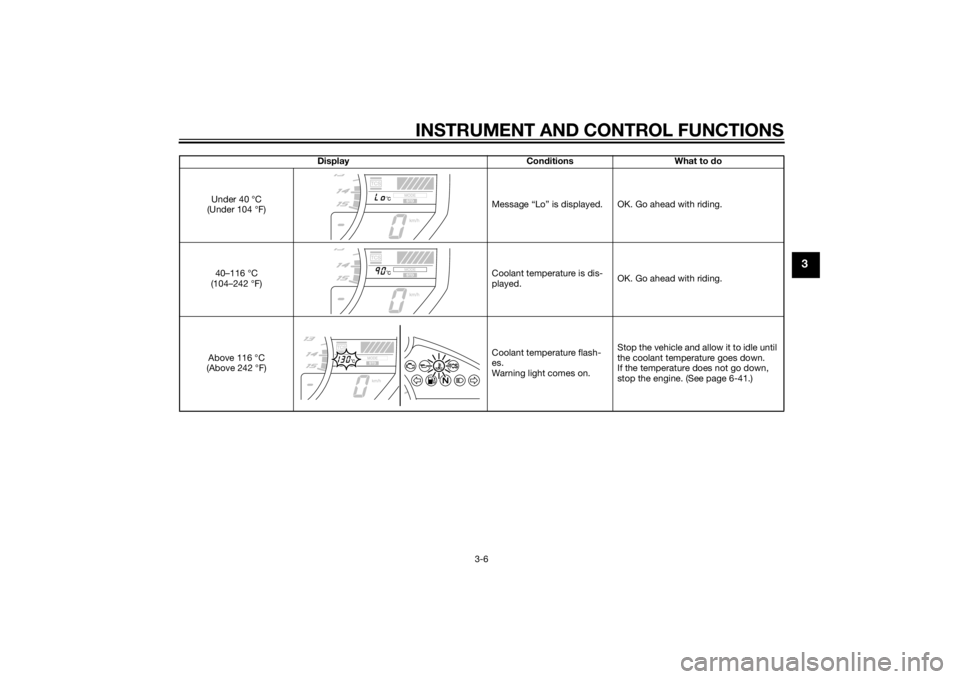
Under 40 °C
(Under 104 °F) Message “Lo” is displayed. OK. Go ahead with riding.
40–116 °C
(104–242 °F) Coolant temperature is dis-
played.
OK. Go ahead with riding.
Above 116 °C
(Above 242 °F) Coolant temperature flash-
es.
Warning light comes on.Stop the vehicle and allow it to idle until
the coolant temperature goes down.
If the temperature does not go down,
stop the engine. (See page 6-41.)
U2SGE0E0.book Page 6 Wednesday, June 12, 2013 1:15 PM
Page 22 of 114
INSTRUMENT AND CONTROL FUNCTIONS
3-7
3
EAU11535
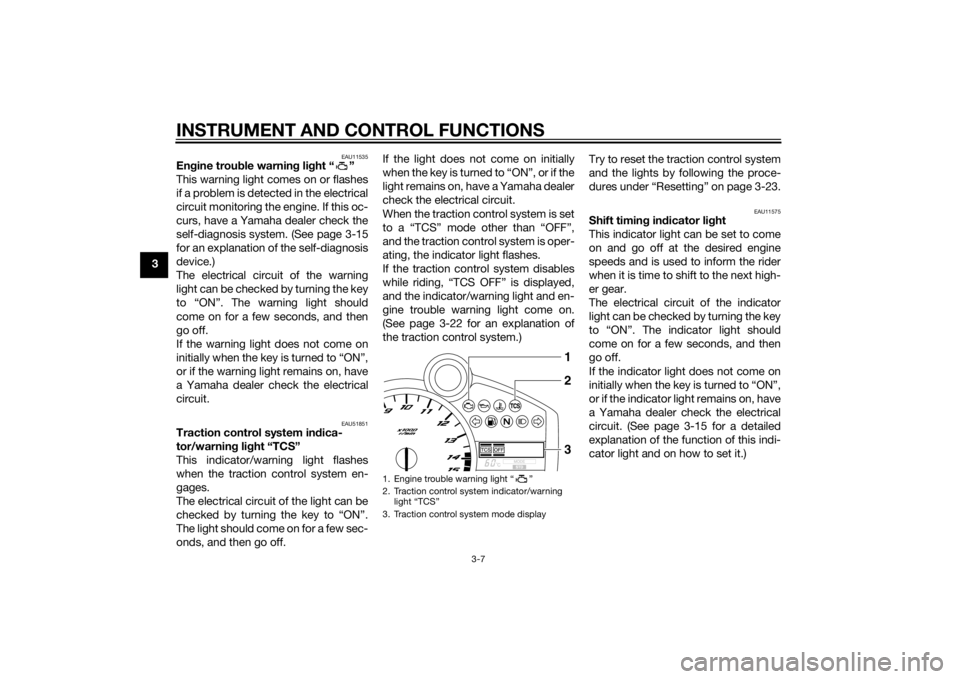
Engine trou ble warnin g lig ht “ ”
This warning light comes on or flashes
if a problem is detected in the electrical
circuit monitoring the engine. If this oc-
curs, have a Yamaha dealer check the
self-diagnosis system. (See page 3-15
for an explanation of the self-diagnosis
device.)
The electrical circuit of the warning
light can be checked by turning the key
to “ON”. The warning light should
come on for a few seconds, and then
go off.
If the warning light does not come on
initially when the key is turned to “ON”,
or if the warning light remains on, have
a Yamaha dealer check the electrical
circuit.
EAU51851
Traction control system in dica-
tor/warnin g li ght “TCS”
This indicator/warning light flashes
when the traction control system en-
gages.
The electrical circuit of the light can be
checked by turning the key to “ON”.
The light should come on for a few sec-
onds, and then go off. If the light does not come on initially
when the key is turned to “ON”, or if the
light remains on, have a Yamaha dealer
check the electrical circuit.
When the traction control system is set
to a “TCS” mode other than “OFF”,
and the traction control system is oper-
ating, the indicator light flashes.
If the traction control system disables
while riding, “TCS OFF” is displayed,
and the indicator/warning light and en-
gine trouble warning light come on.
(See page 3-22 for an explanation of
the traction control system.)
Try to reset the traction control system
and the lights by following the proce-
dures under “Resetting” on page 3-23.
EAU11575
Shift timin
g in dicator li ght
This indicator light can be set to come
on and go off at the desired engine
speeds and is used to inform the rider
when it is time to shift to the next high-
er gear.
The electrical circuit of the indicator
light can be checked by turning the key
to “ON”. The indicator light should
come on for a few seconds, and then
go off.
If the indicator light does not come on
initially when the key is turned to “ON”,
or if the indicator light remains on, have
a Yamaha dealer check the electrical
circuit. (See page 3-15 for a detailed
explanation of the function of this indi-
cator light and on how to set it.)
1. Engine trouble warning light “ ”
2. Traction control system indicator/warning light “TCS”
3. Traction control system mode display
123
U2SGE0E0.book Page 7 Wednesday, June 12, 2013 1:15 PM
Page 23 of 114
INSTRUMENT AND CONTROL FUNCTIONS
3-8
3
EAU38625
Immobilizer system in dicator li ght
The electrical circuit of the indicator
light can be checked by turning the key
to “ON”. The indicator light should
come on for a few seconds, and then
go off.
If the indicator light does not come on
initially when the key is turned to “ON”,
or if the indicator light remains on, have
a Yamaha dealer check the electrical
circuit.
When the key is turned to “OFF” and
30 seconds have passed, the indicator
light will start flashing indicating the im-
mobilizer system is enabled. After 24
hours have passed, the indicator light
will stop flashing, however the immobi-
lizer system is still enabled.
The self-diagnosis device also detects
problems in the immobilizer system
circuits. (See page 3-15 for an expla-
nation of the self-diagnosis device.)
EAU51814
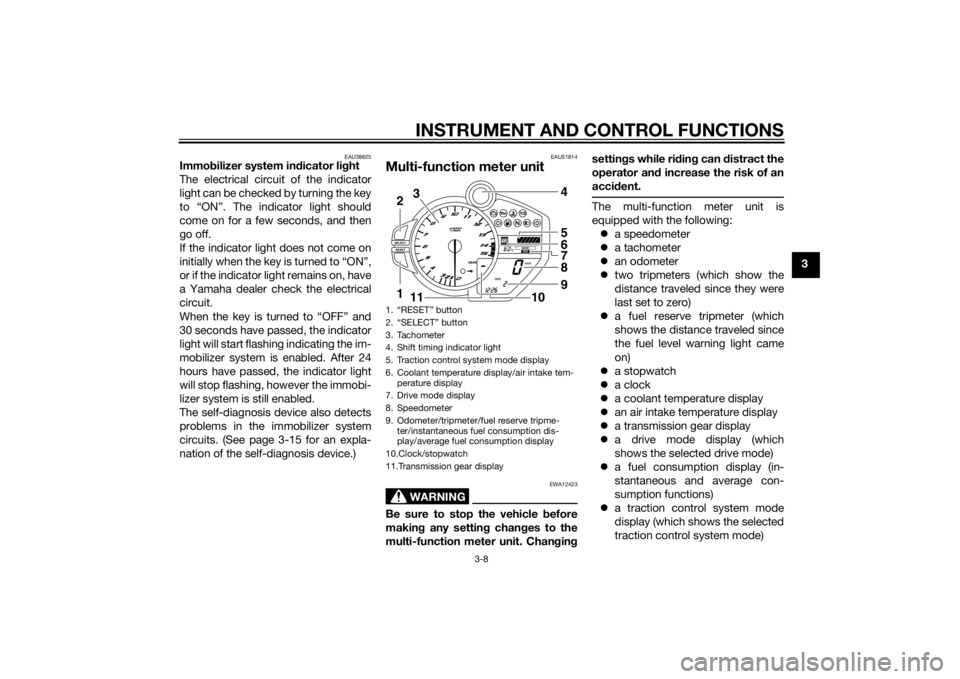
Multi-function meter unit
WARNING
EWA12423
Be sure to stop the vehicle before
makin g any settin g chan ges to the
multi-function meter unit. Chan gin g settin
gs while ri din g can d istract the
operator an d increase the risk of an
acci dent.
The multi-function meter unit is
equipped with the following:
a speedometer
a tachometer
an odometer
two tripmeters (which show the
distance traveled since they were
last set to zero)
a fuel reserve tripmeter (which
shows the distance traveled since
the fuel level warning light came
on)
a stopwatch
a clock
a coolant temperature display
an air intake temperature display
a transmission gear display
a drive mode display (which
shows the selected drive mode)
a fuel consumption display (in-
stantaneous and average con-
sumption functions)
a traction control system mode
display (which shows the selected
traction control system mode)
1. “RESET” button
2. “SELECT” button
3. Tachometer
4. Shift timing indicator light
5. Traction control system mode display
6. Coolant temperature display/air intake tem-
perature display
7. Drive mode display
8. Speedometer
9. Odometer/tripmeter/fuel reserve tripme- ter/instantaneous fuel consumption dis-
play/average fuel consumption display
10.Clock/stopwatch
11.Transmission gear display2
1 3
4
5
6
7
8
9
10
11
U2SGE0E0.book Page 8 Wednesday, June 12, 2013 1:15 PM
Page 24 of 114
INSTRUMENT AND CONTROL FUNCTIONS
3-9
3
a self-diagnosis device
a display brightness and shift tim-
ing indicator light control mode
TIPBe sure to turn the key to “ON” be-
fore using the “SELECT” and “RE-
SET” buttons, except for setting
the display brightness and shift
timing indicator light control
mode.
For the U.K. only: To switch the
speedometer and odometer/trip-
meter/fuel consumption displays
between kilometers and miles,
press the “SELECT” button for at
least one second.
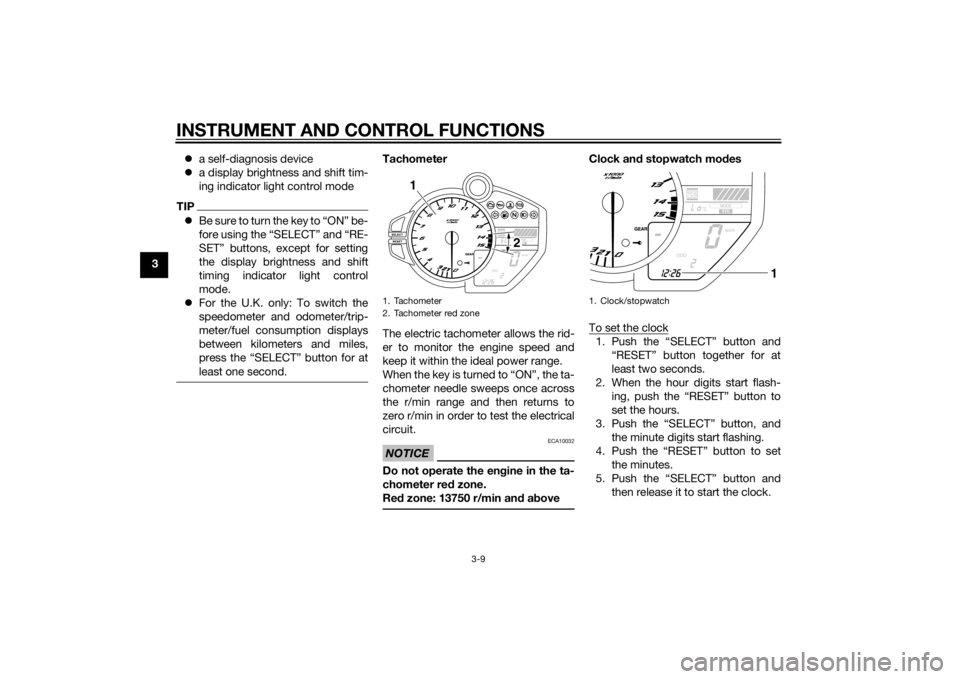
Tachometer
The electric tachometer allows the rid-
er to monitor the engine speed and
keep it within the ideal power range.
When the key is turned to “ON”, the ta-
chometer needle sweeps once across
the r/min range and then returns to
zero r/min in order to test the electrical
circuit.NOTICE
ECA10032
Do not operate the en gine in the ta-
chometer red zone.
Re d zone: 13750 r/min an d a bove
Clock an d stopwatch mo des
To set the clock1. Push the “SELECT” button and “RESET” button together for at
least two seconds.
2. When the hour digits start flash- ing, push the “RESET” button to
set the hours.
3. Push the “SELECT” button, and the minute digits start flashing.
4. Push the “RESET” button to set the minutes.
5. Push the “SELECT” button and then release it to start the clock.
1. Tachometer
2. Tachometer red zone
2
1
1. Clock/stopwatch
1
U2SGE0E0.book Page 9 Wednesday, June 12, 2013 1:15 PM
Page 26 of 114
INSTRUMENT AND CONTROL FUNCTIONS
3-11
3
TIPTo switch between the reverse
chronological order mode and the
speed mode, push the “SELECT”
button for at least one second to
cancel the currently selected
mode, and then repeat step 1 to
select the desired mode.
To reset all the recorded times for
the selected split time history,
push the “RESET” button for at
least one second.4. Push the “SELECT” button for at
least one second to cancel the
split time history and return to the
time measurement. O
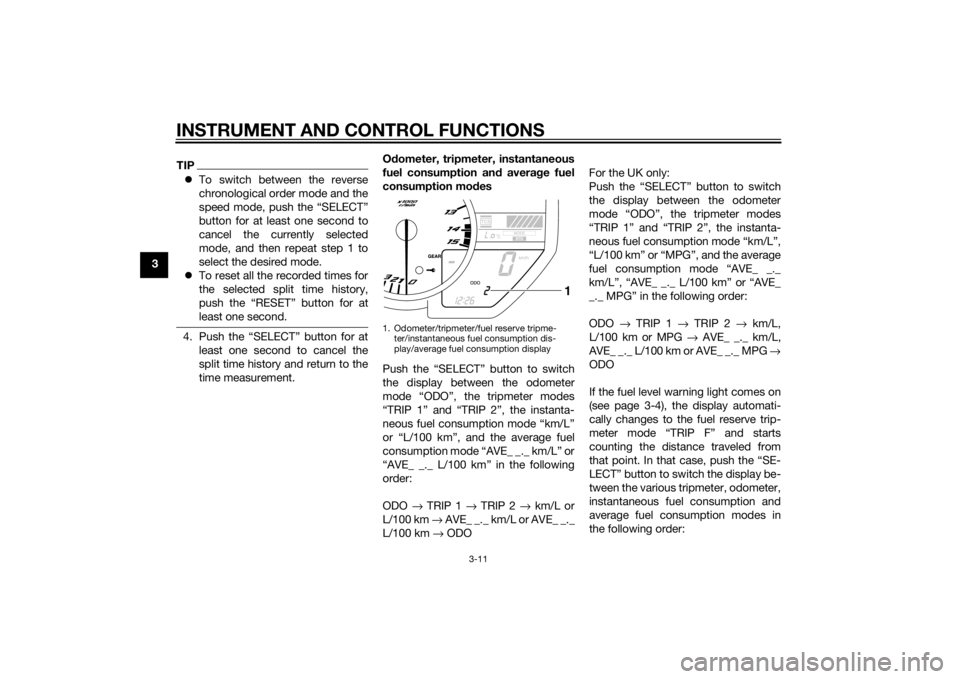
dometer, tripmeter, instantaneous
fuel consumption an d averag e fuel
consumption mo des
Push the “SELECT” button to switch
the display between the odometer
mode “ODO”, the tripmeter modes
“TRIP 1” and “TRIP 2”, the instanta-
neous fuel consumption mode “km/L”
or “L/100 km”, and the average fuel
consumption mode “AVE_ _._ km/L” or
“AVE_ _._ L/100 km” in the following
order:
ODO → TRIP 1 → TRIP 2 → km/L or
L/100 km → AVE_ _._ km/L or AVE_ _._
L/100 km → ODO For the UK only:
Push the “SELECT” button to switch
the display between the odometer
mode “ODO”, the tripmeter modes
“TRIP 1” and “TRIP 2”, the instanta-
neous fuel consumption mode “km/L”,
“L/100 km” or “MPG”, and the average
fuel consumption mode “AVE_ _._
km/L”, “AVE_ _._ L/100 km” or “AVE_
_._ MPG” in the following order:
ODO
→ TRIP 1 → TRIP 2 → km/L,
L/100 km or MPG → AVE_ _._ km/L,
AVE_ _._ L/100 km or AVE_ _._ MPG →
ODO
If the fuel level warning light comes on
(see page 3-4), the display automati-
cally changes to the fuel reserve trip-
meter mode “TRIP F” and starts
counting the distance traveled from
that point. In that case, push the “SE-
LECT” button to switch the display be-
tween the various tripmeter, odometer,
instantaneous fuel consumption and
average fuel consumption modes in
the following order:
1. Odometer/tripmeter/fuel reserve tripme- ter/instantaneous fuel consumption dis-
play/average fuel consumption display
1
U2SGE0E0.book Page 11 Wednesday, June 12, 2013 1:15 PM
Page 28 of 114
INSTRUMENT AND CONTROL FUNCTIONS
3-13
3
“AVE_ _._ km/L”: The average dis-
tance that can be traveled on 1.0 L
of fuel is shown.
“AVE_ _._ L/100 km”: The average
amount of fuel necessary to travel
100 km is shown.
“AVE_ _._ MPG” (for the UK only):
The average distance that can be
traveled on 1.0 Imp.gal of fuel is
shown.
To switch between the average fuel
consumption displays, push the “SE-
LECT” button for one second when
one of the displays is shown.
To reset the average fuel consumption
display, select it by pushing the “SE-
LECT” button, and then push the “RE-
SET” button for at least one second.
TIPAfter resetting an average fuel con-
sumption display, “_ _._” is shown for
that display until the vehicle has trav-
eled 1 km (0.6 mi).
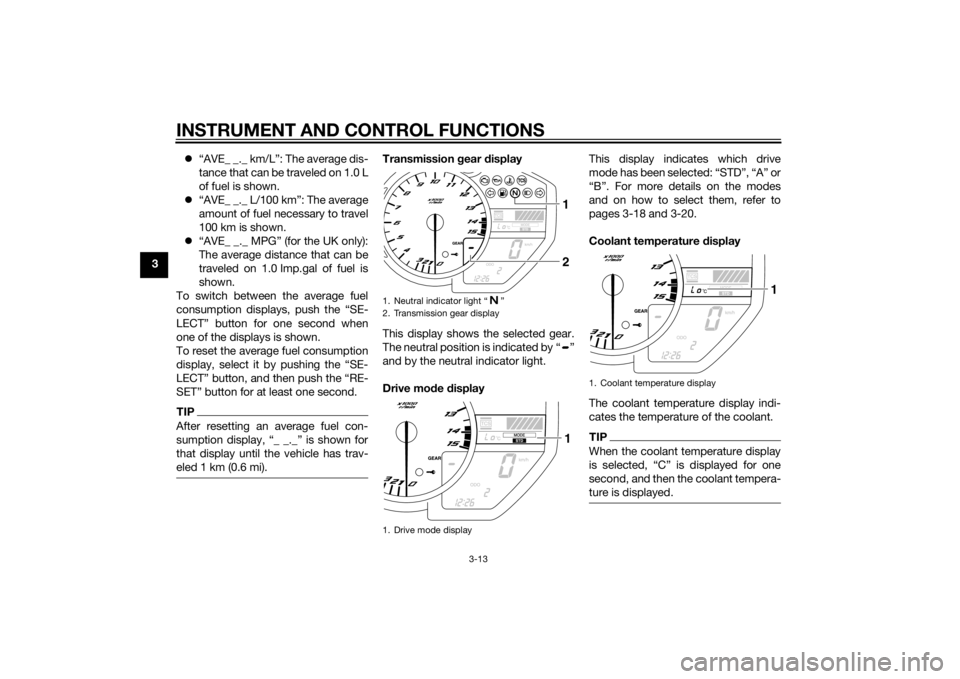
Transmission gear display
This display shows the selected gear.
The neutral position is indicated by “ ”
and by the neutral indicator light.
Drive mo de display This display indicates which drive
mode has been selected: “STD”, “A” or
“B”. For more details on the modes
and on how to select them, refer to
pages 3-18 and 3-20.
Coolant temperature
display
The coolant temperature display indi-
cates the temperature of the coolant.
TIPWhen the coolant temperature display
is selected, “C” is displayed for one
second, and then the coolant tempera-
ture is displayed.
1. Neutral indicator light “ ”
2. Transmission gear display
1. Drive mode display
211
1. Coolant temperature display
1
U2SGE0E0.book Page 13 Wednesday, June 12, 2013 1:15 PM
Page 29 of 114
INSTRUMENT AND CONTROL FUNCTIONS
3-14
3
NOTICE
ECA10022
Do not continue to operate the en-
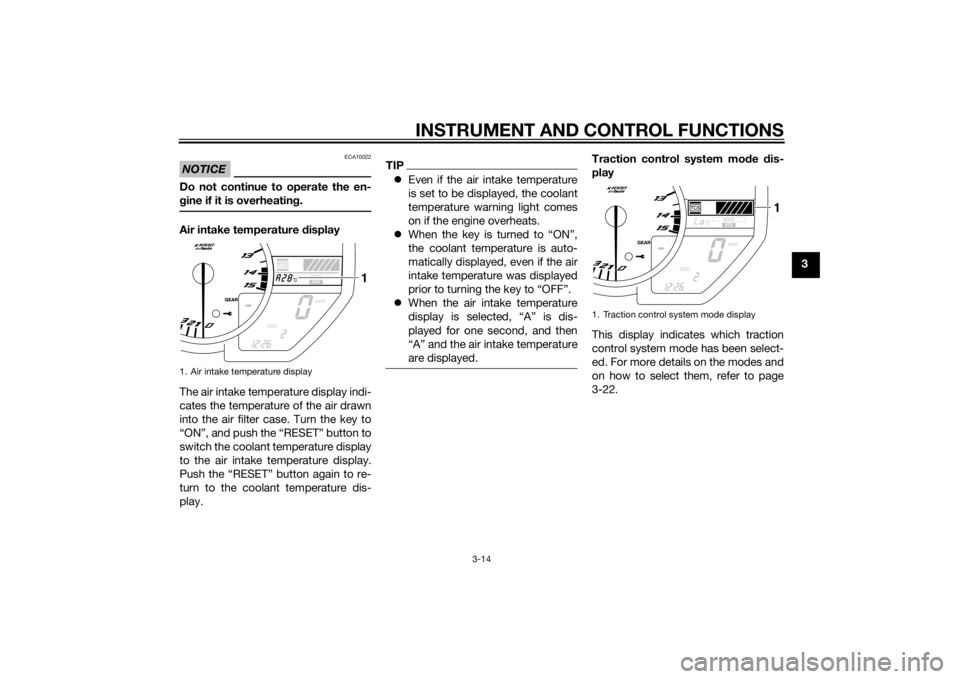
gine if it is overheatin g.Air intake temperature display
The air intake temperature display indi-
cates the temperature of the air drawn
into the air filter case. Turn the key to
“ON”, and push the “RESET” button to
switch the coolant temperature display
to the air intake temperature display.
Push the “RESET” button again to re-
turn to the coolant temperature dis-
play.
TIP Even if the air intake temperature
is set to be displayed, the coolant
temperature warning light comes
on if the engine overheats.
When the key is turned to “ON”,
the coolant temperature is auto-
matically displayed, even if the air
intake temperature was displayed
prior to turning the key to “OFF”.
When the air intake temperature
display is selected, “A” is dis-
played for one second, and then
“A” and the air intake temperature
are displayed.
Traction control system mo de dis-
play
This display indicates which traction
control system mode has been select-
ed. For more details on the modes and
on how to select them, refer to page
3-22.
1. Air intake temperature display
1
1. Traction control system mode display
1
U2SGE0E0.book Page 14 Wednesday, June 12, 2013 1:15 PM
Page 30 of 114
INSTRUMENT AND CONTROL FUNCTIONS
3-15
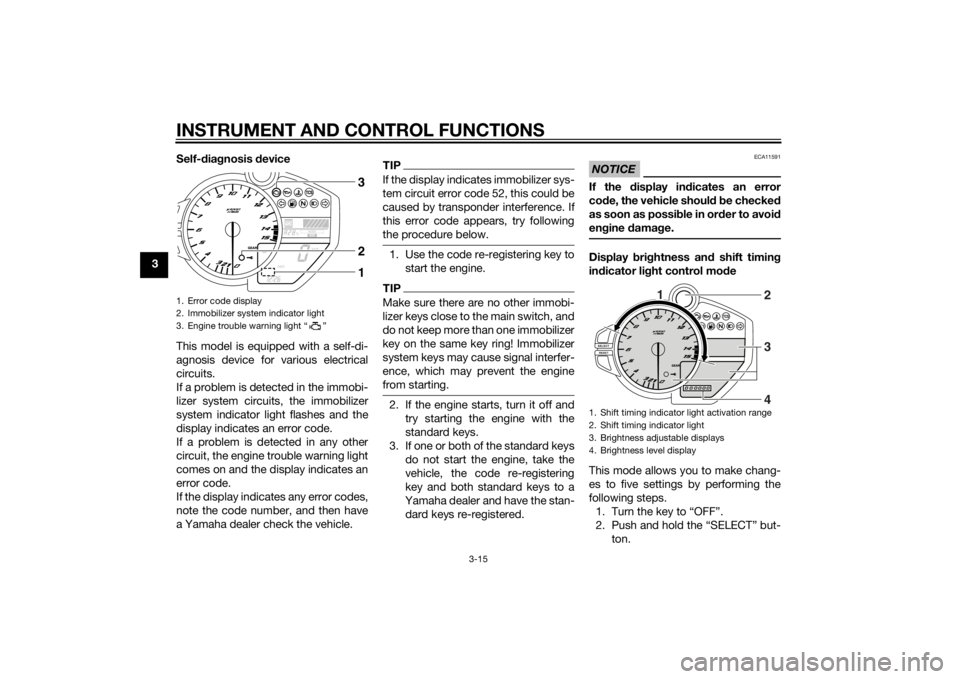
3Self-d
iagnosis device
This model is equipped with a self-di-
agnosis device for various electrical
circuits.
If a problem is detected in the immobi-
lizer system circuits, the immobilizer
system indicator light flashes and the
display indicates an error code.
If a problem is detected in any other
circuit, the engine trouble warning light
comes on and the display indicates an
error code.
If the display indicates any error codes,
note the code number, and then have
a Yamaha dealer check the vehicle.
TIPIf the display indicates immobilizer sys-
tem circuit error code 52, this could be
caused by transponder interference. If
this error code appears, try following
the procedure below.1. Use the code re-registering key to start the engine.TIPMake sure there are no other immobi-
lizer keys close to the main switch, and
do not keep more than one immobilizer
key on the same key ring! Immobilizer
system keys may cause signal interfer-
ence, which may prevent the engine
from starting.2. If the engine starts, turn it off andtry starting the engine with the
standard keys.
3. If one or both of the standard keys do not start the engine, take the
vehicle, the code re-registering
key and both standard keys to a
Yamaha dealer and have the stan-
dard keys re-registered.
NOTICE
ECA11591
If the display in dicates an error
co de, the vehicle shoul d b e checked
as soon as possi ble in or der to avoi d
en gine damag e.Display bri ghtness an d shift timin g
in dicator li ght control mo de
This mode allows you to make chang-
es to five settings by performing the
following steps. 1. Turn the key to “OFF”.
2. Push and hold the “SELECT” but- ton.
1. Error code display
2. Immobilizer system indicator light
3. Engine trouble warning light “ ”
132
1. Shift timing indicator light activation range
2. Shift timing indicator light
3. Brightness adjustable displays
4. Brightness level display
1
2
3
4
U2SGE0E0.book Page 15 Wednesday, June 12, 2013 1:15 PM
Page 31 of 114

INSTRUMENT AND CONTROL FUNCTIONS
3-16
3
3. Turn the key to “ON”, and then re-
lease the “SELECT” button after
five seconds. The display bright-
ness function is selected.
4. Push the “SELECT” button to switch the functions in the order
below.a. Display brightness: This function allows you to ad-
just the brightness of the dis-
plays and tachometer to suit
the outside lighting conditions.
b. Shift timing indicator light ac- tivity:
This function allows you to
choose whether or not the indi-
cator light should be activated
and whether it should flash or
stay on when activated.
c. Shift timing indicator light acti- vation:
This function allows you to se-
lect the engine speed at which
the indicator light is activated.
d. Shift timing indicator light de- activation: This function allows you to se-
lect the engine speed at which
the indicator light is deactivat-
ed.
e. Shift timing indicator light brightness:
This function allows you to ad-
just the brightness of the indi-
cator light to suit your
preference.
TIPThe display shows the current setting
for each function, except the shift tim-
ing indicator light activity function.To adjust the brightness of the multi-function meter displays and tachome-ter1. Turn the key to “OFF”.
2. Push and hold the “SELECT” but- ton.
3. Turn the key to “ON”, and then re- lease the “SELECT” button after
five seconds.
4. Push the “RESET” button to select the desired brightness level. 5. Push the “SELECT” button to con-
firm the selected brightness level.
The control mode changes to the
shift timing indicator light activity
function.
To set the shift timing indicator light ac-
tivity function1. Push the “RESET” button to select one of the following indicator light
activity settings: The indicator light stays on
when activated. (This setting
is selected when the indicator
light stays on.)
The indicator light flashes
when activated. (This setting
is selected when the indicator
light flashes four times per
second.)
The indicator light is deacti-
vated; in other words, it does
not come on or flash. (This
setting is selected when the
indicator light flashes once
every two seconds.)
U2SGE0E0.book Page 16 Wednesday, June 12, 2013 1:15 PM
Page 32 of 114
INSTRUMENT AND CONTROL FUNCTIONS
3-17
32. Push the “SELECT” button to con-
firm the selected indicator light ac-
tivity. The control mode changes
to the shift timing indicator light
activation function.
To set the shift timing indicator light ac-
tivation functionTIPThe shift timing indicator light activa-
tion function can be set between 7000
r/min and 15000 r/min. From 7000
r/min to 12000 r/min, the indicator light
can be set in increments of 500 r/min.
From 12000 r/min to 15000 r/min, the
indicator light can be set in increments
of 200 r/min.1. Push the “RESET” button to select the desired engine speed for acti-
vating the indicator light.
2. Push the “SELECT” button to con- firm the selected engine speed.
The control mode changes to the
shift timing indicator light deacti-
vation function. To set the shift timing indicator light
deactivation functionTIP
The shift timing indicator light de-
activation function can be set be-
tween 7000 r/min and 15000
r/min. From 7000 r/min to 12000
r/min, the indicator light can be set
in increments of 500 r/min. From
12000 r/min to 15000 r/min, the in-
dicator light can be set in incre-
ments of 200 r/min.
Be sure to set the deactivation
function to a higher engine speed
than for the activation function,
otherwise the shift timing indicator
light remains deactivated.1. Push the “RESET” button to select
the desired engine speed for de-
activating the indicator light.
2. Push the “SELECT” button to con- firm the selected engine speed.
The control mode changes to the
shift timing indicator light bright-
ness function. To adjust the shift timing indicator light
brightness1. Push the “RESET” button to select
the desired indicator light bright-
ness level.
2. Push the “SELECT” button to con- firm the selected indicator light
brightness level. The display re-
turns to the odometer or tripmeter
mode.
U2SGE0E0.book Page 17 Wednesday, June 12, 2013 1:15 PM