lock YAMAHA YZF-R1 2018 User Guide
[x] Cancel search | Manufacturer: YAMAHA, Model Year: 2018, Model line: YZF-R1, Model: YAMAHA YZF-R1 2018Pages: 130, PDF Size: 10.29 MB
Page 37 of 130
Instrument and control functions
4-15
1
2
345
6
7
8
9
10
11
12
MENU access and operation
The following wheel switch operations
are common operations for accessing,
selecting, and moving within the MENU
screen and its modules.
Long push - press and hold the wheel
switch for one second to access the
MENU screen or exit MENU entirely.
Select - rotate the wheel switch up or
down to highlight the desired module or
setting item and then short push the
wheel switch (briefly press the wheel
switch inward) to confirm the selection.
Triangle mark
- certain setting screens have an upward pointing triangle mark
item. Select the triangle mark to exit
that screen and move back one screen
(or long push the wheel switch to exit
MENU entirely).
TIPShould vehicle motion be detected, the
screen will automat
ically exit MENUand change to the main screen.
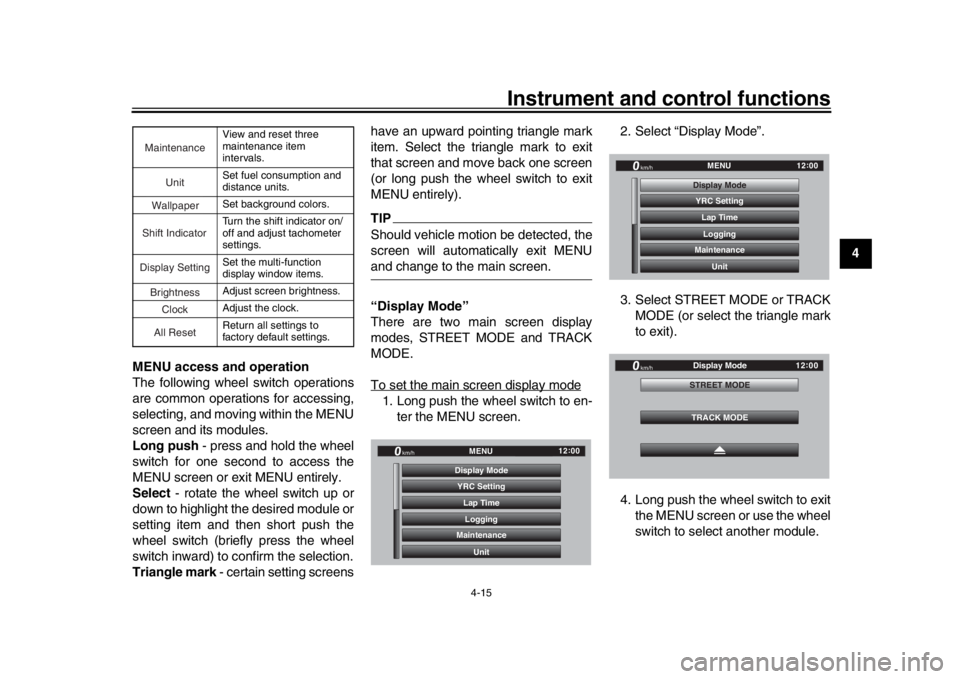
“Display Mode”
There are two main screen display
modes, STREET MODE and TRACK
MODE.
To set the main screen display mode1. Long push the wheel switch to en-
ter the MENU screen. 2. Select “Display Mode”.
3. Select STREET MODE or TRACK
MODE (or select the triangle mark
to exit).
4. Long push the wheel switch to exit the MENU screen or use the wheel
switch to select another module.
View and reset three
maintenance item
intervals.
Set fuel consumption and
distance units.
Set background colors.
Turn the shift indicator on/
off and adjust tachometer
settings.
Set the multi-function
display window items.
Adjust screen brightness.
Adjust the clock.
Return all settings to
factory default settings.
Maintenance
Unit
WallpaperShift IndicatorDisplay SettingBrightnessCloc
k
All Reset
YRC Setting
Lap TimeLogging
Maintenance
Unit
Display ModeMENU
km/h
GPS
12
:
00
YRC Setting
Lap TimeLogging
Maintenance
Unit
Display ModeMENU
km/h
GPS
12
:
00
km/h
12 :
00
TRACK MODE
STREET MODE
Display Mode
BX4-9-E1_1.book 15 ページ 2018年4月27日 金曜日 午後4時3分
Page 51 of 130

Instrument and control functions
4-29
1
2
345
6
7
8
9
10
11
12
4. Select STREET MODE 1-1.
5. Select the desired information dis-
play item with the wheel switch.
TIPThe information display items which
can be selected are:
A.TEMP: air temperature
C.TEMP: coolant temperature
TRIP-1: tripmeter 1 TRIP-2: tripmeter 2
ODO: odometer
FUEL CON: the amount of fuel con-
sumed
FUEL AVG: average fuel consumption
CRNT FUEL: current fuel consumption
6. Select STREET MODE 1-2 or TRACK MODE to set the remain-
ing DISPLAY-1 group items.
7. Select the triangle symbol to exit. To set the other display groups, re-
peat from step 3.
“Brightness”
This module allows you to adjust the
general brightness level of the display
screen. To set the brightness
1. Select “Brightness”.
2. Select the desired brightness level
by rotating the wheel switch, and
then short push the wheel switch
to fix the setting.
“Clock”
This module allows you to set the clock.
STREET MODE 1 - 1
A.TEMP
C.TEMP
C.TEMP
Display Setting DISPLAY-1
km/h
GPS
12 :
00
TRACK MODE STREET MODE 1 - 2 STREET MODE 1 - 1
A.TEMP
C.TEMP
C.TEMP
Display Setting
DISPLAY-1
km/h
GPS
12 :
00
TRACK MODE STREET MODE 1 - 2
STREET MODE 1 - 1
A.TEMP
C.TEMP
C.TEMP
Display Setting
DISPLAY-1
km/h
GPS
12 :
00
TRACK MODE STREET MODE 1 - 2
GPGPS
Wallpaper Unit
Shift Indicator
Display Setting MENU
Maintenance
Brightness
km/h
12 :
00
Brightness
km/h
GPS
12 :
00
2
BX4-9-E1_1.book 29 ページ 2018年4月27日 金曜日 午後4時3分
Page 52 of 130
Instrument and control functions
4-30
1
2
34
5
6
7
8
9
10
11
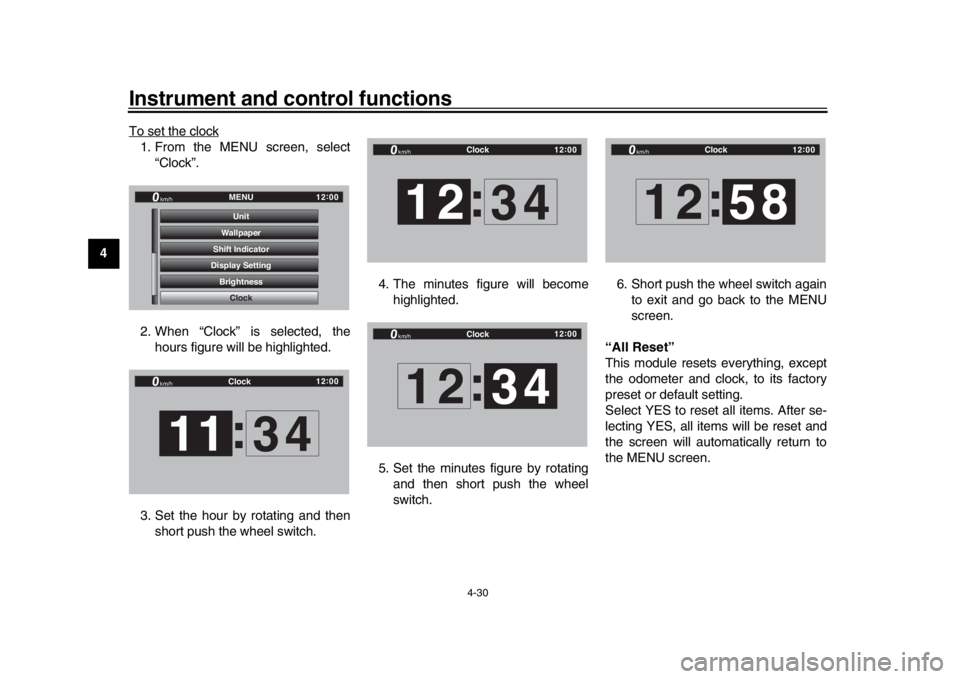
12 To set the clock
1. From the MENU screen, select
“Clock”.
2. When “Clock” is selected, the hours figure will be highlighted.
3. Set the hour by rotating and then short push the wheel switch. 4. The minutes figure will become
highlighted.
5. Set the minutes figure by rotating and then short push the wheel
switch. 6. Short push the wheel switch again
to exit and go back to the MENU
screen.
“All Reset”
This module resets everything, except
the odometer and clock, to its factory
preset or default setting.
Select YES to reset all items. After se-
lecting YES, all items will be reset and
the screen will automatically return to
the MENU screen.
GPGPS
Shift Indicator Wallpaper
Display Setting Brightness MENU
Unit
Clock
km/h
12 :
00
Clock
km/h
12 :
00
11 :
34
Clock
km/h
12 :
00
12 :
34
Clock
km/h
12 :
00
12 34
:
Clock
km/h
12 :
00
12 :
58
BX4-9-E1_1.book 30 ページ 2018年4月27日 金曜日 午後4時3分
Page 55 of 130
Instrument and control functions
4-33
1
2
345
6
7
8
9
10
11
12
EAU67041
Brake systemThis model is equipped with an inte-
grated anti-lock brake system (ABS)
and a variable unified brake system
(UBS).
Regarding ABS, operate the brakes as
you would conventional brakes. If the
ABS is activated, a pulsating sensation
may be felt at the brake lever or brake
pedal. In this situation, continue to ap-
ply the brakes and let the ABS work; do
not “pump” the brakes as this will re-
duce braking effectiveness.
WARNING
EWA16051
Always keep a sufficient distance
from the vehicle ahead to match the
riding speed even with ABS.
The ABS performs best with
long braking distances.
On certain surfaces, such as
rough or gravel roads, the brak-
ing distance may be longer withthe ABS than without.
The ABS and UBS hydraulic control
unit is monitored by the ABS ECU,
which will revert the system to conven- tional braking if a malfunction occurs.
TIP
The ABS performs a self-diagno-
sis test when the vehicle is started
and reaches a speed of 10 km/h (6
mi/h). During this test, a “clicking”
noise may be audible from the hy-
draulic control unit, and a vibration
may be felt at the bake lever or
pedal, but this is normal.
This ABS has a test mode which
allows the owner to experience the
pulsation at the brake lever or
brake pedal when the ABS is oper-
ating. However, special tools are
required, so please consult yourYamaha dealer.
NOTICE
ECA20100
Be careful not to damage the wheel
sensor or wheel sensor rotor; other-
wise, improper performance of theABS will result.
Regarding variable UBS, operating the
brake lever will generate corresponding
brake pressure at the front brake and to
a variable degree, the rear brake. The
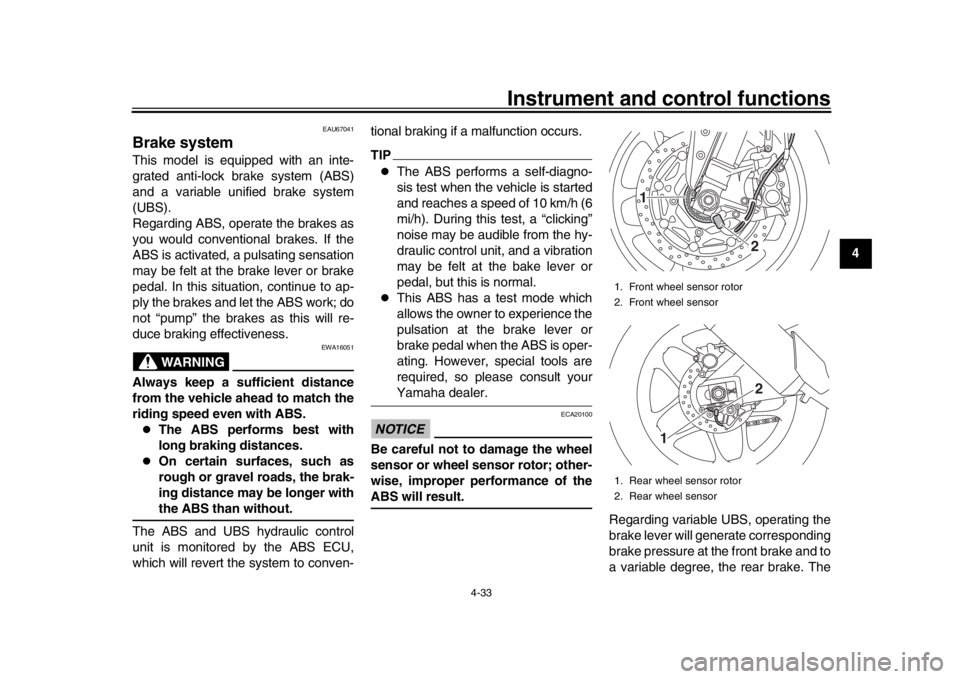
1. Front wheel sensor rotor
2. Front wheel sensor
1. Rear wheel sensor rotor
2. Rear wheel sensor
1
22
1
BX4-9-E1_1.book 33 ページ 2018年4月27日 金曜日 午後4時3分
Page 56 of 130

Instrument and control functions
4-34
1
2
34
5
6
7
8
9
10
11
12 amount of rear wheel braking force to
be applied by the UBS is based on ve-
hicle attitude and lean angle. However,
operating only the brake pedal will not
generate any brake pressure at the
front brake.
For full braking performance, apply
both the brake lever and brake pedal si-
multaneously.
When both the brake lever and the
brake pedal are applied simultaneous-
ly, the UBS will control the distribution
of braking force between the two
wheels.
TIP
The UBS does not function until
the vehicle starts moving.
After coming to a stop while apply-
ing the brake lever, the UBS is still
enabled. As further squeezing of
the brake lever will not increase
the braking power of the rear
brake, apply the rear brake should
further braking power be neces-
sary (such as when parking on a
slope).
The UBS disables after the brake
lever is released. When the vehicle starts moving,
the UBS is re-enabled.
EAU13076
Fuel tank capTo open the fuel tank cap
Open the fuel tank cap lock cover, in-
sert the key into the lock, and then turn
it 1/4 turn clockwise. The lock will be re-
leased and the fuel tank cap can be
opened.
To close the fuel tank cap
With the key still inserted in the lock,
push down the fuel tank cap. Turn the
key 1/4 turn counterclockwise, remove
it, and then close the lock cover.TIPThe fuel tank cap cannot be closed un-1. Fuel tank cap lock cover
2. Unlock.
1
2
BX4-9-E1_1.book 34 ページ 2018年4月27日 金曜日 午後4時3分
Page 57 of 130

Instrument and control functions
4-35
1
2
345
6
7
8
9
10
11
12
less the key is in the lock. In addition,
the key cannot be removed if the cap is
not properly closed and locked.
WARNING
EWA11092
Make sure that the fuel tank cap is
properly closed after filling fuel.Leaking fuel is a fire hazard.
EAU13222
FuelMake sure there is sufficient gasoline in
the tank.
WARNING
EWA10882
Gasoline and gasoline vapors are
extremely flammable. To avoid fires
and explosions and to reduce the
risk of injury when refueling, followthese instructions.
1. Before refueling, turn off the en- gine and be sure that no one is sit-
ting on the vehicle. Never refuel
while smoking, or while in the vi-
cinity of sparks, open flames, or
other sources of ignition such as
the pilot lights of water heaters and
clothes dryers.
2. Do not overfill the fuel tank. When refueling, be sure to insert the
pump nozzle into the fuel tank filler
hole. Stop filling when the fuel
reaches the bottom of the filler
tube. Because fuel expands when
it heats up, heat from the engine or
the sun can cause fuel to spill out
of the fuel tank. 3. Wipe up any spilled fuel immedi-
ately. NOTICE: Immediately wipe
off spilled fuel with a clean, dry,
soft cloth, since fuel may deteri-
orate painted surfaces or plastic
parts.
[ECA10072]
4. Be sure to securely close the fuel tank cap.
WARNING
EWA15152
Gasoline is poisonous and can
cause injury or death. Handle gaso-
line with care. Never siphon gaso-
line by mouth. If you should swallow
some gasoline or inhale a lot of gas-
oline vapor, or get some gasoline in1. Fuel tank filler tube
2. Maximum fuel level
1
2
BX4-9-E1_1.book 35 ページ 2018年4月27日 金曜日 午後4時3分
Page 59 of 130

Instrument and control functions
4-37
1
2
345
6
7
8
9
10
11
12
EAU80200
Fuel tank overflow hoseBefore operating the vehicle:
Check the fuel tank overflow hose
connection.
Check the fuel tank overflow hose
for cracks or damage, and replace
it if necessary.
Make sure that the end of the fuel
tank overflow hose is not blocked,
and clean it if necessary.
Make sure that the end of the fuel
tank overflow hos e is positioned as
shown.
TIPSee page 7-12 for canister information.
EAU13434
Catalytic converterThis model is equipped with a catalytic
converter in the exhaust system.
WARNING
EWA10863
The exhaust system is hot after op-
eration. To prevent a fire hazard or
burns:
Do not park the vehicle near
possible fire hazards such as
grass or other materials that
easily burn.
Park the vehicle in a place
where pedestrians or children
are not likely to touch the hot
exhaust system.
Make sure that the exhaust sys-
tem has cooled down before do-
ing any maintenance work.
Do not allow the engine to idle
more than a few minutes. Long
idling can cause a build-up ofheat.
NOTICE
ECA10702
Use only unleaded gasoline. The use
of leaded gasoline will cause unre-
1. Clamp
2. Paint mark
3. Fuel tank overflow hose
1
2
3
BX4-9-E1_1.book 37 ページ 2018年4月27日 金曜日 午後4時3分
Page 60 of 130

Instrument and control functions
4-38
1
2
34
5
6
7
8
9
10
11
12 pairable damage to the catalytic
converter.
EAU66570
SeatsPassenger seat
To remove the passenger seat1. Insert the key into the seat lock,
and then turn it clockwise.
2. Lift the front of the passenger seat and pull it forward.
To install the passenger seat1. Insert the projection on the rear of the passenger seat into the seat
holder as shown, and then push
the front of the seat down to lock it
in place. 2. Remove the key.
Rider seat
To remove the rider seat
1. Remove the passenger seat.
2. Pull up the corners on the rear of the rider seat as shown, remove
the bolts with the hexagon wrench
located under the passenger seat,
and then pull the seat off.
1. Seat lock
2. Unlock.
12
1. Projection
2. Seat holder
1
2
BX4-9-E1_1.book 38 ページ 2018年4月27日 金曜日 午後4時3分
Page 66 of 130

Instrument and control functions
4-44
1
2
34
5
6
7
8
9
10
11
12
EAU66493
Adjusting th e shock absorber
assembly
WARNING
EWA10222
This shock absorber assembly con-
tains highly pressurized nitrogen
gas. Read and understand the fol-
lowing information before handling
the shock absorber assembly.
Do not tamper with or attempt to
open the cylinder assembly.
Do not subject the shock ab-
sorber assembly to an open
flame or other high heat source.
This may cause the unit to ex-
plode due to excessive gas
pressure.
Do not deform or damage the
cylinder in any way. Cylinder
damage will result in poor
damping performance.
Do not dispose of a damaged or
worn-out shock absorber as-
sembly yourself. Take the shock
absorber assembly to a Yamahadealer for any service.
NOTICE
ECA10102
To avoid damaging the mechanism,
do not attempt to turn beyond themaximum or minimum settings.
For YZF-R1:
This model is equipped with adjustable
suspension. The spring preload, re-
bound damping force, fast compres-
sion damping force, and slow
compression damping force can be ad-
justed.
Spring preload
1. Loosen the locknut.
2. To increase the spring preload and thereby harden the suspension,
turn the adjusting ring in direction
(a). To decrease the spring pre-
load and thereby soften the sus-
pension, turn the adjusting ring in
direction (b).
The spring preload setting is deter-
mined by measuring distance A.
The longer distance A is, the high-
er the spring preload; the shorter
distance A is, the lower the spring preload.
Use the special wrench includ-
ed in the owner’s tool kit to
make the adjustment.
1. Spring preload adjusting ring
2. Locknut
1. Distance A
(a)
(b)1
2
1
BX4-9-E1_1.book 44 ページ 2018年4月27日 金曜日 午後4時3分
Page 67 of 130

Instrument and control functions
4-45
1
2
345
6
7
8
9
10
11
12
3. Tighten the locknut to the specified
torque. NOTICE: Always tighten
the locknut against the adjust-
ing ring, and then tighten the
locknut to the specified
torque.
[ECA22760]
Rebound damping force
To increase the rebound damping force
and thereby harden the rebound damp-
ing, turn the adjusting screw in direction
(a). To decrease the rebound damping
force and thereby soften the rebound
damping, turn the adjusting screw in di-
rection (b). Compression damping force
Fast compression damping force
To increase the compression damping
force and thereby harden the fast com-
pression damping, turn the adjusting
bolt in direction (a). To decrease the
compression damping force and there-by soften the compression damping,
turn the adjusting bolt in direction (b).
Slow compression damping force
To increase the compression damping
force and thereby harden the slow
compression damping, turn the adjust-
ing screw in direction (a). To decrease
Spring preload:
Minimum (soft): Distance A = 77.5 mm (3.05 in)
Standard:
Distance A = 79.0 mm (3.11 in)
Maximum (hard): Distance A = 85.5 mm (3.37 in)
Tightening torque: Locknut: 25 N·m (2.5 kgf·m, 18 lb·ft)
1. Rebound damping force adjusting screwRebound damping setting:Minimum (soft):
23 click(s) in direction (b)*
Standard: 12 click(s) in direction (b)*
Maximum (hard): 1 click(s) in direction (b)*
* With the adjusting screw fully turned
in direction (a)(a) (b)
1
1. Fast compression damping force
adjusting boltFast compression damping settingMinimum (soft):
5.5 turn(s) in direction (b)*
Standard: 3 turn(s) in direction (b)*
Maximum (hard): 0 turn(s) in direction (b)*
* With the adjusting bolt fully turned in
direction (a)
(a) (b)
1
BX4-9-E1_1.book 45 ページ 2018年4月27日 金曜日 午後4時3分