wheel YAMAHA YZF-R1 2018 Owner's Manual
[x] Cancel search | Manufacturer: YAMAHA, Model Year: 2018, Model line: YZF-R1, Model: YAMAHA YZF-R1 2018Pages: 130, PDF Size: 10.29 MB
Page 48 of 130
Instrument and control functions
4-26
1
2
34
5
6
7
8
9
10
11
12 range is 8500–15000 r/min.
TIPThe blue area on the tachometer indi-
cates the currently set operationalrange of the shift indicator light.
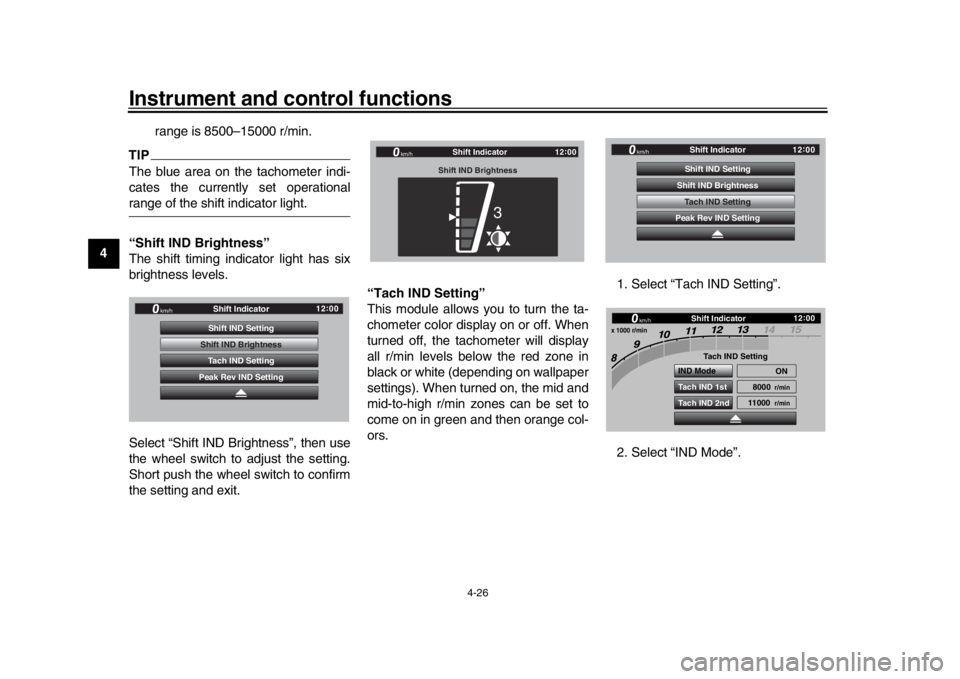
“Shift IND Brightness”
The shift timing indicator light has six
brightness levels.
Select “Shift IND Brightness”, then use
the wheel switch to adjust the setting.
Short push the wheel switch to confirm
the setting and exit.
“Tach IND Setting”
This module allows you to turn the ta-
chometer color display on or off. When
turned off, the tachometer will display
all r/min levels below the red zone in
black or white (depending on wallpaper
settings). When turned on, the mid and
mid-to-high r/min zones can be set to
come on in green and then orange col-
ors.
1. Select “Tach IND Setting”.
2. Select “IND Mode”.
GP GPS
Tach IND Setting
Shift IND Brightness
Peak Rev IND Setting Shift Indicator
Shift IND Setting
km/h
12 :
00
Shift Indicator
Shift IND Brightness
km/h
GPS
12 :
00
3
GPGPS
Tach IND Setting
Shift IND Brightness
Peak Rev IND Setting Shift Indicator
Shift IND Setting
km/h
12 :
00
Shift Indicator
km/h
x 1000 r/min
GPS
12 :
00
Tach IND Setting
IND Mode ON
8000
r/min
11000
r/min
Tach IND 1st
Tach IND 2nd
BX4-9-E1_1.book 26 ページ 2018年4月27日 金曜日 午後4時3分
Page 49 of 130
Instrument and control functions
4-27
1
2
345
6
7
8
9
10
11
12
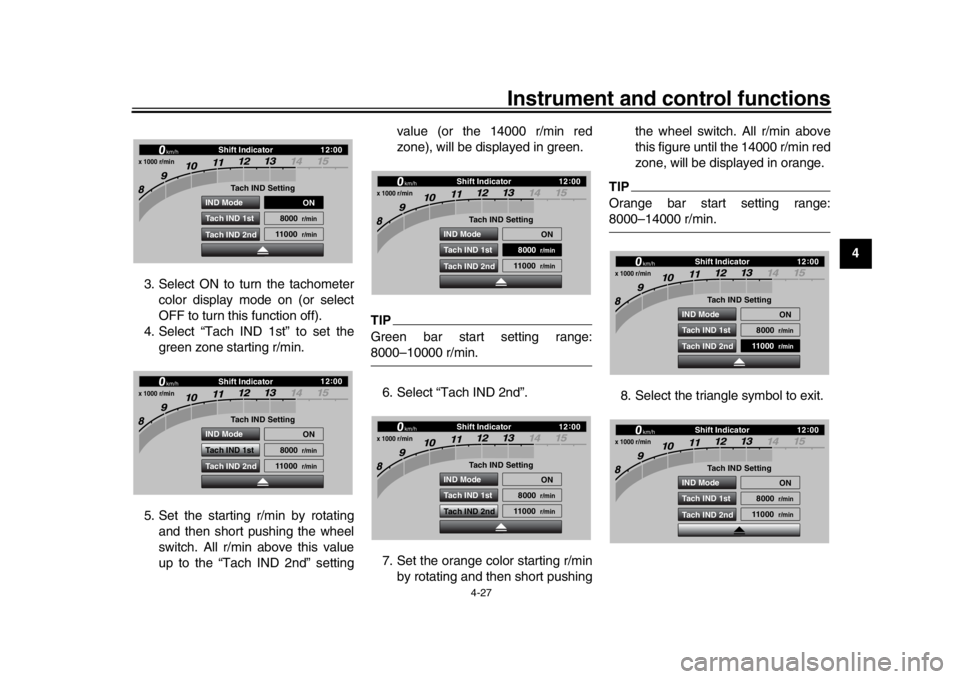
3. Select ON to turn the tachometer
color display mode on (or select
OFF to turn this function off).
4. Select “Tach IND 1st” to set the green zone starting r/min.
5. Set the starting r/min by rotating and then short pushing the wheel
switch. All r/min above this value
up to the “Tach IND 2nd” setting value (or the 14000 r/min red
zone), will be displayed in green.
TIPGreen bar start setting range:8000–10000 r/min.
6. Select “Tach IND 2nd”.
7. Set the orange color starting r/min by rotating and then short pushing the wheel switch. All r/min above
this figure until the 14000 r/min red
zone, will be displayed in orange.
TIPOrange bar start setting range:8000–14000 r/min.
8. Select the triangle symbol to exit.
Shift Indicator
km/h
x 1000 r/min
GPS
12 :
00
Tach IND Setting
IND Mode ON
8000
r/min
11000
r/min
Tach IND 1st
Tach IND 2ndShift Indicator
km/h
x 1000 r/min
GPS
12 :
00
Tach IND Setting
IND Mode ON
8000
r/min
11000
r/min
Tach IND 1st
Tach IND 2nd
Shift Indicator
km/h
x 1000 r/min
GPS
12 :
00
Tach IND Setting
IND Mode ON
8000
r/min
11000
r/min
Tach IND 1st
Tach IND 2ndShift Indicator
km/h
x 1000 r/min
GPS
12 :
00
Tach IND Setting
IND Mode ON
8000
r/min
11000
r/min
Tach IND 1st
Tach IND 2nd
Shift Indicator
km/h
x 1000 r/min
GPS
12 :
00
Tach IND Setting
IND Mode ON
8000
r/min
11000
r/min
Tach IND 1st
Tach IND 2ndShift Indicator
km/h
x 1000 r/min
GPS
12 :
00
Tach IND Setting
IND Mode ON
8000
r/min
11000
r/min
Tach IND 1st
Tach IND 2nd
BX4-9-E1_1.book 27 ページ 2018年4月27日 金曜日 午後4時3分
Page 51 of 130

Instrument and control functions
4-29
1
2
345
6
7
8
9
10
11
12
4. Select STREET MODE 1-1.
5. Select the desired information dis-
play item with the wheel switch.
TIPThe information display items which
can be selected are:
A.TEMP: air temperature
C.TEMP: coolant temperature
TRIP-1: tripmeter 1 TRIP-2: tripmeter 2
ODO: odometer
FUEL CON: the amount of fuel con-
sumed
FUEL AVG: average fuel consumption
CRNT FUEL: current fuel consumption
6. Select STREET MODE 1-2 or TRACK MODE to set the remain-
ing DISPLAY-1 group items.
7. Select the triangle symbol to exit. To set the other display groups, re-
peat from step 3.
“Brightness”
This module allows you to adjust the
general brightness level of the display
screen. To set the brightness
1. Select “Brightness”.
2. Select the desired brightness level
by rotating the wheel switch, and
then short push the wheel switch
to fix the setting.
“Clock”
This module allows you to set the clock.
STREET MODE 1 - 1
A.TEMP
C.TEMP
C.TEMP
Display Setting DISPLAY-1
km/h
GPS
12 :
00
TRACK MODE STREET MODE 1 - 2 STREET MODE 1 - 1
A.TEMP
C.TEMP
C.TEMP
Display Setting
DISPLAY-1
km/h
GPS
12 :
00
TRACK MODE STREET MODE 1 - 2
STREET MODE 1 - 1
A.TEMP
C.TEMP
C.TEMP
Display Setting
DISPLAY-1
km/h
GPS
12 :
00
TRACK MODE STREET MODE 1 - 2
GPGPS
Wallpaper Unit
Shift Indicator
Display Setting MENU
Maintenance
Brightness
km/h
12 :
00
Brightness
km/h
GPS
12 :
00
2
BX4-9-E1_1.book 29 ページ 2018年4月27日 金曜日 午後4時3分
Page 52 of 130
Instrument and control functions
4-30
1
2
34
5
6
7
8
9
10
11
12 To set the clock
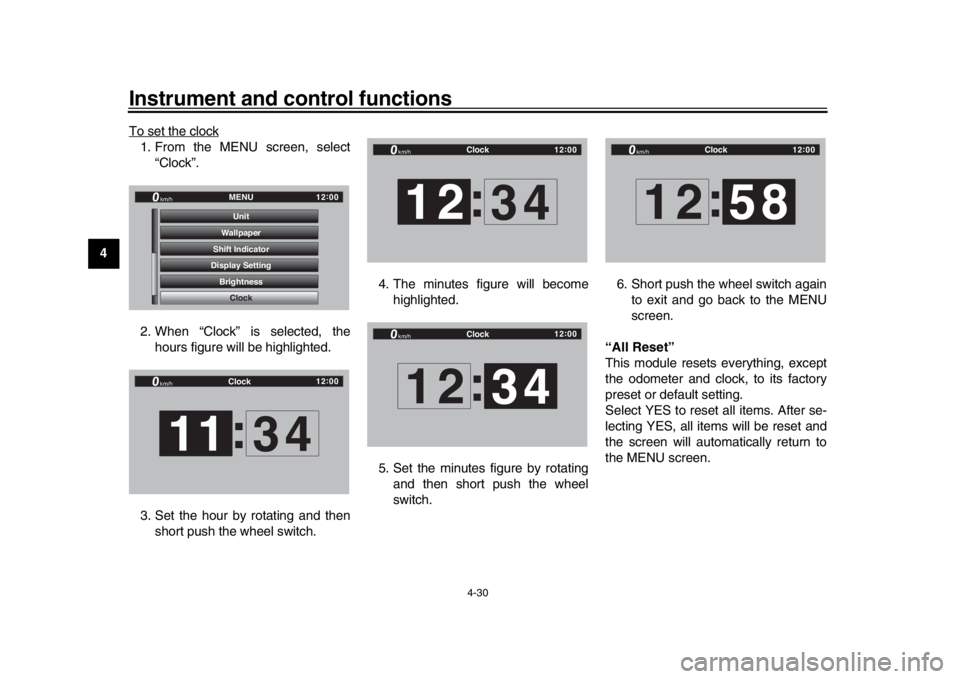
1. From the MENU screen, select
“Clock”.
2. When “Clock” is selected, the hours figure will be highlighted.
3. Set the hour by rotating and then short push the wheel switch. 4. The minutes figure will become
highlighted.
5. Set the minutes figure by rotating and then short push the wheel
switch. 6. Short push the wheel switch again
to exit and go back to the MENU
screen.
“All Reset”
This module resets everything, except
the odometer and clock, to its factory
preset or default setting.
Select YES to reset all items. After se-
lecting YES, all items will be reset and
the screen will automatically return to
the MENU screen.
GPGPS
Shift Indicator Wallpaper
Display Setting Brightness MENU
Unit
Clock
km/h
12 :
00
Clock
km/h
12 :
00
11 :
34
Clock
km/h
12 :
00
12 :
34
Clock
km/h
12 :
00
12 34
:
Clock
km/h
12 :
00
12 :
58
BX4-9-E1_1.book 30 ページ 2018年4月27日 金曜日 午後4時3分
Page 55 of 130
Instrument and control functions
4-33
1
2
345
6
7
8
9
10
11
12
EAU67041
Brake systemThis model is equipped with an inte-
grated anti-lock brake system (ABS)
and a variable unified brake system
(UBS).
Regarding ABS, operate the brakes as
you would conventional brakes. If the
ABS is activated, a pulsating sensation
may be felt at the brake lever or brake
pedal. In this situation, continue to ap-
ply the brakes and let the ABS work; do
not “pump” the brakes as this will re-
duce braking effectiveness.
WARNING
EWA16051
Always keep a sufficient distance
from the vehicle ahead to match the
riding speed even with ABS.
The ABS performs best with
long braking distances.
On certain surfaces, such as
rough or gravel roads, the brak-
ing distance may be longer withthe ABS than without.
The ABS and UBS hydraulic control
unit is monitored by the ABS ECU,
which will revert the system to conven- tional braking if a malfunction occurs.
TIP
The ABS performs a self-diagno-
sis test when the vehicle is started
and reaches a speed of 10 km/h (6
mi/h). During this test, a “clicking”
noise may be audible from the hy-
draulic control unit, and a vibration
may be felt at the bake lever or
pedal, but this is normal.
This ABS has a test mode which
allows the owner to experience the
pulsation at the brake lever or
brake pedal when the ABS is oper-
ating. However, special tools are
required, so please consult yourYamaha dealer.
NOTICE
ECA20100
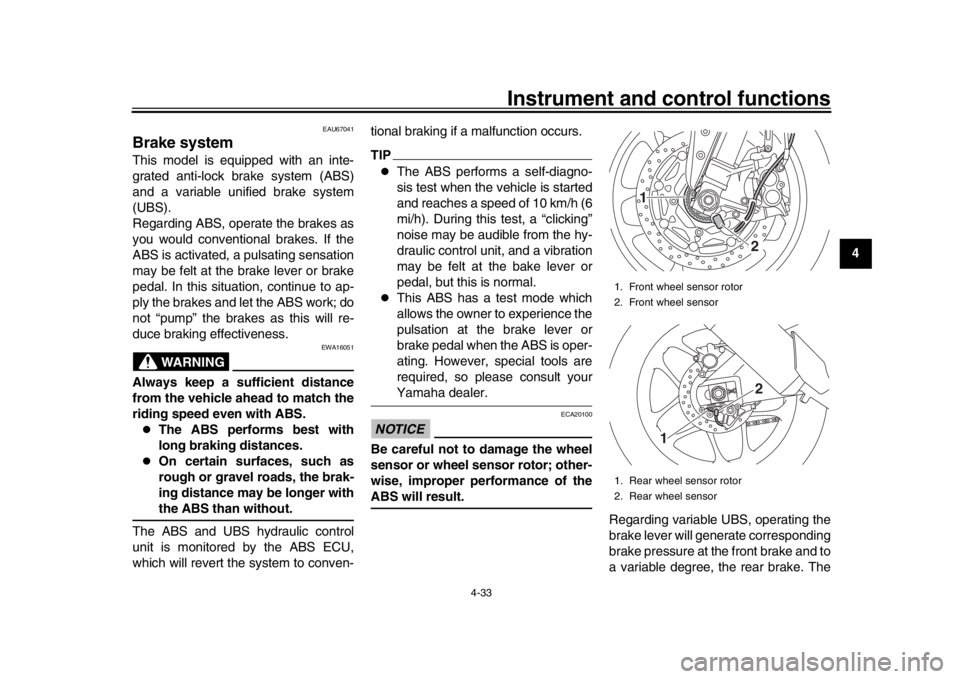
Be careful not to damage the wheel
sensor or wheel sensor rotor; other-
wise, improper performance of theABS will result.
Regarding variable UBS, operating the
brake lever will generate corresponding
brake pressure at the front brake and to
a variable degree, the rear brake. The
1. Front wheel sensor rotor
2. Front wheel sensor
1. Rear wheel sensor rotor
2. Rear wheel sensor
1
22
1
BX4-9-E1_1.book 33 ページ 2018年4月27日 金曜日 午後4時3分
Page 56 of 130

Instrument and control functions
4-34
1
2
34
5
6
7
8
9
10
11
12 amount of rear wheel braking force to
be applied by the UBS is based on ve-
hicle attitude and lean angle. However,
operating only the brake pedal will not
generate any brake pressure at the
front brake.
For full braking performance, apply
both the brake lever and brake pedal si-
multaneously.
When both the brake lever and the
brake pedal are applied simultaneous-
ly, the UBS will control the distribution
of braking force between the two
wheels.
TIP
The UBS does not function until
the vehicle starts moving.
After coming to a stop while apply-
ing the brake lever, the UBS is still
enabled. As further squeezing of
the brake lever will not increase
the braking power of the rear
brake, apply the rear brake should
further braking power be neces-
sary (such as when parking on a
slope).
The UBS disables after the brake
lever is released. When the vehicle starts moving,
the UBS is re-enabled.
EAU13076
Fuel tank capTo open the fuel tank cap
Open the fuel tank cap lock cover, in-
sert the key into the lock, and then turn
it 1/4 turn clockwise. The lock will be re-
leased and the fuel tank cap can be
opened.
To close the fuel tank cap
With the key still inserted in the lock,
push down the fuel tank cap. Turn the
key 1/4 turn counterclockwise, remove
it, and then close the lock cover.TIPThe fuel tank cap cannot be closed un-1. Fuel tank cap lock cover
2. Unlock.
1
2
BX4-9-E1_1.book 34 ページ 2018年4月27日 金曜日 午後4時3分
Page 74 of 130

For your safety – pre-operation checks
5-2
1
2
3
45
6
7
8
9
10
11
12
Rear brake Check operation.
If soft or spongy, have Yamaha dealer bleed hydraulic system.
Check brake pads for wear.
Replace if necessary.
Check fluid level in reservoir.
If necessary, add specified brake fluid to specified level.
Check hydraulic system for leakage. 7-23, 7-24
Clutch Check operation.
Lubricate cable if necessary.
Check lever free play.
Adjust if necessary. 7-21
Throttle grip Make sure that operation is smooth.
Check throttle grip free play.
If necessary, have Yamaha dealer adjust throttle grip free play and lubricate cable
and grip housing. 7-17, 7-27
Control cables Make sure that operation is smooth.
Lubricate if necessary. 7-27
Drive chain Check chain slack.
Adjust if necessary.
Check chain condition.
Lubricate if necessary. 7-25, 7-26
Wheels and tires Check for damage.
Check tire condition and tread depth.
Check air pressure.
Correct if necessary. 7-18, 7-20
Brake and shift pedals Make sure that operation is smooth.
Lubricate pedal pivoting points if necessary. 7-28
Brake and clutch levers Make sure that operation is smooth.
Lubricate lever pivoting points if necessary. 7-28
Sidestand Make sure that operation is smooth.
Lubricate pivot if necessary. 7-29
Chassis fasteners Make sure that all nuts, bolts
and screws are properly tightened.
Tighten if necessary. —
ITEM CHECKS PAGE
BX4-9-E1_1.book 2 ページ 2018年4月27日 金曜日 午後4時3分
Page 83 of 130

Periodic maintenance and adjustment
7-4
1
2
3
4
5
678
9
10
11
12
EAU71351
General maintenance an d lubrication chartNO. ITEM CHECK OR MAINTENANCE JOB ODOMETER READING
ANNUAL
CHECK
1000 km
(600 mi) 10000 km
(6000 mi) 20000 km
(12000 mi) 30000 km
(18000 mi) 40000 km
(24000 mi)
1 *Diagnostic system
check Perform dynamic inspection using
Yamaha diagnostic tool.
Check the error codes.
2 *Air filter element Replace. Every 40000 km (24000 mi)
3Clutch Check operation.
Adjust.
4 *Front brake Check operation, fluid level, and
for fluid leakage.
Replace brake pads if necessary.
5 *Rear brake Check operation, fluid level, and
for fluid leakage.
Replace brake pads if necessary.
6 *Brake hoses Check for cracks or damage.
Replace. Every 4 years
7 *Brake fluid Change. Every 2 years
8 *Wheels Check runout and for damage.
Replace if necessary.
9 *Tires Check tread depth and for
damage.
Replace if necessary.
Check air pressure.
Correct if necessary.
10 *Wheel bearings Check bearing for looseness or
damage.
11 *Swingarm pivot
bearings Check operation and for
excessive play.
Lubricate with lithium-soap-based grease. Every 50000 km (30000 mi)
BX4-9-E1_1.book 4 ページ 2018年4月27日 金曜日 午後4時3分
Page 98 of 130

Periodic maintenance and adjustment
7-19
1
2
3
4
5
67
8
9
10
11
12 The tires should be checked before
each ride. If the center tread depth
reaches the specified limit, if the tire
has a nail or glass fragments in it, or if
the sidewall is cracked, have a Yamaha
dealer replace the tire immediately.
TIPThe tire tread depth limits may differ
from country to country. Always complywith the local regulations.
WARNING
EWA10472
Have a Yamaha dealer replace
excessively worn tires. Besides
being illegal, operating the vehi-
cle with excessively worn tires
decreases riding stability and
can lead to loss of control.
The replacement of all wheel
and brake-related parts, includ-
ing the tires, should be left to a
Yamaha dealer, who has the
necessary professional knowl-
edge and experience to do so.
Ride at moderate speeds after
changing a tire since the tire
surface must first be “broken
in” for it to develop its optimalcharacteristics.
Tire information
This model is equipped with tubeless
tires and tire air valves.
Tires age, even if they have not been
used or have only been used occasion-
ally. Cracking of the tread and sidewall
rubber, sometimes accompanied by
carcass deformation, is an evidence of
ageing. Old and aged tires should be checked by tire specialists to ascertain
their suitability for further use.
WARNING
EWA10482
The front and rear tires should
be of the same make and de-
sign, otherwise the handling
characteristics of the motorcy-
cle may be different, which
could lead to an accident.
Always make sure that the valve
caps are securely installed to
prevent air pressure leakage.
Use only the tire valves and
valve cores listed below to
avoid tire deflation during ahigh-speed ride.
After extensive tests, only the tires list-
ed below are approved for this model
by Yamaha.
Minimum tire tread depth (front and
rear): 1.6 mm (0.06 in)
1. Tire air valve
2. Tire air valve core
3. Tire air valve cap with seal
BX4-9-E1_1.book 19 ページ 2018年4月27日 金曜日 午後4時3分
Page 99 of 130

Periodic maintenance and adjustment7-20
1
2
3
4
5
678
9
10
11
12
WARNING
EWA10601
This motorcycle is fitted with su-
per-high-speed tires. Note the fol-
lowing points in order to make the
most efficient use of these tires.
Use only the specified replace-
ment tires. Other tires may run
the danger of bursting at super
high speeds.
Brand-new tires can have a rela-
tively poor grip on certain road surfaces until they have been
“broken in”. Therefore, it is ad-
visable before doing any
high-speed riding to ride con-
servatively for approximately
100 km (60 mi) after installing a
new tire.
The tires must be warmed up
before a high-speed run.
Always adjust the tire air pres-
sure according to the operatingconditions.
EAU66460
Cast magnesium wheelsTo maximize the performance, durabil-
ity, and safe operation of your motorcy-
cle, note the following points regarding
these wheels.
The wheel rims should be checked
for cracks, bends, warpage or
damage before each ride. If any
damage is found, have a Yamaha
dealer replace the wheel. Do not
attempt even the smallest repair to
the wheel. A deformed or cracked
wheel must be replaced.
The wheel should be balanced
whenever the tire or wheel has
been changed or replaced. An un-
balanced wheel can result in poor
performance, adverse handling
characteristics, and shortened tire
life.
These wheels are made of magnesium
and require special care.
When balancing the wheel, use
press-on type weights to avoid
scratching the wheel.
Regularly inspect the wheel for
nicks and scratches. Use touch-up
paint or other sealant to prevent
Front tire: Size: 120/70ZR17M/C (58W)
Manufacturer/model:
BRIDGESTONE/BATTLAX RAC-
ING STREET RS10F
Rear tire:
Size: 190/55ZR17M/C (75W) (YZF-R1)
200/55ZR17M/C (78W)
(YZF-R1M)
Manufacturer/model: BRIDGESTONE/BATTLAX RAC-
ING STREET RS10R
FRONT and REAR: Tire air valve:
TR412
Valve core: #9100 (original)
BX4-9-E1_1.book 20 ページ 2018年4月27日 金曜日 午後4時3分