light YAMAHA YZF-R6 2017 User Guide
[x] Cancel search | Manufacturer: YAMAHA, Model Year: 2017, Model line: YZF-R6, Model: YAMAHA YZF-R6 2017Pages: 114, PDF Size: 4.2 MB
Page 23 of 114
Instrument and control functions
4-5
4
EAU66010Hazar d switch “ ”
With the key in the “ON” or “ ” posi-
tion, use this switch to turn on the haz-
ard lights (simultaneous flashing of all
turn signal lights).
The hazard lights are used in case of an
emergency or to warn other drivers
when your vehicle is stopped where it
might be a traffic hazard.
NOTICE
ECA10062
Do not use the hazar d lig hts for an
exten ded len gth of time with the en-
g ine not runnin g, otherwise the bat-
tery may dischar ge.
EAU73931Drive mo de switch “MODE”
See page 3-1 for an explanation of the
drive mode.
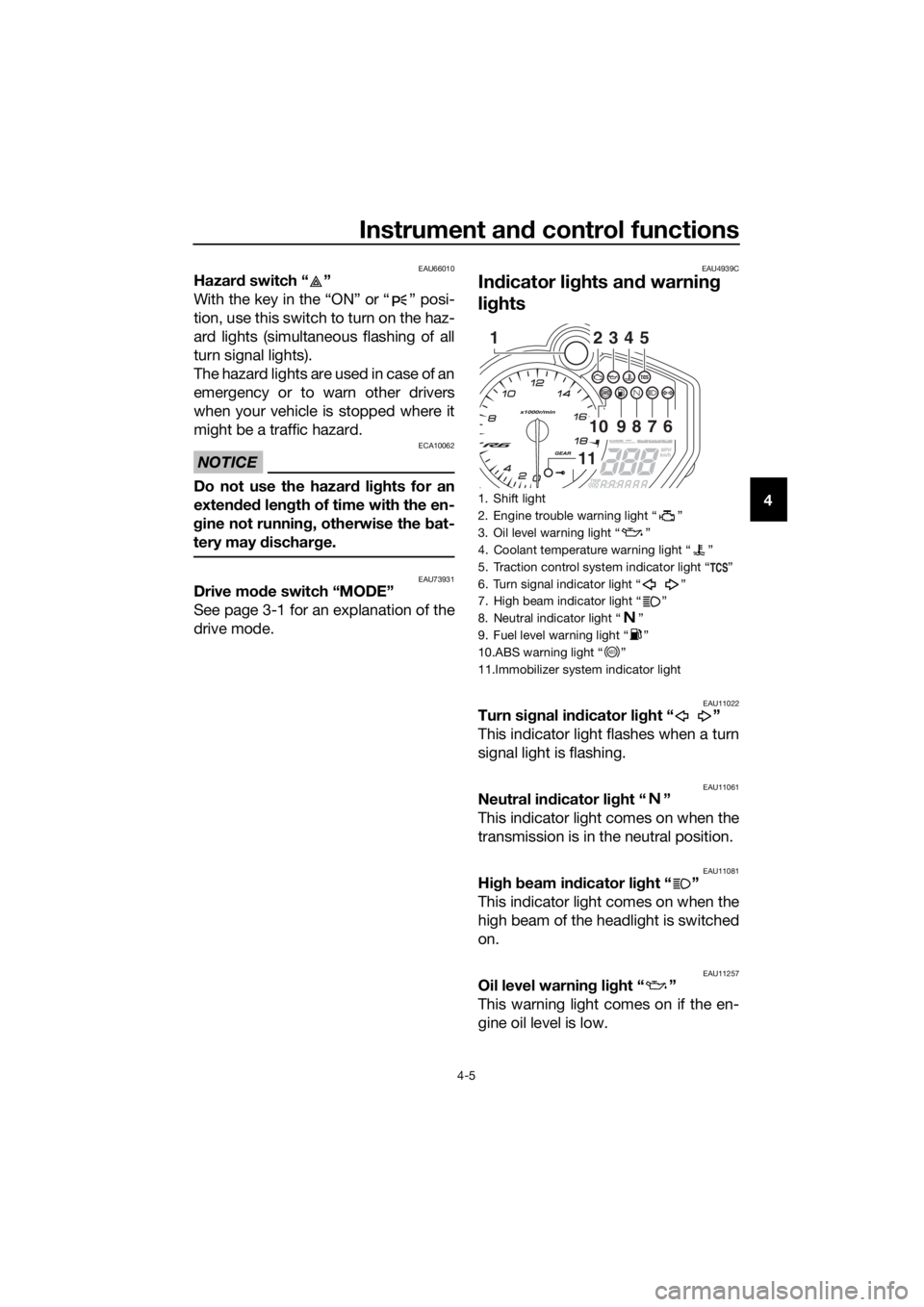
EAU4939C
In dicator li ghts an d warnin g
lig hts
EAU11022Turn si gnal in dicator li ght “ ”
This indicator light flashes when a turn
signal light is flashing.
EAU11061Neutral in dicator li ght “ ”
This indicator light comes on when the
transmission is in the neutral position.
EAU11081Hi gh beam in dicator li ght “ ”
This indicator light comes on when the
high beam of the headlight is switched
on.
EAU11257Oil level warnin g lig ht “ ”
This warning light comes on if the en-
gine oil level is low.
1. Shift light
2. Engine trouble warning light “ ”
3. Oil level warning light “ ”
4. Coolant temperature warning light “ ”
5. Traction control system indicator light “ ”
6. Turn signal indicator light “ ”
7. High beam indicator light “ ”
8. Neutral indicator light “ ”
9. Fuel level warning light “ ”
10.ABS warning light “ ”
11.Immobilizer system indicator light
2345
109876
11
1
ABS
UBN6E0E0.book Page 5 Wednesday, January 25, 2017 1:28 PM
Page 24 of 114
Instrument and control functions
4-6
4 When the vehicle is turned on, the light
will perform a circuit check (come on
for a few seconds and then go off).
If the warning light remains on after
confirming that the oil level is correct
(page 7-13), have a Yamaha dealer
check the vehicle.
TIP
Even if the oil level is sufficient, the
warning light may flicker when rid-
ing up or downhill, or during sud-
den acceleration or deceleration,
but this is not a malfunction.
If a malfunction is detected, the oil
level warning light will flash re-
peatedly. Have a Yamaha dealer
check the vehicle.
EAU11369Fuel level warnin g lig ht “ ”
This warning light comes on when you
are low on fuel. When the fuel level
drops below approximately 3.4 L (0.90
US gal, 0.75 Imp.gal), the light will
come on to remind you to refuel as
soon as possible.
When the vehicle is turned on, the light
will perform a circuit check (come on
for a few seconds and then go off).
If the warning light does not come on
during the circuit check, or if the warn-
ing light remains on after refueling,
have a Yamaha dealer check the vehi-
cle.
TIP
If a malfunction is detected, the fuel
level warning light will flash repeatedly.
Have a Yamaha dealer check the vehi-
cle.
EAU72930Coolant temperature warnin g
li g ht “ ”
This warning light comes on if the en-
gine overheats. If this occurs, reduce
the load on the engine immediately. If
message “HI” flashes in the coolant
temperature display, stop the vehicle,
then stop the engine and let the engine
cool.
The electrical circuit of the warning
light can be checked by turning the key
to “ON”. The warning light should
come on for a few seconds, and then
go off.
If the warning light does not come on
initially when the key is turned to “ON”,
or if the warning light remains on, have
a Yamaha dealer check the electrical
circuit.
NOTICE
ECA10022
Do not continue to operate the en-
g ine if it is overheatin g.
TIP
For radiator-fan-equipped vehi-
cles, the radiator fan(s) automati-
cally switch on or off according to
the coolant temperature in the ra-
diator.
If the engine overheats, see page
7-42 for further instructions.
EAU73171Engine trou ble warnin g lig ht “ ”
This warning light comes on if a prob-
lem is detected in the engine or other
vehicle control system. If this occurs,
have a Yamaha dealer check the on-
board diagnostic system.
UBN6E0E0.book Page 6 Wednesday, January 25, 2017 1:28 PM
Page 25 of 114
Instrument and control functions
4-7
4
The electrical circuit of the warning
light can be checked by turning the key
to “ON”. The warning light should
come on for a few seconds, and then
go off.
If the warning light does not come on
initially when the key is turned to “ON”,
or if the warning light remains on, have
a Yamaha dealer check the vehicle.
EAU69891ABS warnin
g li ght “ ”
In normal operation, this warning light
comes on when the key is turned to
“ON”, and goes off after traveling at a
speed of 10 km/h (6 mi/h) or higher.
If the ABS warning light: does not come on when the key is
turned to “ON”
comes on or flashes while riding
does not go off after traveling at a
speed of 10 km/h (6 mi/h) or high-
er
The ABS may not work correctly. If any
of the above occurs, have a Yamaha
dealer check the system as soon as
possible. (See page 4-19 for an expla-
nation of the ABS.)
WARNING
EWA16041
If the ABS warnin g li ght does not go
off after travelin g at a speed of 10
km/h (6 mi/h) or hi gher, or if the
warnin g li ght comes on or flashes
while ri din g, the b rake system re-
verts to conventional brakin g. If ei-
ther of the ab ove occurs, or if the
warnin g li ght does not come on at
all, use extra caution to avoid possi-
b le wheel lock durin g emer gency b
rakin g. Have a Yamaha d ealer
check the brake system an d electri-
cal circuits as soon as possi ble.
EAU77002Traction control system in dicator
li g ht “ ”
This indicator light flashes when trac-
tion control has engaged. If the traction
control system is turned off, the indica-
tor light will come on.
When the vehicle is turned on, the light
will perform a circuit check (come on
for a few seconds and then go off). If
the light does not come on during the
circuit check, or if the light remains on,
Yamaha dealer check the vehicle.
EAU80370Shift li ght
This light can be set to come on and go
off at select engine speeds. (See page
4-15.)
When the vehicle is turned on, the light
will perform a circuit check (come on
for a few seconds and then go off).
If the light does not come on during the
circuit check, have a Yamaha dealer
check the vehicle.
EAU80300Immo bilizer system in dicator li ght
When the key is turned to “OFF” and
30 seconds have passed, the indicator
light will flash steadily to indicate the
immobilizer system is enabled. After 24
hours have passed, the indicator light
will stop flashing, however the immobi-
lizer system is still enabled.
The electrical circuit of the indicator
light can be checked by turning the key
to “ON”. The indicator light should
come on for a few seconds, and then
go off.
ABS
UBN6E0E0.book Page 7 Wednesday, January 25, 2017 1:28 PM
Page 26 of 114

Instrument and control functions
4-8
4 If the indicator light does not come on
initially when the key is turned to “ON”,
if the indicator light remains on, or if the
indicator light flashes in a pattern (if a
problem is detected in the immobilizer
system, the immobilizer system indica-
tor light will flash in a pattern), have a
Yamaha dealer check the vehicle.
TIP
If the immobilizer system indicator light
flashes in the pattern, slowly 5 times
then quickly 2 times, this could be
caused by transponder interference. If
this occurs, try the following.
1. Make sure there are no other im- mobilizer keys close to the main
switch. Other immobilizer system
keys may cause signal interfer-
ence and prevent the engine from
starting.
2. Use the code re-registering key to start the engine.
3. If the engine starts, turn it off, and try starting the engine with the
standard keys.
4. If one or both of the standard keys do not start the engine, take the
vehicle and all 3 keys to a Yamaha
dealer to have the standard keys
re-registered.
EAU3904F
Multi-function meter unit
WARNING
EWA12423
Be sure to stop the vehicle before
makin g any settin g chan ges to the
multi-function meter unit. Chang ing
settin gs while ri din g can d istract the
operator an d increase the risk of an
acci dent.
The multi-function meter unit is
equipped with the following:
speedometer
tachometer
clock
lap timer
coolant temperature display
air intake temperature display
transmission gear display
drive mode display
TCS display
1. Tachometer
2. Shift light
3. TCS display
4. Coolant/air intake temperature display
5. Quick shift icon “QS”
6. Drive mode display
7. Speedometer
8. Multi-function display
9. Clock/lap timer
10.Transmission gear display
11.“RESET” button
12.“SELECT” button
6
5
7
8
9
2
34
101112
1
UBN6E0E0.book Page 8 Wednesday, January 25, 2017 1:28 PM
Page 27 of 114

Instrument and control functions
4-9
4
QS icon
multi-function display
display brightness and shift light
control mode
TIP
To switch the multi-function meter
unit between kilometers and
miles, push the “SELECT” button
for one second.
The “ ” and “GPS” icons require
accessory parts to function.
Speed ometer
The speedometer shows the vehicle’s
traveling speed.
Tachometer
The electric tachometer shows the en-
gine speed, as measured by the rota-
tional velocity of the crankshaft, in
revolutions per minute (r/min). When
the vehicle is first powered on, the ta-
chometer needle will sweep once
across the r/min range and then return
to zero.
NOTICE
ECA10032
Do not operate the en gine in the ta-
chometer red zone. Re
d zone: 16500 r/min an d a bove
Clock an d lap timer
The clock uses a 12-hour time system.
To set the clock
1. Turn the key to “ON”.
2. Push the “SELECT” button and the “RESET” button for two sec-
onds. The hour digits will start
flashing.
3. Push the “RESET” button to set the hours.
4. Push the “SELECT” button, and the minute digits will start flashing.
5. Push the “RESET” button to set the minutes.
6. Push the “SELECT” button to con- firm the settings and start the
clock.
To switch between the clock and lap
timer
Push and release the “SELECT” button
and the “RESET” button at the same
time.
1. Tachometer
2. Tachometer red zone
2
1
1. Clock
1
UBN6E0E0.book Page 9 Wednesday, January 25, 2017 1:28 PM
Page 29 of 114

Instrument and control functions
4-11
4
4. When you have finished viewing
the lap records you can: push the “RESET” button for
one second to delete that
group of lap records.
push the “SELECT” button
for one second to exit and re-
turn to the lap timer.
Coolant temperature display
This display indicates the temperature
of the coolant from 41 °C to 124 °C in
1 °C increments.
If the coolant temperature is between
117 and 124 °C, the coolant tempera-
ture display flashes and the coolant
temperature warning light comes on. If
this occurs, reduce the load on the en-
gine by riding at a moderate pace, at
low rpm, until the coolant temperature
goes down. If the temperature does
not go down, or if the message “HI”
flashes, stop the engine and let it cool.
(See page 7-42.)
TIP
When the vehicle is turned on, the
coolant temperature display is au-
tomatically selected.
When the coolant temperature is
below 41 °C, “Lo” will be dis-
played.
Air intake temperature display
This display indicates the temperature
of the air drawn into the air intake duct.
Push the “RESET” button to switch the
display between the coolant tempera-
ture and the air intake temperature.
TIP
When the coolant temperature
display is selected, “C” is dis-
played for one second, and then
the coolant temperature is dis-
played.
When the air intake temperature
display is selected, “A” is dis-
played for one second, and then
the air intake temperature is dis-
played.
When the air temperature is below
–9 °C, “–9 °C” will be displayed.
1. Coolant temperature display
1
1. Air intake temperature display
1
UBN6E0E0.book Page 11 Wednesday, January 25, 2017 1:28 PM
Page 30 of 114

Instrument and control functions
4-12
4 Transmission
gear display
This display shows the selected gear.
The neutral position is indicated by “ ”
and by the neutral indicator light.
Drive mo de display
This display indicates which drive
mode has been selected: “STD”, “A” or
“B”. For more details on the modes
and on how to select them, see page
3-1. TCS
display
This display indicates which traction
control system setting has been se-
lected: “1” through “6” or “OFF”. For
more details on the TCS settings and
on how to select them, see page 3-2.
QS icon
When the quick shift system is set to
on (i.e. when the shift switch is con-
nected), this icon will turn on. See page
3-4 for quick shift information.
1. Neutral indicator light “ ”
2. Transmission gear display
1. Drive mode display
2 1
1
1. TCS display
1. Quick shift icon “QS”
1
1
UBN6E0E0.book Page 12 Wednesday, January 25, 2017 1:28 PM
Page 31 of 114

Instrument and control functions
4-13
4
Multi-function
display
The multi-function display is equipped
with the following: odometer
two tripmeters
fuel reserve tripmeter
instantaneous fuel consumption
average fuel consumption
total fuel used
Navi gatin g the multi-function d is-
play
Push the “SELECT” button to change
between the odometer “ODO”, tripme-
ters “TRIP 1” and “TRIP 2”, instanta-
neous fuel consumption “km/L”,
“L/100 km” or “MPG”, average fuel
consumption “AVE _ _ _._ km/L”, “AVE
_ _ _._ L/100 km” or “AVE _ _ _._ MPG”,
and total fuel used “_ _._” in the follow-
ing order:
ODO → TRIP 1 → TRIP 2 → km/L,
L/100 km or MPG → AVE _ _ _._ km/L,
AVE _ _ _._ L/100 km or AVE _ _ _._
MPG → _ _._ → ODO
O dometer an d tripmeters
The odometer shows the total distance
traveled by the vehicle. The tripmeters show the distance trav-
eled since they were last reset. To reset
a tripmeter, push the “RESET” button
for one second.
TIP
The odometer will lock at 999999.
The tripmeters will reset and con-
tinue counting after 9999.9 is
reached.
Fuel reserve tripmeter
If the fuel level warning light comes on,
the display will automatically change to
the fuel reserve tripmeter “TRIP F” and
start counting the distance traveled
from that point. In this case, push the
“SELECT” button to switch the display
in the following order:
TRIP F → km/L, L/100 km or MPG →
AVE _ _ _._ km/L, AVE _ _ _._ L/100 km
or AVE _ _ _._ MPG → _ _._ → ODO →
TRIP 1 → TRIP 2 → TRIP F
TIP
If you do not reset the fuel reserve trip-
meter manually, after refueling and
traveling 5 km (3 mi), it will reset auto-
matically and disappear from the dis-
play.
1. Multi-function display
1
UBN6E0E0.book Page 13 Wednesday, January 25, 2017 1:28 PM
Page 33 of 114

Instrument and control functions
4-15
4
Total fuel used
This display shows the total amount of
fuel that has been used since it was
last reset.
When using kilometers, this figure is
shown in liters. When using miles, this
figure is shown in gallons.
To reset the total fuel used display,
push the “RESET” button for one se-
cond.
TIP
After the total fuel used display is reset,
“_ _ . _” will be shown until the vehicle
has traveled a sufficient distance.
Display
bri ghtness an d shift li ght
control mod e This mode cycles through five control
functions, allowing you to make the fol-
lowing settings in the order listed be-
low.
Display brightness - adjust the
brightness of the displays and ta-
chometer.
Shift light activity function - set the
shift light to on, flash, or off.
Shift light activation - set the en-
gine speed at which the shift light
will be come on.
Shift light deactivation - set the
engine speed at which the shift
light will be go off.
Shift light brightness - adjust the
brightness of the shift light.
TIP
Refer to the brightness level display
when adjusting brightness levels.
To adjust the display and tachometer
brightness
1. Turn the key to “OFF”.
2. Push and hold the “SELECT” but-
ton.
3. Turn the key to “ON”, and then re- lease the “SELECT” button after
five seconds.
4. Push the “RESET” button to set the brightness level.
5. Push the “SELECT” button to con- firm the setting. The control mode
changes to the shift light activity
function.
To set the shift light activity function
1. Push the “RESET” button to select one of the following shift light ac-
tivity settings:
1. Total fuel used display
1. Shift light
2. Shift light activation range
3. Brightness level display
1
12
3
UBN6E0E0.book Page 15 Wednesday, January 25, 2017 1:28 PM
Page 34 of 114

Instrument and control functions
4-16
4
On - the shift light will come
on when activated. (This set-
ting is selected when the shift
light stays on.)
Flash - the shift light will flash
when activated. (This setting
is selected when the shift light
flashes four times per se-
cond.)
Off - the shift light is deacti-
vated; in other words, it will
not come on or flash. (This
setting is selected when the
shift light flashes once every
two seconds.)
2. Push the “SELECT” button to con- firm the selected shift light activity.
The control mode changes to the
shift light activation point setting
function.
To set the shift light activation point
TIP
The shift light activation point can be
set between 10000 r/min and 18000
r/min. From 10000 r/min to 13000
r/min, the shift light can be set in incre-
ments of 500 r/min. From 13000 r/min
to 18000 r/min, the shift light can be set
in increments of 200 r/min.
1. Push the “RESET” button to set the activation point engine speed.
2. Push the “SELECT” button to con- firm the setting. The control mode
changes to the shift light deactiva-
tion point setting function. To set the shift light deactivation point
TIP
The deactivation range is the same as
the activation range. However, be sure
to set the deactivation point to a higher
engine speed than the activation point,
otherwise the shift light will not come
on.
1. Push the “RESET” button to set
the deactivation point engine
speed.
2. Push the “SELECT” button to con- firm the setting. The control mode
changes to the shift light bright-
ness function.
To adjust the shift light brightness
1. Push the “RESET” button to set the shift light brightness level.
2. Push the “SELECT” button to con- firm the setting and exit the dis-
play brightness and shift light
control mode.
UBN6E0E0.book Page 16 Wednesday, January 25, 2017 1:28 PM