light YAMAHA YZF-R6 2017 Owners Manual
[x] Cancel search | Manufacturer: YAMAHA, Model Year: 2017, Model line: YZF-R6, Model: YAMAHA YZF-R6 2017Pages: 114, PDF Size: 4.2 MB
Page 5 of 114

Table of contents
Safety information ............................1-1
Description ........................................2-1
Left view ..........................................2-1
Right view........................................2-2
Controls and instruments ................2-3
Special features ................................3-1
D-mode (drive mode) ......................3-1
Traction control system...................3-2
Quick shift system ...........................3-4
Instrument an d control functions ....4-1
Immobilizer system .........................4-1
Main switch/steering lock ...............4-2
Handlebar switches.........................4-4
Indicator lights and warning
lights ............................................4-5
Multi-function meter unit .................4-8
Clutch lever ...................................4-17
Shift pedal .....................................4-17
Brake lever ....................................4-18
Brake pedal ...................................4-18
ABS ...............................................4-19
Fuel tank cap.................................4-20
Fuel................................................4-20
Fuel tank overflow hose ................4-22
Catalytic converters .....................4-22
Seats .............................................4-23
Rear view mirrors ..........................4-24
Adjusting the front fork..................4-25
Adjusting the shock absorber assembly....................................4-27
EXUP system ................................4-29
Auxiliary DC connector .................4-30
Sidestand ......................................4-30
Ignition circuit cut-off system........4-31
For your safety – pre-operation
checks ...............................................5-1
Operation an d important ri din g
points .................................................6-1
Starting the engine ..........................6-2
Shifting ............................................6-3 Tips for reducing fuel
consumption................................ 6-4
Engine break-in ............................... 6-4
Parking ............................................ 6-5
Perio dic maintenance an d
a d justment ........................................ 7-1
Owner’s tool kit ............................... 7-2
Periodic maintenance chart for the
emission control system.............. 7-3
General maintenance and
lubrication chart........................... 7-4
Removing and installing cowlings and panels ................................... 7-7
Checking the spark plugs ............. 7-11
Canister......................................... 7-12
Engine oil and oil filter cartridge ... 7-13
Coolant ......................................... 7-17
Air filter element ............................ 7-19
Checking the engine idling speed......................................... 7-20
Checking the throttle grip free play ............................................ 7-20
Valve clearance ............................. 7-21
Tires .............................................. 7-21
Cast wheels .................................. 7-24
Adjusting the clutch lever free play ............................................ 7-24
Checking the brake lever free
play ............................................ 7-25
Brake light switches ...................... 7-26
Checking the front and rear brake pads................................. 7-26
Checking the brake fluid level....... 7-27
Changing the brake fluid............... 7-28
Drive chain slack ........................... 7-29
Cleaning and lubricating the drive chain ................................. 7-30
Checking and lubricating the cables ........................................ 7-31
Checking and lubricating the
throttle grip and cable ............... 7-31
Checking and lubricating the brake and shift pedals ............... 7-32
Checking and lubricating the
brake and clutch levers ............. 7-32
UBN6E0E0.book Page 1 Wednesday, January 25, 2017 1:28 PM
Page 6 of 114

Table of contents
Checking and lubricating the
sidestand................................... 7-33
Lubricating the swingarm pivots ........................................ 7-33
Checking the front fork................. 7-34
Checking the steering................... 7-34
Checking the wheel bearings ....... 7-35
Battery .......................................... 7-35
Replacing the fuses ...................... 7-37
Vehicle lights ................................ 7-38
Replacing the license plate light
bulb ........................................... 7-39
Supporting the motorcycle ........... 7-39
Troubleshooting............................ 7-40
Troubleshooting charts................. 7-41
Motorcycle care an d stora ge.......... 8-1
Matte color caution ........................ 8-1
Care ................................................ 8-1
Storage ........................................... 8-4
Specifications ................................... 9-1
Consumer information ................... 10-1
Identification numbers .................. 10-1
Diagnostic connector ................... 10-2
Vehicle data recording.................. 10-3
In dex ................................................ 11-1
UBN6E0E0.book Page 2 Wednesday, January 25, 2017 1:28 PM
Page 10 of 114

Safety information
1-4
1sleeping bags, duffel bags, or
tents, can create unstable han-
dling or a slow steering re-
sponse.
This vehicle is not desi gne d to
pull a trailer or to be attached to
a si decar.
Genuine Yamaha Accessories
Choosing accessories for your vehicle
is an important decision. Genuine
Yamaha accessories, which are avail- able only from a Yamaha dealer, have
been designed, tested, and approved
by Yamaha for use on your vehicle.
Many companies with no connection
to Yamaha manufacture parts and ac-
cessories or offer other modifications
for Yamaha vehicles. Yamaha is not in
a position to test the products that
these aftermarket companies produce.
Therefore, Yamaha can neither en-
dorse nor recommend the use of ac-
cessories not sold by Yamaha or
modifications not specifically recom-
mended by Yamaha, even if sold and
installed by a Yamaha dealer.
Aftermarket Parts, Accessories, an d
Mo difications
While you may find aftermarket prod-
ucts similar in design and quality to
genuine Yamaha accessories, recog-
nize that some aftermarket accesso-
ries or modifications are not suitable
because of potential safety hazards to
you or others. Installing aftermarket
products or having other modifications
performed to your vehicle that change
any of the vehicle’s design or operation
characteristics can put you and others at greater risk of serious injury or
death. You are responsible for injuries
related to changes in the vehicle.
Keep the following guidelines in mind,
as well as those provided under “Load-
ing” when mounting accessories.
Never install accessories or carry
cargo that would impair the per-
formance of your motorcycle.
Carefully inspect the accessory
before using it to make sure that it
does not in any way reduce
ground clearance or cornering
clearance, limit suspension travel,
steering travel or control opera-
tion, or obscure lights or reflec-
tors.
• Accessories fitted to the han- dlebar or the front fork area can
create instability due to improp-
er weight distribution or aerody-
namic changes. If accessories
are added to the handlebar or
front fork area, they must be as
lightweight as possible and
should be kept to a minimum.
• Bulky or large accessories may seriously affect the stability of
the motorcycle due to aerody-
namic effects. Wind may at-
tempt to lift the motorcycle, or
the motorcycle may become
unstable in cross winds. These
accessories may also cause in-
stability when passing or being
passed by large vehicles.
• Certain accessories can dis- place the operator from his or
her normal riding position. This
improper position limits the
freedom of movement of the
UBN6E0E0.book Page 4 Wednesday, January 25, 2017 1:28 PM
Page 11 of 114

Safety information
1-5
1
operator and may limit control
ability, therefore, such accesso-
ries are not recommended.
Use caution when adding electri-
cal accessories. If electrical ac-
cessories exceed the capacity of
the motorcycle’s electrical sys-
tem, an electric failure could re-
sult, which could cause a
dangerous loss of lights or engine
power.
Aftermarket Tires an d Rims
The tires and rims that came with your
motorcycle were designed to match
the performance capabilities and to
provide the best combination of han-
dling, braking, and comfort. Other
tires, rims, sizes, and combinations
may not be appropriate. See page 7-21
for tire specifications and for informa-
tion on servicing and replacing your
tires.
Transportin g the Motorcycle
Be sure to observe following instruc-
tions before transporting the motorcy-
cle in another vehicle. Remove all loose items from the
motorcycle.
Check that the fuel cock (if
equipped) is in the off position and
that there are no fuel leaks.
Shift the transmission into gear
(for models with a manual trans-
mission).
Secure the motorcycle with tie-
downs or suitable straps that are
attached to solid parts of the mo-
torcycle, such as the frame or up-
per front fork triple clamp (and not,
for example, to rubber-mounted handlebars or turn signals, or
parts that could break). Choose
the location for the straps carefully
so the straps will not rub against
painted surfaces during transport.
The suspension should be com-
pressed somewhat by the tie-
downs, if possible, so that the mo-
torcycle will not bounce exces-
sively during transport.
UBN6E0E0.book Page 5 Wednesday, January 25, 2017 1:28 PM
Page 16 of 114
Special features
3-2
3
EAU79732
Traction control system
The traction control system (TCS)
helps maintain traction when acceler-
ating on slippery surfaces, such as un-
paved or wet roads. If sensors detect
that the rear wheel is starting to slip
(uncontrolled spinning), the traction
control system assists by regulating
engine power as needed until traction
is restored.
WARNING
EWA15433
The traction control system is not a
substitute for rid ing appropriately
for the con ditions. Traction control
cannot prevent loss of traction due
to excessive speed when entering
turns, when acceleratin g har d at a
sharp lean an gle, or while brakin g,
an d cannot prevent front wheel slip-
pin g. As with any vehicle, approach
surfaces that may be slippery with
caution an d avoi d especially slip-
pery surfaces.
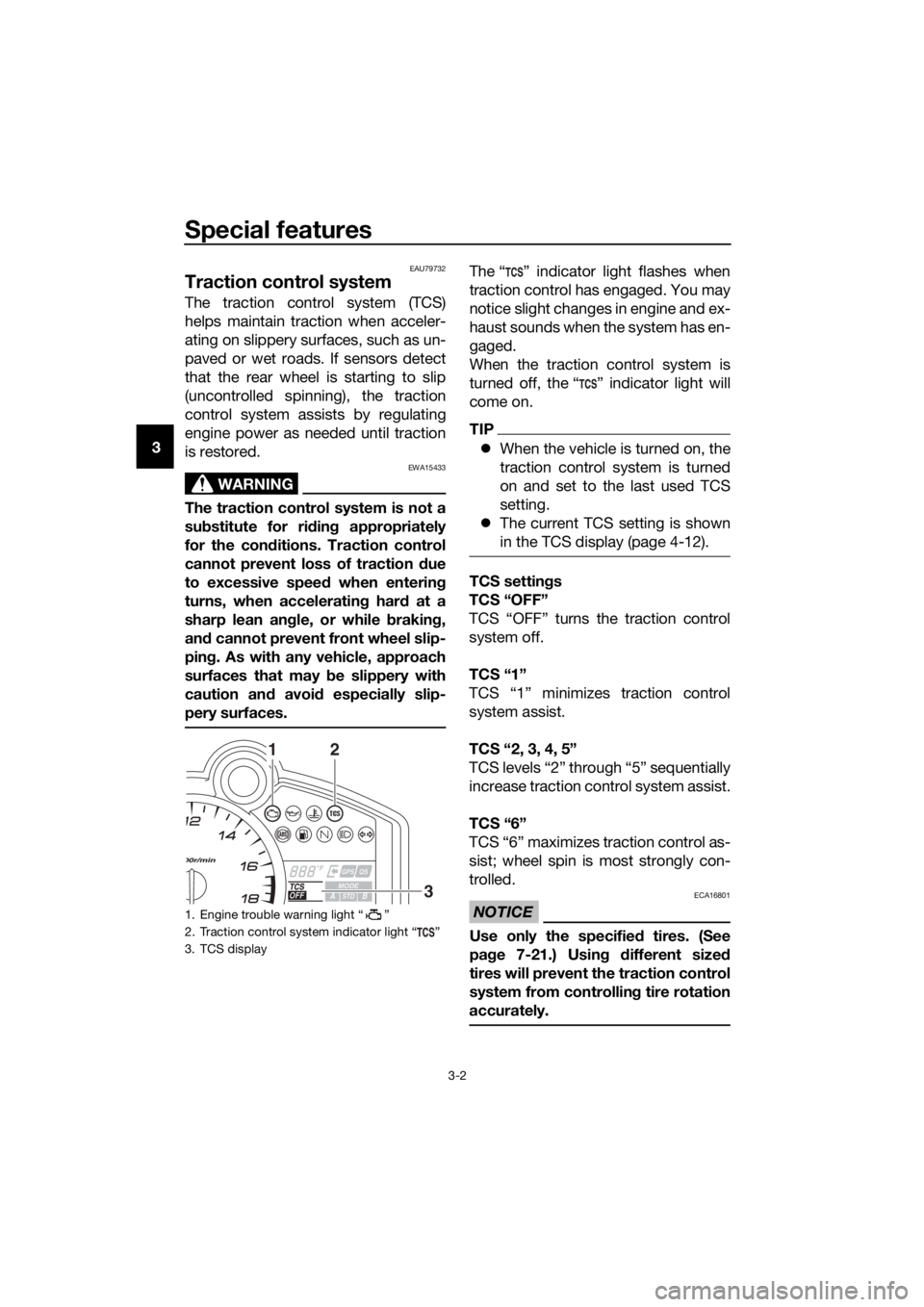
The “ ” indicator light flashes when
traction control has engaged. You may
notice slight changes in engine and ex-
haust sounds when the system has en-
gaged.
When the traction control system is
turned off, the “ ” indicator light will
come on.
TIP
When the vehicle is turned on, the
traction control system is turned
on and set to the last used TCS
setting.
The current TCS setting is shown
in the TCS display (page 4-12).
TCS settin gs
TCS “OFF”
TCS “OFF” turns the traction control
system off.
TCS “1”
TCS “1” minimizes traction control
system assist.
TCS “2, 3, 4, 5”
TCS levels “2” through “5” sequentially
increase traction control system assist.
TCS “6”
TCS “6” maximizes traction control as-
sist; wheel spin is most strongly con-
trolled.
NOTICE
ECA16801
Use only the specifie d tires. (See
pa ge 7-21.) Usin g different sized
tires will prevent the traction control
system from controllin g tire rotation
accurately.
1. Engine trouble warning light “ ”
2. Traction control system indicator light “ ”
3. TCS display
12
3
UBN6E0E0.book Page 2 Wednesday, January 25, 2017 1:28 PM
Page 17 of 114

Special features
3-3
3
Settin
g the traction control system
To turn TCS off
Stop the vehicle and: push up on the TCS switch for two
seconds to turn the traction con-
trol system off.
push down on the TCS switch to
turn the traction control system
back on.
TIP
Turn the traction control system off to
help free the rear wheel if it is stuck in
mud or sand, etc.
To change TCS settings
Stop the vehicle or close the throttle
and:
push up on the TCS switch to de-
crease traction control
(6→ 5→ 4→ 3→ 2→ 1).
push down on the TCS switch to
increase traction control
(1→ 2→ 3→ 4→ 5→ 6).
TIP
TCS settings can also be changed
when moving in straight line if the throt-
tle grip is held in a fixed position for two
seconds while in 4th, 5th, or 6th gear.
WARNING
EWA18940
Take extra precaution when chan g-
in g mo des while ri din g.
Resettin g the traction control sys-
tem
The traction control system will auto-
matically disable when: the front wheel or rear wheel
comes off the ground while riding.
excessive rear wheel spin is de-
tected while riding.
either wheel is rotated with the key
turned to “ON” (such as when per-
forming maintenance).
If the traction control system is dis-
abled, both the “ ” indicator light and
the “ ” warning light will come on.
Should this occur, try resetting the sys-
tem as follows. 1. Stop the vehicle and turn the key to “OFF”.
2. Wait a few seconds and then turn the key back to “ON”.
3. The “ ” indicator light should turn off and the system be en-
abled.
TIP
If the “ ” indicator light remains on af-
ter resetting, the vehicle may still be
ridden; however, have a Yamaha deal-
er check the vehicle as soon as possi-
ble.
4. Have a Yamaha dealer check thevehicle and turn off the “ ”
warning light.
1. Traction control system switch “TCS”
1
UBN6E0E0.book Page 3 Wednesday, January 25, 2017 1:28 PM
Page 19 of 114

Instrument and control functions
4-1
4
EAU10978
Immo bilizer system
This vehicle is equipped with an immo-
bilizer system to help prevent theft by
re-registering codes in the standard
keys. This system consists of the fol-
lowing:
a code re-registering key (with a
red bow)
two standard keys (with a black
bow) that can be re-registered
with new codes
a transponder (which is installed in
the code re-registering key)
an immobilizer unit
an ECU
an immobilizer system indicator
light (See page 4-7.)
The key with the red bow is used to
register codes in each standard key.
Since re-registering is a difficult pro-
cess, take the vehicle along with all
three keys to a Yamaha dealer to have
them re-registered. Do not use the key
with the red bow for driving. It should
only be used for re-registering the
standard keys. Always use a standard
key for driving.
NOTICE
ECA11822
DO NOT LOSE THE CODE RE-
REGISTERING KEY! CONTACT
YOUR DEALER IMMEDIATELY
IF IT IS LOST! If the co de re-reg -
isterin g key is lost, reg istering
new co des in the stan dar d keys
is impossi ble. The stan dar d
keys can still be used to start
the vehicle, however if co de re-
re gisterin g is require d (i.e., if a
new stan dar d key is ma de or all
keys are lost) the entire immob i-
lizer system must be replaced .
Therefore, it is hi ghly recom-
mend ed to use either stan dar d
key an d keep the co de re-re gis-
tering key in a safe place.
Do not su bmerse any key in wa-
ter.
Do not expose any key to exces-
sively hig h temperatures.
Do not place any key close to
ma gnets (this includ es, but not
limite d to, pro ducts such as
speakers, etc.).
Do n
ot place items that transmit
electrical si gnals close to any
key.
Do not place heavy items on any
key.
Do not g rind any key or alter its
shape.
Do not d isassemble the plastic
part of any key.
Do not put two keys of any im-
mo bilizer system on the same
key rin g.
1. Code re-registering key (red bow)
2. Standard keys (black bow)
UBN6E0E0.book Page 1 Wednesday, January 25, 2017 1:28 PM
Page 20 of 114
Instrument and control functions
4-2
4
Keep the stan dar d keys as well
as keys of other immo bilizer
systems away from this vehi-
cle’s cod e re-registering key.
Keep other immo bilizer system
keys away from the main switch
as they may cause si gnal inter-
ference.
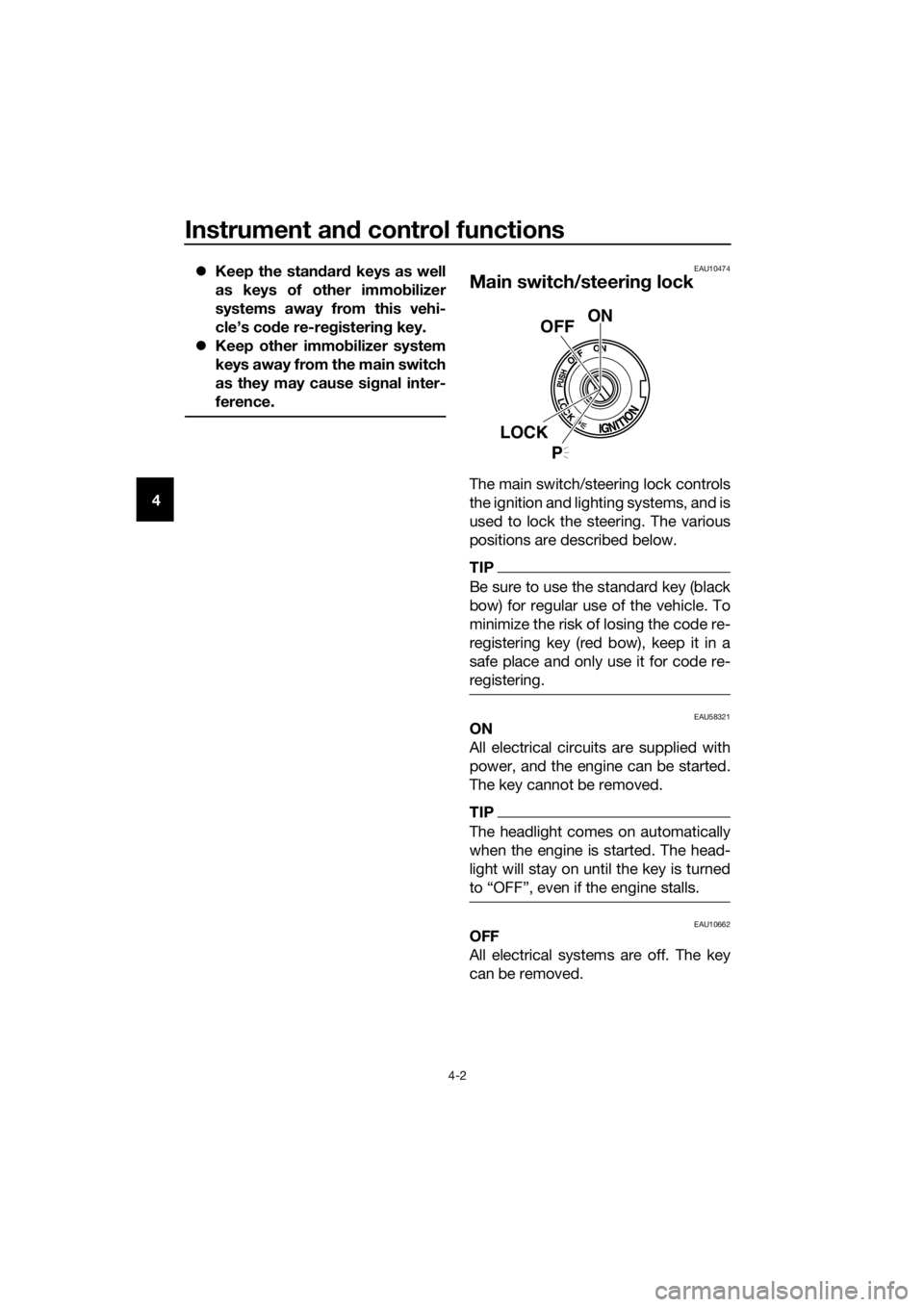
EAU10474
Main switch/steerin g lock
The main switch/steering lock controls
the ignition and lighting systems, and is
used to lock the steering. The various
positions are described below.
TIP
Be sure to use the standard key (black
bow) for regular use of the vehicle. To
minimize the risk of losing the code re-
registering key (red bow), keep it in a
safe place and only use it for code re-
registering.
EAU58321ON
All electrical circuits are supplied with
power, and the engine can be started.
The key cannot be removed.
TIP
The headlight comes on automatically
when the engine is started. The head-
light will stay on until the key is turned
to “OFF”, even if the engine stalls.
EAU10662OFF
All electrical systems are off. The key
can be removed.
ON
OFF
LOCK
P
UBN6E0E0.book Page 2 Wednesday, January 25, 2017 1:28 PM
Page 21 of 114

Instrument and control functions
4-3
4
WARNING
EWA10062
Never turn the key to “OFF” or
“LOCK” while the vehicle is movin g.
Otherwise the electrical systems will
b e switche d off, which may result in
loss of control or an acci dent.
EAU1068BLOCK
The steering is locked and all electrical
systems are off. The key can be re-
moved.
To lock the steering
1. Turn the handlebars all the way to
the left.
2. With the key in the “OFF” position, push the key in and turn it to
“LOCK”.
3. Remove the key.
TIP
If the steering will not lock, try turning
the handlebars back to the right slight-
ly.
To unlock the steering
From the “LOCK” position, push the
key in and turn it to “OFF”.
EAU59680 (Parkin g)
The hazard lights and turn signal lights
can be turned on, but all other electri-
cal systems are off. The key can be re-
moved.
The steering must be locked before the
key can be turned to “ ”.
NOTICE
ECA20760
Usin g the hazar d or turn si gnal li ghts
for an exten ded len gth of time may
cause the battery to d ischarge.
1. Push.
2. Turn.
12
1. Push.
2. Turn.
12
UBN6E0E0.book Page 3 Wednesday, January 25, 2017 1:28 PM
Page 22 of 114
Instrument and control functions
4-4
4
EAU66054
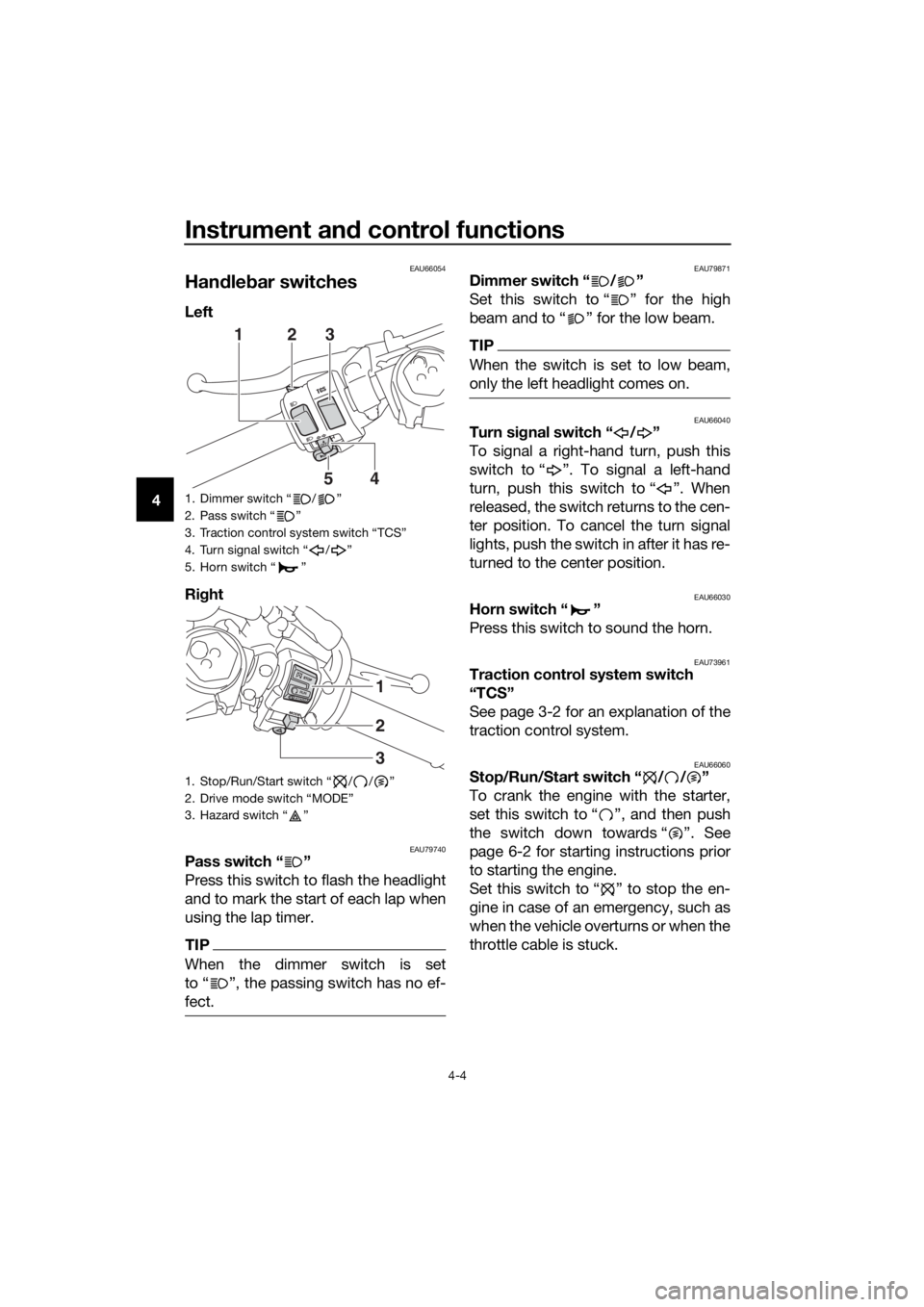
Han dle bar switches
Left
Ri ght
EAU79740Pass switch “ ”
Press this switch to flash the headlight
and to mark the start of each lap when
using the lap timer.
TIP
When the dimmer switch is set
to “ ”, the passing switch has no ef-
fect.
EAU79871Dimmer switch “ / ”
Set this switch to “ ” for the high
beam and to “ ” for the low beam.
TIP
When the switch is set to low beam,
only the left headlight comes on.
EAU66040Turn si gnal switch “ / ”
To signal a right-hand turn, push this
switch to “ ”. To signal a left-hand
turn, push this switch to “ ”. When
released, the switch returns to the cen-
ter position. To cancel the turn signal
lights, push the switch in after it has re-
turned to the center position.
EAU66030Horn switch “ ”
Press this switch to sound the horn.
EAU73961Traction control system switch
“TCS”
See page 3-2 for an explanation of the
traction control system.
EAU66060Stop/Run/Start switch “ / / ”
To crank the engine with the starter,
set this switch to “ ”, and then push
the switch down towards “ ”. See
page 6-2 for starting instructions prior
to starting the engine.
Set this switch to “ ” to stop the en-
gine in case of an emergency, such as
when the vehicle overturns or when the
throttle cable is stuck.
1. Dimmer switch “ / ”
2. Pass switch “ ”
3. Traction control system switch “TCS”
4. Turn signal switch “ / ”
5. Horn switch “ ”
1. Stop/Run/Start switch “ / / ”
2. Drive mode switch “MODE”
3. Hazard switch “ ”
54
231
2
3
1
UBN6E0E0.book Page 4 Wednesday, January 25, 2017 1:28 PM